Better Export PDF

by l1xnan
5
4
3
2
1
Score: 73/100

Description

Category: Note Enhancements

The Better Export PDF plugin for Obsidian is a powerful tool that enhances the official PDF export function. With this plugin, you can now export bookmarks outlines, previews, and add page numbers to your PDF files. Additionally, it allows you to customize margins, add metadata from front matter, and even export internal links within files. The plugin also supports batch exporting multiple Markdown files into one PDF file, making it a valuable tool for creating high-quality reports and documents. Whether you're looking to create a professional-looking presentation or simply want to keep your notes organized, the Better Export PDF plugin is an essential addition to your Obsidian toolkit.

Reviews

  • Ganessh Kumar R P
    Reviewed on Feb 18th, 2026
    Template comes handy but it is a little difficult to use.
  • Qinferl AinGerI
    Reviewed on Dec 25th, 2025
    No review text provided.

Stats

675
stars
248,313
downloads
47
forks
814
days
20
days
392
days
207
total PRs
11
open PRs
137
closed PRs
59
merged PRs
206
total issues
95
open issues
111
closed issues
274
commits

Latest Version

a year ago

Changelog

   🚀 Features

   🐞 Bug Fixes

    View changes on GitHub

README file from

Github

Obsidian Better Export PDF

English | 中文

Better Export PDF is an Obsidian PDF export enhancement plugin that adds the ability to export bookmarks outline, export preview and add page numbers to PDF compared to the official PDF export function.

Features

Compared to the official Export PDF feature:

  • 🚀Support export preview
  • 🎉Export the outline bookmarks
  • 🛩️Customize the margins
  • ✨Export the page numbers
  • 💥Support add PDF metadata from front matter
  • 🎇Export internal links within file
  • 🎈Export multiple Markdown files(folder or specified files) into one PDF file
  • 🌸Batch export multiple PDF files
  • 🍬Support exporting PDFs in any size, and can export all content onto a single page
  • ... ...

Installation

In Obsidian go to Settings > Third-party plugins > Community Plugins > Browse and search for Better Export PDF.

Manual installation

  1. Download the .zip file from the latest Release, or from any other release version.
  2. Unzip into: {VaultFolder}/.obsidian/plugins/
  3. Reload Obsidian and enable the plug-in.

or use the BRAT Plugin.

Usage

  1. Select export target:
    1. In the upper right corner of the current Markdown view, click More options and select Better Export PDF;
    2. Open the command panel and select Better Export PDF: Export Current File to PDF.
  2. In the dialog box that is displayed, modify the configuration.
  3. Click Export, select the export path, and if you don't need to modify the configuration, you can directly press the Enter key to trigger the export operation.

Set page numbers using the Header Template and Footer Template, for example:

<div style="width: 100vw;font-size:10px;text-align:center;">
  <span class="pageNumber"></span> / <span class="totalPages"></span>
</div>

See details <webview>.printToPDF(options).

It can be any HTML fragment, such as adding a base64 image:

<div style="width: 100vw;font-size:10px;text-align:center;">
  <img height="10px" width="10px" src="data:image/svg+xml;base64,xxx..." />
  <span class="title"></span>
</div>

Document level header/footer templates can also be configured in frontMatter:

  • headerTemplate
  • footerTemplate

Customize the export style

If you want to further customize the PDF export style, you can add custom CSS in the Appearance > CSS Snippet, such as custom fonts and sizes:

@media print {
  body {
    --font-interface-override: "Times New Roman" !important;
    --font-text-override: "Times New Roman" !important;
    --font-print-override: "Times New Roman" !important;
    --font-monospace-override: "Consolas" !important;
    --font-text-size: 20px !important;
    font-family: "Times New Roman" !important;
  }
}

Select Disabled CSS Snippts

First, enable the Select CSS snippets option in the plugin configuration. This will allow you to see the CSS snippets option in the modal for exporting PDFs. From there, you can choose CSS snippets that have not been globally enabled in the Appearance > CSS Fragments section.

Add PDF metadata

PDF Metadata can be added to through frontMatter of the configuration document. Supported field items are:

  • title
  • author
  • keywords
  • created_at
  • updated_at
  • creator
  • producer

Export multiple Markdown files

Quick export

Select the folder in the sidebar, right-click the menu Export folder to PDF, you can export the entire folder contents to a PDF file.

Note: This does not guarantee the file export order.

Custom export

Create a new table of contents note, add something like the following, need to add a toc: true document property:

---
toc: true
---

## Table of Contents

[[Note1|Title1]]
[[Note2]]
[[Note2]]

This allows the plugin to export the notes in the order of the internal links. The anchor point of the exported PDF table of contents supports clicking to jump.

Note: When exporting with a Table of Contents file, right click on that toc-file and select Better Export PDF. Do not use Export Folder to PDF.

Folder batch export

Select the folder in the sidebar, right-click the menu Export each file to PDF, you can batch export each file of the entire folder to PDF file.

Export as One Page

In the export dialog, select Custom for Page Size and set Margin to None. Set the page size according to the document's requirements.


Note: You can adjust the concurrency number during the rendering phase when exporting multiple files via Plugin Settings > Limit Concurrency. This can help reduce resource consumption or increase the speed. The default value is 5.

Preview

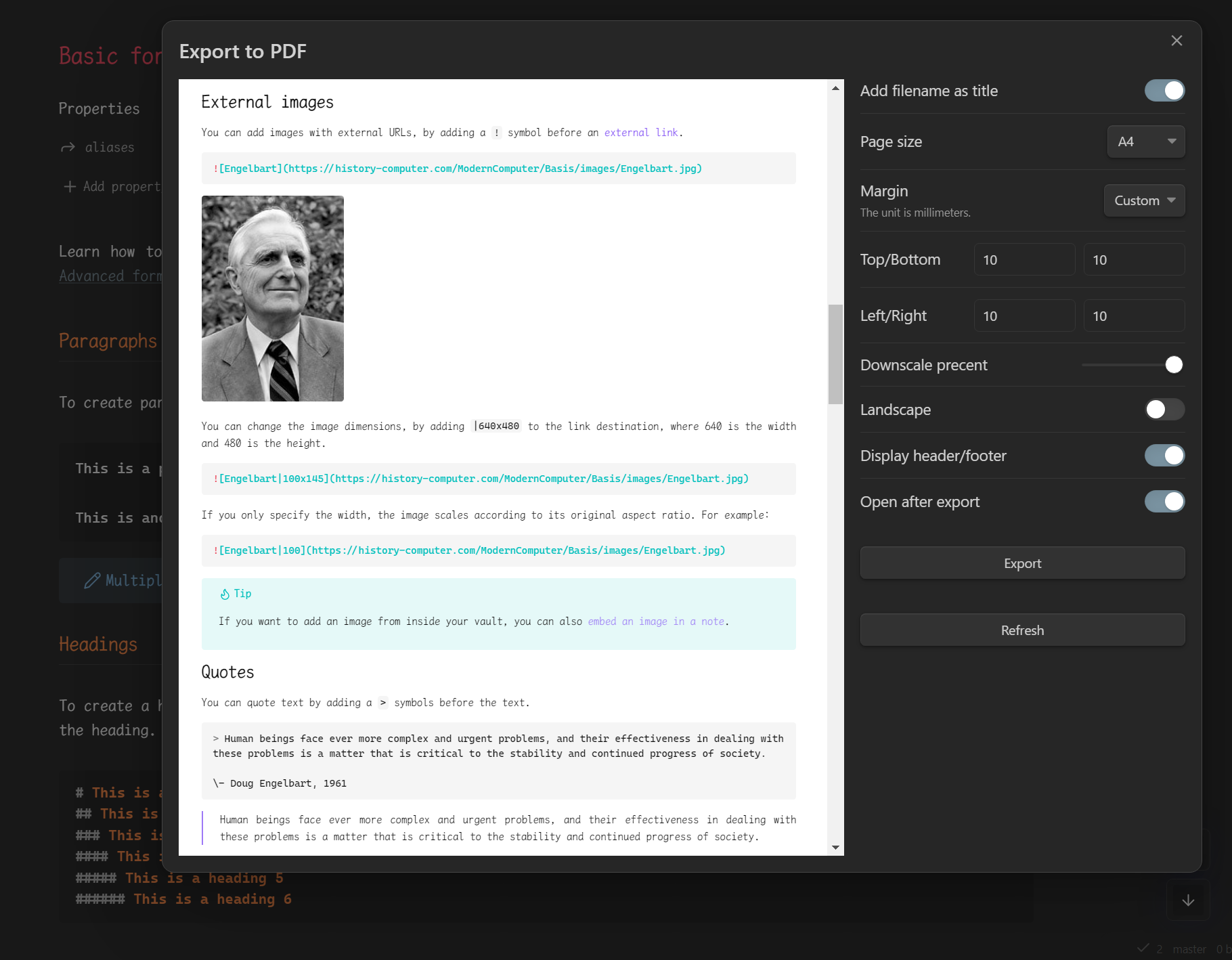
Export preview
Export preview

Effect picture

Export preview

TODO

  • Automatically adds internal link content to footnotes/appendices;
  • Support pagedjs beautification;
  • Support print preview;
  • Export multiple Markdown files into one PDF file;
  • Improves default @media print css style;
  • Support add PDF metadata from front matter;
  • Export internal links within file;

Support This Plugin

This plugin takes a lot of work to maintain and continue adding features. If you want to fund the continued development of this plugin you can do so here:

PayPal or WeChat or Alipay


Similar Plugins

info
• Similar plugins are suggested based on the common tags between the plugins.
Pinboard Sync
4 years ago by Mathew Spolin
Obsidian plugin to sync Pinboard.in links to Daily Notes
Kindle Export
4 years ago by Simeon Stanek
A plugin which converts .md files from Obsidian to your Kindle/PocketBook
Extract PDF Annotations
4 years ago by Franz Achermann
This is a plugin for https://obsidian.md. It extracts Annotations from PDF Files.
Screwdriver
4 years ago by vorotamoroz
Obsidian Enhancing Export
4 years ago by YISH
This is an enhancing export plugin base on Pandoc for Obsidian (https://obsidian.md/ ). It's allow you to export to formats like Markdown、Markdown (Hugo https://gohugo.io/ )、Html、docx、Latex etc.
Obsidian markdown export
3 years ago by bingryan
This plugin allows to export directory/single markdown to a folder. support output format(html/markdown/text)
Text Extractor
3 years ago by Simon Cambier
A (companion) plugin to facilitate the extraction of text from images (OCR) and PDFs.
Webpage HTML Export
3 years ago by Nathan George
Export html from single files, canvas pages, or whole vaults. Direct access to the exported HTML files allows you to publish your digital garden anywhere. Focuses on flexibility, features, and style parity.
Audio Player
3 years ago by noonesimg
audio player plugin with bookmarks for Obsidian.md
Awesome Reader
3 years ago by AwesomeDog
Make Obsidian a proper Reader.
Brainframe
3 years ago by pedersen
Import/Export TiddlyWiki
3 years ago by Lucas Bordeau
Import/export TiddlyWiki tiddler files with Obsidian
Slide Note
3 years ago by Jinyan Xu
Floccus Bookmarks to Markdown
3 years ago by mddevils
PDF++
2 years ago by Ryota Ushio
PDF++: the most Obsidian-native PDF annotation & viewing tool ever. Comes with optional Vim keybindings.
Image Magician
2 years ago by luxmargos
This is a plugin for Obsidian (https://obsidian.md). Supports viewing and exporting various image formats using ImageMagick.
PDF break page
2 years ago by CG
Plugin for obsidian that adding shortcuts to create breakpages for pdf exports.
Gitlab Wiki Exporter
2 years ago by Josef Rabmer
SwiftLaTeX Render
2 years ago by gboyd068
Static Site MD Exporter
2 years ago by Yunfi
Export specific notes to general md for static site generation, such as Hexo, Hugo, or Astro
Strapi Exporter AI
2 years ago by Cinquin Andy
[prod] - 🚀 Strapi Exporter: Supercharge Your Obsidian-to-Strapi Workflow, export an obsidian notes directly to your Strapi API
my anime list text exporter
2 years ago by XmoncocoX
a plugin who create an obsidian page for an anime with the data from my anime list.
Bookmarks Caller
2 years ago by namikaze-40p
This is an Obsidian plugin which can easily open bookmarks.
Marker PDF to MD
2 years ago by L3N0X
Make use of different AI models to convert your pdfs into markdown with perfect ocr, latex formulas, tables, images and more! Supports Mistral AI OCR (free) and self hosted variants!
Export To TeX
5 years ago by Zach Raines
export obsidian markdown files in a format that can be pasted into a TeX file
PDF Highlights
5 years ago by Alexis Rondeau
Extract highlights, underlines and annotations from your PDFs into Obsidian
Hotkeys for Bookmarks
5 years ago by Vinzent
Better PDF
5 years ago by MSzturc
Goal of this Plugin in to implement a native PDF handling workflow in Obsidian
Collapse All
5 years ago by Nathonius
Pandoc
5 years ago by Oliver Balfour
Pandoc document export plugin for Obsidian (https://obsidian.md)
Annotator
5 years ago by Elias Sundqvist
A plugin for reading and annotating PDFs and EPUBs in obsidian.
Markmind
5 years ago by Mark
A mind map, outline for obsidian,It support mobile and desktop
Prominent Bookmarked Files
5 years ago by Jeremy Valentine
Prominently display starred files in Obsidian.md
Metadata Extractor
5 years ago by kometenstaub
Obsidian Plugin that provides metadata export for use with third-party apps.
Omnisearch
4 years ago by Simon Cambier
A search engine that "just works" for Obsidian. Supports OCR and PDF indexing.
LLM Summary
2 years ago by QSun
wip
Quarto Exporter
2 years ago by Andreas Varotsis
Export Obsidian notes to Quarto-compatible QMD files.
downloadPDF
2 years ago by Frieda
PDF2Image
2 years ago by RasmusAChr
Latex Exporter
a year ago by Matthew S. Scott
Hoarder Sync
a year ago by Jordan Hofker
An Obsidian.md community plugin that allows syncing with https://karakeep.app/
Paperless
a year ago by Talal Abou Haiba
BibDesk Integration
a year ago by Andrea Alberti
Integration of Obsidian with bibtex files
WhatsApp export note
a year ago by JoaoEmanuell
Obsidian plugin to export notes for whatsapp
Readeck Importer
a year ago by Makebit
Import bookmarks from Readeck to Obsidian
PDF Paste
a year ago by Cormac
Export Graph View
a year ago by Sean McGhee
Plugin to export your vault's graph view.
Copy Local Graph Paths
a year ago by Amy Z
copy-local-graph-paths is a simple Obsidian plugin that copies the paths of notes linked to your current page.
PDF Folder to Markdowns
a year ago by CrisHood
Convert a folder of PDFs into a folder of Markdown files with embedded PDFs. This plugin is useful for users who want to migrate their PDF notes from different apps (e.g., Boox) or organize their reference materials inside Obsidian.
Yandex Wiki Integration
10 months ago by Pavel Sokolov
Linked Note Exporter
9 months ago by the-c0d3r
Obsidian plugin to export a note along with all its attachments and linked notes—cleanly, conveniently, and ready to share.
Handwriting OCR
9 months ago by ikmolbo
Transform handwritten documents and scanned images into editable text with Handwriting OCR's AI-powered handwriting to text conversion.
Web viewer Bookmarks
7 months ago by Stefan Danzl
Obsidian Plugin to create Bookmarks for internal Web Viewer