
New Plugins (401) & Themes (27)#
- 001.WeiXin MP PublisherPlugin4 hours ago by SKYue微信公众号发布工具 | Publish WeChat Official Account articles with formatting, image upload, and draft push. - This plugin has not been manually reviewed by Obsidian staff.
- 003.EXIF EditorPlugin4 hours ago by Alex ChiuEdit EXIF data of photo files in your vault - This plugin has not been manually reviewed by Obsidian staff.
- 004.Monthly notesPlugin4 hours ago by Ben JohnsonCreate or open this month's monthly note. - This plugin has not been manually reviewed by Obsidian staff.
- 005.Task Calendar BridgePlugin4 hours ago by iavilExport Obsidian tasks with due dates to calendar-friendly ICS files. Pro unlocks full-vault auto export, reminders, durations, and advanced filters. - This plugin has not been manually reviewed by Obsidian staff.
- 006.People TreePlugin7 hours ago by Jörg LortzInteractive family trees, org charts and timelines from YAML frontmatter — with avatars, inline editing and multiple view modes - This plugin has not been manually reviewed by Obsidian staff.
- 008.Smart Related NotesPlugin7 hours ago by Saiki77Surface notes most semantically similar to the one you're reading in a left-sidebar panel, powered by a small multilingual embedding model that runs entirely on your machine. Private and offline. - This plugin has not been manually reviewed by Obsidian staff.
- 009.Plaud ImporterPlugin7 hours ago by Charles KelsoeImport meeting summaries, transcripts, and attachments from Plaud.AI into your vault. - This plugin has not been manually reviewed by Obsidian staff.
- 011.8 hours ago by DevidCodeCreates a clean note containing only the highlighted passages (==...==) of the active note. Works on mobile, desktop and remote. - This plugin has not been manually reviewed by Obsidian staff.
- 012.Extreme WikilinksPlugin8 hours ago by bobstantonTake your Wikilinks to the eXtreme! by using frontmatter to customize their appearance. - This plugin has not been manually reviewed by Obsidian staff.
- 013.Smart Git SyncPlugin8 hours ago by lkmaviAuto git sync — commit & push on every save - This plugin has not been manually reviewed by Obsidian staff.
- 016.AI Model WorkbenchPlugin8 hours ago by flash555588Turn 3D models into linked knowledge assets. - This plugin has not been manually reviewed by Obsidian staff.
- 017.10 hours ago by iavilTrack billable time against notes and projects, aggregate by client, and generate invoices in markdown. Free time tracking plus license-gated invoicing. Fully local. - This plugin has not been manually reviewed by Obsidian staff.
- 019.Bases Power PackPlugin10 hours ago by iavilAdvanced database views and automation for Obsidian Bases: kanban, calendar, Gantt, roll-ups, formulas, and saved filters. Free lite tier plus license-gated premium features. - This plugin has not been manually reviewed by Obsidian staff.
- 020.Mobile WebviewerPlugin10 hours ago by MuratLightweight mobile-first web viewer for Obsidian with search, history, bookmarks, and quick note capture. - This plugin has not been manually reviewed by Obsidian staff.
- 021.File ViewerPlugin10 hours ago by jethrojonesView, search, sort, and edit CSV files in Obsidian, with a built-in log viewer for filtering and inspecting .log files. - This plugin has not been manually reviewed by Obsidian staff.
- 022.Black and WhiteTheme11 hours ago by wulflo

- 023.Ember GraphiteTheme11 hours ago by hpdipto
- 026.Colorful FoldersPlugin13 hours ago by rohitnahar-officalAutomatically adds premium preset colors to all folders and subfolders. - This plugin has not been manually reviewed by Obsidian staff.
- 027.Core HabitsPlugin13 hours ago by Ahmed FarhatBuild your core identity. Track habits visually in daily notes with adaptive sidebar grids, atomic markdown storage, and rich statistics. - This plugin has not been manually reviewed by Obsidian staff.
- 028.LoveTheme14 hours ago by wulflo

- 029.3D Model ViewerPlugin16 hours ago by MechefvectorA lightweight local 3D model viewer for STL, OBJ, and 3MF with automatic centering and no grid, axes, or shadows. - This plugin has not been manually reviewed by Obsidian staff.
- 030.YouTube LinksPlugin16 hours ago by Yash BavadiyaPaste YouTube links and they automatically expand into a readable link with the channel name and video title. - This plugin has not been manually reviewed by Obsidian staff.
- 031.Mobile Tab BarPlugin16 hours ago by nnyjBrowser-style tab bar for switching between open notes on mobile. - This plugin has not been manually reviewed by Obsidian staff.
- 032.Simple Folder IconPlugin16 hours ago by Mirco MacrelliAutomatically add an icon before the name of the configured folders in the file explorer. - This plugin has not been manually reviewed by Obsidian staff.
- 033.Graph Unread HighlightPlugin16 hours ago by Jeonghyeon ParkHighlight new or recently edited notes in the graph view, with one-click 'mark all as read'. - This plugin has not been manually reviewed by Obsidian staff.
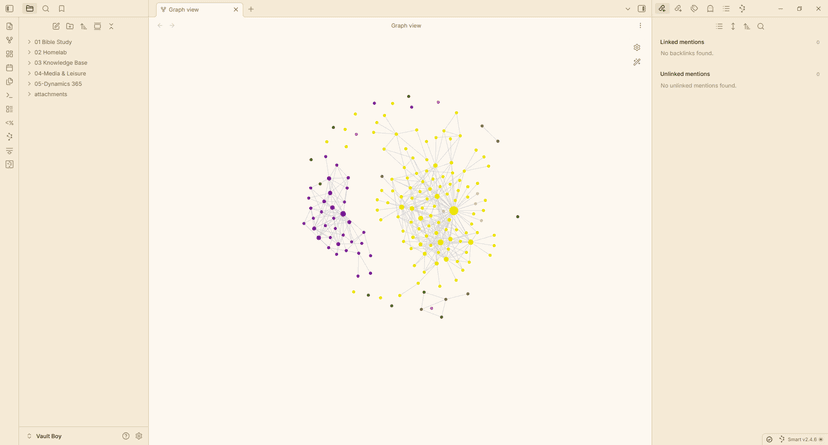
- 034.Graph Depth GradientPlugin16 hours ago by Jeonghyeon ParkColor graph nodes by hop distance from the active note, as a gradient between two colors. - This plugin has not been manually reviewed by Obsidian staff.
- 035.WebDAV Snapshot SyncPlugin16 hours ago by pengGgxp通过 WebDAV 手动上传和恢复整个库的快照包,恢复前会强制创建安全备份。 - This plugin has not been manually reviewed by Obsidian staff.
- 036.Gallery ViewPlugin16 hours ago by mkshp-devCreate interactive image galleries in your notes using obs-gallery code blocks. Supports multiple view types (thumbnail, carousel, grid) and both local vault images and external URLs. - This plugin has not been manually reviewed by Obsidian staff.
- 037.Canvas Layer OrderPlugin18 hours ago by fengzhePowerPoint-style layer controls for Canvas: bring cards to front, send to back, move forward/backward, and preserve layer order when focusing overlapping cards. - This plugin has not been manually reviewed by Obsidian staff.
- 038.Ntfy NotificationsPlugin18 hours ago by MuratSend vault reminders and captured app notices to ntfy with auto scan, editable queues, delayed notifications, repeats, and optional AI webhooks. - This plugin has not been manually reviewed by Obsidian staff.
- 039.Feishu InboxPlugin18 hours ago by qqyzkSync Feishu / Lark group messages into an Obsidian inbox note. - This plugin has not been manually reviewed by Obsidian staff.
- 040.Path PickerPlugin18 hours ago by U-ways E.Fuzzy-find any file or directory under a root, then insert its path at the cursor or open it. - This plugin has not been manually reviewed by Obsidian staff.
- 042.GTD WorkflowPlugin18 hours ago by tiancaijbOrg-mode style GTD workflow for Obsidian: TODO/DONE, priorities, scheduled/deadline dates, agenda view, quick capture. - This plugin has not been manually reviewed by Obsidian staff.
- 043.Tasks TimelinePlugin18 hours ago by leonezzView and manage vault tasks on a timeline. - This plugin has not been manually reviewed by Obsidian staff.
- 044.Quick OrganizePlugin18 hours ago by Vipul BansalA Portent-based dashboard to classify, connect, and track every note through its lifecycle — from raw capture to organized knowledge. Works with any note; enhanced with the QuickClip extension. - This plugin has not been manually reviewed by Obsidian staff.
- 045.Simple WordbookPlugin20 hours ago by BrynWordbook with highlighting, sidebar, mastery/ignore, and fuzzy definitions. - This plugin has not been manually reviewed by Obsidian staff.
- 046.Invoice ForgePlugin20 hours ago by iavilTurn billable hours logged in your notes into client invoices. Track time, manage clients, and generate invoices. Pro unlocks PDF/print export, tax & multi-currency, recurring billing reminders, and payment tracking. - This plugin has not been manually reviewed by Obsidian staff.
- 047.Jira Ticket Data FetcherPlugin20 hours ago by Jessica CrowsonFetches data for Jira tickets directly from Obsidian. - This plugin has not been manually reviewed by Obsidian staff.
- 049.Aliyun Drive SyncPlugin20 hours ago by WjiajieSync an Obsidian vault to a selected Aliyun Drive cloud folder. - This plugin has not been manually reviewed by Obsidian staff.
- 050.Apex DashboardPlugin20 hours ago by PandoraReadsYour personal command center — memos, todos, and projects in one stunning glassmorphism dashboard. - This plugin has not been manually reviewed by Obsidian staff.
- 051.Vault SpotlightPlugin21 hours ago by iavilSpotlight-style vault launcher with fuzzy search, recent files, and property filters. Pro unlocks ripgrep search, starred pins, canvas/PDF, batch open, and custom commands. - This plugin has not been manually reviewed by Obsidian staff.
- 052.HTML EffectivenessPlugin21 hours ago by rosswang边对比 / 流程图 / 幻灯片 / 报告 / 时间线 — 在 Obsidian 中直接渲染空间化 HTML 内容。基于 html-effectiveness 方法论。 - This plugin has not been manually reviewed by Obsidian staff.
- 053.UltraSearchPlugin21 hours ago by sinaaxePowerful offline fuzzy line and file search plus Gemini AI search across all your Markdown files. - This plugin has not been manually reviewed by Obsidian staff.
- 054.Canvas KitPlugina day ago by yaye.workScore: 35/100Explain scoreCanvas Kit - Make your canvas much more fun and eaiser to use - This plugin has not been manually reviewed by Obsidian staff.
- 056.Gentle PomodoroPlugina day ago by jamiestudio-labScore: 35/100Explain scoreA visually soothing, task-integrated Pomodoro timer. Focus on your work with gentle animations and Pomodoro logging. - This plugin has not been manually reviewed by Obsidian staff.
- 057.Yonxao Mind MapPlugina day ago by yonxaoScore: 35/100Explain scoreRender Markdown-heading-style mind maps from yxmm code blocks. - This plugin has not been manually reviewed by Obsidian staff.
- 058.Link TooltipPlugina day ago by Bruno RibeiroScore: 35/100Explain scoreShows where a hovered link points in Live Preview and source mode. - This plugin has not been manually reviewed by Obsidian staff.
- 059.
- 062.a day ago by tahayigitmelekScore: 35/100Explain scoreContext-aware inline AI assistance for active Markdown notes with DeepSeek, OpenAI, Gemini, and Claude. - This plugin has not been manually reviewed by Obsidian staff.
- 063.Note DecayPlugina day ago by NEWO-JScore: 35/100Explain scoreColor-codes notes by how overdue they are for review, using SM-2 spaced repetition. - This plugin has not been manually reviewed by Obsidian staff.
- 064.Note RadarPlugina day ago by tahayigitmelekScore: 35/100Explain scoreTrack view statistics for your vault notes. Analyze them with a detailed dashboard. - This plugin has not been manually reviewed by Obsidian staff.
- 065.Chat Bubble RendererPlugina day ago by bruce2431Score: 35/100Explain scoreRender Markdown chat logs as WeChat-style bubble dialogs. 将聊天记录渲染为微信风格气泡对话框。 - This plugin has not been manually reviewed by Obsidian staff.
- 066.Vault CommanderPlugina day ago by Andre HesslerScore: 35/100Explain scoreA blue, dual-panel orthodox file manager for your vault — inspired by classic DOS file commanders. Browse, copy, move, rename and preview notes and attachments in two panels. - This plugin has not been manually reviewed by Obsidian staff.
- 067.a day ago by AchmageScore: 35/100Explain scoreAuto-render Markdown notes as layout-aware premium slides. Powered by Marp. - This plugin has not been manually reviewed by Obsidian staff.
- 068.Markdown MasonPlugina day ago by Marcus BreidenScore: 35/100Explain scoreReshape pasted or whole-note Markdown to fit a note's structure — heading cascade, footnote renumbering and dedup — plus a runnable, consent-gated script library. - This plugin has not been manually reviewed by Obsidian staff.
- 069.Image Paste on GitHubPlugina day ago by HyoYoonNamScore: 35/100Explain scoreUpload pasted images to your GitHub repository and insert the raw CDN link automatically instead of saving them locally. - This plugin has not been manually reviewed by Obsidian staff.
- 070.Meeting Note ImporterPlugina day ago by Pierre AwaragiScore: 35/100Explain scoreImport meeting notes from calendar invites — drop a .ics file or drag a meeting directly from Outlook. - This plugin has not been manually reviewed by Obsidian staff.
- 074.Neat File TreePlugin2 days ago by NeilScore: 35/100Explain scoreVSCode-style sticky folder headers, accent-colored top-level folders, and tinted indentation guides for the file explorer. - This plugin has not been manually reviewed by Obsidian staff.
- 075.GitHub Repo ToolsPlugin2 days ago by Kyle WhittleScore: 35/100Explain scoreMonitor a GitHub repo — staleness alerts, PR dashboard, and activity notifications. - This plugin has not been manually reviewed by Obsidian staff.
- 077.Gitea CardsPlugin2 days ago by lunerfoxScore: 35/100Explain scoreRender live, auto-refreshing Gitea issue cards in your notes and create issues without leaving the editor. - This plugin has not been manually reviewed by Obsidian staff.
- 078.Voice WorkflowPlugin2 days ago by roar-jarScore: 35/100Explain scoreCapture, transcribe, summarize, and archive voice meeting notes with local or cloud AI providers. - This plugin has not been manually reviewed by Obsidian staff.
- 079.JSON InspectorPlugin2 days ago by JSTools SpaceScore: 35/100Explain scoreRender JSON code blocks as an interactive inspector with Tree, Raw and JSONPath query views. Lossless number handling, search, and copy actions. Fully local, no network. - This plugin has not been manually reviewed by Obsidian staff.
- 080.Agentic ChatPlugin2 days ago by tardigrdeScore: 35/100Explain scorePrivacy-first agentic AI chat in the sidebar. The agent reads, searches, and edits your vault through visible tool calls, routed to zero-data-retention providers by default, or runs fully local with Ollama. - This plugin has not been manually reviewed by Obsidian staff.
- 081.2 days ago by Zhihao NanScore: 35/100Explain scoreOpen files in new tabs and preserve existing file tabs. - This plugin has not been manually reviewed by Obsidian staff.
- 082.AI RewritePlugin2 days ago by masaki39Score: 35/100Explain scoreLocal-first, line-level AI rewriting: proofread, translate, or your own custom modes. Shows a ghost preview below the line; Tab to apply. - This plugin has not been manually reviewed by Obsidian staff.
- 083.Vault ViewerPlugin2 days ago by zhouzeqiangScore: 35/100Explain scoreBrowse all file types, filter/sort, and preview Office documents in Obsidian - This plugin has not been manually reviewed by Obsidian staff.
- 084.Canvas Parent NodesPlugin2 days ago by TommyRoy776Score: 35/100Explain scoreDisplay and navigate to all canvas parent nodes - This plugin has not been manually reviewed by Obsidian staff.
- 085.Code WorkbenchPlugin2 days ago by Vitaly AndrianovScore: 35/100Explain scoreClaude Code IDE for your knowledge base: MCP tools for an AI agent, plus a real code editor with syntax highlighting, Prettier formatting, diagnostics, diffs, code review, and inline git blame. - This plugin has not been manually reviewed by Obsidian staff.
- 086.Journalistic ImporterPlugin2 days ago by homerokemmerichScore: 35/100Explain scoreImport your Journalistic exported entries. - This plugin has not been manually reviewed by Obsidian staff.
- 089.VaultGuard SyncPlugin2 days ago by Peter SedmakScore: 35/100Explain scorePermission-aware encrypted cloud sync for enterprise vaults. Enforces per-file permissions, E2E encryption, and full audit logging through AWS. Replaces standard cloud sync. Desktop + mobile supported - This plugin has not been manually reviewed by Obsidian staff.
- 091.Hub SidebarPlugin2 days ago by Saiki77Score: 35/100Explain scoreFrame the local graph and outline in a clean, Publish-style right-sidebar card, with a one-click Graph / Incoming / Outgoing switcher. - This plugin has not been manually reviewed by Obsidian staff.
- 092.Seafile ContinuedPlugin2 days ago by ryanravnScore: 35/100Explain scoreSync notes across devices using Seafile. - This plugin has not been manually reviewed by Obsidian staff.
- 093.Status PilotPlugin2 days ago by tahayigitmelekScore: 35/100Explain scoreTrack note status, priority, and level metadata from a configurable vault dashboard. - This plugin has not been manually reviewed by Obsidian staff.
- 094.Mermaid ExplorerPlugin2 days ago by tahayigitmelekScore: 35/100Explain scoreDiscover, browse, preview, edit, and export every Mermaid diagram in your vault. - This plugin has not been manually reviewed by Obsidian staff.
- 095.Proton Drive IntegrationPlugin2 days ago by YunusScore: 35/100Explain scoreEmbed Proton Drive files in Obsidian notes. - This plugin has not been manually reviewed by Obsidian staff.
- 096.StashpadPlugin2 days ago by HumanScore: 35/100Explain scoreA chat-style, nested-notes workspace: rapid capture, outliner navigation, fast search, tasks, and per-folder templates, with one-click Open Knowledge Format (OKF) export for LLMs and agents. - This plugin has not been manually reviewed by Obsidian staff.
- 097.Inklaw SyncPlugin2 days ago by InkClawScore: 35/100Explain scoreSync notes you forwarded to Inklaw (auto-transcribed and polished) into your vault, with media attachments. Works on desktop and mobile. - This plugin has not been manually reviewed by Obsidian staff.
- 100.NotebookPointPlugin2 days ago by monoiScore: 35/100Explain score在微信里把文章、链接、资料转发给客服,自动同步成 Obsidian 笔记。 - This plugin has not been manually reviewed by Obsidian staff.
- 101.2 days ago by zoyScore: 35/100Explain scoreTurn a note into a 9:16 vertical short video. A cloud LLM (OpenAI/DeepSeek) rewrites it into a script; local Kokoro TTS and ffmpeg render it with auto images, captions and music. Your note text is sent to the cloud LLM. - This plugin has not been manually reviewed by Obsidian staff.
- 102.LatteLogicTheme3 days ago by kinn00kinn

- 104.Auto LinkerPlugin3 days ago by MrDanRaveScore: 35/100Explain scoreSemantic auto-linking: underlines text that matches a note title and offers one-click wiki-link insertion. - This plugin has not been manually reviewed by Obsidian staff.
- 105.Note Image ManagerPlugin3 days ago by DXShelleyScore: 35/100Explain scoreimage workflow for Obsidian. Import, rename, convert, compress, edit, and recover images safely. - This plugin has not been manually reviewed by Obsidian staff.
- 106.Modern OutlinePlugin3 days ago by KreNtalScore: 35/100Explain scoreA modern and customizable minimap outline for your notes. - This plugin has not been manually reviewed by Obsidian staff.
- 107.AI Study BuddyPlugin3 days ago by ClaudianScore: 35/100Explain scoreAI chat embedded in your vault — direct API calls, works on Desktop and iPad. - This plugin has not been manually reviewed by Obsidian staff.
- 108.MarkNice WeChatPlugin3 days ago by WillmoveScore: 35/100Explain score将 Markdown 笔记一键转换为微信公众号排版:多主题、一键复制不乱版、直接发送到公众号草稿箱。Convert notes into WeChat Official Account layouts with themes, one-click copy, and direct draft publishing. - This plugin has not been manually reviewed by Obsidian staff.
- 109.Select FolderPlugin3 days ago by frogScore: 35/100Explain scoreFinder-like behavior for the file explorer: click the triangle to expand, click a folder to select it, and create new notes inside the selected folder. - This plugin has not been manually reviewed by Obsidian staff.
- 110.Folder RoutinesPlugin3 days ago by shabbirpatheriaScore: 35/100Explain scoreRender a checklist in your daily note from a folder structure. Checking an item logs the daily note's date into that note's 'entries' property. - This plugin has not been manually reviewed by Obsidian staff.
- 111.Auto SidebarPlugin3 days ago by MYQScore: 35/100Explain scoreZen Browser-style compact mode for Obsidian sidebars. - This plugin has not been manually reviewed by Obsidian staff.
- 112.Memos PlusPlugin3 days ago by nocodeuseScore: 35/100Explain scoreA local-first memo workbench stored as readable Markdown. - This plugin has not been manually reviewed by Obsidian staff.
- 113.Apkcore TTSPlugin3 days ago by ApkcoreScore: 35/100Explain scoreText-to-speech plugin with browser TTS and EdgeTTS support. - This plugin has not been manually reviewed by Obsidian staff.
- 114.OPML EditorPlugin3 days ago by RobScore: 35/100Explain scoreView and edit OPML files as interactive, collapsible outline trees directly in Obsidian. - This plugin has not been manually reviewed by Obsidian staff.
- 116.Quick Capture TriagePlugin3 days ago by hazelScore: 35/100Explain scoreClear out notes captured by the obsidian-inbox self-hosted pipeline: keep or discard each pending inbox note. - This plugin has not been manually reviewed by Obsidian staff.
- 117.Meridian ClockPlugin3 days ago by Morpheus GuoScore: 35/100Explain scoreAn aesthetic, highly customizable analog and digital world clock. Features precise global timezones, custom dial geometries, and seamless theme integration. - This plugin has not been manually reviewed by Obsidian staff.
- 118.True RecallPlugin3 days ago by Lucas PieraScore: 36/100Explain scoreAnki-like native system in obsidian. Review flashcards with FSRS spaced repetition. - This plugin has not been manually reviewed by Obsidian staff.
- 119.Acorny SyncPlugin3 days ago by AcornyScore: 35/100Explain scoreSync your Acorny highlights into your vault as Markdown notes. - This plugin has not been manually reviewed by Obsidian staff.
- 120.DayTime TrackerPlugin3 days ago by Hong SeongChanScore: 35/100Explain scoreLog daily activities into intuitive 10-minute grid timelines and archive them directly in Obsidian notes. - This plugin has not been manually reviewed by Obsidian staff.
- 121.Task CenterPlugin3 days ago by correctroadScore: 35/100Explain scoreTask Center adds weekly and monthly task views, custom query panels, and OmniFocus-style planning to Obsidian. and AI-friendly CLI support. - This plugin has not been manually reviewed by Obsidian staff.
- 122.Local Agent ContextPlugin3 days ago by Xu WangScore: 35/100Explain scoreCreate local, token-free context maps that help AI agents navigate your Obsidian vault. - This plugin has not been manually reviewed by Obsidian staff.
- 123.Sticky PropertiesPlugin3 days ago by yaye.workScore: 35/100Explain scoreGet auto-added properties on your new notes. Assign/remove a property to be "sitcky" anytime. - This plugin has not been manually reviewed by Obsidian staff.
- 124.Social ArchiverPlugin3 days ago by Jun LimScore: 39/100Explain scoreArchive social media posts from various platforms. - This plugin has not been manually reviewed by Obsidian staff.
- 125.LskyPro Image UploaderPlugin3 days ago by aceakScore: 35/100Explain scoreAuto upload local images to LskyPro. - This plugin has not been manually reviewed by Obsidian staff.
- 127.Thought NavigatorPlugin3 days ago by qingxuanlin-sScore: 35/100Explain scoreA visual knowledge-processing workspace for Obsidian: connect notes, shape MOCs, build mind maps, and turn Zettelkasten-style thinking into navigable thought maps. - This plugin has not been manually reviewed by Obsidian staff.
- 128.Gemini HelperPlugin3 days ago by takeshyScore: 37/100Explain scoreAI-powered assistant using Google Gemini with File Search RAG capabilities. - This plugin has not been manually reviewed by Obsidian staff.
- 129.SystemSculpt AIPlugin3 days ago by systemsculptScore: 40/100Explain scoreEnhance your data flow with AI-powered tools for note-taking, task management, templates, and so much more.
- 130.Mini World MapPlugin3 days ago by Miro0oScore: 35/100Explain scoreVisualize an Obsidian vault as a hierarchy-first world map with internal links layered on top. - This plugin has not been manually reviewed by Obsidian staff.
- 131.Media EmbedPlugin3 days ago by punkyardScore: 35/100Explain scoreAutomatically converts pasted YouTube links into your preferred embed format on an empty line. - This plugin has not been manually reviewed by Obsidian staff.
- 132.RephraseThisPlugin3 days ago by George PickettScore: 35/100Explain scorePolish selected text with instant rephrase suggestions. - This plugin has not been manually reviewed by Obsidian staff.
- 133.Pretext JustifyPlugin3 days ago by MYQScore: 35/100Explain scoreOptimal Knuth-Plass text justification for reading view. - This plugin has not been manually reviewed by Obsidian staff.
- 134.PDF versioningPlugin3 days ago by Andrea SalomoneScore: 35/100Explain scoreIntegration with external tools for PDF annotations and embedded views with full versioning support. - This plugin has not been manually reviewed by Obsidian staff.
- 135.Card ColumnsPlugin3 days ago by Nik MScore: 35/100Explain scoreKanban-style card view with column grouping, tag filtering, and property chips. Group notes by tags or any frontmatter property. - This plugin has not been manually reviewed by Obsidian staff.
- 136.3 days ago by Marwan LuayScore: 35/100Explain scoreOpen, view, and edit DOCX and PPTX files directly in your vault. - This plugin has not been manually reviewed by Obsidian staff.
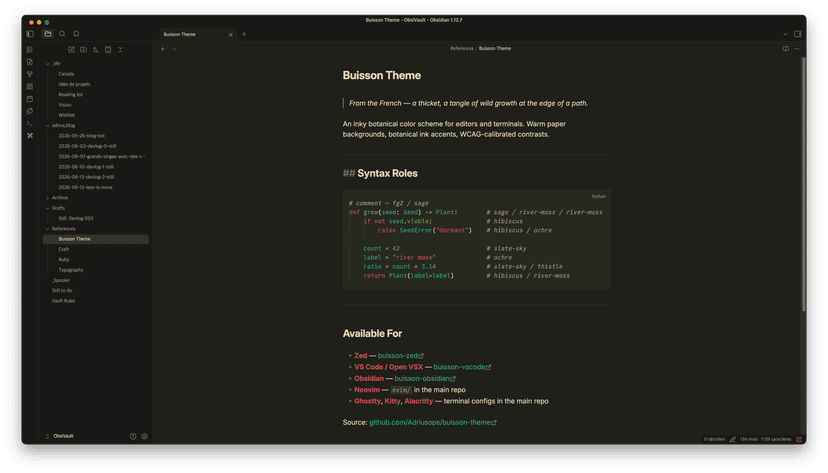
- 137.BuissonTheme3 days ago by adriusops
- 138.Easy LinksPlugin3 days ago by Saiki77Score: 35/100Explain scoreHide the folder path in internal links so only the file name shows, in both reading view and live preview, while keeping the link target intact. Optional smart [[ suggester floats notes from your most-used folders to the top. - This plugin has not been manually reviewed by Obsidian staff.
- 139.Table CalcPlugin3 days ago by Benjamin PattersonScore: 35/100Explain scoreAdds formula support to markdown tables. Use =SUM(A1:A5), =AVG(B1:B3), =A1*B1, etc. in any table cell. - This plugin has not been manually reviewed by Obsidian staff.
- 141.Weekly Todo CalendarPlugin3 days ago by JessieSunScore: 35/100Explain scoreWeekly Todo pages, editable calendar views, and Apple Calendar sync. - This plugin has not been manually reviewed by Obsidian staff.
- 143.Masonry PinboardsPlugin3 days ago by Vitaly MaltsevScore: 35/100Explain scorePinterest-like waterfall masonry layout for folders, pin-boards, tags and such - This plugin has not been manually reviewed by Obsidian staff.
- 144.Cards4LinksPlugin3 days ago by MatthewScore: 35/100Explain scorePaste URLs to generate beautiful card-styled links - This plugin has not been manually reviewed by Obsidian staff.
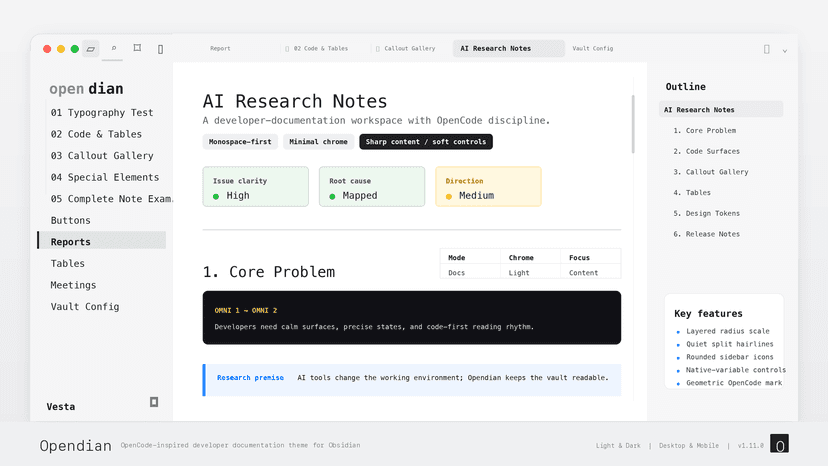
- 146.OpendianTheme3 days ago by elijahchan2019
- 147.3 days ago by raven-pensieveScore: 35/100Explain scoreDownloads and manages components libraries files. - This plugin has not been manually reviewed by Obsidian staff.
- 148.HWP to PDFPlugin3 days ago by kathar0sScore: 35/100Explain scoreConverts HWP/HWPX files to PDF (and optionally Markdown) on creation, fully offline using a WebAssembly renderer. No external server or API key required. - This plugin has not been manually reviewed by Obsidian staff.
- 149.OKF EnforcerPlugin3 days ago by MartinForRealScore: 35/100Explain scoreValidate and enforce the Open Knowledge Format (OKF v0.1): required type frontmatter, index.md/log.md structure, quick-fixes, on-save checks, and a vault-wide report. - This plugin has not been manually reviewed by Obsidian staff.
- 150.Dynamic WallpapersPlugin3 days ago by Josh MedeskiScore: 35/100Explain scoreDynamically change your Obsidian background with wallpapers that adapt to what you're doing. - This plugin has not been manually reviewed by Obsidian staff.
- 152.EVC Team RelayPlugin3 days ago by entire-vcScore: 35/100Explain scoreEnterprise collaboration with self-hosted relay infrastructure. Real-time editing with live cursors and secure team workspaces. - This plugin has not been manually reviewed by Obsidian staff.
- 153.Mi Agrupacion PlusPlugin4 days ago by Jesús GarcíaScore: 35/100Explain scorePlugin centralizado de registro de actividades comunitarias para agrupaciones Bahá'ís. Conexión instantánea con código de invitación. - This plugin has not been manually reviewed by Obsidian staff.
- 154.4 days ago by entire-vcScore: 35/100Explain scoreBidirectional sync of docs folders between your vault and AI development projects. - This plugin has not been manually reviewed by Obsidian staff.
- 155.Exa SearchPlugin4 days ago by 10ishqScore: 35/100Explain scoreSearch the web with Exa AI-native search and insert results directly into your notes. - This plugin has not been manually reviewed by Obsidian staff.
- 156.Git Revision TrackerPlugin4 days ago by Theodor KaiserScore: 35/100Explain scoreTracks your Git progress. - This plugin has not been manually reviewed by Obsidian staff.
- 158.Reformat Windows TitlePlugin4 days ago by zhao414Score: 35/100Explain scoreCustomize the window title format by reordering vault name and file name. - This plugin has not been manually reviewed by Obsidian staff.
- 160.4 days ago by InitsnowScore: 35/100Explain scoreDetect and play harmonic progressions in configured folders. - This plugin has not been manually reviewed by Obsidian staff.
- 161.BP-Wiki StarterPlugin4 days ago by Jie HuangScore: 35/100Explain scoreCreate bilingual starter vaults for knowledge work with 12 templates, setup guides, and optional BP-Wiki Pro upgrade paths. - This plugin has not been manually reviewed by Obsidian staff.
- 164.Graph Scroll PanPlugin4 days ago by Jeonghyeon ParkScore: 35/100Explain scorePan the graph view by scrolling instead of zooming. Zoom with pinch or Cmd/Ctrl+scroll. Great for trackpad users. - This plugin has not been manually reviewed by Obsidian staff.
- 165.MP PublisherPlugin4 days ago by joeytodayScore: 37/100Explain scorePreview with custom CSS themes and publish articles to WeChat Official Accounts with one click. - This plugin has not been manually reviewed by Obsidian staff.
- 166.Content PublisherPlugin4 days ago by roomi-fieldsScore: 35/100Explain scorePublish your notes to multiple platforms: Substack, WordPress, and LinkedIn. - This plugin has not been manually reviewed by Obsidian staff.
- 167.Tutu Emoji ToolbarPlugin4 days ago by tinswangtao-webScore: 35/100Explain score全局 Emoji 插入工具,支持标题、文件重命名、右键菜单、移动端等场景 - This plugin has not been manually reviewed by Obsidian staff.
- 168.Heading ShiftPlugin4 days ago by maleleScore: 35/100Explain scorePromote or demote heading levels together with all sub-headings at once, like Typora. - This plugin has not been manually reviewed by Obsidian staff.
- 169.4 days ago by Andrew MutavdzijaScore: 35/100Explain scoreSeamlessly merge and copy/save Granola meeting notes and transcripts. - This plugin has not been manually reviewed by Obsidian staff.
- 170.FlexplorerPlugin4 days ago by kh4fScore: 47/100Explain scoreEnhance the file explorer with custom sorting, pinning, and hiding. - This plugin has not been manually reviewed by Obsidian staff.
- 175.Book ProgressPlugin4 days ago by ununnamedScore: 35/100Explain scoreRead books with ease: scroll-position memory, remaining reading time, and book progress bars. - This plugin has not been manually reviewed by Obsidian staff.
- 176.Quick ReviewPlugin4 days ago by BitcomingScore: 35/100Explain scoreMulti-agent review and polish plugin for Obsidian notes. - This plugin has not been manually reviewed by Obsidian staff.
- 177.Table FormatterPlugin4 days ago by fangface-hubScore: 35/100Explain scoreFormats Markdown tables when files are saved. - This plugin has not been manually reviewed by Obsidian staff.
- 178.Add To VaultPlugin4 days ago by CLINCHScore: 35/100Explain scoreCompanion plugin to securely sync articles, summarize content with LLMs, and provide vault context to your self-hosted backend. - This plugin has not been manually reviewed by Obsidian staff.
- 179.Language RecallPlugin4 days ago by chaskaneScore: 35/100Explain scoreAdd anki-like spaced repetition and recall to your vault with built-in language translation. - This plugin has not been manually reviewed by Obsidian staff.
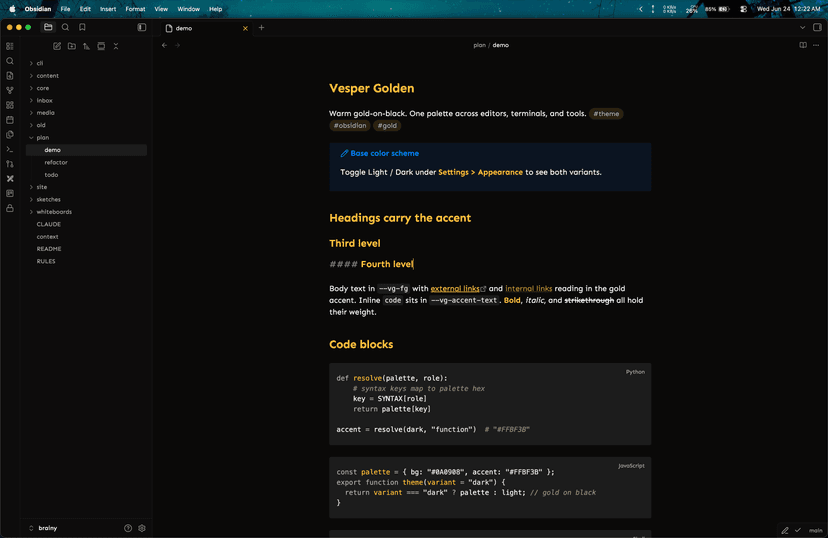
- 180.Vesper GoldenTheme4 days ago by everydayapps
- 182.Just CalendarPlugin4 days ago by aidistanScore: 35/100Explain scoreJust a calendar which works with the core plugins. - This plugin has not been manually reviewed by Obsidian staff.
- 184.Menu-Bar Time TrackerPlugin4 days ago by MeirakamiScore: 35/100Explain scoreOne-click project time tracking from the macOS menu bar. Stop the timer, tag the project, and a markdown session note lands in your vault. - This plugin has not been manually reviewed by Obsidian staff.
- 185.Note From FormPlugin4 days ago by arhichiefScore: 35/100Explain scoreDefine dynamic input form and use it to create notes
- 186.AQL Syntax HighlightingPlugin4 days ago by Poorvi AcharyaScore: 35/100Explain scoreANNIS Query Language (AQL) syntax highlighting for code blocks. - This plugin has not been manually reviewed by Obsidian staff.
- 187.LookoutPlugin4 days ago by Post-MathScore: 35/100Explain scoreSurvey wide content instead of scrolling sideways. Pan and zoom Mermaid diagrams (wheel, Ctrl+wheel, or buttons), fit them to the frame, and open diagrams or wide tables full-screen. - This plugin has not been manually reviewed by Obsidian staff.
- 189.Style ObmdPlugin4 days ago by penytScore: 35/100Explain scoreAdd customizable colors to highlights and bold text, with commands to convert styled Markdown to inline HTML. - This plugin has not been manually reviewed by Obsidian staff.
- 191.Cursor NavigatorPlugin4 days ago by maleleScore: 35/100Explain scoreRemember cursor position per note + VS Code-style global back/forward cursor navigation history. - This plugin has not been manually reviewed by Obsidian staff.
- 192.Smart ReviewPlugin4 days ago by JayceScore: 35/100Explain scoreSmart review system based on Obsidian Properties / YAML frontmatter with Review Center, spaced review feedback, history, and AI payload export. - This plugin has not been manually reviewed by Obsidian staff.
- 193.Easy GitPlugin4 days ago by Saiki77Score: 35/100Explain scoreA secure, plug-and-play way to sync individual vault folders or sections with GitHub. Private repos supported, multiple folder mappings, bidirectional sync, and conflict resolution. - This plugin has not been manually reviewed by Obsidian staff.
- 194.Quick Chinese TranslatePlugin5 days ago by jackScore: 35/100Explain score一键把当前笔记整篇翻译成中文(标题/文件名也翻),生成中文副本。支持 Google/DeepL/LLM 多引擎,不破坏笔记属性。 - This plugin has not been manually reviewed by Obsidian staff.
- 195.LemmaPlugin5 days ago by Sabin PokharelScore: 35/100Explain scoreFlashcard plugin powered by the FSRS spaced repetition algorithm. Supports basic and cloze cards, custom study sessions, review statistics, and optional CouchDB sync. - This plugin has not been manually reviewed by Obsidian staff.
- 196.5 days ago by AriaScore: 35/100Explain scoreRead EPUB files inside Obsidian with persistent, color-coded highlights, notes, and Markdown export. - This plugin has not been manually reviewed by Obsidian staff.
- 198.Pebble SyncPlugin5 days ago by Sabin PokharelScore: 35/100Explain scoreImport Pebble notes into atomic notes and link them back to your daily notes. - This plugin has not been manually reviewed by Obsidian staff.
- 199.Fast 3D GraphPlugin5 days ago by jkraccoonScore: 35/100Explain scoreExplore your vault as a fast 3D force-directed graph. - This plugin has not been manually reviewed by Obsidian staff.
- 200.Weave EPUB ReaderPlugin5 days ago by zhuzhige123Score: 35/100Explain scoreStandalone EPUB reader with bookshelf, deep links, and reading state persistence. - This plugin has not been manually reviewed by Obsidian staff.
- 201.Vault InspectorPlugin5 days ago by rogerdigitalScore: 35/100Explain scoreScan your vault for maintenance problems: broken links, orphan attachments, duplicate files, frontmatter inconsistencies, unused tags, and large files. - This plugin has not been manually reviewed by Obsidian staff.
- 202.Wide ViewTheme5 days ago by jkraccoon
- 203.Mermaid Export FitPlugin5 days ago by Rosetta Zidian GuoScore: 35/100Explain scorePrevents wide Mermaid diagrams from breaking during PDF/HTML export. - This plugin has not been manually reviewed by Obsidian staff.
- 204.Agentage GalaxyPlugin5 days ago by AgentageScore: 35/100Explain scoreVisualize your vault as a 3D, rotating force-graph: notes are nodes, links are edges. Search, filter, and orbit your knowledge graph from the toolbar. Part of Agentage. - This plugin has not been manually reviewed by Obsidian staff.
- 206.5 days ago by Stanislav LevyshchevScore: 35/100Explain scoreChoose which community plugins are enabled on desktop, mobile, both, or disabled. - This plugin has not been manually reviewed by Obsidian staff.
- 208.Copy to WeChatPlugin5 days ago by jerryshiScore: 35/100Explain scoreCopy notes to WeChat as chat-friendly plain text, or as a rendered image. - This plugin has not been manually reviewed by Obsidian staff.
- 210.S-Restore ProfilePlugin5 days ago by Stephenson AlvesScore: 35/100Explain scoreBulk reinstall your community plugins from your existing plugin list. - This plugin has not been manually reviewed by Obsidian staff.
- 211.File HeatmapPlugin5 days ago by satoScore: 35/100Explain scoreShows a color-coded heatmap of recently modified files - This plugin has not been manually reviewed by Obsidian staff.
- 212.Watch Later SynthesizerPlugin5 days ago by ibrh96-progScore: 35/100Explain scoreTriage your YouTube Watch Later backlog: per-video watch-or-skip verdicts, recurring themes across the pile, and a safe-to-delete list. - This plugin has not been manually reviewed by Obsidian staff.
- 213.Bible StudyPlugin5 days ago by linkongrenScore: 35/100Explain score圣经研读助手 — 快速引用经文、圣经阅读面板,支持和合本 (CUV) - This plugin has not been manually reviewed by Obsidian staff.
- 214.Reveal Hidden FilesPlugin5 days ago by Josip MarkusScore: 35/100Explain scoreReveal dot-prefixed files and folders in the File Explorer panel, with a per-pattern deny list. - This plugin has not been manually reviewed by Obsidian staff.
- 215.Outline Level FoldPlugin5 days ago by Josip MarkusScore: 35/100Explain scoreFold and unfold the active note's outline to a chosen depth (levels 1-6) with hotkey-bindable commands. - This plugin has not been manually reviewed by Obsidian staff.
- 216.traVERturePlugin5 days ago by Eryk J.Score: 35/100Explain scoreParse, convert, and preview scripture references; insert citations from NWT Bible, and launch in JW Library and JW.ORG. - This plugin has not been manually reviewed by Obsidian staff.
- 217.Link GrouperPlugin5 days ago by eluisjonathanScore: 35/100Explain scoreGroups links from the active note into a newly created sibling folder. - This plugin has not been manually reviewed by Obsidian staff.
- 218.Docli ConnectPlugin5 days ago by Stanislav AgeevScore: 35/100Explain scoreSync your vault with a docli.ru workspace. - This plugin has not been manually reviewed by Obsidian staff.
- 219.Remove Task FormatPlugin5 days ago by eluisjonathanScore: 35/100Explain scoreRemove task checkbox formatting ([ ] or [x]) from the current line using a keyboard shortcut. - This plugin has not been manually reviewed by Obsidian staff.
- 220.RustShare Vault SyncPlugin5 days ago by RustShareScore: 35/100Explain scoreSync local vaults to RustShare. RustShare is not affiliated with, endorsed by, or sponsored by Dynalist Inc. - This plugin has not been manually reviewed by Obsidian staff.
- 221.5 days ago by DanyScore: 35/100Explain scoreTurn Chinese notes into a learner-friendly comprehensible-input reading environment with dictionary-aware tokenization, exposure tracking, SRS, and optional AI-generated review stories. - This plugin has not been manually reviewed by Obsidian staff.
- 222.Daily TrackerPlugin5 days ago by rapphcdScore: 35/100Explain scoreHabit tracking and daily statistics directly in Obsidian. - This plugin has not been manually reviewed by Obsidian staff.
- 223.5 days ago by liaocaoxuezheScore: 35/100Explain scoreSearch your vault semantically with local vector embeddings and expose RAG search to MCP clients. - This plugin has not been manually reviewed by Obsidian staff.
- 224.ZengQiang EnhancedPlugin5 days ago by lishuScore: 35/100Explain score浮动工具栏、模板库、原生表格配色与多种内嵌实用工具。需同时安装本仓库 companion-plugins 中的 markdown-table-enhancer。增强表格仅在开启实验性 OneNote 高保真粘贴时后台可用。 - This plugin has not been manually reviewed by Obsidian staff.
- 225.Section MeterPlugin5 days ago by Martino WongScore: 35/100Explain scoreShows stats (wordcount, reading time) beside headings and in the status bar - This plugin has not been manually reviewed by Obsidian staff.
- 226.AwareAITheme5 days ago by johncattrall

- 227.LapflyTheme5 days ago by johncattrall

- 228.ClawdiaTheme5 days ago by theshield2594
- 229.Echo RecallPlugin5 days ago by sxjeelScore: 35/100Explain scoreMemorize your notes and paragraphs actively with spaced repetition and retrospective deadlines directly inside Obsidian. - This plugin has not been manually reviewed by Obsidian staff.
- 230.AutoscrollerPlugin5 days ago by chaskaneScore: 35/100Explain scoreAuto-scroll through long notes at your chosen reading pace. - This plugin has not been manually reviewed by Obsidian staff.
- 231.IssueTrackerPlugin5 days ago by mingScore: 35/100Explain scoreSync GitCode issues, classifications, and daily reports into Obsidian. - This plugin has not been manually reviewed by Obsidian staff.
- 232.Feishu Lark CLI SyncPlugin5 days ago by wanghuanScore: 35/100Explain scorePublish and sync Markdown notes to Feishu/Lark Docs via lark-cli. - This plugin has not been manually reviewed by Obsidian staff.
- 233.Vault OKR ManagerPlugin5 days ago by jingmengzhiyueScore: 35/100Explain scoreManage OKRs inside your vault with a streamlined dashboard and built-in check-ins. - This plugin has not been manually reviewed by Obsidian staff.
- 235.Vault OperatorPlugin5 days ago by Sebastian HankeScore: 36/100Explain scoreReal AI agent for your vault. Coworker, Copilot & thinking partner, that maintains your memory & knowledge, adapts to your workflows, uses plugins, skills & tools with full safety controls. BYOK & MCP - This plugin has not been manually reviewed by Obsidian staff.
- 236.Recipe VaultPlugin5 days ago by taylorsduggerScore: 35/100Explain scoreRecipe Vault is a full recipe management system for Obsidian — import from web, image, or scratch, browse your vault visually, and build shopping lists automatically. - This plugin has not been manually reviewed by Obsidian staff.
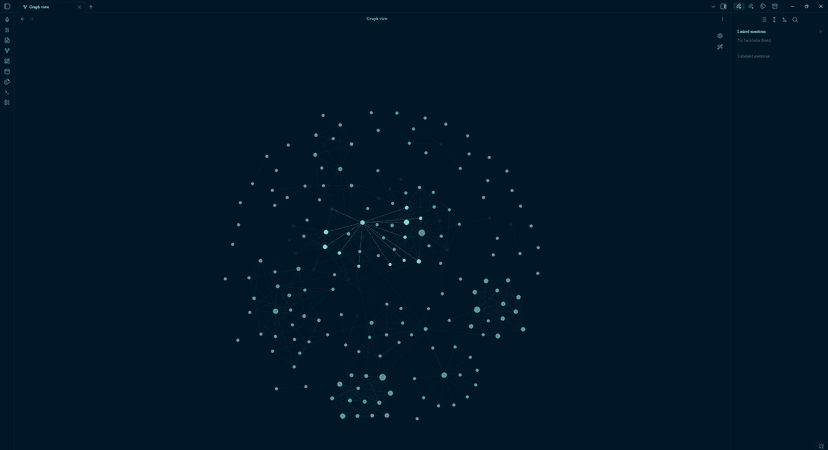
- 237.Night Owl NativeTheme5 days ago by huydnd
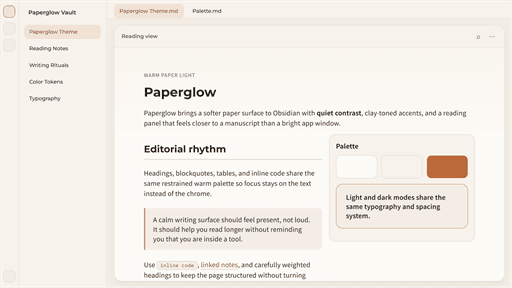
- 238.PaperglowTheme5 days ago by cloudy-liu
- 242.Orange Book ClothTheme5 days ago by surprisedduck

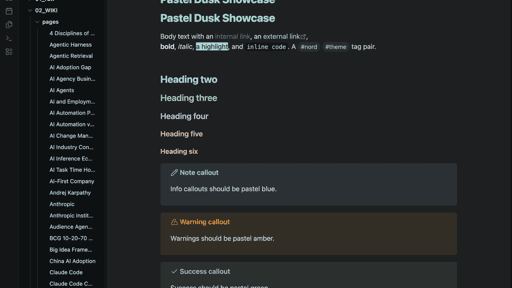
- 243.Pastel DuskTheme5 days ago by surprisedduck
- 245.Mini CalendarPlugin6 days ago by rancelee233Score: 35/100Explain scoreAdd a compact one-week calendar below Obsidian's file explorer. - This plugin has not been manually reviewed by Obsidian staff.
- 246.LLM Auto TaggerPlugin6 days ago by MatboiScore: 35/100Explain scoreAutomatically adds existing vault tags to notes with your configured LLM API. - This plugin has not been manually reviewed by Obsidian staff.
- 248.Custom Tag ColorPlugin6 days ago by Anand BaghelScore: 35/100Explain scoreDefine custom text colors (and derived backgrounds) for tags based on regex patterns. - This plugin has not been manually reviewed by Obsidian staff.
- 249.Image to MarkdownPlugin6 days ago by Johannes KaindlScore: 35/100Explain scoreTranscribe the images in a note to Markdown with a local vision LLM — fully offline, non-destructive, streaming into the sidebar. - This plugin has not been manually reviewed by Obsidian staff.
- 250.6 days ago by TaoyeScore: 35/100Explain scoreImport EPUB files into a vault as chapter-based Markdown reading workspaces. - This plugin has not been manually reviewed by Obsidian staff.
- 251.Note DatabasePlugin6 days ago by pangyScore: 35/100Explain scoreLocal-first database views for Obsidian notes: table, board, gallery, list, chart, calendar, timeline, formulas, filters, and inline editing. - This plugin has not been manually reviewed by Obsidian staff.
- 252.Karpathy LLM WikiPlugin6 days ago by Greener-DaliiScore: 36/100Explain scoreKarpathy's LLM Wiki implementation - multi-page knowledge generation with entity/concept pages and conversational query. - This plugin has not been manually reviewed by Obsidian staff.
- 253.Local Agent OfficePlugin6 days ago by Gustavo LourençoScore: 35/100Explain scoreTurn your vault into a team of AI agents built from your own notes — they chat, act on your notes (with approval), remember, and brainstorm together. Bring your own key, local-first. - This plugin has not been manually reviewed by Obsidian staff.
- 254.6 days ago by ChongCyrusScore: 35/100Explain scoreDraw math formulas by hand or import from album, then convert them to LaTeX using AI APIs (SimpleTex / Custom). - This plugin has not been manually reviewed by Obsidian staff.
- 255.Yet Another All-In-OnePlugin6 days ago by cmdaeoScore: 35/100Explain scoreAll-in-one plugin featuring Git sync and more - because one plugin is never enough. - This plugin has not been manually reviewed by Obsidian staff.
- 256.LexVoicePlugin6 days ago by LynnxScore: 35/100Explain score后台录音、实时转写、AI 结构化纪要与知识沉淀 | Background recording, segmented or streaming transcription, and AI-organized Markdown notes for meetings, interviews, monologues, and learning material. - This plugin has not been manually reviewed by Obsidian staff.
- 257.Vault LensPlugin6 days ago by suzhanScore: 35/100Explain scorePreview docx/xlsx/pptx and 60+ code files (sql/java/py/js/ts/…). Zoom, edit & save, line numbers, XLSX tabs. - This plugin has not been manually reviewed by Obsidian staff.
- 258.Regex ReplacePlugin6 days ago by bonghoScore: 35/100Explain scoreFind and replace text using regular expressions with real-time preview and match highlighting. - This plugin has not been manually reviewed by Obsidian staff.
- 259.Wysimark EditorPlugin6 days ago by takeshyScore: 35/100Explain scoreA modern WYSIWYG Markdown editor. Edit your notes with a rich text interface while keeping pure Markdown. - This plugin has not been manually reviewed by Obsidian staff.
- 260.AGE CryptoPlugin6 days ago by Toru4kaScore: 35/100Explain scoreEncrypt/decrypt notes with age. - This plugin has not been manually reviewed by Obsidian staff.
- 261.Hemingway TypewriterPlugin6 days ago by David YarzebinskiScore: 35/100Explain scoreA write-only typewriter mode: you can only write forward, with a distraction-free focus environment. - This plugin has not been manually reviewed by Obsidian staff.
- 262.LogographyPlugin6 days ago by vanmartinScore: 35/100Explain scoreAnalyze dreams and explore personal beliefs through guided Socratic dialogue. Sessions stay in your vault as Markdown. - This plugin has not been manually reviewed by Obsidian staff.
- 263.GitHub ContributionsPlugin6 days ago by gearheadedScore: 35/100Explain scoreDisplay GitHub and local Git contribution graphs in the Obsidian sidebar with streak tracking, repository insights, and daily note integration. - This plugin has not been manually reviewed by Obsidian staff.
- 264.DnD Beyond ImporterPlugin6 days ago by jktaisaScore: 35/100Explain scoreImport public D&D Beyond characters as beautifully formatted Obsidian notes. - This plugin has not been manually reviewed by Obsidian staff.
- 265.Charted RootsPlugin6 days ago by John BanisterScore: 38/100Explain scoreFamily tree visualization with GEDCOM/Gramps import and Canvas/PDF/Markdown export. Charts, maps, timelines, citations, fictional calendars. For genealogists, worldbuilders, and TTRPG campaigns. - This plugin has not been manually reviewed by Obsidian staff.
- 266.Zotero Cite LinksPlugin6 days ago by jpeacock29Score: 35/100Explain scoreCmd-click a Pandoc @citekey in your notes to open the cited PDF in Zotero at the page locator from the citation. - This plugin has not been manually reviewed by Obsidian staff.
- 267.Novels Note JPPlugin6 days ago by p77-donScore: 35/100Explain scoreJapanese novel writing support tools for Obsidian. - This plugin has not been manually reviewed by Obsidian staff.
- 268.Folia KanbanPlugin6 days ago by Rafael StavarengoScore: 35/100Explain scoreA real Kanban board with drag-and-drop, nested subcards, comments, and history — every card is a plain Markdown file. - This plugin has not been manually reviewed by Obsidian staff.
- 269.Mi AgrupacionPlugin6 days ago by Jesús GarcíaScore: 35/100Explain scoreRegistro de actividades comunitarias, visitas y proceso educativo para agrupaciones Bahá'ís. - This plugin has not been manually reviewed by Obsidian staff.
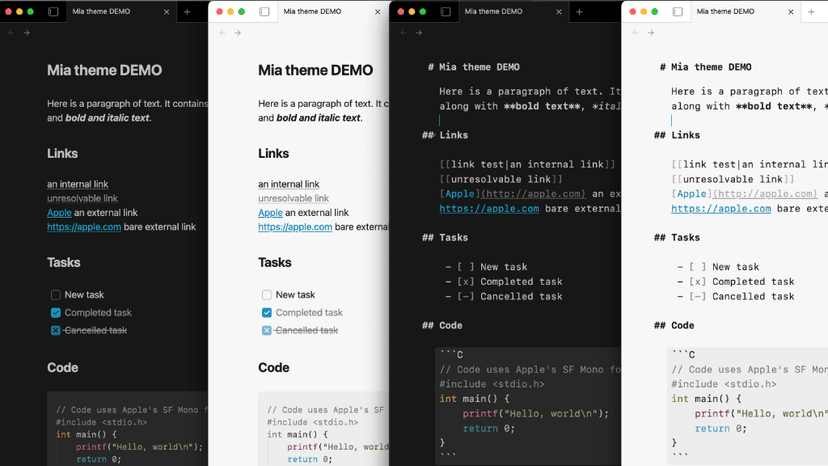
- 270.MiaTheme6 days ago by playerofgames
- 271.Bible Verse TipsPlugin6 days ago by Joel WongScore: 35/100Explain scoreHover any Bible reference to preview the verse; click to read the whole chapter, with an inline translation switcher. - This plugin has not been manually reviewed by Obsidian staff.
- 272.marimo BridgePlugin6 days ago by soakayeScore: 35/100Explain scoreView and edit marimo notebooks (.py). Auto-manages a local marimo server and embeds its UI in a webview. - This plugin has not been manually reviewed by Obsidian staff.
- 273.Subscription CalculatorPlugin6 days ago by citrusrenegadeScore: 35/100Explain scoreTrack enabled and disabled subscriptions, yearly totals, and cached favicons. - This plugin has not been manually reviewed by Obsidian staff.
- 274.Vim Mode StatusPlugin6 days ago by penytScore: 35/100Explain scoreShow Vim mode (Normal/Insert/Visual) in the status bar with colors. - This plugin has not been manually reviewed by Obsidian staff.
- 276.Popup DictionaryPlugin6 days ago by Nikitas TsirisScore: 35/100Explain scoreShow word definitions in a popup when you select or Ctrl-hover a word, powered by Wiktionary across many languages. - This plugin has not been manually reviewed by Obsidian staff.
- 277.Save HistoryPlugin6 days ago by GuglScore: 35/100Explain scoreSaves and restores versions of markdown files. - This plugin has not been manually reviewed by Obsidian staff.
- 278.Sidebar MiMo-CodePlugin6 days ago by AllenX95Score: 35/100Explain scoreEmbeds MiMo-Code CLI Agent as an AI collaborator in your vault. Your vault becomes the working directory, giving MiMo-Code capabilities for file reads and writes, search, bash commands, and multi-step workflows. - This plugin has not been manually reviewed by Obsidian staff.
- 279.VaultRelayPlugin6 days ago by Anti-WarlockScore: 35/100Explain scoreTurn long-form notes into publish-ready content without moving your vault. - This plugin has not been manually reviewed by Obsidian staff.
- 280.Annotation ManagerPlugin6 days ago by JoshScore: 35/100Explain scoreAnnotate text inline with {={id}text=} syntax, view all annotations in a sidebar, and query them via Dataview. - This plugin has not been manually reviewed by Obsidian staff.
- 282.FilamentalPlugin6 days ago by Scott TurnbullScore: 35/100Explain scoreView your project vault in 3D using Filamental. Both apps use the same markdown files, so your notes stay in sync automatically. Free forever for one project — Pro for professional and commercial use. - This plugin has not been manually reviewed by Obsidian staff.
- 284.ChronostraPlugin6 days ago by kntanakaScore: 35/100Explain scoreHierarchical life-planning table with virtual scrolling and timeline view. - This plugin has not been manually reviewed by Obsidian staff.
- 285.Borrax HTMLPlugin7 days ago by dogukansahilScore: 35/100Explain scoreView HTML files inside your vault with working links, CSS and scripts. - This plugin has not been manually reviewed by Obsidian staff.
- 286.Masking as MDPlugin7 days ago by ahseygScore: 35/100Explain scoreOpen non-markdown files (.py, .html, .txt, .js, .css, etc.) as editable text documents directly in Obsidian. - This plugin has not been manually reviewed by Obsidian staff.
- 287.Agentage SyncPlugin7 days ago by AgentageScore: 35/100Explain scoreLet Claude, ChatGPT, Cursor, and any MCP client read and write your Obsidian vault. Two-way Git sync to a private memory, safe merges with flagged conflicts, plain Markdown you own, up to 100 MB - This plugin has not been manually reviewed by Obsidian staff.
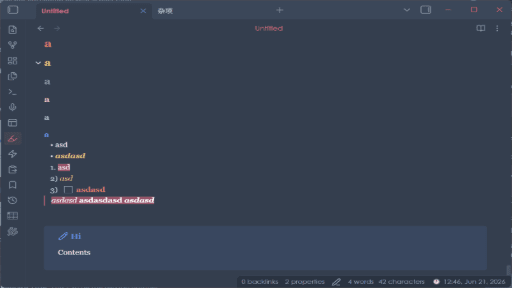
- 289.Enhanced CanvasTheme7 days ago by jimcsuen
- 290.Folder and Graphs PlusPlugin7 days ago by pilafdobScore: 35/100Explain scoreColours Folder2Graph folder nodes with matching native Graph View group colours. - This plugin has not been manually reviewed by Obsidian staff.
- 291.AI Chat SidebarPlugin7 days ago by AntigravityScore: 35/100Explain scoreAI chat sidebar for Obsidian with Claude Max OAuth, Anthropic API key, and ChatGPT Plus/Codex support. - This plugin has not been manually reviewed by Obsidian staff.
- 292.Special CalloutsPlugin7 days ago by ahseygScore: 35/100Explain scoreAdvanced callout styling with grid layouts, custom colors, gradients, glow effects, and multi-column support. - This plugin has not been manually reviewed by Obsidian staff.
- 293.Formula LibraryPlugin7 days ago by strangelionScore: 35/100Explain scoreLaTeX formula editor with MathLive WYSIWYG editing, 2100+ categorized formulas, smart search, and extensible formula folders. - This plugin has not been manually reviewed by Obsidian staff.
- 294.Quick MemoPlugin7 days ago by songwzScore: 35/100Explain scoreMarkdown-native daily quick records, flash thoughts, todos, history, filters, and heatmap. - This plugin has not been manually reviewed by Obsidian staff.
- 297.Full Calendar RemasteredPlugin7 days ago by obsidian-full-calendar-remasteredScore: 39/100Explain scoreComplete Calendar HUB experience. Work with all your calendars in one place. Analyze your time and take action! - This plugin has not been manually reviewed by Obsidian staff.
- 298.7 days ago by satojin219Score: 35/100Explain scoreEdit image (PNG/JPEG) descriptions as Markdown and persist them as image metadata. - This plugin has not been manually reviewed by Obsidian staff.
- 299.Engram Vault SyncPlugin7 days ago by RasbanditScore: 35/100Explain scoreYour notes are your AI's memory. Sync your vault everywhere, search by meaning, and let Claude, Cursor, and other AI apps read and write your notes. Hosted or self-host — free to start. - This plugin has not been manually reviewed by Obsidian staff.
- 303.Nextcloud SyncPlugin7 days ago by Daisuke ITOScore: 35/100Explain scoreBidirectional sync between Obsidian and Nextcloud using hash-based change detection. - This plugin has not been manually reviewed by Obsidian staff.
- 305.Dictionary PlusPlugin7 days ago by michellegdyasonScore: 35/100Explain scoreDictionary lookup with mobile selection, right-click support, and flashcard-ready lookup history. - This plugin has not been manually reviewed by Obsidian staff.
- 306.Trietment KanbanPlugin7 days ago by TrietmentScore: 35/100Explain scoreCollect tasks from across your vault as draggable Kanban cards, with due dates, projects, priorities, subtasks and recurring tasks. - This plugin has not been manually reviewed by Obsidian staff.
- 308.Scoped SnippetsPlugin7 days ago by SAN-SchXScore: 35/100Explain scoreChoose a CSS snippet per Obsidian .base or .md file, and apply it only to that Base or Markdown view. - This plugin has not been manually reviewed by Obsidian staff.
- 309.UGREEN NAS SyncPlugin7 days ago by tsfreddieScore: 35/100Explain scoreSync vault with UGREEN NAS. - This plugin has not been manually reviewed by Obsidian staff.
- 310.See Also SidebarPlugin7 days ago by David BreeceScore: 35/100Explain scoreDisplay related notes in a sidebar view using a custom property or using notes with the same tags. - This plugin has not been manually reviewed by Obsidian staff.
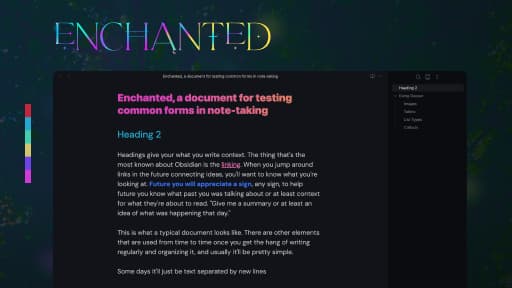
- 311.EnchantedTheme7 days ago by enchantedcoloring
- 312.DnDJay SoundboardPlugin7 days ago by CosmakesScore: 35/100Explain scoreA tabletop control console: a 4-channel Web Audio soundboard with loadouts, scenes and live meters. - This plugin has not been manually reviewed by Obsidian staff.
- 313.Workspace ClockPlugin7 days ago by toyotathiefScore: 35/100Explain scoreA clock + dropdown stopwatch and calendar that lives in the workspace tab - This plugin has not been manually reviewed by Obsidian staff.
- 315.Note DoctorPlugin7 days ago by MrDanRaveScore: 35/100Explain scoreAuto-tags new notes as #INCOMPLETE, and provides Complete/Mark-Incomplete commands and a triage stack for reviewing incomplete notes. - This plugin has not been manually reviewed by Obsidian staff.
- 316.Custom Sidebar WidthPlugin8 days ago by Avni BilginScore: 35/100Explain scoreSets the left and right sidebar widths per note based on frontmatter properties or tags. - This plugin has not been manually reviewed by Obsidian staff.
- 317.Git History ReviewerPlugin8 days ago by timdommettScore: 35/100Explain scoreReview every commit in your vault's git history with a dark-mode diff view, and track which commits you've reviewed and approved. Review state is stored locally so it never creates new commits. - This plugin has not been manually reviewed by Obsidian staff.
- 318.IntervaultsPlugin8 days ago by MrDanRaveScore: 35/100Explain scoreVisualise multiple Obsidian vaults as an interactive graph, compare shared notes across vaults, and merge conflicting versions side-by-side. - This plugin has not been manually reviewed by Obsidian staff.
- 319.8 days ago by SKYueScore: 35/100Explain score支持中文自然语言输入日期,如 @今天、@下周三、@3天后 - This plugin has not been manually reviewed by Obsidian staff.
- 321.Block Step ReaderPlugin8 days ago by gorfScore: 35/100Explain scoreReader-like step reading in Obsidian: block navigation, reading library, progress in frontmatter, and multi-language UI. - This plugin has not been manually reviewed by Obsidian staff.
- 322.Local RunnerPlugin8 days ago by joke-lxScore: 35/100Explain score在侧边栏启动本地命令并查看输出(如 npm run dev / npx vite)。 - This plugin has not been manually reviewed by Obsidian staff.
- 323.Mobile ExplorerPlugin8 days ago by Marc PanuScore: 35/100Explain scoreReplace the file explorer with an Apple Notes-style drill-down navigator. - This plugin has not been manually reviewed by Obsidian staff.
- 324.Kami ReaderTheme8 days ago by kkenny0
- 325.Nu AyuTheme8 days ago by mrparalloid

- 326.Contextual AI ReaderPlugin8 days ago by TaoyeScore: 35/100Explain scoreAI reading companion for translation, contextual vocabulary, PDFs, and Markdown notes. - This plugin has not been manually reviewed by Obsidian staff.
- 327.Copilot PersonalPlugin8 days ago by JosefScore: 35/100Explain scoreAI agent with 17 tools, multi-provider LLM (11 providers), RAG semantic search, PDF extraction, web search, and autonomous note creation. - This plugin has not been manually reviewed by Obsidian staff.
- 329.Source ObserverPlugin8 days ago by Iskandar SitdikovScore: 35/100Explain scoreBrowse any local codebase, view syntax-highlighted files, and review git diffs — without leaving your vault. - This plugin has not been manually reviewed by Obsidian staff.
- 331.Collapsing Group TablePlugin8 days ago by Gilbert HyattScore: 35/100Explain scoreA Bases table view whose groups collapse like a tree, with nested groups, inline editing, and tag/link autocomplete. - This plugin has not been manually reviewed by Obsidian staff.
- 332.Folder ChildrenPlugin8 days ago by AaronScore: 35/100Explain scoreSync each folder's direct children into a Children callout on its folder note. Requires Folder Notes. - This plugin has not been manually reviewed by Obsidian staff.
- 333.Documents BundlePlugin8 days ago by kq996Score: 35/100Explain scoreTreat each Markdown document as a self-contained bundle with local assets. - This plugin has not been manually reviewed by Obsidian staff.
- 334.Subtitles MDPlugin8 days ago by Pedro FuentesScore: 35/100Explain scoreAn Obsidian plugin that reads .srt/.vtt transcripts as readable, searchable Markdown. - This plugin has not been manually reviewed by Obsidian staff.
- 335.Smart Tagger AIPlugin8 days ago by ONEGAYIScore: 35/100Explain score使用 AI 为文档自动生成标签 - This plugin has not been manually reviewed by Obsidian staff.
- 336.Lecture LensPlugin8 days ago by YimaScore: 35/100Explain scoreTurn lecture PDFs and course materials into structured Markdown notes with LLM chat and RAG. - This plugin has not been manually reviewed by Obsidian staff.
- 337.Simple mind mapPlugin8 days ago by wanglinScore: 36/100Explain scoreA relatively powerful mind map. - This plugin has not been manually reviewed by Obsidian staff.
- 339.InterlinearPlugin8 days ago by Yupeng LinScore: 35/100Explain scoreTranslate notes paragraph by paragraph in reading view — bilingual or translation-only alongside the original, without ever modifying your files. BYOK (DeepSeek or any OpenAI-compatible endpoint). - This plugin has not been manually reviewed by Obsidian staff.
- 342.Inline PropertiesPlugin8 days ago by ZizouetScore: 35/100Explain scoreReference note properties as inline variables anywhere in your vault using {{variable}} syntax. - This plugin has not been manually reviewed by Obsidian staff.
- 343.neoloopyPlugin8 days ago by neoloopyScore: 35/100Explain scoreSystems-thinking causal-loop diagrams (CLDs): build variables and causal links, detect reinforcing/balancing feedback loops, and annotate them — fully local and offline. - This plugin has not been manually reviewed by Obsidian staff.
- 344.IslandsTheme8 days ago by bulat-beltone
- 345.Simple GitPlugin8 days ago by Mikhail SoldatkinScore: 35/100Explain scoreA lightweight and simple git client. - This plugin has not been manually reviewed by Obsidian staff.
- 346.CheckSortedPlugin8 days ago by Javad EsmaeelpourScore: 35/100Explain scoreKeep checkbox lists tidy: move completed items into a separate section, autocomplete tasks, and delete them in one click. - This plugin has not been manually reviewed by Obsidian staff.
- 348.Jamie SyncPlugin8 days ago by JamieScore: 35/100Explain scoreSync your Jamie meeting notes and transcripts into your vault. - This plugin has not been manually reviewed by Obsidian staff.
- 349.8 days ago by beaurancourtScore: 35/100Explain scoreBack/forward through cursor + scroll positions, including jumps within a single file via internal links. - This plugin has not been manually reviewed by Obsidian staff.
- 350.8 days ago by ibrh96-progScore: 35/100Explain scoreTurn your scattered highlights into synthesized reading memory. - This plugin has not been manually reviewed by Obsidian staff.
- 351.Tag Folder ExplorerPlugin8 days ago by Atharva DhamankarScore: 35/100Explain scoreA tag folder based explorer for obsidian. Uses the nested tags feature of obsidian to create virtual folders, allowing individual files to exist in multiple locations, inside a single vault. - This plugin has not been manually reviewed by Obsidian staff.
- 352.Block Reference EnhancerPlugin8 days ago by msjsc001Score: 35/100Explain scoreRender UUID-based block references and block embeds from Markdown. - This plugin has not been manually reviewed by Obsidian staff.
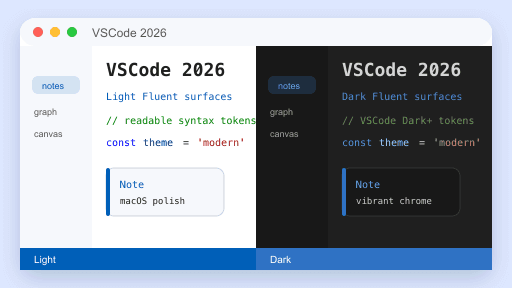
- 354.VSCode 2026Theme8 days ago by yangsonhung
- 355.Read AlongPlugin8 days ago by 拔插头艺术家Score: 35/100Explain scoreExport notes into clean, offline-readable pages, with optional Read Along — TTS narration plus synchronized sentence highlighting. - This plugin has not been manually reviewed by Obsidian staff.
- 356.Banshan Habits TrackerPlugin8 days ago by PassengerC07Score: 35/100Explain scoreTrack your habits with visual progress and streaks. - This plugin has not been manually reviewed by Obsidian staff.
- 358.Diagrammo DiagramsPlugin8 days ago by diagrammoScore: 35/100Explain score40+ diagram types in your notes from one plain-text language. Process, architecture, data, project, hierarchy — diffable, searchable, mobile-friendly, with live preview and themed palettes. - This plugin has not been manually reviewed by Obsidian staff.
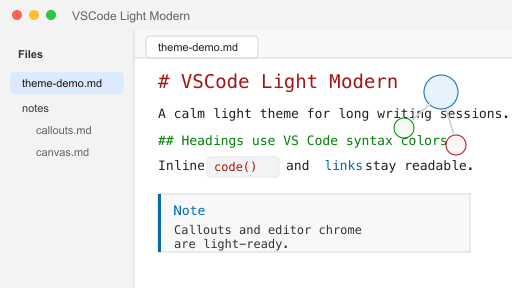
- 359.VSCode Light ModernTheme9 days ago by yangsonhung
- 360.Github PR TrackerPlugin9 days ago by David MonnomScore: 35/100Explain scoreTrack and manage GitHub pull request reviews directly from Obsidian. - This plugin has not been manually reviewed by Obsidian staff.
- 362.Time Stamp HiderPlugin9 days ago by LeonYew-LeyScore: 35/100Explain scoreHide timestamp prefixes in Zettelkasten-style internal link display text without changing notes or filenames. - This plugin has not been manually reviewed by Obsidian staff.
- 363.Random List PickPlugin9 days ago by Roman KliuchkovychScore: 35/100Explain scoreInsert {{rnd}} in a note to get a button that picks a random item from the list below it. - This plugin has not been manually reviewed by Obsidian staff.
- 364.9 days ago by Li ShiScore: 35/100Explain scoreRender your markdown note with custom styles and sync directly to WeChat Official Account Drafts with one click. - This plugin has not been manually reviewed by Obsidian staff.
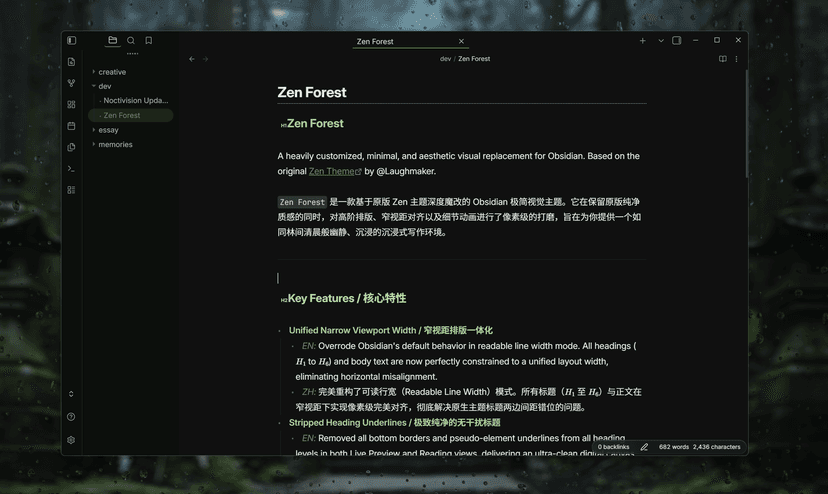
- 365.Zen ForestTheme9 days ago by hobbysoftwaredeveloper
- 366.UnderstoryPlugin9 days ago by Rosetta Zidian GuoScore: 35/100Explain scoreLocal-first knowledge layer for relationship discovery, ER facts, graph analysis, and optional model-powered insights. - This plugin has not been manually reviewed by Obsidian staff.
- 369.Background TrayPlugin9 days ago by SynaphiScore: 35/100Explain scoreKeep Obsidian running in the system tray instead of quitting when the window is closed. - This plugin has not been manually reviewed by Obsidian staff.
- 370.Bamboo DartsPlugin9 days ago by 羽鳞君Score: 35/100Explain score竹叶飞刃:AI 提炼子弹笔记,过滤信息垃圾,把阅读转化为可检索的知识节点。 - This plugin has not been manually reviewed by Obsidian staff.
- 371.Word ScalpelPlugin9 days ago by Grich HiranyaphinantScore: 35/100Explain scorePrecise word deletion for Thai and Japanese — fixes Option+Backspace so it deletes one word at a time instead of the entire sentence. - This plugin has not been manually reviewed by Obsidian staff.
- 372.Note Refactor PlusPlugin9 days ago by aonosotaScore: 35/100Explain scoreExtract selections or headings into new notes using multiple configurable profiles (template, folder, filename rule, link style). - This plugin has not been manually reviewed by Obsidian staff.
- 373.agentcairnPlugin9 days ago by Charles C. FigueiredoScore: 35/100Explain scoreSee, filter, and navigate your agentcairn agent-memory vault: provenance and currency at a glance. - This plugin has not been manually reviewed by Obsidian staff.
- 374.OneNote IntegrationPlugin9 days ago by QoderScore: 35/100Explain scoreEmbed and edit OneNote notes directly in Obsidian via local COM integration — real window embedding, sidebar browsing, and interactive page selection. - This plugin has not been manually reviewed by Obsidian staff.
- 375.Pinball DBPlugin9 days ago by tgrosingerScore: 35/100Explain scoreTrack and organize a database of pinball machines inside your vault. - This plugin has not been manually reviewed by Obsidian staff.
- 377.AntinomiaPlugin9 days ago by Giuseppe De MartinoScore: 35/100Explain scoreMap and work through the contradictions in your vault: tensions, tradeoffs, and conflicting goals organized in 5 layers via frontmatter, with an AI Contradiction Hunter and PDF concept extraction. Works with cloud APIs or fully local models. - This plugin has not been manually reviewed by Obsidian staff.
- 378.Cockpit BoardPlugin9 days ago by andreconde21Score: 35/100Explain scoreDynamic Kanban board from frontmatter properties with calendar views, timers, and recurring tasks. - This plugin has not been manually reviewed by Obsidian staff.
- 381.Cursor TimestampPlugin9 days ago by Ørjan HesjedalScore: 35/100Explain scoreInsert a configurable, timezone-aware date and time stamp at the cursor, with custom prefix and suffix text and optional bold, italic, or coloured styling. - This plugin has not been manually reviewed by Obsidian staff.
- 382.PDF Image ExtractorPlugin9 days ago by svewScore: 35/100Explain scoreAdds a command to extract embedded images from the currently open PDF and save them to your vault's attachments folder. - This plugin has not been manually reviewed by Obsidian staff.
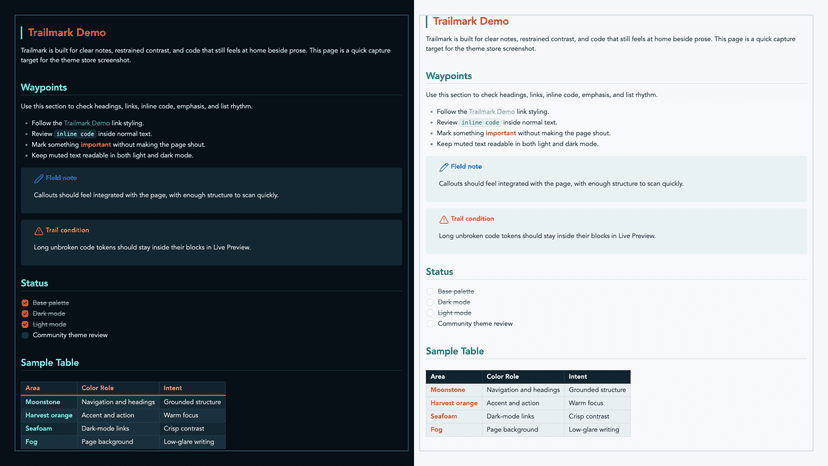
- 383.TrailmarkTheme9 days ago by joshua-walls
- 384.RPG Homebrew ImporterPlugin9 days ago by Jackson WoodardScore: 35/100Explain scoreImport RPG Homebrew JSON as rendered TTRPG statblocks, receive direct website exports, and roll clickable dice notation. - This plugin has not been manually reviewed by Obsidian staff.
- 385.MiStudio SyncPlugin9 days ago by MiStudioScore: 35/100Explain scoreSync your MiStudio folders, notes, tasks, and calendar with your Obsidian vault (always download; optional two-way upload, including task check-in), with daily notes including Phil's study plan, selec - This plugin has not been manually reviewed by Obsidian staff.
- 387.Folder to TagPlugin9 days ago by merijnvervoornScore: 35/100Explain scoreAutomatically adds or updates a tag based on the folder a note is in. Updates both on creation and file move. - This plugin has not been manually reviewed by Obsidian staff.
- 388.9 days ago by 4Cjyxbq25CbScore: 35/100Explain scoreHighlights currently open notes in the graph view — custom color, enlarged size, and dimming of other nodes. Includes an in-graph control panel. - This plugin has not been manually reviewed by Obsidian staff.
- 389.Document CommentsPlugin9 days ago by Kyle McDonaldScore: 35/100Explain scoreNotion-style margin comments stored inline in your markdown, so agents and other tools can read them too. - This plugin has not been manually reviewed by Obsidian staff.
- 391.Brains SyncPlugin9 days ago by BrainsScore: 35/100Explain scoreSync your vault with Brains, the persistent, cross-LLM second brain your AI never had. Pull pages in, edit, and push changes back. One memory for Claude, ChatGPT, and whatever's next. - This plugin has not been manually reviewed by Obsidian staff.
- 393.Hypermnesic CompanionPlugin9 days ago by Léonard SellemScore: 35/100Explain scoreSurface read-only, pause-triggered related notes and an interrogable reinvention nudge from your tailnet hypermnesic index as you write. Never writes the vault. - This plugin has not been manually reviewed by Obsidian staff.
- 395.SrceryTheme9 days ago by soykindabored

- 396.SwiftSnippetsPlugin9 days ago by nilmarkoScore: 35/100Explain scoreQuickly toggle Obsidian CSS Snippets with a status bar popup. Supports grouping, drag reorder, and i18n. - This plugin has not been manually reviewed by Obsidian staff.
- 397.Link TracePlugin9 days ago by lucasScore: 35/100Explain scorePublish notes as short links and track who's viewed them. - This plugin has not been manually reviewed by Obsidian staff.
- 398.Bento GridPlugin9 days ago by ruveydayilmazScore: 35/100Explain scoreA draggable, resizable bento-style grid for embedding markdown and widgets. - This plugin has not been manually reviewed by Obsidian staff.
- 399.Hermes AgentPlugin9 days ago by JasonScore: 35/100Explain scoreChat with a locally installed Hermes Agent from your vault. Send the current note or selection to the local Hermes gateway and stream replies in a sidebar, with agent file tools and saved chat history. - This plugin has not been manually reviewed by Obsidian staff.
- 401.Dagens OrdPlugin9 days ago by Shuyang LiuScore: 35/100Explain scoreDaily Danish word learning plugin for Obsidian - This plugin has not been manually reviewed by Obsidian staff.
- 402.9 days ago by fengzheScore: 35/100Explain scoreAuto-size only the currently edited Canvas text node, with CJK-friendly width padding and configurable height. - This plugin has not been manually reviewed by Obsidian staff.
- 404.GothicTheme10 days ago by highway-wu
- 405.Synapse AIPlugin10 days ago by FredrixScore: 35/100Explain scoreChat with your notes using Gemini, OpenRouter or any OpenAI-compatible model. Bring your own key, vault-aware context, saved replies. Private, local-first. - This plugin has not been manually reviewed by Obsidian staff.
- 407.10 days ago by Patrick DriggettScore: 35/100Explain scorePlan and track weekly music practice: per-skill progress by day, plus per-day notes. - This plugin has not been manually reviewed by Obsidian staff.
- 408.RepertoirePlugin10 days ago by samuelbeardScore: 35/100Explain scoreHelps musicians manage their music with chord sheets and automatic transposing. - This plugin has not been manually reviewed by Obsidian staff.
- 409.10 days ago by xuezha985Score: 35/100Explain scoreCopy the current note or selection as possible-bar styled WeChat Official Account HTML. - This plugin has not been manually reviewed by Obsidian staff.
- 410.Timeline CalendarPlugin10 days ago by zenScore: 35/100Explain scoreA clean timeline calendar with grid-aligned time labels for daily notes and tasks. - This plugin has not been manually reviewed by Obsidian staff.
- 411.System RecordingPlugin10 days ago by Yuto TakagiScore: 35/100Explain scoreRecord system audio (Zoom, Meet, Teams) and save as M4A in your vault - This plugin has not been manually reviewed by Obsidian staff.
- 412.Selection TranslatorPlugin10 days ago by tlmkiraScore: 35/100Explain scoreTranslate selections, notes, Markdown documents, images, and speech with AI and machine translation providers. - This plugin has not been manually reviewed by Obsidian staff.
- 414.10 days ago by april-grasScore: 44/100Explain scoreSimple timeline generator for story tellers.
- 415.Meeting Notes SyncPlugin10 days ago by Andrea GrandiScore: 35/100Explain scoreSync meeting transcripts, notes, and AI summaries from MacParakeet and Fellow into your vault. - This plugin has not been manually reviewed by Obsidian staff.
- 416.WeChat ObsyncPlugin10 days ago by ObsyncScore: 35/100Explain scoreSync WeChat Official Account articles from a Mini Program into Obsidian. - This plugin has not been manually reviewed by Obsidian staff.
- 417.Share LinkerPlugin10 days ago by Sean localScore: 35/100Explain scoreShare selected plugins from the current vault to another Obsidian vault by creating symbolic links. - This plugin has not been manually reviewed by Obsidian staff.
- 419.Bases Spotlight ViewPlugin10 days ago by mymindstormScore: 35/100Explain scoreA spotlight view for Obsidian Bases. Focuses on content with an attributes sidebar. - This plugin has not been manually reviewed by Obsidian staff.
- 420.Hotkeys CheatsheetPlugin10 days ago by Pierre AwaragiScore: 35/100Explain scoreDisplay a searchable cheatsheet of all your Obsidian hotkeys. - This plugin has not been manually reviewed by Obsidian staff.
- 421.ReWrite (Voice Notes)Plugin10 days ago by wiseguruScore: 35/100Explain scoreRecord or paste speech and have it transcribed and structured by AI. - This plugin has not been manually reviewed by Obsidian staff.
- 422.ScholariumPlugin10 days ago by tenor-johnScore: 35/100Explain scoreAn all-in-one scholarly workspace with AI-assisted writing, literature management, notes, and productivity tools. - This plugin has not been manually reviewed by Obsidian staff.
- 423.UnmarkdownPlugin10 days ago by unmarkdownScore: 35/100Explain scorePaste notes into Google Docs, Word, Slack, OneNote, or Email with formatting intact. Publish to the web with one click. - This plugin has not been manually reviewed by Obsidian staff.
- 424.Pseudo MicaPlugin10 days ago by Alexis CScore: 36/100Explain scoreCustomize translucent window effects on Windows and macOS.
- 428.CodeSuitePlugin10 days ago by felixleopoldScore: 35/100Explain scoreExecute code inside your notes: Shiki syntax highlighting with 65+ themes, live streaming output, inline Matplotlib and Plotly graphs, shared variables, and styled HTML and PDF export with outputs. - This plugin has not been manually reviewed by Obsidian staff.