
README file from
Github
🧠 Karpathy LLM Wiki Plugin for Obsidian
AI-powered structured knowledge base that ingests your notes and generates a connected Wiki — based on Andrej Karpathy's LLM Wiki concept.
Obsidian official score 95/100 | Native support for 10 languages | Actively maintained, continuously evolving










English | 简体中文 | 繁體中文 | 日本語 | 한국어 | Deutsch | Français | Español | Português | Italiano
Official Site | Blog | Feedback & Discussion | 🤖 Explore Repo with DeepWiki
⚡ Quick Update Reminder: This project evolves rapidly with frequent bug fixes, performance improvements, new features, and UX optimizations. We recommend updating to the latest version regularly in Obsidian (Settings → Community plugins → Check for updates), or enabling automatic plugin updates to ensure the best experience.
📑 Contents
💡 What is LLM-Wiki?
You write. AI organizes. You ask. That's it.
🎯 The problem. Your notes are a goldmine — people, concepts, ideas, connections. But right now they're just files in folders. Finding what relates to what means searching, tagging, and hoping you remember the thread.
✨ The fix. Andrej Karpathy suggested something elegant: treat your notes as raw material, and let an LLM do the architect work. It reads what you write, pulls out entities and concepts, and weaves them into a structured Wiki — complete with [[bidirectional links]], an auto-generated index, and a chat interface that answers questions from your knowledge.
📚 So you don't have to be the librarian. No deciding what deserves a page. No maintaining cross-links. No wondering if something is out of date. Drop notes into sources/ and the LLM reads, extracts, writes, links, and even flags contradictions — while you stay in flow.
🤖 And it's not another chatbot. ChatGPT knows the internet. LLM-Wiki knows you — or rather, what you've taught it. Every answer carries [[wiki-links]] back into your knowledge graph. Every response is a trailhead, not a dead end.
⚡ Why Obsidian + LLM-Wiki?
Obsidian is brilliant at linked thinking. But there's a catch: you're the one doing all the linking.
LLM-Wiki flips that. Instead of you building the graph by hand, the AI grows it with you. Add a note about a new concept — it finds the connections you'd miss. Ask a question — it walks your own knowledge graph and brings back answers with citations.
- 🔗 Your Graph View comes alive. New notes don't just sit there — they sprout links to entities, concepts, and sources. The graph grows organically, and the plugin maintains it: detecting duplicates, fixing dead links, bridging languages with aliases.
- 💬 Your notes learn to talk back. Search becomes conversation. "What did I write about X?" becomes a dialogue, with streaming responses and
[[wiki-links]]as breadcrumbs. Every answer is a path deeper into your own knowledge. - 🧠 Obsidian becomes a thinking partner. It stops being a cabinet for notes and starts being something that helps you think — surfacing hidden connections, flagging contradictions, remembering what you forgot you knew.
🚀 Quick Start
📦 Installation
🌟 Recommended — Obsidian Community Plugin Market:
- In Obsidian, go to Settings → Community plugins
- Click Browse and search for "Karpathy LLM Wiki"
- Click Install, then Enable
🌐 Or from the Community Plugin website — visit community.obsidian.md/plugins/karpathywiki and click Add to Obsidian to install directly.
⚙️ Manual (alternative):
- Download
main.js,manifest.json,styles.cssfrom Releases - In Obsidian, go to Settings → Community plugins. On the Installed plugins tab, click the folder icon to open your plugins directory
- Create a folder named
karpathywiki, drop the three files inside - Back in Obsidian, click the refresh icon — Karpathy LLM Wiki will appear under Installed plugins
- Toggle it on to enable
🔨 Development: git clone, pnpm install, pnpm build.
🔄 Updating
This project evolves rapidly — new features, bug fixes, and improvements are shipped frequently. We recommend keeping up to date:
Option A — Manual update (recommended):
- Go to Settings → Community plugins
- Click Check for updates
- Find Karpathy LLM Wiki in the list and click Update
Option B — Enable auto-update:
- Go to Settings → Community plugins
- Toggle on Automatically check for plugins updates
- New versions will be detected automatically; update manually at your convenience
💡 Why stay updated? Each release may include new features, performance improvements, and important bug fixes. We actively maintain this plugin — missing updates means missing out on a better experience.
🔑 Configure an LLM Provider
- Open Settings → Karpathy LLM Wiki
- Pick a provider from the dropdown (Anthropic, Anthropic Compatible, Google Gemini, OpenAI, DeepSeek, Kimi, GLM, MiniMax, LM Studio, Ollama, OpenRouter, or custom)
- Enter your API key (not needed for Ollama)
- Click Fetch Models to populate the model dropdown, or type a model name manually
- Click Test Connection, then Save Settings
🦙 Ollama (local, no API key): Install Ollama, pull a model (ollama pull gemma4 or ollama pull qwen3.5:27b), select "Ollama (Local)" in the provider dropdown.
🎛️ LM Studio (local, no API key): Install LM Studio, start its local server (default http://localhost:1234/v1), select "LM Studio (Local)" in the provider dropdown. LM Studio runs a built-in OpenAI-compatible server — API key field is optional.
See Model Selection Guide for details.
🎮 Usage
| Method | How |
|---|---|
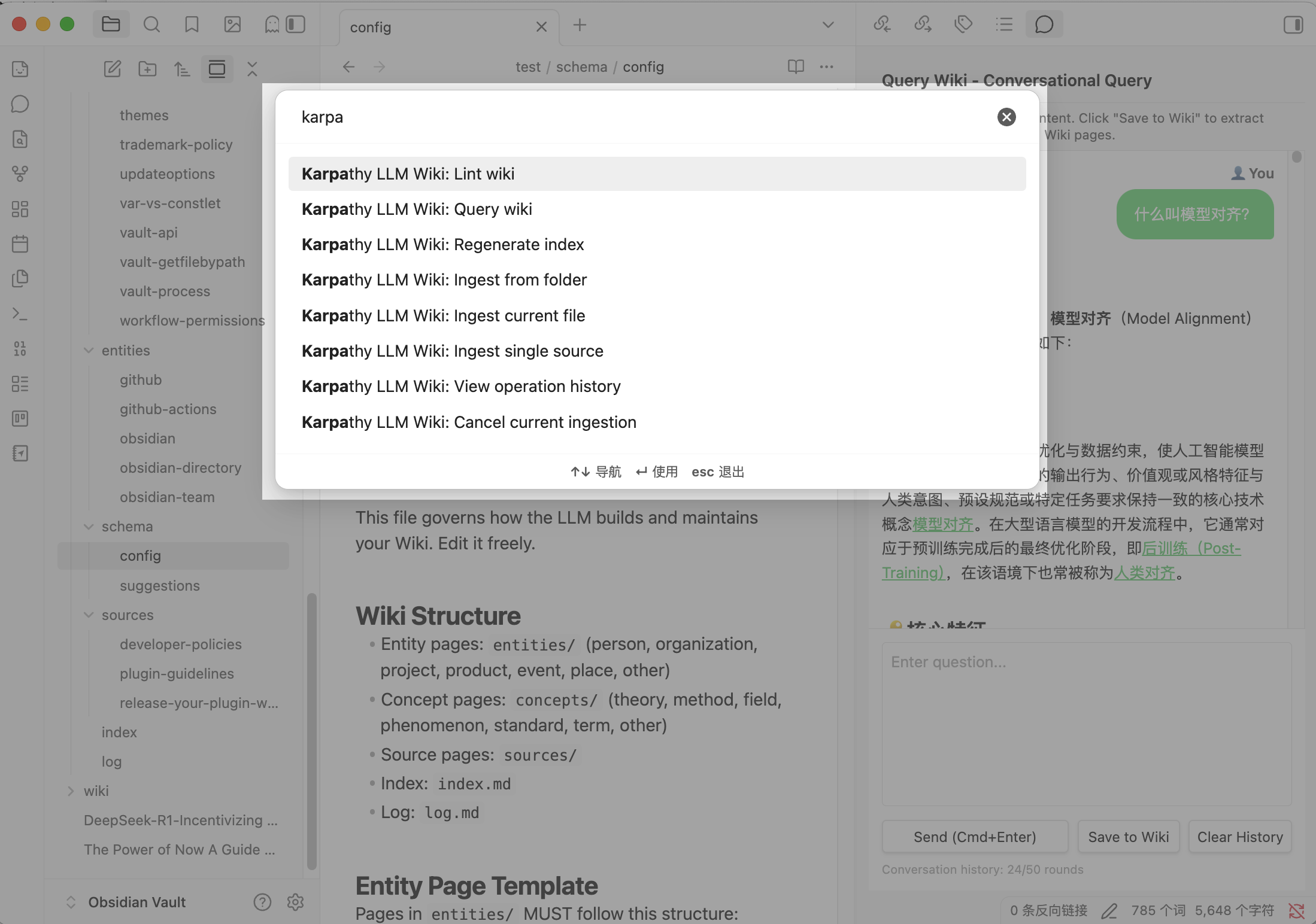
| 📥 Ingest single source | Cmd+P → "Ingest single source" — select a note to extract entities and concepts into Wiki pages |
| 📂 Ingest from folder | Cmd+P → "Ingest from folder" — pick a folder, batch generate Wiki from all notes inside |
| 🔍 Query wiki | Cmd+P → "Query wiki" — ask questions, get streaming answers with [[wiki-links]] |
| 🛠️ Lint wiki | Cmd+P → "Lint wiki" — health scan: duplicates, dead links, empty pages, orphans, missing aliases |
| 📋 Regenerate index | Cmd+P → "Regenerate index" — rebuild wiki/index.md with current pages and aliases |
| 🎯 One-click ingest | Click the sticker icon in the left sidebar or Cmd+P → "Ingest current file" — directly ingest the file you're editing |
Re-ingesting the same source does incremental updates on entity/concept pages (new info merged in). Summary pages are regenerated.
💡 Smart Batch Skip: When ingesting a folder, the plugin automatically detects already-processed files and skips them to save time and API costs. The batch report shows skipped count.
⚠️ Upgrading from an Older Version?
This release is fully backward-compatible. No breaking changes since v1.0.0 — your existing wiki pages, settings, and workflows are preserved. No reconfiguration or data migration needed.
Upgrading to v1.20.3 from any earlier version: source-page slugs are now fingerprinted (every sources/<slug>.md becomes sources/<basename>_<6hex>.md). On your next ingest, existing sources/ pages are renamed in place and all [[sources/<slug>]] backlinks update automatically — no action required, but the file rename may briefly appear in your Obsidian file explorer. If you have external scripts or bookmarks that reference sources/<slug>.md paths directly, update them to use the new fingerprinted names.
If your existing Wiki was built across many versions, some pages may lack recent capabilities (aliases, alias-aware dedup, modernized prompts). Run Lint Wiki to see what needs attention. Smart Fix All handles the most common cleanups in one click.
If upgrading from a version before v1.16.0, run Lint Wiki once to automatically fix historical issues:
- Double-nested links
[[[[entities/Foo|Foo]]]]in log.md — Lint detects and fixes these with zero LLM cost - Cross-directory stub duplicates — pages that exist in both
entities/andconcepts/with the same slug are now correctly matched
For wikis built across many versions, follow these steps to bring your Wiki up to current standards:
1️⃣ Rebuild your index
Cmd+P → "Regenerate index" — This rebuilds wiki/index.md with alias entries for every page, enabling alias-aware search (e.g., searching "DSA" finds "DeepSeek-Sparse-Attention"). The old index format only listed page titles.
2️⃣ Run Lint wiki
Cmd+P → "Lint wiki" — This scans your entire Wiki and shows:
- 🏷️ Missing aliases: Pages without aliases (any version, if you never ran "Complete Aliases"). Click "Complete Aliases" — the LLM generates translations, acronyms, and alternate names in bulk. This is critical for duplicate detection.
- 🔄 Duplicate pages: Pages with overlapping content (e.g., "CoT" vs "思维链" created by older versions that didn't have alias-aware dedup). Click "Merge Duplicates" to fuse them and preserve all aliases.
- 💀 Dead links / Empty pages / Orphans: Standard wiki maintenance issues.
3️⃣ Use Smart Fix All Click "Smart Fix All" in the Lint report for a one-click, causality-ordered repair: aliases completed → duplicates merged → dead links fixed → orphans linked → empty pages expanded. This is the fastest way to clean up a wiki built across many versions.
4️⃣ Enable parallel page generation Settings → LLM Configuration:
- ⚡ Page Generation Concurrency: Set to 3 for most providers. Speeds up ingestion 2–3× on sources with 10+ entities.
- ⏱️ Batch Delay: Start at 300ms. Increase to 500–800ms if you hit rate limits.
5️⃣ Review current settings:
- 🌐 Wiki Output Language: Independent from UI language — your Wiki can be in Chinese while the plugin UI stays in English, or vice versa.
- 📊 Extraction Granularity: Five options control how deeply the LLM extracts entities from sources:
- Fine (~100 items) — Deep analysis, edge-case mentions included. High token cost, best for key sources.
- Standard (~50 items) — Balanced extraction. Good default for daily notes.
- Coarse (~10 items) — Quick overview, core entities only. Low cost, fast ingestion.
- Minimal (~5 items) — Essential items only. Ideal for batch processing 100+ files or testing new sources.
- Custom (1–300 items) — User-defined entity/concept limits for specialized workflows.
💡 Recommendation: Use Minimal or Coarse for large folders to save time and API costs. Use Fine selectively on key documents that warrant deep analysis.
- 🔄 Auto-Maintenance: Startup Quick Fixes defaults ON (one-time startup health check); File Watcher and Periodic Lint default OFF — enable only if you want automatic background processing.
🛡️ Safety: Parallel generation uses
Promise.allSettled— if one page fails, others continue. Failed pages are retried individually with exponential backoff. Smart Batch Skip automatically detects already-ingested files to save time and API costs.
⚡ What's New in v1.22.0
v1.22.0 is a MINOR feature release that delivers a long-requested one-click schema update workflow, Traditional Chinese as the 10th language, and an improved ingestion status bar.
- 📝 Schema one-click apply (Issue #97). LLM-generated schema suggestions are now displayed in an IDE-style dual-pane diff Modal, with Apply / Cancel / Open File buttons. Applying a suggestion automatically backs up the previous schema (rotated, max 3 backups) before writing. "Update Schema" is now accessed from the Lint Modal — the command palette entry was removed to enforce a single entry point.
- 🏷️ Schema dynamic tag sync. Schema vocabulary is now the single source of truth — active tags are automatically injected into every LLM call, eliminating the "schema template overridden by hardcoded sections" bug from v1.21.0 Phase 1.
- 🇹🇼 Traditional Chinese (zh-TW) locale. Plugin UI and wiki output now support Traditional Chinese as the 10th language. Bidirectional parity guard extended to all 10 locales.
- 📊 Ingest status bar with document name (PR #189). The status bar now shows the current document name (
My Note · Ingesting...) and batch progress during folder ingest ([4/10] My Note · Ingesting...). Contributed by @YounianC.
v1.22.1 — 2026-06-24 (PATCH)
A focused PATCH that closes three P0 bugs reported by users and ships one UX improvement.
- 🛡️ Fix Dead Links no longer fabricates AI-expanded stub pages (Issue #197). Previously, when
fixDeadLinkcouldn't resolve a dead link to an existing page, it created a stub and calledfillEmptyPage()— letting the LLM invent alias claims and related links against zero source content. This re-introduced the empty-source hallucination class that #164/#174 was designed to prevent in the ingest path. Stubs are now honest placeholders with ageneration_complete: falsemarker so #170's incomplete-cleaner recognizes them, and a future real ingest fills them through the normal gated path. - ✅ "Run quick fixes on startup" toggle now sticks (Issue #199). A v1.18.3 migration silently forced
startupCheck: false → trueon every plugin load, undoing the user's explicit toggle. Migration removed; remaining migrations extracted to a pure functionapplySettingsMigrations()incore/settings-migrations.ts. New installs default ON; explicit choices are respected. - 🎨 CSS
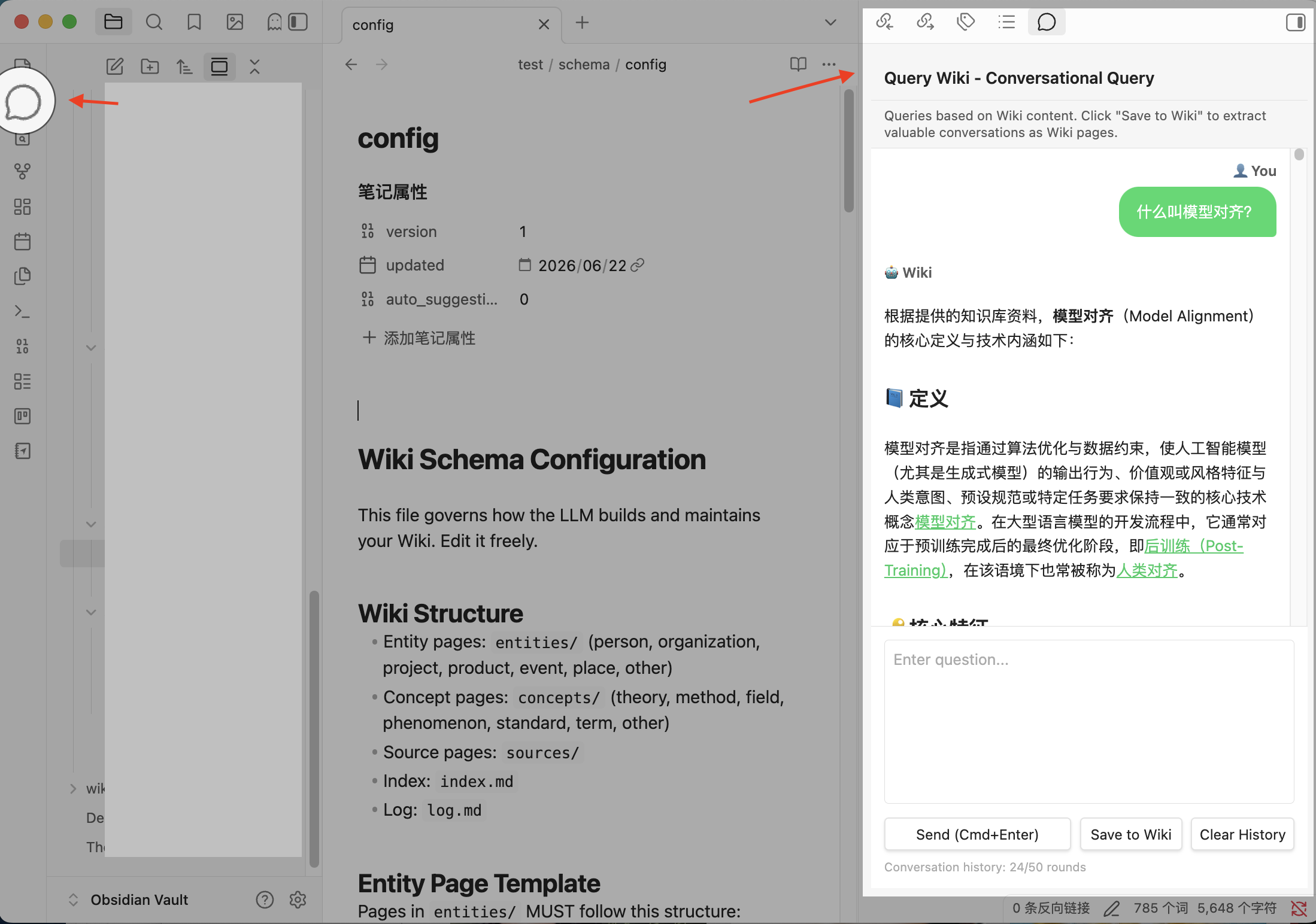
:has()review warning cleared..modal:has(.llm-wiki-schema-diff-modal)replaced with direct class selector. Newscripts/css-lint.mjsmulti-rule lint catches!important+:has()to prevent regression (wired into Gate 1). - 🪟 Query Wiki is now a Copilot-style right-docked side panel (PR #196 by @YounianC).
QueryModal extends ModalbecameQueryView extends ItemView— the conversation can stay open alongside your notes instead of interrupting with a popup. Themessage-circleribbon icon andQuery Wikicommand now activate/reveal a right sidebar leaf (reusing the existing leaf if already open). All functionality is preserved unchanged: three-tier retrieval, streaming + non-streaming fallback, collapsible thinking panel, save-to-wiki feedback loop, and history. Styling moved to nativevar(--…)theme tokens for automatic light/dark adaptation. - 🧹 Related-link prefix re-asserted deterministically (PR #200 by @DocTpoint, Issue #187). LLM-generated
Related Concepts/Related Entitiesentries occasionally default to[[sources/<slug>]]when the target falls outside the truncated existing-pages window — or hasn't been created yet in the same ingest run. New pure-functioncorrectRelatedLinkPrefixes()re-asserts each related name's known type after generation. Section-scoped by header label so legitimate[[sources/<slug>]]citations in Mentions in Source are never rewritten; also self-heals stale links carried through amergePage.
v1.22.2 — 2026-06-26 (PATCH)
This PATCH improves the auto-ingest UX, localizes the operation log, and removes dead code.
- 📋 Auto Ingest no longer blocks with a modal (Issue #204). Watch-mode auto-ingest now defaults to a transient Notice instead of opening the full Ingest Report Modal. Users who prefer the detailed report can switch to "Modal" in Settings → Auto Maintenance → Watch Mode. The Operation History Panel and
log.mdremain available for review at any time. - 🔧 Auto Smart Fix modal → transient Notice. When Auto Smart Fix completes, a concise Notice with a hint to the Operation History Panel replaces the previously-blocking
FixReportModal. Behavior controlled by the same Auto Ingest Notification setting. - 🌐 Operation log is now i18n (10 languages). When
log.mdis first created (or on next startup for existing wikis), it gets an auto-migrated header explaining the log and pointing to the Operation History Panel. Each language shows its own localized text. - 📅 Periodic Lint: "Hourly" removed, "Monthly" added. Existing "Hourly" choices automatically fall back to "Daily". Remaining options: Off, Daily, Weekly, Monthly.
- 🧹 Dead code cleanup. Removed redundant
console.debuginslug.tsand two deadsetDoneCallbackresets inmain.ts. - ⚙️ Auto Ingest Notification setting (conditional). A new dropdown (Notice / Modal) appears under Watch Mode when set to "Auto Ingest", hidden when Watch Mode is "Notify Only".
- ♻️ Log header auto-migration (startup Phase 4.5). Existing
log.mdfiles with the old single-line header are detected and non-destructively migrated on next plugin load — all existing## [date time]entries are preserved.
v1.22.3 — 2026-06-26 (PATCH)
A focused Hotfix that hardens the v1.22.2 log header mechanism and prevents frontmatter pollution on non-content files.
- 🔧 log header detection now language-agnostic and robust. Switched from text-based detection (which broke for German/Japanese/Korean/etc. and could be confused by natural log entry content) to a structural
<!-- llm-wiki-log-header-start -->HTML-comment marker embedded in the header. Existing v1.22.2 log files are auto-upgraded on next startup. - 🧹 log header strings consolidated into
src/texts/<lang>.ts. The four localised header strings previously duplicated incore/log-header.tsnow live alongside every other UI string, so translators and parity tests cover them automatically. - 🚫
generation_completeno longer stamped ontolog.md/index.md/schema/.createOrUpdateFilepreviously calledmarkPageCompletefor every write, which would prepend a brand-new frontmatter block withgeneration_complete: trueto files that didn't have frontmatter — visibly polluting log.md body. NewisInWikiContentFolder()guard restricts the stamp towiki/{entities,concepts,sources}/...only.
We recommend upgrading — log.md no longer accumulates stray frontmatter on every quick-fix run, and the detection works in every language without per-locale special cases.
v1.22.4 — 2026-06-27 (PATCH)
A focused PATCH that restores GPT-5.x compatibility, propagates real provider error messages to the Test Connection UI, and centralises lint performance knobs.
- 🛡️ GPT-5.x models no longer fail Test Connection with 400 (Issue #207). v1.20.0's
params.model.startsWith('gpt-5-')prefix-matching heuristic only matched the dash-suffixed OpenAI gpt-5 family (gpt-5-mini,gpt-5-nano, etc.) and silently broke for every new gpt-5.x release (gpt-5.1,gpt-5.4-mini,gpt-5.5). Replaced with a runtime probe-then-cache mechanism: first request usesmax_tokens, if the backend rejects with 400 we cache the alternate key (max_completion_tokensor vice versa) and retry. Subsequent requests reuse the cache — no more model-name prefix-matching, and the probe gracefully handles every new OpenAI naming scheme. - 📜 Real provider error messages now reach the Test Connection UI. Previously,
requestUrlerrors were re-wrapped asstatus 400: ${data.error.message}(or just "status 400" when the response body was lost) and the provider's actual error — e.g. "Invalid parameter: max_tokens should be max_completion_tokens" — was never visible. NewextractProviderErrorMessage()enriches the thrown error so users see actionable provider detail instead of a generic HTTP status. - ♻️ Lint performance knobs centralised in
src/constants.ts. Yield cadences (LINT_YIELD_EVERY_OUTER/_PHASE1/_COMPARISON), candidate batch sizing (LINT_CANDIDATE_TOKEN_ESTIMATE,LINT_MAX_INPUT_TOKENS,LINT_DEDUP_BATCH_SIZE), prep batch read (LINT_PREP_BATCH_READ), and source-analyzer batch sizing (SHORT_CONTENT_THRESHOLD,BATCH_CHARS_PER_ITEM) now live in one place. Previously these values were duplicated or had drifted acrosscontroller.ts,duplicate-detection.ts,preparation.ts, andbatch-limits.ts— including a literalMAX_TOKENS=16000copy ofMAX_TOKENS_BATCH. Tuning lint performance is now a single-file change.
We recommend upgrading — gpt-5.x models work again out of the box, and the Test Connection UI now tells you exactly what the provider rejected so you can fix your baseUrl / model name / API key without digging through the console.
We recommend upgradingWe recommend upgrading — the fix-dead-link stub fabrication class of bugs is now closed, and the Query Wiki side panel keeps your notes visible while chatting.
See CHANGELOG.md for full details.
✨ Features
📊 Knowledge Quality
- 🔍 Entity/Concept extraction — LLM extracts entities (people, organizations, products, events, etc.) and concepts (theories, methods, terms, etc.) from your notes and generates standalone Wiki pages. Flexible extraction granularity (minimal ~5, coarse ~10, standard ~50, fine ~100, custom 1–500) balances analysis depth with API cost.
- 🏷️ Mandatory page aliases — every generated page includes at least 1 alias (translation, abbreviation, variant) for cross-language duplicate detection.
- 🔄 Duplicate detection & merge — semantic tiered detection catches true duplicates (cross-language translations, abbreviations, spelling variants); smart LLM fusion merges content while preserving aliases.
- 🧩 Intelligent knowledge fusion — multi-source updates merge new information without duplication; contradictions are preserved with source attribution;
reviewed: truepages are protected from overwrite. - 📏 Content truncation guard — 8000 max_tokens with automatic stop_reason detection and 2× token retry, covering all providers.
- 📝 Original quote preservation — Mentions-in-Source sections preserve quotes in their original language (optional translation) for full traceability.
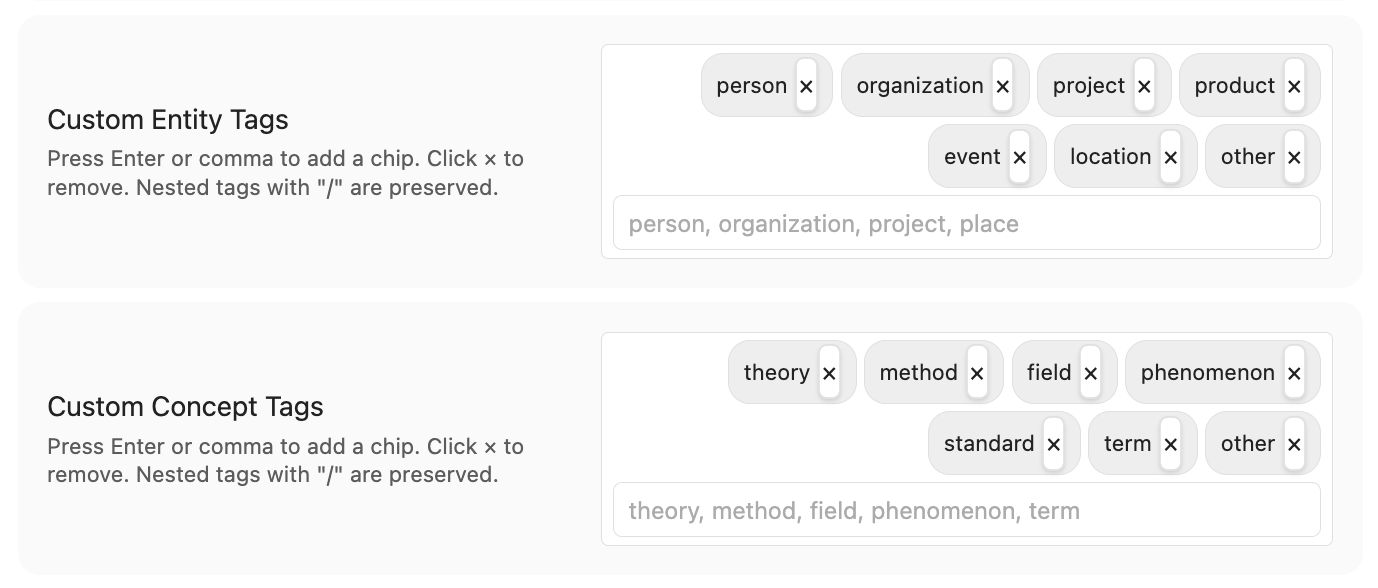
- 🎨 Customizable tag vocabulary (v1.18.0). Settings → Wiki → Tag Vocabulary Mode → Custom lets you define your own entity-type and concept-type tag lists (e.g.
Medical_Arzneimittel,法规). The plugin respects your vocabulary in extraction prompts and frontmatter validation; the existing Lint audit (Issue #85 v7) reports any page whose tags fall outside the active vocabulary.
🛠️ Maintenance
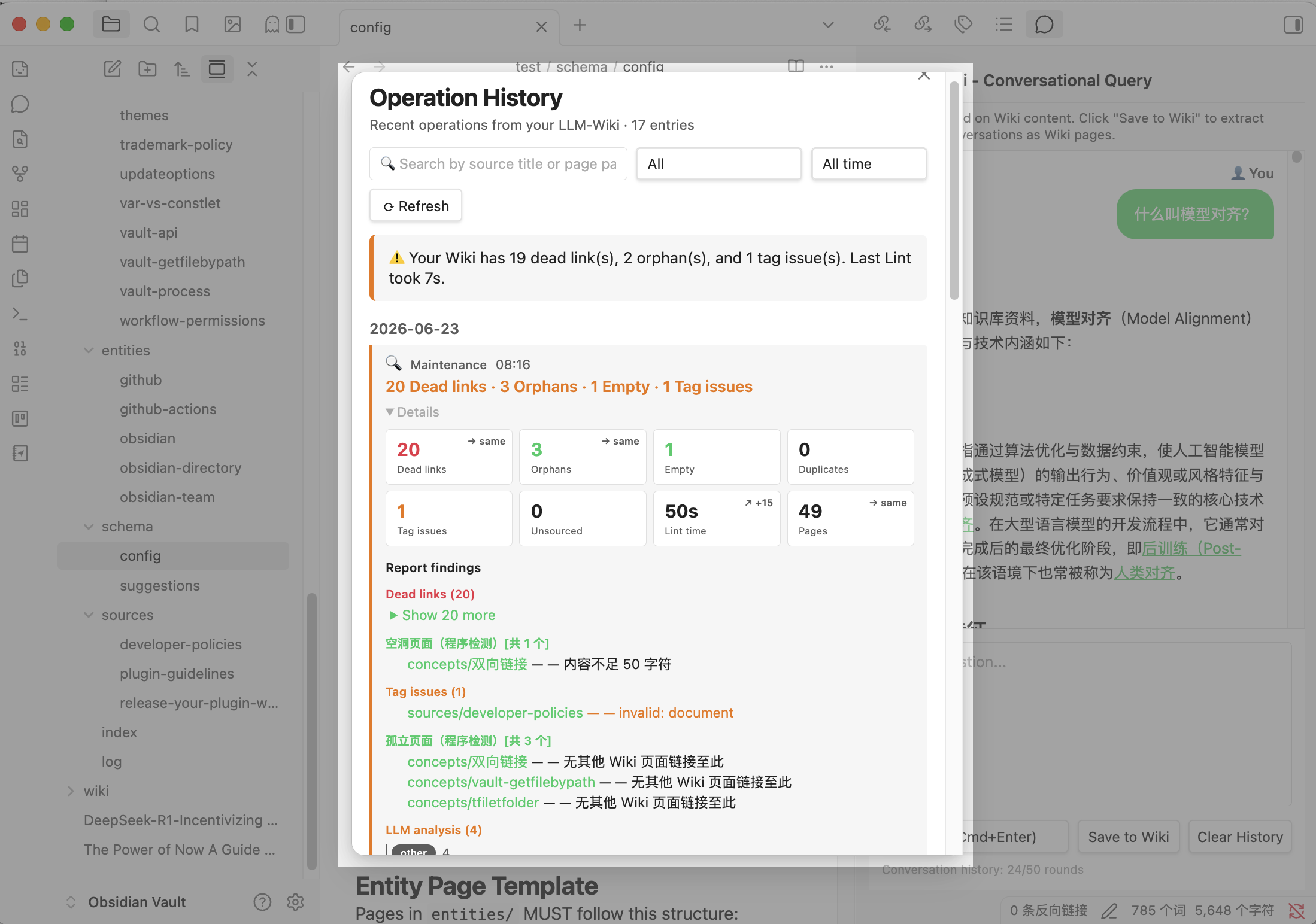
- 🔍 Lint health scan — single comprehensive report detects: duplicate pages, dead links, empty pages, orphans, missing aliases, contradictions.
- 🎯 Tiered semantic duplicate detection — Tier 1 (direct name match: cross-language, abbreviation, high-similarity titles) always verified; Tier 2 (indirect signals: shared links, medium similarity) fills token budget.
- ⚡ One-click Smart Fix All — batch fixes in causal order: fill aliases → merge duplicates → fix dead links → link orphans → expand empty pages, with per-phase popup report.
- 🏷️ Alias completion — one-click parallel batch generation of missing aliases, improving future duplicate detection.
- 🔄 Auto-maintenance — multi-folder watching, scheduled Lint, startup health check (all optional).
- ⚠️ Contradiction state machine —
detected → review-passed → resolved(AI-fix) ordetected → unresolved(manual). - 🛡️ Pre-ingest requirements gate (v1.21.0) — every source file is validated before any LLM call: empty/whitespace/frontmatter-only notes are rejected, and content-hash dedup catches identical files across paths. Prevents small/local models from hallucinating entity names on blank inputs.
- 📊 Operation History Panel (v1.21.0) — searchable, filterable UI for past ingestions, lint reports, and maintenance runs, with insight-driven KPI cards and clickable page links.
- 🧹 Incomplete-page cleaner (v1.21.0) — pages left in a partial state after interrupted ingests are automatically archived on startup. Recoverable from Obsidian's
.trash.
💬 Query & Feedback
- 🤖 Conversational query — ChatGPT-style dialog with streaming Markdown output, automatic
[[wiki-links]], and multi-turn history. - 🪟 Right-docked side panel (v1.22.1, PR #196). Query Wiki opens in a Copilot-style right sidebar leaf (reusing an existing leaf if already open) instead of a centered popup. The
message-circleribbon icon andQuery Wikicommand activate/reveal the panel; your notes stay visible alongside the conversation. All functionality is preserved unchanged.
- 📤 Query → Wiki feedback — save valuable conversations back into the Wiki, with entity/concept extraction and pre-save semantic dedup.
- 🔒 Duplicate-save guard — hash tracking prevents unchanged conversations from re-evaluating.
🌐 LLM & Language
- 🔌 Multi-provider support — Anthropic, Anthropic-compatible (Coding Plan), Gemini, OpenAI, DeepSeek, Kimi, GLM, MiniMax, LM Studio, OpenRouter, Ollama, custom endpoint.
- 🔄 5xx auto-retry — exponential backoff on HTTP 5xx / 429 / 529 across all clients (max 2 retries).
- 📋 Dynamic model list — fetched live from the provider API.
- 🌐 Wiki output language — 9 languages independent of UI (English / 中文 / 日本語 / 한국어 / Deutsch / Français / Español / Português / Italiano), with custom input option.
- 🌍 Full UI internationalization — plugin UI in 9 languages with 269+ UI fields fully translated to natural local expression.
- ⚡ Rate-limit guardian — automatically detects when parallel generation triggers rate limits and prompts to lower concurrency, increase batch delay, or switch provider.
- 🦙 Web Clipper compatibility — one-click addition of the official Obsidian Web Clipper's
Clippings/folder to the watch list; clipped web pages auto-ingest into the Wiki.
🏗️ Architecture & Performance
- ⚡ Parallel page generation — configurable 1–5 concurrent pages, default 3 (parallel), 2–3× speedup on large sources; per-page error isolation.
- 📚 Iterative batched extraction — adaptive batch sizing eliminates the long-document max_tokens bottleneck.
- 🏛️ Three-layer architecture —
sources/(read-only) →wiki/(LLM-generated) →schema/(co-evolved configuration). - 🧩 Modular codebase — 20+ focused modules in
src/.
🔒 Privacy & Security
- No backend, no tracking. The plugin runs entirely inside Obsidian — no external servers, no analytics, no data collection of any kind. Unless you actively configure an LLM provider, your notes never leave your vault.
- Data stays local by default. The plugin does not store, cache, or transmit your content anywhere outside of the LLM API you have chosen. Only the text you send for ingestion or query leaves your device — and only to the provider you configured.
- Full local mode via Ollama, LM Studio, or local providers. For complete data sovereignty, use a locally running LLM. Your notes are processed entirely on your machine — never touching the internet.
- Minimal permissions. Vault file access is used for Wiki management (reading notes, generating pages, detecting dead links). Network access is used only for communicating with your chosen LLM provider's API. Clipboard access is limited to the "Copy" button in the Query modal — used only when you click it.
⌨️ Commands
| Command | Description |
|---|---|
| 📥 Ingest single source | Select a note → generate Wiki pages with entities, concepts, and summary |
| 📂 Ingest from folder | Select a folder → batch generate Wiki from existing notes |
| 🎯 Ingest current file | Quickly ingest the file you're currently editing (one-click) |
| 🔍 Query wiki | Conversational Q&A over your Wiki, streaming responses with [[wiki-links]] |
| 🛠️ Lint wiki | Full health scan: duplicates, dead links, empty pages, orphans, missing aliases, contradictions |
| 📋 Regenerate index | Manually rebuild wiki/index.md |
| 📊 View Ingestion History (v1.21.0) | Browse past ingestions, lint reports, and maintenance runs in a searchable, filterable UI |
| ⏹ Cancel current ingestion | Stop an in-progress operation cleanly at the next batch boundary |
Note: Schema update is no longer a top-level command. Schema suggestions are surfaced from inside the 🛠️ Lint wiki Modal — a single entry point so the user always sees the current schema context before applying changes. The Lint Modal's "Update Schema" button opens the IDE-style diff view (Issue #97).
📖 Example
Input: sources/machine-learning.md
### Machine Learning
Machine learning uses algorithms to learn from data.

### Types
- Supervised learning
- Unsupervised learning
- Reinforcement learning
Output — Concept page: wiki/concepts/supervised-learning.md
---
type: concept
created: 2025-12-01
updated: 2026-05-15
sources: ["[[sources/machine-learning]]"]
tags: [method]
aliases: ["监督学习", "Supervised Learning"]
---

### Supervised Learning

### Basic Information
- Type: method
- Source: [[sources/machine-learning]]

### Description
Supervised learning is a machine learning paradigm where models learn
from labeled training data to make predictions on unseen data...

### Related Concepts
- [[concepts/Machine-Learning|Machine Learning]]
- [[concepts/Unsupervised-Learning|Unsupervised Learning]]

### Related Entities
- [[entities/Arthur-Samuel|Arthur Samuel]]

### Mentions in Source
- "Supervised learning uses labeled data to train predictive models..."
🤖 Model Selection Guide
This plugin follows Karpathy's philosophy: feed the LLM full Wiki context, not chunked RAG retrieval. Long-context models are strongly recommended — the larger your Wiki grows, the more context the LLM needs.
💡 Why not RAG? Karpathy's original critique argues that RAG fragments knowledge and breaks the LLM's ability to reason across the full knowledge graph.
💰 Value-First Strategy: You don't need flagship models. The following cost-effective alternatives deliver excellent results at lower prices:
| Tier | Model | Context | Why |
|---|---|---|---|
| 🌟 Value Pick | DeepSeek V4-Flash | 1M tokens | Lowest cost ($0.14/M), 284B MoE, ideal for batch ingestion |
| 🌟 Value Pick | Gemini-3.5-Flash | 1M tokens | 4× faster output than GPT-5.5, great for agent tasks |
| 🌟 Value Pick | Qwen3.6-Plus | 1M tokens | Strong coding & agentic capabilities, competitive pricing |
| 🌟 Value Pick | Grok-4 | 2M tokens | xAI 2025-07 flagship, 2M context, strong reasoning & code tasks |
| Balanced | Claude Sonnet 4.6 | 1M tokens | Great quality/cost balance, $3/$15 per million tokens |
| Lightweight | Claude Haiku 4.5 | 200K tokens | Fast and affordable for smaller wikis |
| Budget | Xiaomi MiMo-V2.5 | 1M tokens | Xiaomi 310B/15B MoE, MIT open-source 2026-04, agent & multimodal |
| Flagship | Claude Opus 4.7 | 1M tokens | Ultimate quality, higher cost — use selectively |
| Flagship | GPT-5.5 | 1M tokens | Top reasoning, higher cost — use selectively |
For local models (Ollama): context windows are typically smaller (8K–128K). Consider using a cloud provider for ingestion + local model for query.
🔌 Anthropic Compatible (Coding Plan): If your provider offers an Anthropic-compatible API endpoint, select "Anthropic Compatible" and enter your provider's Base URL and API Key.
💡 Subscription plans: Coding Plan, OpenAI Pro, or Anthropic Pro plans are excellent options for cost control with frequent use. This plugin supports these services.
🏗️ Architecture
Karpathy's three-layer separation design:
sources/     # 📄 Your source documents (read-only)
  ↓ ingest
wiki/        # 🧠 LLM-generated Wiki pages
  ↓ query / maintain
schema/      # 📋 Wiki structure configuration (naming, templates, categories)
Codebase (src/):
main.ts                  # 🔌 Plugin entry point
wiki/                    # Wiki engine modules
  wiki-engine.ts         # 🎯 Orchestrator
  query-engine.ts        # 💬 Conversational query
  source-analyzer.ts     # 📊 Iterative batch extraction
  page-factory.ts        # 🏗️ Entity/concept CRUD + merge
  conversation-ingest.ts # 📥 Chat → wiki knowledge
  contradictions.ts      # ⚠️ Contradiction detection
  system-prompts.ts      # 🗣️ Language directive + section labels
  lint/                  # Lint sub-modules
    controller.ts        # 🔍 Lint orchestration
    fix-runners.ts       # ⚡ Batch fix execution helpers
    scanners.ts          # 🔍 Scanners (dead links, orphans, aliases, quote grounding)
    duplicate-detection.ts # 🔄 Programmatic candidate generation
    report-builder.ts    # 📋 Pure-function report markdown builder
    phases/              # Phased lint execution
  prompts/               # LLM prompt templates by domain
schema/                  # Schema co-evolution
  manager.ts             # 📋 Schema CRUD + suggestions
  auto-maintain.ts       # 🔄 File watcher + periodic lint + startup quick fixes
  analyze.ts             # 📊 Schema-analyze with cancel wiring
ui/                      # User interface
  settings.ts            # ⚙️ Settings panel
  modals.ts              # 📦 Lint / Ingest / Query / History modals
core/                    # 🧩 Pure function modules (zero IO, fully testable)
  i18n, slug, json, frontmatter, tag-vocab, sources-normalizer, ...
+ shared: llm-client.ts, llm-client-wrapper.ts, texts.ts, prompts.ts, types.ts
Generated pages:
wiki/sources/filename.md— 📄 Source summarywiki/entities/entity-name.md— 👤 Entity pages (people, orgs, projects, etc.)wiki/concepts/concept-name.md— 💡 Concept pages (theories, methods, terms, etc.)wiki/index.md— 📑 Auto-generated indexwiki/log.md— 📝 Operation log
❓ FAQ
Keep your plugin updated. This project ships frequently — new features and fixes land every few days. Run Settings → Community Plugins → Check for updates regularly.
For more, see the FAQ Discussion on GitHub.
💡 General
What does the plugin actually do?
You drop notes in, it extracts people, concepts, and theories, then generates an interlinked wiki with [[bidirectional links]]. Ask questions and get answers grounded in your notes — not internet hallucinations.
Minimum requirements? Obsidian v1.11.0+, desktop (Windows/macOS/Linux), an LLM provider API key. Ollama works locally with no API key. See Configure an LLM Provider above.
Which model should I use? See Model Selection Guide above. Long-context models work best — the larger your wiki, the more context the LLM needs.
🏷️ Aliases & Duplicates
Why does Lint show "missing aliases" on almost all my pages? Pages generated before v1.7.11 didn't include aliases. This is harmless — aliases are an enhancement, not a bug. Click Complete Aliases in the Lint report to batch-generate translations, acronyms, and alternate names. Once aliases exist, duplicate detection and alias-aware search become much more effective.
Why do I see duplicate pages like "CoT" and "思维链"? Pre-v1.7.10 versions lacked alias-aware duplicate detection. Run Lint Wiki → Merge Duplicates to fuse them. The merged page preserves aliases from both, preventing future duplicates.
How does duplicate detection work? (v1.7.10+) Two-tier semantic detection: Tier 1 (always LLM-verified) catches cross-language matches, abbreviations, high-similarity titles. Tier 2 fills remaining token budget with moderate-similarity candidates. Aliases are critical for Tier 1 — run Complete Aliases if your pages are pre-v1.7.11.
What are "polluted pages"? (v1.9.0)
Pages with folder prefixes accidentally baked into filenames — e.g. concepts/concepts布局优化.md. Run Lint Wiki → 🧹 Fix Polluted Pages to rename and update all incoming links.
⚡ Performance & Cost
How do I speed up ingestion? In Settings → LLM Configuration: increase Page Generation Concurrency to 3–5 (parallel page creation), lower Batch Delay to 100–300ms (watch for rate limits). Choose "Minimal", "Coarse", or "Standard" Extraction Granularity to reduce page count and save API costs.
Why am I getting HTTP 429 errors? The plugin auto-detects rate-limiting and suggests: lower concurrency to 1–2, increase Batch Delay to 500–800ms, or switch to a higher-limit provider.
How do I control API costs?
- Auto-Maintenance is OFF by default (enable only if you need background processing)
- Smart Batch Skip automatically skips already-ingested files
- "Standard" or "Coarse" granularity = fewer LLM calls
- Batch Delay > 500ms spaces calls without increasing token usage
- Lint report shows counts before you run fixes — decide what's worth it
🧹 Maintenance
What does Smart Fix All do? Runs fixes in causality order (v1.9.0+):
- 🧹 Fix polluted pages → 2. 🏷️ Complete aliases → 3. 🔄 Merge duplicates → 4. 🔗 Fix dead links → 5. 🔗 Link orphans → 6. 📝 Expand empty pages
Lint freezes on a large Wiki? Upgrade to v1.7.17+ — Lint now yields to Obsidian's UI thread every 50 pages, preventing multi-second freezes even on 1200+ page wikis.
🔍 Troubleshooting
Why can't I use ingest/lint/query after installing? The plugin requires a successful connection test before core features unlock. Go to Settings → Karpathy LLM Wiki → pick a provider → enter your API key → click Fetch Models → select a model → click Test Connection. Once you see the green "LLM Ready" indicator, all features are available. This prevents silent failures from misconfigured providers.
How do I cancel a running ingestion or lint?
Click the status bar text during an operation (it shows "Ingesting... click to cancel"), or use Ctrl+P → "Cancel current ingestion". The operation stops cleanly at the next batch boundary, preserving all completed work.
How do I quickly ingest the file I'm currently editing?
Click the sticker icon in the left ribbon bar, or use Ctrl+P → "Ingest current file". This skips the file picker and directly ingests the active editor tab.
I see [[[[entities/Foo|Foo]]]] double brackets in my log.md — how do I fix this?
Run Lint Wiki — the scanner now automatically detects and fixes all double-nested wiki-links across your entire wiki directory (including log.md) with zero LLM cost. No manual cleanup needed.
Why am I getting "Overloaded" errors? The plugin now recognizes Anthropic's 529 overload error as retryable. Overload errors are automatically retried with exponential backoff across all providers.
Why was a duplicate stub created when the page already exists in entities/ or concepts/? The plugin now uses slug-based matching — different formatting of the same name resolves to the existing page instead of creating a duplicate stub.
Query can't find pages I know exist? Three common causes: (1) Index is stale → Regenerate index. (2) Missing aliases → Complete Aliases. (3) Try different phrasing — LLM does semantic matching, not keyword search.
Can I manually edit Wiki pages?
Yes. Set reviewed: true in frontmatter to protect from overwrite. Manual aliases, tags, and sources are preserved during merges.
Safe upgrade?
The plugin never modifies your source files. Backup wiki/ → update plugin → Regenerate index → Lint Wiki → fix selectively.
My local model (Ollama, LM Studio) is fabricating weird entity names from blank or frontmatter-only notes. (v1.21.0) Fixed in v1.21.0 by the pre-ingest requirements gate: empty/whitespace/frontmatter-only notes are now rejected before any LLM call, and content-hash dedup catches identical files across paths. Upgrade to v1.21.0+ to stop the empty-file hallucination class of bugs (small models filling in made-up entity names when given a blank prompt).
My sources/ files got renamed after upgrading to v1.20.3 — is something wrong? (v1.20.3+)
No — this is the new collision-safe source-slug fingerprint at work. Every sources/<slug>.md is now sources/<basename>_<6hex>.md (the hex is an FNV-1a hash of the file's full path). Files with the same basename across different folders (e.g. 11× About this course.md in Academy courses) no longer collide. Re-ingest renames existing sources/ pages in place and all [[sources/<slug>]] backlinks update automatically. If you have external scripts or bookmarks pointing to sources/<old-slug>.md, update them to the new fingerprinted names.
Will re-ingesting an unrelated source overwrite a page I locked with reviewed: true? (v1.20.3+)
No — Stage 4 (updateRelatedPage) now respects reviewed: true and routes to the append-only path, same as the ingest path. Your curated body survives verbatim; only genuinely new content is appended.
How do I get help?
- GitHub Issues — bug reports
- GitHub Discussions — questions & feedback
How do I collect debug logs for troubleshooting?
- Open Developer Tools (
Ctrl+Shift+I/Cmd+Option+I) - Go to the Console tab
- Run your operation (ingest, query, or lint)
- Look for messages with module name prefixes like
[Step],[LLM], module names - For local testing, use
pnpm build:devinstead ofpnpm buildto preserve full debug output - Copy the relevant log lines and include them in your GitHub issue — this makes bug diagnosis much faster
🔒 Transparency & Compliance
This plugin is listed on the Obsidian Community Plugin Market and undergoes automated review for security and permissions.
The plugin has no backend, no server infrastructure, and no data collection of any kind. It is purely local software running inside Obsidian. The plugin cannot and does not collect, store, or transmit your data to any server — because no such server exists.
Network access is used only to communicate with the LLM provider you configure — no other network calls are made. This is entirely under your control: you choose the provider, you enter the API key, you decide where your data goes.
File system access (vault enumeration) is required to build and maintain the wiki: reading your source notes, generating pages, scanning for dead links, and detecting duplicate pages. The plugin never modifies your source files — only files under the wiki folder.
Clipboard access is used exclusively by the "Copy" button in the Query modal, and only when you click it.
If you prefer complete data locality, use a local LLM provider such as Ollama or LM Studio. With a local provider, your data never leaves your machine.
📜 License
MIT License — see LICENSE.
🙏 Acknowledgments
- 💡 Concept: Andrej Karpathy's LLM Wiki — the original vision that inspired this plugin
- 🛠️ Platform: Obsidian Plugin API
- 🔌 LLM transport: Obsidian
requestUrl(Anthropic) + handcrafted OpenAI-compatible HTTP client (3rd-party OpenAI-compatible providers)