
README file from
Githubmd2flomo
一个将 Obsidian 笔记一键发送到 flomo 的插件。
支持标签解析、内容清理、批量发布,帮助你将 Obsidian 的内容快速同步到 flomo。
📸 使用效果
单篇发布
- 点击侧边栏发布按钮(小飞机图标)
- 使用命令栏发布
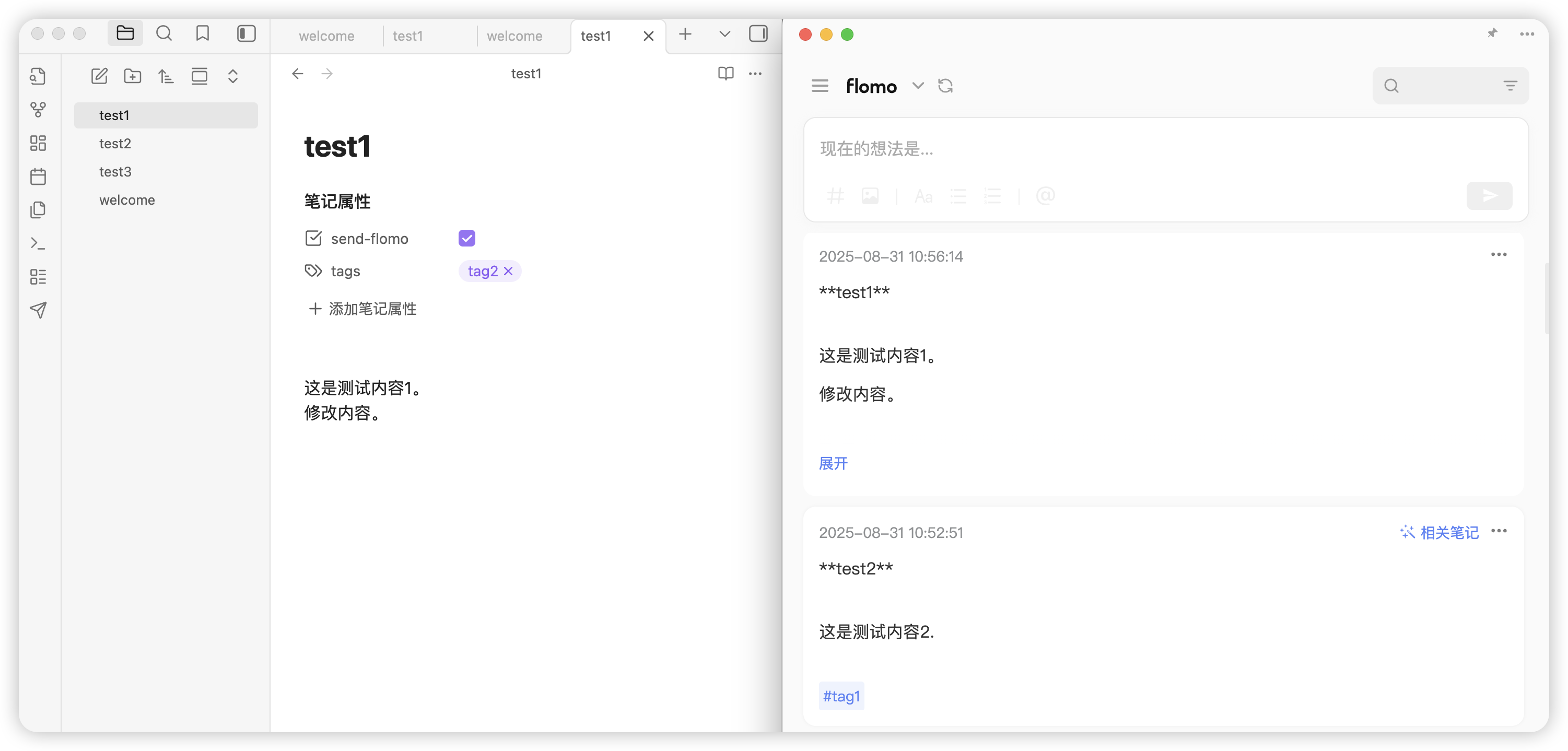
如果 send-flomo 状态为 false,点击发布后会确认内容,确认后此状态会更新为 true。
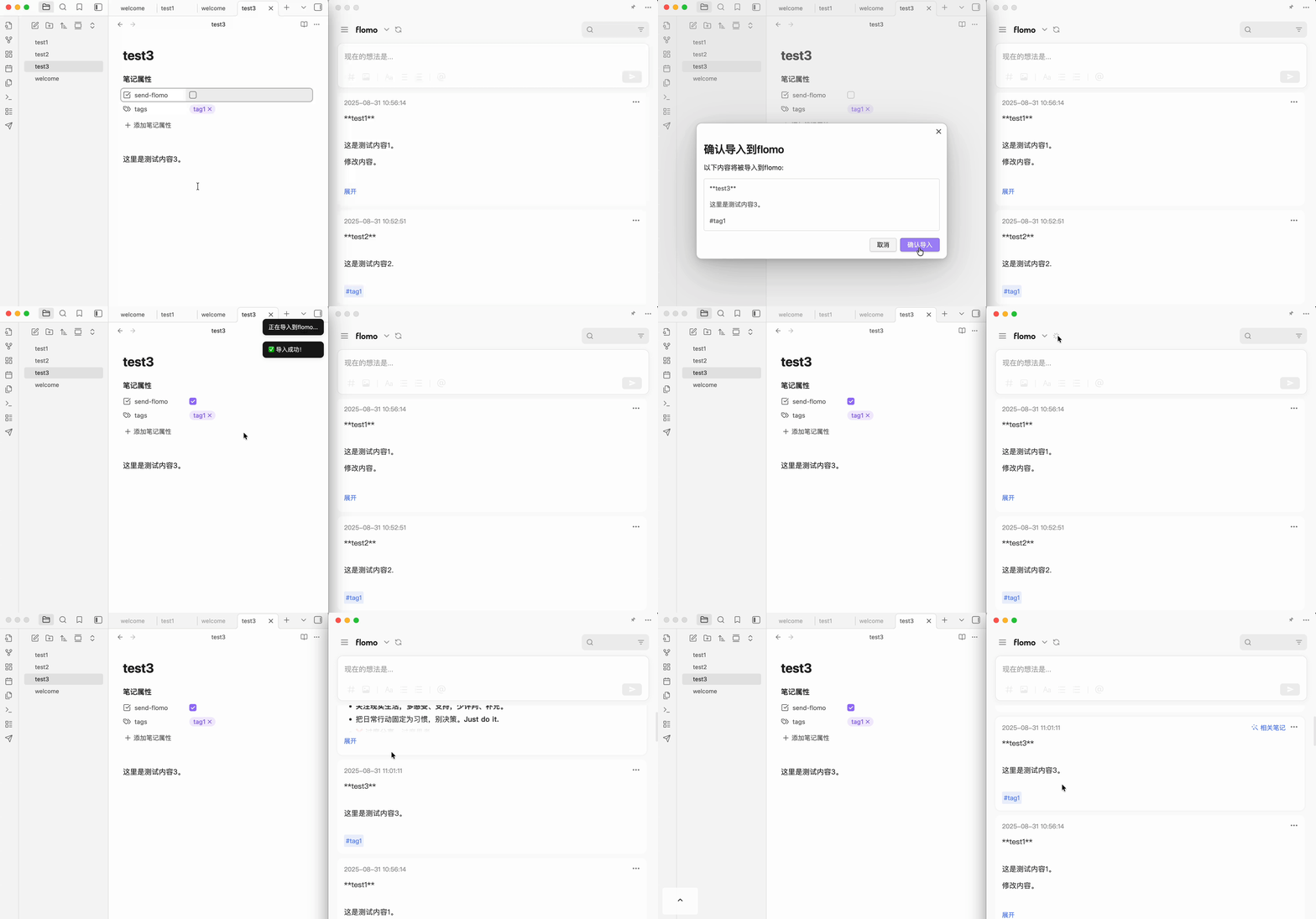
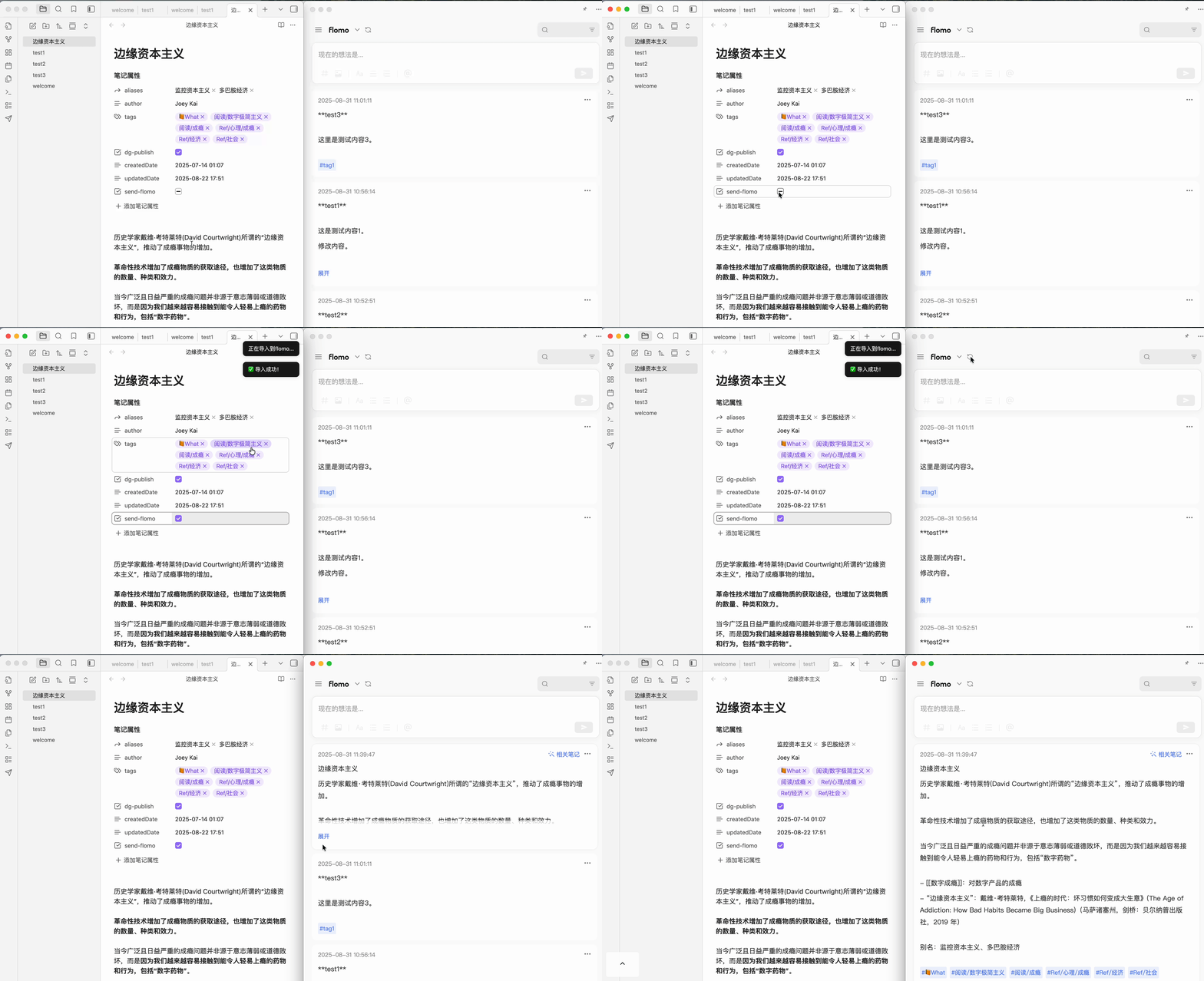
去除格式效果
发布后台状态修复
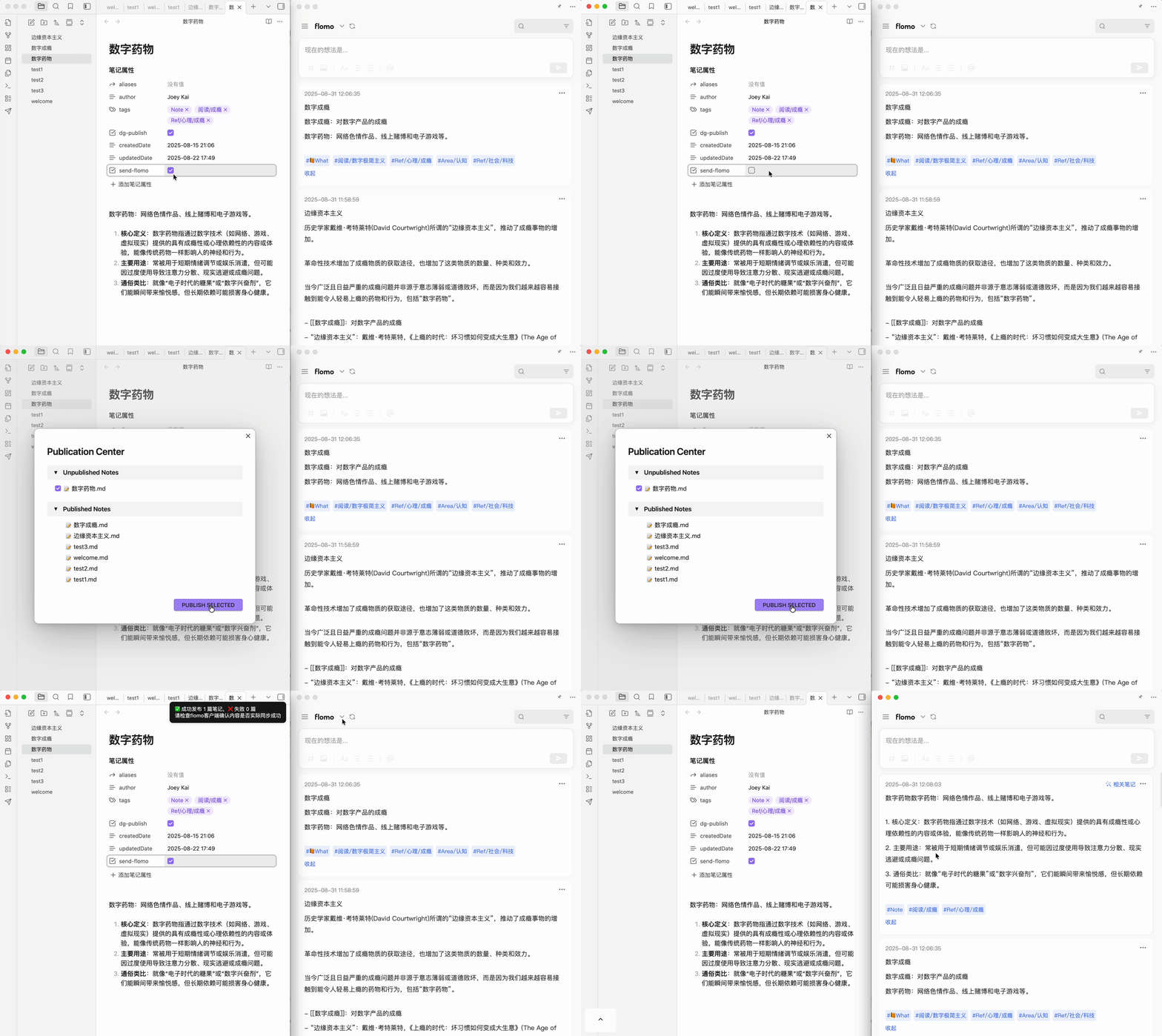
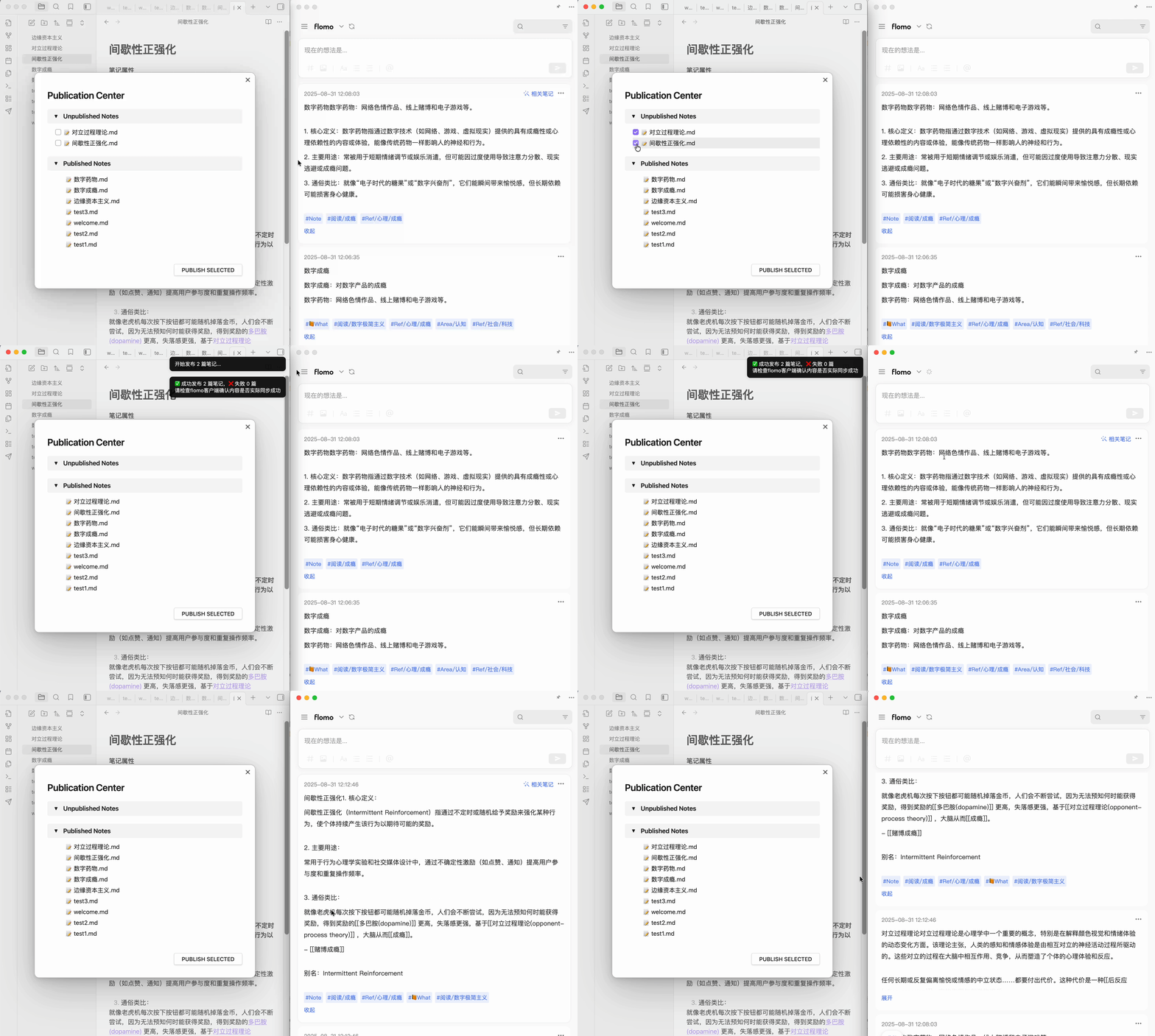
批量发布
✨ 功能特性
- 🔑 在插件设置中配置 flomo API Token
- ✅ 测试 API 是否可用(测试发送功能)
- 📝 单篇笔记上传至 flomo
- 📌 侧边栏小图标:点击即可发送当前笔记
- 🏷️ 将 frontmatter 中
tags转换为 flomo 标签 - 📂 内容样式:
- 标题加粗
- 文件正文内容
- 文件别名显示在底部
- 标签展示在内容下方
- 🎈 批量发布后台
- 📊 发布后台状态管理:
- 已发送 →
published - 未发送 →
unpublished
- 已发送 →
🚀 安装
手动安装
- 进入release界面,下载最新的
md2flomo-0.5.3.zip插件包,此安装包只包含必要文件。 - 解压
md2flomo-0.5.3.zip插件包之后,将文件夹放在你的仓库/.obsidian/plugins内。 - 进入 Obsidian 设置,选择【第三方插件】,关闭【安全模式】
- 进入第三方插件,你可以看到 md2flomo 插件。
- 启用插件
在插件市场安装
目前还在审核中。
- 进入 Obsidian 设置,选择【第三方插件】,关闭【安全模式】,浏览社区插件
- 在社区插件中搜索
md2flomo,点击安装并启用。
⚙️ 使用方法
- 在 设置 → 插件设置 中输入 flomo API Token
- 点击「发送测试内容」确认连接成功
- 打开任意笔记,点击右侧栏图标 → 即可发送到 flomo
- 在插件后台可查看:
published:已发送笔记unpublished:未发送笔记
详细版本更新见 👉 CHANGELOG
🤝 贡献
欢迎提交 PR 或 Issue 来帮助改进此插件。
本项目遵循 MIT License。
📬 联系方式
- 作者:@joeytoday
- 邮箱: [email protected]
English
An Obsidian plugin that sends your notes to flomo with one click.
Supports tag extraction, content cleanup, and batch publishing — helping you sync Obsidian content to flomo effortlessly.
📸 Screenshots
Single Note Publish
- Click the sidebar publish icon (paper plane)
- Use the command palette to publish
When send-flomo is false, a confirmation dialog appears before publishing. After confirmation, the status updates to true.
Clean Formatting
Publish Status Fix
Batch Publish
✨ Features
- 🔑 Configure flomo API Token in plugin settings
- ✅ Test API connectivity (send test content)
- 📝 Publish single notes to flomo
- 📌 Sidebar icon: one-click publish for the current note
- 🏷️ Convert frontmatter
tagsto flomo tags - 📂 Content formatting:
- Bold title
- Note body content
- Aliases displayed at the bottom
- Tags appended below content
- 🎈 Batch publish dashboard
- 📊 Publish status management:
- Published →
published - Unpublished →
unpublished
- Published →
🚀 Installation
Manual Installation
- Go to the Releases page and download the latest
md2flomo-0.5.3.zipplugin package. - Unzip and place the folder in
your-vault/.obsidian/plugins/. - Open Obsidian Settings → Community Plugins → disable Safe Mode.
- Find md2flomo in Community Plugins and enable it.
Install from Community Plugin Market
Currently under review.
- Open Obsidian Settings → Community Plugins → disable Safe Mode → Browse community plugins
- Search for
md2flomo, click Install and Enable.
⚙️ Usage
- Enter your flomo API Token in Settings → Plugin Settings
- Click "Send test content" to verify the connection
- Open any note, click the sidebar icon → publish to flomo
- View publish status in the dashboard:
published: sent notesunpublished: unsent notes
See CHANGELOG for version updates.
🤝 Contributing
PRs and Issues are welcome!
This project is licensed under the MIT License.
📬 Contact
- Author: @joeytoday
- Email: [email protected]