
README file from
GithubDiagrammo Diagrams for Obsidian
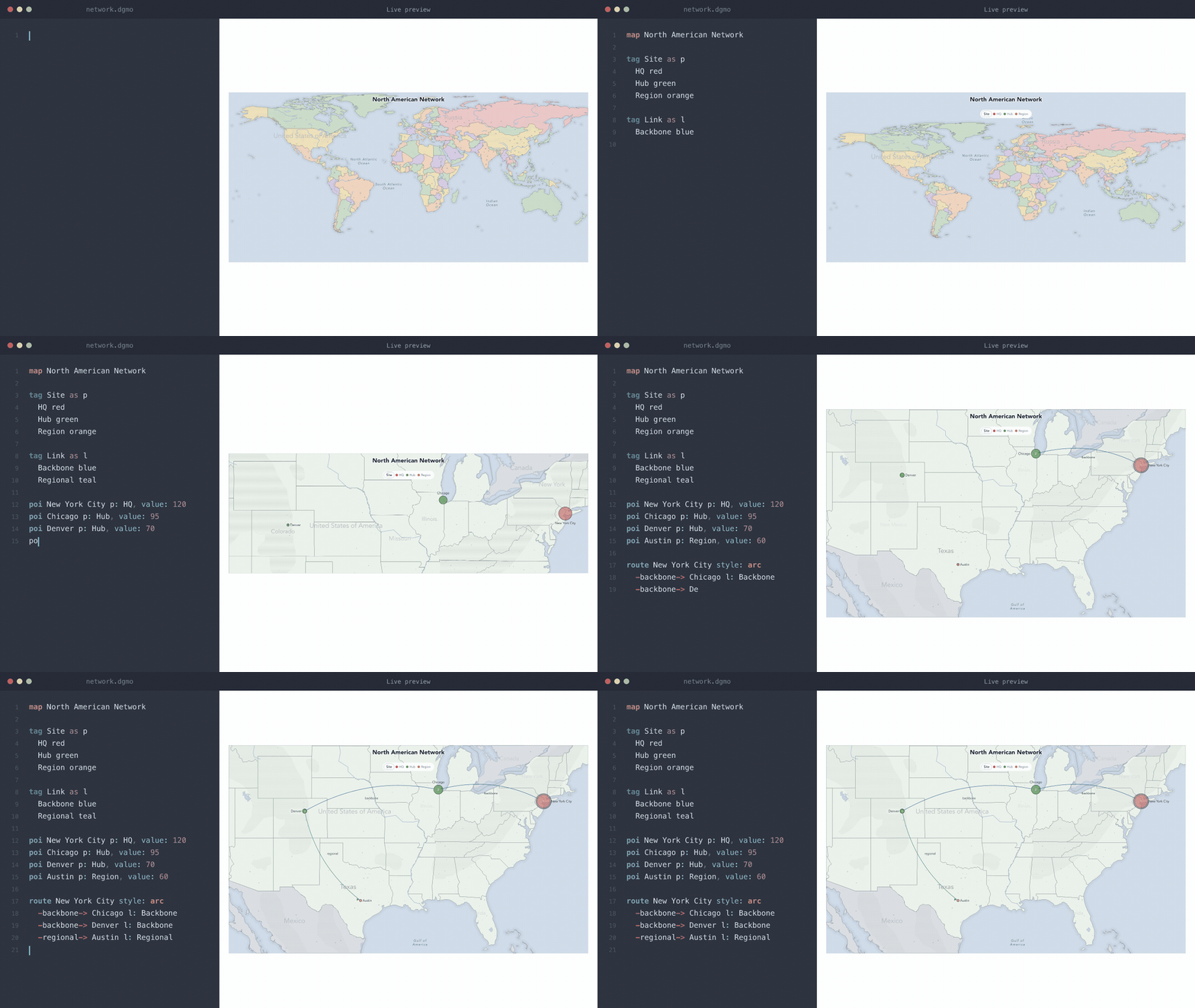
Write a dgmo code block and it renders as a diagram inline in your notes — reading mode and live preview, desktop and mobile.
Diagrammo gives you 45 chart types from one small plain-text language: data viz, software architecture, project planning, hierarchies, geographic maps, and more. Because the diagrams are plain text, they're searchable in Obsidian, diffable in git or Sync history, and never go stale the way an exported image does.
📖 Setup guide: diagrammo.app/embed#obsidian
Supported chart types
Every chart type from @diagrammo/dgmo renders in Obsidian:
| Category | Types |
|---|---|
| Data & charts | arc, area, bar, bar-stacked, chord, doughnut, funnel, function, heatmap, line, multi-line, pie, polar-area, radar, sankey, scatter, slope, treemap, wordcloud |
| Business & strategy | cycle, journey-map, map, org, pyramid, quadrant, ring, tech-radar, venn |
| Project & process | gantt, kanban, pert, raci, rasci, daci, timeline |
| Software & architecture | boxes-and-lines, c4, class, er, flowchart, infra, mindmap, sequence, sitemap, state, wireframe |
Run Diagrammo Diagrams: Create example note with all chart types from the command palette to see every chart type rendered with working sample data. Full language reference at diagrammo.app/reference.
Usage
Write a fenced code block with the dgmo language tag:
```dgmo
bar Quarterly Revenue
x-label Quarter
y-label Revenue ($M)

Q1 4.2
Q2 4.8
Q3 5.1
Q4 5.9
```
The diagram renders inline in reading mode and live preview. Hover any rendered diagram to reveal a small open-in-new-tab icon in the top-right corner — click it to pop the source open in online.diagrammo.app for live editing, with the same palette and theme.
Author in the Diagrammo app
This plugin renders the exact same DGMO that powers the Diagrammo desktop app (native macOS, offline, auto-updating) and the online editor (any browser, nothing to install). When you want a heavier authoring session, open a diagram there for live preview, autocomplete, optional vim keybindings, all 7 palettes (light/dark/transparent), and one-click PNG/SVG export plus shareable links — then paste the text straight back into your note. Same language, same palettes, everywhere. There's even an MCP server so AI assistants can draft diagrams for you.
Example note
Open the command palette (Cmd/Ctrl + P) and run:
Diagrammo Diagrams: Create example note with all chart types
This creates a Diagrammo Examples.md file in your vault with working examples of every supported chart type.
Settings
| Setting | Description | Default |
|---|---|---|
| Palette | Color palette for all diagrams — all 7 dgmo palettes available (slate, atlas, blueprint, tidewater, nord, catppuccin, tokyo-night) | slate |
| Theme | Light, dark, or auto (follows Obsidian's theme) | auto |
Install
- Open Settings > Community Plugins > Browse in Obsidian
- Search for "Diagrammo Diagrams"
- Click Install, then Enable
Or install directly from community.obsidian.md/plugins/dgmo.
Development
Prerequisites
- Node.js 18+
Setup
npm install
Commands
npm run build     # One-shot build → main.js (esbuild, CJS bundle)
npm run dev       # Watch mode (rebuilds on save, inline sourcemaps)
The build bundles @diagrammo/dgmo and its rendering dependencies into a single main.js in the repo root, which Obsidian loads directly. obsidian, electron, and CodeMirror packages are externalized.
Project structure
src/
├── main.ts       # Plugin lifecycle, markdown post-processor, example note command
├── render.ts     # Rendering dispatcher (delegates each chart type to @diagrammo/dgmo)
├── settings.ts   # Settings tab UI (palette dropdown, theme override)
└── examples.ts   # Example note content with all chart types
Dependencies
@diagrammo/dgmo^0.30.0— diagram parsing and rendering (bundled by esbuild; brings its own transitive rendering deps)obsidian^1.12.3— Obsidian plugin API (dev only, externalized)
Testing locally
- Run
npm run dev(watch mode) - Symlink or copy the repo into your vault's
.obsidian/plugins/dgmo/folder - Enable the plugin in Obsidian settings
- Edit a note with a
dgmocode block — changes rebuild automatically
Releasing
GitHub release
- Bump
versionin bothpackage.jsonandmanifest.json(must match) - Build:
npm run build - Commit and push
- Create a GitHub release with tag
<version>(e.g.,1.0.1) - Attach these files to the release:
main.jsmanifest.jsonstyles.css
Obsidian Community Plugins
The plugin is listed in the Obsidian Community Plugins registry. New versions are picked up automatically from GitHub releases — just publish a new release with the required files attached.
Links
- community.obsidian.md/plugins/dgmo — official Obsidian plugin page
- diagrammo.app — full desktop editor
- @diagrammo/dgmo — the dgmo markup library and CLI
- dgmo syntax reference
License
MIT