
README file from
GithubO-Tie
Build and edit risk bowtie diagrams in Obsidian with an interactive visual editor. O-Tie is for bowtie risk analysis — a visual method used in process safety, operations, and HSE work to show how a hazard can lead to a top event (loss of control), which threats can cause it, which consequences may follow, and which barriers prevent or reduce harm.
Diagrams are stored as .bowtie files in your vault and auto-save as you edit.
Screenshots
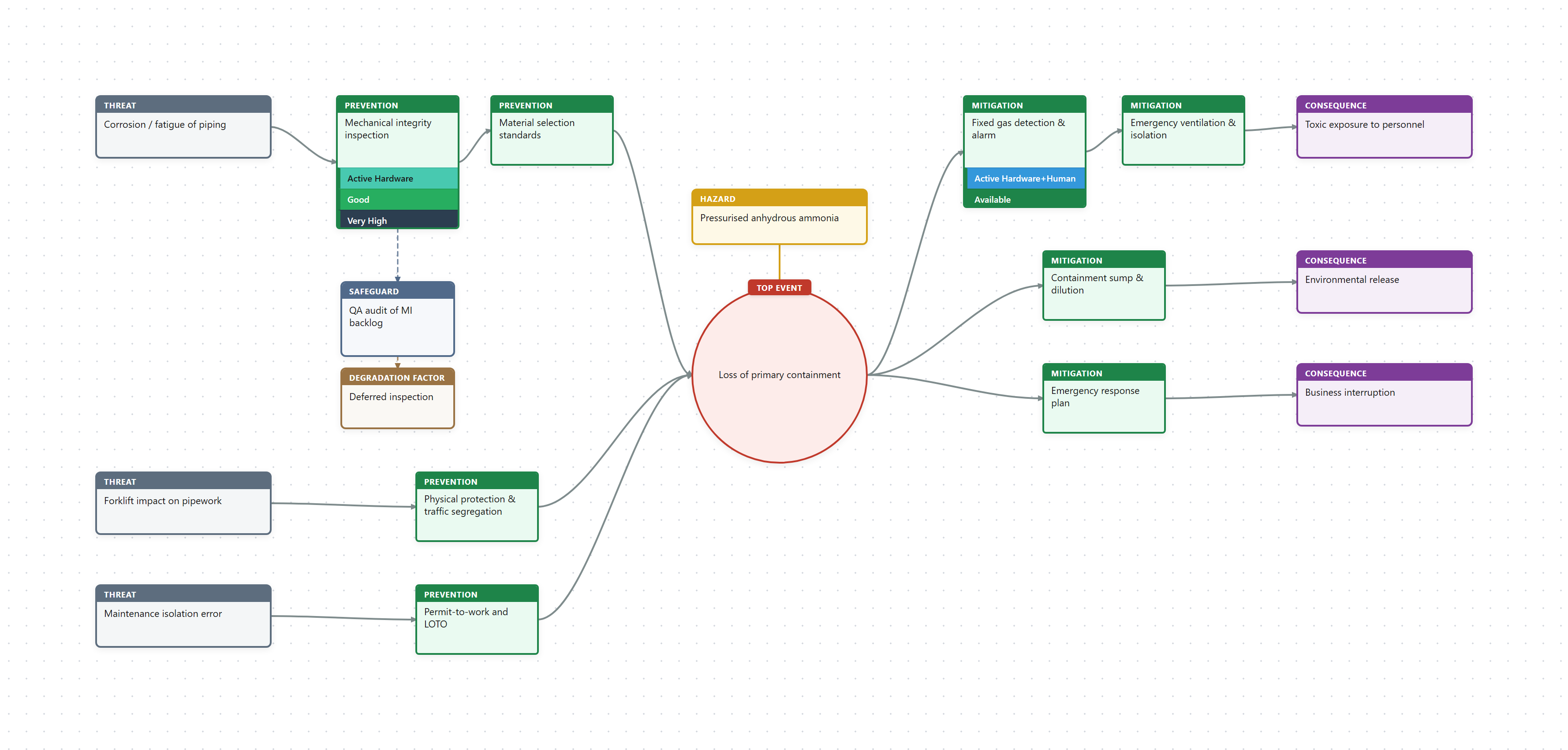
A bowtie for a cold-storage ammonia loss-of-primary-containment scenario.
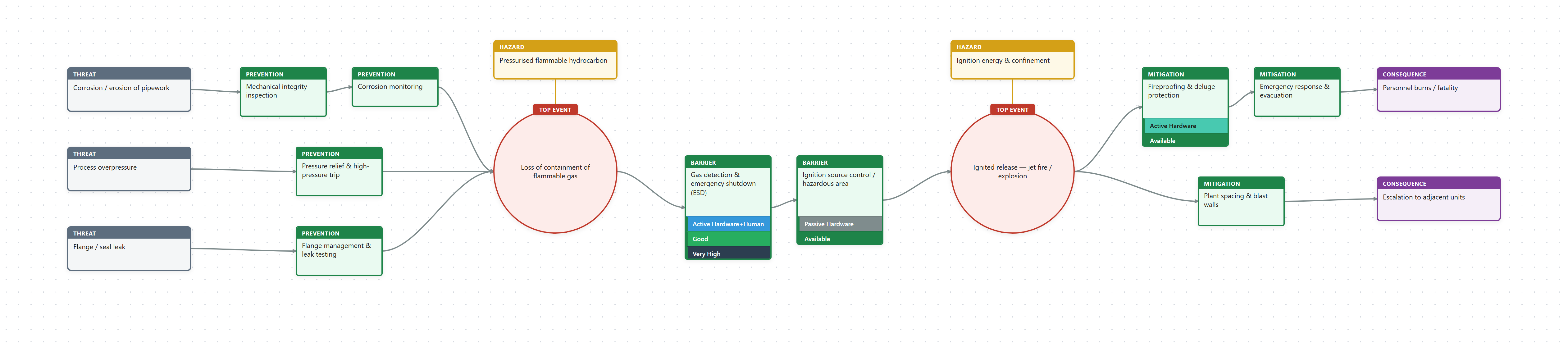
A chained, multi-event bowtie: between-event barriers sit between two top events, so threats feed the first event and consequences flow from the second.
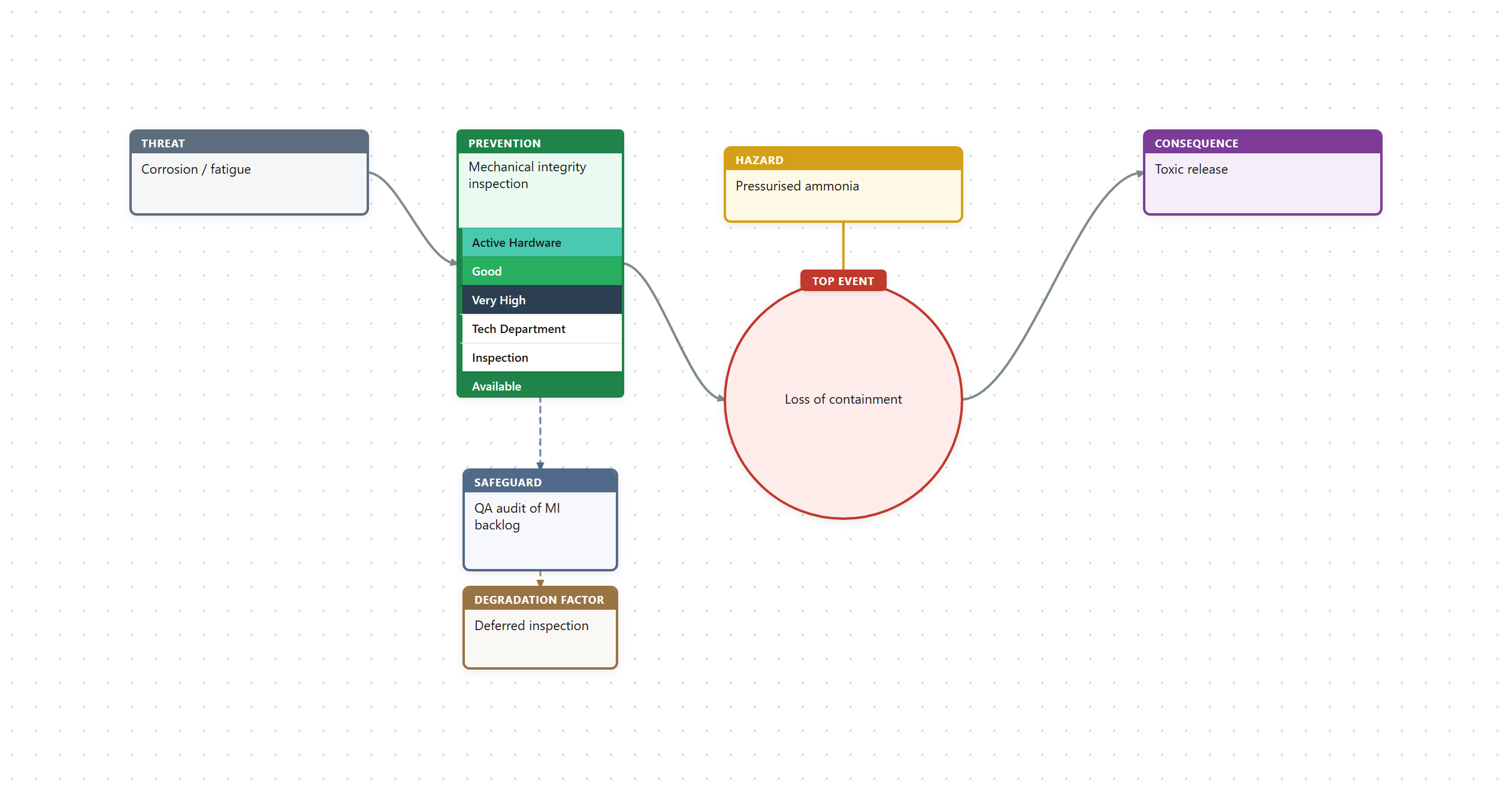
Per-barrier analysis stacks and escalation factors (safeguards and degradation factors).
Regenerate these images with
npm run screenshots(requiresnpx playwright install chromiumonce).
Features
- Interactive bowtie editor with fan-in/fan-out layout
- Threats, prevention barriers, top event, mitigation barriers, consequences, and hazard
- Escalation factors and escalation barriers
- Per-barrier analysis stacks (type, effectiveness, criticality, and custom rows)
- Toolbar: add elements, undo/redo, fit, zoom, PNG export, help
- Inspector panel for label, notes, and delete
- Pan and zoom on the canvas
- Auto-save to
.bowtiefiles
Bowtie structure
Threats → Prevention Barriers → Top Event → Mitigation Barriers → Consequences
                                      ↑
                                   Hazard
Installation
From Obsidian Community Plugins
- Open Settings → Community plugins.
- Turn off Restricted mode if needed.
- Click Browse, search for O-Tie, and install.
- Enable the plugin.
Manual installation
- Download
main.js,manifest.json, andstyles.cssfrom the latest release. - Copy them into
<vault>/.obsidian/plugins/o-tie/. - Reload Obsidian and enable O-Tie under Settings → Community plugins.
Usage
- Click the bowtie ribbon icon or run O-Tie: Create new bowtie.
- Enter a name — a
.bowtiefile opens in the editor. - Edit on the diagram:
- Toolbar: add threat, consequence, or barrier; fit; zoom; export; help
- Double-click a node or title to rename
- Click a node to inspect it in the bottom panel
- Right-click for context menus
- Hover nodes for quick add/delete buttons
- Drag empty canvas space to pan; scroll to zoom (desktop)
- Phone/tablet: one finger to pan, two fingers to pinch zoom; toolbar +/− as fallback
- Delete removes the selected node
- Ctrl+Z / Ctrl+Y for undo and redo
- Changes save automatically.
Settings
Open Settings → O-Tie to configure:
- Default folder for new bowties
- Column gap, row gap, node width, and node height
Obsidian Sync (phone and tablet)
.bowtie files are normal vault files, but Obsidian Sync does not include custom extensions by default. On every device (desktop, phone, and tablet):
- Open Settings → Sync → Selective sync and enable Sync all other types.
- Under Vault configuration sync, enable Active community plugin list and Installed community plugins so O-Tie is installed on mobile.
- Confirm both devices use the same remote vault and no folder with
.bowtiefiles is under Excluded folders. - Force-quit and reopen Obsidian after changing sync settings.
After updating O-Tie on desktop, let Obsidian Sync finish, then reload Obsidian on mobile so the plugin files (main.js, styles.css, manifest.json) update.
Commands
| Command | Description |
|---|---|
| Create new bowtie | Create a new .bowtie file |
| Open bowtie file | Open the active .bowtie file in the editor |
| Export bowtie as image | Export the diagram as PNG |
File format
.bowtie files are JSON. The hazard and top event live inside events, and barriers can carry escalation chains and an analysis stack:
{
  "id": "b1f2…",
  "name": "Defective steamcracker",
  "events": [
    {
      "id": "ev1",
      "label": "Loss of containment",
      "hazard": "High-pressure ethylene",
      "transitionBarriers": []
    }
  ],
  "threats": [
    {
      "id": "t1",
      "label": "Tube corrosion / fatigue",
      "preventionBarriers": [
        {
          "id": "pb1",
          "label": "Mechanical integrity inspection",
          "degradationChains": [],
          "stack": [
            { "id": "s1", "field": "type", "label": "Active Hardware", "color": "#48c9b0" }
          ],
          "stackCollapsed": false
        }
      ]
    }
  ],
  "consequences": [
    { "id": "c1", "label": "Fire / explosion", "mitigationBarriers": [] }
  ],
  "view": { "zoom": 1, "panX": 0, "panY": 0 },
  "createdAt": "2026-06-12T00:00:00.000Z",
  "updatedAt": "2026-06-12T00:00:00.000Z"
}
Files written by older versions (with top-level hazard/topEvent and barrier escalationFactors) are migrated automatically on open.
See examples/steamcracker.bowtie and examples/cold-storage-ammonia.bowtie.
Changelog
See CHANGELOG.md.
Development
npm install
npm run dev        # watch mode
npm run build      # production build
npm run lint       # Obsidian plugin guidelines check
npm test           # unit tests (model + layout)
npm run screenshots # regenerate README images (needs: npx playwright install chromium)
npm run examples   # regenerate example .bowtie files
See CONTRIBUTING.md for setup, asset regeneration, and the release/QA checklist.
Third-party licenses
This plugin bundles html-to-image (MIT) for PNG export.
License
MIT — see LICENSE.