
README file from
GithubChat Bubble Renderer
Render Markdown chat logs as WeChat-style bubble dialogs directly in Obsidian. 将聊天记录渲染为微信风格气泡对话框。


Features
- Auto-render — Switch to reading view on tagged files, bubbles appear automatically.
Ctrl+Pmanual trigger also available. - Parse — Standard message headers
[Sender] YYYY-MM-DD HH:MM:SS, quoted replies, merge-forward cards, system messages (nudge/recall), and Obsidian internal links![[file.ext]] - Render — WeChat-style bubbles: others left (gray), yourself right (green); quoted replies with gray bar and media icons; merge-forward cards with click-to-expand bubble view (sender+timestamp, self/other alignment, inline media); images/audio/video inline with click-to-preview
- File attachments — PDF/DOC/XLS etc. rendered as file cards (name + type icon); PDFs open preview modal on click; file cards in merge-forward with send-time alignment
- Media preview — Click any image or video to view full-size in dark overlay modal (close by clicking background)
- Performance — Chunked base64 encoding, shared vault-name lookup, event-driven auto-render (no polling)
- Theme-aware — Follows Obsidian's dark/light theme automatically
Usage
Tag your Markdown file with tags: [聊天记录], then switch to reading view (Ctrl+E). Bubbles render automatically. Esc to exit.
Chat Log Format
---
tags:
  - 聊天记录
---

[自己] 2026-06-15 08:00:00
我喜欢你

[对方] 2026-06-18 08:01:52
> [自己] 我喜欢你
我不喜欢你

[自己] 2026-06-18 11:16:02
![[哭哭_emoj.jpg]]

[对方] 2026-06-19 17:34:39
![[文件.pdf]]
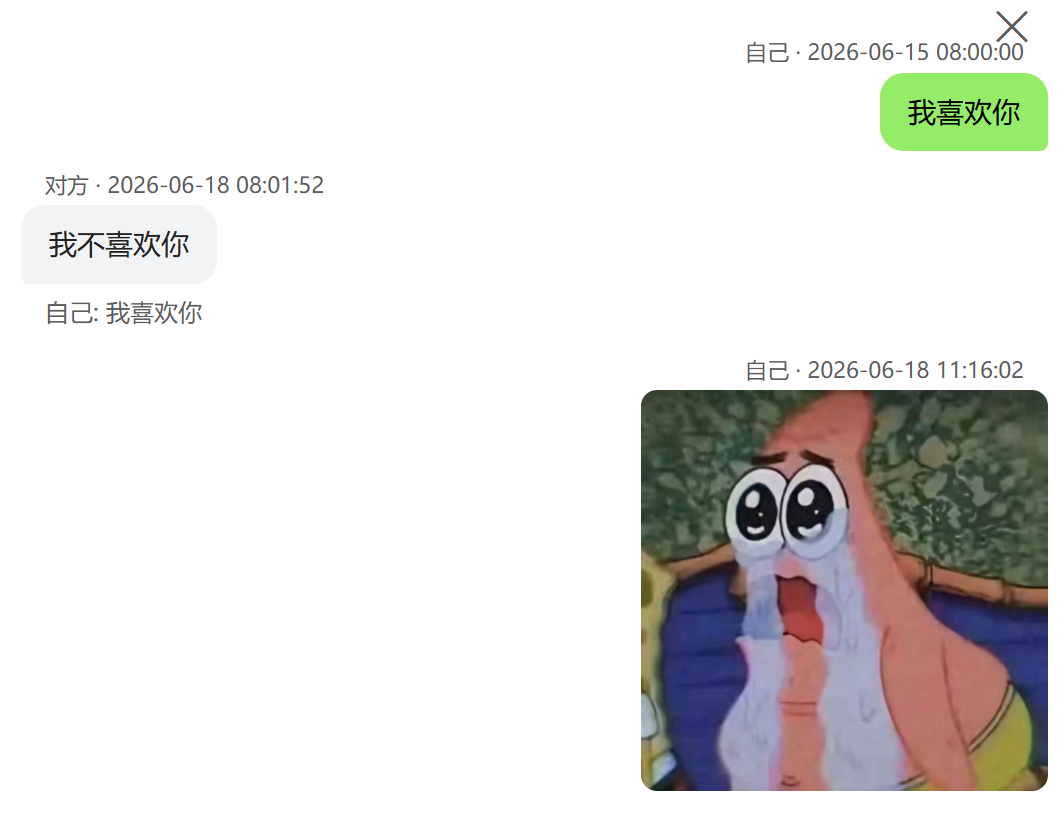
Supported formats: quote replies (>), merge-forward ([合并转发|title]), system messages (nudge/recall), media embeds (![[file.ext]]), file attachments (PDF/DOC/XLS).
Installation
Community Plugin Store: Search "Chat Bubble Renderer" in Obsidian → Community plugins.
Manual: npm install && npm run build → copy main.js, styles.css, manifest.json to .obsidian/plugins/chat-bubble-renderer/.
Settings
| Setting | Description | Default |
|---|---|---|
| Self Identifiers | Names that identify "you" in chat logs | 我, me, 自己 |
License
MIT