
README file from
GithubOwnly




Own less, Live more, Decide better.
Local-first ownership memory for humans and AI agents.
Ownly helps you track what you own, what it costs, how you used it, and what you learned — all stored as plain Markdown in your Obsidian vault.
- Agent-readable ownership memory — Stable CLI read surface with structured JSON output, designed for AI agents to read and safely interact with your data.
- Markdown-native personal data — Every object, snapshot, and review is a
.mdfile with YAML frontmatter. No proprietary formats, no lock-in. - Decision-first object lifecycle — Seed, observe, decide, use, and review. Each object earns its place through structured reflection.
- Human UI + Agent CLI — Full Obsidian workspace for daily use; CLI for automation, scripting, and agent integration.
Built for AI Agents
Agents can read your local ownership data through stable CLI JSON commands. Every command follows a documented JSON contract — no UI scraping needed.
# Set your vault path
export OWNLY_VAULT=/path/to/vault

# Read commands designed for agents
npm run --silent wyqd -- object list --json
npm run --silent wyqd -- object get --id <id> --json
npm run --silent wyqd -- object history --id <id> --json
npm run --silent wyqd -- object review-needed --json
npm run --silent wyqd -- recurring list --active --json
npm run --silent wyqd -- summary --json
See Agent CLI Contract for the full stable API reference, JSON shapes, and error codes. For agent workflow guidance, see Agent CLI Guide.
Project Status
Ownly 1.x is a public Obsidian plugin release; Obsidian is the primary runtime. Current validation status is tracked in docs/QUALITY_BASELINE.md. The Web runtime is kept for local browser use, development, and shared-core validation.
| Area | Status |
|---|---|
| Obsidian plugin | Primary runtime |
| Web runtime | Compatible local runtime |
| Agent CLI | Stable read surface with JSON contract |
| Data format | Plain Markdown + YAML frontmatter |
| Storage model | Local vault / local folder |
Why Ownly?
Most tracking tools focus on how much you spend. Ownly focuses on whether you should.
- Seed a desire → Observe it over time → Decide to buy or pass → Use → Review after retirement
- Every object has a lifecycle. Every experience gets a review. The data informs your next decision.
- Your data lives as plain Markdown in your Obsidian vault — you can edit, version-control, or move files freely.
Quick Start
- Install — Open Obsidian → Settings → Community plugins → Browse → search "Ownly" → Install & Enable.
- Open — Click the Ownly icon in the left ribbon or run
Open Ownly workspacefrom the command palette. - Explore — Demo data is auto-seeded on first connect with sample objects, snapshots, and reviews.
Features
Ownership Ledger
Track three object types with full lifecycle management:
| Type | Lifecycle |
|---|---|
| Physical items | Seeded → Observing → Purchased → Using → Idle → Transferred / Discarded |
| Subscriptions | Active → Paused → Cancelled |
| Experiences | Planned → In Progress → Completed → Reviewed |
- Quick entry templates and paste-line parsing for fast capture.
- Cost tracking: purchase price, billing amount, budget vs actual, daily cost, annualized cost.
- Payment account aggregation for fixed costs.
Agent CLI Read Surface
- Stable JSON output for all read commands:
object list,object get,object search,object history,review-needed,recurring list,summary. - Type-specific fields exposed automatically: cost fields for physical items, billing fields for subscriptions, location data for travel experiences.
- Enriched agent fields:
has_review,needs_review,review_ref, source file path. - JSON error format with documented error codes (
NOT_FOUND,MISSING_OPTION,INVALID_INPUT,VAULT_NOT_FOUND). - See Agent CLI Contract for the full specification.
Review Memory
- Write exit records for physical items and reviews for experiences.
- Score food, scenery, and experience on a 1-10 scale.
- Rank and compare across categories.
- Reviews link back to objects via bidirectional
review_ref/target_id.
Local Markdown Data
- All data stored as plain
.mdfiles underOwnly/Objects,Ownly/Reviews,Ownly/Snapshots. - Each file is self-contained YAML frontmatter + Markdown body.
- No database, no cloud sync, no telemetry.
Data Health
- Doctor diagnostics — Local quality checks: duplicate IDs, schema validation, negative costs, dangling references, review ref integrity.
- Repair tool — Preview and fix
review_refmismatches with file-level confirmations. - Archive & restore — Soft-delete with full recovery.
Supporting UI
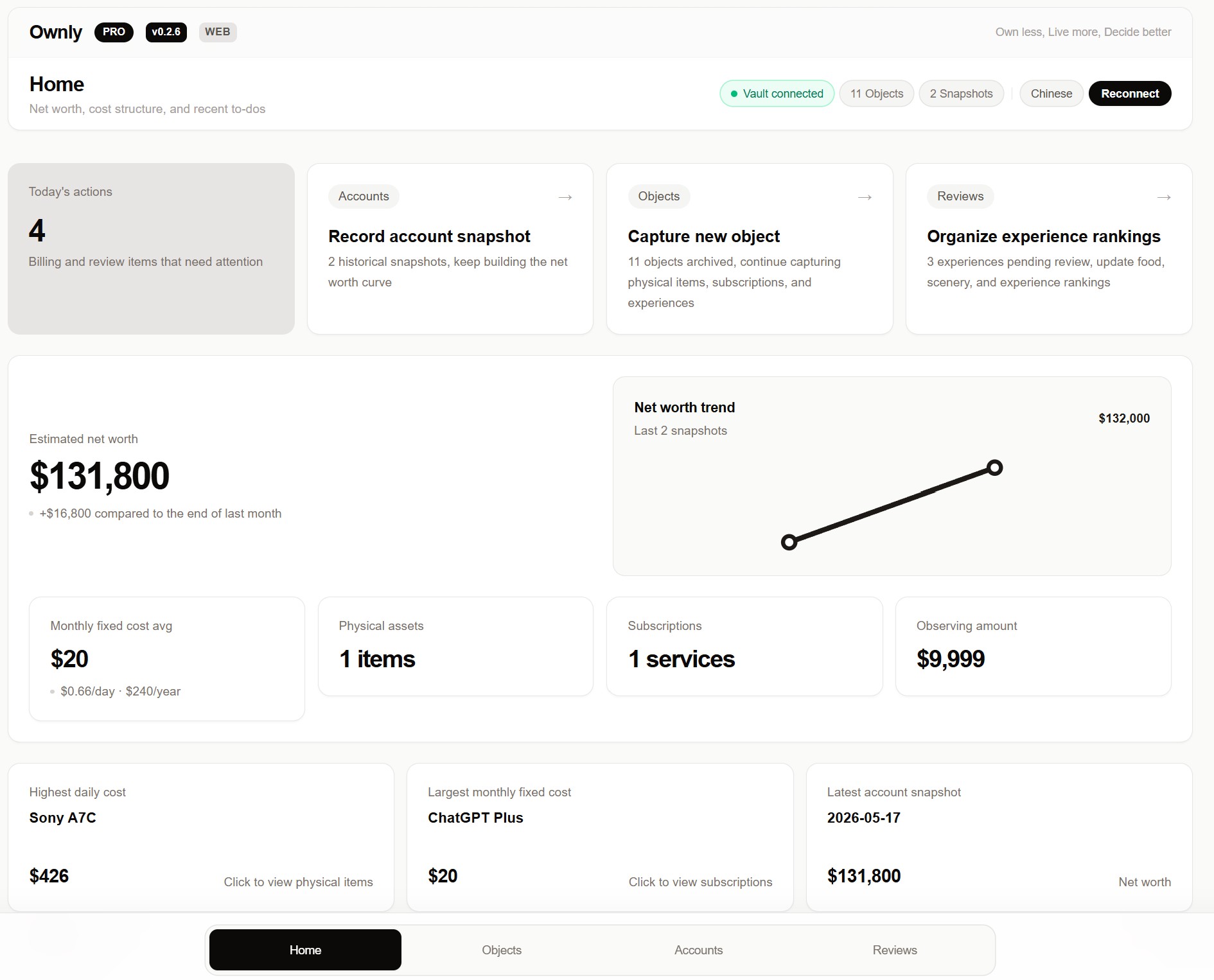
- Dashboard — Ownership overview, cost pressure, quick entry, review actions, and data scale.
- Travel Insights — World map with visited countries, travel timeline, statistics.
- Ranking boards — Top experiences by food, scenery, and experience scores.
- Bilingual UI — English and Chinese, auto-detected.
Installation
Obsidian Plugin (Recommended)
Install from the Obsidian Community Plugins directory:
Web Runtime
Run locally in a browser via File System Access API:
git clone https://github.com/liuh886/ownly.git
cd ownly
npm ci
npm run dev       # localhost:3000
Data Storage
Ownly/
  Objects/         # Physical items, subscriptions, experiences
  Snapshots/       # Net worth snapshots
  Reviews/         # Exit records, experience reviews
  Archive/         # Soft-deleted items (recoverable)
Sponsorship
Ownly is free with generous limits (200 objects, 100 reviews). A free activation code shown in the app unlocks unlimited usage and Pro features. No paid license verification, no network calls for activation.
Documentation
- User Guide — Core features and workflows.
- Agent CLI Contract — Stable JSON API for AI agents.
- Agent CLI Guide — Agent workflow patterns and write commands.
- Data Model — Markdown frontmatter schemas.
- Troubleshooting — Doctor tool and data repair.
- Release Checklist — Release process.
- Obsidian Reviewer Checklist — Plugin submission checklist.
Developer Quick Reference
npm run validate           # Full gate: tsc + lint + build + obsidian validation
npm run test               # Unit tests (vitest)
npm run wyqd -- --vault <path> object list --json
License
MIT. See LICENSE. All data stays local. No telemetry. No cloud sync.