Email Block

by joleaf
5
4
3
2
1
Score: 62/100

Description

Category: 3rd Party Integrations

The Email Block plugin allows users to draft and plan emails directly within Obsidian notes. By using a structured code block, users can define email parameters such as recipients, subject, and body content. The plugin supports referencing notes as the email body and incorporating variables for placeholders, which can be dynamically replaced. It also provides options to include 'mailto' links for easy email launching. This plugin is ideal for those who want to organize and format email drafts efficiently while integrating them into their existing Obsidian workflow.

Reviews

No reviews yet.

Stats

40
stars
7,212
downloads
9
forks
1,207
days
169
days
169
days
5
total PRs
0
open PRs
0
closed PRs
5
merged PRs
15
total issues
2
open issues
13
closed issues
12
commits

Latest Version

6 months ago

Changelog

README file from

Github

Email Block for Obsidian GitHub tag (latest by date) Release Obsidian Plugin Obsidian downloads

This plugin lets you plan small emails inside your Obsidian notes.

Install ..

.. automatically in Obsidian

  1. Go to Community Plugins in your Obsidian Settings and disable Safe Mode
  2. Click on Browse and search for "Email Block"
  3. Click install
  4. Toggle the plugin on in the Community Plugins tab

.. manually from this repo

  1. Download the latest release *.zip file.
  2. Unpack the zip in the .obsidan/plugins folder of your obsidian vault

How to use

Add the "email" code block into your note:

... with plain text as body content:

```email
to: [email protected]
subject: My Subject
body: "Hey info,

  here is some content"
```

... with a referenced note as body content:

```email
to: [email protected]
subject: My Subject
body: [[MyMail4711]]
variables:
  myvar: TestVar
```

You can use the variables parameter to replace placeholders in your body text with the variable values. To include a variable in the body text just add a placeholder {{myvar}}. Variables from fontmatter data can be used as well.

... with a body text after the yaml:

```email
to: [email protected]
subject: Hello World
---
Hi there,
this is my new body
Best!
JB
```

... you can use properties, like variables, on the subject or within the body:

```email
to: [email protected]
subject: reminder for {{name}}
---
Dear {{name}},
this is not a personal email.
Regards,
FI
```

Parameter

You can customize the view with the following parameters:

Parameter Description Values Required
to The main receiver of the mail. Multiple receiver seperated by ",". String / List of Strings
cc The cc receiver of the mail. Multiple receiver seperated by ",". String / List of Strings
bcc The bcc receiver of the mail. Multiple receiver seperated by ",". String value / List of Strings
subject The subject of the email. Plain text or combined text with variables String value x
body (1) The body of the email. Plain text or a link to a [[NoteFile]] (2). String value x
showmailto Show the "mailto" link after the mail body. true/false (Default: true)
variables A map of placeholder variables. YAML Object
from A from field (only for documentation). String value
date The date/time the mail was sent (only for documentation). String value
  1. The body can be appended after the yaml with a "---" separation
  2. No formatting is supported (only new lines) (reason).

Example
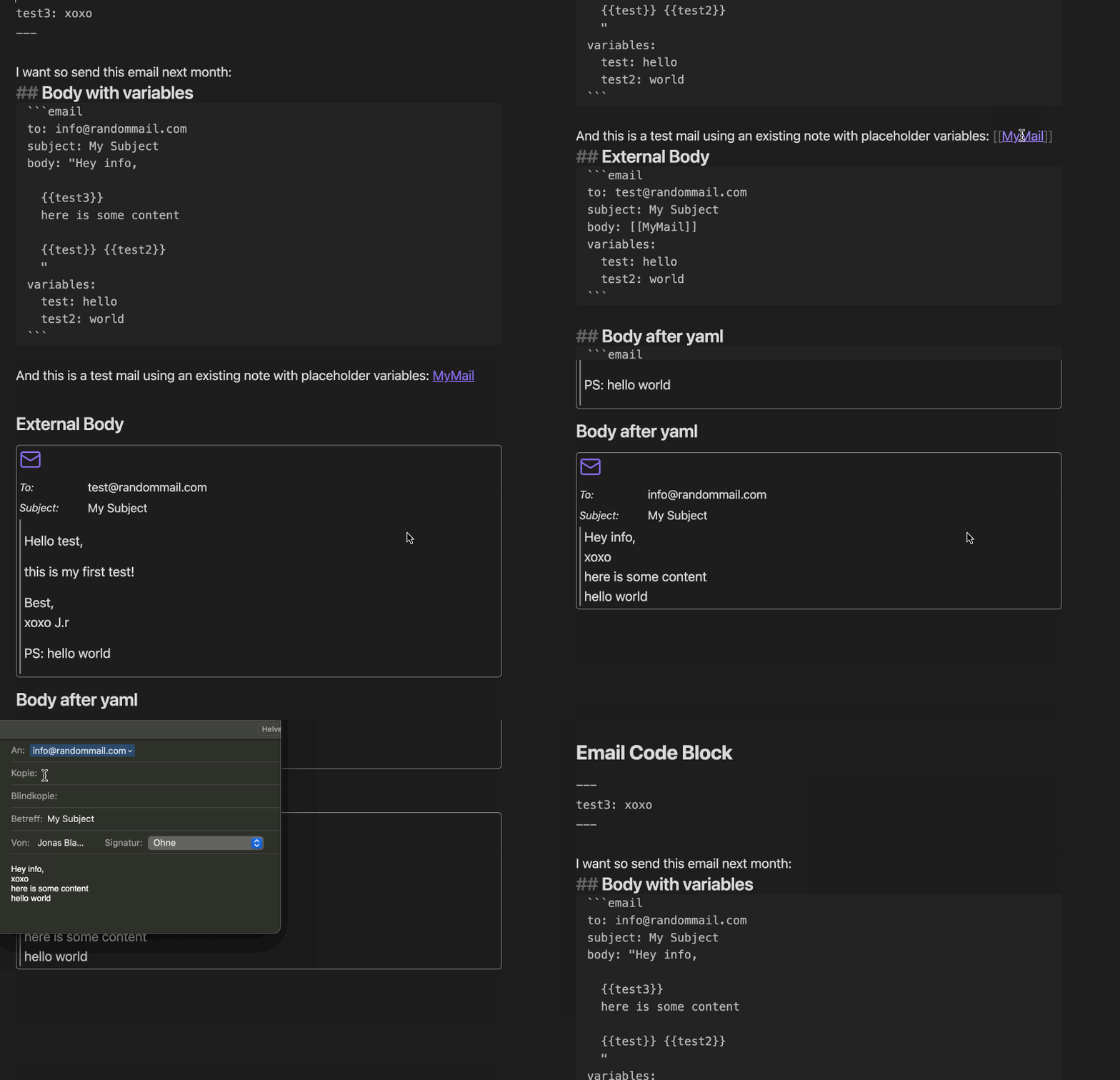
Example

How to dev

  1. Clone this repo into the plugin folder of a (non-productive) vault (.obsidian/plugins/)
  2. npm i
  3. npm run dev
  4. Toggle the plugin on in the Community Plugins tab

Contributors

Thank you for your contributions!

Donate

Similar Plugins

info
• Similar plugins are suggested based on the common tags between the plugins.
Buttondown
4 years ago by caro401
Plugin for Obsidian.md to send markdown notes to Buttondown.email
Canvas Conversation
3 years ago by André Baltazar
A plugin for Obsidian that allows you to create a canvas conversation using ChatGPT.
Codeblock Template
3 years ago by Super10
A template plugin that allows for the reuse of content within Code Blocks!一个可以把Code Block的内容重复利用模板插件!
Contextual note templating
2 years ago by Roman Kubiv
Contextual note templating with value input prompts configured in frontmatter.
Date Range Expander
a year ago by Mil
Obsidian plugin - Date Range Expander
Draft Indicator
2 years ago by Brian Boucheron
Show draft status with ✎ icons in the Obsidian file explorer.
Email Reader
3 years ago by Pulsovi
Flow
2 years ago by Ben Phillips
Implements key processes in David Allen's Getting Things Done (GTD) methodology
Git Integration
2 years ago by noradroid
Obsidian plugin to add git integration
GitHub Link
2 years ago by Nathonius
Import/Export TiddlyWiki
3 years ago by Lucas Bordeau
Import/export TiddlyWiki tiddler files with Obsidian
Linear
9 months ago by Casey Becking
Live Variables
2 years ago by Hamza Ben Yazid
Define variables in your note's properties and reuse them throughout your content.
Markdown Calendar Generator
10 months ago by Zach Russell
An intentionally simple obsidian markdown table calendar generator
Markwhen File Sync
a year ago by rouvenjahnke
Synchronize properties from your Obsidian notes with a Markwhen timeline file.
MrDoc
6 months ago by zmister
An Obsidian plugin for MrDoc that enables two-way synchronization between local Obsidian documents and MrDoc.一个 Obsidian 的 MrDoc 插件,用于 Obsidian 本地文档与 MrDoc 的双向同步
MSG Handler
3 years ago by Ozan Tellioglu
newslog
5 months ago by protoavatar
Sync your newslog.me daily bundles and Kindle's highlighted articles directly into Obsidian.
Obsidian-compatible Watcher for ActivityWatch
3 years ago by Grimmauld
Obsidian plugin to track user activity with ActivityWatch
Proletarian Wizard Task Manager
a year ago by Charles Feval
Obsidian plugin ot manage todos and projects directly from your notes.
Tomorrow's Daily Note
4 years ago by Will Olson
An obsidian plugin that creates tomorrows daily note for preemtive planning.
Varinote
a year ago by Giorgos Sarigiannidis
A plugin for Obsidian that allows you to add variables in Templates and set their values during the Note creation.
XMind Linker
8 months ago by Leafney
View XMind mind maps directly in Obsidian and seamlessly connect to XMind software for editing
Yandex Wiki Integration
10 months ago by Pavel Sokolov

