HiWords

by Kai
5
4
3
2
1
Score: 40/100

Description

The HiWords - Vocabulary Manager plugin transforms vocabulary building into a seamless part of your reading flow. It uses Obsidian's Canvas files to visually manage and categorise words, enabling users to create multiple vocabulary books with flexible layouts and colour-coded word cards. As you read, the plugin highlights known words from your collections, adapts highlight colours from the Canvas settings, and lets you instantly access definitions via hover popups that support markdown formatting. A sidebar panel shows all relevant words in the current note for quick navigation, while a right-click or command palette action makes adding new words effortless.

Reviews

No reviews yet.

Stats

155
stars
8,645
downloads
13
forks
206
days
7
days
7
days
4
total PRs
2
open PRs
0
closed PRs
2
merged PRs
27
total issues
8
open issues
19
closed issues
9
commits

Latest Version

7 days ago

Changelog

  • 优化 AI 设置;
  • 优化 pdf 单词高亮;

  • Optimize AI settings;
  • Optimize PDF word highlighting;

README file from

Github

简体中文 | English

An intelligent Obsidian plugin that transforms your reading into an immersive vocabulary learning experience. HiWords automatically highlights unfamiliar words from your custom vocabulary books, provides instant definitions on hover, and helps you master new words effortlessly while reading.
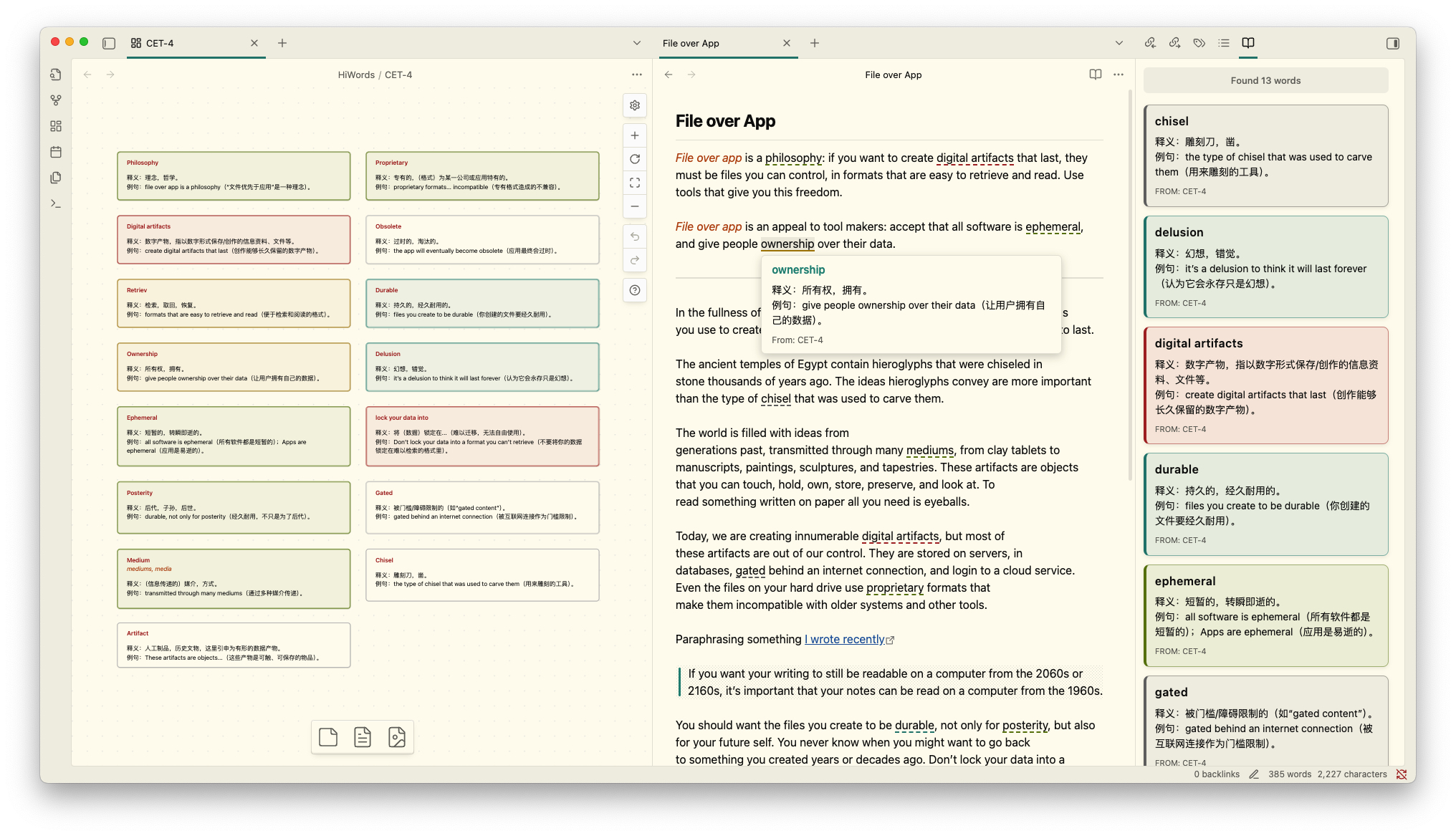
Screenshot


📚 Canvas-Based Vocabulary Management

Manage your vocabulary books using Obsidian's powerful Canvas feature. You can freely arrange vocabulary cards on Canvas with drag-and-drop, create multiple independent vocabulary books for different topics, languages, or learning goals, and use node colors to categorize words by difficulty, topic, or mastery level. All changes to your vocabulary books are automatically synced and reflected in your reading highlights.
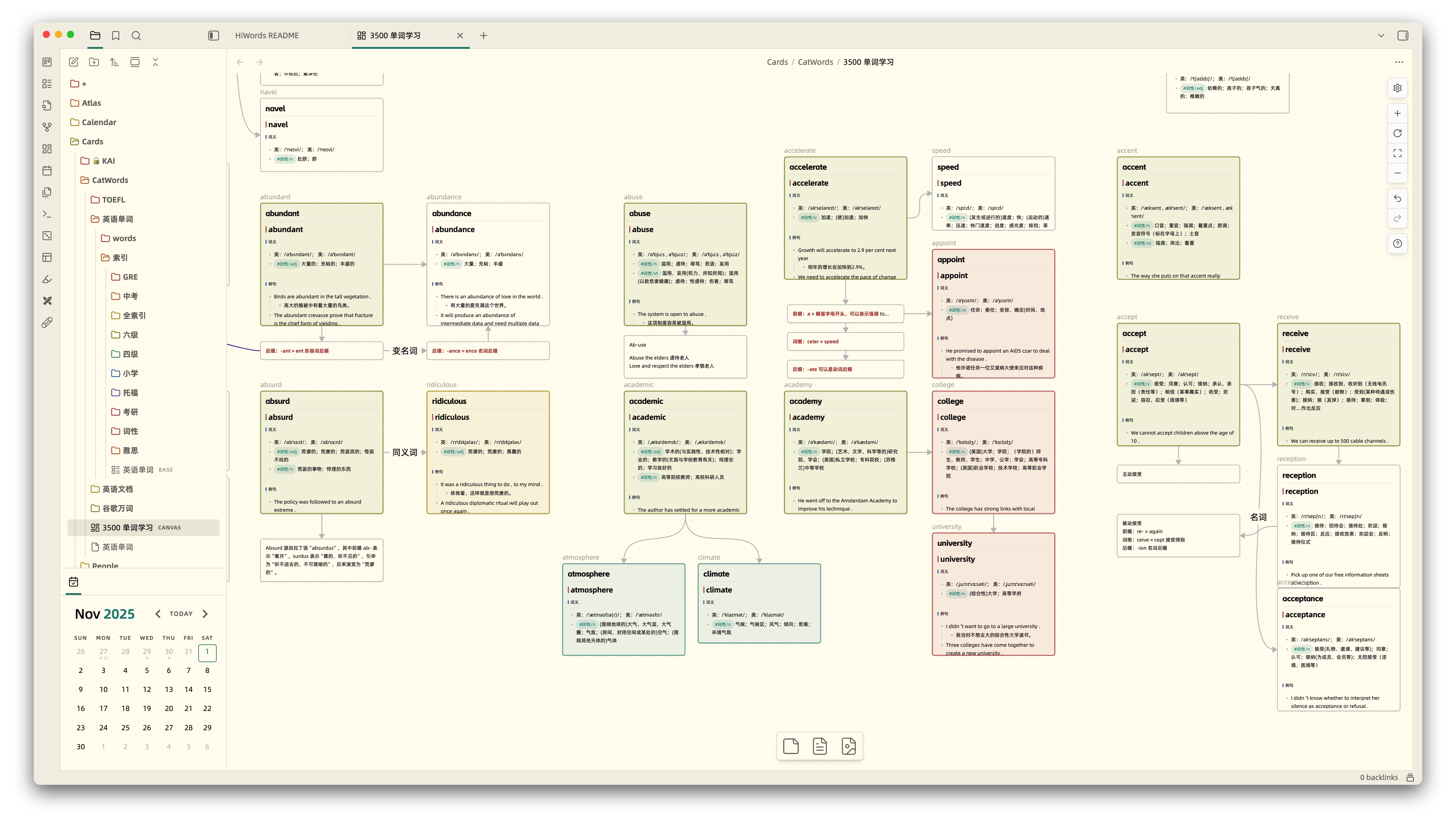
Vocabulary Management


🎯 Smart Highlighting System

HiWords intelligently highlights vocabulary words in your notes, making it easy to spot and review words you're learning. It instantly recognizes and highlights words from your vocabulary books as you read, with highlight colors matching your Canvas node colors for visual consistency. You can flexibly choose to highlight in all files, specific folders, or exclude certain paths. Built on CodeMirror 6 for smooth performance even with large documents.

Supports not only editing mode but also perfectly supports Markdown reading mode and PDF file highlighting, providing a consistent learning experience across all reading scenarios.
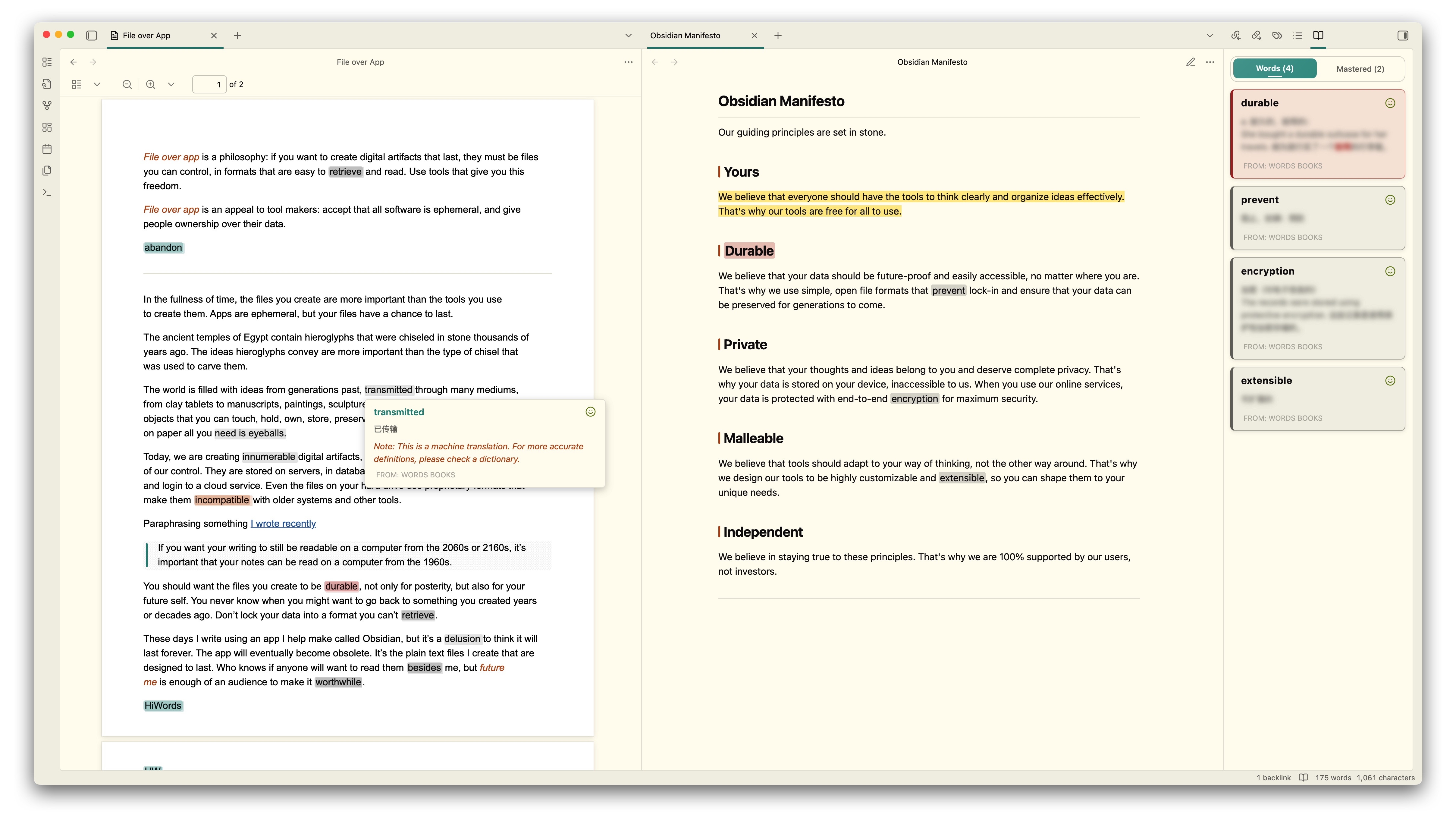
PDF Support


💡 Instant Definitions on Hover

Simply hover over any highlighted word to instantly view detailed definitions with Markdown formatting support, without leaving your current document. You can mark words as mastered directly in the popup, click the word to hear pronunciation (supports custom TTS services, defaults to English pronunciation), and the popup interface seamlessly adapts to your Obsidian theme for a consistent visual experience.


🤖 AI-Powered Definitions

Configure your preferred AI service (supports OpenAI, Anthropic, and other compatible formats) to let AI automatically generate contextual definitions. You can customize prompt templates using {{word}} and {{sentence}} variables, quickly generate AI definitions when adding new words, helping you better understand words in specific contexts.
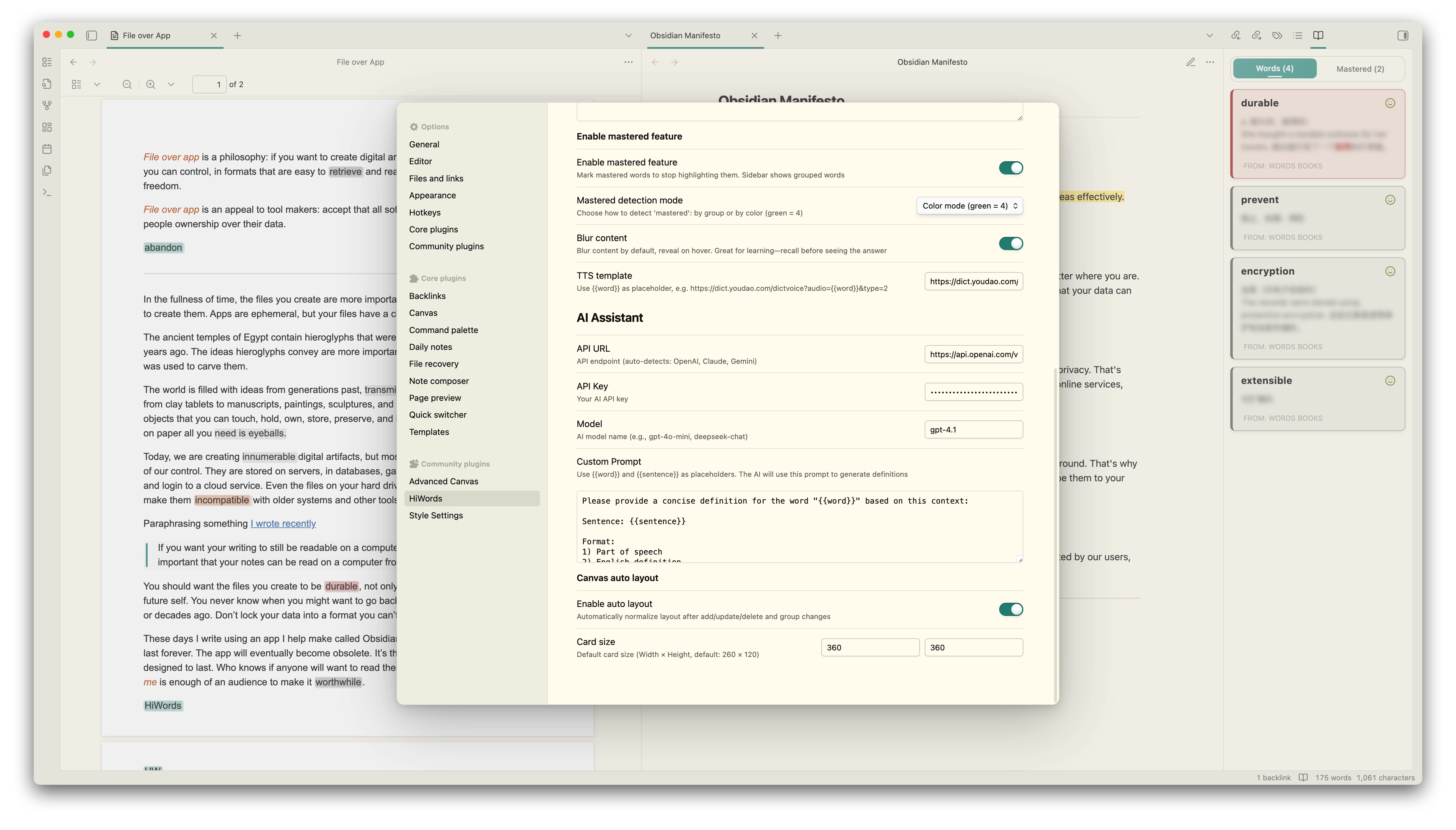
AI Integration


📋 Sidebar Vocabulary View

Open the sidebar with a quick command to track your vocabulary learning and see all words in the current document at a glance. Click any word to hear pronunciation, with colors matching Canvas node colors. You can toggle mastered words visibility to focus on active learning, and the list automatically updates in real-time as you edit or switch documents.


⚡ Quick Word Management

Select any text and right-click to quickly add it to your vocabulary book, or use Ctrl/Cmd+P to add selected words via the command palette. The plugin intelligently detects if a word already exists and automatically switches to edit mode, capturing surrounding sentences for better context when adding. Supports efficient management of multiple words across different vocabulary books.
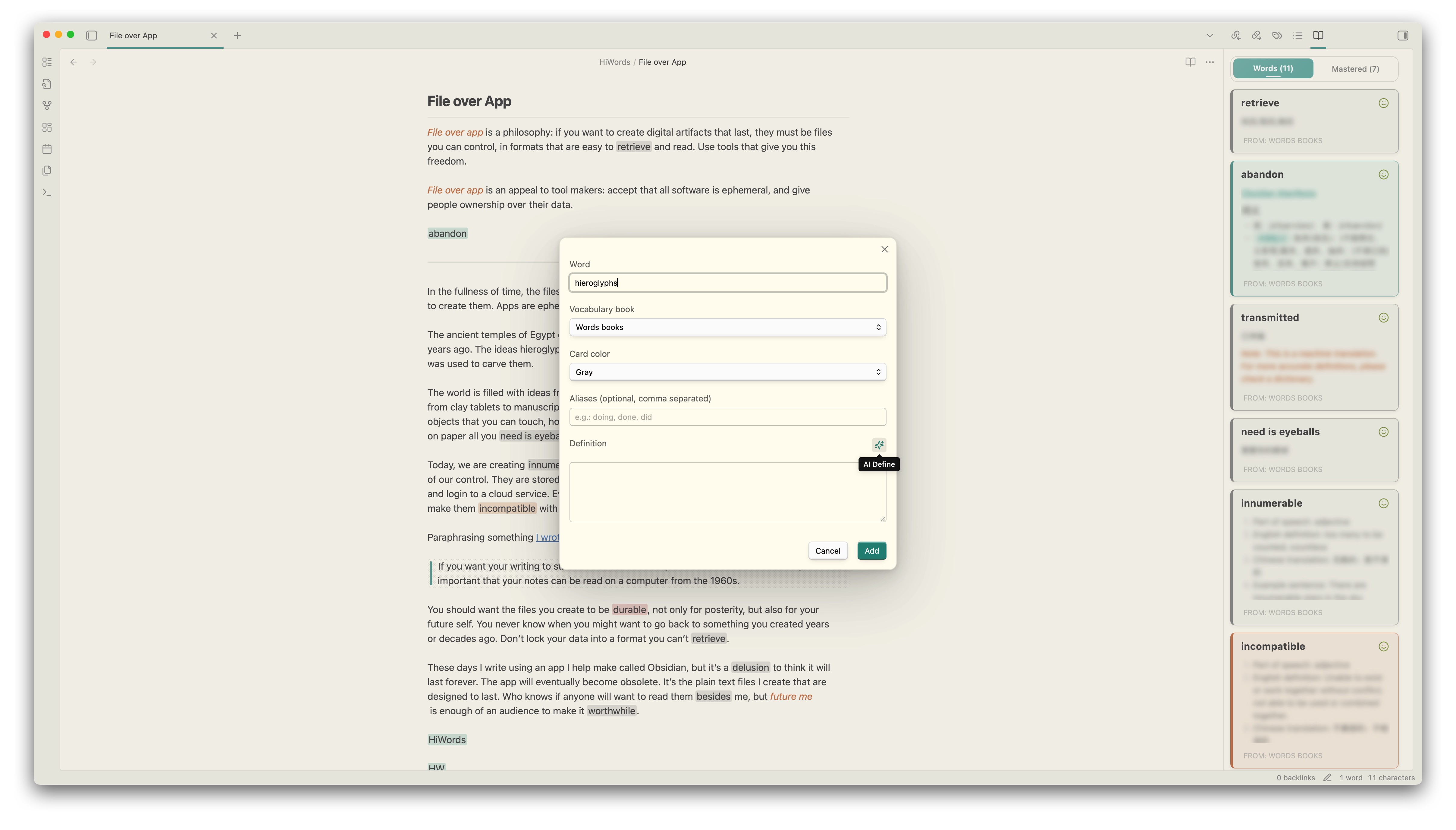
Quick Add


🚀 Getting Started

Installation

From Obsidian Community Plugins (Recommended)

  1. Open Obsidian Settings → Community Plugins
  2. Search for "HiWords"
  3. Click Install, then Enable

Creating Your First Vocabulary Book

  1. Create a Canvas file

    • Right-click in file explorer → New Canvas
    • Name it (e.g., English Vocabulary.canvas)
  2. Add vocabulary cards

    • Create text nodes with this format:
    
    serendipity
    *serendipitous, serendipitously*
    
    **n.** The ability to make fortunate discoveries by accident
    
    **Example:** The discovery of penicillin was a fortunate serendipity.
    
    
  3. Organize with colors

    • Click nodes to set card colors
    • Use colors to categorize by difficulty, topic, or mastery
  4. Link to HiWords

    • Open HiWords settings
    • Add your Canvas file as a vocabulary book
    • Start reading and watch words highlight automatically!

Tips: You can directly drag files into Canvas, and HiWords will automatically parse the file content and add it to your vocabulary book. Configure file node mode in HiWords settings to choose filename only or with aliases.


⚙️ Configuration

Highlighting Settings

  • Enable Auto Highlighting: Toggle automatic word highlighting
  • Highlight Style: Choose highlight display style, supports background highlight, underline, bold, and more
  • Highlight Scope: All files (default), only specific folders, or exclude specific folders

Hover Popup Settings

  • Show on Hover: Enable/disable definition popups
  • Blur Definitions: Blur definitions until you hover (for active recall practice)
  • TTS Template: Customize pronunciation service URL

AI Assistant Settings

  • API URL: Your AI service endpoint
  • API Key: Authentication key for AI service
  • Model: AI model to use (e.g., gpt-4o-mini)
  • Custom Prompt: Design your prompt with {{word}} and {{sentence}} placeholders

Canvas Settings

  • Auto Layout: Automatically arrange new vocabulary cards
  • Card Size: Set default width and height for vocabulary cards
  • File Node Mode: Choose how to parse file nodes (filename only or with aliases)

Mastery Tracking

  • Enable Mastery Feature: Track which words you've mastered
  • Show Mastered in Sidebar: Display or hide mastered words in the sidebar view

🎯 Usage Tips

Organizing Vocabulary Books

  • By Language: Create separate books for different languages
  • By Topic: Organize words by subject (business, academic, casual, etc.)
  • By Source: Keep words from different books or courses separate
  • By Difficulty: Use colors to mark beginner, intermediate, and advanced words

Effective Learning Workflow

  1. Read naturally - Let HiWords highlight words automatically
  2. Hover to review - Check definitions without breaking flow
  3. Mark mastered - Track your progress as you learn
  4. Add new words - Right-click or use quick commands to add unfamiliar words
  5. Use AI assistance - Generate contextual definitions for better understanding

📝 Commands

Access these commands via Ctrl/Cmd+P:

  • Refresh Vocabulary - Reload all vocabulary books
  • Show Vocabulary Sidebar - Open the sidebar view
  • Add Selected Word - Add selected text to vocabulary

🔒 Privacy & Security

HiWords is privacy-focused: all vocabulary data is stored locally in your vault, and the plugin works completely offline by default with no telemetry. The optional AI dictionary feature (disabled by default) sends words and sentences directly to your configured AI provider only when you manually use the auto-fill button.


🤝 Support

If you find HiWords helpful, please consider supporting its development:


📄 License

MIT License - feel free to use and modify as needed.


Made with ❤️ by CatMuse

Similar Plugins

info
• Similar plugins are suggested based on the common tags between the plugins.
Advanced Canvas
2 years ago by Developer-Mike
⚡ Supercharge your canvas experience! Graph view integration and unlimited styling options empower flowcharts, dynamic presentations, and interconnected knowledge.
Advanced Сanvas Filter
2 years ago by CHex0K
Always Color Text
8 months ago by Kazi Aidah Haque
Automatically colors texts across the Obsidian Vault!
Annotator
5 years ago by Elias Sundqvist
A plugin for reading and annotating PDFs and EPUBs in obsidian.
Attachments MD Indexer
a year ago by Ian Inkov
Converts Obsidian canvas files to markdown index files, making canvas content searchable and graph-viewable within Obsidian.
Augmented Canvas
2 years ago by Léopold Szabatura
Supercharge your Obsidian canvas experience with AI features.
Better Canvas Lock
2 years ago by Mara-Li
An Obsidian plugin that improve the read-only mode of Canvas.
Canvas Card Background Remover
2 years ago by luxmargos
This Obsidian plugin allows you to make the background of cards transparent in the Canvas for specific embed types, including Image (png), Canvas, and even Markdown.
Canvas Connect
10 months ago by camadkins
Dynamically optimize connection anchors in Obsidian Canvas view
Canvas Conversation
3 years ago by André Baltazar
A plugin for Obsidian that allows you to create a canvas conversation using ChatGPT.
Canvas Daily Note
2 years ago by Andrew McGivery
A plugin for Obsidian that allows you to add a daily note node to the canvas that will always show todays note.
Canvas Explorer
2 years ago by Henri Jamet
A plugin that enables users to explore their vault by iteratively adding or ignoring linked notes, ultimately generating a customizable canvas that visually represents the preserved notes and their connections.
Canvas Filter
3 years ago by Ivan Koshelev
Obsidian Canvas plugin that let's you show only pages / arrows with specific tags / colors / connections.
Canvas Format Brush
a year ago by wenlzhang
An Obsidian plugin that allows you to copy and paste formatting attributes (size and color) between canvas elements, similar to the format painter in Word.
Canvas Link Optimizer
2 years ago by khaelar
An Obsidian plugin that optimizes canvas links by displaying a page thumbnail.
Canvas Link to Group
7 months ago by TGRRRR
Plugin for Obsidian Canvas enabling direct links to specific groups within canvas files for improved navigation
Canvas Links
3 years ago by aqav
Show the links between "Canvas" and "File"
Canvas LLM Extender
3 years ago by Pasi Saarinen
Let the OpenAI LLM add nodes to your Obsidian canvas
Canvas Mindmap
3 years ago by Boninall
A plugin to make your canvas work like a mindmap.
Canvas Mindmap Helper
2 years ago by Tim Smart
Canvas minimap
2 years ago by ifree
Obsidian canvas minimap
Canvas Picture in Picture
2 years ago by hypersphere
Canvas Presentation
3 years ago by Boninall
A plugin to help you display cards based on sequence.
Canvas Random Note
3 years ago by jmilldotdev
Random notes from search on the Obsidian canvas
Canvas Send to Back
3 years ago by Zachatoo
Send a card in Obsidian Canvas to be behind all other cards.
Canvas2Document
2 years ago by slnsys
Plugin for Obsidian to convert a complete Canvas to a long form document
CardNote
2 years ago by cycsd
Help you extract your thoughts more quickly in canvas
Caret
2 years ago by Jake Colling
Caret, an Obsidian Plugin
Circuit Sketcher
a year ago by Code Forge Temple
A plugin for Obsidian to draw circuits on a canvas.
Code Preview
3 years ago by Hank
Obsidian code block render by file path
Code Styler
3 years ago by Mayuran Visakan
A plugin for Obsidian.md for styling codeblocks and inline code
Codeblock Customizer
3 years ago by mugiwara
Codeblock Customizer plugin for Obsidian
Collapse Node
3 years ago by Boninall
A node collapsing plugin for Canvas in Obsidian.
Crafty
2 years ago by liolle
Add tooltip to your obsidian canvas's nodes and navigation between nodes
Dictionary Lexicon
3 months ago by Alvin
Look up words and improve vocabulary by using flash card style cards.
Enhanced Canvas
a year ago by RobertttBS
When editing on Canvas, properties and Markdown links to notes are automatically updated, enabling backlinks in Canvas.
Extended Markdown Syntax
a year ago by Kotaindah55
Extend your Markdown syntax using delimiters instead of HTML tags, such as underlining, superscript, subscript, highlighting, and spoiler.
Folder Canvas
a year ago by Nancy Lee
Generate a canvas view of your folder structure
GDScript Syntax Highlighting
2 years ago by RobTheFiveNine
Adds live GDScript syntax highlighting to code blocks in the Obsidian editor.
Hanzi Writer
a year ago by Nikita Smirnov
Highlightr
4 years ago by Chetachi
A minimal and aesthetically pleasing highlighting menu that makes color-coded highlighting much easier 🎨.
Index Checker
3 years ago by Pavlo Deshko
Repo for Index Checker plugin for Obsidian
Japanese note taking helper
a year ago by OverFitter
Keyword Highlighter
2 years ago by Marcel Goldammer
Automatically highlight specified keywords within your Obsidian notes for enhanced visibility and quick reference.
Kindle Vocab
9 months ago by Truong Gia Bao
Generate the markdown version of your Vocabulary Builder in Kindle, and put it in your Obsidian Vault.
Link Exploder
3 years ago by Ben Hughes
Long sentence highlighter
8 months ago by Robert Meißner
Lovely-Mindmap
3 years ago by shaun
Build your own knowledge graph with smiles :-)
Memodack
a year ago by Pavlo Kobyliatskyi
Your second language memory tool
Node Auto Resize
2 years ago by Boninall
Note Annotations
a year ago by Jan Beck
Occura
2 years ago by Alexey Sedoykin
Plugin for https://obsidian.md/ that automatically selected same text occurrences in opened note
OpenWords
a year ago by insile
用于英语学习中背单词与单词管理的 Obsidian 插件
Optimize Canvas Connections
3 years ago by Félix Chénier
An Obsidian plugin that declutters a canvas by reconnecting notes using their nearest edges
PDF++
2 years ago by Ryota Ushio
PDF++: the most Obsidian-native PDF annotation & viewing tool ever. Comes with optional Vim keybindings.
Search In Canvas
2 years ago by Boninall
Semantic Canvas
2 years ago by Aaron Gillespie
An Obsidian Plugin to update note properties using links on Canvases
Send to Canvas
10 months ago by wenlzhang
An Obsidian plugin that allows you to send tasks, blocks, and notes to Canvas files as plain text, links, and embeds.
Sentence Rhythm
a year ago by Adam Fletcher
Obsidian plugin added toggleable colored highlights to sentences based on their length
Simple CanvaSearch
3 years ago by ddalexb
Textfresser
a year ago by clockblocker
Obsidian plugin to automatically fill in the gaps of your Deutsch
Timeline Canvas Creator
10 months ago by chris-codes1
Quickly create timeline structured canvases in Obsidian.
Vocabulary Cards
3 years ago by Eugene Myazin
An easy way to display vocabulary words as flashcards and as a list
Vocabulary Highlighter
2 years ago by eatgrass
Highlight English words according to the frequency with Obsidian
Vocabulary View
5 years ago by nnshi-s
Youglish
5 years ago by Noureddine Haouari
Use YouTube to improve your pronunciation. YouGlish plugin gives you fast, unbiased answers about how words is spoken by real people and in context.
Zhongwen Reader
a year ago by natipt
This is a Chinese hover dictionary and vocabulary-building plugin for ObsidianMD.