Media Extended

by AidenLx
5
4
3
2
1
Score: 85/100

Description

Category: Note Enhancements

The Media Extended plugin is a game-changer for Obsidian users who want to enrich their note-taking experience with multimedia content. This plugin seamlessly integrates audio and video files into your notes, allowing you to play, pause, skip, and timestamp them with ease. With support for multiple video platforms, including YouTube, Vimeo, and Coursera, you can embed a wide range of media types directly into your notes. The plugin also features local subtitle support, media fragments, playlist support, and more. Whether you're a student, researcher, or content creator, Media Extended makes it easy to incorporate multimedia materials into your digital notebook.

Reviews

No reviews yet.

Stats

903
stars
328,072
downloads
79
forks
1,853
days
2
days
2
days
11
total PRs
0
open PRs
5
closed PRs
6
merged PRs
553
total issues
55
open issues
498
closed issues
0
commits

Latest Version

README file from

Github

[!WARNING] License Change: Future releases of v4 will be closed source. The original codebase up to version 3 remains open source under the MIT license and can be found in the v3 branch. For details, see v4 release notes
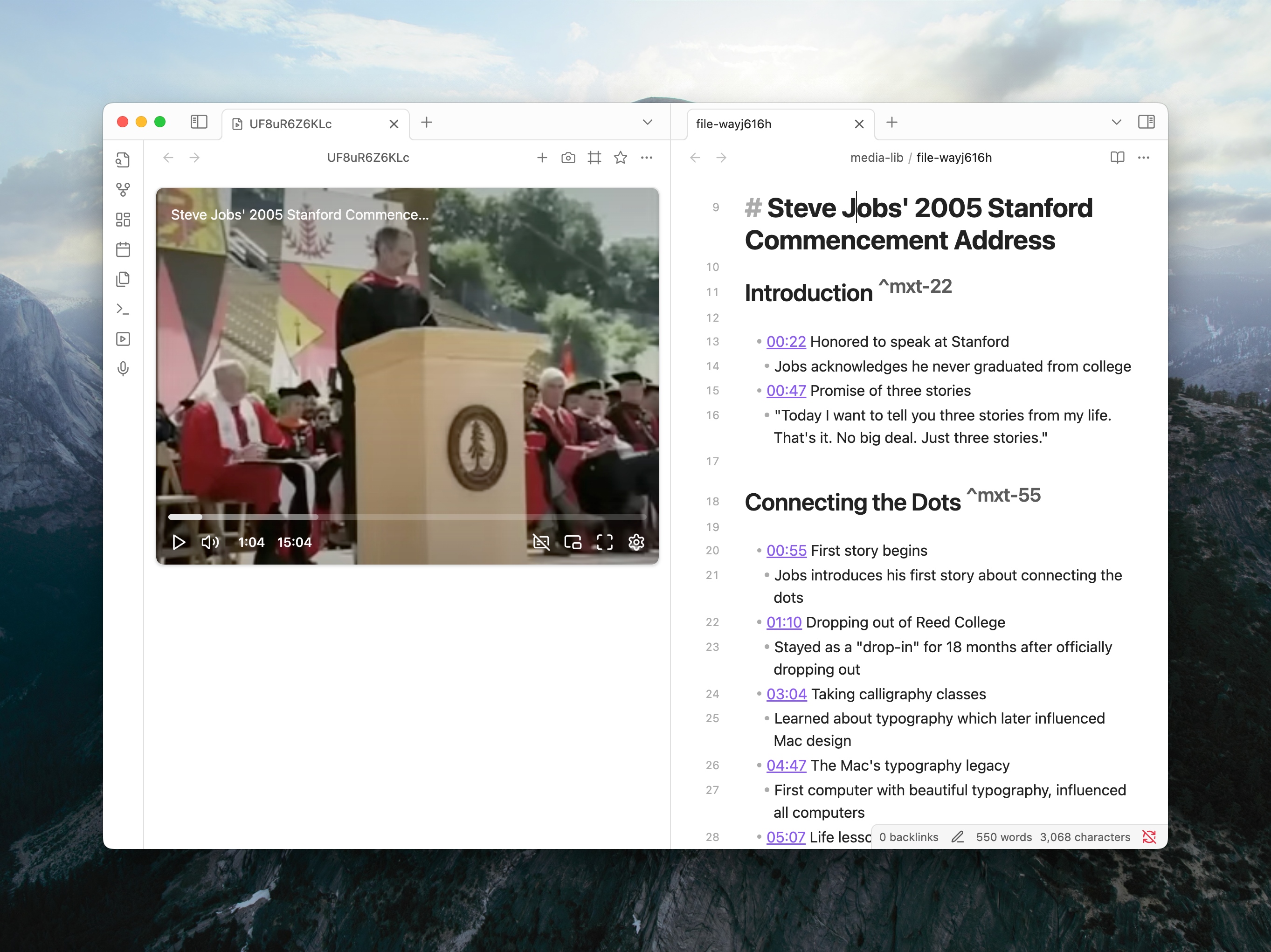
Media Extended plugin with player and media note

Overview

Media Extended is a plugin that integrates media playback and management into Obsidian. Whether you're a student, researcher, or content creator, this plugin makes it easier to incorporate, control, and reference audio and video materials directly within your digital notebook, preserving Obsidian's philosophy of plain-text, future-proof note-taking.

⭐ Key Features

Feature Description
Broad Media Support Open and play local media files, remote URLs, and videos from services like YouTube and Vimeo directly in Obsidian.
Advanced Playback Control Control playback with global hotkeys without leaving your notes. Pin a player to avoid tab clutter.
Timestamped Notes Insert links to specific moments in your media with a single click or command. Clicking the timestamp jumps to the exact moment.
Screenshot Capture Capture screenshots from videos, with options to crop, and embed them in your notes with a timestamp link back to the source.
Interactive Transcripts Link transcripts (.srt, .vtt) to your media. Click to navigate, search the full text, and copy timestamped quotes.
Live Recording Timestamps While using Obsidian's audio recorder, drop timestamp markers into your notes that automatically become clickable links when the recording is saved.
Customizable Templates Tailor the format of inserted timestamps and screenshot links to fit your personal note-taking workflow.
Powerful Linking Create media links and embeds with fragments for start/end times (#t=...), looping, and auto-play for precise control.

📋 Disclosures

[!IMPORTANT] File System Access This plugin may access files outside of Obsidian vaults when you store media files on external drives, portable disks, or cloud storage services like OneDrive. This access is necessary to play media files that aren't stored directly within your vault.

[!IMPORTANT]
Network Access This plugin requires network access to stream media from online services (YouTube, Vimeo, etc.) and to connect to hosted WebDAV services for remote media storage. Network connections are only made to services you explicitly configure or link to.

🚀 Quick Start

Try it now: With Media Extended installed, copy the URL below and paste it into your browser's address bar to open Steve Jobs' 2005 Stanford Commencement Address directly in Obsidian.

obsidian://mx-open?url=https%3A%2F%2Fwww.youtube.com%2Fwatch%3Fv%3DUF8uR6Z6KLc

For detailed guides, please refer to the Documentation.

🆘 Support

If you have questions or issues about the plugin, please post them to our community: https://mx.aidenlx.site/community

For bug reports, use the GitHub Discussions Q&A category: https://github.com/aidenlx/media-extended/discussions/categories/q-a

Similar Plugins

info
• Similar plugins are suggested based on the common tags between the plugins.
AI Transcriber
4 months ago by Musashino Software
AI-powered speech-to-text transcription using OpenAI GPT-4o and Whisper APIs
Annotate Audio
a year ago by VidE
Audio Notes
3 years ago by Jason Maldonis
Easily take notes on podcasts and other audio files using Obsidian Audio Notes.
Audio Player
3 years ago by noonesimg
audio player plugin with bookmarks for Obsidian.md
AutoPause
2 years ago by Chris Kephart
Allows only one audio track playing in Obsidian at a time, pausing the others.
Autoplay & Loop
2 years ago by Zerkshop & Wapply
This Obsidian plugin auto reproduces content inside notes.
Card Viewer
6 months ago by vsme
一个用于在 Obsidian 中解析和查看电影、电视剧、书籍、音乐和 HTML 内容卡片的插件。
Cloudinary
3 years ago by Uday Samsani, Jordan Handy
Cloudinary plugin for content uploading and transformation.
Cloudinary Uploader
4 years ago by Jordan Handy
An uploader for Obsidian to Cloudinary
Douban
4 years ago by Wanxp
an obsidian plugin that can pull data from douban to your markdown file
Eleven Labs
3 years ago by Mark Charles
Enhance YouTube Links
3 years ago by GitSum
Take a YouTube link and get the title and optionally channel name, channel URL, and thumbnailURL.
Geulo
2 years ago by Junyoung Bang
Extension for pulling and syncing the videos that you liked in Youtube to Obsidian vault.
Image Picker
a year ago by ari.the.elk
Local Media Embedder
2 years ago by seyf1elislam
an obsidian plugin allows you to Embed videos and images and audios from your local device in your notes.
Media Companion
a year ago by Nick de Bruin
Media DB Plugin
4 years ago by Moritz Jung
A plugin that can query multiple APIs for movies, series, anime, games, music and wiki articles, and import them into your vault.
Media Slider
a year ago by Aditya Amatya
An obsidian plugin that helps to make slider for images, audios, videos, pdfs, markdown, etc in obsidian notes.
Media Sync
3 years ago by fnya
Media Sync is Plugin for Obsidian
Memories
3 months ago by DIMFLIX
Plugin to display a gallery directly in a note.
mpv links
2 years ago by patsh90
Obisidian plugin for creating and using video links
Notion Video Embed
4 years ago by lastknightcoder
Super Duper Audio Recorder
2 years ago by Thiago MadPin
Ever felt like the core audio recorder in Obsidian was playing hard to get? Well, fret no more! Our Super Duper Audio Recorder is here to save the day (and your sanity)! This plugin enhances your audio recording experience in Obsidian by adding folder selection and audio source options.
Text to Speech
4 years ago by Johannes Theiner
Text to speech for Obsidian. Hear your notes.
TikToker
2 months ago by ameyxd
Save TikTok videos as markdown notes with embedded content and metadata extraction.
Timestamp Notes
4 years ago by Julian Grunauer
This plugin allows side-by-side notetaking with videos. Annotate your notes with timestamps to directly control the video and remember where each note comes from.
VLC Bridge
2 years ago by zuluwi
An Obsidian plugin that lets you control VLC Player via Obsidian and add a timestamped link or snapshot from existing video to your note
Voicenotes Sync
2 years ago by Andrew Lombardi
Official Obsidian plugin that syncs your notes from VoiceNotes.com into your vault
Waveform Player
a year ago by Zhou Hua
WHISPERER.md
a year ago by Falcion
A plugin for note-taking app Obsidian which allows you to play ambience music in vault and assign different tracks to files specifically
Xiaohongshu Importer
a year ago by bnchiang96
An Obsidian plugin to import Xiaohongshu (小红书) notes into your vault. Extract titles, content, images, videos, and tags from share links, with customizable categories and optional local media downloads.
Yesterday
2 years ago by Dominik Mayer
Obsidian plugin providing Yesterday journaling support
YouTube Template
2 years ago by sundevista
📺 A plugin that would help you to fetch YouTube videos data into your vault.