
README file from
GithubObsidian Noor Plugin
Noor is a plugin for Obsidian.md. It aims to help Muslims stay enlightened with Islam, Quran, Hadith, and Sunnah
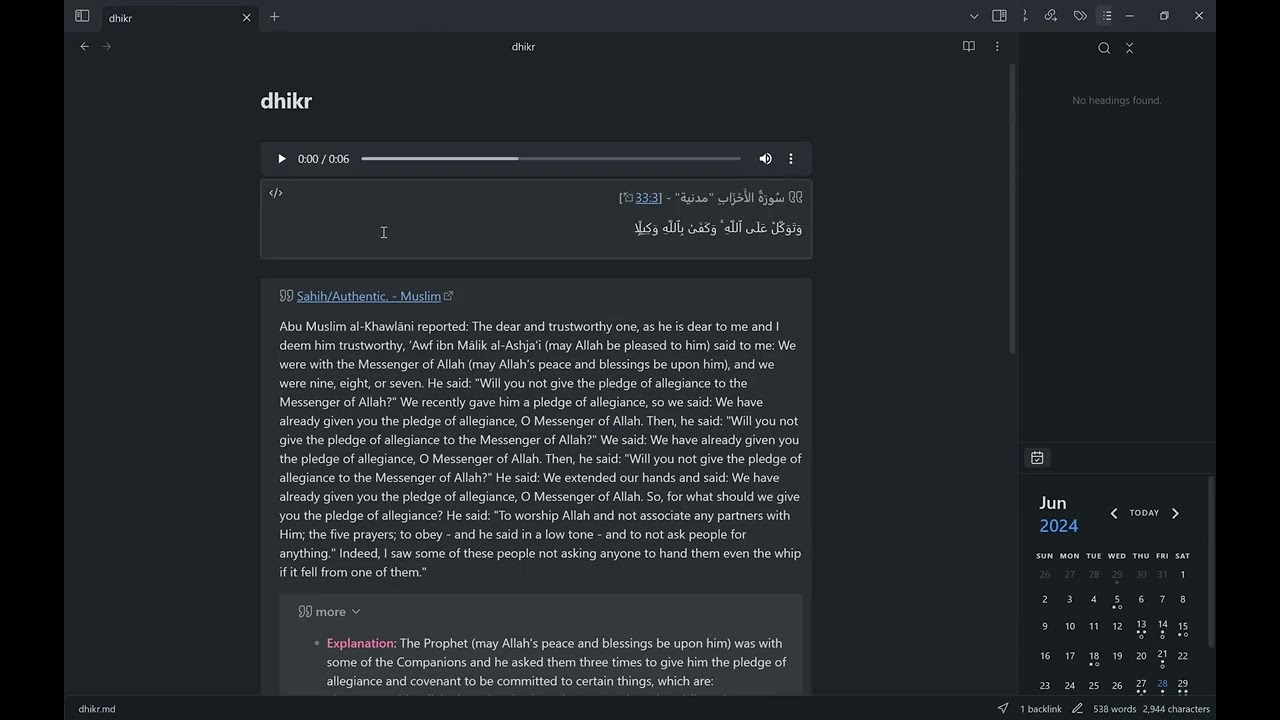
Features
- Insert a Quran Quote at the current location containing a random verse with recitation in Arabic, chosen translation language, and a hyperlink for more info.
- Insert a Hadith Quote at the current location containing a random hadith in the chosen language and a hyperlink for more info.
- Create a Dhikr file at the configured location containing a Quran Quote and a Hadith Quote (can be used again to update file with new quotes)
Usage
After enabling the plugin in the settings menu, you should see the added commands and the noorJS object.
- commands:
Noor: Random Quran quote: inserts a quote block at the current editor location containing a Quran QuoteNoor: Random Hadith quote: inserts a quote block at the current editor location containing a Hadith QuoteNoor: Open Dhikr file: creates a Dhikr file at the configured location containing a Quran Quote and a Hadith Quote then opens in current viewNoor: Open Dhikr file popup: creates a Dhikr file at the configured location containing a Quran Quote and a Hadith Quote then opens in popup window view
- scripting:
noorJS.randomQuranQuote(): this function returns a Quran QuotenoorJS.randomHadithQuote(): this function returns a Hadith Quote
Integration with other plugins
obsidian plugins complement each other, here are some ideas
- with templater: use
<% noorJS.randomQuranQuote() %>to insert the Quran quote into your notes (like the daily note to get a daily verse) - with commander: use it to create a button for the
Noor: Random Quran quotecommand
Settings
General settings
- Dhikr file path: configure where to create the Dhikr file
Quran settings
- Reciter: choose your favorite reciter from the drop-down menu
- Show translation: choose Arabic only or dual language mode
- Translation Language: choose the second language to show next to Arabic
- Translation Options: choose your favorite translation from the ones available in selected Translation Language
Hadith settings
- Hadith language: choose your preferred language to show the hadith in.
Manually installing the plugin
- Copy over
main.js,manifest.jsonto your vault.obsidian/plugins/noor/. - Reload Obsidian to load the new version of your plugin.
- Enable the plugin in the settings window.
Attributions
AlQuran Cloud APIs
The Quran verses are retrieved from
- alquran.cloud: An opensource Quran API made by the Islamic Network (github) and respective contributors.
Hadith Encyclopedia APIs
The Hadith quotes are retrieved from
- hadeethenc.com: Encyclopedia of Translated Prophetic Hadiths.
Contributions and suggestions
Please feel free to open a pull request with suggested improvements and new feature requests