Cursor Location

by Sean Slater
5
4
3
2
1
Score: 64/100

Description

Category: Coding & Technical Tools

The Cursor Location plugin for Obsidian is a valuable tool for writers and editors who need to keep track of their cursor position within a document. This plugin displays the location of the cursor, including character and line numbers, in a customizable format. With options to set your own pattern for displaying cursor information, you can tailor the plugin to suit your specific needs.

The plugin also offers advanced features such as selection mode, which allows you to display the range of a selection or the position where the cursor started or ended. You can even choose to display the percentage of the document that the cursor is currently on, with options for different levels of precision.

Additionally, the plugin provides settings to customize the appearance and behavior of the status bar, including the ability to add padding to reduce shifting and adjust the width of the padding. Overall, the Cursor Location plugin is a must-have tool for anyone who wants to stay organized and focused while writing or editing in Obsidian.

Reviews

No reviews yet.

Stats

30
stars
11,295
downloads
5
forks
1,760
days
221
days
221
days
12
total PRs
0
open PRs
0
closed PRs
12
merged PRs
12
total issues
0
open issues
12
closed issues
4
commits

Latest Version

7 months ago

Changelog

Marking as version 1.0.0 because there isn't any other features I want to add. Will continue maintaining and fixing any bugs that pop up in the future. Feel free to submit any feature requests if there is something you'd like and I will consider if I think it's in the scope of the plugin.

What's Changed

New Contributors

Full Changelog: https://github.com/spslater/obsidian-cursor-location-plugin/compare/0.3.2...1.0.0

README file from

Github

Cursor Location GitHub tag (Latest by date) GitHub all releases

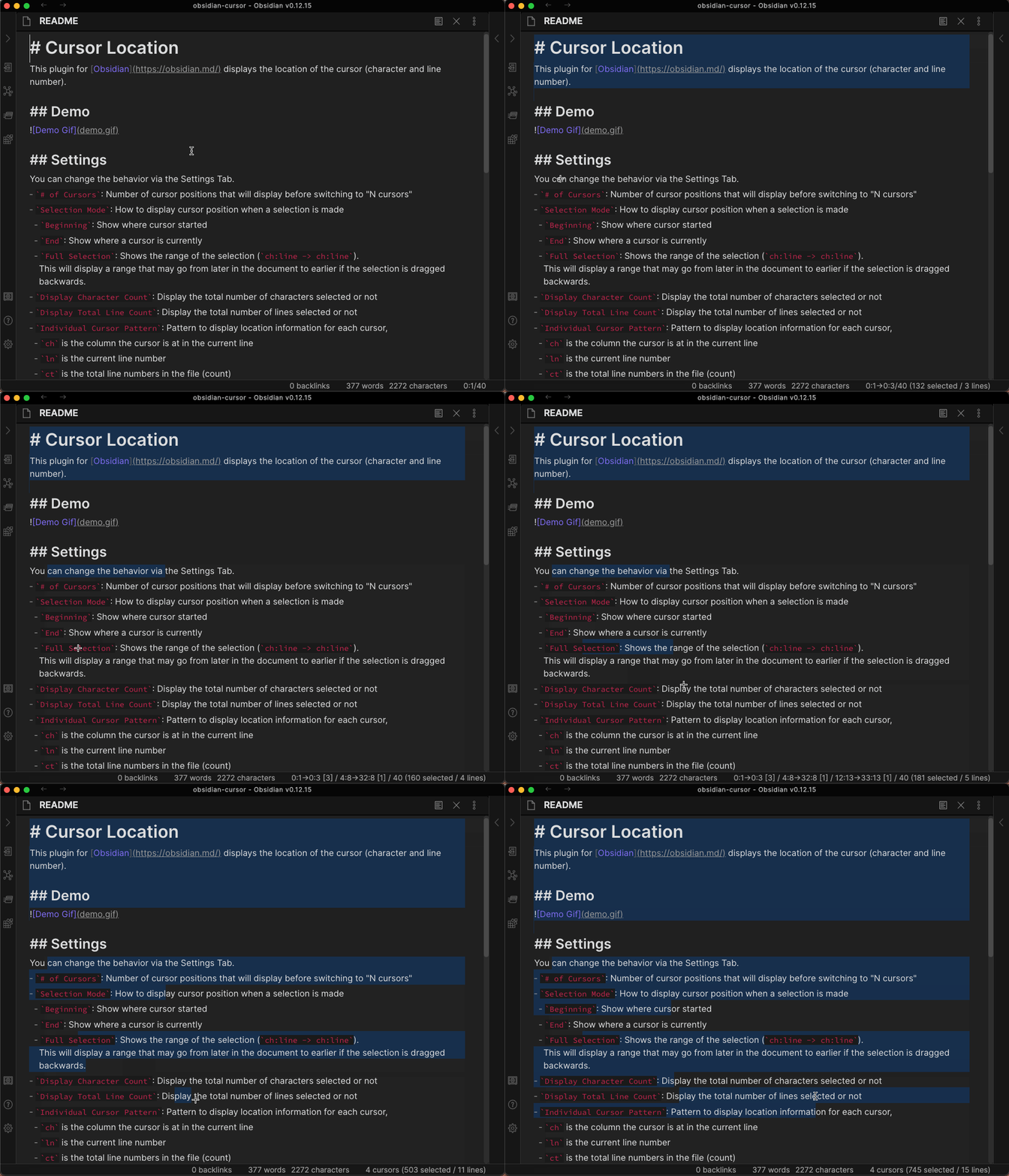
This plugin for Obsidian displays the location of the cursor (character and line number).

Currently, the plugin is Desktop Only because the mobile apps do not support custom status bar items.

Demo

This demo uses an older version of Obsidian, but the output functions the same. Demo Gif
Settings

custom options in dropdowns allow you to set your own pattern if none of the predefined ones suit your needs. For settings that used to be text boxes and are now dropdowns, if you've modified that setting from the previous default and would like to switch back, selecting custom will revert to your setting.

You can change the behavior via the Settings Tab.

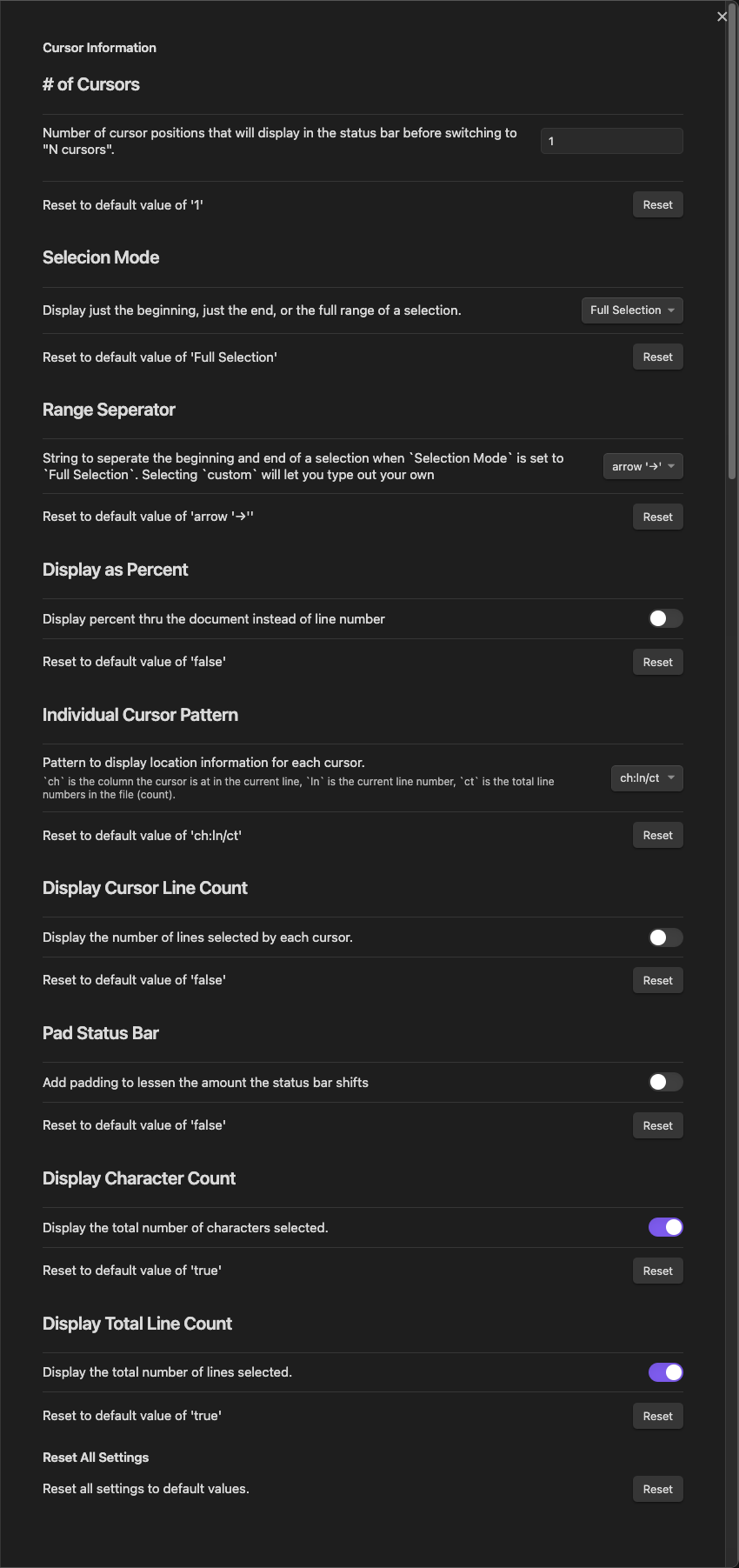
  • # of Cursors: Number of cursor positions that will display before switching to "N cursors"
  • Cursor Separator: String to separate multiple cursor locations when # of Cursors is greater than 1. Consecutive whitespace is squashed to 1 space (per HTML rules).
    • This will only display if you have # of Cursors greater than 1
  • Selection Mode: How to display cursor position when a selection is made
    • Beginning: Show where cursor started
    • End: Show where a cursor is currently
    • Full Selection: Shows the range of the selection (ch:line -> ch:line). This will display a range that may go from later in the document to earlier if the selection is dragged backwards.
  • Range Separator: String to separate the beginning and end of a selection when Selection Mode is set to Full Selection. Consecutive whitespace is squashed to 1 space (per HTML rules).
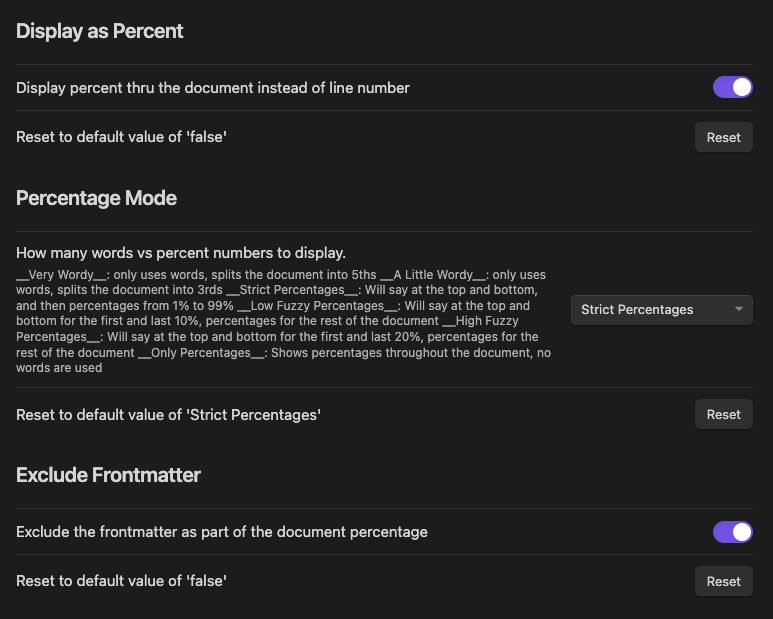
  • Display as Percent: Displays percent thru the document instead of what line number you are currently on.
  • Percentage Mode: How many words vs percent numbers to display
    • Very Wordy: only uses words, splits the document into 5ths
    • A Little Wordy: only uses words, splits the document into 3rds
    • Strict Percentages: Will say at the top and bottom, and then percentages from 1% to 99%
    • Low Fuzzy Percentages: Will say at the top and bottom for the first and last 10%, percentages for the rest of the document
    • High Fuzzy Percentages: Will say at the top and bottom for the first and last 20%, percentages for the rest of the document
    • Only Percentages: Shows percentages throughout the document, no words are used
  • Individual Cursor Pattern: Pattern to display location information for each cursor
    • ch is the column the cursor is at in the current line
    • ln is the current line number
    • ct is the total line numbers in the file (count)
    • If ct is the first or last of the three values, it will be removed when displaying a range.
  • Include Frontmatter: Count the frontmatter as part of the document percentage
  • Frontmatter Phrase: If not including frontmatter, what should it be called.
    • frontmatter
    • metadata
    • preamble
  • Display Cursor Line Count: Display the number of lines selected by each cursor.
  • Cursor Line Pattern: Pattern to display when Display Cursor Line Count is enabled
    • custom allows you to set your own pattern if none of the predefined ones suit your needs
    • If you've changed this from the default previously and would like to switch back, selecting custom will pick that one.
  • Pad Status Bar: Add padding to lessen the amount the status bar shifts
  • Padding Width: Amount status bar will pad, only shows when Pad Status Bar is enabled
  • Display Character Count: Display the total number of characters selected or not
  • Display Total Line Count: Display the total number of lines selected or not
  • Reset: Reset all values to the default settings

Default Settings
Default Settings

Percentage Settings
Percentage Settings

Installation

You can install the plugin via the Community Plugins tab within Obsidian. Just search for "Cursor Location"

Contributing

Help is greatly appreciated. First check if there are any issues open that relate to what you want to help with. Also feel free to make a pull request with changes / fixes you make.

License

MIT License

Similar Plugins

info
• Similar plugins are suggested based on the common tags between the plugins.
Dynamic Highlights
4 years ago by nothingislost
An experimental Obsidian plugin that highlights all occurrences of the word under the cursor
Remember File State
4 years ago by Ludovic Chabant
A plugin for Obsidian that remembers cursor position, selection, scrolling, and more for each file.
Mark and Select
4 years ago by anselmwang
Scroll Offset
4 years ago by Lijyze
Scroll Offset for Obsidian
Ninja Cursor
4 years ago by vorotamoroz
Dashing Cursor
4 years ago by Shukai Ni
Character Insertion
3 years ago by TakamiChie
カーソル前に記号を挿入するプラグイン(Plug-in to insert symbol before cursor)
Select current line
3 years ago by Gokul
Obsidian plugin to select the current line on 'Esc' button press.
Auto Hide Cursor
3 years ago by Mo Ismat
A simple plugin for https://obsidian.md
Geocoding Properties
3 years ago by Jose Elias Alvarez
Insert address / location data from geocoding APIs as Obsidian properties.
cursor-goaway
2 years ago by Xuer
make cursor goaway after open a text file
Cursor Jump
2 years ago by Sangwon Jung
Remember cursor position
5 years ago by Dmitry Savosh
Obsidian plugin. Remember cursor position for each note
Relative Find
5 years ago by phibr0
Advanced Cursors
5 years ago by SkepticMystic
Custom Attachment Location
5 years ago by RainCat1998
Customize attachment location with variables($filename, $data, etc) like typora.
Mapbox Location Image
2 years ago by Aaron Czichon
Render a mapbox location image based on provided coordinates
Cursor Bridge
2 years ago by Adam Cloud
Seamlessly bridge Obsidian and Cursor, the AI-powered code editor. Elevate your coding workflow by opening notes directly in Cursor, bringing the power of AI to your knowledge base.
Cursor Position on Title Enter
a year ago by Por Chainarong Tangsurakit
Obsidian Plugin: Set the cursor position after pressing Enter on the note title.
Cursor Position History
a year ago by Florian Gubler
A Plugin to remember (and make accessible) the cursor history in Obsidian. Both within a file and across files.
Smooth Cursor
a year ago by Busyo
Obsidian光标美化插件
HOME key
8 months ago by shichishima
Obsidian Plugin to move cursor to beginning of text, considering Markdown heading characters.
Move Cursor On Startup
8 months ago by Jared Kelnhofer
Obsidian plugin to move the cursor to the right and back to the left when starting up. Why? To keep DataView expressions from not running on the first load of, say, your Home file.