packUp4AI

by Jeffry
5
4
3
2
1
Score: 45/100

Description

The packUp4AI plugin helps you prepare meaningful context bundles from your notes for use with AI chatbots or large language models. Starting from the active note, it gathers linked notes up to a configurable depth and optionally includes backlinks. The collected notes are displayed in an interactive D3-based graph, where node size reflects word count, making relationships easy to understand. Along with visualization, it provides statistics like total and average word counts to gauge the size of the bundle. You can refine the process with settings such as excluded files, output filenames, and default collection parameters.

Reviews

No reviews yet.

Stats

14
stars
791
downloads
1
forks
266
days
198
days
198
days
0
total PRs
0
open PRs
0
closed PRs
0
merged PRs
3
total issues
1
open issues
2
closed issues
0
commits

Latest Version

7 months ago

Changelog

#2

README file from

Github

packUp4AI for Obsidian

Collect related notes based on links/backlinks to provide focused context for external AI chatbots. Explore note relationships visually and export the bundle.

Developed by Jeffry.

🤔 What it Does

When interacting with Large Language Models (LLMs) or AI chatbots, providing relevant context is crucial for getting good results. packUp4AI helps you gather this context directly from your Obsidian vault.

Starting from your currently open note, it:

  1. Collects: Finds notes linked from and optionally to your starting note, going out to a specified number of "hops" (Collection Depth).
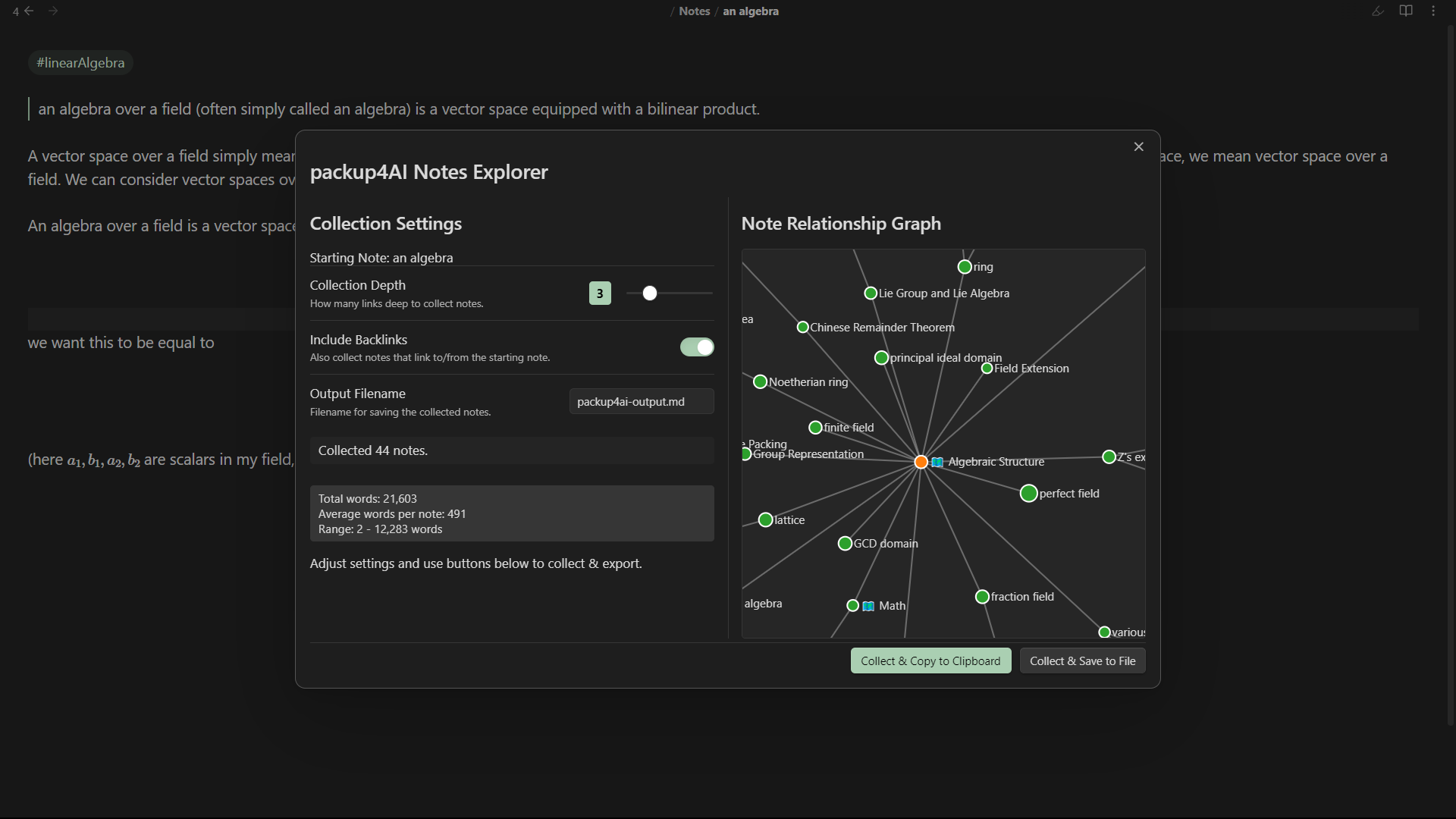
  2. Visualizes: Displays an interactive graph showing the relationships between the collected notes. Nodes are sized based on their word count.
  3. Stats: Shows you how many notes were collected and provides basic word count statistics (total, average, range).
  4. Exports: Allows you to easily copy this context bundle to your clipboard or save it as a new Markdown file in your vault.

This makes it much easier to copy-paste relevant information from your vault into your favorite AI tool.

✨ Features

  • Interactive Relationship Graph: Uses D3.js (included locally) to visualize how collected notes are connected.
  • Configurable Collection:
    • Set Collection Depth (1-10 hops).
    • Toggle Include Backlinks.
    • Specify Excluded Files/Folders.
    • Set the Output Filename for saving.
  • Real-time Updates: See the number of collected notes and word count update as you adjust settings.
  • Word Count Statistics: Get a quick overview of the collected content size.
  • Node Sizing: Graph nodes are sized proportionally to their word count.
  • Easy Export:
    • Copy to Clipboard: Get the formatted bundle ready to paste.
    • Save to File: Create a Markdown file containing the context bundle.
  • Quick Access: Open via Command Palette.
  • Settings Tab: Configure default values for depth, backlinks, output filename, and exclusions.

🚀 How to Use

  1. Open a Note: Navigate to the note you want to use as the starting point for context collection.
  2. Activate the Plugin:
    • Open the Command Palette (Ctrl+P or Cmd+P).
    • Search for and select packUp4AI: Open packup4AI Notes.
  3. Use the Modal:
    • The packUp4AI Notes Explorer modal will appear.
    • Left Pane: Adjust Collection Depth, Include Backlinks, and Output Filename. You'll see the collection status and word count update here.
    • Right Pane: See the interactive relationship graph of the collected notes. Hover over nodes for titles and word counts. Click nodes to open them in Obsidian.
    • Bottom Buttons:
      • Collect & Copy to Clipboard: Gathers the notes based on current settings and copies the formatted bundle to your clipboard.
      • Collect & Save to File: Gathers the notes and saves the bundle to the specified Output Filename in your vault.

Similar Plugins

info
• Similar plugins are suggested based on the common tags between the plugins.
SystemSculpt AI
2 years ago by SystemSculpt.com
Enhance your Obsidian App experience with AI-powered tools for note-taking, task management, and much, MUCH more.
Ollama
3 years ago by hinterdupfinger
Prompt ChatGPT
2 years ago by Coduhuey
Copilot auto completion
3 years ago by Jordi Smit
Nexus AI Chat Importer
2 years ago by Superkikim
zettelkasten navigation
2 years ago by terrychenzw
This plugin provides 2 customViews for navigating a zettelkasten using Luhmann-style IDs and key word indexes.
Local LLM Helper
2 years ago by Mani Mohan
An Obsidian plugin to process text, chat with AI, and semantically search your notes — works with any OpenAI-compatible LLM server (Ollama, LM Studio, vLLM, and more).
Augmented Canvas
2 years ago by Léopold Szabatura
Supercharge your Obsidian canvas experience with AI features.
AI Agent
7 months ago by Manuel Magaña López
Empower your Obsidian vault with Google Gemini.
Adjacency Matrix Maker
5 years ago by SkepticMystic
Creative an interactive adjacency matrix of your Obsidian vault
Gladdis
3 years ago by Aurélien Stébé
Gladdis (Generative Language Artificial Dedicated & Diligent Intelligence System) - it's an AI chatbot.
Pure Chat LLM
a year ago by Justice Vellacott
Turn notes into conversations with chatGPT or better yet Ollama
OpenAugi
a year ago by Chris Lettieri
The self-organizing second brain. Augmented intelligence for thinkers.
AI Chat as Markdown
2 years ago by Charl P. Botha
Image to notes by Photes.IO
2 years ago by Kanaries Data Inc.
AI Image to text notes plugin in obsidian
Notes Refresher
2 years ago by Connor Park
Obsidian plugin for AI-generated note refreshers
NoteSmith
8 months ago by csteamengine
On This Day I
a year ago by Ben Stuart
AI tools for Daily Notes, an Obsidian Plugin