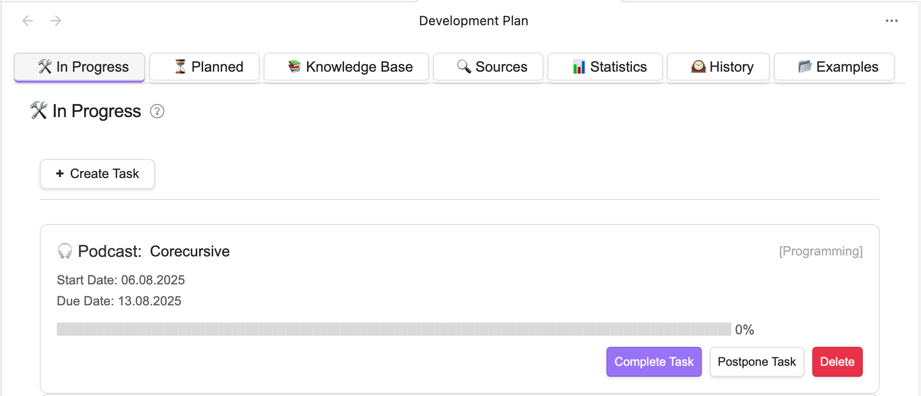
The Personal Development Plan plugin offers a structured workspace for managing your long-term personal or professional growth. It organises tasks into seven clear tabs: in progress, planned, knowledge base, sources, statistics, history, and examples. This visual layout mirrors a full task lifecycle-starting from collecting ideas to executing and finally archiving them. You can set up periodic goals using built-in templates for daily to yearly intervals, ensuring steady progress through automatic task generation. The plugin also includes helpful alerts for task overload and approaching deadlines. A statistics panel tracks progress over time, giving you clarity on what's working and where you lag.
Personal Development Plan Plugin - Release Notes
Version 1.0.5
🚀 New Features
Enhanced Organization & Navigation
- Added "Other Types" tab (📦) on "In Progress" and "Knowledge Base" pages
- Displays items with types not found in your enabled material types
- Only appears when there are items with unrecognized types
- Added "Other Sections" tab on "Knowledge Base" pages
- Shows items with sections not configured in your settings
- Only visible when items with unknown sections exist
New Settings & Controls
- Issue 1: "Move completed files to History Folder" checkbox in General Settings
- Automatically relocate completed learning materials to a dedicated history folder
- Issue 2: Delete buttons (×) for Material Types and Sections in settings
- Quick removal of unwanted items
- Protection against deleting the last remaining item in each category
Expanded Example Plans Library
Issue 2: Added three new comprehensive learning plans:
- Personal Development & Self-Improvement Resources - Curated collection for personal growth, mindset development, and habit building
- Time Management & Productivity System - Essential resources for mastering time management and work organization
- Personal Effectiveness & Performance Optimization - Strategies for maximizing personal effectiveness and energy management
📚 Documentation Updates
💡 Usage Tips
- Use the "Other" tabs to identify and categorize uncategorized learning materials
- Explore the new example plans to jumpstart your personal development journey
- Utilize delete buttons to maintain a clean and relevant set of material types and sections