README file from
GithubPlugin Update Locker
English | 中文
Plugin Update Locker helps you freeze selected Obsidian community plugins on a known-good version. It works by rewriting a target plugin's manifest.json version to a very large value (for example 9999.1.6.5) so Obsidian treats it as already up to date.
Features
- Version locking: Prevent selected plugins from being updated by prefixing their version with
9999.. - Batch operations: Lock or unlock all currently visible plugins after search / filtering.
- Conflict detection: Detect mismatches between lock records and physical plugin files.
- Snapshot and restore: Create a snapshot before locking and restore backed-up plugin assets later.
- Release preview: Click a plugin name to try fetching GitHub release notes and compare versions when repository information can be resolved.
- Compatibility warning: Warn when a plugin's
minAppVersionis newer than your current Obsidian version. - Config sync: Export lock settings to JSON files inside your vault and import JSON config files from the same vault.
- Bilingual UI: English and Chinese interface support.
Usage
Plugin list management
The settings page shows installed community plugins and lets you manage their lock state.
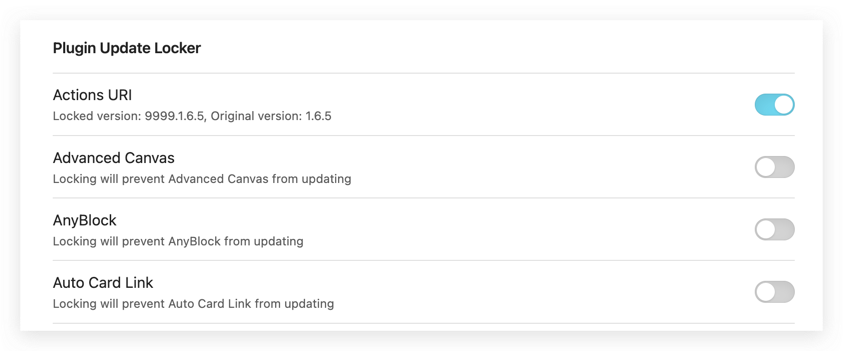
- Lock: Toggle a plugin on. Its version changes from
x.y.zto9999.x.y.z. - Unlock: Toggle it off to restore the original version.
- Batch lock / unlock: Use the top action buttons on the currently visible list.
- Manual scan: Re-scan for conflicts after external file changes.
Snapshot recovery
Before a plugin is locked, Plugin Update Locker can save a snapshot of:
main.jsstyles.cssmanifest.json
If a later update breaks the plugin, you can restore the saved snapshot from the settings page.
Release notes preview
When the changelog module is enabled, clicking a plugin name attempts to fetch GitHub release data and opens a modal preview when the plugin repository can be identified.
Config export / import
Use the sync module to:
- export current lock settings to
Plugin Update Locker/locker-config-YYYY-MM-DD.jsoninside your current vault; - import any JSON config file that already exists inside the current vault.
External access and data changes
- The locking feature directly rewrites other community plugins'
manifest.jsonfiles inside your vault configuration directory. - The snapshot feature stores backup copies of
main.js,styles.css, andmanifest.jsonfor target plugins. - The changelog feature sends requests to the GitHub Releases API when you click a plugin name or when version preview data is fetched.
Network note
The changelog feature requests data from the GitHub Releases API only when that module is enabled and used.
Why this exists
Many Obsidian plugins ship breaking changes between versions. This plugin is meant for users who prefer to stay on a stable, known-good version until they are ready to migrate.