
README file from
GithubRTL Math Text
RTL Math Text is a plugin for Obsidian that adds basic support for mixing right-to-left (RTL) and left-to-right (LTR) text in MathJax expressions through the use of custom LaTeX commands.
Features
- Add strictly right-to-left (RTL) text (e.g. Hebrew) inside math expressions using
\R{\text{...}} - Nest strictly left-to-right (LTR) text (e.g. English) inside RTL using
\L{...} - Nest math (e.g. numbers) inside RTL/LTR using
$...$in display mode or using\(...\) - Configure the names of the
\R{...}and\L{...}commands in the settings
⚠ Note: The plugin does not add support for languages with combining letters (e.g. Arabic). This is expected to be resolved with the upcoming release of MathJax 4.0 (see mathjax/MathJax#3041).
Examples
Getting started
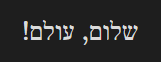
$\R{\text{שלום, עולם!}}$
Nesting LTR and math inside RTL
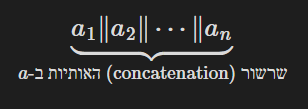
$$
\underbrace{a_1 \| a_2 \| \cdots \| a_n}_{
\R{\text{
שרשור
(\L{concatenation})
האותיות ב-$
a$}}}
$$
(line breaks for readability)
Manually installing the plugin
- Download the latest release from the release page
- Unzip & copy the files into your
.obsidian/plugins/rtl-math-textfolder - Enable the plugin from Obsidian settings
- Reload Obsidian or reopen your notes
Manually building the plugin
- Clone or download this repo
- Make sure your NodeJS is at least v16 (
node --version) npm ioryarnto install dependenciesnpm run buildfor production build (ornpm run devfor dev build in watch mode)- Copy
main.js,styles.css, andmanifest.jsoninto your.obsidian/plugins/rtl-math-textfolder
License
MIT