
README file from
GithubTodo.txt Mode for Obsidian
Todo.txt Mode is an Obsidian plugin that provides support for the todo.txt file format in Obsidian.
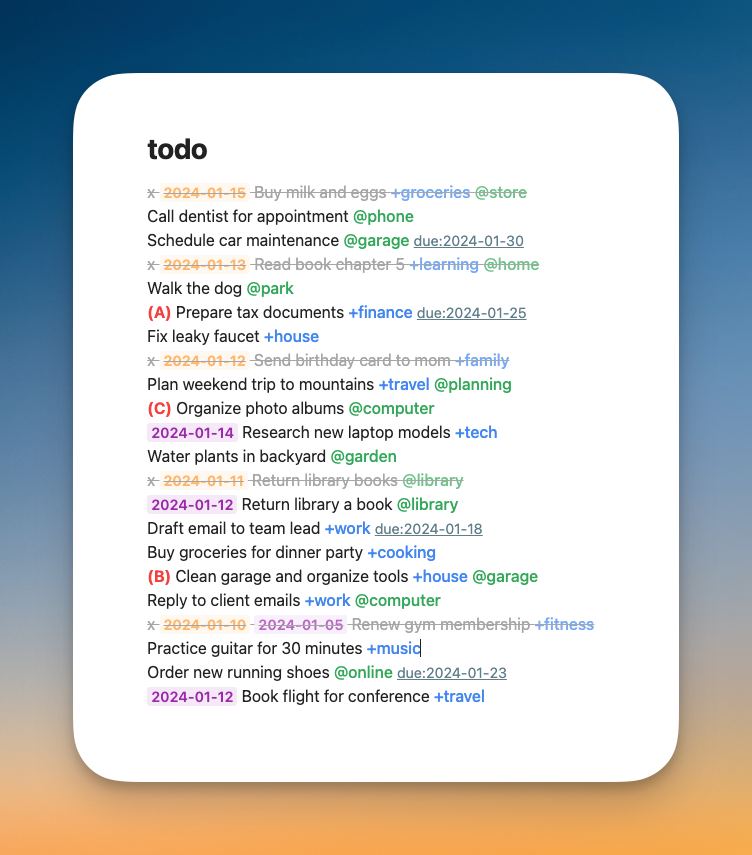
Features
-
Syntax Highlight:
- Automatic highlighting for todo.txt elements
- Completed tasks, project tags (
+project), context tags (@context), priority markers ((A),(B)), due dates (due:yyyy-mm-dd), recurring task markers (rec:d,rec:w,rec:m,rec:y)
- Completed tasks, project tags (
- Customize colors with the Style Settings Plugin
- Automatic highlighting for todo.txt elements
-
Automatic Completion Date:
- Automatically adds completion date when marking tasks as complete with
x
- Automatically adds completion date when marking tasks as complete with
-
Recurring tasks:
- Automatic recurring task generation using
rec:- attribute Intervals:
d(daily),b(business days),w(weekly),m(monthly),y(yearly)
- attribute Intervals:
- Numeric prefixes:
rec:3m(every 3 months) - Strict mode:
rec:+m(based on original due date)
- Automatic recurring task generation using
-
Task Management:
- Move completed tasks to done file
Todo.txt: Move completed tasks to done file
- Move completed tasks to done file
-
Task Sorting:
- Sort by priority, project, context, due date
Todo.txt: Sort by priority/project/context/due date
- Sort by priority, project, context, due date
About todo.txt format
Basic todo.txt format:
x 2023-05-08 Completed task +project @context
Today's task +work @office
(A) High priority task +project
A task with due:2023-05-15 date
Daily standup @work rec:d due:2023-05-08
Monthly review +personal rec:+m due:2023-05-01
Submit report @work rec:3b due:2023-05-12
Visit the official website for more details.