Virtual Linker / Glossary

by Valentin Schröter
5
4
3
2
1
Score: 48/100

Description

Category: Note Enhancements

The Virtual Linker / Glossary plugin allows you to automatically generate virtual links within your Obsidian notes that match with the titles or aliases of other notes in your vault. This feature enables you to create a glossary-like functionality, where you can quickly jump between related notes without having to manually link them. The plugin works seamlessly in both edit mode and read mode, ensuring that your links are always up-to-date. With its advanced settings, you can customize the linking behavior to suit your needs, including options for case sensitivity, multiple matching suppression, and part-word matching.

Reviews

No reviews yet.

Stats

214
stars
31,148
downloads
26
forks
673
days
478
days
478
days
21
total PRs
3
open PRs
5
closed PRs
13
merged PRs
100
total issues
52
open issues
48
closed issues
85
commits

Latest Version

a year ago

Changelog

What's Changed

New Contributors

Full Changelog: https://github.com/vschroeter/obsidian-virtual-linker/compare/1.5.1...1.5.2

README file from

Github

Buy Me a Coffee PayPal

Obsidian Virtual Linker Plugin (Glossary Plugin)

This plugin automatically generates virtual links for text within your notes that match with the titles or aliases of other notes in your vault.

Features:

  • create a glossary like functionality
  • works in edit mode and read mode
  • created links are always up to date
  • no manual linking necessary
  • works with aliases of notes
  • links do not appear in graph view & reference counting
  • updates the links automatically while you expand your vault or type new text
  • convert the virtual links to real links in the context menu

Usage demo (literally just typing text ;-): Demo
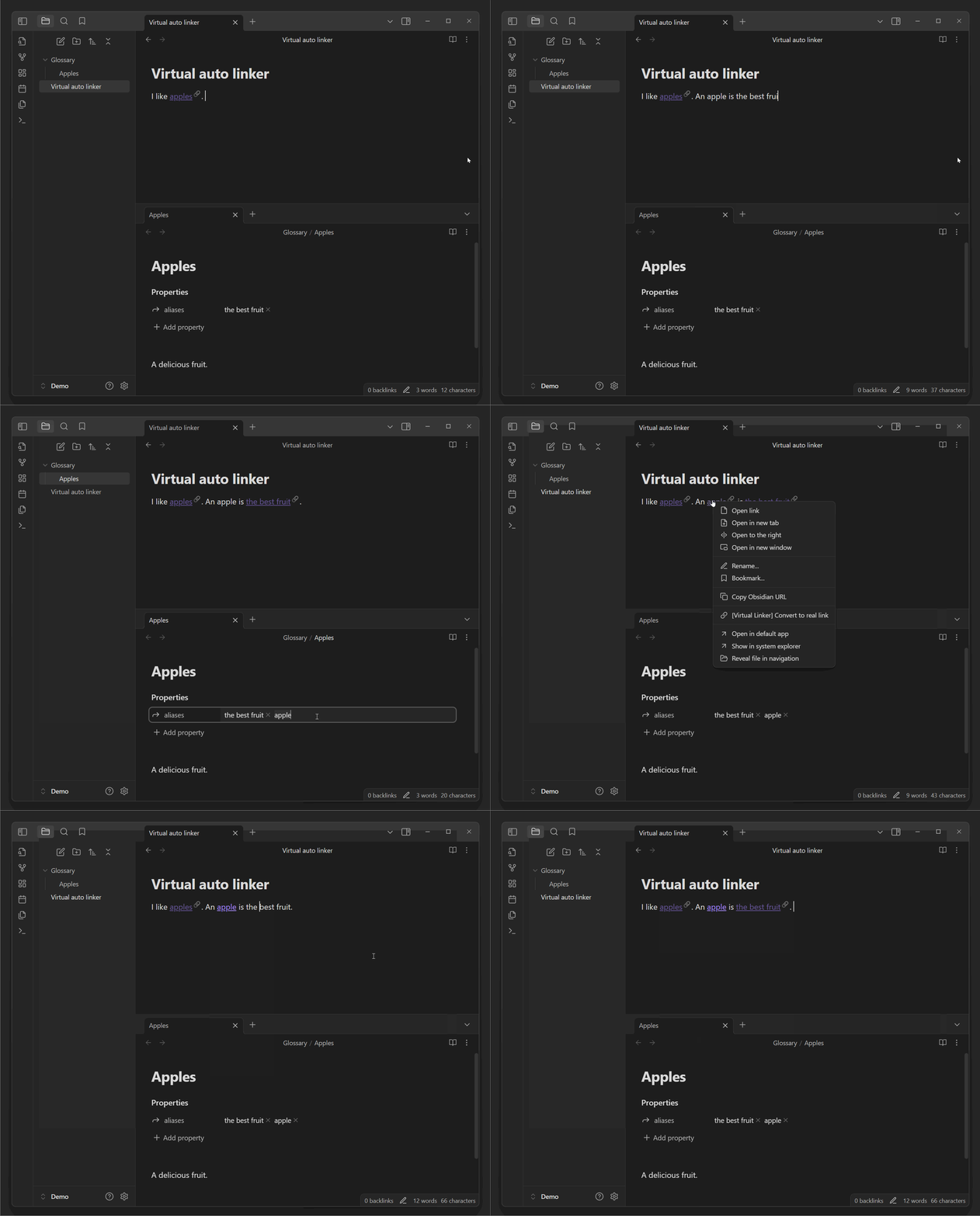
Usage

By default, the plugin will automatically link all notes of your vault. All occurrences of a note title or alias will be linked in your current note text. If you only want to include notes of a specific folder, you can define this folder in the settings.

[!Note] The auto generated links are post-processed, so they neither change your note text to hard-coded links enclosed in brackets not appear in the graph view or reference counting.

Installing the plugin

Inside obsidian, you can search for "Virtual Linker" in the community plugins tab. After installing, enable the plugin in the settings.

To manually install the plugin:

  • Copy over main.js & manifest.json (find them under Releases) to your vault VaultFolder/.obsidian/plugins/virtual-linker/.
  • or clone the repository into the plugins folder of your vault and build the plugin yourself.

Settings

Matched files

You can toggle the matching of files between:

  • "Match all files": All files in your vault are matched.
  • "Match only files in a specific folder": Only files in a specific folder are matched. You can specify the folder in the settings. This is useful if you want to only create virtual links to notes in a dedicated glossary directory.

Furthermore, you can explicitly include or exclude specific files from being matched, by adding a tag to the file. You can change the tag in the settings, by default it is:

  • linker-include to explicitly include a file
  • linker-exclude to explicitly exclude a file

You can also exclude all files in a specific folder by adding the folder to the exclude list in the settings.

[!Note] To include / exclude a file or folder, you can use the context menu on virtual links or in the file explorer.

Case sensitivity

You can toggle the case sensitivity of the matching. By default, the matching is case insensitive.

Often there are words with mainly capitalized letters, that should be matched case sensitive. By default, words with 75% or more capitalized letters are matched case sensitive. You can change this threshold in the settings.

You can also explicitly change the case sensitivity of a specific file by adding a tag to the file. You can change the tag in the settings, by default it is:

  • linker-match-case to make the matching case sensitive
  • linker-ignore-case to make the matching case insensitive

If you want to define the case sensitivity for specific aliases, you can define the frontmatter property lists in a note:

  • linker-match-case with a list of names that should be matched only case sensitive
  • linker-ignore-case with a list of names that should be matched case insensitive These property names can be changed in the settings.

Matching mode

By default, the plugin will suppress several identical virtual link in the same note. Furthermore, you can toggle to suppress the creation of virtual links to files, that are linked by real links in the current note.

Part matching

You can toggle the matching mode between:

  • "Matching only whole words": Only whole words are matched. E.g. "book" will not match "Notebook".
  • "Match also beginning of words": The beginning of a word is matched. E.g. "book" will not match "Notebook", but "Note" will match "Notebook".
  • "Matching any part of a word": Any part of a word is matched. E.g. "book" will match "Notebook".

You furthermore have the option to suppress the link suffix for these matches to avoid cluttering your text.

By default, links to a note itself are suppressed. This link suppression might be a bit buggy and not work in all cases, e.g. in preview windows. If you like self-links to the note itself, you can toggle this behavior in the settings.

By default, links are created directly as you type. You can disable links for the current line you are typing.

[!Note] Deactivating the link creation for the current line is recommended when using the plugin with IME (input method editor) for languages like Chinese or Japanese, as the plugin might otherwise interfere with the IME.

Any created virtual link will be appended with this suffix. This is useful to distinguish between real and virtual links. By default, the suffix is "🔗".

By default (and if the default styling is toggled on in the settings), the links appear a little bit darker than your normal links. You can turn off this default styling in the settings.

To apply custom styling to the links, you can add a CSS-snippet at VaultFolder/.obsidian/snippets/virtualLinks.css file.

/* Properties of the virtual link when not hovered */
.virtual-link.glossary-entry a {
    /* To have the normal text color when not hovered */
    color: inherit;

    /* Or add a color, e.g. red */
    /* color: red; */

    /* You can also change the underline of the link in thickness, color, and other properties */
    text-decoration-thickness: 1px;
    text-decoration-color: rgb(var(--color-purple-rgb), 0.6);
    text-underline-position: under;
    /* text-decoration-style: dotted; */
    /* text-underline-offset: 0em; */
}

/* Properties of the virtual link when hovered */
.virtual-link.glossary-entry a:hover {
    color: var(--link-color);
}

[!Note] If you want to apply custom styling, don't forget to turn off the "Apply default link styling" in the settings.

Commands

The plugin provides the following commands that you can use:

  • Convert All Virtual Links in Selection to Real Links: Converts all virtual links within the selected text to real links.
  • Activate Virtual Linker: Activates the virtual linker if it is currently deactivated.
  • Deactivate Virtual Linker: Deactivates the virtual linker if it is currently activated.

You can access these commands from the command palette or assign custom hotkeys to them in the settings.

Context Menu Options

When right-clicking on a virtual link, the following options are available in the context menu:

  • Convert to real link: Converts the selected virtual link to a real link.
  • Exclude this file: Adds the linker-exclude tag to the file, preventing it from being matched by the virtual linker.
  • Include this file: Adds the linker-include tag to the file, ensuring it is matched by the virtual linker.

How to use for development

  • Clone this repo (into your-vault/.obsidian/plugins/).
  • yarn to install dependencies
  • yarn dev to start compilation in watch mode.
  • yarn build to compile your main.ts into main.js.

It is recommended to use the Hot Reload Plugin for development.

Similar Plugins

info
• Similar plugins are suggested based on the common tags between the plugins.
Link Favicons
4 years ago by Johannes Theiner
See the favicon for a linked website.
Insert Heading Link
4 years ago by Signynt
Add a Link to a Heading.
Link Embed
4 years ago by SErAphLi
This plugin allow you to convert URLs in your notes into embeded previews.
Auto Card Link
4 years ago by Nekoshita Yuki
Linkify
4 years ago by Matthew Chan
Zotero Link
4 years ago by Shmavon Gazanchyan
Obsidian plugin to insert link to Zotero item
Metadata Menu
4 years ago by mdelobelle
For data management enthusiasts : type and manage the metadata of your notes.
URL Namer
4 years ago by zfei
Update Relative Links
4 years ago by val
Account Linker
4 years ago by qwegat
Plugin for posting links to various SNS accounts on Obsidian
Auto Glossary
3 years ago by Ennio Italiano
Obsidian plugin that allows user to create a glossary of notes or a MOC from a selected folder.
External Link Opener
3 years ago by zorazrr
Obsidian plugin to open external links in modals or tabs
External Link Helper
3 years ago by Jhonghee Park
Obsidian plugin for link suggestion
Boost Link Suggestions
3 years ago by Jacob Levernier
An Obsidian (https://obsidian.md) plugin for altering the order of inline link suggestions by link count and manual boosts.
Short Internal Links to Headings
3 years ago by Scott Moore
An Obsidian plugin to display short internal links.
Pending notes
3 years ago by Ulises Santana
Obsidian plugin for searching links without notes in your vault.
Link Exploder
3 years ago by Ben Hughes
Testing Vault
3 years ago by Michael Pedersen
Bulk open selected links
3 years ago by Steven Jin
This plugin would work by extending Obsidian's functionality to detect when multiple notes or files are being dragged onto its interface
Links
3 years ago by MiiKey
manipulate & manage obisidian links
Persistent Links
3 years ago by Ivan Lednev
More robust internal links for Obsidian!
Canvas Links
3 years ago by aqav
Show the links between "Canvas" and "File"
Shukuchi
3 years ago by tadashi-aikawa
Shukuchi is an Obsidian plugin that enables you to teleport to links (URL or internal link).
Markdown Link Space Encoder
3 years ago by Ron Kosova
Obsidian plugin to automatically encode spaces to %20 in Markdown-style links
LinkShelf
3 years ago by Joel Sequeira
Effortlessly save and organize your web links in Obsidian
Nifty Links
3 years ago by x-Ai
Generating elegant, Notion-styled rich link cards to enhance your note-taking experience.
2Hop Links Plus
3 years ago by Tokuhiro Matsuno, L7Cy
Related links up to 2 hops away are displayed in a card format.
Just Share Please
3 years ago by Ellpeck
An Obsidian plugin that allows quickly and easily sharing individual notes online using an anonymized link
Next Link
3 years ago by Juan Luque
Enhance YouTube Links
3 years ago by GitSum
Take a YouTube link and get the title and optionally channel name, channel URL, and thumbnailURL.
Timestamp Link
2 years ago by wenlzhang
An Obsidian plugin to copy timestamped links to blocks, headings and notes.
Note Batcher
2 years ago by MrAnyx
Create all unresolvered links with a single click on your Obsidian vault
Paste Link
2 years ago by Jose Elias Alvarez
Intelligently paste Markdown links in Obsidian.
Spotify Links
2 years ago by Dillon Cutaiar
For those that get inspired to write by music, a small plugin connecting Spotify to Obsidian.md
Canvas Link Optimizer
2 years ago by khaelar
An Obsidian plugin that optimizes canvas links by displaying a page thumbnail.
Tag Links
2 years ago by Zacchary Dempsey-Plante
A plugin for Obsidian that allows tags to be opened as links using a hotkey.
Alias Picker
2 years ago by rostunic
mpv links
2 years ago by patsh90
Obisidian plugin for creating and using video links
Better Markdown Links
2 years ago by mnaoumov
Obsidian plugin that adds support for angle bracket links and manages relative links properly
Text expand
6 years ago by MrJackphil
A simple text expand plugin for Obsidian.md
Jump to link
6 years ago by MrJackphil
Quick jump between links using hotkeys
Find orphaned files and broken links
5 years ago by Vinzent
Find files, which are nowhere linked, so they are maybe lost in your vault.
Consistent attachments and links
5 years ago by Dmitry Savosh
Obsidian plugin. Move note with attachments.
Buttons
5 years ago by Sam Morrison
Buttons in Obsidian
Auto Link Title
5 years ago by Matt Furden
Automatically fetch the titles of pasted links
2Hop Links
5 years ago by Tokuhiro Matsuno
Open Link With
5 years ago by MamoruDS
Open external link with specific brower in Obsidian
Breadcrumbs
5 years ago by SkepticMystic
Add typed-links to your Obsidian notes
Rich Links
5 years ago by dhamaniasad
Hover External Link
5 years ago by Jamie Brynes
Small plugin to add tooltips on hovering external links
Better File Link
5 years ago by Marc Julian Schwarz
A plugin for the note taking app Obsidian to add better external file links to your notes.
Link Converter
5 years ago by Ozan Tellioglu
Obsidian Plugin to scan all your links in your vault and convert them to your desired format.
Link Archive
5 years ago by Tamás Deme
Link Archive plugin for Obsidian
Publish and GitHub URL
4 years ago by kometenstaub
Copy or open the Obsidian Publish URL of a note. You can also open its Git commit history on GitHub.
Link Navigation
2 years ago by xRyul
Navigate between incoming links (inlinks), outgoing links (outlinks) N levels deep. Links from Canvas are also supported.
Modal Opener
2 years ago by Muuxi
Open files and links in modal windows, or create and edit compatible files in modal windows.
Link Preview
a year ago by Felipe Tappata
Obsidian plugin that previews external links on hover.
Abbrlink
a year ago by Q78KG
Share as ZIP
a year ago by Till Friebe
New Note Fixer
a year ago by mnaoumov
Obsidian Plugin that unifies the way non-existing notes are created when clicking on their links
Title As Link Text
a year ago by Lex Toumbourou
An Obsidian plugin to set the Link Text using the document title
Node Factor
a year ago by CalfMoon
Customize factors effecting node size in obsidian graph.
Alpha Bullet
10 months ago by Mara-Li
Obsidian plugin that sorts bulleted lists alphabetically.
Ghost Text
8 months ago by lawrencefeng17
GH Links Shortener
6 months ago by David Barnett
Obsidian plugin to set shortened link text for pasted GitHub URLs