
README file from
GithubWater Tracker plugin
Overview
The purpose of this Obsidian plugin is to help you keep track of how much water you drink on a daily basis. The plugin is customisable through a number of configurations, but mainly these are related to the size of the device used to drink and where to save the amount you drink.
Features
- By means of a specific command or by clicking on an icon in the ribbon bar (if enabled and customisable), it is possible to increase the water-drinking counter
- The size of the glass/cup/whatever can be used for drinking can be specified in the given configuration
- You can choose where to save the total amount of water drunk:
- Using a property with the total count in the current file
- Using a property with the total count in the daily file
- Adding a drink event log to the current file
- Adding a drink-related event log to the daily file
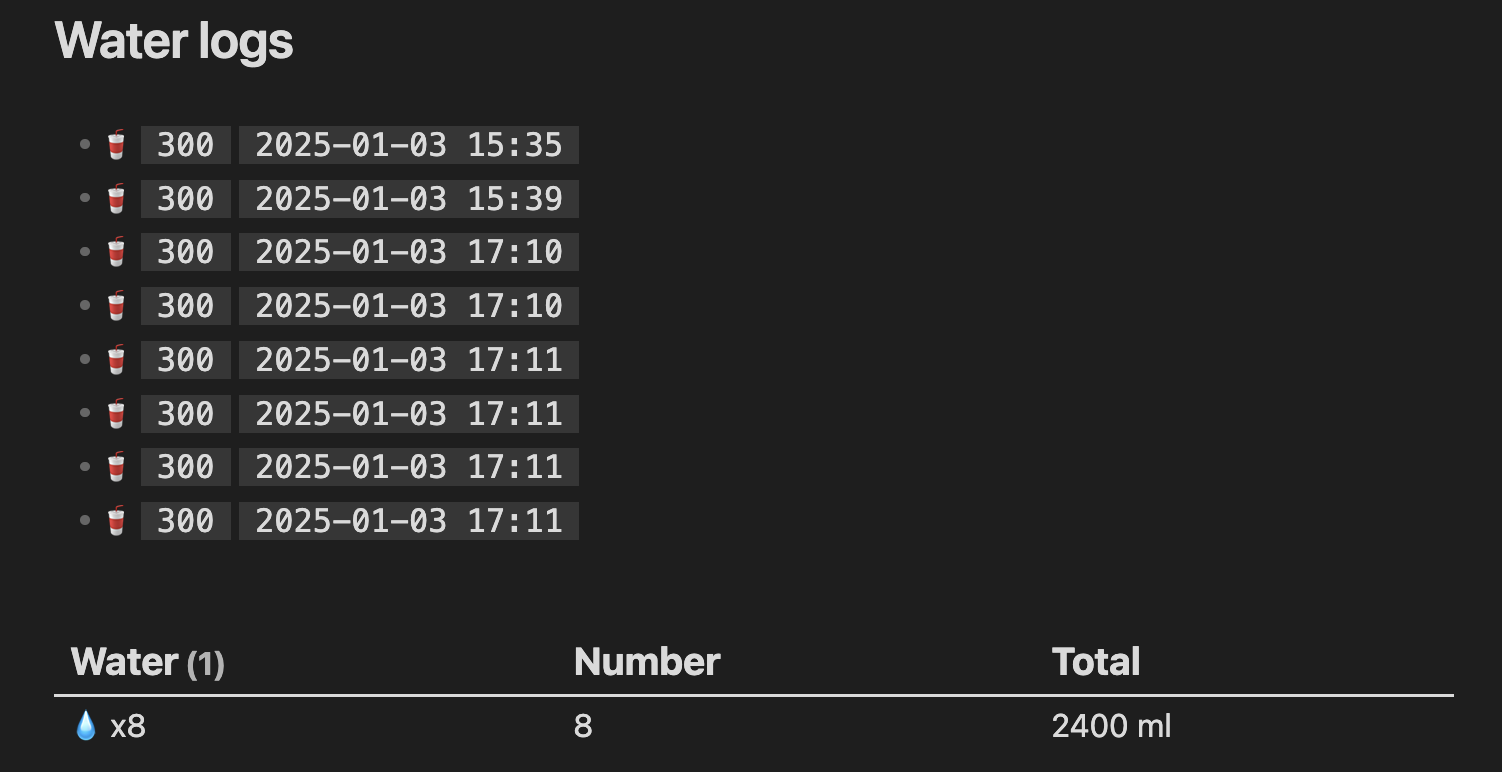
If the storage method used is log file, the logs can be summirized by using dataviewjs like this:
const file = dv.current();

// Check if the file exists for today
if (file && file.file.lists) {
    const emoji = "💧";

    // Create a table to display total water drunk today
    dv.table(
        ["Water", "Number", "Total"],
        file.file.lists
            .filter((item) => item.time && item.water !== undefined) // Ensure items have time and water defined
            .groupBy((item) => {
                const date = item.time.length >= 10 ? item.time.substring(0, 10) : "Unknown Date";
                return date;
            })
            .map((group) => {
                const waterCount = group.rows.length;
                let sum = 0;

                // Sum up the water
                group.rows.forEach((row) => {
                    if (typeof row.water === "number") sum += row.water; // Ensure water is numeric
                });

                // Display water consumption
                const waterDisplay = waterCount > 5 ? `${emoji} x${waterCount}` : emoji.repeat(waterCount);

                return [waterDisplay, waterCount, `${sum} ml`];
            })
    );
} else {
    dv.paragraph("No water found for today.");
}
resulting in:
Contributing
Contributions are welcome! Feel free to submit a pull request or report issues.
- Fork this repository.
- Create a branch (
git checkout -b feature/your-feature). - Commit your changes (
git commit -am 'Add your feature'). - Push to the branch (
git push origin feature/your-feature). - Open a pull request.
How to run
- Clone this repo.
- Make sure your NodeJS is at least v16 (
node --version). npm ioryarnto install dependencies.npm run devto start compilation in watch mode.
License
This project is licensed under the MIT License. See the LICENSE file for details.
If you encounter any bugs or have suggestions for new features, feel free to open an issue or contribute!