
README file from
GithubWord Count Heatmap
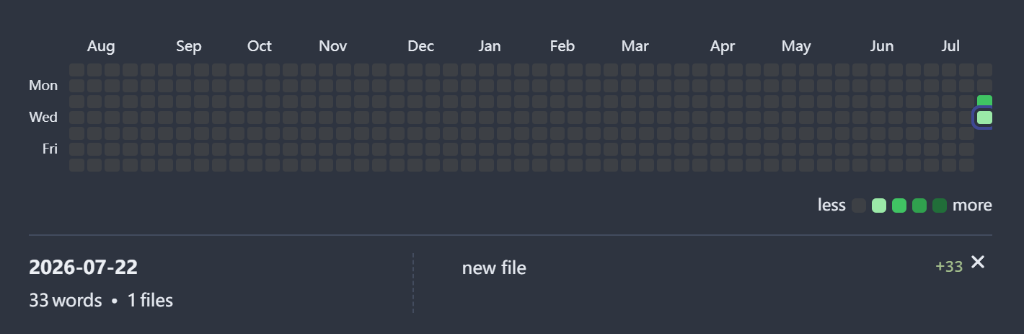
An Obsidian plugin that visualizes your daily writing productivity with a GitHub-style word or character count heatmap.
Features
- GitHub-Style Heatmap: Visualizes your daily word or character counts over a custom date range (e.g., last 30 days, 365 days, or a fixed year).
- Interactive Details Panel: Click any day in the heatmap to inspect the breakdown of words written, including which files were edited and how many words were added to each.
- Customizable Color Thresholds: Define your own color shading intervals (steps 1 to 3) in the settings menu to match your writing goals.
- Flexible Exclusions: Exclude specific folders from being tracked in your word counts.
- Multilingual Support: Supports English and Chinese UI, seamlessly adapting to your Obsidian system locale.
- Toggleable Metrics: Choose between tracking word count (for English) or character count (recommended for Chinese).
Usage
Method 1: Command Palette (Ctrl/Cmd + P)
- Open the Command Palette using
Ctrl + P(Windows/Linux) orCmd + P(macOS). - Type and select
Word Count Heatmap: Insert Word Heatmap(or插入字数热力图in Chinese environment). - The plugin will automatically insert a code block at your current cursor position:
```word-heatmap
```
Method 2: Manual Code Block Insertion
Simply insert the following code block in any note to render the heatmap:
```word-heatmap
```
You can configure the heatmap directly by clicking the Set (settings) button in the upper-right corner of the rendered block, or by defining config parameters inline using YAML.
Settings
Access the plugin configuration modal via the gear icon on the heatmap block to customize:
- Basic Settings: Title, Language, Date Range, Start of Week.
- Metrics & Filters: Word/Character Count tracking, folder exclusions, and details retention policy.
- Style & Layout: Themes and grid layout behavior.
- Color Shading Intervals: Set the specific count thresholds for each color intensity level (Light → Medium-Light → Medium-Dark → Darkest).
Installation
From Community Plugins
- Open Obsidian settings.
- Go to Community plugins -> Browse.
- Search for
Word Count Heatmap. - Click Install, then Enable.
Via BRAT (Beta Reviewer's Auto-update Tool)
- Install the BRAT plugin from the community plugin store and enable it.
- Open Obsidian settings and find BRAT in the sidebar.
- Click Add Beta plugin.
- Enter the GitHub repository URL:
https://github.com/AshenAshes/word-count-heatmap. - Click Add Plugin, then enable
Word Count Heatmapunder Community plugins settings.
Manual Installation
- Download
main.js,manifest.json, andstyles.cssfrom the releases. - Create a folder named
obsidian-word-heatmapunder your vault's.obsidian/plugins/directory. - Copy the downloaded files into that folder.
- Reload Obsidian and enable the plugin in the Community plugins settings.
License
This project is licensed under the MIT License.