Yearly Glance

by Moy & RavenHogWarts
5
4
3
2
1
Score: 48/100

Description

The Yearly Glance plugin offers a clean, interactive calendar interface to track and manage key dates across the entire year. It supports multiple event types like birthdays, holidays, and custom entries, all shown in a single view. With options for classic or list layouts, users can filter events, hide empty days, and customise appearance using colors and emojis. Each event is clickable, allowing quick edits or detailed views. It also includes birthday attributes like age and zodiac, and provides support for lunar calendar formats. Designed for flexibility, the plugin makes annual planning and review both visual and efficient, especially for users who prefer a bird's eye view of their timelines.

Reviews

No reviews yet.

Stats

71
stars
9,315
downloads
6
forks
331
days
2
days
261
days
59
total PRs
1
open PRs
5
closed PRs
53
merged PRs
56
total issues
13
open issues
43
closed issues
0
commits

Latest Version

9 months ago

Changelog

🎉 This is a stable release

Version: 3.2.0

English Changelog | 中文更新日志

English Changelog

Changes

♻️ Refactor

  • Remove the old event management view, add an overview management view (#100) (9a9954a), closes #100

✨ Features

  • Support Ctrl+Enter / Cmd+Enter shortcut to submit form (#99) (92b204e), closes #99
  • Support for event import and export (#86) (b8619b7), closes #86

Installation

  1. Download yearly-glance.zip
  2. Unzip it to your Obsidian vault's plugins folder: <vault>/.obsidian/plugins/yearly-glance/
  3. Reload Obsidian
  4. Enable yearly-glance plugin in settings

中文更新日志

更新内容

♻️ 重构

  • 移除旧事件管理视图,新增总览管理视图 (#100) (9a9954a), closes #100

✨ 新功能

  • 支持 Ctrl+Enter / Cmd+Enter 快捷键提交表单 (#99) (92b204e), closes #99
  • 支持事件的导入导出 (#86) (b8619b7), closes #86

如何安装

  1. 下载 yearly-glance.zip 压缩文件
  2. 解压到你的 Obsidian 库的插件文件夹内: <vault>/.obsidian/plugins/yearly-glance/
  3. 重启 Obsidian
  4. 在设置中启用 yearly-glance 插件

README file from

Github

Yearly Glance - All the moments, at a glance

English | 中文文档

GitHub stars Total Downloads GitHub Issues GitHub Last Commit

Yearly Glance is an Obsidian plugin that provides a visual and customizable overview of annual events, helping you efficiently plan, review, and manage important dates throughout the year.
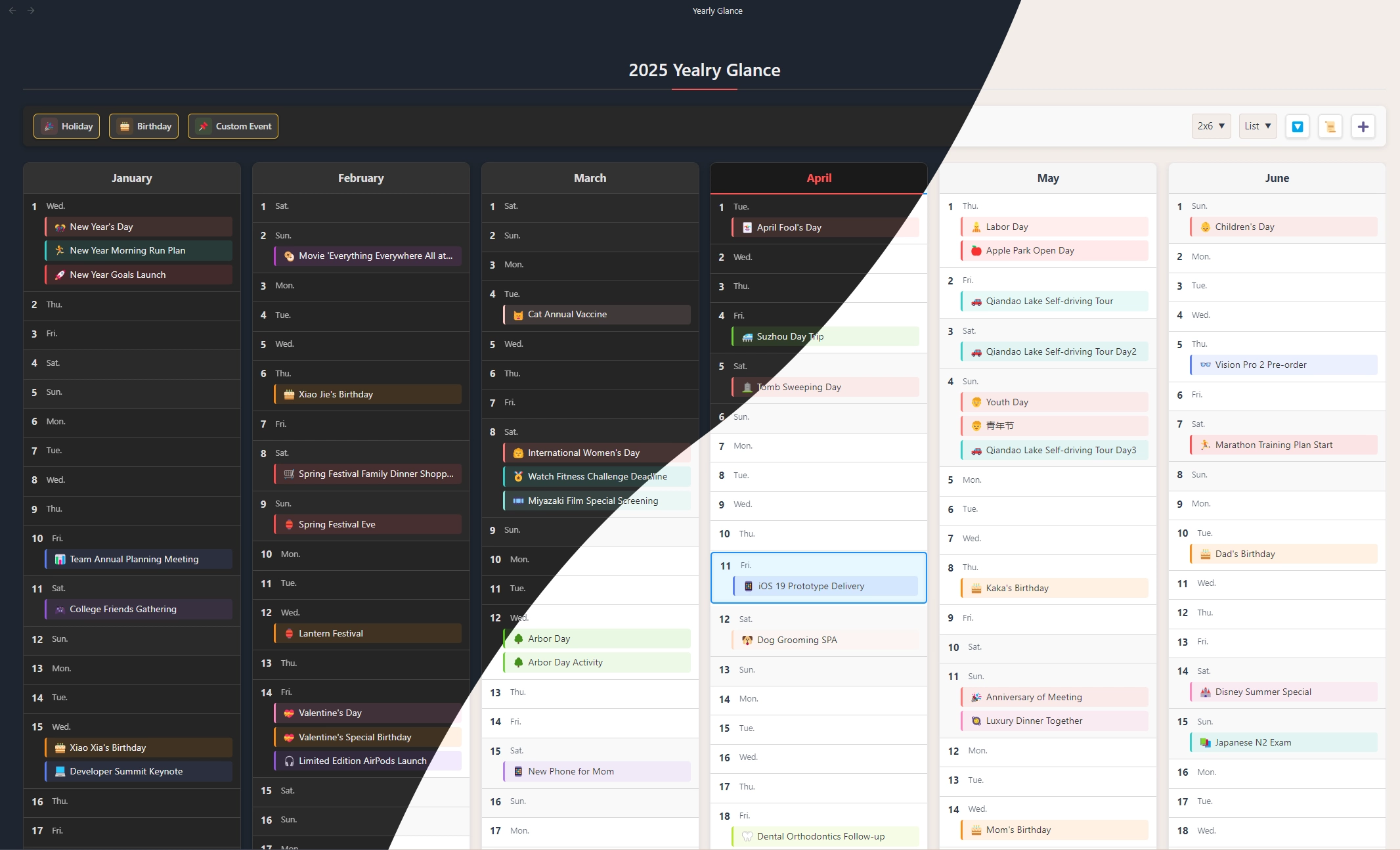
preview


Table of Contents

Features

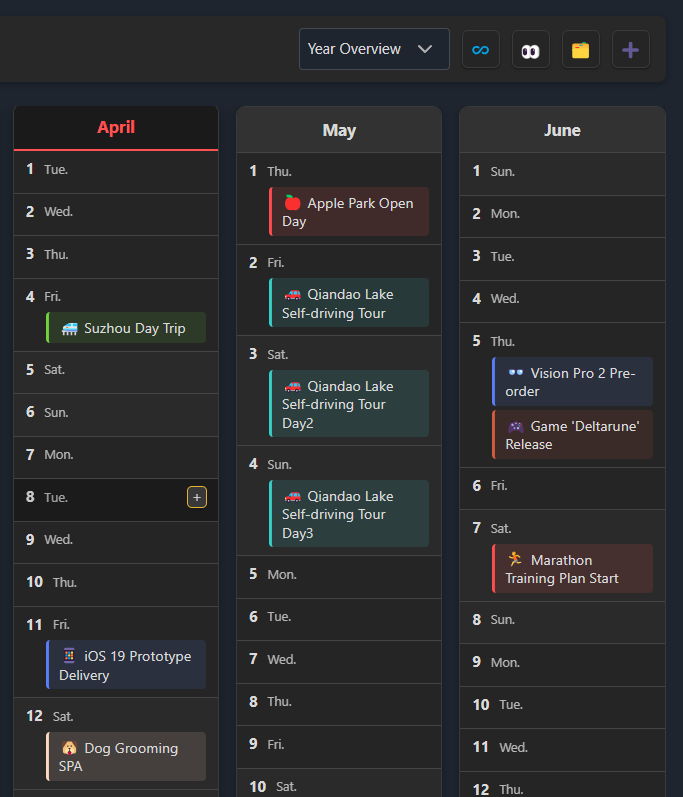
  • 🗓️ Yearly Calendar View: See all months and days of the year at a glance, making annual planning effortless.
  • 🎉 Multiple Event Types: Supports holidays, birthdays, and fully customizable events.
  • 🎂 Birthday Management: Track birthdays with age, zodiac, and other attributes.
  • 🎨 Highly Customizable: Choose from various layouts and display styles; personalize with custom colors and emojis.
  • 🖱️ Interactive Interface: Click any event to view details or edit quickly.
  • 🔍 Event Filtering: Filter by event type and hide empty dates for a cleaner view.
  • 🌙 Lunar Calendar Support: Natively supports the traditional Chinese lunar calendar.
  • 🌏 Multi-language Support: English and Chinese (Both simplified and traditional) available.
  • 📄 Note Events: Use notes with frontmatter properties as event sources, with Bases integration for advanced filtering. Learn more

Screenshots

Customizable List View

details

Display and manage events in a flexible list format.

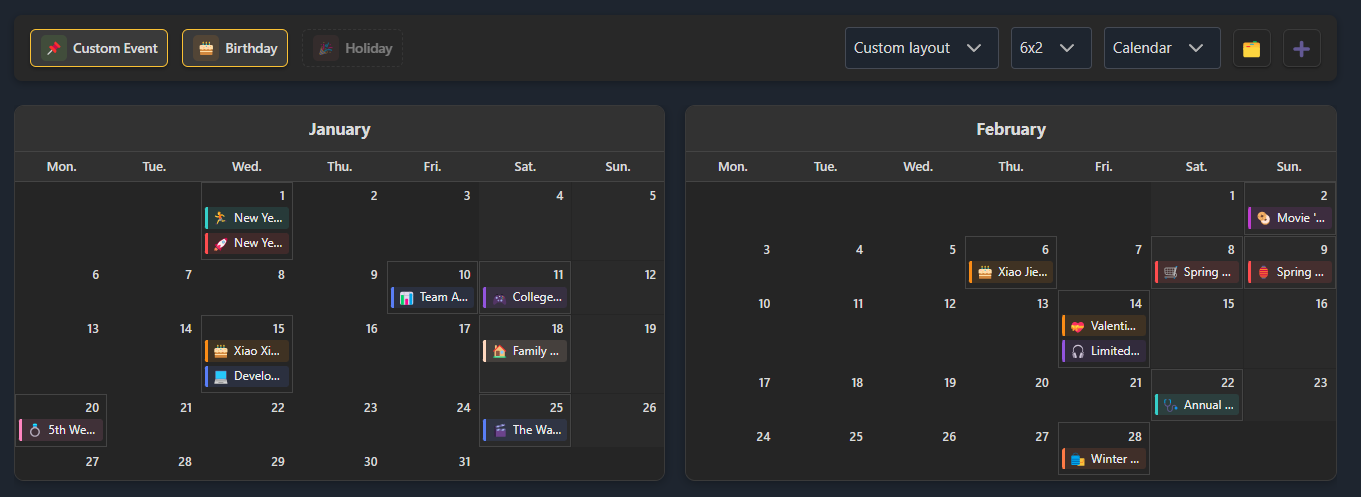
Classic Calendar View
calendar

Traditional calendar layout for intuitive navigation.

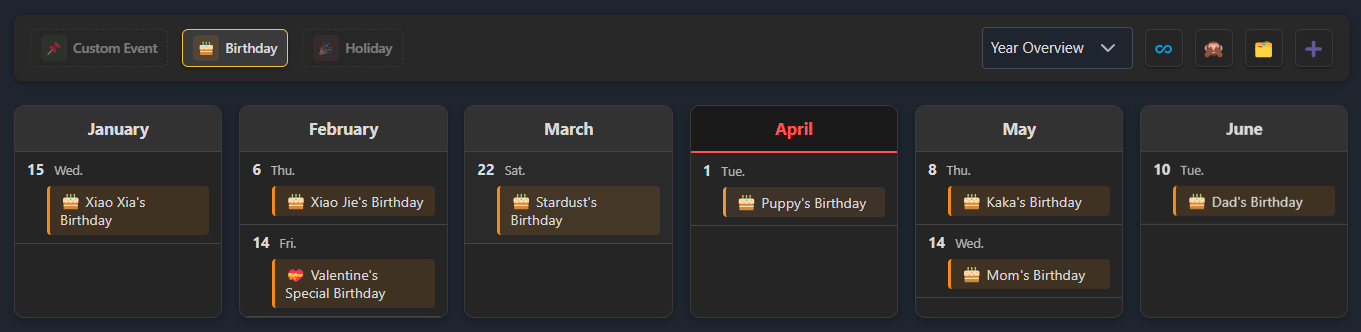
Event Filtering
filter

Filter by event type and hide dates with no events.

View & Edit Event Details
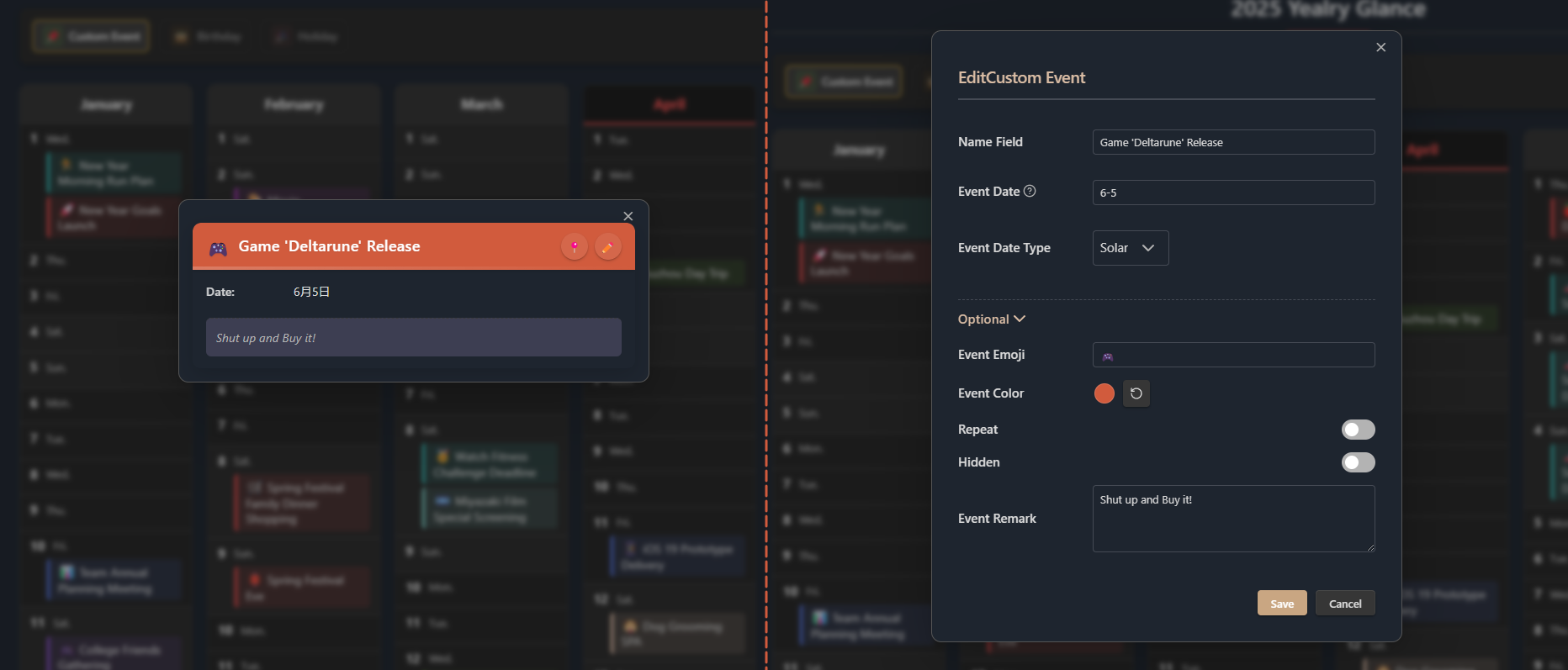
view-and-edit

Quickly view and edit event details in a modal.

Getting Started

1. Open Yearly Glance

  • Click the 🔭 telescope icon in the left sidebar
  • Or use the command palette (Ctrl+P) to search for "Open Yearly Glance"
  • Or use keyboard shortcuts (if configured)

2. View Events

  • Different colors represent different event types on the calendar
  • Click an event to see details
  • Click the 🗂️ Manage button to open the Events Manager and view all events

3. Add Events

  • Open the Events Manager via the command palette and click the ➕ Add button
  • Or, hover over a date and click the + button
  • Or, select "Add Event" in the command palette

4. Manage Events

  • Open the Events Manager from the command palette
  • Pin events from the details modal to locate them in the Events Manager
  • Edit: Click the ✏️ Edit button on an event (in manager or detail modal), modify info and save
  • Delete: Click the 🗑️ Trash button on an event in the Events Manager
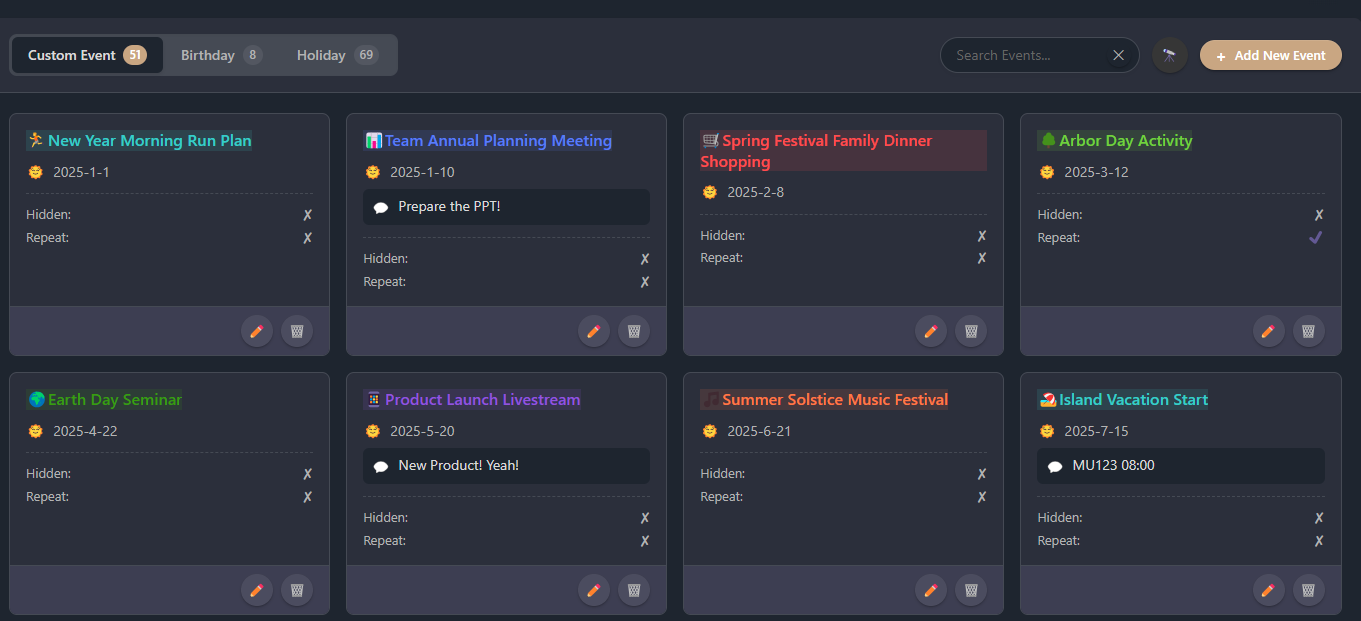
Event Management Centralized event management interface.

Customization Settings

display

At the top of the overview, there are several display options:

  • Show/hide holidays, birthdays, and custom events
  • Switch between Yearly Overview (recommended), Classic Calendar, or Custom View
  • List View only:
    • Limit the list height
    • Hide dates with no events

More settings are available in the plugin settings within Obsidian.
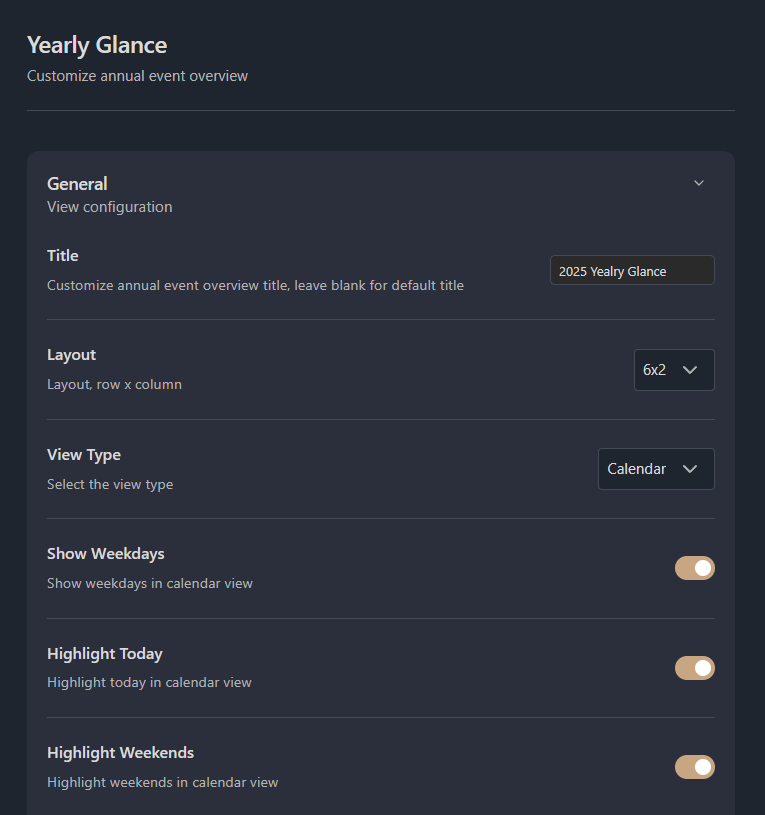
settings

Installation

Manual Installation

  1. Download the yearly-glance.zip from the latest release
  2. Unzip it to your vault's plugins folder: <your-vault>/.obsidian/plugins/yearly-glance/
    • Tip: You can find your vault path in Obsidian's vault settings.
  3. Reload Obsidian
  4. Enable Yearly Glance in Settings → Community Plugins
  1. Install the BRAT plugin
  2. Click "Add Beta plugin" in BRAT settings
  3. Enter Moyf/yearly-glance
  4. Enable the plugin

Development

  1. Clone this repo
  2. Ensure NodeJS version is at least v18 (node --version)
  3. Install dependencies: npm i or yarn
  4. Start compilation in watch mode: npm run dev
  5. Build the plugin: npm run build
  6. Build and copy to your vault (requires .env file in project root with VAULT_PATH=/path/to/your/vault): npm run build:local
  7. Bump version and update manifests: npm run version
  8. Release new version: npm run release

Support

If you encounter any issues or have suggestions:

License

This project is licensed under the MIT License. See the LICENSE file for details.

Star History

Star History Chart

If you like this plugin, please consider star it! 🌟

Similar Plugins

info
• Similar plugins are suggested based on the common tags between the plugins.
Calendar
6 years ago by Liam Cain
Simple calendar widget for Obsidian.
Google Calendar
4 years ago by YukiGasai
Add Google Calendar inside Obsidian
Calendarium
2 years ago by Jeremy Valentine
The ultimate Obsidian plugin for crafting mind-bending fantasy and sci-fi calendars
Heatmap Calendar
4 years ago by Richard Slettevoll
An Obsidian plugin for displaying data in a calendar similar to the github activity calendar
Journals
2 years ago by Sergii Kostyrko
Tasks Calendar Wrapper
3 years ago by zhuwenq
This plugin currently provides a timeline view to display your tasks from your obsidian valut, with customizable filters and renderring options.
Calendar Bases
2 months ago by Edrick Leong
Adds a calendar layout to bases so you can display notes with dates in an interactive calendar view.
Time Ruler
3 years ago by Joshua Tazman Reinier
A drag-and-drop time ruler combining the best of a task list and a calendar view (integrates with Tasks, Full Calendar, and Dataview).
Big Calendar
4 years ago by Boninall
Big Calendar in Obsidian, for manage your events in a day/week/month and see agenda too!
Heatmap Tracker
a year ago by Maksim Rubanau
A customizable heatmap tracker plugin for Obsidian to visualize daily data trends with intuitive navigation and flexible settings.
ICS
3 years ago by muness
Generate Daily Planner from one or more ical feeds
OZ Calendar
3 years ago by Ozan Tellioglu
Jump-to-Date
5 years ago by TfTHacker
Jump to a date via a convenient popup form. This plugin is a part of the Obsidian42 family of Obsidian plugins.
Daily notes calendar
a year ago by bartkessels
Quickly navigate your vault using a calendar view, this plugin allows you to create and navigate to periodic notes and notes that are created on a specific date.
Date Inserter
2 years ago by namikaze-40p
An Obsidian plugin that lets you insert a date at the cursor position using a calendar.
iCal
2 years ago by Andrew Brereton
This is a plugin for Obsidian that searches your vault for tasks that contain dates, and generates a calendar in iCal format that can be imported into your preferred calendar application.
Chinese Calendar
2 years ago by DevilRoshan
在obsidian中使用的更符合中国习惯的日历插件。
Dust Calendar
2 years ago by 纳米级尘埃
obsidian 日历插件
Morgen Tasks
2 years ago by Morgen AG
Outlook Meeting Notes
a year ago by David Ingerslev
An Obsidian plugin to create meeting notes from Microsoft Outlook .msg files
Habit Calendar
3 years ago by Hedonihilist
Monthly Habit Calendar for DataviewJS. This plugin helps you render a calendar inside DataviewJS code block, showing your habit status within a month.
Itinerary
5 years ago by Adam Coddington
Make planning your trip or event easier by rendering a calendar from event information found in your notes.
Diarian
2 years ago by Erika Gozar
All-in-one journaling toolkit.
Datepicker
2 years ago by Mostafa Mohamed
Datepicker widget for Obsidian.
Persian Calendar
2 years ago by Hossein Maleknejad
Persian Calendar for Obsidian.md
MagicCalendar
3 years ago by Vaccarini Lorenzo
An obsidian plugin that exploit a natural language processing engine to find potential events and sync them with iCalendar
Single File Daily Notes
2 years ago by Pranav Mangal
An Obsidian plugin to create and manage daily notes in a single file
Daily Statistics
2 years ago by yefengr
obsidian daily statistics
Lunar Calendar
3 years ago by OSmile
obsidian插件,一个支持农历的日历插件。
Obsidian Attendance
4 years ago by Tiim
Attendance tracking using obsidian.md
MemoChron
a year ago by Michalis Efstratiadis
Calendar integration and note creation with support for public iCalendar URLs.
Daily Routine
a year ago by sechan100
new version of daily-routine obsidian plugin
Calendar Event Sync
2 years ago by Stephen Dolan
Set the title of your note to the current event
Every Day Calendar
a year ago by QuBe
Obsidian plugin to create calendars inspired by Simone Giertz's Every Day Calendar
Life in Weeks Calendar
6 months ago by Jeff Szuc
Plugin for the Obsidian markdown editor. Displays a calendar of your life in weeks with weekly Periodic Notes plugin integration. Includes options for the traditional Memento Mori/Stoic style calendar, as well as a Gregorian calendar accurate version.
Markdown Calendar Generator
10 months ago by Zach Russell
An intentionally simple obsidian markdown table calendar generator
Synaptic View
2 months ago by Yongmini
A dynamic control center for your vault. Unify hubs, notes, tasks, periodic notes, and web resources with intuitive buttons. Replace new tab for instant access.