Animated Cursor

by Kotaindah55
5
4
3
2
1
Score: 44/100

Description

The Animated Cursor plugin adds smooth motion and blinking animations to the text cursor, bringing a subtle yet polished effect while navigating and editing notes. It supports multi-cursor setups and works consistently across page previews and canvas. Users can adjust speed, blink duration, and enable infinite blinking through the Style Settings plugin.

Reviews

No reviews yet.

Stats

18
stars
4,573
downloads
4
forks
302
days
281
days
292
days
0
total PRs
0
open PRs
0
closed PRs
0
merged PRs
5
total issues
2
open issues
3
closed issues
0
commits

Latest Version

10 months ago

Changelog

Improvement

Backward compatibility support up to Obsidian 1.6.7. Solve #3.

Thanks to @shuxueshuxue for the notice and the test.

README file from

Github

Animated Cursor - Obsdian Plugin

latest-version current-downloads current-stars open-issues

Give your cursor a simple, yet smooth, move animation. Inspired by Microsoft Office and VSCode smooth cursor.
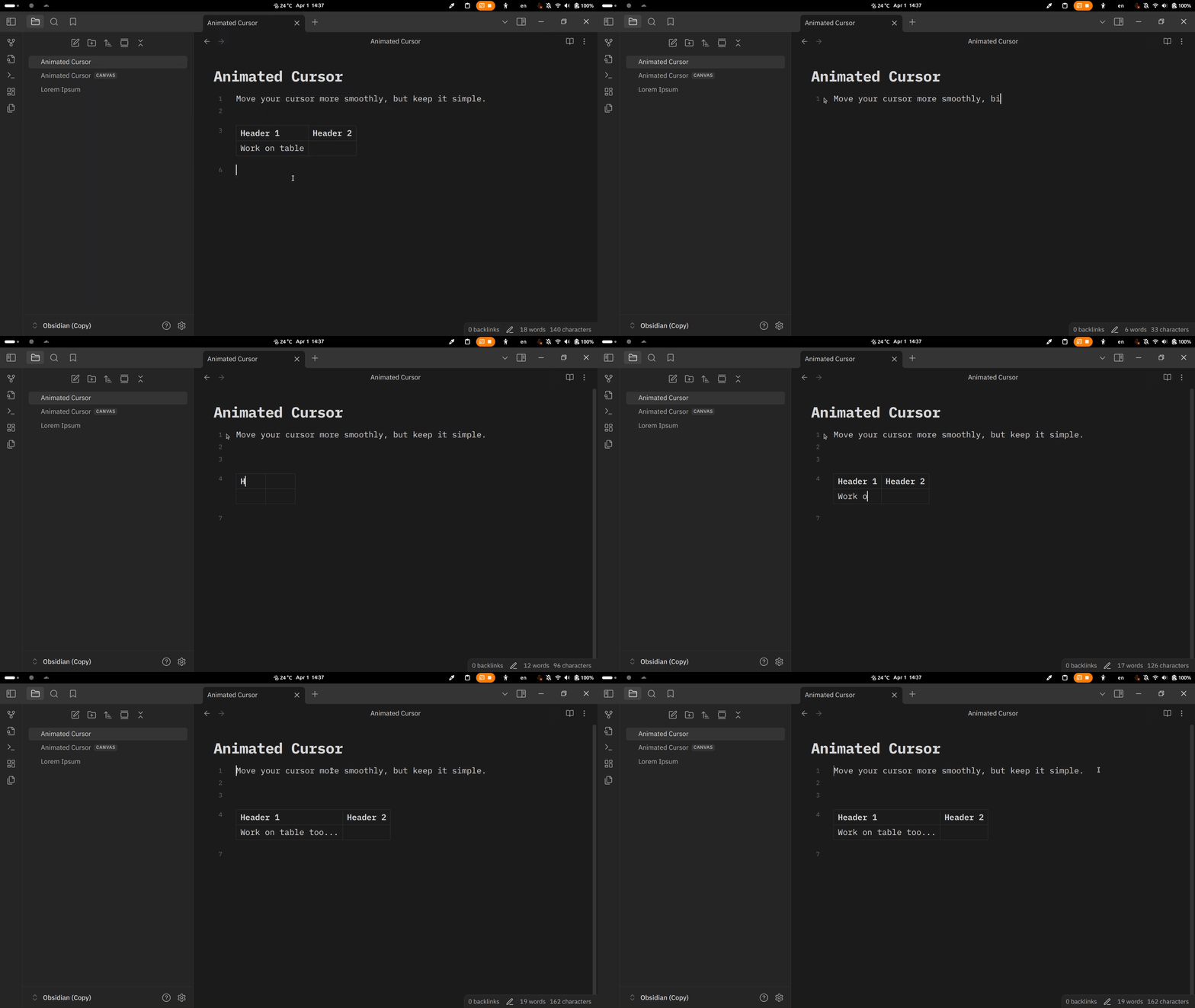
animated-cursor.gif

[!WARNING]

Read caveat section below before installing this plugin!

🚀 Features

  • Move and blink animation for the cursor.
  • Work on both hovering page preview and canvas.
  • Support multi-cursor.
  • Adjustable cursor speed and blink duration (via Style Settings plugin).

🎨 What makes it different?

  • Works as native cursor. This plugin patch existing Obsidian cursor, avoiding any unintended calculations. The same plugin before creates another cursor instance, yet still let Obsidian calculate its own cursor.
  • Hardly relies on CodeMirror API. It's the secret of the consistency of the cursor behavior. Thus, it doesn't face any meaningful problems with multi-cursor, canvas, etc.

📦 Installation

  • Manual
    • Create a folder named animated-cursor under YOUR_VAULT_NAME/.obsidian/plugins.
    • Place manifest.json, main.js, and style.css from the latest release into the folder.
    • Enable it through the "Community plugin" setting tab.
  • In-app
    • Open settings.
    • Choose "Community plugins" setting tab.
    • Turn off "Restricted mode" if it was enabled before.
    • Click "Browse" at "Community plugins" item.
    • Type "Animated Cursor" in the search box.
    • Install and enable it.
  • Using BRAT.

✍️ Usage

Simply move the cursor by pressing arrow keys, clicking or dragging using your mouse. The cursor will stop blinking while it's moving.

⚙️ Adjustment

Via Style Settings plugin you can:

  • adjust the cursor speed in miliseconds,
  • adjust the blink rate in miliseconds,
  • set the blink count in a sequence,
  • toggle infinity blinking.

Additionally, in the "Animated Cursor" plugin settings, you have an option to make the cursor move slightly more smoothly:

  • If turned on, move transition uses transform property, but the cursor seems to appear blurry.
  • If turned off, it uses top and left properties.

[!Note]

You can disable the blink by adjust the blink count to zero.

⚠️ Caveat

Because this plugin uses DOM to draw the cursor, it could -probably- cost expensive performance due to frequently layout recomputation, especially when you repeatedly move the cursor.

🐞 Known Bugs

  • Buggy multi-cursors on the table.
  • Flicker/jitter effect occurs when the cursor is continously moved by holding the arrow keys.
  • Weird behavior when move the cursor outside the table.

Feel free to let me know if you find any bugs...

©️ Attribution

This plugin includes some of the source codes developed by Marijnh Haverbeke and the others at CodeMirror, with some modifications. All their works are licensed under MIT.

🙏 Acknowledgment

Thanks to:

Similar Plugins

info
• Similar plugins are suggested based on the common tags between the plugins.
Style Settings
5 years ago by mgmeyers
A dynamic user interface for adjusting theme, plugin, and snippet CSS variables within Obsidian
Color Palette
3 years ago by ALegendsTale
Create and insert color palettes into your notes.
Sidebar Expand on Hover
5 years ago by Tousif Iqbal Anik (toiq)
This Obsidian plugin expands or collapses the sidebar based on mouse hovering on the ribbons.
Rainbow-Colored Sidebar
a year ago by Kevin Woblick
Automatically color your sidebar like a rainbow. No configuration needed. 8 themes included.
Simple Colored Folder
a year ago by Mara-Li
Color each folder starting by their root. Allow to detecting root directly by obsidian ; and configuring using Style Settings.
Live Background
a year ago by Rememememe :3
A plugin that lets you style your notes with wallpapers (videos, GIFs, and images) with custom effects.
Custom Classes
3 years ago by Lila Rest
A minimal Obsidian plugin that allows you to add your own HTML classes to chosen Markdown elements directly from your notes.
Always Color Text
8 months ago by Kazi Aidah Haque
Automatically colors texts across the Obsidian Vault!
Autofit Tabs
a year ago by Bradley Wyatt
Obsidian Plugin that automatically adjusts tab header widths in real-time to perfectly fit each tab's title content while maintaining a clean, seamless interface that prevents awkward text truncation and ensures optimal readability of your document titles.
Limelight
5 years ago by Scott Mikula
Spotlight your active pane
Tab Navigator
2 years ago by o02c
obsidian-tab-switcher
FolderFile Splitter
a year ago by Xu Quan
Inline Callouts
a year ago by @gapmiss
An Obsidian.md plugin for displaying inline "callouts" badges & icons.
Double row toolbar
a year ago by Lorens Osman
Mobile Sidebar Notes
6 months ago by Chris Kephart
Open notes & new tabs in the sidebar on the Obsidian mobile app.
NerdFont Icon Picker
a year ago by Xaver Wenhart
a simple nerdfont icon picker for obsidian
short tab name
2 years ago by Shumpei Tanaka
a plugin of obsidian for to change showing tab name to short
Easy Keep View
a year ago by @tazihad
Google Keep style view plugin for Obsidian
Drag To Scroll
8 months ago by Constantine Sazonov
Adds drag-to-scroll functionality to Obsidian. Hold mouse button and drag - now you can scroll like on touch device!
Mark Open Files
a year ago by Michael Schrauzer
Adds a marker to all the File Explorer items that are currently open in the Obsidian workspace.
Canvas Picture in Picture
2 years ago by hypersphere
Pin Enhancer
2 years ago by Sheeplet1
Image Border Style
a year ago by Anurag Shenoy
An Obisidian plugin to configure rounded borders for images (both in-editor and in reading-mode).
About Blank
a year ago by Ai-Jani
Customize the empty file (New tab) itself a little bit by adding "Commands" or "Open files". And edit these: Grouping, Set icon, Ask before execution, Register as a new command.
Tab File Path
8 months ago by John Burnett
Click Hint
a year ago by kbwo