Custom Commands

by Staaaaaaaaaan
5
4
3
2
1
Score: 55/100

Description

The Custom Commands plugin lets users define personalized commands to speed up common workflows like opening specific notes, creating templated files, inserting dynamic text snippets, or chaining multiple actions together. Each command type-Open, Create, Insert, and Sequence-can be customized with placeholders like date and time, and even configured to open notes in a new tab or window. This is particularly useful for recurring tasks such as journaling, note-taking for meetings, or setting up a morning routine. By centralizing these repetitive actions into named commands accessible from the command palette, the plugin helps users save time and maintain consistency in their workflows.

Reviews

No reviews yet.

Stats

17
stars
1,516
downloads
1
forks
367
days
46
days
46
days
7
total PRs
0
open PRs
0
closed PRs
7
merged PRs
4
total issues
0
open issues
4
closed issues
0
commits

Latest Version

2 months ago

Changelog

What's Changed

New Contributors

Full Changelog: https://github.com/Staaaaaaaaaan/obsidian-custom-commands/compare/1.0.6...1.0.7

README file from

Github

Custom Commands for Obsidian

Create personalized commands in Obsidian to streamline your workflow. Define commands that can open specific notes, create new notes with optional templates, insert text snippets, or run sequences of other commands.
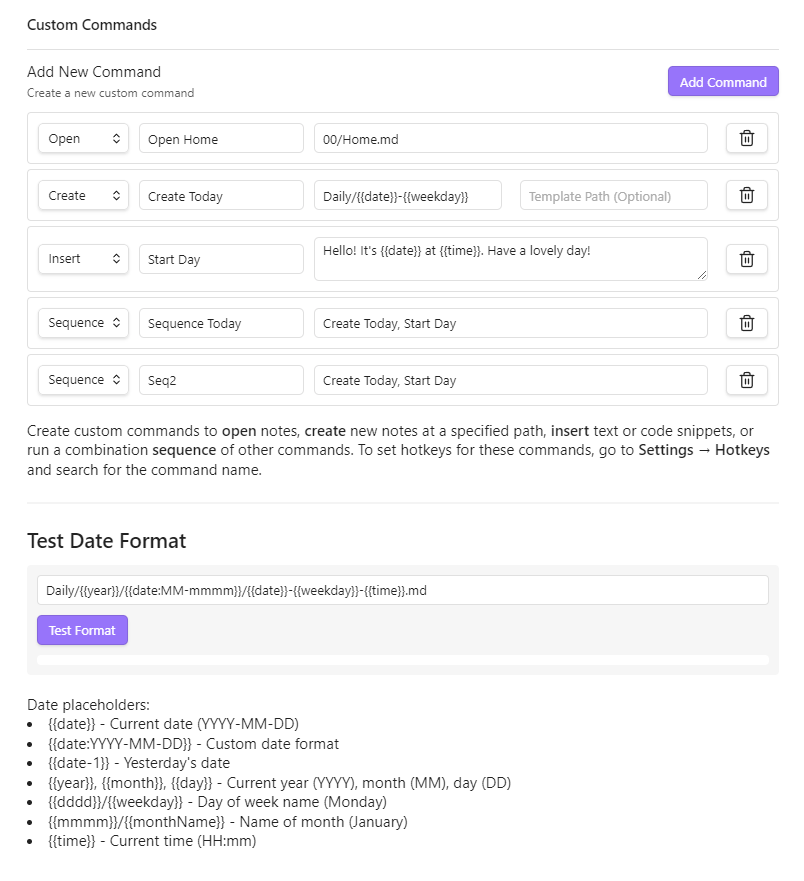
Custom Commands Settings

Features

  • Open Commands: Navigate directly to specific notes using dynamic date formatting
  • Create Commands: Generate new notes at specific paths with optional templates
  • Insert Commands: Insert text snippets with dynamic date/time placeholders
  • Sequence Commands: Chain multiple commands together to execute in sequence
  • Date & Time Placeholders: Use dynamic date/time formatting in all commands
  • New Tab Control: Choose whether commands open notes in current tab, new tab, or new window

Installation

From Obsidian Community Plugins

  1. Open Settings in Obsidian
  2. Navigate to Community plugins and turn off Restricted Mode
  3. Click Browse and search for "Custom Commands"
  4. Install the plugin and enable it

Manual Installation

  1. Download the latest release from the GitHub releases page
  2. Extract the files into your .obsidian/plugins/custom-commands/ folder
  3. Reload Obsidian and enable the plugin in Settings > Community plugins

Usage

Creating a Command

  1. Go to Settings > Custom Commands
  2. Click "Add Command"
  3. Choose a command type (Open, Create, Insert, or Sequence)
  4. Give your command a name
  5. Fill in the required fields based on the command type
  6. Your command will appear in the Command Palette (Ctrl/Cmd+P)

Command Types

Open Command

Opens an existing note at the specified path.

  • Path: The path to the note (e.g., Journal/{{date}}.md)
Create Command

Creates a new note at the specified path, optionally using a template.

  • Path: Where to create the new note (e.g., Meetings/{{date}}-Meeting.md)
  • Template Path: Optional path to a template file to use as content
Insert Command

Inserts a snippet of text at the current cursor position.

  • Snippet: The text to insert, which can include date/time placeholders
Sequence Command

Runs multiple commands in sequence.

  • Command Names: Comma-separated list of command names to execute in order

Date & Time Placeholders

Use these dynamic placeholders in paths, templates, and snippets:

  • {{date}} - Current date (YYYY-MM-DD)
  • {{date:YYYY-MM-DD}} - Custom date format
  • {{date+1}} - Tomorrow's date
  • {{date-1}} - Yesterday's date
  • {{year}}, {{month}}, {{day}} - Current year, month, day
  • {{weekday}} - Day name (Monday, Tuesday, etc.)
  • {{monthName}} - Month name (January, February, etc.)
  • {{time}} - Current time (HH:mm)
  • {{time:HH:mm:ss}} - Custom time format

Adding Hotkeys

  1. Go to Settings > Hotkeys
  2. Search for your custom command by name
  3. Click the plus icon to add a hotkey

Examples

Daily Journal

  • Type: Create
  • Name: Open Today's Journal
  • Path: Journal/{{year}}/{{date}}-{{weekday}}.md
  • Template: Templates/Journal.md

Meeting Notes

  • Type: Create
  • Name: New Meeting
  • Path: Meetings/{{date}}-Meeting.md
  • Template: Templates/Meeting.md

Insert Timestamp

  • Type: Insert
  • Name: Add Timestamp
  • Snippet: [{{time}}]

Morning Routine

  • Type: Sequence
  • Name: Morning Setup
  • Command Names: Open Today's Journal, Add Timestamp, Daily Note: Open today's daily note

Compatibility

  • Requires Obsidian v0.15.0 or above
  • Works on desktop and mobile

License

This project is licensed under the MIT License - see the LICENSE file for details.

Support

Similar Plugins

info
• Similar plugins are suggested based on the common tags between the plugins.
Auto pair chinese symbol
5 years ago by renmu123
中文符号自动补齐
Better Command Palette
4 years ago by Alex Bieg
A better command palette for obsidian
Calculite
10 months ago by Holo
Standard calculator plugin for Obsidian.
Callout Integrator
3 years ago by
A plugin for Obsidian to allow the integration of long blocks of text into callouts.
Capitaliser
2 months ago by Emanuel Oliveira
Cycle text capitalisation (lowercase, Capitalise Each Word, UPPERCASE).
Chorded Hotkeys
3 years ago by Trey Connor Meyers
Type multiple letters at the same time to trigger text insertion, template insertion, or command execution.
CmdSearch
a year ago by SpaceshipCaptain
Code Editor Shortcuts
5 years ago by Tim Hor
Obsidian plugin to add keyboard shortcuts commonly found in code editors such as Visual Studio Code (vscode) or Sublime Text
Command Palette--
4 years ago by qawatake
An Obsidian plugin to provide a command palette without unwanted commands
Custom list character
3 years ago by Lilian POULIQUEN
Custom list character is a simple plugin allowing you to choose which character to use when making bullet lists in Obsidian.
Cycle In Sidebar
3 years ago by Houcheng
Cycle through tabs of left/ right sidebar panel
Duplicate line
a year ago by Marcin Sztolcman
Plugin for Obsidian: duplicate current line, or selection.
Editing Mode Hotkey
2 years ago by Signynt
Obsidian plugin to change the default editing mode (between Live Preview and Source) using a command or hotkey
Editor Commands Remap
5 years ago by cactus5
Obsidian plugin to map hotkeys to editor commands
Font Size Adjuster
2 years ago by Ryota Ushio
An Obsidian.md plugin to adjust font size via commands.
Format Hotkeys
5 years ago by Ansel Santosa
Google Docs style formatting hotkeys for Obsidian
Global Hotkeys
4 years ago by Marc Jessome
Global hotkey support for Obsidian.md
HOME key
8 months ago by shichishima
Obsidian Plugin to move cursor to beginning of text, considering Markdown heading characters.
Hotkey Helper
5 years ago by PJ Eby
Easily see and access any Obsidian plugin's options pane or hotkey assignments (including conflicts) from the Community Plugins tab
Hotkeys Chords
4 years ago by Dario Balboni
Hotkeys for Bookmarks
5 years ago by Vinzent
Hotkeys for specific files
5 years ago by Vinzent
Hotkeys for templates
5 years ago by Vinzent
Hotkeys++
6 years ago by Argentina Ortega Sainz
Adds hotkeys to toggle todos, ordered/unordered lists and blockquotes in Obsidian
Hotstrings
a year ago by wakywayne
Hyperlink Remover
10 months ago by Daniel Agafonov
Easily remove hyperlinks and wikilinks from selected text or the entire note.
Julian Date
5 years ago by thek3nger
Plugin for Obsidian to add the current Julian Date for astronomical observations
Jump to link
6 years ago by MrJackphil
Quick jump between links using hotkeys
Keyboard Analyzer
4 years ago by cogscides
Obsidian plugin to display command hotkeys on a visible keyboard layout
Keyshots
3 years ago by KrazyManJ
🔮📝 Obsidian plugin that adds classic hotkey/shortcuts commands from popular IDEs like Visual Studio Code or JetBrains Family.
Leader Hotkeys
5 years ago by Tony Grosinger
Use a leader-key (tmux style) for hotkeys in Obsidian.md
MemoChron
a year ago by Michalis Efstratiadis
Calendar integration and note creation with support for public iCalendar URLs.
Mesh AI
2 years ago by Chasebank87
Min3ditorHotkeys
5 years ago by Davor Sauer
Obsidian plugin adding minimal editor hotkeys
ObsidianTweaks
4 years ago by Jeppe Klitgaard
A plugin that implements a number of tweaks that should've been native to Obsidian.
Open File by Magic Date
4 years ago by simplgy
Open in Cursor
8 months ago by awaken233
An Obsidian plugin to open files in Cursor IDE or other VSCode-based editors (VSCode, Kiro, etc.) with automatic cursor position jumping. 一个可以在 Cursor IDE 或其他类 VSCode 编辑器中打开文件并自动跳转光标位置的 Obsidian 插件。
Recent Tab Switcher
2 years ago by Samuel Ang
Recent Tab Switcher Plugin for Obsidian.
Search Everywhere
4 years ago by Mom0
Obsidian Search Everywhere Plugin
Select word
2 years ago by Connor Espino
Sequence Hotkeys
4 years ago by Ruan Moolman
Obsidian plugin to support a sequenced of keyboard shortcuts to run commands.
Shell commands
5 years ago by Jarkko Linnanvirta
Execute system commands via hotkeys or command palette in Obsidian (https://obsidian.md). Some automated events are also supported, and execution via URI links.
Streams
a year ago by Floyd
Streams Obsidian Plugin
Symbol linking
10 months ago by Evan Bonsignori ; Mara-Li
Adds ability to link with any trigger in Obsidian. Each trigger can limit linking to specific folders or file.
Vim Marker Sharpener
a year ago by Artem Dvoryadkin
Text formatting commands in Vim mode. Supports applying styles (bold, italic, etc.). Works correctly in visual mode with selected text.
Web viewer Bookmarks
7 months ago by Stefan Danzl
Obsidian Plugin to create Bookmarks for internal Web Viewer
YouTrack Fetcher
a year ago by Forketyfork
Obsidian plugin for creating notes out of YouTrack issues