ExMemo Tools

by Yan.Xie
5
4
3
2
1
Score: 43/100

Description

The ExMemo Tools plugin provides advanced document management and content optimization for Obsidian users. It utilizes large language models (LLMs) to generate and update file metadata, such as tags, descriptions, titles, and editing times. Users can optimize selected text within notes, move files to the most appropriate directories, and insert new content into the ideal position in existing documents. The plugin also offers smart file archiving, recommending suitable directories for files based on metadata and directory structure. Customizable prompts enable users to polish, translate, or restructure content directly in Obsidian. With features for automating repetitive metadata tasks and streamlining file organization, ExMemo Tools boosts productivity and efficiency for content management.

Reviews

No reviews yet.

Stats

31
stars
1,813
downloads
4
forks
512
days
338
days
338
days
10
total PRs
0
open PRs
0
closed PRs
10
merged PRs
11
total issues
6
open issues
5
closed issues
32
commits

Latest Version

a year ago

Changelog

Added

  • Add card extraction feature
  • Support custom prompts for meta information extraction
  • Generate index for multiple files based on search results and add meta information in batch
  • Add settings import and export functionality
  • Add LLM test button
  • Direct support for Gemini models in LLM
  • Support custom insertion positions for auxiliary tools

Changed

  • Adjust multilingual support logic
  • Refine LLM settings descriptions, change API key to non-plaintext storage
  • Optimize prompt editing interface, add reset button, adjust display lines

README file from

Github

English | 中文简体

ExMemo Tools

ExMemo Tools is an Obsidian plugin powered by large language models (LLM), offering intelligent document management and content optimization features.

Watch the video:
Watch the video

Main Features

  • Smart File Archiving - Auto-recommend suitable directories
  • Smart Content Insertion - Auto-locate optimal insertion points
  • Metadata Management - Auto-generate tags, descriptions, titles
  • Directory Indexing - Create directory summaries and content tags
  • AI-Assisted Editing - Support content optimization and text continuation
  • Generate Card - Create Luhmann cards for files or selected paragraphs

Quick Start

Basic Configuration

  1. Configure LLM parameters: Set API key, base URL, and model name
  2. Optional: Configure tag list or auto-extract tags from repository
  3. Optional: Customize metadata generation prompts
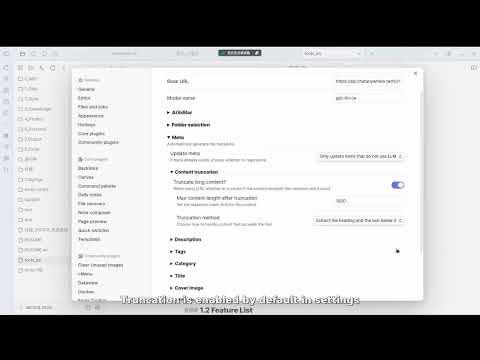
  4. Recommended: Enable "content truncation" for long documents to control API costs

Need more detailed setup guide? Check out the Configuration Documentation

Core Features

Generate Metadata (Ctrl+P > ExMemo Tools: Generate Metadata)

  • Auto-generate tags, descriptions, titles, categories, and dates
  • Support incremental updates for existing metadata

Smart Archiving (Ctrl+P > ExMemo Tools: Select Suitable Directory for Current File)

  • Recommend best directories based on file content
  • Support directory filtering and path completion

Smart Content Editing (Ctrl+P > ExMemo Tools: Insert selected text/LLM Assistant/Continue Writing)

  • Smart insertion point location
  • AI-assisted content editing (with prompt management)
  • Context-aware text continuation

Generate Card (Ctrl+P > ExMemo Tools: Generate Luhmann Card)

  • Create Luhmann cards based on selected text or file content
  • Automatically insert cards into the file

Generate Index (Right-click directory > ExMemo Generate Directory Index / Search results > Create Index)

  • Generate directory structure and content summary
  • Auto-extract and aggregate tags
  • Auto-extract cards from files

License

This project is licensed under the GNU Lesser General Public License v3.0. For more details, please refer to the LICENSE file.

coffee

Similar Plugins

info
• Similar plugins are suggested based on the common tags between the plugins.
Custom File Explorer sorting
4 years ago by SebastianMC
Take full control over the order and sorting of folders and notes in File Explorer in Obsidian
Attachment Management
3 years ago by trganda
Attachment Management of Obsidian
Folder Index
4 years ago by turulix
Daily Named Folder
5 years ago by Nemo Andrea
Like daily note, but nested in a daily folder and some more improvements
Bulk Rename
4 years ago by Oleg Lustenko
Project Browser
2 years ago by Dale de Silva
Attachment Manager
3 years ago by chenfeicqq
Attachment folder name binding note name, automatically rename, automatically delete, show/hide.
Metadata Hider
2 years ago by Benature
Hide metadata property if its value is empty
FolderFile Splitter
a year ago by Xu Quan
Private AI
9 months ago by GB
Effortlessly chat with your Obsidian notes using a privacy first LLM. Private by design, your notes never leave the device and use local processing only.
Alias Management
2 years ago by WithMarcel
Identify duplicate notes based on similar aliases and filenames in Obsidian.
Notemd
a year ago by Jacob
A Easy way to create your own Knowledge-base! Notemd enhances your Obsidian workflow by integrating with various Large Language Models (LLMs) to process your notes, automatically generate wiki-links for key concepts, create corresponding concept notes, perform web research, and more.
Folder by tags distributor
2 years ago by RevoTale
Automatically group Obsidian notes into folder by tags specified in note.
Clone Vault
a year ago by Sebastian Baroni
Clones the current Obsidian vault by copying settings and folder structure without note contents.
Auto Folder Note Paste
a year ago by d7sd6u
Convert your note into folder note upon pasting or drag'n'dropping an attachment
ExMemo Assistant
a year ago by ExMemo AI
Using LLMs to manage files and generating metadata such as tags and summaries.
Daily Notes Automater
a year ago by David Pedrero