Bulk Rename

by Oleg Lustenko
5
4
3
2
1
Score: 42/100

Description

Category: File Management

The Bulk Rename plugin streamlines the process of renaming or relocating multiple files within an Obsidian vault while automatically updating all references to those files. Users can perform renaming actions based on folder location, tags, or regular expressions, ensuring that file organization is both flexible and efficient. The plugin supports advanced customization options, such as specifying replacement symbols and using regular expression patterns with various flags. Its preview feature allows users to verify changes before applying them, reducing errors and saving time.

Reviews

No reviews yet.

Stats

87
stars
18,033
downloads
3
forks
1,341
days
1,176
days
1,176
days
8
total PRs
1
open PRs
0
closed PRs
7
merged PRs
28
total issues
17
open issues
11
closed issues
0
commits

Latest Version

3 years ago

Changelog

RegExp Advanced Release

In this release I was focused on making RegExp works for advanced scenarios

Features:

  • RegExp now can be used for Replacement and Existing fields
  • for turning on RegExp for these fields use special toggle

image

image

What's Changed

Full Changelog: https://github.com/OlegLustenko/obsidian-bulk-rename/compare/0.4.4...0.5.2

README file from

Github

Obsidian Bulk Rename Plugin

Release Obsidian plugin GitHub license Github all releases GitLab latest release

Introduction

Now you can rename a bunch of files from the directory and all references also will be updated across the vault.
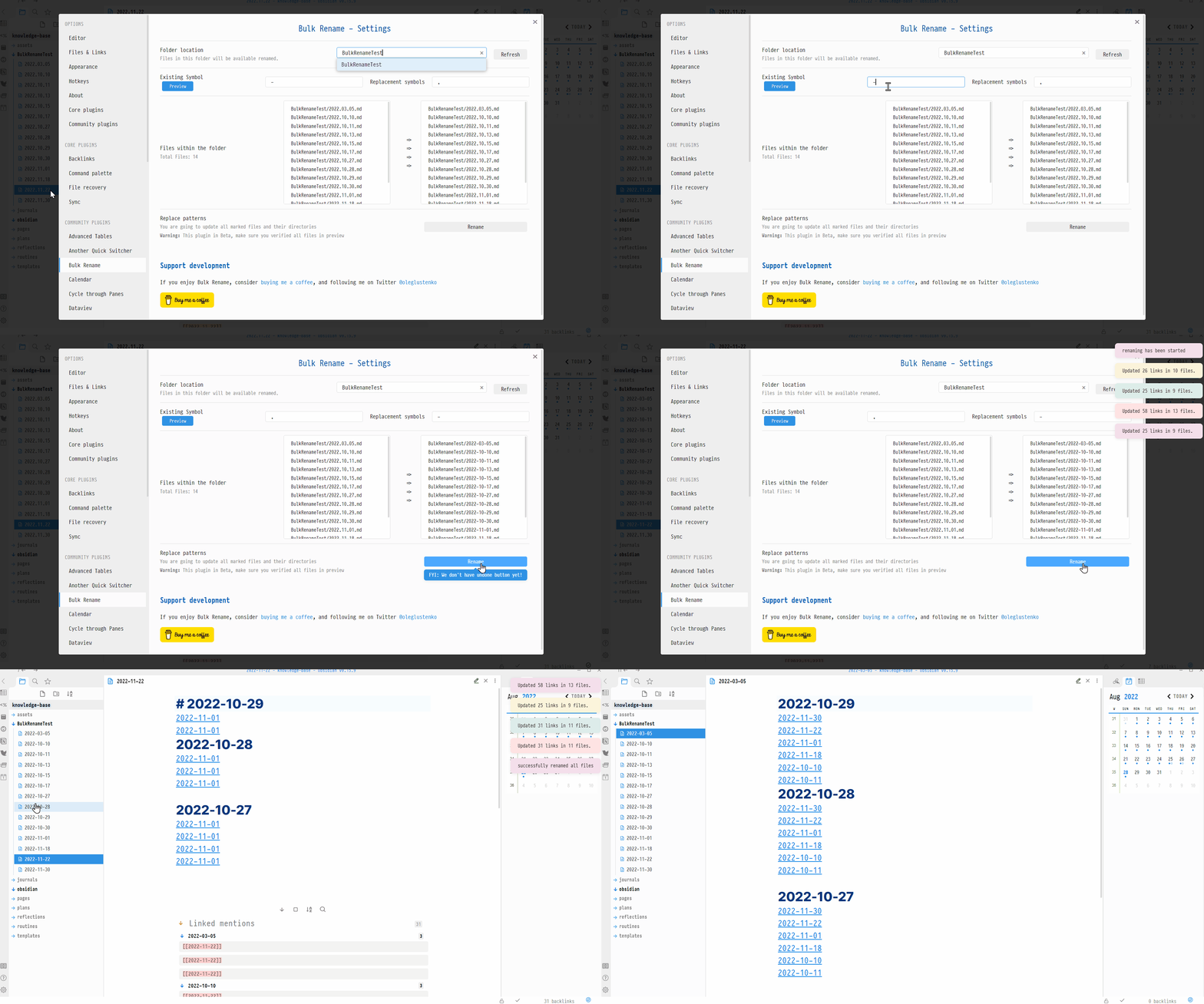
Under the hood this plugin is using obsidian API for renaming, but we just applying it for many files

Features

Whenever we're updating Replacement Symbols you can set new Directory Location too so, you can also move files to another directory

Rename/Move files based on folder location

Click Search By Folder

Update Folder Location where are you wanting to get files from, put Existing Characters from the file path later on update Replacement Symbols those symbols will be used for in a new path.

Rename/Move files based on tags

Click Search By Tags

Put tags in Tags names field search will be completed across the vault, use coma separator if you need more than 1 tag Click Refresh Update Existing Characters field with a pattern you are looking for in existing notes, set Replacement Symbols

Search By RegExp

Usage of Search By RegExp You have two fields, RegExp pattern, and RegExp Flags

RegExp pattern will be wrapped into / /

Supported flags:

  • g - global
  • i - ignore case
  • m - multiline anchors
  • s - dot matches all (aka singleline) - works even when not natively supported
  • u - unicode (ES6)
  • y - sticky (Firefox 3+, ES6)
  • n - explicit capture
  • x - free-spacing and line comments (aka extended)
  • A - astral (requires the Unicode Base addon)

Click Preview or Enter to see intermediate results(nothing will be changed/moved/renamed).

Click Rename whenever you're done

API

  • folder location - Files from which folder you need to rename
  • Symbols in existing files - the symbols/characters that we have in the files
  • Replacement Symbols - a new symbols that will be pasted instead
  • Files within the folder - this is for information purpose
  • RegExp pattern - pattern of RegExp to match
  • RegExp flags - flags that will be applied to RegExp pattern

Rename Button will start renaming all files by respective path.

Motivation

This plugin was developed to cover my needs. Originally I've started to use my daily files with _ delimiter. So my files looked like this: 2022_01_01, over the time I realized other platform out of the box configured to prefer dashes, like this 2022-01-01

Here is many guides on how to rename files, what kind of script we need to run, what version of python or Node.js we need to install and so on.

Why Not to have this functionality build-in into Obsidian?

And rename a bunch of files and update their reference in code base respectively. So now you can rename a bunch of files at once and all imports also will be updated in the vault

Installation

Follow the steps below to install Tasks.

  1. Search for "Bulk Rename" in Obsidian's community plugins browser
  2. Enable the plugin in your Obsidian settings (find "Bulk Rename" under "Community plugins").
  3. Welcome on board! Follow the guides above, share your findings!

Support development

If you enjoy Bulk Rename, consider buying me a coffee, and following me on twitter @oleglustenko "Buy Me A Coffee"

Similar Plugins

info
• Similar plugins are suggested based on the common tags between the plugins.
Regex Find and Replace
4 years ago by Martin Eder
Plugin for Obsidian, providing search/replace functionality which supports regular expressions and selections.
Dynamic Highlights
4 years ago by nothingislost
An experimental Obsidian plugin that highlights all occurrences of the word under the cursor
Folder Index
4 years ago by turulix
Linkify
4 years ago by Matthew Chan
Custom File Explorer sorting
4 years ago by SebastianMC
Take full control over the order and sorting of folders and notes in File Explorer in Obsidian
Global Search and Replace
3 years ago by Mahmoud Fawzy Khalil
A plugin to do a global search and replace in all your Obsidian vault files.
Attachment Management
3 years ago by trganda
Attachment Management of Obsidian
Attachment Manager
3 years ago by chenfeicqq
Attachment folder name binding note name, automatically rename, automatically delete, show/hide.
File Explorer++
3 years ago by kelszo
A plugin for https://obsidian.md, which enables the ability to hide and pin specific files and folders in the file explorer by applying custom filters.
R.E.L.A.X.
2 years ago by Syr
Regex Obsidian Plugin
Alias Management
2 years ago by WithMarcel
Identify duplicate notes based on similar aliases and filenames in Obsidian.
Project Browser
2 years ago by Dale de Silva
Tag Links
2 years ago by Zacchary Dempsey-Plante
A plugin for Obsidian that allows tags to be opened as links using a hotkey.
LinkMagic
2 years ago by AndyReifman
Regex Mark
2 years ago by Mara-Li
Folder by tags distributor
2 years ago by RevoTale
Automatically group Obsidian notes into folder by tags specified in note.
Find and replace in selection
5 years ago by Dmitry Savosh
Obsidian plugin. Find and replace in selection.
Regex Pipeline
5 years ago by No3371
An Obsidian plugin that allows users to setup custom regex rules to automatically format notes.
Daily Named Folder
5 years ago by Nemo Andrea
Like daily note, but nested in a daily folder and some more improvements
Blue Star
2 years ago by Wang Guoshi
A plugin for Obsidian that generates Anki flashcards in various ways.
ExMemo Tools
a year ago by Yan.Xie
Use large models for smart document management and optimization, including relocating files, enhancing text, and generating metadata.
Clone Vault
a year ago by Sebastian Baroni
Clones the current Obsidian vault by copying settings and folder structure without note contents.
Hide Commands in Menu
a year ago by bomian98
Obsidian Plugin, hide different commands in different menus.
FolderFile Splitter
a year ago by Xu Quan
AutoMover
a year ago by Al0cam
Move files and notes with specified names into their designated folders according to rules you define.
Auto Folder Note Paste
a year ago by d7sd6u
Convert your note into folder note upon pasting or drag'n'dropping an attachment
Daily Notes Automater
a year ago by David Pedrero
aDHL
a year ago by tine-schreibt
The Dynamic Highlights Plugin, but with hotkeys, more options and sorting; works well with Highlightr.
FileName Styler
a year ago by Marc Feininger
An Obsidian plugin to hide, customize, and decorate file names in the sidebar using regex and customizable profiles.
Regex Line Filter
a year ago by 64MM4-KN1F3
A note filtering plugin for Obsidian
Custom Selected Word Count
a year ago by banisterious
Custom Selected Word Count for Obsidian
Auto Replacer
10 months ago by Alecell
A live text replacement plugin that applies automatic formatting, corrections, or custom replacements in real-time. Define your own regex-based rules and transformation logic to modify text dynamically as you type.
URL Formatter
8 months ago by Thomas Snoeck
Automatically formats specific URLs pasted into Obsidian into clean Markdown links.