FileName Styler

by Marc Feininger
5
4
3
2
1
Score: 25/100

Description

The FileName Styler plugin enhances how file names appear in the sidebar by allowing you to hide, modify, and decorate them based on patterns or folder-specific rules. It's especially useful for setups that use timestamp-based or Zettelkasten-style IDs, offering options to hide these identifiers or move them to the end of filenames. You can apply custom prefixes, suffixes, colors, and even emoji icons without altering the actual file names. The plugin supports multiple styling profiles that can be independently configured and scoped to particular folders, making it a flexible solution for organizing large vaults with visual cues.

Reviews

No reviews yet.

Stats

17
stars
2,206
downloads
2
forks
361
days
363
days
381
days
5
total PRs
2
open PRs
1
closed PRs
2
merged PRs
1
total issues
1
open issues
0
closed issues
0
commits

Latest Version

a year ago

Changelog

Changes in v1.2.3

  • Updated UI text labels to follow Sentence Case for improved readability and consistency
  • Removed obsolete "main" field from manifest.json to align with Obsidian plugin guidelines

UI consistency update — no breaking changes.

README file from

Github

FileName Styler

FileName Styler is a plugin for Obsidian that allows you to hide, modify, and decorate parts of file names in the sidebar based on patterns or folder locations.

Originally created as simple “Zettelkasten ID Hider,” this plugin has evolved into a flexible tool for styling file names based on regex or timestamp-based IDs.

Special thanks to Simon for the original idea and inspiration behind this plugin.


Features

  • Hide timestamp-based IDs (8-, 12-, or 14-digit) from file names
  • Support for custom regular expressions with 3 capture groups
  • Add custom prefixes and suffixes to matching file names
  • Apply custom colors and custom file icons (e.g. 🧠 or 📖)
  • Restrict styling to specific folders only
  • Combine multiple styling profiles – different styles for different folders or file types
  • Automatically restore original file names and styles when unloading

Preview

Here’s a quick before/after look at how file names appear with and without styling enabled:
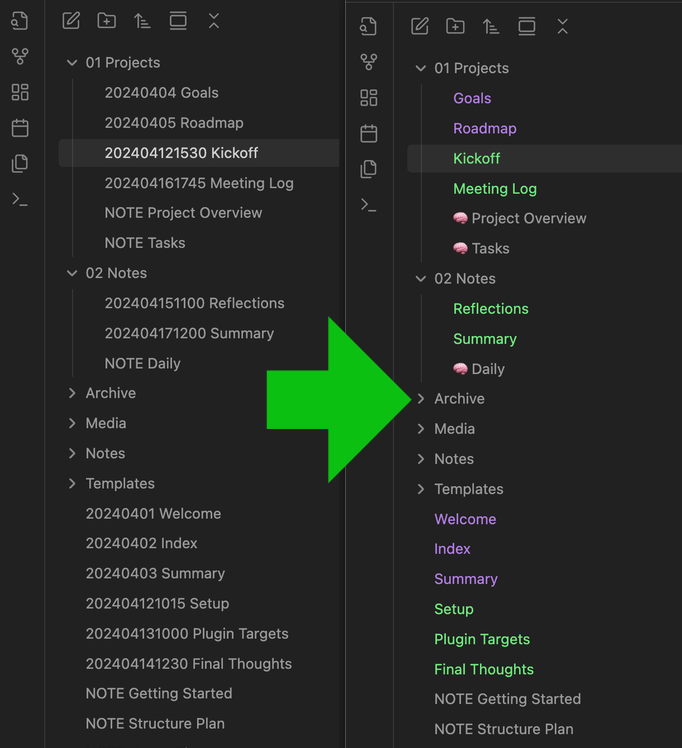
File name styling example


How it works

This plugin searches for matching file names based on selected ID formats:

  • yyyyMMddHHmmss → 14-digit

  • yyMMddHHmmss → 12-digit

  • yyyyMMdd → 8-digit

  • or a custom regular expression, such as:

    ^(\d{6})([-_ ]?)(.+)$
    

It then applies the configured styling to each match within the File Explorer (without changing the actual file name on disk).


Settings

You can configure and combine multiple profiles. Each profile supports:

  • ID format – Choose from predefined timestamp formats or define your own regex
  • Move ID to end – Display the ID at the end of the file name instead of the start
  • Custom prefix – Text to prepend to the displayed name
  • Custom suffix – Text to append to the displayed name
  • Custom text color – Optional color override
  • Custom icon – Emoji or Unicode (e.g. 🧠, 📖)
  • Folder filter – Apply profile only in certain folders

All profiles can be toggled independently and are applied in order.


Installation

  1. Download or clone this repository.

  2. Copy the following files into your Obsidian vault under:

    .obsidian/plugins/filename-styler/
    

    Required files:

    • main.js
    • manifest.json
    • (optional) styles.css
  3. Enable the plugin in Obsidian under Settings → Community Plugins.


Compatibility

Compatible with Obsidian v1.8.9 and higher. Earlier versions might also work, but have not been tested.


License

MIT License.


Created with ❤️ by and for the Obsidian community.

Similar Plugins

info
• Similar plugins are suggested based on the common tags between the plugins.
Regex Find and Replace
4 years ago by Martin Eder
Plugin for Obsidian, providing search/replace functionality which supports regular expressions and selections.
Dynamic Highlights
4 years ago by nothingislost
An experimental Obsidian plugin that highlights all occurrences of the word under the cursor
Linkify
4 years ago by Matthew Chan
Bulk Rename
4 years ago by Oleg Lustenko
Onyx Boox Annotation & Highlight Extractor
4 years ago by Akos Balasko
This tool extracts the highlights and the annotations from OnyxBoox Reading Notes txt files, and converts them to linked zettelkasten literature and permanent notes
Canvas Random Note
3 years ago by jmilldotdev
Random notes from search on the Obsidian canvas
Global Search and Replace
3 years ago by Mahmoud Fawzy Khalil
A plugin to do a global search and replace in all your Obsidian vault files.
Unitade
3 years ago by Falcion
A plugin for note-taking app Obsidian which allows you to treat any file extension as markdown note-file
File Explorer++
3 years ago by kelszo
A plugin for https://obsidian.md, which enables the ability to hide and pin specific files and folders in the file explorer by applying custom filters.
ZettelFlow
3 years ago by RafaelGB
ZettelFlow is a plugin for Obsidian that helps you to create and manage your notes in a Zettelkasten way.
Zettelkasten Outliner
2 years ago by Tyler Suzuki Nelson
Desk
2 years ago by David Landry
A desk for obsidian
R.E.L.A.X.
2 years ago by Syr
Regex Obsidian Plugin
Tag Links
2 years ago by Zacchary Dempsey-Plante
A plugin for Obsidian that allows tags to be opened as links using a hotkey.
LinkMagic
2 years ago by AndyReifman
zettelkasten navigation
2 years ago by terrychenzw
This plugin provides 2 customViews for navigating a zettelkasten using Luhmann-style IDs and key word indexes.
Regex Mark
2 years ago by Mara-Li
Find and replace in selection
5 years ago by Dmitry Savosh
Obsidian plugin. Find and replace in selection.
Regex Pipeline
5 years ago by No3371
An Obsidian plugin that allows users to setup custom regex rules to automatically format notes.
Luhman
5 years ago by Dylan Elliott
Blue Star
2 years ago by Wang Guoshi
A plugin for Obsidian that generates Anki flashcards in various ways.
Template by Note Name
a year ago by Jacob Learned
A simple Obsidian plugin to automatically template notes based on their title
Explorer Colors
a year ago by Scott Van der Zwet
Set cascading colors for files and folders in Obsidian.
Note ID
a year ago by Dominik Mayer
Displays notes by their ID, enabling structured sequences for manuscripts or a Zettelkasten ("Folgezettel")
Hide Commands in Menu
a year ago by bomian98
Obsidian Plugin, hide different commands in different menus.
AutoMover
a year ago by Al0cam
Move files and notes with specified names into their designated folders according to rules you define.
aDHL
a year ago by tine-schreibt
The Dynamic Highlights Plugin, but with hotkeys, more options and sorting; works well with Highlightr.
Regex Line Filter
a year ago by 64MM4-KN1F3
A note filtering plugin for Obsidian
Custom Selected Word Count
a year ago by banisterious
Custom Selected Word Count for Obsidian
Canvas Connect
10 months ago by camadkins
Dynamically optimize connection anchors in Obsidian Canvas view
Auto Replacer
10 months ago by Alecell
A live text replacement plugin that applies automatic formatting, corrections, or custom replacements in real-time. Define your own regex-based rules and transformation logic to modify text dynamically as you type.
Timeline Canvas Creator
10 months ago by chris-codes1
Quickly create timeline structured canvases in Obsidian.
Zettelkasten Branch Tracker
8 months ago by James Cussen
Obsidian Graph View Plugin for Zettelkasten Notes
URL Formatter
8 months ago by Thomas Snoeck
Automatically formats specific URLs pasted into Obsidian into clean Markdown links.
Graphic Organizer
2 months ago by Nick Le Guillou - Superhuman Curiosity
Interactive tree view for visualizing and managing your vault's file hierarchy.