ZettelFlow

by RafaelGB
5
4
3
2
1
Score: 64/100

Description

Category: Learning & Knowledge Management

The ZettelFlow plugin streamlines the Zettelkasten workflow within Obsidian by leveraging its native canvas interface. This plugin allows users to visually design and customize workflows for creating new notes with specified properties, templates, and storage locations. It integrates the principles of the Zettelkasten method, enabling users to create interconnected, individual notes that foster a dynamic network of ideas. By configuring elements like relationships, metadata, and organizational criteria on the canvas, users can generate structured notes effortlessly, saving time and enhancing productivity. ZettelFlow transforms the traditional Zettelkasten approach into a visually intuitive and efficient process, ideal for those looking to optimize their knowledge organization within Obsidian.

Reviews

No reviews yet.

Stats

162
stars
22,011
downloads
9
forks
949
days
265
days
265
days
3
total PRs
0
open PRs
0
closed PRs
3
merged PRs
75
total issues
9
open issues
66
closed issues
157
commits

Latest Version

9 months ago

Changelog

Shinny new things

  • You can copy paste actions between steps
  • Types editor to add new properties for hooks
  • shortcut to manage the properties (rename, change property type or delete them)

No longer broken

  • Refactor of hooks state management. It was duplicated and sometimes does not work correctly.
  • Multiple hooks triggers could affect the performance. It was fixed
  • Errors inside hooks will be managed correctly now.
  • Search scroll (any search) now follow the parent scrolls

README file from

Github

Obsidian-ZettelFlow

GitHub release (latest SemVer) Github All Releases

ZettelFlow: Unlock the Power of Custom Note Flows in Obsidian

Welcome to ZettelFlow, the ultimate plugin for Obsidian that empowers you to design and navigate your own personalized workflows for creating and editing notes. Whether you're a fan of the Zettelkasten methodology or simply seeking a flexible way to structure your ideas, ZettelFlow adapts to your needs and puts creativity in your hands.


Quick Start Guide

Use our community resources to kickstart your ZettelFlow experience. You can find pre-built flows, steps, and actions that you can easily import into your own vault. Check out the Community Resources Guide for more information.

What is ZettelFlow?

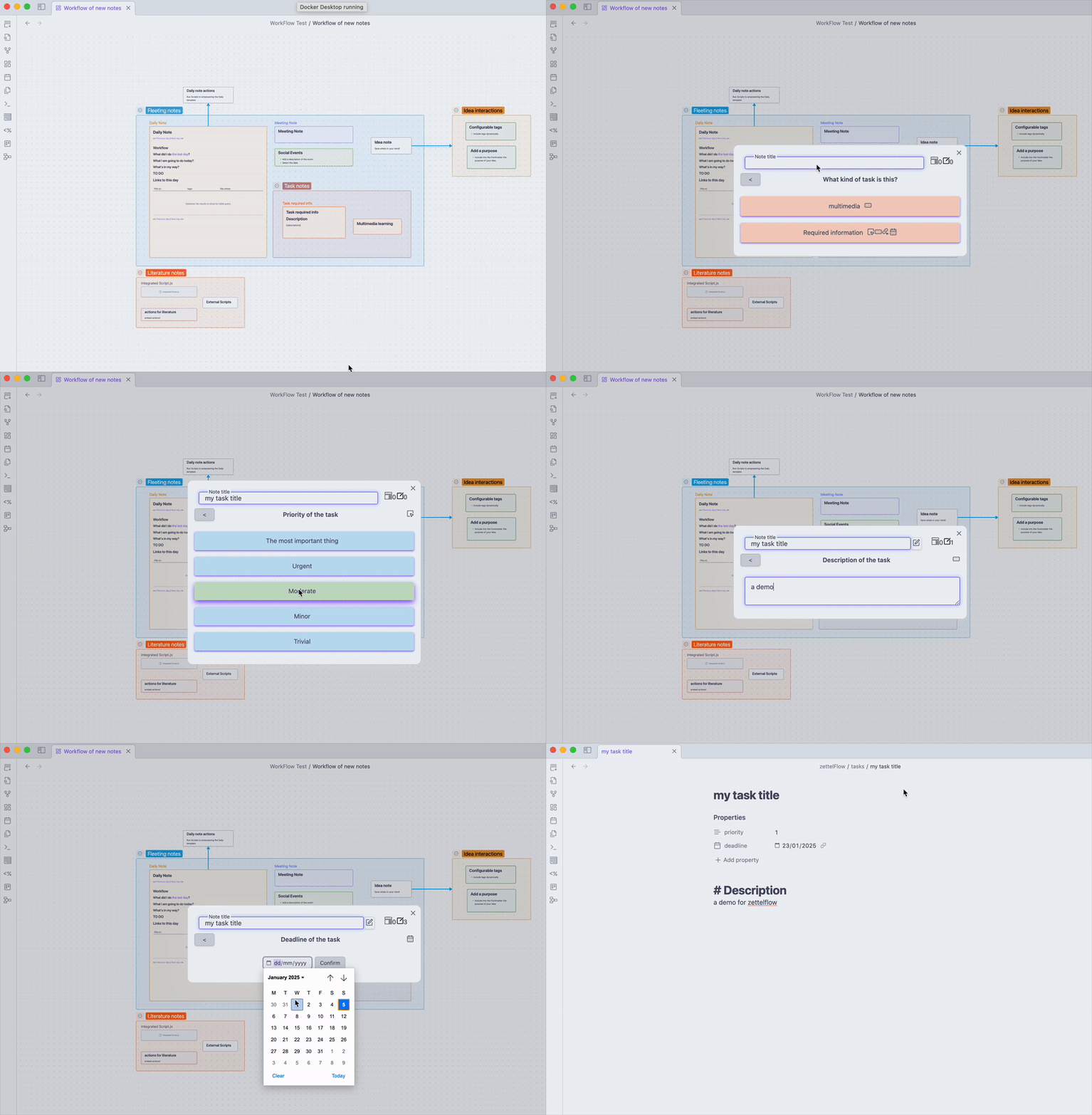
ZettelFlow transforms Obsidian into a dynamic space for note-taking and knowledge management by using canvas drawings to create flows. These flows guide you through step-by-step processes, where each step can be a note, a group, or a card on the canvas, interconnected with arrows that represent their relationships.

ZettelFlow encourages you to:

  • Embrace the Zettelkasten philosophy while tailoring it to your unique workflow.
  • Design custom flows that resonate with how you think and organize.
  • Dive deeper into your notes, crafting them in a structured yet flexible way.

How Does It Work?

1. Root Notes

Every flow begins with a Root Note. These are the starting points that appear when you initiate a new workflow. Think of them as entry points into your creative process.

2. Steps

A flow consists of multiple steps, which can be:

  • Notes: Standard Obsidian notes.
  • Groups: Collections of related items.
  • Canvas Cards: Visual representations within the Obsidian canvas.

These steps are linked with arrows, creating a clear visual representation of how your ideas connect and progress.

3. Actions

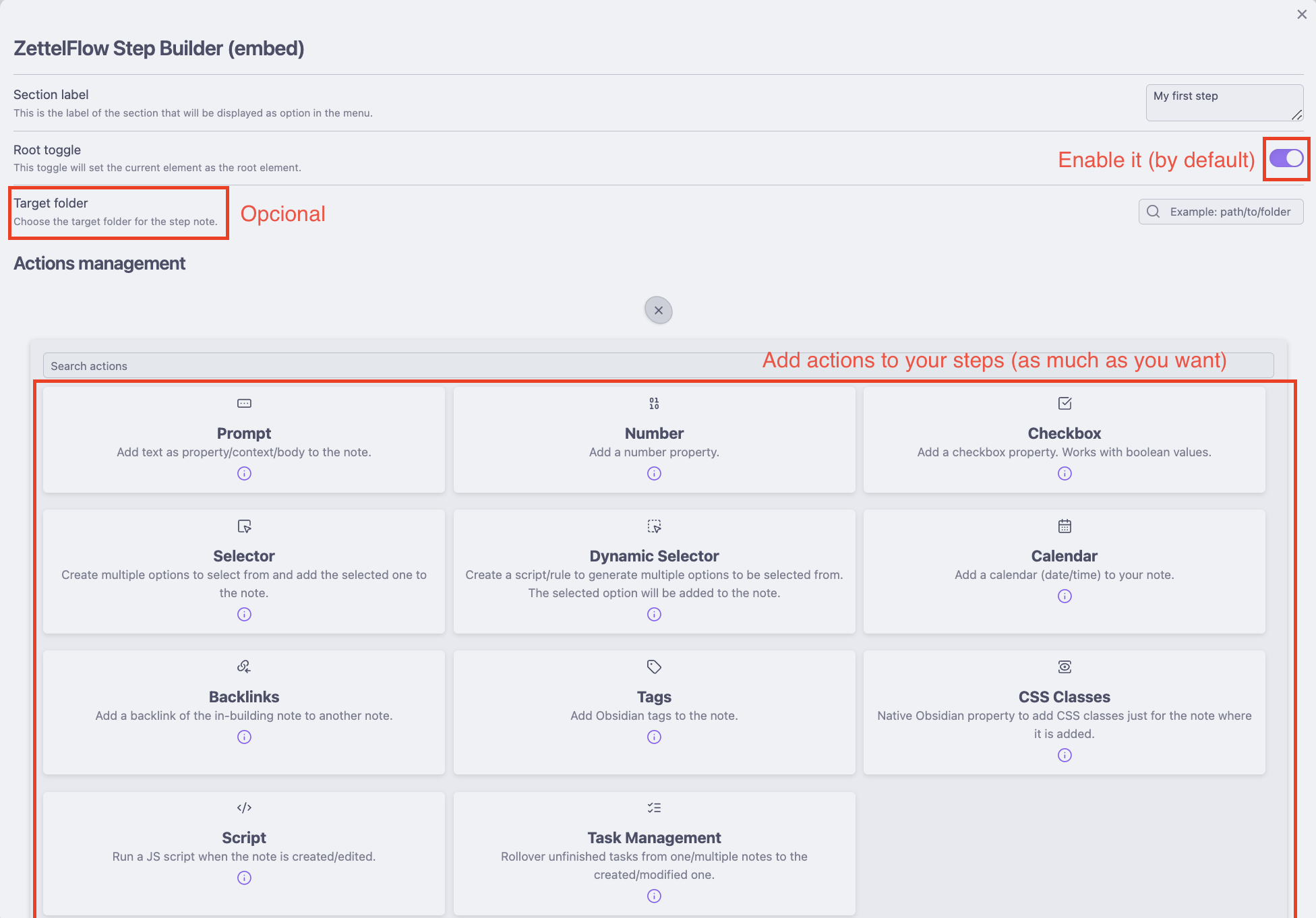
Within each step, you can add Actions to enhance your notes. Actions are interactive elements that:

  • Modify your final note.
  • Edit existing notes dynamically.

[!IMPORTANT]
The canvas editor flow is different from the canvas creation flow. It should be configured independently in the plugin settings.

Available Actions

ZettelFlow provides a wide array of actions, including:


Relationships Between Steps

In ZettelFlow, steps can be interconnected in different ways, allowing you to create meaningful relationships between your notes, groups, and actions. Here are the types of relationships available:

1. Arrow-Based Connections

Notes and cards can be linked using arrows, representing a direct relationship or flow between steps. These connections visually guide the sequence of actions or ideas.

2. Group-to-Nodes Relationships

Groups establish a one-to-many relationship with the nodes they contain. For example:

  • A group can include multiple notes or cards as its children.
  • Any action performed on the group can cascade or relate to its nodes.
  • A group can act as a Root Node, serving as the starting point of a flow.

3. JavaScript File Connections

JavaScript files can be linked to steps as if they were actions, executing custom scripts. These connections allow advanced users to:

  • Extend ZettelFlow's functionality.
  • Automate or customize specific parts of the workflow.

[!NOTE] Limitations JavaScript files cannot serve as Root Nodes. They can only appear in the middle or at the end of a flow chain.

4. Root Node Eligibility

Steps that can serve as Root Nodes include:

  • Groups
  • Notes
  • Cards

[!WARNING] Exclusions JavaScript files are excluded from being Root Nodes.

These relationships give you the freedom to structure your workflows logically and intuitively, ensuring each flow adapts to your specific needs.


Why Use ZettelFlow?

  • Freedom to Customize: ZettelFlow adapts to your way of working, not the other way around.
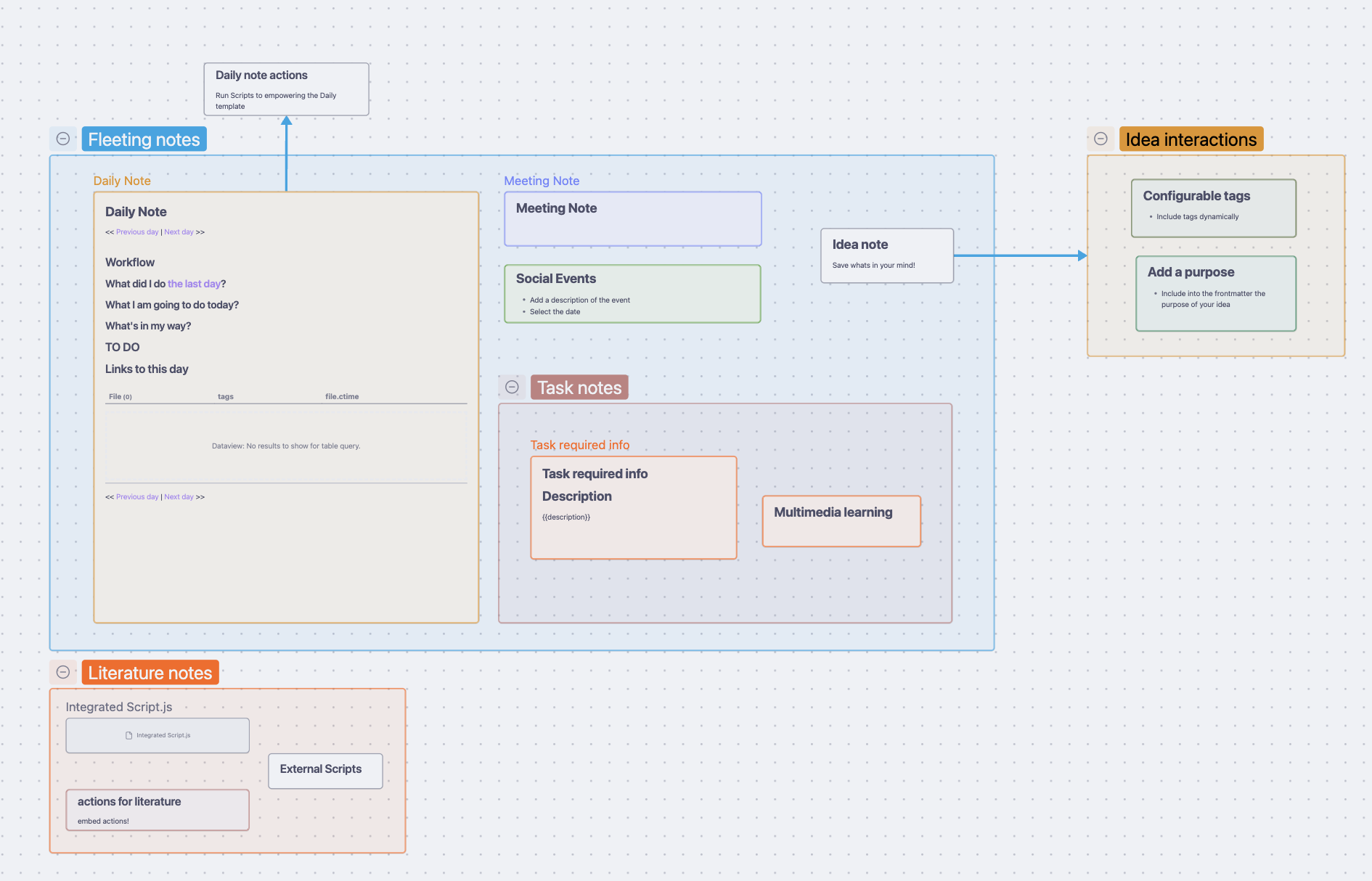
  • Visual Clarity: Flows on the canvas provide an intuitive overview of your thought process.
  • Deep Integration: Seamlessly integrates with Obsidian, enhancing your existing workflow.
  • Powerful Actions: Automate and enrich your notes with a variety of built-in actions.

Getting Started

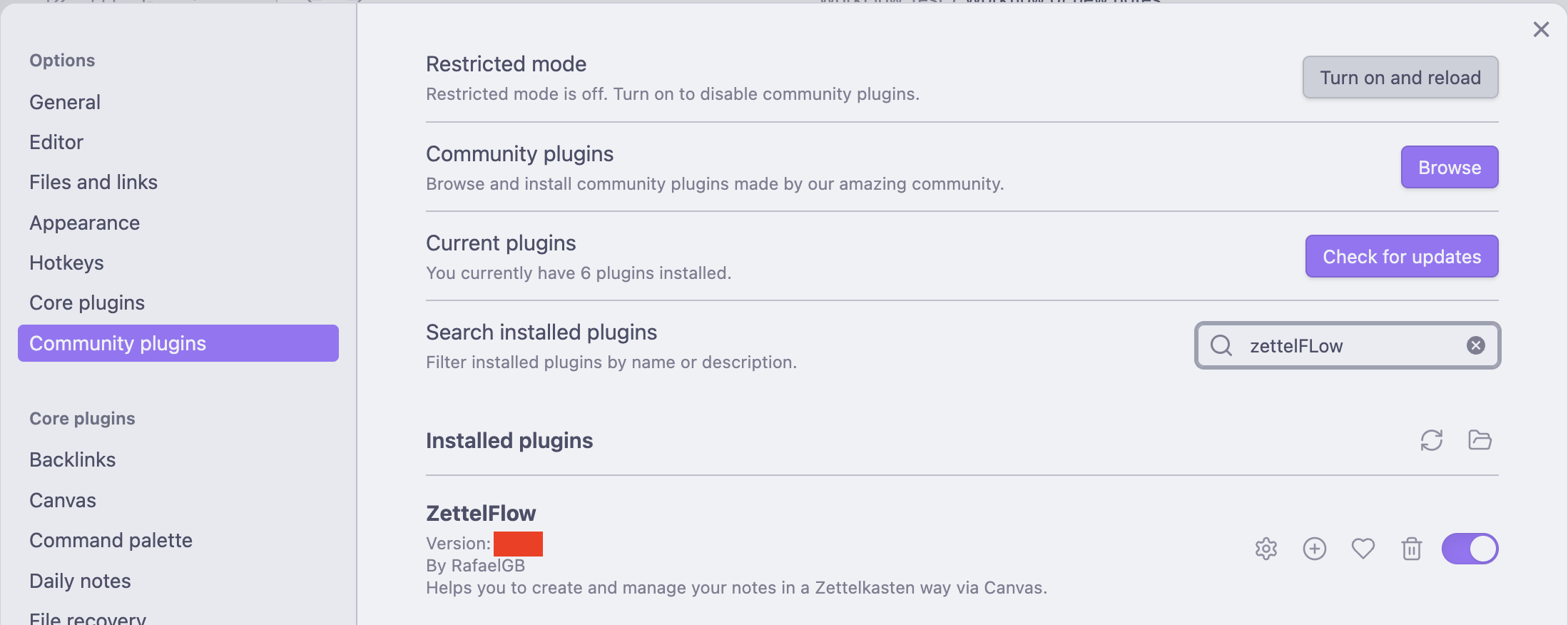
  1. Install the Plugin
    • Download and install ZettelFlow from the Obsidian plugin marketplace.
2. Create Your First Flow

  • Create a new Canvas file in Obsidian.
  • Configure it as the principal Flow file in the plugin settings.
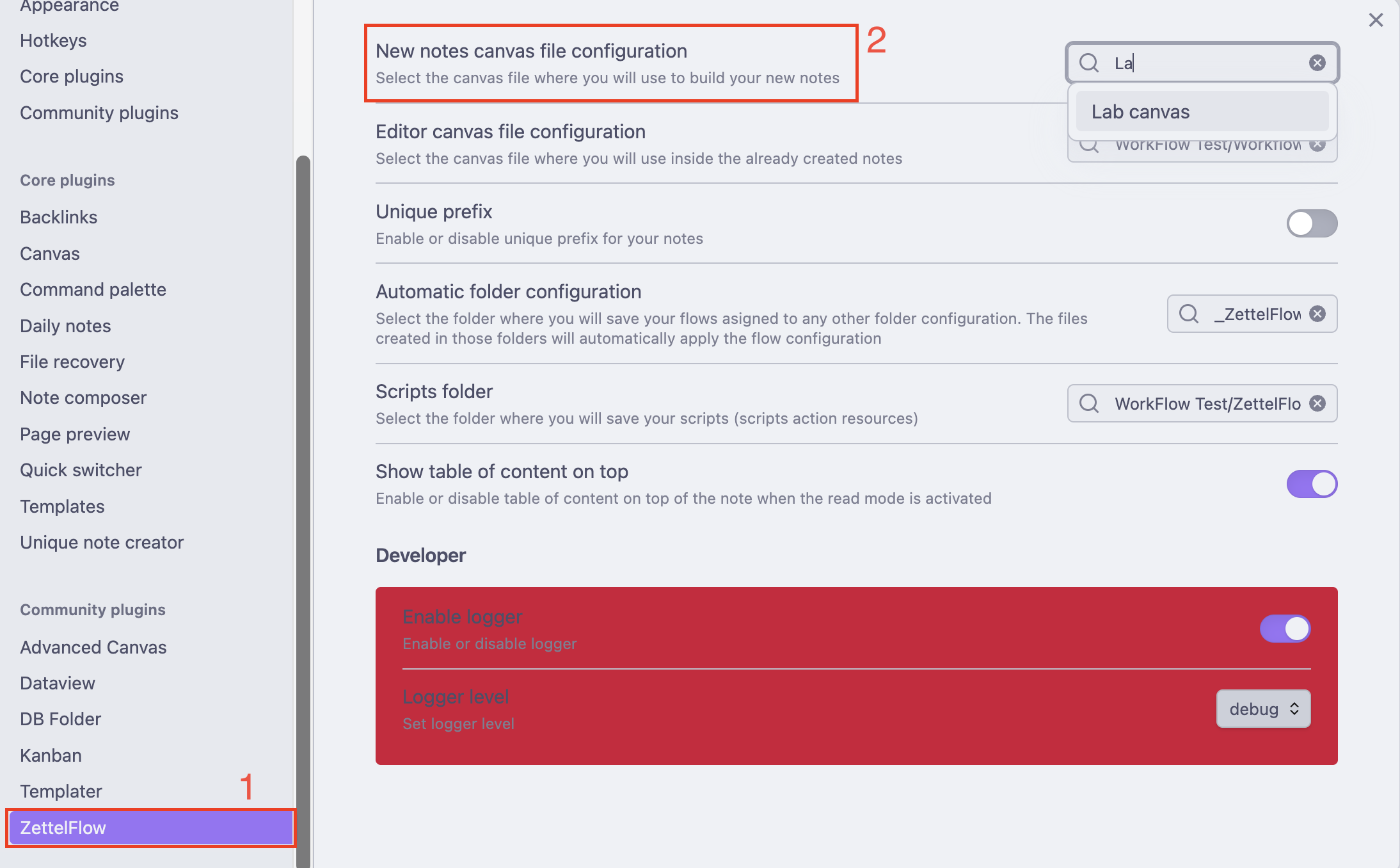
  • Open a canvas and start designing your flow by adding steps and connecting them with arrows.
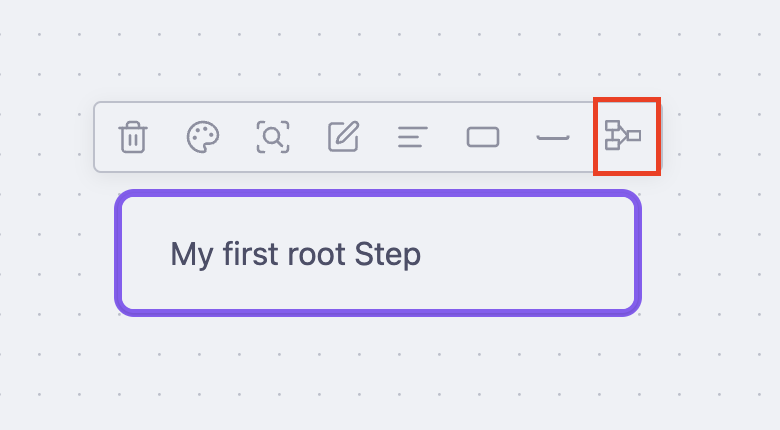
  1. Add Actions
    • Select a step and incorporate actions to modify or enhance your notes.
  1. Explore Examples

Learn More

For detailed instructions, descriptions of each action, and tips for creating advanced flows, visit the ZettelFlow Documentation.

If you have any questions or feedback, feel free to reach out via the Obsidian community forums or GitHub issues.


Unleash the full potential of your notes with ZettelFlow. Your ideas, your flow, your rules.

Support

If you enjoy ZettelFlow, consider buy me a coffee or sponsor me to support my work. Thank you!

GitHub Sponsors

"Buy Me A Coffee"

Similar Plugins

info
• Similar plugins are suggested based on the common tags between the plugins.
Achievements
3 years ago by Zachatoo
Add achievements to Obsidian to help guide the user to build good habits in Obsidian.
AI bot
a year ago by kuzzh
The AI Bot Plugin is a powerful tool designed to enhance your note-editing experience in Obsidian by leveraging the capabilities of AI. This plugin allows you to interact with an AI assistant directly within Obsidian, making it easier to generate, edit, and organize your notes with intelligent suggestions and automated tasks.
Alias Picker
2 years ago by rostunic
Archiver
5 years ago by ivan-lednev
Archive completed tasks in your Obsidian vault (plus other org-mode-like features)
Asana
a year ago by Ryan Bantz
Obsidan plugin that creates tasks in Asana for highlighted text or the current line
Auto Bullet
a year ago by takitsuba
Auto Classifier
3 years ago by Hyeonseo Nam
Auto classification plugin for Obsidian using ChatGPT.
Auto Hide
4 years ago by skelato1
This Obsidian plugin enables you to collapse (and expand) the sidebar easier.
Better Plugins Manager
a year ago by zero
BlazeJump
a year ago by henryco
Plugin for Obsidian that makes text navigation blazingly fast.
BookNav
2 years ago by jemberton
A plugin for ObsidianMD that enables book style navigation links in a note.
Bottom to Top
a year ago by Henry Gustafson
Callout Toggles
2 years ago by Aly Thobani
An Obsidian plugin to quickly add, change, or remove callout wrappers in your notes.
Canvas Blocks
2 years ago by Kay606
Close Window When Empty
2 years ago by Taylor Jadin
Cloud Atlas
2 years ago by Cloud Atlas
Cloud Atlas Obsidian Client
Command Alias
5 years ago by @Yajamon
Obsidianのコマンドに対してエイリアスを設定するプラグイン
Consecutive Lists
2 years ago by Josh Tucker
Context Command Hider
a year ago by Mara-Li
This plugin allows you to hide every command from the Obsidian's right-click context menu.
Cursor Position History
a year ago by Florian Gubler
A Plugin to remember (and make accessible) the cursor history in Obsidian. Both within a file and across files.
Custom save
2 years ago by Hananoshika Yomaru
add custom save action to your save command
Custom State for Task List
3 years ago by Okami Wong
A plugin for Obsidian to define your own states for task items.
Custom window title
5 years ago by Joost Plattel
Small Obsidian plugin that updates the window title with the current open note
Desk
2 years ago by David Landry
A desk for obsidian
Editor Autofocus
2 years ago by Mgussekloo
Extended Task Lists
2 years ago by joeriddles
Extended Markdown support for task lists in Obsidian.
File chucker
3 years ago by Ken Lim
FileName Styler
a year ago by Marc Feininger
An Obsidian plugin to hide, customize, and decorate file names in the sidebar using regex and customizable profiles.
Ghost Fade Focus
5 years ago by Sami Korpela
Ghost Fade Focus plugin for Obsidian
GPT-3 Notes
3 years ago by micahke
An Obsidian plugin to generate notes based on GP3 output.
GTD No Next Step
3 years ago by Tobias Davis
Obsidian plugin for GTD workflow, badge projects with no next step.
Hide Commands in Menu
a year ago by bomian98
Obsidian Plugin, hide different commands in different menus.
Homepage
5 years ago by mirnovov
An Obsidian plugin that opens a specified note, canvas, or workspace on startup, instead of the most recent one.
Hotkeys for specific files
5 years ago by Vinzent
HTML Tabs
3 years ago by Patrick Tournet
Obsidian plugin allowing the creation and rendering of Tabs and tab panels in your notes.
Jira Issue Manager
a year ago by Alamion
Obisdian plugin to sync tasks between Obsidian and Jira
LinkMagic
2 years ago by AndyReifman
LLM Summary
2 years ago by QSun
wip
Luhman
5 years ago by Dylan Elliott
Masking Type
a year ago by Telehakke
Obsidian plugin.
Mindmap
2 years ago by YunXiaoYi
An Obsidian plugin for creating Mindmaps.
New Bullet With Time
3 years ago by Boninall
A plugin allows you to auto add current time to new bullet line.
New Note Fixer
a year ago by mnaoumov
Obsidian Plugin that unifies the way non-existing notes are created when clicking on their links
New Tab +
2 years ago by Raphaël Le Carval
Allow to open markdown files, graph and canvas in new tab as the default behavior.
Next Link
3 years ago by Juan Luque
NodeFlow
a year ago by LincZero
Render node streams like `ComfyUi`, `UE`, `Houdini`, `Blender`, etc., to make it easy to write relevant notes. json describes the chart, compared to screenshots, making it easier to modify later. The plugin is also compatible with blogs.",
Note Chain
2 years ago by ZigHolding
Package my frequently used tools, highly personal plugins.
Note ID
a year ago by Dominik Mayer
Displays notes by their ID, enabling structured sequences for manuscripts or a Zettelkasten ("Folgezettel")
Notice logger
2 years ago by @gapmiss
An Obsidian.md plugin for logging all notices to the developer console, with optional prefix & timestamp.
Onyx Boox Annotation & Highlight Extractor
4 years ago by Akos Balasko
This tool extracts the highlights and the annotations from OnyxBoox Reading Notes txt files, and converts them to linked zettelkasten literature and permanent notes
Open File by Magic Date
4 years ago by simplgy
Open with
5 years ago by phibr0
open-as-md
2 years ago by kursad-k
open and edit preferred formats as markdown in Obsidian
Outline to task list
2 years ago by alexandrerbb
A simple Obsidian plugin to convert a note's outline to a task list
Overdue
4 years ago by Peter Parente
Obsidian plugin that marks items as [[Overdue]] if they are not checked off by their due date
Peekaboo
2 years ago by Wang Guoshi
An Obsidian plugin protects your privacy by setting a password to hide notes.
Personal OS
2 years ago by A.Buot
Pluck
5 years ago by Kevin Barrett
Quickly create notes in Obsidian from web pages.
Post Webhook
a year ago by MasterB1234
A plugin for Obsidian that sends notes to Webhook endpoints (e.g. n8n, Make.com, Zapier) for streamlined automation and integration.
Previous Daily Note
a year ago by Marcos Talau
Plugin for Obsidian that opens the previous daily note
Quick Open
2 years ago by James Alexandre
Quickly select items in any modal using keyboard shortcuts. Supercharge your workflow with fast, efficient item selection in Obsidian modals.
Rapid Notes
3 years ago by valteriomon
Reading comments
3 years ago by BumbrT
Reading comments, for consuming books or large articles in markdown with https://obsidian.md/.
Relative Timestamps
2 years ago by Charles Young
Runsh
a year ago by Ddone
A simple plugin that allows to run shell commands from obsidian.
Sequence Hotkeys
4 years ago by Ruan Moolman
Obsidian plugin to support a sequenced of keyboard shortcuts to run commands.
Slash Commander
2 years ago by alephpiece
Customizable slash command list for Obsidian.md
Spacekeys
a year ago by Jared Lumpe
Obsidian plugin to define hotkeys based on sequences of keypresses.
Swiss army knife
3 years ago by mwoz123
Table Extended
5 years ago by AidenLx
Extend basic table in Obsidian with MultiMarkdown table syntax
Tag Buddy
2 years ago by David Fasullo
Unlock powerful tag editing features in Reading Mode. Add, remove and edit tags across your vault. Use tag inboxes to level up any workflow with a powerful idea assembly line.
Tag Project
3 years ago by Odaimoko
Task Board
a year ago by Atmanand Gauns
An Obsidian plugin to view and manage your tasks from whole vault using much efficient boards using various methodologies.
Task Genius
4 years ago by Boninall
Comprehensive task management plugin for Obsidian
Task Marker
3 years ago by wenlzhang
An Obsidian plugin to change task status and append text with hotkeys and right-click context menu.
Task Mover
a year ago by Mariia Nebesnaia
A plugin for obsidian to move unfinished tasks to the daily note automatically
Task Status
2 years ago by Valerie Burzynski
Quickly change any task status in Obsidian. The searchable modal enables a more dynamic and indiscriminate workflow when you need to change your checkbox markers.
Template by Note Name
a year ago by Jacob Learned
A simple Obsidian plugin to automatically template notes based on their title
Templated daily notes
2 years ago by digitorum
Allow to create templayted daily note in specific folder
Templater
6 years ago by SilentVoid
A template plugin for obsidian
tidit
a year ago by codingthings.com
tidit is an Obsidian - https://obsidian.md - plugin that adds timestamps to your document as you type — when you want it, how you want it, where you want it.
Time Inserter
7 months ago by heycalmdown
Obsidian plugin to insert current time at cursor position with exact or rounded formats
ToggleList
4 years ago by Lite C
This is a simple plugin for Obsidian to overwrite the default behavior of toggle checkbox status. Also, it offers a simple way to toggle through frequently used attributes: task states, task tags, highlighted list, etc.
Trakt.tv Sync
a year ago by Nick Felker
Sync Trakt checkins to Obsidian file
Unitade
3 years ago by Falcion
A plugin for note-taking app Obsidian which allows you to treat any file extension as markdown note-file
URI Converter
a year ago by wenlzhang
An Obsidian plugin to convert Obsidian URIs to Obsidian internal links.
Varinote
a year ago by Giorgos Sarigiannidis
A plugin for Obsidian that allows you to add variables in Templates and set their values during the Note creation.
Vim Toggle
3 years ago by Conner Ohnesorge
This is a plugin that adds the ability to toggle on and off vim into obsidian with a nice notice to let you know when you switched.
Weekly Review
3 years ago by Brandon Boswell
Whisper
3 years ago by Nik Danilov
Speech-to-text in Obsidian using Whisper
Zettelkasten Branch Tracker
8 months ago by James Cussen
Obsidian Graph View Plugin for Zettelkasten Notes
zettelkasten navigation
2 years ago by terrychenzw
This plugin provides 2 customViews for navigating a zettelkasten using Luhmann-style IDs and key word indexes.
Zettelkasten Outliner
2 years ago by Tyler Suzuki Nelson