Auto Classifier

by Hyeonseo Nam
5
4
3
2
1
Score: 57/100

Description

The Auto Classifier plugin is a game-changer for Obsidian users who struggle with organizing their notes. This plugin uses the ChatGPT API to automatically classify tags from your notes, saving you time and effort. With its intuitive interface, you can choose from four input commands that analyze different areas of your note, such as title, frontmatter, content, or selected area. The plugin also allows you to customize the output format and toggle between different tag reference types. Whether you're using it for DDC classification, keyword recommendation, or research paper categorization, Auto Classifier makes note organization a breeze.

Reviews

No reviews yet.

Stats

131
stars
15,170
downloads
20
forks
1,115
days
242
days
303
days
10
total PRs
0
open PRs
1
closed PRs
9
merged PRs
34
total issues
13
open issues
21
closed issues
21
commits

Latest Version

10 months ago

Changelog

  • Add Jina AI API
  • Update user-friendly error handlings
  • Update default chatgpt model (gpt-3.5-turbo → gpt-4.1-mini)

README file from

Github

Auto Classifier

GitHub release (latest by date) GitHub all releases

Auto Classifier is an Obsidian plugin that helps you automatically classify tags in your notes using either OpenAI-compatible APIs (ChatGPT, Ollama, LocalAI, etc.) or Jina AI Classifier. The plugin can analyze your note (including its title, frontmatter, content, or selected area) and suggest relevant tags based on the input with tags in your vault. This can be used for various specific purposes, for example, DDC classification for books, keyword recommendation, research paper categorization, and so on. Save time and improve your note organization.

How to use

  • Configure your classification engine and API settings in the settings tab:

    • Choose your Classification Engine:

      • OpenAI-compatible API: Uses OpenAI API, Local AI (Ollama, LocalAI), or other compatible APIs
      • Jina AI: Uses Jina AI Classifier (cost-effective, multilingual)
    • For OpenAI-compatible API:

      • Enter your API key (leave empty for local AI)
      • Set the base URL:
        • OpenAI: https://api.openai.com/v1 (default)
        • Local OpenAI-compatible API (Ollama, LocalAI):
          • Ollama: http://localhost:11434/v1
          • LocalAI: http://localhost:8080/v1
      • Choose your model:
        • OpenAI: gpt-4.1-mini (recommended), gpt-4.1, gpt-4o, ...
        • Local OpenAI-compatible API: llama3, mistral, phi3, qwen2, ... (Ollama/LocalAI)
      • Test your configuration using the Test API call button
    • For Jina AI:

      • Enter your Jina AI API key (free tier available with 10M tokens)
      • Choose your preferred model (default: jina-embeddings-v3)
      • Test your configuration using the Test Jina API button
      • Getting a Jina AI API Key: Visit the Jina AI website to obtain a free temporary API key (you can get the key without creating an account).
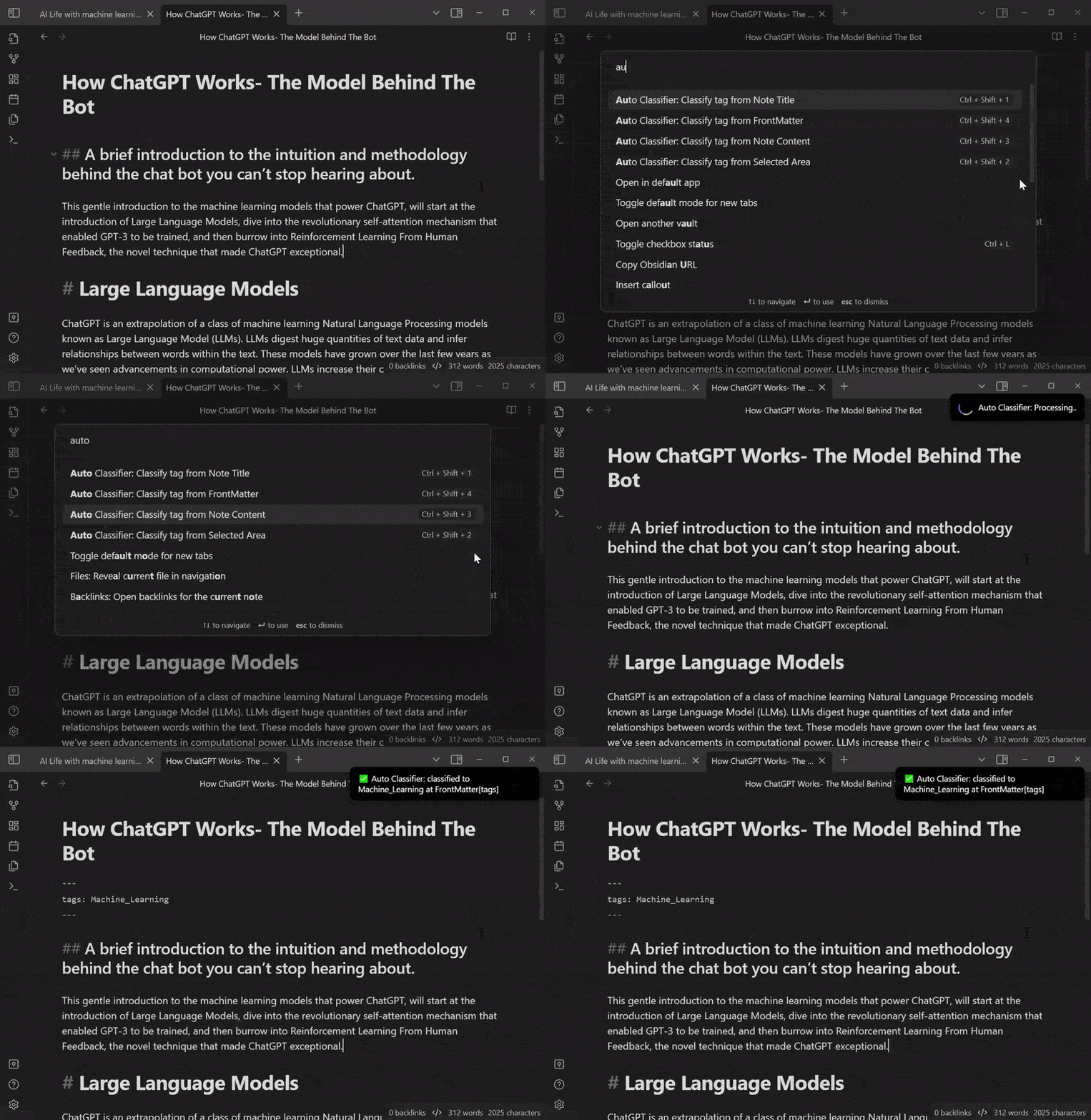
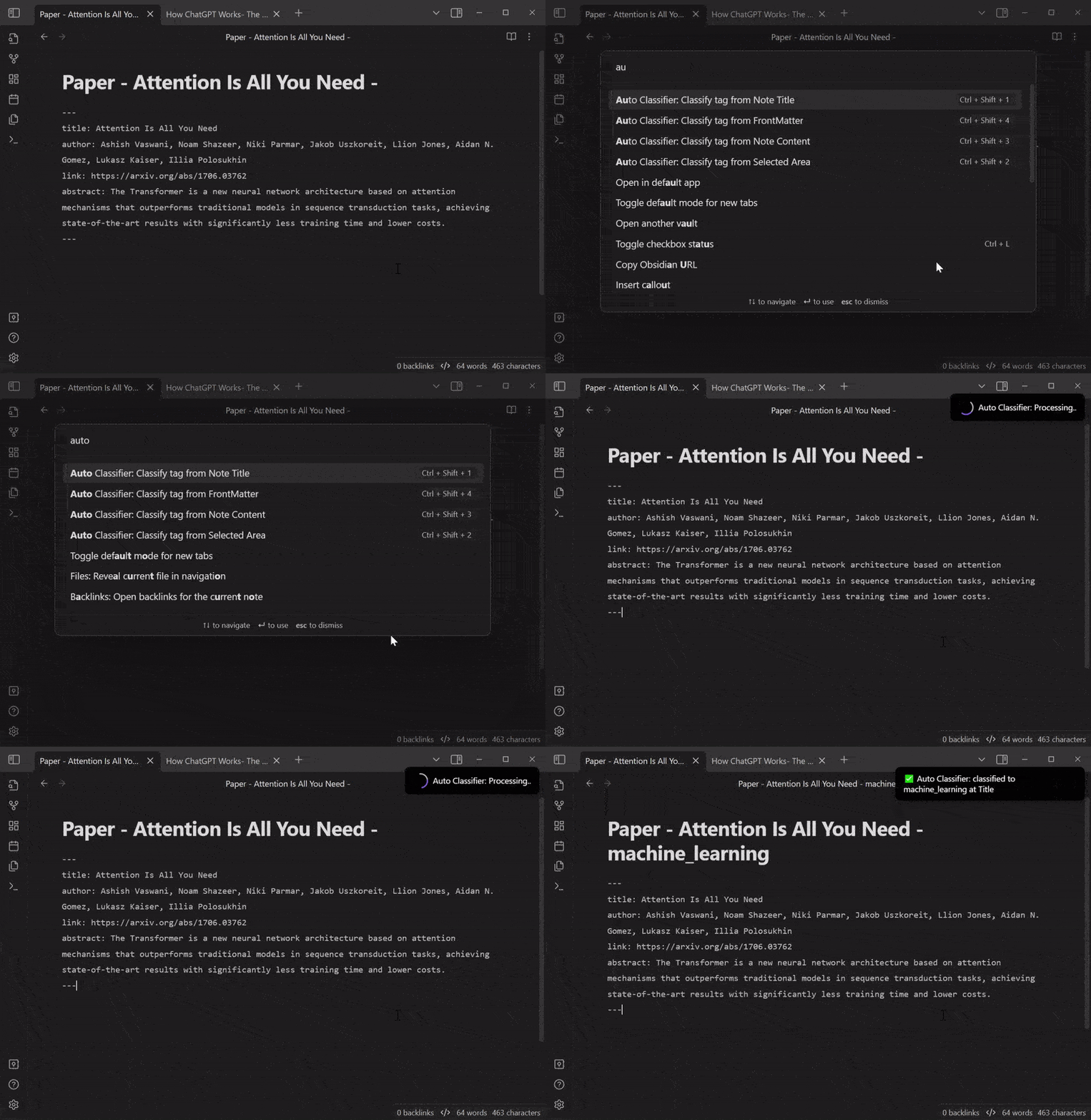
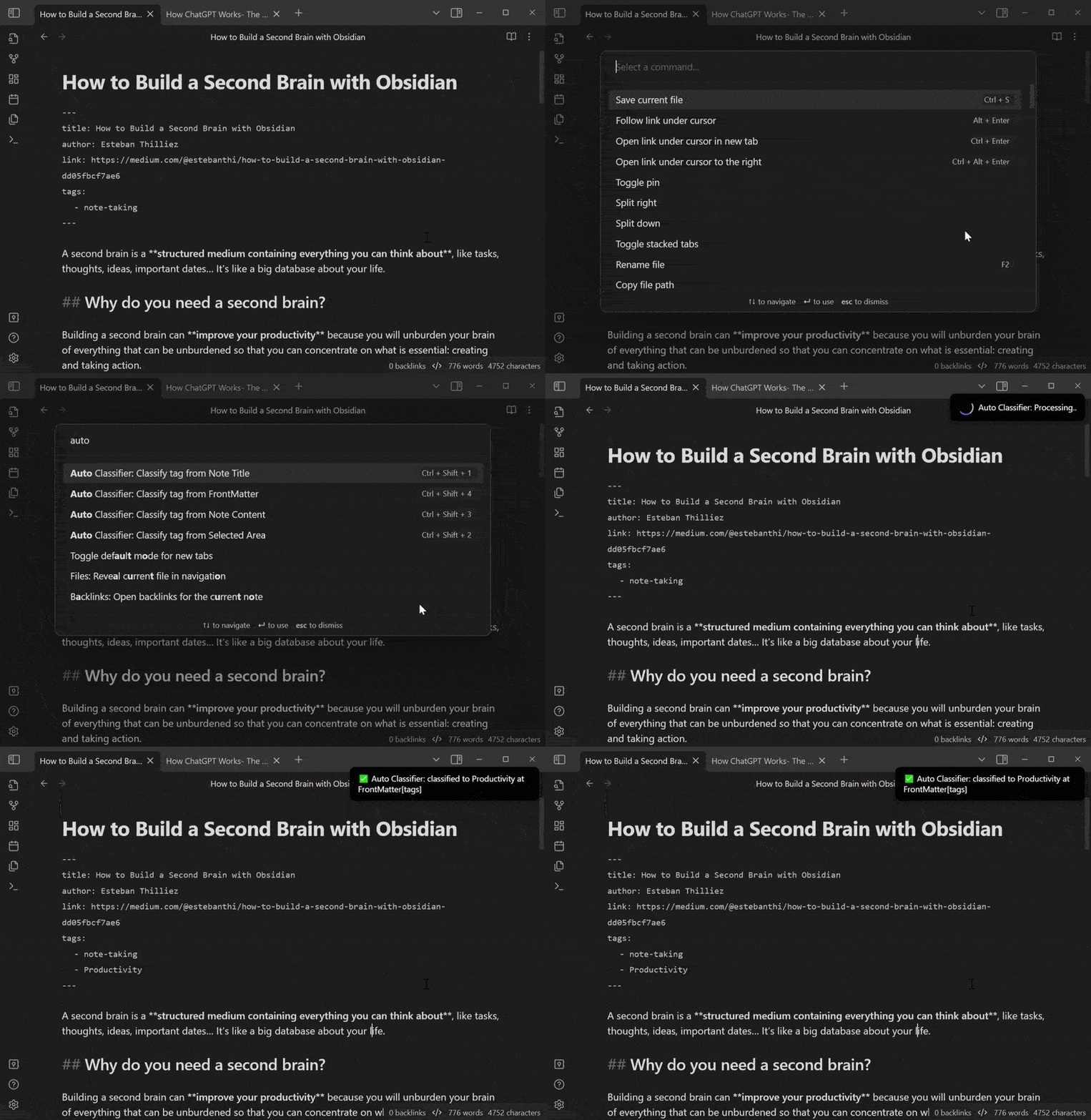
  • This plugin consists of 4 Input Commands that you can run. By simply running these commands, it will automatically classify your note:

    • Classify tag from Note title
    • Classify tag from Note FrontMatter
    • Classify tag from Note Content
    • Classify tag from Selected Area
  • Toggle and choose from different Tag Reference types. The LLM will select the appropriate tag from these references:

    • All tags (default)
    • Filtered Tags with regular expression
    • Manual Tags that are defined manually
  • Specify the Output Type from the response of the LLM:

    • #Tag: at your Current Cursor or Top of Content
    • [[WikiLink]]: at your Current Cursor or Top of Content
    • FrontMatter: with key
    • Title Alternative: at the end of note's title
  • (Optional) Add a Prefix or Suffix for the output format.

  • (Optional) You can use your custom request for your selected API:

    • Custom Prompt Template
      • The LLM will respond based on this prompt. The input coming from your Command will be replaced by {{input}}, and the reference tags you set will be placed in {{reference}}.
    • Custom Chat Role
      • You can guide the AI's behavior by setting this system role

Classification Engines

OpenAI-compatible API

  • Flexibility: Supports custom prompts and chat roles
  • Multiple Providers: Works with OpenAI, Ollama, LocalAI, and other compatible APIs
  • Local AI Support: Run models locally without internet connection
  • Recommended OpenAI models: gpt-4.1-mini, gpt-4.1, gpt-4o
  • Advanced Features: Custom prompt templates, system roles, and token control

Jina AI Classifier

  • Cost-Effective: Generous free tier with 10 million tokens
  • Multilingual: Supports multiple languages including non-English content
  • High Performance: Zero-shot classification with up to 8192 tokens input and 256 distinct classes
  • Optimized: Works best with semantic labels (e.g., "happy", "sad", "angry")
  • Easy Setup: Often no account creation required, can generate fresh API keys as needed

Local AI Setup (Ollama, LocalAI)

Experimental Support: ⚠️ You may use local OpenAI-compatible APIs such as Ollama or LocalAI. However, support for these engines is experimental and full compatibility or stability is not guaranteed. Some features may not work as expected. Please test thoroughly before relying on these engines for important workflows. If you encounter issues or want to help improve compatibility, contributions and pull requests are very welcome!

Example setup:

  1. Install Ollama or LocalAI
  2. Prepare your model: For Ollama, run ollama pull llama3. For LocalAI, configure your models as needed.
  3. Set Base URL: Ollama - http://localhost:11434/v1, LocalAI - http://localhost:8080/v1
  4. Set Model: e.g., llama3, mistral, etc.
  5. API Key: Leave empty

Example

Use Case #1: Selected areaCurrent cursor

Use Case #2: ContentFrontMatter

Use Case #3: FrontMatterTitle

Use Case #4: TitleFrontMatter

DDC number classification

If you want to use this plugin for DDC number classification, edit the Custom Prompt Template like this:

Please use Dewey Decimal Classification (DDC) to classify this content:
"""
{{input}}
"""
Answer format is JSON {reliability:0~1, output:"[ddc_number]:category"}.
Even if you are not sure, qualify the reliability and select one.
Convert the blank spaces to "_" in the output.

LCSH classification

LCSH classification can be similar:

Please use Library of Congress Subject Headings (LCSH) to classify this content:
"""
{{input}}
"""
Answer format is JSON {reliability:0~1, output:"[First LCSH term]--[Second LCSH term]--[Third LCSH term]"}.
Even if you are not sure, qualify the reliability and select one.
Convert the blank spaces to "_" in the output.

Installation

  • Search for Auto Classifier in the Community plugin tab of the Obsidian settings.
  • Alternatively, you can manually download the latest release from this repository's GitHub releases and extract the ZIP file to your Obsidian plugins folder.

Support

If you encounter any issues while using this plugin or have suggestions for improvement, please feel free to submit an issue on the GitHub repository. Pull requests are also welcome.

🙌 Contributors

  • @gravityfargo
  • @rtuszik
  • @tk42
  • @SophomoreSo
  • @ThiagoVsky

License

MIT License

Similar Plugins

info
• Similar plugins are suggested based on the common tags between the plugins.
Templater
6 years ago by SilentVoid
A template plugin for obsidian
Copilot
3 years ago by Logan Yang
THE Copilot in Obsidian
Tag Wrangler
5 years ago by PJ Eby
Rename, merge, toggle, and search tags from the Obsidian tag pane
Auto Link Title
5 years ago by Matt Furden
Automatically fetch the titles of pasted links
Colored Tags
3 years ago by Pavel Frankov
Colorizes tags in different colors.
ChatGPT MD
3 years ago by Bram Adams
A (nearly) seamless integration of ChatGPT into Obsidian.
Table Extended
5 years ago by AidenLx
Extend basic table in Obsidian with MultiMarkdown table syntax
Collapse All
5 years ago by Nathonius
Colored Tags Wrangler
2 years ago by AndreasSasDev
Obsidian Plugin : Assign colors to tags. Has integrations with other plugins, like Kanban.
Whisper
3 years ago by Nik Danilov
Speech-to-text in Obsidian using Whisper
GPT-3 Notes
3 years ago by micahke
An Obsidian plugin to generate notes based on GP3 output.
Companion
3 years ago by rizerphe
Autocomplete your obsidian notes with AI, including ChatGPT, through a copilot-like interface.
Frontmatter Tag Sugest
4 years ago by Jonathan Miller
Autocompletes tags in Obsidian YAML frontmatter. No more deleting #!
Smart ChatGPT
a year ago by 🌴 Brian
ZettelFlow
3 years ago by RafaelGB
ZettelFlow is a plugin for Obsidian that helps you to create and manage your notes in a Zettelkasten way.
Multi Tag
3 years ago by fez-github
Obsidian plugin that allows the user to add a tag to all files in a folder. Not in active development. Now working on Multi-Properties, which covers most of this plugin's functionality.
Prompt ChatGPT
2 years ago by Coduhuey
Nested tags graph
3 years ago by drpilman
A small plugin for Obsidian that links nested tags in graph view
Tags Overview
3 years ago by Christian Wannerstedt
Obsidian plugin which adds an extended tags panel where tagged files can be overviewed, filtered and accessed in an easy way.
HTML Tags Autocomplete
5 years ago by bicarlsen
Autocomplete HTML formatting tags.
AutoMOC
4 years ago by Diego Alcantara
Mindmap
2 years ago by YunXiaoYi
An Obsidian plugin for creating Mindmaps.
Tags Routes
2 years ago by Ken
This is a plugin for obsidian, to visualize files and tags as nodes in 3D graph.
Canvas Filter
3 years ago by Ivan Koshelev
Obsidian Canvas plugin that let's you show only pages / arrows with specific tags / colors / connections.
Quick Tagger
2 years ago by Gorkycreator
Quick tagger for Obsidian.md
Tag Page
3 years ago by Matthew Sumpter
An Obsidian plugin to create and manage dedicated Markdown pages for tags, with features to automatically populate and refresh content based on user-defined settings.
Smart Title
2 years ago by magooup
obsidian-plugin-smart-title
Ghost Fade Focus
5 years ago by Sami Korpela
Ghost Fade Focus plugin for Obsidian
Reading comments
3 years ago by BumbrT
Reading comments, for consuming books or large articles in markdown with https://obsidian.md/.
AI Research Assistant
3 years ago by Interweb Alchemy
Prompt Engineering Research Tool for AI APIs
Pluck
5 years ago by Kevin Barrett
Quickly create notes in Obsidian from web pages.
Nexus AI Chat Importer
2 years ago by Superkikim
Vault Chat
3 years ago by Exo Ascension
A ChatGPT bot trained on your vault notes. Ask your AI questions about your own thoughts and ideas!
Insta TOC
a year ago by Nick C.
Generate, update, and maintain a table of contents for your notes while typing in real time.
HTML Tabs
3 years ago by Patrick Tournet
Obsidian plugin allowing the creation and rendering of Tabs and tab panels in your notes.
LLM Summary
2 years ago by QSun
wip
Achievements
3 years ago by Zachatoo
Add achievements to Obsidian to help guide the user to build good habits in Obsidian.
Canvas Conversation
3 years ago by André Baltazar
A plugin for Obsidian that allows you to create a canvas conversation using ChatGPT.
Automatic Renumbering
a year ago by Omri Levi
Automatically reorders checklists and numbered lists as you edit them.
Base Tag Renderer
3 years ago by Darren Kuro
A lightweight obsidian plugin to render the basename of tags in preview mode.
New Bullet With Time
3 years ago by Boninall
A plugin allows you to auto add current time to new bullet line.
Media Companion
a year ago by Nick de Bruin
Post Webhook
a year ago by MasterB1234
A plugin for Obsidian that sends notes to Webhook endpoints (e.g. n8n, Make.com, Zapier) for streamlined automation and integration.
Youtube Summarizer
2 years ago by ozdemir08
QuickLink
8 months ago by Jamba Hailar
On obsidian, use @ to quickly link files
Metadata Auto Classifier
2 years ago by Beomsu Koh
AI-powered Obsidian plugin that automatically classifies and generates metadata (tags, frontmatter) for your notes.
Tag Buddy
2 years ago by David Fasullo
Unlock powerful tag editing features in Reading Mode. Add, remove and edit tags across your vault. Use tag inboxes to level up any workflow with a powerful idea assembly line.
FuzzyTag
3 years ago by Adrian
Liquid Templates
5 years ago by Diomede Tripicchio
Define your templates with LiquidJS tags support
GPT-LiteInquirer
3 years ago by ittuann
💬 Experience OpenAI ChatGPT assistance directly within Obsidian, drafting content without interrupting your creative flow.
ZettelGPT
3 years ago by Overraddit
Turbocharge Your Note-taking with AI Assistance
Tag Group Manager
5 months ago by Stargazer-cc
Tag Group Manager is a plugin designed for Obsidian that helps manage tag groups and quickly insert tags.
Ring a secretary
3 years ago by vorotamoroz
EmoTagsTitler
3 years ago by Cyfine
Obsidian Attendance
4 years ago by Tiim
Attendance tracking using obsidian.md
Callout Toggles
2 years ago by Aly Thobani
An Obsidian plugin to quickly add, change, or remove callout wrappers in your notes.
Testing Vault
3 years ago by Michael Pedersen
Related Notes by Tag
9 months ago by Chris Howard
displays notes that share tags with your currently active note
Generate Timeline
a year ago by Shanshuimei
An obsidian plugin to generate timelines from tags, folders, files or metadata automatically. 根据标签,文件夹,文件或者属性自动生成时间轴的插件。
Index Notes
2 years ago by Alejandro Daniel Noel
Plugin that automatically generates index blocks based on tags
Tag Breakdown Generator
3 years ago by Hananoshika Yomaru
Break down nested tags into multiple parent tags
AI bot
a year ago by kuzzh
The AI Bot Plugin is a powerful tool designed to enhance your note-editing experience in Obsidian by leveraging the capabilities of AI. This plugin allows you to interact with an AI assistant directly within Obsidian, making it easier to generate, edit, and organize your notes with intelligent suggestions and automated tasks.
Editor Autofocus
2 years ago by Mgussekloo
Note 2 Tag Generator
2 years ago by Augustin
Tag Formatter
2 years ago by snsvrno
Configurable Obsidian plugin that hides parent tags.
Tag Tactician
a year ago by Scott Tomaszewski
Folder by tags distributor
2 years ago by RevoTale
Automatically group Obsidian notes into folder by tags specified in note.
Pure Chat LLM
a year ago by Justice Vellacott
Turn notes into conversations with chatGPT or better yet Ollama
Auto Bullet
a year ago by takitsuba
Masking Type
a year ago by Telehakke
Obsidian plugin.
Advanced Сanvas Filter
2 years ago by CHex0K
Consecutive Lists
2 years ago by Josh Tucker
Tagvis
a year ago by Mason Bryant
Tag Links
2 years ago by Zacchary Dempsey-Plante
A plugin for Obsidian that allows tags to be opened as links using a hotkey.
tidit
a year ago by codingthings.com
tidit is an Obsidian - https://obsidian.md - plugin that adds timestamps to your document as you type — when you want it, how you want it, where you want it.
Current File Tags
a year ago by Trung Tran
BookNav
2 years ago by jemberton
A plugin for ObsidianMD that enables book style navigation links in a note.
Relative Timestamps
2 years ago by Charles Young
Varinote
a year ago by Giorgos Sarigiannidis
A plugin for Obsidian that allows you to add variables in Templates and set their values during the Note creation.
Private Mode
a year ago by markusmo3
Trakt.tv Sync
a year ago by Nick Felker
Sync Trakt checkins to Obsidian file
Auto Close Tags
9 months ago by k0src
Obsidian MD plugin to auto-close HTML tags.
Note Reviewer
2 years ago by Travis Linkey
An obsidian plugin to help review notes that have been taken
Tag Timer
4 months ago by quantavil
The Tag Timer is a versatile plugin for Obsidian that allows you to seamlessly track the time you spend on specific tasks or sections within your notes.
Time Inserter
7 months ago by heycalmdown
Obsidian plugin to insert current time at cursor position with exact or rounded formats
Bottom to Top
a year ago by Henry Gustafson
SafeLearn Formatter
8 months ago by UnterrainerInformatik
A community plugin for Obsidian, that offers visual aids for the SafeLearn-specific tags.