ChatGPT MD

by Bram Adams
5
4
3
2
1
Score: 77/100

Description

Category: 3rd Party Integrations

The ChatGPT MD plugin integrates ChatGPT functionality directly into Obsidian, allowing users to create dynamic, interactive chats within markdown notes. It supports chat creation, streaming responses, and the use of templates for reusable chat scenarios. The plugin enables the use of frontmatter to customize ChatGPT API parameters and supports multiple roles like system, assistant, and user. Users can generate chats from highlighted text, add comment blocks, and infer chat titles from messages. Custom API endpoints are also supported, and responses can be streamed in real-time. Additional features include language selection for title inference, custom heading levels for roles, and options to stop ongoing streams. The plugin maintains minimal boilerplate for ease of use and integrates seamlessly with Obsidian's markdown rendering system, supporting lists, code blocks, and more.

Reviews

No reviews yet.

Stats

1396
stars
117,917
downloads
101
forks
1,156
days
87
days
87
days
73
total PRs
5
open PRs
9
closed PRs
59
merged PRs
112
total issues
21
open issues
91
closed issues
2
commits

Latest Version

3 months ago

Changelog

v3.1.0 — Agents

Build your own AI team, right inside Obsidian.

Agents are reusable AI personas that live as Markdown files in your vault. Each agent carries its own model, temperature, and system prompt — so you can switch between a creative writing partner, a code reviewer, and a research assistant in seconds.

Create agents in two ways

AI Wizard — Just describe what you need. "A Socratic tutor that teaches through questions" — the AI generates a name, tunes the temperature, and writes a comprehensive system prompt. Review it, tweak it if you want, save.

Manual — Full control. Pick your model (with autocomplete across all your configured providers), dial in the temperature, write your system prompt.

Use them anywhere

Run Choose Agent on any note. The agent's settings merge seamlessly with your note's frontmatter — your per-note overrides still win. Switch agents mid-conversation. Mix and match.

What else is new

Streaming is now rock-solid. Tables, code blocks, and other block-level markdown no longer corrupt during streaming. The new line-boundary flushing engine writes content at natural breakpoints, eliminating the cursor race conditions that caused visual glitches.

Dependencies updated across the board — all packages at their latest compatible versions.


Getting Started

  1. Open Settings → ChatGPT MD and set your Agent Folder (default: ChatGPT_MD/agents)
  2. Run the Create new agent command
  3. Choose AI Wizard or Manual
  4. Apply it to any chat note with Choose Agent

Your agents are just Markdown files — version them, share them, sync them across devices. They're yours.

Full Changelog: https://github.com/bramses/chatgpt-md/compare/3.0.1...3.1.0

README file from

Github

ChatGPT MD

🚀 A seamless integration of ChatGPT, OpenRouter.ai and local LLMs via Ollama/LM Studio into Obsidian.
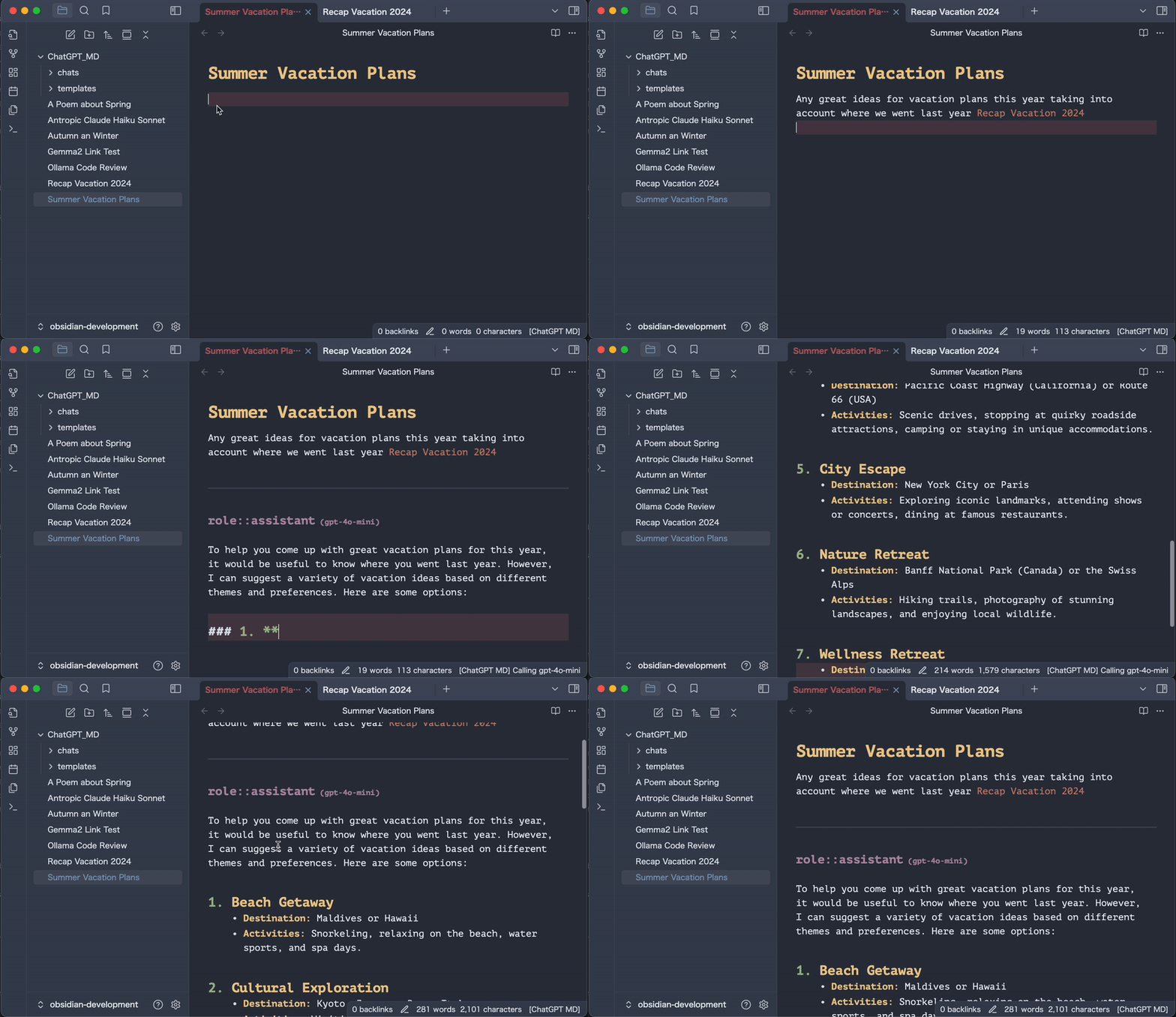
Chatting with links about vacation plans

🚀 What's New

v3.1.0: Agents System

Create reusable AI personas with custom system prompts, models, and temperature settings.

Define agents as Markdown files with frontmatter and a system prompt body. Apply an agent to any note with the Choose Agent command, or create new agents with the AI Wizard—describe what you want, and AI generates the name, temperature, and a comprehensive system prompt for you.

v3.0.0: Privacy-First AI Tool Calling (off by default - Settings → ChatGPT MD → Tool Calling)

Your AI assistant can now actively search your vault, read files, and query the web—with a human-in-the-loop architecture that keeps you in control.

Tool calling built on privacy-first principles. When your AI needs information, it requests permission to use tools—you approve execution, review results, and control exactly what gets shared back to the model. Nothing leaves your vault without explicit consent.

A simple and quick Start 🏁

Get started in just a few simple steps:

  1. Install ChatGPT MD: Go to Settings > Community Plugins > Browse, search for ChatGPT MD and click Install.
  2. Add your OpenAI API key: In the plugin settings, add your OpenAI API key and/or install Ollama and local LLMs of your choice.
  3. Start chatting: Use the ChatGPT MD: Chat command (cmd + p or ctrl + p) to start a conversation from any note.

💡 Pro tip: Set up a hotkey for the best experience! Go to Settings > Hotkeys, search for ChatGPT MD: Chat and add your preferred keybinding (e.g., cmd + j).

Start chatting, don't worry too much about the more advanced features. They will come naturally :-)

Local LLM Setup (Ollama & LM Studio) 🏠

Want to keep your conversations private and avoid API costs? Use local LLMs with ChatGPT MD!

Ollama Setup

  1. Install Ollama: Download from ollama.ai and install on your system
  2. Download a model: Run in terminal:
    ollama pull llama3.2    # or any model of your choice
    ollama pull qwen2.5     # another popular option
    
  3. Configure ChatGPT MD:
    • Go to Settings > ChatGPT MD > Ollama Defaults
    • The Ollama URL should already be set to http://localhost:11434
    • Set your default model in the settings (e.g., [email protected])
  4. Start chatting: Use the ChatGPT MD: Chat command to start conversations with your configured default model, or override it in individual notes:
    ---
    model: [email protected]  # Override default if needed
    temperature: 0.7
    ---
    

LM Studio Setup

  1. Install LM Studio: Download from lmstudio.ai
  2. Download and load a model in LM Studio
  3. Start the server: In LM Studio, go to Local Server and start it
  4. Configure ChatGPT MD:
    • Go to Settings > ChatGPT MD > LM Studio Defaults
    • The LM Studio URL should be set to http://localhost:1234
    • Set your default model in the settings (e.g., lmstudio@your-model-name)
  5. Start chatting: Use the ChatGPT MD: Chat command to start conversations with your configured default model, or override it in individual notes:
    ---
    model: lmstudio@your-model-name  # Override default if needed
    temperature: 0.7
    ---
    

Finding Your Model Names

  • Ollama: Run ollama list in terminal to see installed models
  • LM Studio: Check the model name in LM Studio's interface when the model is loaded

Important Notes for Local LLMs

  • Default Model Configuration: Set your preferred local model as the default in settings - it works just like cloud services
  • Per-Note Overrides: You can override the default model in individual notes using frontmatter, same as with other providers
  • Model Discovery: Use ollama list (Ollama) or check LM Studio interface to find your available model names for configuration

Features

  • Interactive conversations:
    • Engage directly with ChatGPT, OpenRouter.ai models, and Ollama from any Markdown note, edit questions or responses on-the-fly, and continue the chat seamlessly.
  • Privacy & Zero API Costs:
    • Use local LLMs via Ollama, keeping your chats on your computer and avoiding API costs.
  • Web Access Models:
    • Get real-time information from the web with OpenAI's gpt-4o-search-preview and Perplexity's openrouter@perplexity/llama-3.1-sonar-small-128k-online (via openrouter.ai).
  • Multiple AI Providers:
    • Choose from OpenAI, OpenRouter.ai (with access to models like Gemini, Claude, DeepSeek, Llama, Perplexity), or local models via Ollama.
  • System Commands:
    • Instruct the LLM via system commands to get the best possible answers.
  • Link context:
    • Provide links to any other note in your vault for added context during conversations with Markdown or Wiki links.
  • Per-note Configuration:
  • Markdown Support:
    • Enjoy full rendering of lists, code blocks, and more from all responses.
  • Minimal Setup:
    • Utilize your OpenAI API key, OpenRouter.ai API key, or install any LLM locally via Ollama.
  • Comment Blocks:
    • Ignore parts of your notes using comment blocks.
  • Chat Templates:

Privacy and Security

ChatGPT MD is

  • only storing data locally in your vault, with zero tracking and no 3rd party integrations except direct calls to the AI APIs (OpenAI, OpenRouter.ai).
  • allowing you to use Ollama, a local LLM installation for offline conversation-based knowledge exploration.

Default Configuration

The plugin comes with a well-balanced pre-configuration to get you started immediately. You can change the global settings or use the local parameters in any note via frontmatter (start typing --- in the first line of your note to add properties)

---
system_commands: ['You are a helpful assistant.']
temperature: 0.3
top_p: 1
max_tokens: 300
presence_penalty: 0.5
frequency_penalty: 0.5
stream: true
stop: null
n: 1
model: gpt-5-mini

# Service-specific URLs (optional, will use global settings if not specified)
openaiUrl: https://api.openai.com
# openrouterUrl: https://openrouter.ai
# ollamaUrl: http://localhost:11434
---

💡 Pro tip: Increasing max_tokens to a higher value e.g. 4096 for more complex tasks like reasoning, coding or text creation. The default model gpt-5-mini is optimized for speed and efficiency. Upgrade to gpt-5 for enhanced reasoning capabilities or use gpt-5-nano for ultra-lightweight responses.

Tools

  1. Install: Update or install v3.0.0+ from Obsidian
  2. Configure: Settings → ChatGPT MD → Tool Calling → Enable,
  3. Optional: Add Brave Search API key (free tier: 1,000 queries/month)
  4. Chat: Use the ChatGPT MD: Chat command. AI will request tool use when needed.

The implementation follows a three-layer approval pattern:

  1. Execution Layer: AI requests tool use with parameters
  2. Processing Layer: Tool executes locally in your vault using Obsidian's API (full-text search across filenames and content)
  3. Approval Layer: Interactive modals let you filter results before they're returned to the AI

Available Tools

Vault Search (vault_search)

  • Multi-word OR search: matches ANY query term across your vault
  • Searches both filenames and file content simultaneously
  • Excludes current file to prevent recursion
  • Configurable result limits (default: 5 files)
  • Query editing: refine search terms before execution

File Read (file_read)

  • Direct file access when AI knows specific file paths
  • Batch reading support for multiple files
  • Full content extraction with your approval
  • Useful for targeted lookups once files are discovered

Web Search (web_search)

  • Powered by Brave Search API (privacy-focused, 1,000 free queries/month)
  • Custom search provider support for self-hosted endpoints
  • Optional full-page content fetching
  • Automatic API key validation—tool only appears when configured
  • Query editing: modify web search queries before execution

Privacy & Security

  • Local-First Execution: All vault operations run entirely within Obsidian's API
  • Selective Sharing: Multi-select modals let you choose exactly which results to share
  • No Telemetry: Zero tracking or analytics—tool usage stays private

Configuration

Enable tool calling in Settings → ChatGPT MD → Tool Calling:

  • Enable Tool Calling: Master switch (default: disabled)
  • Brave Search API Key: Your Brave Search API key
  • Custom Provider URL: Self-hosted search endpoint
  • Max Web Results: Number of web results to return (1-10)

Use Cases

Research Assistant: "Search my vault for notes about quantum computing algorithms and recent papers on the topic"

→ AI discovers relevant notes → You approve which files to share → AI synthesizes information with proper attribution

Knowledge Synthesis: "Find all my Q3 meeting notes and summarize key decisions about product roadmap"

→ Vault search returns meeting files → You select the relevant ones → AI extracts and summarizes decisions

Web-Enhanced Writing: "Search the web for latest climate change statistics and incorporate them into my article"

→ Web search fetches current data → You filter reliable sources → AI integrates citations into your draft

Cross-Reference Discovery: "Find notes that mention both machine learning and productivity techniques"

→ Multi-word OR search finds intersections → You approve interesting connections → AI highlights patterns you might have missed

⚠️ Note: Tool support depends on model capabilities. Older models may not support function calling. You can check tool capabilities in the tool selection list after enabling tool support in the settings.

Multi Model Chats

You can set and change the model for each request in your note. Specify the model property via frontmatter:

for OpenAI models (including the latest GPT-5 family)

---
model: gpt-5  # or gpt-5-mini, gpt-5-nano, gpt-5-chat-latest
system_commands: [act as a senior javascript developer]
---

prefix it with ollama@ for Ollama models or lmstudio@ for LM Studio models.

---
model: ollama@gemma2:27b
temperature: 1
---

The AI responses will keep the used model name in the response title for future reference. You can find the list of your installed Ollama model names from your terminal via ollama list or the available openAI model names online on this openAI models page.

Service URLs

Each AI service has its own dedicated URL parameter that can be configured globally in settings or per-note via frontmatter:

---
# For OpenAI
openaiUrl: https://api.openai.com

# For OpenRouter
openrouterUrl: https://openrouter.ai

# For Ollama
ollamaUrl: http://localhost:11434
---

The default URLs are:

  • OpenAI: https://api.openai.com
  • OpenRouter: https://openrouter.ai
  • Ollama: http://localhost:11434

Note: Previous versions used a single url parameter which is now deprecated. Please update your templates and notes to use the service-specific URL parameters.

Commands 👨‍💻

Run commands from Obsidian's command pallet via cmd + p or ctrl + p and start typing chatgpt or set hotkeys (a chat command hotkey is highly recommended for effortless chats (I use cmd + j, which works fantastic, because your index finger is already resting on that key)).

Main Command
  • Chat: Parse the file and interact with ChatGPT. Assign a hotkey, e.g. cmd + j.
Creation Commands
  • New Chat with Highlighted Text: Start a chat using highlighted text and default frontmatter in Chat Folder.
  • New Chat From Template: Create chats from templates in Chat Template Folder.
Utility Commands
  • Infer Title: Automatically generate a note title based on the notes content. Configurable to auto-run after 4+ messages.
  • Add Comment Block: Insert comment blocks for parts of your note that should be ignored.
  • Select Model: Choose from all available LLMs (OpenAI, OpenRouter.ai, Ollama) and set the current model for your note.
Maintenance Commands
  • Clear Chat: Remove all messages while retaining frontmatter.
  • Stop Streaming (Desktop Only): Halt ongoing streams if necessary.
Formatting Tools
  • Add Divider: Insert horizontal rulers to organize content visually.

Beta Testing 🧪

Want to try the latest features before they're officially released? You can beta test ChatGPT MD using the BRAT (Beta Reviewer's Auto-update Tool) community plugin:

  1. Install the BRAT plugin from Obsidian's Community Plugins
  2. Open BRAT settings and add bramses/chatgpt-md as a beta plugin
  3. Select "latest version" from the dropdown in the BRAT plugin settings
  4. Enable the ChatGPT MD plugin in your community plugins list

This gives you early access to new features while they're still being developed and tested.

⚠️ WARNING: Beta testing is dangerous and happens at your own risk. Always test beta versions on a new empty vault, not on your main vault. Beta features can break and possibly lead to data loss.

FAQs ❓

How do I start chatting with ChatGPT MD?

Use the ChatGPT MD: Chat command from the Obsidian command Palette (cmd + p or ctrl + p) to start a conversation from any note.

Can I set up a hotkey for the ChatGPT MD: Chat command?

Yes, you should! Go to Settings > Hotkeys, search for ChatGPT MD: Chat and add your preferred keybinding (e.g., cmd + j).

How do I use chat and reasoning models?

You can use OpenAI's GPT 3 and 4 models, various models through OpenRouter.ai (like Claude, Gemini, DeepSeek, Llama, Perplexity), or any model you have installed via Ollama. DeepSeek-r1:7b works great for reasoning locally via Ollama.

How do I use a custom endpoint?

Ensure your custom API adheres to OpenAI's specifications, such as Azure's hosted endpoints. Consult your provider for API key management details.

Where should I add my OpenAI API key?

In the plugin settings, add your OpenAI API key and/or install Ollama and local LLMs of your choice.

What happened to the 'url' parameter in the frontmatter?

The single 'url' parameter is now deprecated. In v2.2.0 and higher, we've introduced service-specific URL parameters: openaiUrl, openrouterUrl, and ollamaUrl. This allows for more flexibility and clarity when configuring different services. Please update your templates and notes accordingly.

🤖 Enjoy exploring the power of ChatGPT MD in your Obsidian vault!🚀

Contributions Welcome 🤝

Pull requests, bug reports, and all other forms of contribution are welcomed and highly encouraged! :octocat:

Development Setup

# Clone the repository
git clone https://github.com/bramses/chatgpt-md.git
cd chatgpt-md

# Install dependencies
yarn install

# Development mode (watch for changes)
yarn dev

# Run tests
yarn test

# Run tests with coverage
yarn test:coverage

# Lint code
yarn lint
yarn lint:fix

# Production build
yarn build

Testing

The project uses Jest for testing with 104 tests covering utility functions. Before submitting a PR:

  1. Run yarn test to ensure all tests pass
  2. Run yarn lint to check code quality
  3. Run yarn build to verify the build succeeds

Code Quality Standards

  • Complexity: Functions should be under 50 lines with cyclomatic complexity ≤15
  • Type Safety: Minimize any usage; prefer explicit types
  • Async Safety: All promises must be handled properly (awaited, caught, or explicitly ignored)
  • Testing: Add tests for new utility functions in src/Utilities/*.test.ts

Pre-commit Hooks

Pre-commit hooks automatically run on git commit:

  • ESLint auto-fixes linting issues
  • Prettier formats code
  • Only staged files are checked

CI/CD

GitHub Actions automatically runs on pull requests:

  • Lint check
  • TypeScript type checking
  • Test suite with coverage
  • Production build

Project Structure

src/
├── Commands/           # Obsidian command handlers
├── Services/           # Business logic & AI adapters
├── Views/              # UI components & modals
├── Utilities/          # Pure helper functions (well-tested)
├── Models/             # TypeScript interfaces
├── Types/              # Type definitions
└── core/               # Dependency injection container

For detailed development documentation, see CLAUDE.md and docs/development.md.

Submitting Changes

  1. Fork the repository
  2. Create a feature branch (git checkout -b feature/amazing-feature)
  3. Make your changes (tests, linting, and docs)
  4. Commit your changes (git commit -m 'Add amazing feature')
  5. Push to the branch (git push origin feature/amazing-feature)
  6. Open a Pull Request

Your PR will be automatically checked by CI. Please ensure all checks pass before requesting review!

About the Developers ✍️

Bram created ChatGPT MD in March 2023 lives in NYC and is building Your Commonbase (A Self Organizing Scrapbook with Zero Stress Storing, Searching, and Sharing). His personal website and newsletter is located at bramadams.dev

Deniz joined Bram in 2024 to continue development. He is working in a gaming company in Germany and uses AI heavily in his work and private life. Say "hi" on Bluesky: Deniz

Happy writing with ChatGPT MD! 💻 🎉

Similar Plugins

info
• Similar plugins are suggested based on the common tags between the plugins.
Kanban
5 years ago by mgmeyers
Create markdown-backed Kanban boards in Obsidian.
Copilot
3 years ago by Logan Yang
THE Copilot in Obsidian
Smart Connections
3 years ago by Brian Petro
Chat with your notes & see links to related content with AI embeddings. Use local models or 100+ via APIs like Claude, Gemini, ChatGPT & Llama 3
Linter
5 years ago by Victor Tao
An Obsidian plugin that formats and styles your notes with a focus on configurability and extensibility.
Advanced Slides
3 years ago by MSzturc
Create markdown-based reveal.js presentations in Obsidian
Mind Map
5 years ago by James Lynch
An Obsidian plugin for displaying markdown notes as mind maps using Markmap.
PDF++
2 years ago by Ryota Ushio
PDF++: the most Obsidian-native PDF annotation & viewing tool ever. Comes with optional Vim keybindings.
ExcaliBrain
4 years ago by Zsolt Viczian
A graph view to navigate your Obsidian vault
Quiet Outline
4 years ago by the_tree
Improving experience of outline in Obsidian
Enhancing Mindmap
5 years ago by Mark
obsidian plugin editable mindmap,you can edit mindmap on markdown file
Multi-Column Markdown
4 years ago by Cameron Robinson
A plugin for the Obsidian markdown note application, adding functionality to render markdown documents with multiple columns of text.
Excel to Markdown Table
4 years ago by Ganessh Kumar R P
An Obsidian plugin to paste data from Microsoft Excel, Google Sheets, Apple Numbers and LibreOffice Calc as Markdown tables in Obsidian editor.
CardBoard
4 years ago by roovo
An Obsidian plugin to make working with tasks a pleasure (hopefully anyway).
Smart Composer
2 years ago by Heesu Suh
AI chat assistant for Obsidian with contextual awareness, smart writing assistance, and one-click edits. Features vault-aware conversations, semantic search, and local model support.
Sheet Plus
2 years ago by ljcoder
obsidian spreadsheets solutions
Emoji Shortcodes
5 years ago by phibr0
Emoji Shortcodes - Obsidian Plugin | Adds Support for Emoji Shortcodes to Obsidian
ReadItLater
5 years ago by Dominik Pieper
Markdown Formatting Assistant
5 years ago by Reocin
This Plugin provides a simple WYSIWYG Editor for Markdown and in addition a command line interface. The command line interface facilitate a faster workflow.
MCP Tools
a year ago by Jack Steam
Add Obsidian integrations like semantic search and custom Templater prompts to Claude or any MCP client.
Markdown prettifier
5 years ago by pelao
A markdown prettifier for obsidian
Links
3 years ago by MiiKey
manipulate & manage obisidian links
Docxer
2 years ago by Developer-Mike
🚀 Boost your productivity by previewing and converting Word files easily to markdown.
Table Extended
5 years ago by AidenLx
Extend basic table in Obsidian with MultiMarkdown table syntax
File Cleaner Redux
2 years ago by husjon
A plugin for Obsidian to help clean up files in your vault
Smart Second Brain
2 years ago by Leo310, nicobrauchtgit
An Obsidian plugin to interact with your privacy focused AI-Assistant making your second brain even smarter!
Table Generator
4 years ago by Boninall
A plugin for generate markdown table quickly like Typora.
Image Captions
3 years ago by Alan Grainger
Add captions to images with inline Markdown and link support. The caption format is compatible with the CommonMark spec and other Markdown applications.
Khoj
3 years ago by Debanjum Singh Solanky
Your AI second brain. Self-hostable. Get answers from the web or your docs. Build custom agents, schedule automations, do deep research. Turn any online or local LLM into your personal, autonomous AI (gpt, claude, gemini, llama, qwen, mistral). Get started - free.
Obsidian Clipper
3 years ago by John Christopher
Obsidian plugin that allows users to clip parts of a website into their obsidian daily note (or new note)
Enveloppe
4 years ago by Mara-Li
Enveloppe helps you to publish your notes on a GitHub repository from your Obsidian Vault, for free!
Copy as HTML
4 years ago by Bailey Jennings
A simple plugin that copies the selected text to your clipboard as HTML
Recipe view
3 years ago by lachholden
View your Obsidian notes as interactive recipe cards while you cook.
Sheets Extended
3 years ago by NicoNekoru
Plugin that adds features to tables in obsidian including merging, vertical headers, and custom css
Gemini Scribe
a year ago by Allen Hutchison
An obsidian plugin to interact with Google Gemini
Obsidian markdown export
3 years ago by bingryan
This plugin allows to export directory/single markdown to a folder. support output format(html/markdown/text)
AI Providers
a year ago by Pavel Frankov
This plugin is a hub for setting AI providers (OpenAI-like, Ollama and more) in one place.
BMO Chatbot
3 years ago by Longy2k
Generate and brainstorm ideas while creating your notes using Large Language Models (LLMs) from Ollama, LM Studio, Anthropic, Google Gemini, Mistral AI, OpenAI, and more for Obsidian.
Chronos Timeline
a year ago by Claire Froelich
Render interactive timelines in your Obsidian notes from simple Markdown.
Tars
2 years ago by Tarslab
Obsidian tars plugin that supports text generation based on tag suggestions, using services like DeepSeek, Claude, OpenAI, OpenRouter, SiliconFlow, Gemini, Ollama, Kimi, Doubao, Qwen, Zhipu, QianFan & more.
Github Copilot
2 years ago by Vasseur Pierre-Adrien
A bridge between Obsidian and Github Copilot
GitHub Sync
2 years ago by Kevin Chin
Sync Obsidian vault to personal GitHub
Note Companion AI
8 months ago by Benjamin Ashgan Shafii
Note Companion: AI assistant for Obsidian that goes beyond just a chat. (prev File Organizer 2000)
HiNote
a year ago by Kai
Add comments to highlighted notes, use AI for thinking, and flashcards for memory.
Creases
4 years ago by Liam Cain
👕 Tools for effectively folding markdown sections in Obsidian
Extract url content
5 years ago by Stephen Solka
Plugin to extract markdown out of urls
YOLO
4 months ago by Lapis0x0
Smart, snappy, and multilingual AI assistant for your vault.
Mehrmaid
2 years ago by huterguier
Rendering Obsidian Markdown inside Mermaid diagrams.
Image Caption
5 years ago by bicarlsen
Add captions to images in Obsidian.
Companion
3 years ago by rizerphe
Autocomplete your obsidian notes with AI, including ChatGPT, through a copilot-like interface.
Slides Extended
2 years ago by Erin Schnabel (original: MSzturc)
Create markdown-based reveal.js presentations in Obsidian
Heading Shifter
4 years ago by kasahala
Easily Shift and Change markdown headings.
AI image analyzer
2 years ago by Swaggeroo
Analyze images with AI to get keywords of the image.
AI Assistant
3 years ago by Quentin Grail
AI Assistant Plugin for Obsidian
Smart ChatGPT
a year ago by 🌴 Brian
Markdown Attributes
5 years ago by Jeremy Valentine
Add attributes to elements in Obsidian
Slurp
2 years ago by inhumantsar
Slurps webpages and saves them as clean, uncluttered Markdown. Think Pocket, but better.
Markdown table checkboxes
3 years ago by DylanGiesberts
Obsidian plugin. Allows for the usage of checkboxes inside markdown tables.
Marker PDF to MD
2 years ago by L3N0X
Make use of different AI models to convert your pdfs into markdown with perfect ocr, latex formulas, tables, images and more! Supports Mistral AI OCR (free) and self hosted variants!
Prompt ChatGPT
2 years ago by Coduhuey
InfraNodus AI Graph View
2 years ago by Nodus Labs
Advanced graph view for Obsidian: text analysis, topic modeling, and AI with InfraNodus AI text analysis tool: https://infranodus.com
Smart Context
a year ago by 🌴 Brian
Personal Assistant
3 years ago by edony
A plugin that harnesses AI agents and streamlining techniques to help you automatically manage Obsidian.
Paste Mode
5 years ago by Jacob Levernier
Obsidian Notes plugin for pasting text and blockquotes to the cursor's current level of indentation.
Simple Columns
10 months ago by Josie
An Obsidian plugin that lets you create easily resizable and customizable columns in your notes.
Quiz Generator
2 years ago by Edward Cui
Generate interactive flashcards from your notes using models from OpenAI (ChatGPT), Google (Gemini), Ollama (local LLMs), and more. Or manually create your own to use with the quiz UI.
Marp
3 years ago by JichouP
Plugin to use Marp with Obsidian
Paste Link
2 years ago by Jose Elias Alvarez
Intelligently paste Markdown links in Obsidian.
Gemini Assistant
2 years ago by eatgrass
Your AI assistant in obsidian
Markdown Furigana
5 years ago by Steven Kraft
Simple Markdown to Furigana Rendering Plugin for Obsidian
Auto Classifier
3 years ago by Hyeonseo Nam
Auto classification plugin for Obsidian using ChatGPT.
Mesh AI
2 years ago by Chasebank87
Better Markdown Links
2 years ago by mnaoumov
Obsidian plugin that adds support for angle bracket links and manages relative links properly
AI Tagger
2 years ago by Luca Grippa
Simplify tagging in Obsidian. Instantly analyze and tag your document with one click for efficient note organization.
Tweet to Markdown
5 years ago by kbravh
An Obsidian.md plugin to save tweets as Markdown files.
CookLang Editor
4 years ago by death_au/cooklang
Edit and display Cooklang recipes in Obsidian
Image Upload Toolkit
3 years ago by Addo Zhang
An obsidian plugin for uploading local images embedded in markdown to remote store and export markdown for publishing to static site.
Smart Templates
2 years ago by 🌴 Brian Petro
Smart Templates is an AI powered templates for generating structured content in Obsidian. Works with Local Models, Anthropic Claude, Gemini, OpenAI and more.
Avatar
3 years ago by froehlichA
An obsidian plugin for displaying an avatar image in front of your notes.
AI for Templater
2 years ago by TfTHacker
Extends Templater with AI Chat commands using the OpenAI Client Library
Chat with Bard
3 years ago by Artel250
An obsidian plugin that enables you to talk to Google Gemnini directly
Copy as LaTeX
4 years ago by mo-seph
Quick plugin to be able to copy/paste from Obsidian/Markdown into a Latex document
Advanced Progress Bars
a year ago by cactuzhead
Obsidian plugin to create custom progress bars
Dataview Serializer
2 years ago by Sébastien Dubois
Obsidian plugin that gives you the power of Dataview, but generates Markdown, making it compatible with Obsidian Publish, and making the links appear on the Graph.
Ollama Chat
2 years ago by Brumik
A plugin for chatting with you obsidian notes trough local Ollama LLM instead of Chat GTP.
Dataview Publisher
2 years ago by UD
Output markdown from your Dataview queries and keep them up to date. You can also be able to publish them.
AI Tagger Universe
a year ago by Hu Nie
An intelligent Obsidian plugin that leverages AI to automatically analyze note content and suggest relevant tags, supporting both local and cloud-based LLM services.
Recipe Grabber
3 years ago by seethroughdev
AI Research Assistant
3 years ago by Interweb Alchemy
Prompt Engineering Research Tool for AI APIs
Enhanced Copy
2 years ago by Mara-Li
A obsidian plugin that allows to copy in markdown in reading view or canvas read-only view, creating profile and transform the text during copy.
Markdown to Jira Converter
3 years ago by muckmuck
An obsidian.md plugin, which provides a markdown to jira markup converter
Markitdown File Converter
a year ago by Ethan Troy
Integrate Microsoft's Markitdown tool to convert various file formats to Markdown for your vault.
Nexus AI Chat Importer
2 years ago by Superkikim
My Bible
2 years ago by GsLogimaker
Your own customization bible in your personal vault!
qmd as md
4 years ago by Daniel Borek
A plugin for Obsidian that enables editing and compiling `qmd` Quarto files.
Markdown Tags
a year ago by John Smith III
Enhance your Markdown documents with custom tags. Use predefined or custom labels, customizable colors, and arrow indicators to visually track tasks and statuses.
Vault Chat
3 years ago by Exo Ascension
A ChatGPT bot trained on your vault notes. Ask your AI questions about your own thoughts and ideas!
Insta TOC
a year ago by Nick C.
Generate, update, and maintain a table of contents for your notes while typing in real time.
Caret
2 years ago by Jake Colling
Caret, an Obsidian Plugin
Marjdown shortcuts
4 years ago by Jules Guesnon
🪨 Obsidian plugin that allows to write markdown from commands
Arcana
3 years ago by A-F-V
Supercharge your Obsidian note-taking through AI-powered insights and suggestions
Chat Stream
3 years ago by Ryan P Smith
Obsidian canvas plugin for using AI completion with threads of canvas nodes
Automatic Linker
a year ago by Kodai Nakamura
Extended Markdown Syntax
a year ago by Kotaindah55
Extend your Markdown syntax using delimiters instead of HTML tags, such as underlining, superscript, subscript, highlighting, and spoiler.
AI LLM
2 years ago by Sparky4567
Lets to use local llms in your Obsidian Vaults, extend your stories or create entirely new texts based on your previous input
Horizontal Blocks
7 months ago by iCodeAlchemy
Bring Notion-style layouts to Obsidian — with side-by-side, resizable markdown blocks that support full Obsidian syntax including images, embeds, and internal links.
Markdown Tree
3 years ago by carvah
Introducing a powerful plugin that revolutionizes directory tree creation. With its intuitive Markdown-inspired coding style, this plugin empowers users to effortlessly and swiftly construct intricate directory trees.
Meal Plan
2 years ago by Tyler Mayoff
A meal plan & recipe manager plugin for Obsidian
Formatto
2 years ago by Deca
Simple, fast, and easy-to-use Obsidian Markdown formatter.
MagicCalendar
3 years ago by Vaccarini Lorenzo
An obsidian plugin that exploit a natural language processing engine to find potential events and sync them with iCalendar
Quoth
4 years ago by Eric Rykwalder
WordWise
2 years ago by ckt1031
Writing companion for AI content generation.
Local LLM Helper
2 years ago by Mani Mohan
An Obsidian plugin to process text, chat with AI, and semantically search your notes — works with any OpenAI-compatible LLM server (Ollama, LM Studio, vLLM, and more).
Dirtreeist
3 years ago by kasahala
Render a directory Structure Diagram from a markdown lists in codeblock.
Canvas Conversation
3 years ago by André Baltazar
A plugin for Obsidian that allows you to create a canvas conversation using ChatGPT.
YouTube Video Summarizer
a year ago by mbramani
Generate AI-powered summaries of YouTube videos directly in Obsidian using Google's Gemini AI.
Autocorrect Formatter
2 years ago by b-yp
A plugin running on Obsidian that utilizes autocorrect to format Markdown content.
mdx as md
5 years ago by Nikolay Kozhukharenko
Edit mdx files in Obsidian.md as if they were markdown
Hard Breaks
4 years ago by Börge Kiss
↩ A plugin for Obsidian that adds functionality to force hard line breaks
InlineAI
a year ago by FBarrca
GPT Assistant
3 years ago by M7mdisk
Ask GPT from your notes and get personalized answers based on your knowledge base.
Floccus Bookmarks to Markdown
3 years ago by mddevils
AI Mentor
3 years ago by clementpoiret
Confluence to Obsidian
3 years ago by K
import confluence space into obsidian
Youtube Summarizer
2 years ago by ozdemir08
AI Editor
3 years ago by Zekun Shen
Yesterday
2 years ago by Dominik Mayer
Obsidian plugin providing Yesterday journaling support
Immersive Translate
2 years ago by imfenghuang
Immersive Translate For Obsidian
Table Checkbox Renderer
5 months ago by Daniel Aguerrevere
Interactive checkboxes for Markdown tables in Obsidian. Toggle checkboxes in Reading Mode and instantly update your Markdown file. Supports multiple checkboxes per cell and any table layout.
ChatCBT
2 years ago by Claire Froelich
AI-powered journaling plugin for your Obsidian notes, inspired by cognitive behavioral therapy
Quadro
2 years ago by Chris Grieser (aka pseudometa)
Obsidian Plugin for social-scientific Qualitative Data Analysis (QDA). An open alternative to MAXQDA and atlas.ti, using Markdown to store data and research codes.
Metadata Auto Classifier
2 years ago by Beomsu Koh
AI-powered Obsidian plugin that automatically classifies and generates metadata (tags, frontmatter) for your notes.
Discord Message Formatter
3 years ago by Emile Durkheim
Obsidian.md plugin that lets you copy Discord conversations and perfectly formats them to Obsidian Markdown!
Flashcard Generator
3 years ago by ChloeDia
Obsidian Plug-in to automatically create a set of questions/answers on your notes !
Blockquote Levels
4 years ago by Carlo Zottmann
A plugin for Obsidian (https://obsidian.md) that adds commands for increasing/decreasing the blockquote level of the current line or selection(s).
GPT-LiteInquirer
3 years ago by ittuann
💬 Experience OpenAI ChatGPT assistance directly within Obsidian, drafting content without interrupting your creative flow.
Explain Selection With AI
2 years ago by Ben Wurster
This is my first go at making an Obsidian plugin to elaborate on and describe selected bits of information and their context.
Console Markdown Plugin
3 years ago by Daniel Ellermann
An Obsidian plugin which renders console commands and their output.
AI Notes Summary
3 years ago by R. Ian Bull (irbull)
An Obsidian plugin that uses ChatGPT to generate a summary of referenced notes
Mochi Cards Exporter
5 years ago by kalbetre
Mochi Cards Exporter Plugin for Obsidian
Awesome Flashcard
4 years ago by AwesomeDog
Handy Anki integration for Obsidian.
File Include
3 years ago by Till Hoffmann
ZettelGPT
3 years ago by Overraddit
Turbocharge Your Note-taking with AI Assistance
OzanShare Publish
5 years ago by Ozan Tellioglu
This plugin allows you to publish your markdown notes with a single click directly from your Obsidian vault.
Silicon AI
3 years ago by deepfates
Add some intelligence to your notes with Silicon AI for Obsidian
brAIn
3 years ago by lusob
Friday
a year ago by sunwei
Write anywhere. Publish everywhere. Sync your notes, publish instantly, turn Markdown into websites.
Markdown to Slack Message
3 years ago by Woongshik Choi
More Markdown file suffix (.mdx/.svx)
4 years ago by swissmation.com
Use markdown files of additional file suffix as .mdx, .svx in Obsidian
Advanced Copy
2 years ago by leschuster
An Obsidian plugin to copy Markdown and transform it into HTML, Anki, or any custom format. Create custom profiles with versatile templates tailored to your workflow.
Markdown Sync Scroll
3 years ago by ProjectXero
Synchronize scroll in linked Markdown views.
O2
3 years ago by haril song
Converts obsidian markdown syntax to other platforms.
Markdown Blogger
3 years ago by Alexa Fazio
Allows developers to push markdown notes to their local blog, portfolio, or static site. Works with Astro.js, Next.js, and any other framework configured to render markdown pages.
Obsidian Handlebars Template Plugin
3 years ago by Sean Quinlan
This is a plugin for Obsidian adding support for the Handlebars template engine in Obsidian notes
Obsidian GoLinks
4 years ago by David Brownman (@xavdid)
Turn go/links into clickable elements in Obsidian
Ring a secretary
3 years ago by vorotamoroz
Auto Front Matter
3 years ago by conorzhong
ChatGPT Definition
3 years ago by julix14
Prettier
2 years ago by GoodbyeNJN
PDF Folder to Markdowns
a year ago by CrisHood
Convert a folder of PDFs into a folder of Markdown files with embedded PDFs. This plugin is useful for users who want to migrate their PDF notes from different apps (e.g., Boox) or organize their reference materials inside Obsidian.
Filename Emoji Remover
4 years ago by Yüksel Tolun
A simple plugin for the note taking app Obsidian that will rename your files to remove emojis in their names.
Global Markdown Encryption
3 years ago by shlemiel
a plugin for encrypting obsidian markdowns in-memory, single password based.
Canvas LLM Extender
3 years ago by Pasi Saarinen
Let the OpenAI LLM add nodes to your Obsidian canvas
Markdown Link Space Encoder
3 years ago by Ron Kosova
Obsidian plugin to automatically encode spaces to %20 in Markdown-style links
LLM Test Generator
a year ago by Aldo E George
Spoilers
2 years ago by Jacobtread
Spoiler blocks for Obsidian
Cloud Atlas
2 years ago by Cloud Atlas
Cloud Atlas Obsidian Client
Notemd
a year ago by Jacob
A Easy way to create your own Knowledge-base! Notemd enhances your Obsidian workflow by integrating with various Large Language Models (LLMs) to process your notes, automatically generate wiki-links for key concepts, create corresponding concept notes, perform web research, and more.
Slackify Note
2 years ago by Jeremy Overman
NeuroVox
a year ago by Synaptic Labs
Obsidian plugin for transcription and generation
Markdown Timeline
a year ago by Jiaheng Zhang
An Obsidian plugin to record the events in a Flashback timeline
PubScale
3 years ago by piriwata
An obsidian plugin for insert your note into a PlanetScale table
Strapi Exporter AI
2 years ago by Cinquin Andy
[prod] - 🚀 Strapi Exporter: Supercharge Your Obsidian-to-Strapi Workflow, export an obsidian notes directly to your Strapi API
Title As Link Text
a year ago by Lex Toumbourou
An Obsidian plugin to set the Link Text using the document title
Postfix
3 years ago by Bhagya Nirmaan Silva (@bhagyas)
A postfix plugin for Obsidian
Embed 3D
a year ago by Jesse Strijker
An Obsidian Plugin for embedding 3D models in your notes. And manipulating the scenes to look the best you want
Markdown Image Caption
3 years ago by Hananoshika Yomaru
Generate image caption easily. Completely markdown-based.
Intelligence
2 years ago by John Mavrick
Pandoc Extended Markdown
3 months ago by ErrorTzy
This plugin enables Obsidian to render Pandoc extended markdown lists, and adds useful sidebar for lists and footnotes
Smart Export
2 months ago by Iván Sotillo
Plugin that follows wikilinks to a configurable depth, joining the notes into a single export.
Cooklang
2 years ago by Roger Veciana i Rovira
Reason
2 years ago by Joshua Pham
Digest your Obsidian notes
Proofreader
a year ago by pseudometa (aka Chris Grieser)
AI-based proofreading and stylistic improvements for your writing. Changes are inserted as suggestions directly in the editor, similar to suggested changes in word processing apps.
Pickly PageBlend
3 years ago by Dmitrii Mitrichev
The easiest way to share your Obsidian notes
Attachments MD Indexer
a year ago by Ian Inkov
Converts Obsidian canvas files to markdown index files, making canvas content searchable and graph-viewable within Obsidian.
Task list
2 years ago by Ted Marozzi
A simple obsidian plugin enabling better task management via lists.
Callout Copy Buttons
a year ago by Aly Thobani
An Obsidian plugin that adds copy buttons to callout blocks in your notes.
Note Minimap
8 months ago by Yair Segel
Add a minimap to your Obsidian notes.
SlashComplete
5 months ago by Spiderpig86
Notion-style Markdown autocompletion for Obsidian.
AI Summarize
2 years ago by Alp Sariyer
Easy to use AI Summary tool for your notes in Obsidian
AI bot
a year ago by kuzzh
The AI Bot Plugin is a powerful tool designed to enhance your note-editing experience in Obsidian by leveraging the capabilities of AI. This plugin allows you to interact with an AI assistant directly within Obsidian, making it easier to generate, edit, and organize your notes with intelligent suggestions and automated tasks.
Highlight Helper
2 years ago by Chongmyung Park
Helper to collect highlight in Obsidian
Foodiary
2 years ago by vkostyanetsky
Food tracker plugin for Obsidian
AI Zhipu
2 years ago by Tarslab
AI-zhipu is an Obsidian plugin that helps you utilize the Zhipu API. 智谱AI obsidian 插件
Strip Internal Links
2 years ago by Adi Ron
A simple Obsidian plugin to strip internal links from files
Simple Todo
a year ago by elliotxx
A minimalist text-based todo manager (Text-Based GTD) for efficient task management in Obsidian.
Copy Section
2 years ago by skztr
Obsidian.md plugin adding a Copy button to the top of Headed sections
Outline++
2 years ago by Ryota Ushio
Images to Notes
a year ago by Rodolfo Terriquez
Turn photos of your handwritten notes into markdown
LLM workspace
a year ago by Olivér Falvai
Vision Recall
a year ago by Travis Van Nimwegen
Transform screenshots into searchable Obsidian notes using AI vision and text analysis
AI Chat
2 years ago by arenasys
Pure Chat LLM
a year ago by Justice Vellacott
Turn notes into conversations with chatGPT or better yet Ollama
Select & Complete
2 years ago by Mario De Luca
A really simple and easy to use AI completion for Obsidian
Nova
3 months ago by Shawn Duggan
Nova - AI plugin for Obsidian that edits your documents directly through natural conversation. Stop copying from chat, start collaborating with AI.
Remove HTML Tag
2 years ago by ChenPengyuan
WhatsApp export note
a year ago by JoaoEmanuell
Obsidian plugin to export notes for whatsapp
WeWrite
a year ago by Learner Chen
Obsidian plugin to render note as WeChat MP article.
Reverse Prompter
2 years ago by Ryan Halliday
Let AI generate prompts to keep you writing
Markpilot
2 years ago by Taichi Maeda
AI-powered inline completions and chat view for Obsidian
CoCo AskAI
2 years ago by Yukee
CoCo-AskAI is an Obsidian plugin that enables AI-powered note assistance, enhancing the writing experience with customizable functions.
AI integration Hub
a year ago by Hishmat Salehi
A modular AI integration hub for Obsidian
Archivist Importer
2 months ago by Archivist AI
Import selected vault files into Archivist campaigns.
Note Linker with Previewer
2 years ago by Nick Allison
Obsidian Plugin to find and Link notes
AI Chat as Markdown
2 years ago by Charl P. Botha
Limitless Lifelogs
a year ago by Maclean Dunkin
Sync your Limitless AI lifelog entries directly into Obsidian markdown files.
ii
2 years ago by Wilson
The main feature of this plugin is to quickly insert common Markdown code and HTML code, including Sup, Sub, Audio, Video, Iframe, Left-Center-Right Alignment, Variables, Footnotes, Callout, Anchor Points, HTML Comments and so on.
Simple File Push
2 years ago by Kim Hudaya
Simple file push blog plugin
AI LaTeX Generator
2 years ago by Aayush Shah
An Obsidian plugin that generates latex code from natural language inputs.
Quarto Exporter
2 years ago by Andreas Varotsis
Export Obsidian notes to Quarto-compatible QMD files.
AI Transcriber
4 months ago by Musashino Software
AI-powered speech-to-text transcription using OpenAI GPT-4o and Whisper APIs
Import GitHub Readme
2 years ago by Chasebank87
AI Note Tagger
a year ago by Jasper Mayone
Auto tagging obsidian notes w/ AI
Markdown Calendar Generator
10 months ago by Zach Russell
An intentionally simple obsidian markdown table calendar generator
Open Interpreter
2 years ago by Mike Bird
The power of Open Interpreter in your Obsidian vault
WhatsApp backup importer
a year ago by Luigi Cerone
Obsidian plugin that allows you to import exported WhatsApp chat archives (in .zip format) into your vault.
LLM docs
a year ago by Shane Lamb
Chat with LLM in regular markdown files in Obsidian
Hydrate
5 months ago by hydrateagent
AI Revisionist
a year ago by Synaptic Labs
Asciidoc Reader
2 years ago by voidgrown
Obsidian plugin for reading AsciiDoc files
Recursive Copy
2 years ago by datawitch
Ayanite
2 years ago by jemstelos
Memos AI Sync
a year ago by leoleelxh
obsidian-memos-sync-plugin,将 Memos 内容同步到 Obsidian 的插件,提供无缝集成体验。
Research Quest
a year ago by Nathan Arthur
Chat clips
a year ago by sleepingraven
Record chat in ordinary markdown list.
Student Repo
a year ago by Feirong.zfr
学生知识库助手(Student Repository Helper)是一个面向学生或学生家长的Obsidian 插件,这款插件旨在解决学生在学习阶段面临的资料管理难题,将学习过程中产生的各类重要资料,如试卷、笔记、关键文档、绘画手工作品等,进行系统性的数字化整合与管理,并利用 AI 助手定期进行学习分析总结。随着时间的推移,它将助力你逐步搭建起一座专属你自己的知识宝库,这座宝库将伴随你一生,成为你知识成长与积累的见证。
Keyboard Formatter
8 months ago by Lauloque
Formats keyboard text (kbd) in your Obsidian notes quickly and consistently.
AI Helper
a year ago by David Connolly
Interactive Code Blocks
2 years ago by Student Assistenten Team Deeltaken
Blog AI Generator
a year ago by Gareth Ng
Obsidian Plugin: generate blog via AI based on the current note.
Cooksync
a year ago by Cooksync
This is the official Obsidian plugin for Cooksync, maintained by the Cooksync team. It enables automatic import of recipe data from your Cooksync account. Note that this plugin requires a Cooksync account - a paid service that makes it easy to collect recipes from almost any recipe website.
GH Links Shortener
6 months ago by David Barnett
Obsidian plugin to set shortened link text for pasted GitHub URLs
Hexo Toolkit
a year ago by Xiangru
An Obsidian plugin for maintaining Hexo posts.
Arweave Uploader
2 years ago by makesimple