CardBoard

by roovo
5
4
3
2
1
Score: 70/100

Description

Category: Task Management

The CardBoard plugin for Obsidian introduces a dynamic Kanban-style interface for managing tasks directly from your markdown files. It integrates seamlessly with your vault, allowing you to organize tasks into columns based on due dates, tags, or custom setups. Subtasks, notes, and tags are visually displayed on task cards, offering clarity and detail at a glance. The plugin syncs task completion between the board and markdown files, including timestamping. Customization options abound, from task filtering and tag styling to card highlights and column configurations. CardBoard ensures a visually organized and functional workflow tailored to your note-taking and task management needs.

Reviews

No reviews yet.

Stats

619
stars
162,274
downloads
30
forks
1,638
days
804
days
804
days
18
total PRs
0
open PRs
10
closed PRs
8
merged PRs
199
total issues
120
open issues
79
closed issues
218
commits

Latest Version

2 years ago

Changelog

No new features: I have split out some of the internal workings in preparation for drag and drop - hopefully managed this without introducing any bugs or performance issues - eek!

README file from

Github

Obsidian CardBoard Plugin

License GitHub release (latest by date) Obsidian Downloads

An Obsidian plugin to make working with tasks a pleasure (hopefully anyway).

  • Uses regular tasks/subtasks wherever they are in your vault.
  • Shows them on kanban style boards.
  • Two column types supported (any combination can be on a single board):
    • Date based (with daily/periodic notes support).
    • Tag based (use #tags to define columns).

New

  • No new features: I have split out some of the internal workings in preparation for drag and drop - hopefully managed this without introducing any bugs or performance issues.

Installation

Please install via the regular Community Plugins setting tab within Obsidian.
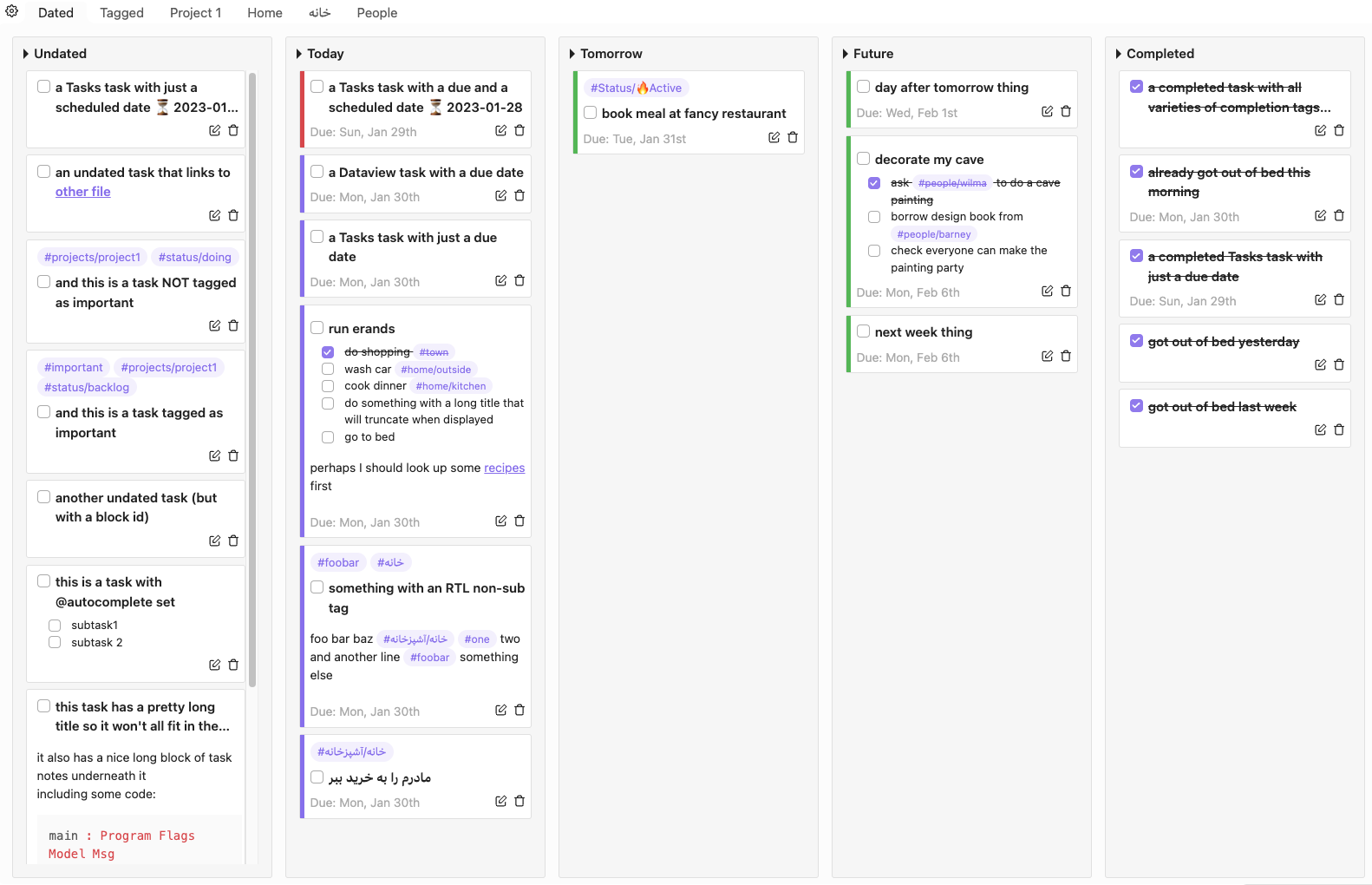
date based board screenshot

Use

When installed, you can launch the plugin:

  • using the icon in the app ribbon (see below), or
  • using the Command Pallete command (which allows you to open a specific board).
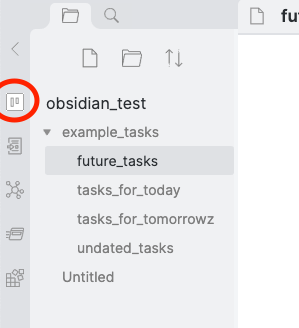
app ribbon icon

If you have no boards defined, you should get a dialog asking you to add a new board. You can choose from one of 3 board types to get going:

  • Date based: looks like the main screenshot above.
  • Tag based: includes the built-in tag based columns. You will need to add the tag columns you wish to include.
  • Empty board: has no pre-defined columns.

These are just to get you started. You can mix date and tag based columns on the same board: use the plugin's settings to add/edit/re-order/delete columns.

Cards

Any task in your vault can appear as a card in a column on a board. In order to do this, it must:

  • Be in a markdown file.
  • Not be indented - it must be at the start of the line.
  • Use one of the commonmark supported unordered list formats:
    • - [ ] Task title
    • * [ ] Task title
    • + [ ] Task title

What appears on the card depends on what your task looks like:

  • Anything that is indented under a task will appear in the body of the task.
    • Indented tasks will appear as subtasks (all subtasks are grouped together).
    • Indented text will appear as notes.
  • #tags on the line of the task or included in the tags property of the note containing the task will appear at the top of the card
  • Due date (if given) will appear at the bottom of the card.

So, if you had the following in one of your markdown files:

- [ ] run erands @due(2022-12-02)
  - [x] do shopping #town
  - [ ] wash car #home/outside
  - [ ] cook dinner #home/kitchen

  perhaps I should look up some [[example_tasks/recipes|recipes]] first

  - [ ] do something with a long title that will truncate when displayed
  - [ ] go to bed

It will look something like this on a card on your board:
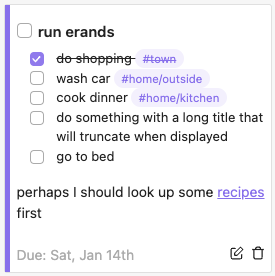
example card

Marking a task as complete

If you mark a task as complete on the board it will be marked as completed in the markdown file (and vice-versa). If you mark as complete on the board, a completion timestamp is appended to the task:

- [x] Task title @completed(2021-10-30T13:57:48)

See the compatibility section for details on how you can choose to use a format compatible with other plugins (or to choose not to add any completion text).

You can choose wether to use local or UTC time in completion timestamps via the plugin's settings (in the Global Settings section).

If you have subtasks and the parent task is tagged as an autocomplete task then the main task will be marked as complete when you tick off the final subtask:

- [ ] Task title @autocomplete(true)
  - [ ] Do this first
  - [ ] Do this next
  - [ ] Finally do this and you are done

Deleting a task

You can delete a task using the trash icon on the card. This will not actually delete the task from your vault, it simply surrounds it with markdown <del> tags:

<del>- [x] Task title</del>

Editing due date

You can change the due date of a task by right clicking on a card and selecting the only option currently available on the context menu.

You can enter the date directly in the input (uses YYYY-MM-DD format), use the calendar dropdown which will appear when you click in the input, or clear the date to remove the due date from the task.

Editing tasks (and hover preview)

Click on the edit icon to open the note containing the task. Cmd (or Ctrl on windows) hover over the icon for the normal Obsidian hover preview.

Card ordering in columns

The current behaviour for the different columns is:

  • Completed: has the most recently completed at the top (assuming they were marked as complete using the checkbox on the board).
  • Date & Tag columns are sorted by due date and then alphabetically within this.
  • other columns are sorted alphabetically.

Customising Tags

I have to recommend using the wonderful Colorful Tag plugin as this will allow you to style tags on your markdown pages as well as in CardBoard.

If you would like to "roll your own", you can using a CSS snippet containing something along the lines of:

.card-board-view a.tag[href="#foo/bar"] {
  background-color: HotPink;
  color: DimGrey;
}

This will style the tag #foo/bar wherever it appears in the CardBoard view with your favorite color for foo/bars, which just has to be HotPink :)

Customising Card Highlight Color

By default cards with due dates will have a colored bar on their left hand side to give a visual indication of when they are due. These colours are dependent on the theme you are using. There are two way to over-ride this, both of which require the use of css snippets.

If you wish to stick with the due date based behaviour, but would like to choose the colors, you can use a snippet along these lines:

/* overdue */
.card-board-view .card-board-card-highlight-area.critical {
  background-color: red;
}

/* due today */
.card-board-view .card-board-card-highlight-area.important {
  background-color: orange;
}

/* due after today */
.card-board-view .card-board-card-highlight-area.good {
  background-color: green;
}

If you wish to set the color based on tags, then you can use a snippet such as:

.card-board-card[data-tags~=status-doing] .card-board-card-highlight-area {
  background-color: yellow;
}

Which will set the color to yellow for all cards with a tag #status/doing. This will override any date based highlighting. If you use nested tags, you will need to replace the / character with a - (as in the example above). If the card has multiple tags which you have set different colors for, the last one read from your snippets will take priority. Tag based colors will be applied for tags even if the tags are hidden.

Boards

Boards are simply a collection of columns, which are defined either by:

  • Dates (with daily/periodic notes support).
  • Tags (uses #tags to define the column).

Adding boards

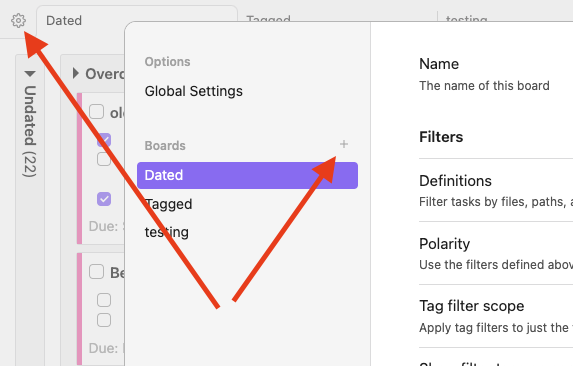
add new board

Use the + icon on the settings dialog.

Reordering boards

Boards can be reordered by dragging their tabs on the main view or dragging their name in the list on the settings pane.

Date columns

You will get the best out of these if you are using the (core) Daily Notes or the (community) Periodic Notes plugins, as any tasks you place on a daily note will be assigned to the day of the note. If you do not want this behaviour you can turn it off in the Global Settings pane, then tasks on daily notes pages will not have a due date unless one is specified on the line of the task.
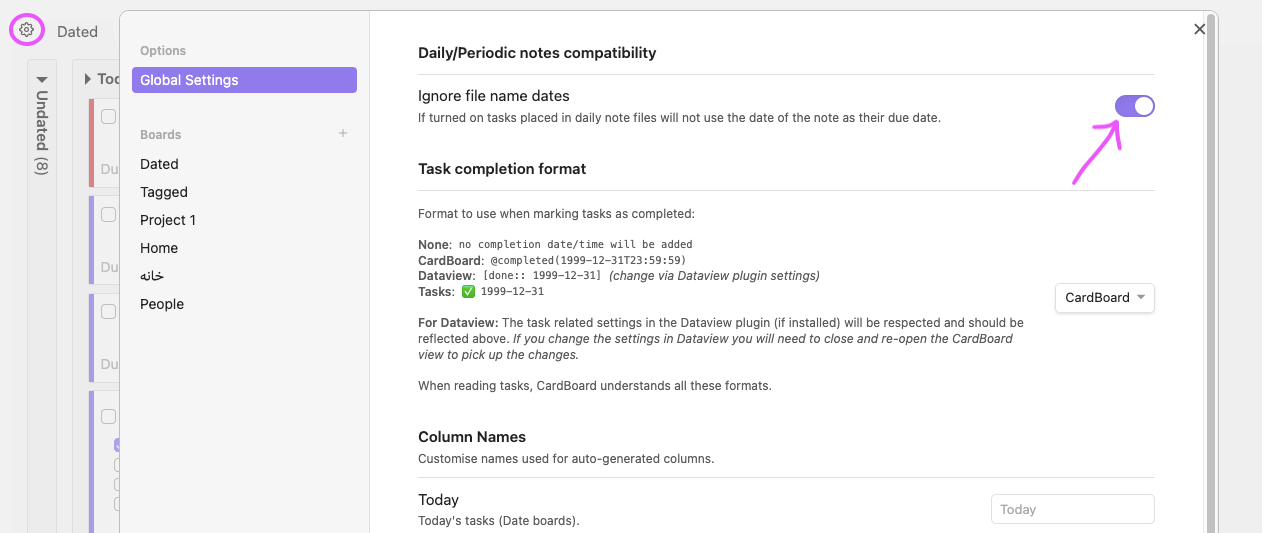
filters

You can assign a date to any task using the format:

- [ ] My task @due(2021-10-31)

Cardboard also understands the format used by Dataview and Tasks:

- [ ] My task [due:: 2021-10-31]
- [ ] My task 📅 2021-10-31

A due date specified on a task line will overide any date derived from a task being on a daily note page.

You can turn off the due date for a specific task on a daily note page:

- [ ] My task @due(none)
Overdue tasks

In the default Date Board, these will appear in the Today column above any any tasks that are actually due today.

The idea being that it will get steadily more annoying to see what you were planning to do today if you have a lot of incomplete tasks from previous days, (hopefully) encouraging you to do something about them; like do them or move them to a future date if you want to schedule them later.

If you prefer to have overdue tasks in their own column you can configure this in the settings:
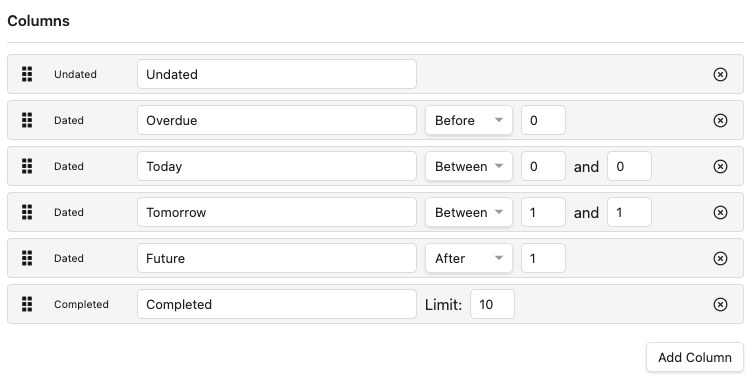
date board column settings

This shows the 3 types of date based columns you can use: Before, Between, and After. Each of these use relative dates, where 0 means today, so:

  • Between -1 and -1 means yesterday
  • Between 0 and 0 means today
  • Between 1 and 1 means tomorrow
  • Before 0 means before today (overdue)
  • After 1 means after tomorrow

The only other date based column you can include is an Undated column, which will include all tasks which have no due date. You cannot have more than one Undated column on a board.

Tag columns

If you give your tasks tags, you can use these to set up tag columns. So if you have the tags #status/backlog, #status/triaged, status/blocked, #status/doing, you can define a board that shows tasks tagged with these in separate columns:
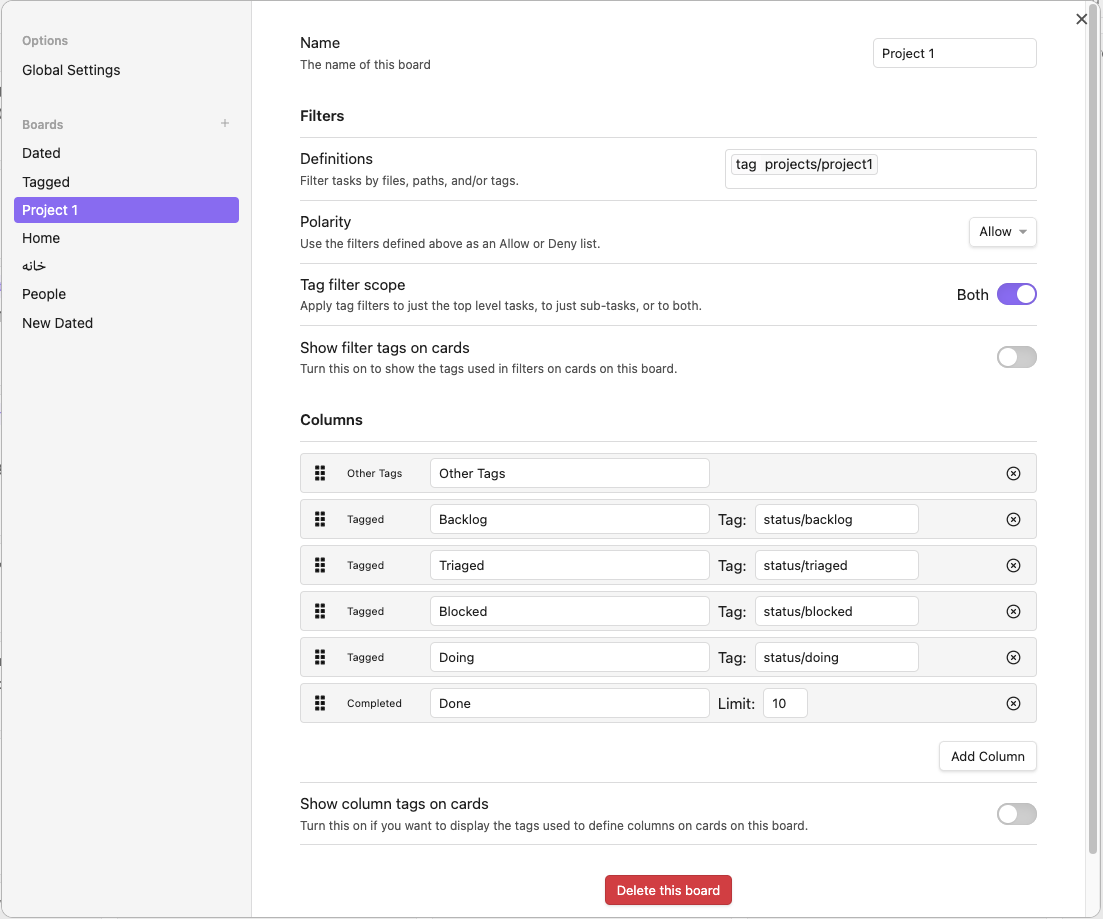
tag board settings

You do not need to inclue the # character at the start of the tag when defining which tag shold be used for a column.

Subtags

If you specify a tag with a trailing / in the settings for the column, then the column will contain all tasks which have subtags of the tag, as well as those with the base tag.

Sub-tasks

Tasks with sub-tasks that have matching tags will also appear on the board.

Tag Properties

If you want to give all the tasks on a page the same tag, you can put it in the properties of a note:

---
tags:
  - recipe
  - cooking
---

# Project 1

- [ ] this task will automatically have the recipe and cooking tags
Hiding Tags

If you don't want to see the tags used to configure the board's columns on the cards, you can show/hide them in the settings. If you choose not to show the column tags, this will hide the tags defined for columns wherever cards are on the board. Only tags that exactly match those used in the settings will be hidden.

The other types of tag based columns are:

  • Other Tags: include any tasks with tags that are not in one of the defined tag-based columns.
  • Untagged: for any tasks which have no tags.

You cannot have more that one of each of these on a board.

Completed column

You can include a complted column on your board. This will only include completed tasks that would have appeared in one of the other columns had it not been completed; i.e. it only contains tasks that belong on the board.

Where you have columns based on tags and a task is shown in a column due to tags on sub-tasks it will only show in that column if those subtasks are incomplete. So the following task is shown only in the Barney column as the Wilma sub-task is complete:
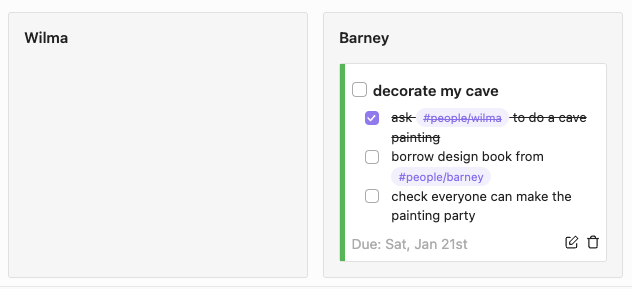
wilma_barney

This does mean that a card can appear in the completed column even if the top level task is not complete, e.g for the above example if the Barney task is marked as complete the card will move to the Completed column:
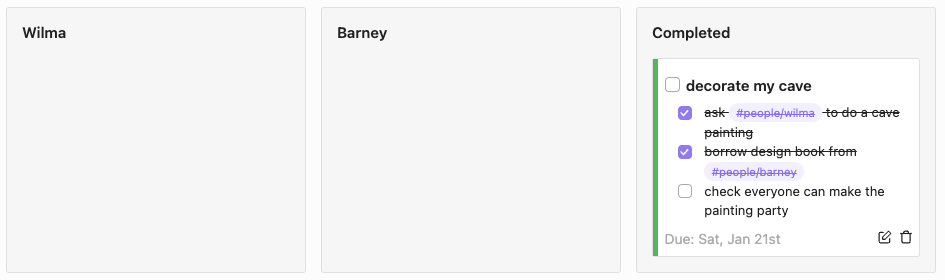
wilma_barney_completed

You cannot have more than one Completed column on a board.

Board Filters

You can filter which tasks appear on each board in the board settings. There are 3 types of filter you can use: file, path, and #tags (which includes tags in note properties). You can use any combination of these on a per-board basis.

You can also:

  • Choose whether to use the filters as an allow or a deny list.
  • Choose if you want any tags specified as a filter to be shown or hidden on cards on the board.

Filters are applied before tasks are placed onto a board:
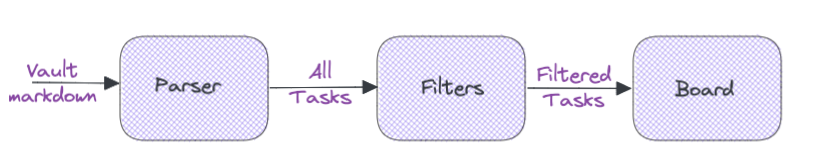
filters

Settings

Plugin settings are accessible from the plugin view itself, via the settings icon above the board to the left of the tabs. You can:

  • Choose files and paths you do not want to load any tasks from.
  • Create new boards (using the + icon next to the Boards heading).
  • Configure your boards.
  • Customize the default names of the built-in columns.
  • Add/remove/edit/reorder columns.
  • Delete boards.
  • Choose whether to use Cardboard, Dataview or Tasks format for marking task completion.
  • Choose whether to use local or UTC time when marking tasks as completed.
  • Choose to not use the date of daily notes files as the due date for tasks.

The settings for your boards are saved in the

.obsidian/plugins/card-board/data.json

file inside your vault. You may see some older versions (e.g. data.0.5.0.json) in there as well. These are saved when the internal version of the settings file is updated, just in case something goes wrong! If you want to ensure you never loose your CardBoard settings then do ensure that your .obsidian directory is backed up.

Other Plugin Compatibility

Cardboard is compatible with the Due and Completion date formats used in both Tasks and Dataview. Due dates from both of these are understood with no configuration.

When marking a task as complete, you can choose which format to use via CardBoard's Global Settings:
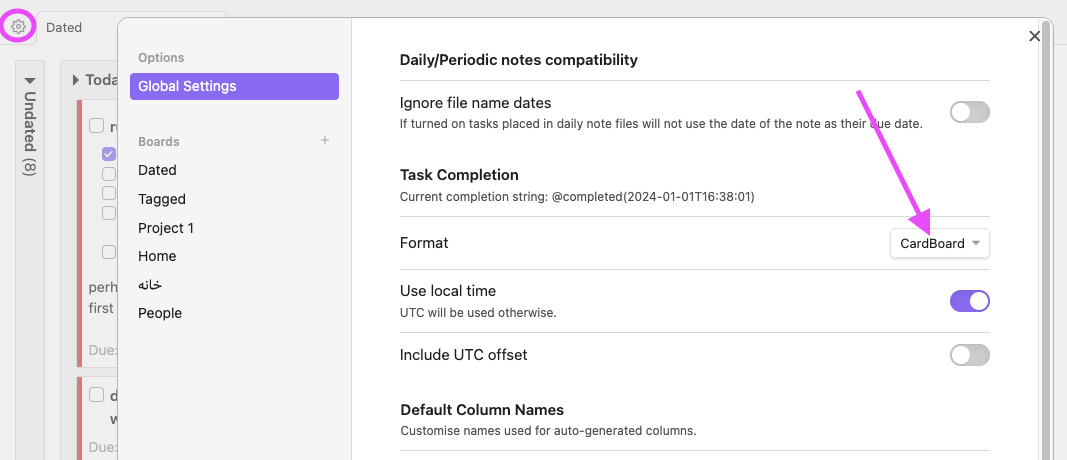
task completion format setting panel

You can also set this value to None if you don't want any completion date or timestamp adding to a task on completion. This is not recommended as if you do this, the task may well not appear at (or near) the top of any completed column you have on your board when you mark it as complete. CardBoard uses this time or date so it knows which are the most recently completed tasks so they can be shown at the top of the column.

Dataview Plugin

- [ ] todo in Dataview format [due:: 2021-10-30] [completion:: 2021-10-29]

Will be read as a task with a due date of 30th Oct 2021 which was completed a day early.

Cardboard will honour the task related settings in Dataview, so if you set Dataview to use emoji completion or a different "completion" string (such as "done") then CardBoard will mirror this.

Tasks Plugin

- [ ] todo in Tasks format 📅 2021-10-30 ✅ 2021-10-29

Will be read as a task with a due date of 30th Oct 2021 which was completed a day early.

Recurring Tasks

CardBoard does not understand recurring tasks, even if you have set it up to use Tasks format for marking tasks as complete. Checking off a recurring task from the CardBoard board view will add the completion date in Tasks format but will not generate a new instance of the recurring task.

To get the correct behavior for recurring tasks, click the edit icon on the card to go to the file where the task is written, and then use the "Tasks: Toggle Done" command or click the checkbox from there.

Scaling Board Text and Column Sizes

Use the following css snippet to customize these:

.card-board-view {
  font-size: 1em;
}

.card-board-view .card-board-column {
  width: 20em;
}

You can alter the general size of the contents of the cards by changng the font-size, and/or set the width of the columns by changing the width setting.

Limitations

  • Might not work that great on large vaults (as it parses all markdown files at startup). If you use folders in your vault and there are folders which you know will never contain any tasks you wish to use with CardBoard you can configure CardBoard to ignore these.
  • Might not work that great on large markdown files (as it parses all markdown files, and doesn't use any form of cache). If you know any large markdown files will never contain tasks you wish to use with Cardboard, you can add them to the ignore list in settings.
  • Might not be great on mobile (see previous, plus I haven't put any particular effort into making the interface mobile friendly - yet).

Alternatives

If the way that this works isn't for for you, there are plenty of other fabulous plugins you can use for task management in Obsidian, e.g. Checklist, Kanban, Reminder, Tasks, Projects, as well as the Tasks Calendar snippet. There are others too, see the wonderful Obsidian Plugin Stats site.

Contributing

I am working on this myself for now; it's my do-some-coding-when-I-have-some-time project so I am not accepting pull requests. However, if you want to mess around with the code then see contributing doc for more info on getting a dev environment set up and running.

If you have any thoughts, ideas, bugs n stuff:

Similar Plugins

info
• Similar plugins are suggested based on the common tags between the plugins.
Advanced Copy
2 years ago by leschuster
An Obsidian plugin to copy Markdown and transform it into HTML, Anki, or any custom format. Create custom profiles with versatile templates tailored to your workflow.
Advanced Progress Bars
a year ago by cactuzhead
Obsidian plugin to create custom progress bars
Advanced Slides
3 years ago by MSzturc
Create markdown-based reveal.js presentations in Obsidian
Agile Task Notes
4 years ago by BoxThatBeat
This Obsidian plugin integrates your TFS data from either Jira or Azure Devops
AI Chat as Markdown
2 years ago by Charl P. Botha
Archivist Importer
2 months ago by Archivist AI
Import selected vault files into Archivist campaigns.
Arweave Uploader
2 years ago by makesimple
Asciidoc Reader
2 years ago by voidgrown
Obsidian plugin for reading AsciiDoc files
Attachments MD Indexer
a year ago by Ian Inkov
Converts Obsidian canvas files to markdown index files, making canvas content searchable and graph-viewable within Obsidian.
Auto Front Matter
3 years ago by conorzhong
Auto Strikethrough Tasks
2 years ago by Nomekuma
Automatically adds strikethrough to completed tasks.
Auto Tasks
a year ago by Jamie Hurst
Obsidian plugin to combine periodic notes with tags and tasks to automatically manage your daily, weekly and project TODO lists. Requires the "Periodic Notes" and "Tasks" plugins.
Autocorrect Formatter
2 years ago by b-yp
A plugin running on Obsidian that utilizes autocorrect to format Markdown content.
Automatic Linker
a year ago by Kodai Nakamura
Avatar
3 years ago by froehlichA
An obsidian plugin for displaying an avatar image in front of your notes.
Awesome Flashcard
4 years ago by AwesomeDog
Handy Anki integration for Obsidian.
Better Markdown Links
2 years ago by mnaoumov
Obsidian plugin that adds support for angle bracket links and manages relative links properly
Blockquote Levels
4 years ago by Carlo Zottmann
A plugin for Obsidian (https://obsidian.md) that adds commands for increasing/decreasing the blockquote level of the current line or selection(s).
BuJo Bullets
a year ago by Will Olson
Alternate checkbox types for Obsidian to support Bullet Journal bullets
Callout Copy Buttons
a year ago by Aly Thobani
An Obsidian plugin that adds copy buttons to callout blocks in your notes.
Canvas LMS Task Importer
2 years ago by jordaeday
Imports assignments from Canvas LMS as tasks in Obsidian
Chat clips
a year ago by sleepingraven
Record chat in ordinary markdown list.
ChatGPT MD
3 years ago by Bram Adams
A (nearly) seamless integration of ChatGPT into Obsidian.
Check and Delete
a year ago by Danitiate
An Obsidian plugin that allows you to quickly clean up temporary list-items with the press of a button
Chronos Timeline
a year ago by Claire Froelich
Render interactive timelines in your Obsidian notes from simple Markdown.
Clear Todos
a year ago by Joshua Gawenda
An Obsidian Plugin to clear todos that are done
Completed Task Display
5 years ago by Ben Lee-Cohen
Obsidian plugin to control the display of completed tasks
Completed Tasks
a year ago by Mgussekloo
A free, simple and intuitive Obsidian plugin that automatically moves completed tasks (checked checkboxes) to the bottom of the list they're in.
Confluence to Obsidian
3 years ago by K
import confluence space into obsidian
Console Markdown Plugin
3 years ago by Daniel Ellermann
An Obsidian plugin which renders console commands and their output.
Cooklang
2 years ago by Roger Veciana i Rovira
CookLang Editor
4 years ago by death_au/cooklang
Edit and display Cooklang recipes in Obsidian
Cooksync
a year ago by Cooksync
This is the official Obsidian plugin for Cooksync, maintained by the Cooksync team. It enables automatic import of recipe data from your Cooksync account. Note that this plugin requires a Cooksync account - a paid service that makes it easy to collect recipes from almost any recipe website.
Copy as HTML
4 years ago by Bailey Jennings
A simple plugin that copies the selected text to your clipboard as HTML
Copy as LaTeX
4 years ago by mo-seph
Quick plugin to be able to copy/paste from Obsidian/Markdown into a Latex document
Copy Section
2 years ago by skztr
Obsidian.md plugin adding a Copy button to the top of Headed sections
Creases
4 years ago by Liam Cain
👕 Tools for effectively folding markdown sections in Obsidian
Create Task
2 years ago by Simon Knittel
Create tasks faster from anywhere.
Dataview Publisher
2 years ago by UD
Output markdown from your Dataview queries and keep them up to date. You can also be able to publish them.
Dataview Serializer
2 years ago by Sébastien Dubois
Obsidian plugin that gives you the power of Dataview, but generates Markdown, making it compatible with Obsidian Publish, and making the links appear on the Graph.
Dirtreeist
3 years ago by kasahala
Render a directory Structure Diagram from a markdown lists in codeblock.
Discord Message Formatter
3 years ago by Emile Durkheim
Obsidian.md plugin that lets you copy Discord conversations and perfectly formats them to Obsidian Markdown!
Docxer
2 years ago by Developer-Mike
🚀 Boost your productivity by previewing and converting Word files easily to markdown.
Embed 3D
a year ago by Jesse Strijker
An Obsidian Plugin for embedding 3D models in your notes. And manipulating the scenes to look the best you want
Emoji Shortcodes
5 years ago by phibr0
Emoji Shortcodes - Obsidian Plugin | Adds Support for Emoji Shortcodes to Obsidian
Enhanced Copy
2 years ago by Mara-Li
A obsidian plugin that allows to copy in markdown in reading view or canvas read-only view, creating profile and transform the text during copy.
Enhancing Mindmap
5 years ago by Mark
obsidian plugin editable mindmap,you can edit mindmap on markdown file
Enveloppe
4 years ago by Mara-Li
Enveloppe helps you to publish your notes on a GitHub repository from your Obsidian Vault, for free!
ExcaliBrain
4 years ago by Zsolt Viczian
A graph view to navigate your Obsidian vault
Excel to Markdown Table
4 years ago by Ganessh Kumar R P
An Obsidian plugin to paste data from Microsoft Excel, Google Sheets, Apple Numbers and LibreOffice Calc as Markdown tables in Obsidian editor.
Extended Markdown Syntax
a year ago by Kotaindah55
Extend your Markdown syntax using delimiters instead of HTML tags, such as underlining, superscript, subscript, highlighting, and spoiler.
Extended Task Lists
2 years ago by joeriddles
Extended Markdown support for task lists in Obsidian.
Extract url content
5 years ago by Stephen Solka
Plugin to extract markdown out of urls
File Cleaner Redux
2 years ago by husjon
A plugin for Obsidian to help clean up files in your vault
File Include
3 years ago by Till Hoffmann
Filename Emoji Remover
4 years ago by Yüksel Tolun
A simple plugin for the note taking app Obsidian that will rename your files to remove emojis in their names.
Floccus Bookmarks to Markdown
3 years ago by mddevils
Foodiary
2 years ago by vkostyanetsky
Food tracker plugin for Obsidian
Formatto
2 years ago by Deca
Simple, fast, and easy-to-use Obsidian Markdown formatter.
Friday
a year ago by sunwei
Write anywhere. Publish everywhere. Sync your notes, publish instantly, turn Markdown into websites.
GChat Reminder
2 years ago by Anil Erdogan
GH Links Shortener
6 months ago by David Barnett
Obsidian plugin to set shortened link text for pasted GitHub URLs
GitHub Sync
2 years ago by Kevin Chin
Sync Obsidian vault to personal GitHub
GitHub Tasks
8 months ago by Mike Thicke
Obsidian plugin to sync GitHub issues and PRs to Obsidian TODOs
Global Markdown Encryption
3 years ago by shlemiel
a plugin for encrypting obsidian markdowns in-memory, single password based.
Hard Breaks
4 years ago by Börge Kiss
↩ A plugin for Obsidian that adds functionality to force hard line breaks
Heading Shifter
4 years ago by kasahala
Easily Shift and Change markdown headings.
Hexo Toolkit
a year ago by Xiangru
An Obsidian plugin for maintaining Hexo posts.
Highlight Helper
2 years ago by Chongmyung Park
Helper to collect highlight in Obsidian
Horizontal Blocks
7 months ago by iCodeAlchemy
Bring Notion-style layouts to Obsidian — with side-by-side, resizable markdown blocks that support full Obsidian syntax including images, embeds, and internal links.
ii
2 years ago by Wilson
The main feature of this plugin is to quickly insert common Markdown code and HTML code, including Sup, Sub, Audio, Video, Iframe, Left-Center-Right Alignment, Variables, Footnotes, Callout, Anchor Points, HTML Comments and so on.
Image Caption
5 years ago by bicarlsen
Add captions to images in Obsidian.
Image Captions
3 years ago by Alan Grainger
Add captions to images with inline Markdown and link support. The caption format is compatible with the CommonMark spec and other Markdown applications.
Image Upload Toolkit
3 years ago by Addo Zhang
An obsidian plugin for uploading local images embedded in markdown to remote store and export markdown for publishing to static site.
Immersive Translate
2 years ago by imfenghuang
Immersive Translate For Obsidian
Import GitHub Readme
2 years ago by Chasebank87
Import Todoist tasks
a year ago by Duke
Import Todoist tasks as Obsidian tasks.
Inline Checkbox Groups
a year ago by Bradley Wyatt
Obsidian Plugin that creates multiple checkboxes on a single line, separated by a customizable separator character (default '|'), with the option to automatically cross out text when all checkboxes in the line are checked.
Insta TOC
a year ago by Nick C.
Generate, update, and maintain a table of contents for your notes while typing in real time.
Interactive Code Blocks
2 years ago by Student Assistenten Team Deeltaken
Kanban
5 years ago by mgmeyers
Create markdown-backed Kanban boards in Obsidian.
Kanban Bases View
2 months ago by I. Welch Canavan
A kanban-style drag-and-drop custom view for Bases.
Kanban Status Updater
a year ago by Ankit Kapur
Obsidian plugin that automatically updates the note property when card is moved to a column.
Keyboard Formatter
8 months ago by Lauloque
Formats keyboard text (kbd) in your Obsidian notes quickly and consistently.
LighterPack importer
a month ago by Nicola Siniscalchi
Import a packing list from https://lighterpack.com.
Limitless Lifelogs
a year ago by Maclean Dunkin
Sync your Limitless AI lifelog entries directly into Obsidian markdown files.
Links
3 years ago by MiiKey
manipulate & manage obisidian links
Linter
5 years ago by Victor Tao
An Obsidian plugin that formats and styles your notes with a focus on configurability and extensibility.
MagicCalendar
3 years ago by Vaccarini Lorenzo
An obsidian plugin that exploit a natural language processing engine to find potential events and sync them with iCalendar
Marjdown shortcuts
4 years ago by Jules Guesnon
🪨 Obsidian plugin that allows to write markdown from commands
Markdown Attributes
5 years ago by Jeremy Valentine
Add attributes to elements in Obsidian
Markdown Blogger
3 years ago by Alexa Fazio
Allows developers to push markdown notes to their local blog, portfolio, or static site. Works with Astro.js, Next.js, and any other framework configured to render markdown pages.
Markdown Calendar Generator
10 months ago by Zach Russell
An intentionally simple obsidian markdown table calendar generator
Markdown Formatting Assistant
5 years ago by Reocin
This Plugin provides a simple WYSIWYG Editor for Markdown and in addition a command line interface. The command line interface facilitate a faster workflow.
Markdown Furigana
5 years ago by Steven Kraft
Simple Markdown to Furigana Rendering Plugin for Obsidian
Markdown Image Caption
3 years ago by Hananoshika Yomaru
Generate image caption easily. Completely markdown-based.
Markdown Link Space Encoder
3 years ago by Ron Kosova
Obsidian plugin to automatically encode spaces to %20 in Markdown-style links
Markdown prettifier
5 years ago by pelao
A markdown prettifier for obsidian
Markdown Sync Scroll
3 years ago by ProjectXero
Synchronize scroll in linked Markdown views.
Markdown table checkboxes
3 years ago by DylanGiesberts
Obsidian plugin. Allows for the usage of checkboxes inside markdown tables.
Markdown Tags
a year ago by John Smith III
Enhance your Markdown documents with custom tags. Use predefined or custom labels, customizable colors, and arrow indicators to visually track tasks and statuses.
Markdown Timeline
a year ago by Jiaheng Zhang
An Obsidian plugin to record the events in a Flashback timeline
Markdown to Jira Converter
3 years ago by muckmuck
An obsidian.md plugin, which provides a markdown to jira markup converter
Markdown to Slack Message
3 years ago by Woongshik Choi
Markdown Tree
3 years ago by carvah
Introducing a powerful plugin that revolutionizes directory tree creation. With its intuitive Markdown-inspired coding style, this plugin empowers users to effortlessly and swiftly construct intricate directory trees.
Marker PDF to MD
2 years ago by L3N0X
Make use of different AI models to convert your pdfs into markdown with perfect ocr, latex formulas, tables, images and more! Supports Mistral AI OCR (free) and self hosted variants!
Markitdown File Converter
a year ago by Ethan Troy
Integrate Microsoft's Markitdown tool to convert various file formats to Markdown for your vault.
Marp
3 years ago by JichouP
Plugin to use Marp with Obsidian
mdx as md
5 years ago by Nikolay Kozhukharenko
Edit mdx files in Obsidian.md as if they were markdown
Meal Plan
2 years ago by Tyler Mayoff
A meal plan & recipe manager plugin for Obsidian
Mehrmaid
2 years ago by huterguier
Rendering Obsidian Markdown inside Mermaid diagrams.
Mind Map
5 years ago by James Lynch
An Obsidian plugin for displaying markdown notes as mind maps using Markmap.
Mochi Cards Exporter
5 years ago by kalbetre
Mochi Cards Exporter Plugin for Obsidian
More Markdown file suffix (.mdx/.svx)
4 years ago by swissmation.com
Use markdown files of additional file suffix as .mdx, .svx in Obsidian
Multi-Column Markdown
4 years ago by Cameron Robinson
A plugin for the Obsidian markdown note application, adding functionality to render markdown documents with multiple columns of text.
My Bible
2 years ago by GsLogimaker
Your own customization bible in your personal vault!
Note Linker with Previewer
2 years ago by Nick Allison
Obsidian Plugin to find and Link notes
Note Minimap
8 months ago by Yair Segel
Add a minimap to your Obsidian notes.
O2
3 years ago by haril song
Converts obsidian markdown syntax to other platforms.
Obsidian Clipper
3 years ago by John Christopher
Obsidian plugin that allows users to clip parts of a website into their obsidian daily note (or new note)
Obsidian GoLinks
4 years ago by David Brownman (@xavdid)
Turn go/links into clickable elements in Obsidian
Obsidian Handlebars Template Plugin
3 years ago by Sean Quinlan
This is a plugin for Obsidian adding support for the Handlebars template engine in Obsidian notes
Obsidian markdown export
3 years ago by bingryan
This plugin allows to export directory/single markdown to a folder. support output format(html/markdown/text)
Open cards in imdone.
5 years ago by saxmanjes
Open cards in imdone from obsidian
Outline++
2 years ago by Ryota Ushio
Overdue
4 years ago by Peter Parente
Obsidian plugin that marks items as [[Overdue]] if they are not checked off by their due date
OzanShare Publish
5 years ago by Ozan Tellioglu
This plugin allows you to publish your markdown notes with a single click directly from your Obsidian vault.
Packrat
4 years ago by Thomas Herden
Process completed instances of recurring items created by the Obsidian Tasks plugin
Pandoc Extended Markdown
3 months ago by ErrorTzy
This plugin enables Obsidian to render Pandoc extended markdown lists, and adds useful sidebar for lists and footnotes
Paste Link
2 years ago by Jose Elias Alvarez
Intelligently paste Markdown links in Obsidian.
Paste Mode
5 years ago by Jacob Levernier
Obsidian Notes plugin for pasting text and blockquotes to the cursor's current level of indentation.
PDF Folder to Markdowns
a year ago by CrisHood
Convert a folder of PDFs into a folder of Markdown files with embedded PDFs. This plugin is useful for users who want to migrate their PDF notes from different apps (e.g., Boox) or organize their reference materials inside Obsidian.
PDF++
2 years ago by Ryota Ushio
PDF++: the most Obsidian-native PDF annotation & viewing tool ever. Comes with optional Vim keybindings.
Pickly PageBlend
3 years ago by Dmitrii Mitrichev
The easiest way to share your Obsidian notes
Postfix
3 years ago by Bhagya Nirmaan Silva (@bhagyas)
A postfix plugin for Obsidian
Prettier
2 years ago by GoodbyeNJN
Project Tasks
a year ago by Paul Paterson
An Obsidian Add-in that allows you to create simple projects out of tasks
Proletarian Wizard Task Manager
a year ago by Charles Feval
Obsidian plugin ot manage todos and projects directly from your notes.
PubScale
3 years ago by piriwata
An obsidian plugin for insert your note into a PlanetScale table
qmd as md
4 years ago by Daniel Borek
A plugin for Obsidian that enables editing and compiling `qmd` Quarto files.
Quadro
2 years ago by Chris Grieser (aka pseudometa)
Obsidian Plugin for social-scientific Qualitative Data Analysis (QDA). An open alternative to MAXQDA and atlas.ti, using Markdown to store data and research codes.
Quarto Exporter
2 years ago by Andreas Varotsis
Export Obsidian notes to Quarto-compatible QMD files.
Quiet Outline
4 years ago by the_tree
Improving experience of outline in Obsidian
Quoth
4 years ago by Eric Rykwalder
ReadItLater
5 years ago by Dominik Pieper
Reason
2 years ago by Joshua Pham
Digest your Obsidian notes
Recipe Grabber
3 years ago by seethroughdev
Recipe view
3 years ago by lachholden
View your Obsidian notes as interactive recipe cards while you cook.
Recursive Copy
2 years ago by datawitch
Remove HTML Tag
2 years ago by ChenPengyuan
Rewarder
4 years ago by Gustav Gnosspelius
An Obsidian-plugin to get rewards for completing todos
Send Tasks to OmniFocus
3 years ago by Henry Gustafson
Sheet Plus
2 years ago by ljcoder
obsidian spreadsheets solutions
Sheets Extended
3 years ago by NicoNekoru
Plugin that adds features to tables in obsidian including merging, vertical headers, and custom css
Simple Columns
10 months ago by Josie
An Obsidian plugin that lets you create easily resizable and customizable columns in your notes.
Simple File Push
2 years ago by Kim Hudaya
Simple file push blog plugin
Simple Todo
a year ago by elliotxx
A minimalist text-based todo manager (Text-Based GTD) for efficient task management in Obsidian.
Slackify Note
2 years ago by Jeremy Overman
SlashComplete
5 months ago by Spiderpig86
Notion-style Markdown autocompletion for Obsidian.
Slides Extended
2 years ago by Erin Schnabel (original: MSzturc)
Create markdown-based reveal.js presentations in Obsidian
Slurp
2 years ago by inhumantsar
Slurps webpages and saves them as clean, uncluttered Markdown. Think Pocket, but better.
Smart Export
2 months ago by Iván Sotillo
Plugin that follows wikilinks to a configurable depth, joining the notes into a single export.
Spoilers
2 years ago by Jacobtread
Spoiler blocks for Obsidian
Strip Internal Links
2 years ago by Adi Ron
A simple Obsidian plugin to strip internal links from files
Student Repo
a year ago by Feirong.zfr
学生知识库助手(Student Repository Helper)是一个面向学生或学生家长的Obsidian 插件,这款插件旨在解决学生在学习阶段面临的资料管理难题,将学习过程中产生的各类重要资料,如试卷、笔记、关键文档、绘画手工作品等,进行系统性的数字化整合与管理,并利用 AI 助手定期进行学习分析总结。随着时间的推移,它将助力你逐步搭建起一座专属你自己的知识宝库,这座宝库将伴随你一生,成为你知识成长与积累的见证。
Sync Google Calendar
3 years ago by Dexin Qi
Sync tasks from Obsidian with system calendar
Table Checkbox Renderer
5 months ago by Daniel Aguerrevere
Interactive checkboxes for Markdown tables in Obsidian. Toggle checkboxes in Reading Mode and instantly update your Markdown file. Supports multiple checkboxes per cell and any table layout.
Table Extended
5 years ago by AidenLx
Extend basic table in Obsidian with MultiMarkdown table syntax
Table Generator
4 years ago by Boninall
A plugin for generate markdown table quickly like Typora.
Tag Project
3 years ago by Odaimoko
Task Board
a year ago by Atmanand Gauns
An Obsidian plugin to view and manage your tasks from whole vault using much efficient boards using various methodologies.
Task Collector (TC)
5 years ago by ebullient
Manage tasks and logs within an Obsidian note.
Task Director
a year ago by Cybertramp
A plugin that allows you to easily manage tasks in bulk.
Task list
2 years ago by Ted Marozzi
A simple obsidian plugin enabling better task management via lists.
Task List Kanban
2 years ago by Chris Kerr
Task Mover
a year ago by Mariia Nebesnaia
A plugin for obsidian to move unfinished tasks to the daily note automatically
Task Status
2 years ago by Valerie Burzynski
Quickly change any task status in Obsidian. The searchable modal enables a more dynamic and indiscriminate workflow when you need to change your checkbox markers.
Tasks
5 years ago by Clare Macrae and Ilyas Landikov (created by Martin Schenck)
Task management for the Obsidian knowledge base.
Tasks Calendar Wrapper
3 years ago by zhuwenq
This plugin currently provides a timeline view to display your tasks from your obsidian valut, with customizable filters and renderring options.
Tasks Cleaner
a year ago by lowit
🧹 Tasks Cleaner is a plugin for Obsidian that helps you automatically remove old completed tasks from your Markdown notes
Tasks Map
7 months ago by NicoKNL
A graph view of your tasks.
TaskWarrior Task Wiki
2 years ago by SntTGR
Small and simple task manager widget for obsidian and powered by taskwarrior.
TickTick
3 years ago by Viduy Cheung
TickTick Quick Add Task
a year ago by Muxin Li
The TickTick Quick Add Obsidian Plugin lets you quickly create tasks in TickTick directly from your Obsidian notes.
TickTickSync
2 years ago by thesamim
Time Ruler
3 years ago by Joshua Tazman Reinier
A drag-and-drop time ruler combining the best of a task list and a calendar view (integrates with Tasks, Full Calendar, and Dataview).
Title As Link Text
a year ago by Lex Toumbourou
An Obsidian plugin to set the Link Text using the document title
Todo sort
3 years ago by Ryan Gomba
A plugin for Obsidian that sorts todos within a note
Todoist completed tasks
4 years ago by Andrew 'Ledary' Kulishov
Obsidian plugin to display the completed tasks
Todoist Context Bridge
a year ago by wenlzhang
Bridge your Obsidian notes with Todoist tasks while preserving rich context, helping you highlight important tasks and maintain seamless workflows between the two platforms. Seamlessly integrate with Dataview and Tasks plugins.
Todoist Text
4 years ago by Wes Moncrief
TODOseq
7 months ago by Stephen Cross
TODOseq ("to-do-seek") is a lightweight, keyword-based task tracker for Obsidian
ToggleList
4 years ago by Lite C
This is a simple plugin for Obsidian to overwrite the default behavior of toggle checkbox status. Also, it offers a simple way to toggle through frequently used attributes: task states, task tags, highlighted list, etc.
Trello
5 years ago by Nathonius
An Obsidian Plugin that connects Trello cards to Obsidian notes.
Tweet to Markdown
5 years ago by kbravh
An Obsidian.md plugin to save tweets as Markdown files.
WeWrite
a year ago by Learner Chen
Obsidian plugin to render note as WeChat MP article.
WhatsApp export note
a year ago by JoaoEmanuell
Obsidian plugin to export notes for whatsapp
Yesterday
2 years ago by Dominik Mayer
Obsidian plugin providing Yesterday journaling support