Trello

by Nathonius
5
4
3
2
1
Score: 58/100

Description

The Trello plugin integrates Trello with Obsidian, allowing users to manage their Trello cards directly from within their notes. It provides features such as connecting cards to notes, updating labels, adding comments, and managing checklists. Users can create new cards, move them between lists, and customize the displayed Trello elements to suit their workflow.

Reviews

No reviews yet.

Stats

133
stars
18,068
downloads
12
forks
1,759
days
175
days
175
days
36
total PRs
0
open PRs
3
closed PRs
33
merged PRs
43
total issues
19
open issues
24
closed issues
25
commits

Latest Version

6 months ago

Changelog

Fixes

  • Update dependencies.
  • Update ESLint, rollup, and TypeScript configurations.
  • Fix build errors on release.

README file from

Github

Obsidian Trello

ObsidianTrello

Overview

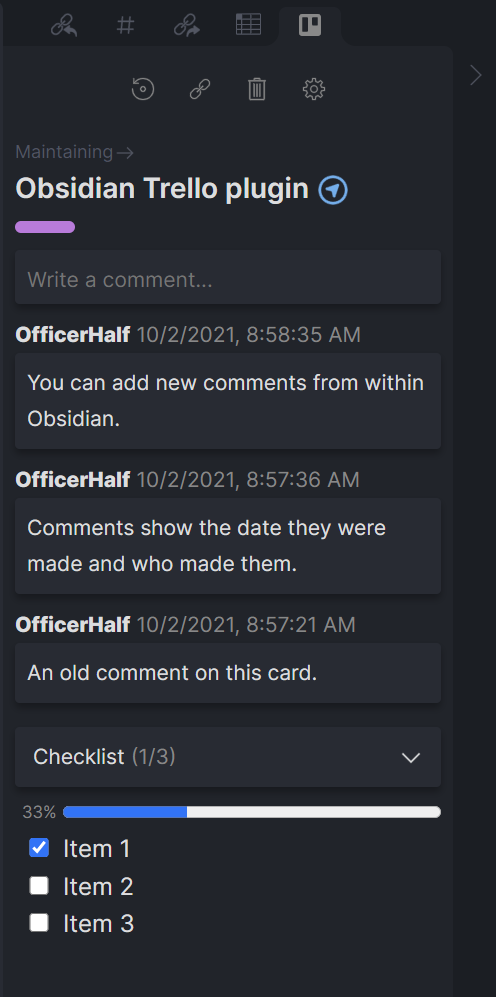
Connect your Trello cards with your Obsidian notes to see and update labels, comments, and checklists from within Obsidian. There are plenty of features on the horizon and you can track progress on the Trello board for the project.

Use

Once installed and set up with a Trello API token (see prerequisites below) you can connect a card to a note.

Open the Trello Pane

If the Trello pane is not automatically opened, use the Show Trello view command and it will be created.

Connecting Cards

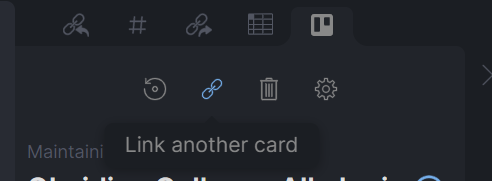
To connect a card to a note either use the Connect Trello card command or click the 'Connect Trello Card' button in the Trello Pane. If a card is already connected, there is a button to link a different card instead.
LinkAnother

Creating new cards

When connecting a card, after selecting the Trello board you want to use, select 'Create a new card...'.

Refreshing Cards

The plugin does not poll or listen for updates from Trello, so changes made in Trello may not be immediately reflected in Obsidian. If you believe a card is out of date, click the refresh button. Data is cached for anywhere from one minute to ten minutes depending on the type of data. If you wish to forcibly refresh the entire cache, you can use the 'Reload app without saving' command.

Do be mindful that Trello's REST API has strict rate limits. If you run into any rate limiting issues please contact me so I can work on a fix.

Disconnecting Cards

If want to remove the connection between a note and Trello card, click the 'Unlink card' button or use the Disconnect Trello card command. Removing the trello_plugin_note_id and trello_board_card_id YAML frontmatter keys will also unlink the card, but prefer the button or command as they cleans up cached data as well.

Moving cards between lists

A card can be moved to a new list by clicking on the list name.

Adding comments

New comments can be added from within Obsidian. It will appear at the top of the list as the most recent comment.

Checklists

Checking or unchecking an item in a checklist makes the corresponding change on the Trello card.

Customizing UI

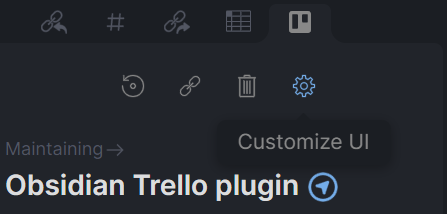
If your workflow doesn't include comments or labels, for example, you can disable them in obsidian. Each UI element can be toggled on or off. This can be global, for all connected cards, using the 'Customize UI' option in plugin settings. Or, this can be managed for an individual note using the gear icon.
CustomUI

Setup

Prerequisites

  1. A Trello account
  2. A Trello API token (see below).

Before you can connect a Trello card, you need to create an API token and set it in the plugin settings. You can create a token here; make sure to copy it before closing the tab.

Tokens can be revoked at any time in your Trello account settings.

Settings

Trello Token - See the prerequisites above. This is required.

Customize UI - Adjust which parts of a card are displayed. This setting can be updated globally, which applies to all cards, and overridden on an individual note.

Select Boards - Filter the boards available to select cards from. If none are selected, all boards will be available.

Open to Side - Whether to open the Trello view to the left or right by default.

New Card Position - Whether newly created cards should be added to the top or bottom of the list by default. Can be overridden when adding a card.

Moved Card Position - When moving a card from one list to another, should it be moved to the top or bottom of the selected list.

Verbose Logging - Enable this if you're having trouble with the plugin. Logs will be enabled in the console. These can help me diagnose issues.

Commands

Show Trello view - Open the Trello pane, if it isn't already.

Connect Trello card - Connect a note to a (new) Trello card. Optionally, create a new Trello card.

Disconnect Trello card - Remove the Trello connection from a note.

Theming

Wherever possible, the plugin uses built-in theme variables, so your color variable overrides will apply here. The exception is the trello colors included in the plugin; these match the colors from Trello's UI. However, these can be overridden the same as Obsidian's color variables. See variables.scss for the full listing of colors. Each has a base shade, lighter shade, and darker shade.

Is the plugin incompatible with a custom theme? Let me know and I'll look into updating the plugin or contributing to the theme to fix it.

Contributing

Pull requests are always welcome. Keep in mind that this plugin makes heavy use of rxjs for reactive state management.

Support

Raise an issue here on GitHub if there's a problem. If you're unsure, feel free to contact me on the Obsidian discord, @nathan.smith.

Similar Plugins

info
• Similar plugins are suggested based on the common tags between the plugins.
Agile Task Notes
4 years ago by BoxThatBeat
This Obsidian plugin integrates your TFS data from either Jira or Azure Devops
Amazing Marvin
5 years ago by Shirayuki Nekomata
Simple plugin for Amazing Marvin
Amazing Marvin Integration
2 years ago by Cloud Atlas
Interoperability between Obsidian and Amazing Marvin
Another Simple Todoist Sync
2 years ago by eudennis
Obsidian.md plugin to integrate with Todoist app.
Archiver
5 years ago by ivan-lednev
Archive completed tasks in your Obsidian vault (plus other org-mode-like features)
Asana
a year ago by Ryan Bantz
Obsidan plugin that creates tasks in Asana for highlighted text or the current line
Auto Tasks
2 years ago by Jamie Hurst
Obsidian plugin to combine periodic notes with tags and tasks to automatically manage your daily, weekly and project TODO lists. Requires the "Periodic Notes" and "Tasks" plugins.
Big Calendar
4 years ago by Boninall
Big Calendar in Obsidian, for manage your events in a day/week/month and see agenda too!
Brainframe
3 years ago by pedersen
CardBoard
5 years ago by roovo
An Obsidian plugin to make working with tasks a pleasure (hopefully anyway).
Carry-Forward
5 years ago by Jacob Levernier
An Obsidian Notes plugin for generating and copying block IDs, and copying lines with a link to the copied line
Checkbox 3 states
4 years ago by Renaud Héluin @ NovaGaïa
This is a simple plugin for add a third state to checkbox list.
Checkbox Sounds
2 years ago by yasd251
Adds a nice completion sound for checkboxes when ticked in Obsidian
Checkbox Time Tracker
2 years ago by UD
Checkbox Time Tracker for Obsidian
Checklist Reset
3 years ago by Luke Hansford
Add a command to reset the state of any checklists in a document in Obsidian
Custom State for Task List
3 years ago by Okami Wong
A plugin for Obsidian to define your own states for task items.
doing
2 years ago by rooyca
What was I doing?
Due When
3 years ago by Andy Baxter
An Obsidian plugin which gives shortcuts to insert set due dates
Dynamic Timetable
3 years ago by L7Cy
Calculate the estimated completion time from the estimated task time and dynamically create a timetable.
Ego Rock
2 years ago by Ashton Eby
An obsidian plugin that implements a basic taskwarrior UI for listing and modifying tasks.
Flow
2 years ago by Ben Phillips
Implements key processes in David Allen's Getting Things Done (GTD) methodology
Goal Tracker
a year ago by Ben Rotholtz
Grind Manager
2 years ago by dromse
Gamify your task management with rewards system, craft your tasks by tags.
GTD No Next Step
3 years ago by Tobias Davis
Obsidian plugin for GTD workflow, badge projects with no next step.
Habitica Sync
5 years ago by Leoh and Ran
This is a under-development Obsidian Plugin for Habitica
Homework Manager
3 years ago by Kadison McLellan
An Obsidian plugin that keeps track of homework through a to-do list.
iCal
3 years ago by Andrew Brereton
This is a plugin for Obsidian that searches your vault for tasks that contain dates, and generates a calendar in iCal format that can be imported into your preferred calendar application.
Jira Issue
4 years ago by marc0l92
This plugin allows you to track the progress of Atlassian Jira issues from your Obsidian notes.
Kanban
5 years ago by mgmeyers
Create markdown-backed Kanban boards in Obsidian.
Kanban Bases View
3 months ago by I. Welch Canavan
A kanban-style drag-and-drop custom view for Bases.
Kanban Status Updater
a year ago by Ankit Kapur
Obsidian plugin that automatically updates the note property when card is moved to a column.
Kikijiki Habit Tracker
a year ago by KIKIJIKI
Kikijiki Habit Tracker Plugin for Obsidian
Linear
10 months ago by Casey Becking
Linear Integration
8 months ago by casals
Sync Linear (https://linear.app) issues with Obsidian notes. Create, update, and track Linear issues directly from your vault.
Morgen Tasks
2 years ago by Morgen AG
Obsidian Google Tasks
4 years ago by YukiGasai
Add Google Tasks inside Obsidian
Onto Tracker
2 years ago by Jacob Hart
Plugin for obsidian allowing project management with ontologies.
Open cards in imdone.
5 years ago by saxmanjes
Open cards in imdone from obsidian
Order List
3 years ago by Henry Gustafson
Org Mode
5 years ago by ryanpcmcquen
Add Org Mode support to Obsidian.
PARA Workflower
2 years ago by KevTheDevX
Helpful commands for starting and working in your vault with the PARA method.
Pending notes
3 years ago by Ulises Santana
Obsidian plugin for searching links without notes in your vault.
Personal OS
2 years ago by A.Buot
Pivotal Tracker Integration
3 years ago by jondeates
Pomodoro Planner
2 years ago by Onur Nesvat
Prioritize
3 years ago by EloiMusk
Obsidian Plugin, to prioritize stuff in Obsidian
ProgressTracker
a year ago by Van Nam
A plugin that helps you track progress and manage tasks in your notes.
Project Browser
2 years ago by Dale de Silva
Project Tasks
a year ago by Paul Paterson
An Obsidian Add-in that allows you to create simple projects out of tasks
Random To-Do
5 years ago by NatiAris
Pick a random todo item or a file with todo items
Send to Canvas
a year ago by wenlzhang
An Obsidian plugin that allows you to send tasks, blocks, and notes to Canvas files as plain text, links, and embeds.
Simple Todo
2 years ago by elliotxx
A minimalist text-based todo manager (Text-Based GTD) for efficient task management in Obsidian.
Tag Project
3 years ago by Odaimoko
Task Board
a year ago by Atmanand Gauns
An Obsidian plugin to view and manage your tasks from whole vault using much efficient boards using various methodologies.
Task Genius
4 years ago by Boninall
Comprehensive task management plugin for Obsidian
Task list
2 years ago by Ted Marozzi
A simple obsidian plugin enabling better task management via lists.
Task List Kanban
2 years ago by Chris Kerr
Task Marker
3 years ago by wenlzhang
An Obsidian plugin to change task status and append text with hotkeys and right-click context menu.
Things Link
4 years ago by @gavmn
Things3 Today
2 years ago by wudanyang6
Timekeep
2 years ago by Jacobtread
Obsidian task time tracking
TODO Wrangler
3 years ago by Jeel Shah
An obsidian plugin to wrangle your Todos and put them in their place.
TodoTxt
3 years ago by Mark Grimes
Obsidian plugin to manage todotxt files
Track-a-Lot
2 years ago by Iulian Onofrei
This is a tracker plugin for Obsidian
Uncheck All
3 years ago by Shahar Har-Shuv
Obsidian plugin to uncheck all checkboxes in a file with one action
Vikunja Sync
2 years ago by Peter Heiss
Manage your tasks in vikunja.
Week Planner
4 years ago by Ralf Wirdemann