Sync Google Calendar

by Dexin Qi
5
4
3
2
1
Score: 37/100

Description

Category: 3rd Party Integrations

The Sync Google Calendar plugin integrates Google Calendar events into your Obsidian workflow, enabling seamless synchronization and management of tasks. It leverages the Dataview plugin to display tasks based on specific date ranges and formats them for easy tracking. Users can sync tasks between their vault and Google Calendar, allowing event details to update automatically in Obsidian. Customizable parameters like date ranges and auto-refresh intervals provide flexibility. The plugin does not support recurring tasks and primarily focuses on managing events centered around the calendar, with changes in the calendar being reflected back in Obsidian.

Reviews

No reviews yet.

Stats

84
stars
13,087
downloads
7
forks
1,053
days
742
days
1,066
days
5
total PRs
1
open PRs
0
closed PRs
4
merged PRs
13
total issues
10
open issues
3
closed issues
0
commits

Latest Version

3 years ago

Changelog

README file from

Github

Obsidian x Google Calendar Plugin

中文

An Obsidian plugin that synchronizes google events from the calendar and manages them like tasks.

GitHub Workflow Status GitHub release (latest SemVer)

Note:

  1. Please be aware that this plugin relies on the Dataview plugin to list tasks within a specific date range. Please make sure you have the Dataview plugin installed before using this plugin.
  2. Our task format is borrowed from tasks, but we do not support recurring tasks at the moment.
  3. To sync tasks from Obsidian to the calendar, you need to attach a start time element to the task (i.e. 🛫 YYYY-MM-DD), then click the sync icon or call the Sync with Calendar command.
  4. Our task synchronization is centered around calendar events, which means that after syncing tasks from Obsidian to the calendar, modifications to tasks in Obsidian will not be synced to the calendar. To further modify the schedule, you need to modify it directly in the calendar. The changes made in the calendar will be automatically synced back to Obsidian later.
  5. This plugin is still in early alpha and is subject to change at any time!
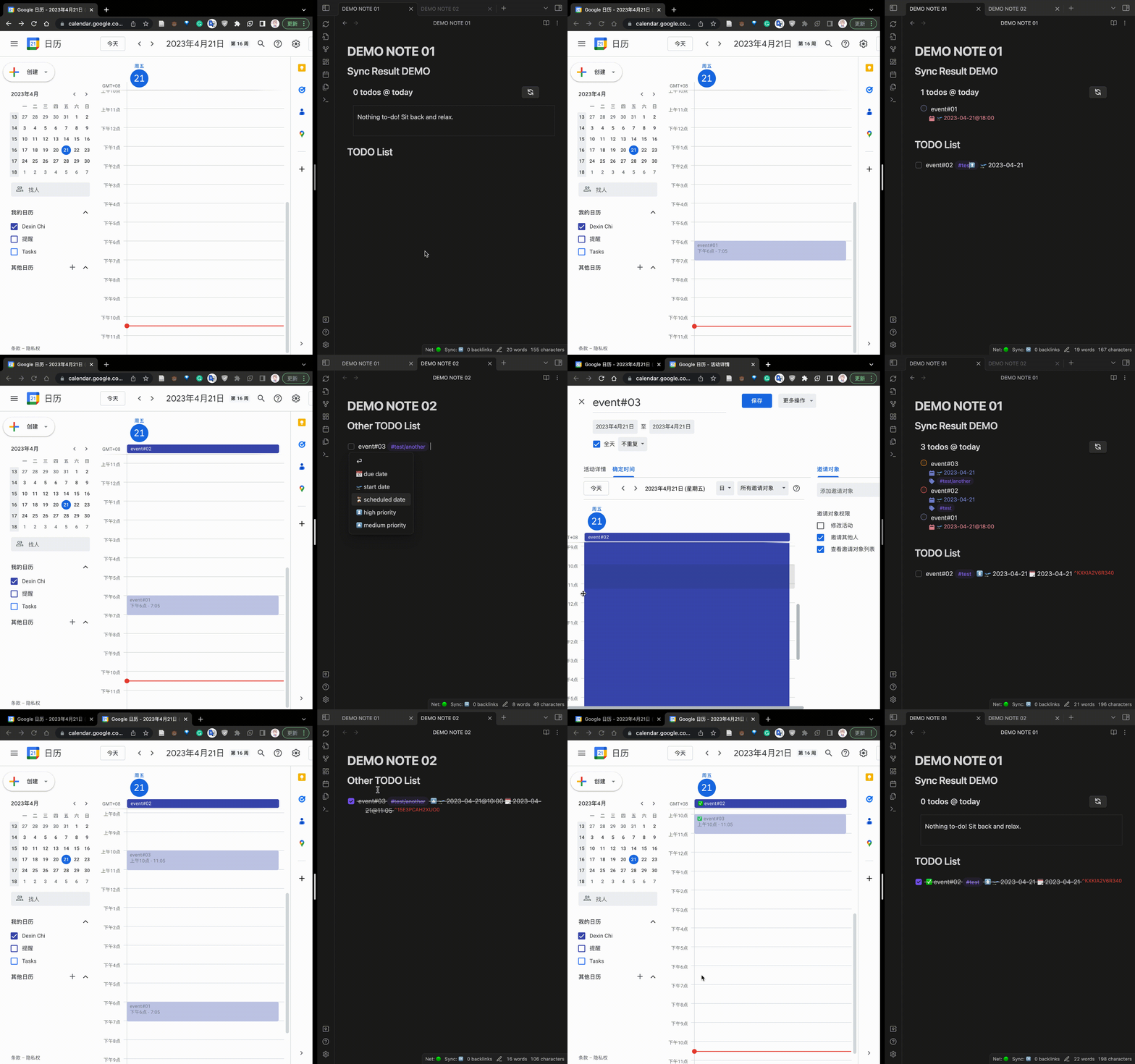
RELEASE DEMO

Installation & Usage

First of All

Manually installing the plugin

  • Download main.js, styles.css, manifest.json from the release page.
  • Copy the downloaded files to VaultFolder/.obsidian/plugins/your-plugin-id/.

Note: You can also compile this plugin yourself:

  • Clone this repo.
  • Run npm i or yarn to install dependencies.
  • Run npm run dev to start compilation in watch mode.

From Obsidian Community Plugins Broswer (Not Avaliable for now.)

  • Install the plugin through the Obsidian's community plugins browser.
  • Enable the plugin in Obsidian.

Use this Plugin

  • Place a code block like the following in any note:
    ```sync-calendar
    name: "{numberTodos} todos @ Apr. 21"
    timeMin: "2023-04-21"
    timeMax: "2023-04-22"
    ```
    
  • Swap to preview mode and the plugin should replace this code block with the materialized result.

If you are synchronizing your vault, I recommend explicitly ignoring the VaultFolder/.obsidian/calendar.sync.token.json file for security reasons, if possible.

Inputs

Name Type Description Default
name string The title for the query. You can use the {numberTodos} template which will be replaced by the number of todos returned by the query. {numberTodos} todos in calendar
timeMin string A string that conforms to moment.js, the minimum time (including timeMin) for events. One week before the current time
timeMax string A string that conforms to moment.js, the maximum time (excluding timeMax) for events. null
refreshInterval number The auto-refresh interval in seconds. Set to -1 to disable auto-refresh. 10

Note: timeMin and timeMax will be parsed by moment.js. Ideally, Any string that satisfies moment.js can be parsed, for example:

  • "2023-04-21"
  • "2023-04-21 16:00"
  • "2023-04-21T08:00:00.000Z"

Note: About fetching interval: For example, if there is an event whose time span is "2023-04-21 14:00" - "2023-04-21 16:00", if you do not want this event to be displayed during crawling, you should specify timeMin: "2023-04-21 16:00".

Note: sort, filtergroup are features which will be released in next version. Welcome to contribute!

Command

Currently, only one command is supported, which is used to manually trigger the synchronization of tasks from Obsidian to Calendar.

Sync with Calendar:

This command will fetch tasks with a startDate (i.e. 🛫 YYYY-MM-DD) in Obsidian.

Thanks to

The brilliant plugins:

obsidian-todoist

obsidian-tasks

obsidian-dataview

This plugin has borrowed a lot of valuable experience from the above plugins.

And I would also like to thank Wang Jiayu for accompanying me through the conception, design, and development of this plugin.

Support

Have you found the obsidian-sync-calendar plugin helpful and want to support it? I accept donations that will go towards future development efforts. I generally do not accept payment for bug bounties/feature requests, as financial incentives add stress/expectations which I want to avoid for a hobby project!

Similar Plugins

info
• Similar plugins are suggested based on the common tags between the plugins.
Tasks
5 years ago by Clare Macrae and Ilyas Landikov (created by Martin Schenck)
Task management for the Obsidian knowledge base.
CardBoard
4 years ago by roovo
An Obsidian plugin to make working with tasks a pleasure (hopefully anyway).
Tasks Calendar Wrapper
3 years ago by zhuwenq
This plugin currently provides a timeline view to display your tasks from your obsidian valut, with customizable filters and renderring options.
Time Ruler
3 years ago by Joshua Tazman Reinier
A drag-and-drop time ruler combining the best of a task list and a calendar view (integrates with Tasks, Full Calendar, and Dataview).
Task Board
a year ago by Atmanand Gauns
An Obsidian plugin to view and manage your tasks from whole vault using much efficient boards using various methodologies.
Completed Task Display
5 years ago by Ben Lee-Cohen
Obsidian plugin to control the display of completed tasks
Task Collector (TC)
5 years ago by ebullient
Manage tasks and logs within an Obsidian note.
Rewarder
4 years ago by Gustav Gnosspelius
An Obsidian-plugin to get rewards for completing todos
TickTickSync
2 years ago by thesamim
ToggleList
4 years ago by Lite C
This is a simple plugin for Obsidian to overwrite the default behavior of toggle checkbox status. Also, it offers a simple way to toggle through frequently used attributes: task states, task tags, highlighted list, etc.
Google Calendar and Contacts Lookup
4 years ago by ntawileh
Obsidian plugin that pulls contact and calendar event information from your Google account
Todoist Text
4 years ago by Wes Moncrief
Proletarian Wizard Task Manager
a year ago by Charles Feval
Obsidian plugin ot manage todos and projects directly from your notes.
Todoist completed tasks
4 years ago by Andrew 'Ledary' Kulishov
Obsidian plugin to display the completed tasks
Tasks Map
7 months ago by NicoKNL
A graph view of your tasks.
Tag Project
3 years ago by Odaimoko
TickTick
3 years ago by Viduy Cheung
Task Status
2 years ago by Valerie Burzynski
Quickly change any task status in Obsidian. The searchable modal enables a more dynamic and indiscriminate workflow when you need to change your checkbox markers.
Todo sort
3 years ago by Ryan Gomba
A plugin for Obsidian that sorts todos within a note
Send Tasks to OmniFocus
3 years ago by Henry Gustafson
Packrat
4 years ago by Thomas Herden
Process completed instances of recurring items created by the Obsidian Tasks plugin
Auto Tasks
a year ago by Jamie Hurst
Obsidian plugin to combine periodic notes with tags and tasks to automatically manage your daily, weekly and project TODO lists. Requires the "Periodic Notes" and "Tasks" plugins.
Overdue
4 years ago by Peter Parente
Obsidian plugin that marks items as [[Overdue]] if they are not checked off by their due date
Todoist Context Bridge
a year ago by wenlzhang
Bridge your Obsidian notes with Todoist tasks while preserving rich context, helping you highlight important tasks and maintain seamless workflows between the two platforms. Seamlessly integrate with Dataview and Tasks plugins.
BuJo Bullets
a year ago by Will Olson
Alternate checkbox types for Obsidian to support Bullet Journal bullets
Create Task
2 years ago by Simon Knittel
Create tasks faster from anywhere.
Extended Task Lists
2 years ago by joeriddles
Extended Markdown support for task lists in Obsidian.
Completed Tasks
a year ago by Mgussekloo
A free, simple and intuitive Obsidian plugin that automatically moves completed tasks (checked checkboxes) to the bottom of the list they're in.
Another Simple Todoist Sync
2 years ago by eudennis
Obsidian.md plugin to integrate with Todoist app.
Seafile
2 years ago by conql
TODOseq
7 months ago by Stephen Cross
TODOseq ("to-do-seek") is a lightweight, keyword-based task tracker for Obsidian
GChat Reminder
2 years ago by Anil Erdogan
Project Tasks
a year ago by Paul Paterson
An Obsidian Add-in that allows you to create simple projects out of tasks
Inline Checkbox Groups
a year ago by Bradley Wyatt
Obsidian Plugin that creates multiple checkboxes on a single line, separated by a customizable separator character (default '|'), with the option to automatically cross out text when all checkboxes in the line are checked.
Google Calendar Importer
7 months ago by Fan Li
A simple and light-weighted google calendar importer, allow injecting the events / tasks of a day automatically to your daily notes, or import it to anywhere with a command.
TaskWarrior Task Wiki
2 years ago by SntTGR
Small and simple task manager widget for obsidian and powered by taskwarrior.
Canvas LMS Task Importer
2 years ago by jordaeday
Imports assignments from Canvas LMS as tasks in Obsidian
Task Mover
a year ago by Mariia Nebesnaia
A plugin for obsidian to move unfinished tasks to the daily note automatically
TickTick Quick Add Task
a year ago by Muxin Li
The TickTick Quick Add Obsidian Plugin lets you quickly create tasks in TickTick directly from your Obsidian notes.
Check and Delete
a year ago by Danitiate
An Obsidian plugin that allows you to quickly clean up temporary list-items with the press of a button
Tasks Cleaner
a year ago by lowit
🧹 Tasks Cleaner is a plugin for Obsidian that helps you automatically remove old completed tasks from your Markdown notes
Auto Strikethrough Tasks
2 years ago by Nomekuma
Automatically adds strikethrough to completed tasks.
Clear Todos
a year ago by Joshua Gawenda
An Obsidian Plugin to clear todos that are done
Import Todoist tasks
a year ago by Duke
Import Todoist tasks as Obsidian tasks.
GitHub Tasks
8 months ago by Mike Thicke
Obsidian plugin to sync GitHub issues and PRs to Obsidian TODOs
Task Director
a year ago by Cybertramp
A plugin that allows you to easily manage tasks in bulk.
sync-db-os
2 years ago by ketd
LighterPack importer
2 months ago by Nicola Siniscalchi
Import a packing list from https://lighterpack.com.