Time Ruler

by Joshua Tazman Reinier
5
4
3
2
1
Score: 67/100

Description

Category: Task Management

The Obsidian Time Ruler plugin helps you manage your tasks and deadlines by displaying them in a calendar view. It integrates with the Dataview, Tasks, and Full Calendar plugins to provide a comprehensive task management system. The plugin allows you to schedule tasks, set reminders, and customize the display of tasks using filters and styles. It also includes features such as a timer, quick add, and search functionality. With its customizable settings and styling options, Time Ruler is a powerful tool for boosting your productivity in Obsidian.

Reviews

No reviews yet.

Stats

344
stars
61,739
downloads
13
forks
1,023
days
132
days
388
days
4
total PRs
0
open PRs
1
closed PRs
3
merged PRs
155
total issues
12
open issues
143
closed issues
22
commits

Latest Version

a year ago

Changelog

Added:

  • Support links in tasks

Changed:

  • Linked tasks [[ ]] no longer render the link's children

Fixed:

  • Pressing Tab on New Task no longer indents the editor window

README file from

Github

Time Ruler combines the best parts of a nested tasklist and an event-based calendar view. Drag-and-drop tasks to time-block and reschedule, and view tasks on top of read-only online calendars. Integrates well with the Tasks, FullCalendar, Reminder, and Obsidian Day Planner plugins.
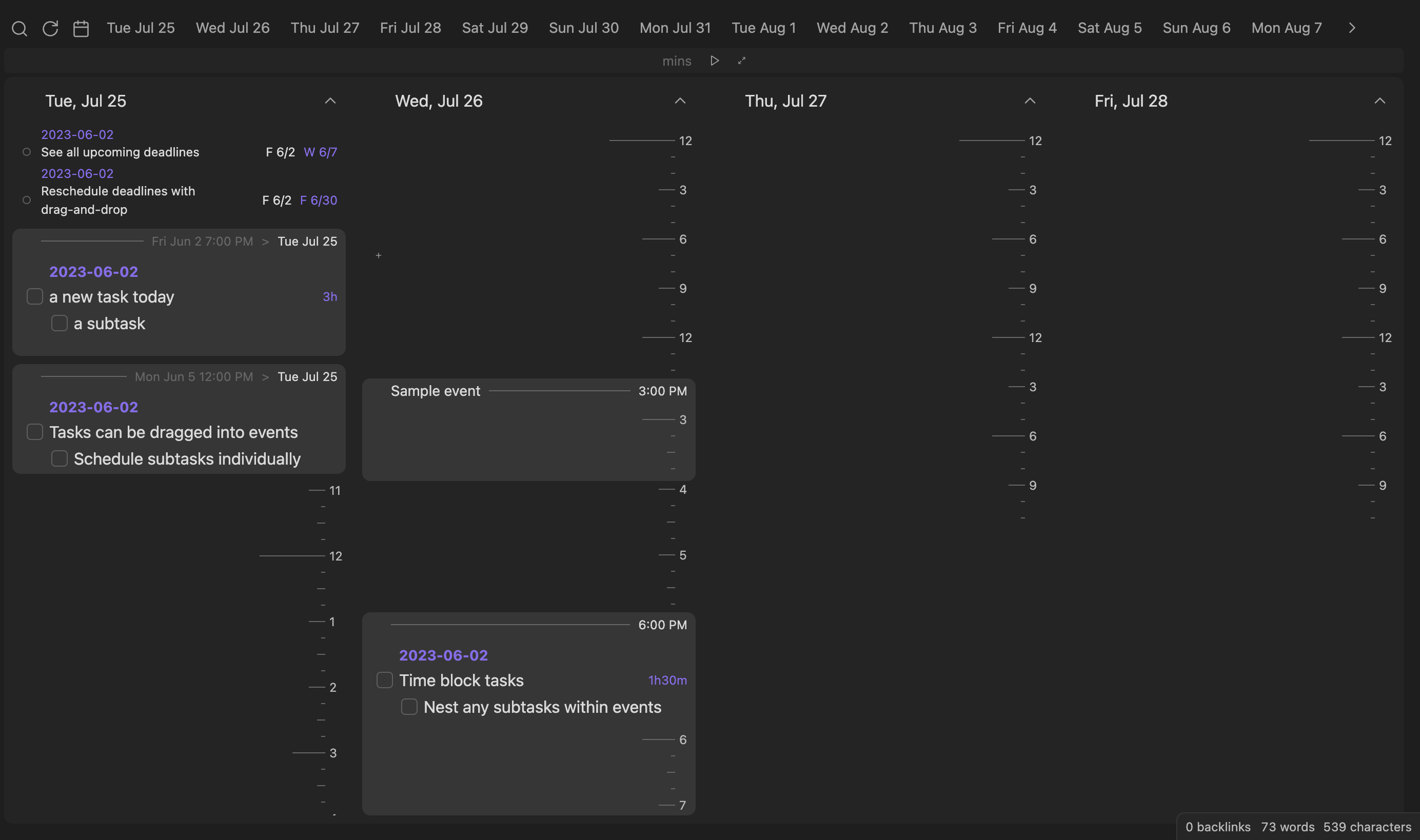
cover

Features

  • Reads and writes tasks in a variety of formats (Dataview inline fields, Tasks plugin emojis, or Full Calendar task-events)
  • Time-blocks with nested tasks
  • Search and filter scheduled, unscheduled, and due tasks
  • Drag 'n drop tasks to reschedule and change duration
  • Show all files and headings, drag to create new tasks
  • Create new tasks at specific times via drag-and-drop
  • Read-only online calendars via sharing links
  • Integrated timer/stopwatch for Pomodoro and time-tracking
  • Play a sound when you check a task!

Documentation

Time Ruler uses the Dataview plugin to read tasks, so please install it before you use this plugin.

Reading tasks

Task metadata can be specified in any of the following formats:

  • Day Planner: YYYY-MM-DD hh:mm - hh:mm task content > yyyy-mm-dd [query:: <query>] ?/!/!!/!!!
    • Beginning date/times: scheduled & duration, >: due date.
    • In Daily Notes, you can omit the date from scheduled and Time Ruler will parse the date from the note title. Only 24-hour format times are understood.
    • You can omit minutes and only put hh - hh for times.
  • Dataview: [scheduled:: yyyy-mm-ddThh:mm] [due:: yyyy-mm-dd] [duration:: #h#m] [priority:: lowest/low/medium/high/highest] [query:: <query>]
  • Tasks: [startTime:: hh:mm] [duration:: #h#m] [query:: <query>] ⏳ yyyy-mm-dd 📅 yyyy-mm-dd ⏬/🔽/🔼/⏫/🔺
    • ⏳: scheduled, 📅: due. See the Tasks docs for a full description.
    • Order matters: inline fields must go before tasks emojis or Tasks won't understand it.
  • Full Calendar: [date:: yyyy-mm-dd] [startTime:: hh:mm] [endTime:: hh:mm] or [allDay:: true] [due:: yyyy-mm-dd] [priority:: lowest/low/medium/high/highest] [query:: <query>]

Queries

As of version 2.0, Time ruler includes queries, tasks whose children are taken from a Dataview search. Some example searches:

  • [query:: "Path/to/folder"] (notice the double-quotes, which are used for Dataview folder sources. Use # to designate a heading afterwards)
  • [query:: "#heading"] (headings begin with #, but are framed in double-quotes).
  • [query:: #tag]
  • [query:: incoming([[link to note]]) WHERE scheduled and !due]
  • Time Ruler supports sources, as well as WHERE queries with task properties. Read the full reference here.

Pages (tasks from full notes)

Time Ruler now reads Full Calendar note events as well as any page with completed: false or completed: null and the following optional Properties:

  • scheduled: date
  • due: date
  • priority: highest/high/medium/low/lowest
  • duration: #h#m (a Dataview duration - see above)
  • start: date

Reminder

You can specify any of the Obsidian Reminder formats as well.

When editing a task via drag-and-drop, tasks are converted back to the formatting detected in the task. If this is not possible, the user's preferred format (Day Planner, Dataview, Tasks, or Full Calendar) is used. This can be changed in Settings.

Note: Double-spaces are used between brackets because without them, Obsidian thinks they are markdown links.

Scheduling tasks

  • To reschedule a task, drag-and-drop the task onto the target block or time. You can drag a task to one of the day buttons or a day's heading to reschedule to that day. Click on a task to jump to it in Obsidian.
  • To create a new scheduled task, drag the + button (top left) onto a time. For unscheduled, simply click the + button.
  • To move a task to a different file or heading, drag it to the blue -> button (top left).
  • To change the duration of a task, drag its duration onto a time.
  • To change the deadline of a task, drag its deadline onto a time.
  • To unschedule a task, drag the task to the Unscheduled button.
  • You can also drag groups, headings, and blocks to reschedule all of the tasks contained in them.
  • Dragging and holding over a date button will scroll to that date, allowing you to drop the task there.

Online calendars

  • To import a calendar, simply copy a shared link (iCal format) into Settings (Ensure that the Access Permission for your calendar is set to public!).
  • Events show as blocks which can contain tasks scheduled at the same time. You can drag an event to reschedule the tasks contained, but the event is read-only.
  • To refresh events, click the Refresh button (the circular arrow) in the toolbar.
  • For Google Calendar Users - You can find your iCal link at - "Calendar Settings\[Your Calendar]\Integrate Calendar\Public address in iCal format\".

Buttons

  • Search: Jump to a specific task.
  • Unscheduled: Drag a task here to unschedule it. Click to show unscheduled tasks (shortcut to Search view).
  • Dates: Click to scroll to that date, drag a task on top to schedule it for that date.
  • Quick add: To create a task, drag the + button onto a time. By default, you will create in today's Daily note, but you can pick a specific heading or file.
  • Click the menu ... button (top-left) to view settings.
  • Past / Future: show dates going to past or future. Past shows only completed tasks, while future shows uncompleted.
  • Reload: Reload Obsidian tasks and online calendars.
  • Hide / Show Times: Toggle the display of tic marks on Time Ruler.
  • Hours / Days / Weeks view: Toggle between daily and hourly views. In daily view, hours are hidden.

Timer

timer

  • To start a stopwatch, click the play button without any time entered.
  • To start a timer, enter an amount in minutes and press the play button or "Enter."
  • You can add or subtract 5 minutes while the timer is playing by clicking the + and - buttons.
  • Click the focus button (outwards arrows) to expand the timer and focus on current tasks.

Customization Settings

  • Custom Filter: This is passed to dv.pages(<custom filter>). It only filters out certain pages, and can't filter specific tasks within those. Use Custom Statuses to filter out tasks. See this link for dv.pages() and this link for how to format query sources.

    Note: do not include dv.pages() in the entry box—only the query string passed to the function.

    • Include a folder and its children: "folder"
    • Exclude a folder and its children: -"folder"
    • Include two folders and exclude a third: "folder" or "folder2" and -"folder3"
    • Include tags: #tag or #tag2 and -#tag3
    • Include pages which link to a page: [[page]]
    • Include links from page: outgoing([[page]])
  • Filter Function: Provides a filtering function that uses the data passed from dv.pages()['file']['tasks']

    • Filtering out empty tasks: (tasks) => tasks.where(task => task.text != "")
    • Filtering out empty tags: (tasks) => tasks.where(task => task.tags.length===0)
  • Custom Status: Either include only certain custom statuses, or exclude all specified custom statuses (characters between [ ] in tasks).

  • To style Time Ruler, the following classes are added:

    • task-list-item, task-list-item-checkbox, task-due, task-scheduled, data-task, and task-priority coincide with Tasks plugin styling, and additional task-duration and task-reminder classes are added to those parts of tasks, so you can style them with CSS snippets (unfortunately, you will need to add your own custom status styling, due to custom themes being formatted for the Obsidian markdown editor, and not Time Ruler).
    • time-ruler-heading and time-ruler-block classes let you style headings and blocks.
    • time-ruler-container is added to the plugin's container element.

Credit

  • Many thanks to the Dataview, Tasks, and Full Calendar plugins for setting the standards and formatting for managing tasks across the Obsidian vault.
  • The Dataview plugin's MetadataCache made Time Ruler possible, so a huge thanks for the automatic indexing and parsing of task metadata.

Network Usage

Upon calendar refresh, the plugin makes a single GET request to any calendars you are subscribed to, which downloads their events in .ics format.

Changelog

For more information on past and future updates, please consult the roadmap and changelog.

If you appreciate this plugin, I would love your support for further development!

Similar Plugins

info
• Similar plugins are suggested based on the common tags between the plugins.
Todoist Text
4 years ago by Wes Moncrief
Big Calendar
4 years ago by Boninall
Big Calendar in Obsidian, for manage your events in a day/week/month and see agenda too!
Heatmap Calendar
4 years ago by Richard Slettevoll
An Obsidian plugin for displaying data in a calendar similar to the github activity calendar
Rewarder
4 years ago by Gustav Gnosspelius
An Obsidian-plugin to get rewards for completing todos
Packrat
4 years ago by Thomas Herden
Process completed instances of recurring items created by the Obsidian Tasks plugin
TimeDiff plugin
4 years ago by Grzegorz Dominiczak
Obsidian plugin which calculates and displays diff in hours and minutes between two dates in `timediff` markdown block
Todoist completed tasks
4 years ago by Andrew 'Ledary' Kulishov
Obsidian plugin to display the completed tasks
Google Calendar
4 years ago by YukiGasai
Add Google Calendar inside Obsidian
ToggleList
4 years ago by Lite C
This is a simple plugin for Obsidian to overwrite the default behavior of toggle checkbox status. Also, it offers a simple way to toggle through frequently used attributes: task states, task tags, highlighted list, etc.
New Bullet With Time
3 years ago by Boninall
A plugin allows you to auto add current time to new bullet line.
Todo sort
3 years ago by Ryan Gomba
A plugin for Obsidian that sorts todos within a note
Habit Calendar
3 years ago by Hedonihilist
Monthly Habit Calendar for DataviewJS. This plugin helps you render a calendar inside DataviewJS code block, showing your habit status within a month.
ProgressBar
3 years ago by Wei Zhang
Code block plugin for Obsidian generating a progress bar
Tasks Calendar Wrapper
3 years ago by zhuwenq
This plugin currently provides a timeline view to display your tasks from your obsidian valut, with customizable filters and renderring options.
OZ Calendar
3 years ago by Ozan Tellioglu
Send Tasks to OmniFocus
3 years ago by Henry Gustafson
Sync Google Calendar
3 years ago by Dexin Qi
Sync tasks from Obsidian with system calendar
ICS
3 years ago by muness
Generate Daily Planner from one or more ical feeds
TickTick
3 years ago by Viduy Cheung
Lunar Calendar
3 years ago by OSmile
obsidian插件,一个支持农历的日历插件。
MagicCalendar
3 years ago by Vaccarini Lorenzo
An obsidian plugin that exploit a natural language processing engine to find potential events and sync them with iCalendar
Tag Project
3 years ago by Odaimoko
GChat Reminder
2 years ago by Anil Erdogan
iCal
2 years ago by Andrew Brereton
This is a plugin for Obsidian that searches your vault for tasks that contain dates, and generates a calendar in iCal format that can be imported into your preferred calendar application.
TickTickSync
2 years ago by thesamim
Task Status
2 years ago by Valerie Burzynski
Quickly change any task status in Obsidian. The searchable modal enables a more dynamic and indiscriminate workflow when you need to change your checkbox markers.
Extended Task Lists
2 years ago by joeriddles
Extended Markdown support for task lists in Obsidian.
Create Task
2 years ago by Simon Knittel
Create tasks faster from anywhere.
Single File Daily Notes
2 years ago by Pranav Mangal
An Obsidian plugin to create and manage daily notes in a single file
Journals
2 years ago by Sergii Kostyrko
Date Inserter
2 years ago by namikaze-40p
An Obsidian plugin that lets you insert a date at the cursor position using a calendar.
Calendarium
2 years ago by Jeremy Valentine
The ultimate Obsidian plugin for crafting mind-bending fantasy and sci-fi calendars
Persian Calendar
2 years ago by Hossein Maleknejad
Persian Calendar for Obsidian.md
Dust Calendar
2 years ago by 纳米级尘埃
obsidian 日历插件
Calendar Event Sync
2 years ago by Stephen Dolan
Set the title of your note to the current event
TaskWarrior Task Wiki
2 years ago by SntTGR
Small and simple task manager widget for obsidian and powered by taskwarrior.
Datepicker
2 years ago by Mostafa Mohamed
Datepicker widget for Obsidian.
Chinese Calendar
2 years ago by DevilRoshan
在obsidian中使用的更符合中国习惯的日历插件。
Daily Statistics
2 years ago by yefengr
obsidian daily statistics
Canvas LMS Task Importer
2 years ago by jordaeday
Imports assignments from Canvas LMS as tasks in Obsidian
Diarian
2 years ago by Erika Gozar
All-in-one journaling toolkit.
Morgen Tasks
2 years ago by Morgen AG
Calendar
6 years ago by Liam Cain
Simple calendar widget for Obsidian.
Completed Task Display
5 years ago by Ben Lee-Cohen
Obsidian plugin to control the display of completed tasks
Tasks
5 years ago by Clare Macrae and Ilyas Landikov (created by Martin Schenck)
Task management for the Obsidian knowledge base.
Jump-to-Date
5 years ago by TfTHacker
Jump to a date via a convenient popup form. This plugin is a part of the Obsidian42 family of Obsidian plugins.
Task Collector (TC)
5 years ago by ebullient
Manage tasks and logs within an Obsidian note.
Itinerary
5 years ago by Adam Coddington
Make planning your trip or event easier by rendering a calendar from event information found in your notes.
CardBoard
4 years ago by roovo
An Obsidian plugin to make working with tasks a pleasure (hopefully anyway).
Overdue
4 years ago by Peter Parente
Obsidian plugin that marks items as [[Overdue]] if they are not checked off by their due date
Auto Strikethrough Tasks
2 years ago by Nomekuma
Automatically adds strikethrough to completed tasks.
Daily notes calendar
a year ago by bartkessels
Quickly navigate your vault using a calendar view, this plugin allows you to create and navigate to periodic notes and notes that are created on a specific date.
Check and Delete
a year ago by Danitiate
An Obsidian plugin that allows you to quickly clean up temporary list-items with the press of a button
Auto Tasks
a year ago by Jamie Hurst
Obsidian plugin to combine periodic notes with tags and tasks to automatically manage your daily, weekly and project TODO lists. Requires the "Periodic Notes" and "Tasks" plugins.
Task Director
a year ago by Cybertramp
A plugin that allows you to easily manage tasks in bulk.
Proletarian Wizard Task Manager
a year ago by Charles Feval
Obsidian plugin ot manage todos and projects directly from your notes.
Clear Todos
a year ago by Joshua Gawenda
An Obsidian Plugin to clear todos that are done
Todoist Context Bridge
a year ago by wenlzhang
Bridge your Obsidian notes with Todoist tasks while preserving rich context, helping you highlight important tasks and maintain seamless workflows between the two platforms. Seamlessly integrate with Dataview and Tasks plugins.
Heatmap Tracker
a year ago by Maksim Rubanau
A customizable heatmap tracker plugin for Obsidian to visualize daily data trends with intuitive navigation and flexible settings.
Import Todoist tasks
a year ago by Duke
Import Todoist tasks as Obsidian tasks.
Project Tasks
a year ago by Paul Paterson
An Obsidian Add-in that allows you to create simple projects out of tasks
BuJo Bullets
a year ago by Will Olson
Alternate checkbox types for Obsidian to support Bullet Journal bullets
Inline Checkbox Groups
a year ago by Bradley Wyatt
Obsidian Plugin that creates multiple checkboxes on a single line, separated by a customizable separator character (default '|'), with the option to automatically cross out text when all checkboxes in the line are checked.
Every Day Calendar
a year ago by QuBe
Obsidian plugin to create calendars inspired by Simone Giertz's Every Day Calendar
Task Board
a year ago by Atmanand Gauns
An Obsidian plugin to view and manage your tasks from whole vault using much efficient boards using various methodologies.
Daily Routine
a year ago by sechan100
new version of daily-routine obsidian plugin
Task Mover
a year ago by Mariia Nebesnaia
A plugin for obsidian to move unfinished tasks to the daily note automatically
Outlook Meeting Notes
a year ago by David Ingerslev
An Obsidian plugin to create meeting notes from Microsoft Outlook .msg files
Completed Tasks
a year ago by Mgussekloo
A free, simple and intuitive Obsidian plugin that automatically moves completed tasks (checked checkboxes) to the bottom of the list they're in.
MemoChron
a year ago by Michalis Efstratiadis
Calendar integration and note creation with support for public iCalendar URLs.
Tasks Cleaner
a year ago by lowit
🧹 Tasks Cleaner is a plugin for Obsidian that helps you automatically remove old completed tasks from your Markdown notes
TickTick Quick Add Task
a year ago by Muxin Li
The TickTick Quick Add Obsidian Plugin lets you quickly create tasks in TickTick directly from your Obsidian notes.
Yearly Glance
a year ago by Moy & RavenHogWarts
An obsidian plugin to build "year at a glance" view.
Markdown Calendar Generator
10 months ago by Zach Russell
An intentionally simple obsidian markdown table calendar generator
GitHub Tasks
8 months ago by Mike Thicke
Obsidian plugin to sync GitHub issues and PRs to Obsidian TODOs
Tasks Map
7 months ago by NicoKNL
A graph view of your tasks.
TODOseq
7 months ago by Stephen Cross
TODOseq ("to-do-seek") is a lightweight, keyword-based task tracker for Obsidian
Life in Weeks Calendar
6 months ago by Jeff Szuc
Plugin for the Obsidian markdown editor. Displays a calendar of your life in weeks with weekly Periodic Notes plugin integration. Includes options for the traditional Memento Mori/Stoic style calendar, as well as a Gregorian calendar accurate version.
Status Bar Clock
3 months ago by Marty Ballard
Status Bar Clock for Obsidian
Calendar Bases
a month ago by Edrick Leong
Adds a calendar layout to bases so you can display notes with dates in an interactive calendar view.
LighterPack importer
a month ago by Nicola Siniscalchi
Import a packing list from https://lighterpack.com.
Synaptic View
a month ago by Yongmini
A dynamic control center for your vault. Unify hubs, notes, tasks, periodic notes, and web resources with intuitive buttons. Replace new tab for instant access.