Daily notes calendar

by bartkessels
5
4
3
2
1
Score: 58/100

Description

Category: Note Enhancements

The Daily Note Calendar Plugin for Obsidian provides a streamlined way to access and manage your daily and weekly notes via an intuitive calendar view. Users can fully customize the format of their notes, with support for popular date formatting options using date-fns rules. This plugin eliminates the need to manually search for files in the file tree, offering a much quicker navigation system. While it currently focuses on navigating to notes, future updates will include features like date indicators for notes and the

Reviews

No reviews yet.

Stats

75
stars
16,739
downloads
8
forks
544
days
1
days
27
days
99
total PRs
2
open PRs
5
closed PRs
92
merged PRs
70
total issues
18
open issues
52
closed issues
231
commits

Latest Version

a month ago

Changelog

  • Display the current month as the active month when it's visible
  • Update the current day when midnight passes (might be 10 minutes later)
  • Add commands to open monthly, quarterly and yearly notes

README file from

Github

Daily note calendar plugin

License: GPL v3 GitHub release (latest by date)

Build and test the daily-note-calendar plugin Release Obsidian plugin


The Daily note calendar plugin started as a hobby project because another calendar plugin to open daily notes couldn't handle my own date format for daily notes which is (yyyyMMdd - eeee e.g. 20241231 - Saturday). Therefore, I decided to write my own plugin which allows you to customize the format of your daily and even weekly notes.

Table of contents

1. Features

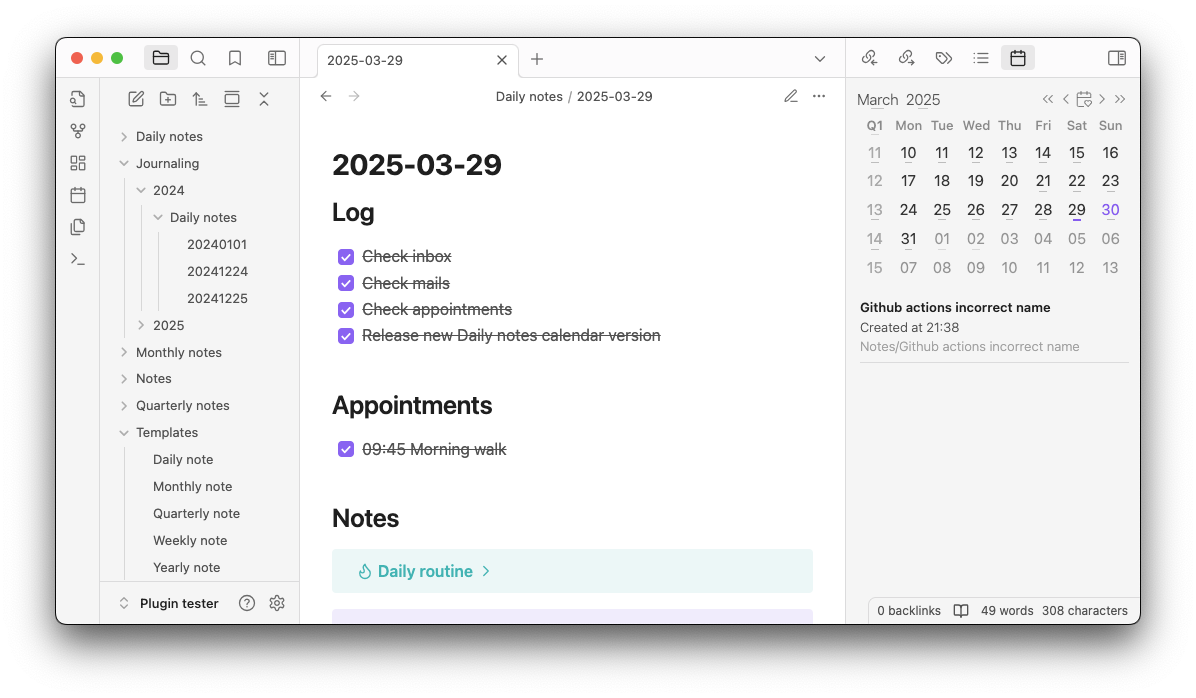
Daily note calendar plugin light mode

1.1 Periodic notes

Quickly navigate your vault using a calendar view, this plugin allows you to create and navigate to your periodic notes such as

  • Daily notes
    • By clicking on a specific date
  • Weekly notes
    • By clicking on the week number
  • Monthly notes
    • By clicking on the month name
  • Quarterly notes
    • By clicking on the quarter name in the upper-left corner
  • Yearly notes
    • By clicking on the year number

For each note, you can specify the template of the name yyyy-MM-dd - eeee and the folder where the newly created periodic note should be stored. The path is also customizable using the date formatting rules of date-fns.

Below each date, you can choose to display an indicator whether or note that date already has a note.

1.2 Variables

All the notes that you create must be based on a template, this allows you to create your periodic note based on the same template every time. Inside your template-file you can use the following variables:

Variable Description Template
{{date:<template>}} The date of the note. This date is based on the date that you've clicked on in the calendar. You can use the same date templating rules of date-fns that you use in the name or the folder. Thus {{date:yyyy-MM-dd - eeee}} would turn into 2024-12-31 - Monday.
{{today:<template>}} The date of today. This date is based on the date and time of creation of the note. You can use the same date templating rules of date-fns that you use in the name or the folder. Thus {{today:yyyy-MM-dd - eeee, HH:mm}} would turn into 2024-12-31 - Monday, 12:59.
{{title}} - This will take the title of the note you had opened before clicking a date in the calendar.

1.2.1 Calculating dates

For the {{date:<template>}} and {{today:<template>}} variables, you can add or subtract days, weeks, months and years.

You can subtract or add a period using the + or - sign followed by the period and the amount of that period you want to add or subtract.

Period Variable Template example
Day +1d or -1d {{date+1d:yyyy-MM-dd - eeee}}
Week +1w or -1w {{date+1w:yyyy-MM-dd - eeee}}
Month +1m or -1m {{date+1m:yyyy-MM-dd - eeee}}
Year +1y or -1y {{date+1y:yyyy-MM-dd - eeee}}

Where the number is the amount of the period you want to add or subtract.

The complete template would look like {{date+1y:<template>}} or {{today+1y:<template>}}. to add one year to the date. You can change the amount or the period in the above example to any period from the above table.

1.3 Notes created on a specific day

For each day you select, you can enable the feature to display all the notes created on that specific day below the calendar. This allows you to easily navigate your vault using the calendar view and quickly find the notes you've created on any day.

In the settings, you can specify how you want the plugin to find the notes created on a date. Either use the default created date of the actual file or use a specific property in the front matter of the note.

The created on time displayed below each note can be customized using the date formatting rules of date-fns.

You can always navigate to created notes by pressing the shift key and clicking on the date. This will only list the notes created on that date and not open or create the daily note.

1.4 Commands

To navigate your vault even faster, the Daily Notes Calendar plugin offers a couple of commands to navigate your periodic notes.
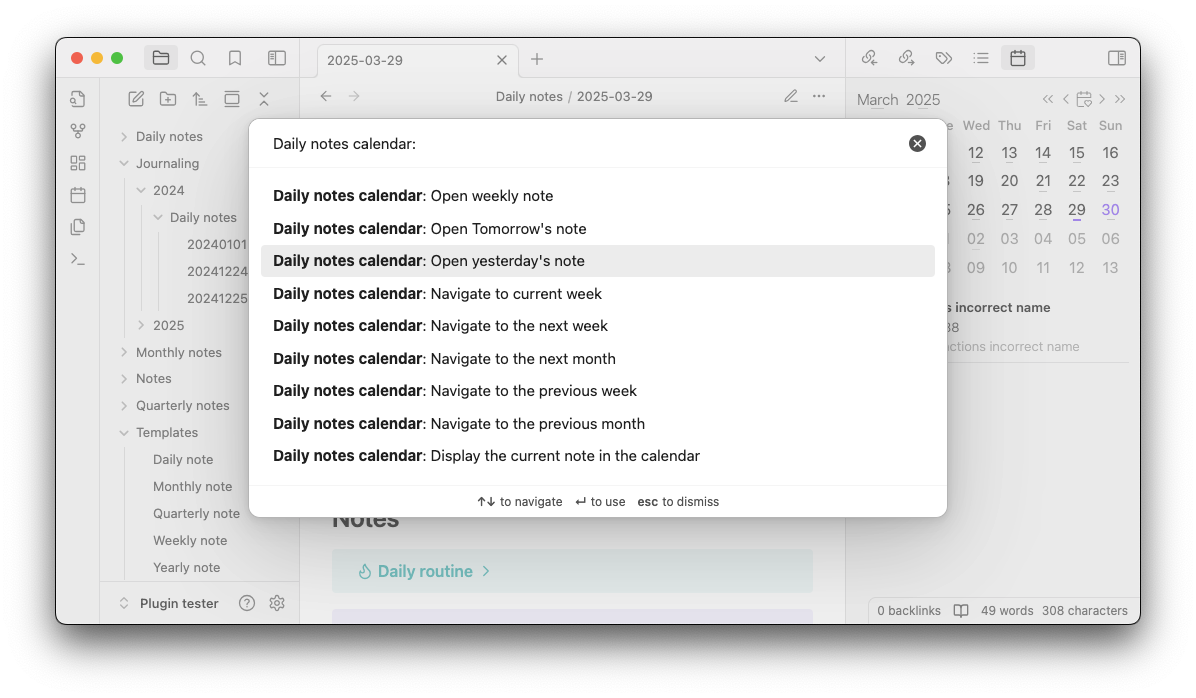
Daily notes calendar plugin commands

1.4.1 Open periodic notes

You can open your weekly, monthly, quarterly or yearly note by using the one of the following commands

Open weekly note

Daily notes calendar: Open weekly note

If today is 2024-12-31, the command will open the note 2024-W52 in the folder specified in the settings.

Open monthly note

Daily notes calendar: Open monthly note

If today is 2024-12-31, the command will open the note 2024-12 in the folder specified in the settings.

Open quarterly note

Daily notes calendar: Open quarterly note

If today is 2024-12-31, the command will open the note 2024-Q4 in the folder specified in the settings.

Open yearly note

Daily notes calendar: Open yearly note

If today is 2024-12-31, the command will open the note 2024 in the folder specified in the settings.

1.4.2 Navigate to the next or previous week

You can navigate the calendar to the next or previous week by using the following commands

Daily notes calendar: Navigate to the next week

This will navigate to the next week relative to the current weeks in the calendar.

Daily notes calendar: Navigate to the previous week

This will navigate to the previous week relative to the current weeks in the calendar.

1.4.3 Navigate to the next or previous month

You can navigate the calendar to the next or previous month by using the following commands

Daily notes calendar: Navigate to the next month

This will navigate to the next month relative to the current month in the calendar.

Daily notes calendar: Navigate to the previous month

This will navigate to the previous month relative to the current month in the calendar.

1.4.4 Display the current note in calendar

You can navigate to the current note's date in the calendar using the following command

Daily notes calendar: Display the current note in calendar

This will navigate the calendar to the date of the currently opened note. This will either take the creation date of the note, or the created date property if you've enabled that setting.

1.5 Displaying notes created on a specific day

When you've enabled the feature to display notes created on a specific day, you can also choose to display the current opened note in the calendar. This can be done by using the command Daily notes calendar: Display the current note in calendar. This will highlight the date of the current note in the calendar, and below the calendar all notes that are created on the same date as the currently opened note.

The command will either use the date that the note was created on, or the property specified in the plugin settings.

2. External dependencies

The Daily note calendar plugin uses npm as a package manager, so most dependencies required by the plugin can be installed using the following command:

$ npm install

To locally test your plugin, you need to have Obsidian (which is pretty self-explanatory why). For more information about the process of developing an Obsidian plugin, I'm happy to refer you to the Obsidian documentation.

3. Build and test

To build and test the daily-note-calendar plugin, you can use the following commands:

$ npm install
$ npm run build
$ npm run test

Only the business logic is tested that doesn't depend on anything from Obsidian.

4. Contribute

Is there a feature you'd like to see, or a bug you've encountered? Please let us know, and help us make the Daily note calendar great for everyone! Or, if you're a developer, try to fix it yourself! If you'd like to contribute back to the project, but you're not quite sure yet what you can add, take a look at the roadmap.

All contributions are welcome, so feel free to join the open source community and support Daily note calendar through your expertise!

To make sure everyone can contribute to Daily note calendar we value the quality and understandability of our code and repository. So when you're building a feature, or patching a bug, and you've made a decision, please document that decision in the docs/design.md document. This will help future contributors to understand your rationale. If you've updated some logic in the code, please check the decision records and update the related ones. If you've done all this, update the test-suite and validate that your newly created code does exactly what you'd documented.

4.1 Branching strategy

So now that your idea is implemented, documented and tested, it's time to merge it into the project! To help you out a bit on how to set up a branch, we've got you covered in this chapter!

The Daily notes calendar project does not use a development branch but instead uses short-lived feature branches which are directly merged into the main-branch. We've chosen this strategy 'cause we believe in release often, release fast. There's no need for your feature to gather dust in a stale development branch while waiting on some arbitrary date to be released. But, we do however, have some guidelines:

  • If you're contributing a feature use the feature/<your-feature-name> naming convention
  • If you're contributing a bug fix use the bugfix/<the-name-of-the-bug> naming convention.
  • If you're contributing to documentation use the documentation/<name-of-change> naming convention.
  • If you're contributing a hot fix use the hotfix/<hotfix-type>-<name> naming convention
    • These can be useful for updating dependency versions

5. Create a new release

To create a new release of the plugin, edit the package.json file and update the version property. Then run npm run version to update the version in the manifest.json and versions.json file. Once the release is completed, merge the branch back into the main branch.

For versioning Daily note calendar uses semantic versioning. Which, given the documentation on semver.org, means that the version number consists of MAJOR.MINOR.PATCH.

When creating a release of Daily note plugin, check what kind of changes have been applied since the previous version and categorize these in one of the following segments:

  1. Incompatible API change, or a user interface change
  2. New functionality which doesn't break existing functionality
  3. Bug fix

These can be mapped on the semantic versioning scheme in the following ways:

  • Update the MAJOR version when you've made a breaking change either in the interfaces or in the UI.
  • Update the MINOR version when a new feature is introduced
  • Update the PATCH version when a bug is resolved

When you've updated the version in package.json create a new tag in Git using the following structure: MAJOR.MINOR.PATCH. For version 5 with a bugfix this would be 5.0.1.

This can be created using the following Git-command:

$ git tag -a 5.0.1
$ git push -u origin 5.0.1

This will create the tag locally and then push it to Github which in turn will kick off the required pipelines to create the new release and add the build artifacts.

Similar Plugins

info
• Similar plugins are suggested based on the common tags between the plugins.
Calendar
6 years ago by Liam Cain
Simple calendar widget for Obsidian.
Google Calendar
4 years ago by YukiGasai
Add Google Calendar inside Obsidian
Calendarium
2 years ago by Jeremy Valentine
The ultimate Obsidian plugin for crafting mind-bending fantasy and sci-fi calendars
Heatmap Calendar
4 years ago by Richard Slettevoll
An Obsidian plugin for displaying data in a calendar similar to the github activity calendar
Rollover Daily Todos
5 years ago by Matt Sessions
An obsidian plugin that rolls over todo items from the previous daily note
Automatic Table Of Contents
3 years ago by Johan Satgé
💠 An Obsidian plugin to create a table of contents in a note, that updates itself when the note changes
Journals
2 years ago by Sergii Kostyrko
Tasks Calendar Wrapper
3 years ago by zhuwenq
This plugin currently provides a timeline view to display your tasks from your obsidian valut, with customizable filters and renderring options.
Calendar Bases
a month ago by Edrick Leong
Adds a calendar layout to bases so you can display notes with dates in an interactive calendar view.
Review
6 years ago by ryanjamurphy
Add the current note to a future daily note to remember to review it.
Time Ruler
3 years ago by Joshua Tazman Reinier
A drag-and-drop time ruler combining the best of a task list and a calendar view (integrates with Tasks, Full Calendar, and Dataview).
Big Calendar
4 years ago by Boninall
Big Calendar in Obsidian, for manage your events in a day/week/month and see agenda too!
Heatmap Tracker
a year ago by Maksim Rubanau
A customizable heatmap tracker plugin for Obsidian to visualize daily data trends with intuitive navigation and flexible settings.
Daily Named Folder
5 years ago by Nemo Andrea
Like daily note, but nested in a daily folder and some more improvements
ICS
3 years ago by muness
Generate Daily Planner from one or more ical feeds
Daily Note Outline
4 years ago by iiz
Add a custom view which shows outline of multiple daily notes with headings, links, tags and list items
Journey
5 years ago by Alexis Rondeau
Discover the story between your notes in Obsidian
OZ Calendar
3 years ago by Ozan Tellioglu
Jump-to-Date
5 years ago by TfTHacker
Jump to a date via a convenient popup form. This plugin is a part of the Obsidian42 family of Obsidian plugins.
Journal Review
3 years ago by Kageetai
Review your daily notes on their anniversaries, like "what happened today last year"
Daily Notes Viewer
4 years ago by Johnson0907
Date Inserter
2 years ago by namikaze-40p
An Obsidian plugin that lets you insert a date at the cursor position using a calendar.
Tomorrow's Daily Note
4 years ago by Will Olson
An obsidian plugin that creates tomorrows daily note for preemtive planning.
Repeat
4 years ago by Andre Perunicic
Review notes using periodic or spaced repetition.
iCal
2 years ago by Andrew Brereton
This is a plugin for Obsidian that searches your vault for tasks that contain dates, and generates a calendar in iCal format that can be imported into your preferred calendar application.
Chinese Calendar
2 years ago by DevilRoshan
在obsidian中使用的更符合中国习惯的日历插件。
Dust Calendar
2 years ago by 纳米级尘埃
obsidian 日历插件
Morgen Tasks
2 years ago by Morgen AG
Outlook Meeting Notes
a year ago by David Ingerslev
An Obsidian plugin to create meeting notes from Microsoft Outlook .msg files
Habit Calendar
3 years ago by Hedonihilist
Monthly Habit Calendar for DataviewJS. This plugin helps you render a calendar inside DataviewJS code block, showing your habit status within a month.
Things Logbook
5 years ago by Liam Cain
Sync your Things 3 Logbook with Obsidian
Itinerary
5 years ago by Adam Coddington
Make planning your trip or event easier by rendering a calendar from event information found in your notes.
Diarian
2 years ago by Erika Gozar
All-in-one journaling toolkit.
Yearly Glance
a year ago by Moy & RavenHogWarts
An obsidian plugin to build "year at a glance" view.
Lumberjack
5 years ago by ryanjamurphy
Log your thoughts! Lumberjack adds URL commands to help you axe inefficiency and get right to writing.
Datepicker
2 years ago by Mostafa Mohamed
Datepicker widget for Obsidian.
Daily Note Pinner
3 years ago by LukeMT
Pins the daily note of the day and unpins other daily notes in Obsidian
Daily notes opener
4 years ago by Reorx
Easily open daily notes and periodic notes in new pane; customize periodic notes background; quick append new line to daily notes.
Persian Calendar
2 years ago by Hossein Maleknejad
Persian Calendar for Obsidian.md
Daily Note Navbar
2 years ago by Karsten Finderup Pedersen
Adds a daily note navbar to quickly navigate between sequential daily notes in Obsidian.
MagicCalendar
3 years ago by Vaccarini Lorenzo
An obsidian plugin that exploit a natural language processing engine to find potential events and sync them with iCalendar
Single File Daily Notes
2 years ago by Pranav Mangal
An Obsidian plugin to create and manage daily notes in a single file
Telegram Inbox
2 years ago by icealtria
Receive messages from Telegram bots and add them to Obsidian's daily note.
Auto Journal
3 years ago by Evan Bonsignori
Opinionated journaling automation like daily notes but with backfills for the days that you didn't open Obsidian.
Opener: New Tab by Default
a year ago by LukeMT, Aidan Gibson
Opens new tabs by default. Like an IDE would. Can also open pdfs with default system app, if desired.
Wordflow Tracker
a year ago by LeCheenaX
Track the changes and stats of your edited note files automatically in Obsidian. Record the modified notes and statistics to your daily note with various customizations!
Daily Statistics
2 years ago by yefengr
obsidian daily statistics
Upcoming
4 years ago by Charlie Chao
Show upcoming daily notes in their own panes.
Reflection
3 years ago by Brandon Boswell
An Obsidian Plugin for seeing daily and weekly notes from this day in years past.
Pinboard Sync
4 years ago by Mathew Spolin
Obsidian plugin to sync Pinboard.in links to Daily Notes
Lunar Calendar
3 years ago by OSmile
obsidian插件,一个支持农历的日历插件。
Phone to Note
5 years ago by Dylan Garrett
Unofficial phonetoroam.com plugin for Obsidian
Nav Link Header
2 years ago by ahts4962
Display navigation links at the top of the notes in Obsidian
Nested Daily Todos
2 years ago by Thomas Brezinski
A plugin for Obsidian will parse previous Daily Notes for incomplete todos and add them to today's Daily Note. It supports grouping the todos by section and supports alternative checkbox states and nested todos.
Waka time box
3 years ago by complexzeng
MemoChron
a year ago by Michalis Efstratiadis
Calendar integration and note creation with support for public iCalendar URLs.
Memos Sync
2 years ago by RyoJerryYu
Syncing Memos to Obsidian daily note. Fully compatible with official Daily Notes plugin, Calendar plugin and Periodic Notes plugin.
Canvas Daily Note
2 years ago by Andrew McGivery
A plugin for Obsidian that allows you to add a daily note node to the canvas that will always show todays note.
Daily Routine
a year ago by sechan100
new version of daily-routine obsidian plugin
Foodiary
2 years ago by vkostyanetsky
Food tracker plugin for Obsidian
Templated daily notes
2 years ago by digitorum
Allow to create templayted daily note in specific folder
Bearings
2 years ago by Jeet Sukumaran
An Obsidian plugin providing dynamically scoped tree views of multidimensional semantic and logcal archictectures of your vault.
Daily note creator
2 years ago by Mario Holubar
Automatically creates missing daily notes.
Daily Note Collector
2 years ago by Adar Butel
An Obsidian plugin that adds links to new notes to your daily note.
Streams
a year ago by Floyd
Streams Obsidian Plugin
Backlink Settings
a year ago by calvinwyoung
Daily Note Metrics
a year ago by Andre-Diamond
Obsidian Plugin that parses Daily Notes and uses data to create charts
Google Calendar Importer
7 months ago by Fan Li
A simple and light-weighted google calendar importer, allow injecting the events / tasks of a day automatically to your daily notes, or import it to anywhere with a command.
Geulo
2 years ago by Junyoung Bang
Extension for pulling and syncing the videos that you liked in Youtube to Obsidian vault.
Calendar Event Sync
2 years ago by Stephen Dolan
Set the title of your note to the current event
On This Day
a year ago by Jose Elias Alvarez
Show your daily notes from this day in a simple panel view. Inspired by Day One's On This Day feature.
Daily Prompt
2 years ago by Erl-koenig
Limitless Lifelogs
a year ago by Maclean Dunkin
Sync your Limitless AI lifelog entries directly into Obsidian markdown files.
Hledger Notes
a year ago by Boburmirzo Khamrakulov
Hledger Notes: Create and manage hledger entries directly in Obsidian Daily notes
Pinned Daily Notes
a year ago by Jeremy Neiman
Dynamically update a pinned tab with today's daily note
Every Day Calendar
a year ago by QuBe
Obsidian plugin to create calendars inspired by Simone Giertz's Every Day Calendar
LongtimeDiary
2 months ago by sawamaru
Show past Daily notes on the same day in previous years.
Organized daily notes
a year ago by duchangkim
Automatically organizes your daily notes into customizable folder structures for better organization and easier navigation.
Task Mover
a year ago by Mariia Nebesnaia
A plugin for obsidian to move unfinished tasks to the daily note automatically
Life in Weeks Calendar
6 months ago by Jeff Szuc
Plugin for the Obsidian markdown editor. Displays a calendar of your life in weeks with weekly Periodic Notes plugin integration. Includes options for the traditional Memento Mori/Stoic style calendar, as well as a Gregorian calendar accurate version.
Open with Natural Language Dates
2 years ago by Charlie Chao
Quickly open a daily note using natural language. Requires "Natural Language Dates" plugin to work.
Markdown Calendar Generator
10 months ago by Zach Russell
An intentionally simple obsidian markdown table calendar generator
Synaptic View
a month ago by Yongmini
A dynamic control center for your vault. Unify hubs, notes, tasks, periodic notes, and web resources with intuitive buttons. Replace new tab for instant access.
Coalesce
10 months ago by Floyd
Coalesce is an Obsidian plugin that merges all your linked notes into a single, organized view for a cohesive research and writing experience.
Everyday Classical Music
2 years ago by the flying markhor
Obsidian Plugin: Enhance your daily notes with the timeless elegance of classical music. Have a great day with the company of beautiful melodies!
Multiple Daily Notes
a year ago by Vab Kapoor
Obsidian plugin for adding multiple daily notes, with some extra configurations too.
Note Navigator
7 months ago by m
An extension for Obsidian bringing OneNote-like navigation behavior and keyboard shortcuts
Daily Note Structure
2 years ago by db-developer
This obsidian plugin creates a structure for your daily notes
Auto Daily Note
a year ago by John Dolittle
Daily Notes Automater
a year ago by David Pedrero
Yesterday's note
a year ago by Trevor Tyler Lee
Obsidian plugin to open yesterday's daily note
Open or Create File
7 months ago by Ilya Paripsa
Set up Obsidian commands that create or open files based on predefined patterns.
Future Dates
2 years ago by Dmitry Manannikov
Create Note with Date in This Directory
a year ago by Sangrak Choi
Obsidian plugin for creating a note with current date in this directory
Previous Daily Note
a year ago by Marcos Talau
Plugin for Obsidian that opens the previous daily note
Inboxer
a year ago by Eoin Hurrell
Obsidian plugin to add an inbox to notes
Status.lol Publisher
a year ago by Eric Walker
Allows you to post to weblogs.lol, status.lol, some.pics and paste.lol from Obsidian.
Timestamper
6 months ago by René Coignard
Insert the current timestamp into your notes.
Daily Notes Tweaks
6 months ago by René Coignard
Open a random daily note and automatically switch past daily notes to reading mode.