
README file from
GithubObsidian Daily Note Outline
ページ後半に日本語のドキュメントがあります。 Japanese documentation is located on the second half of this page.
Introduction
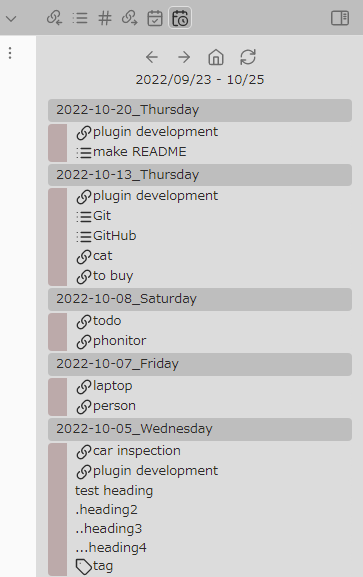
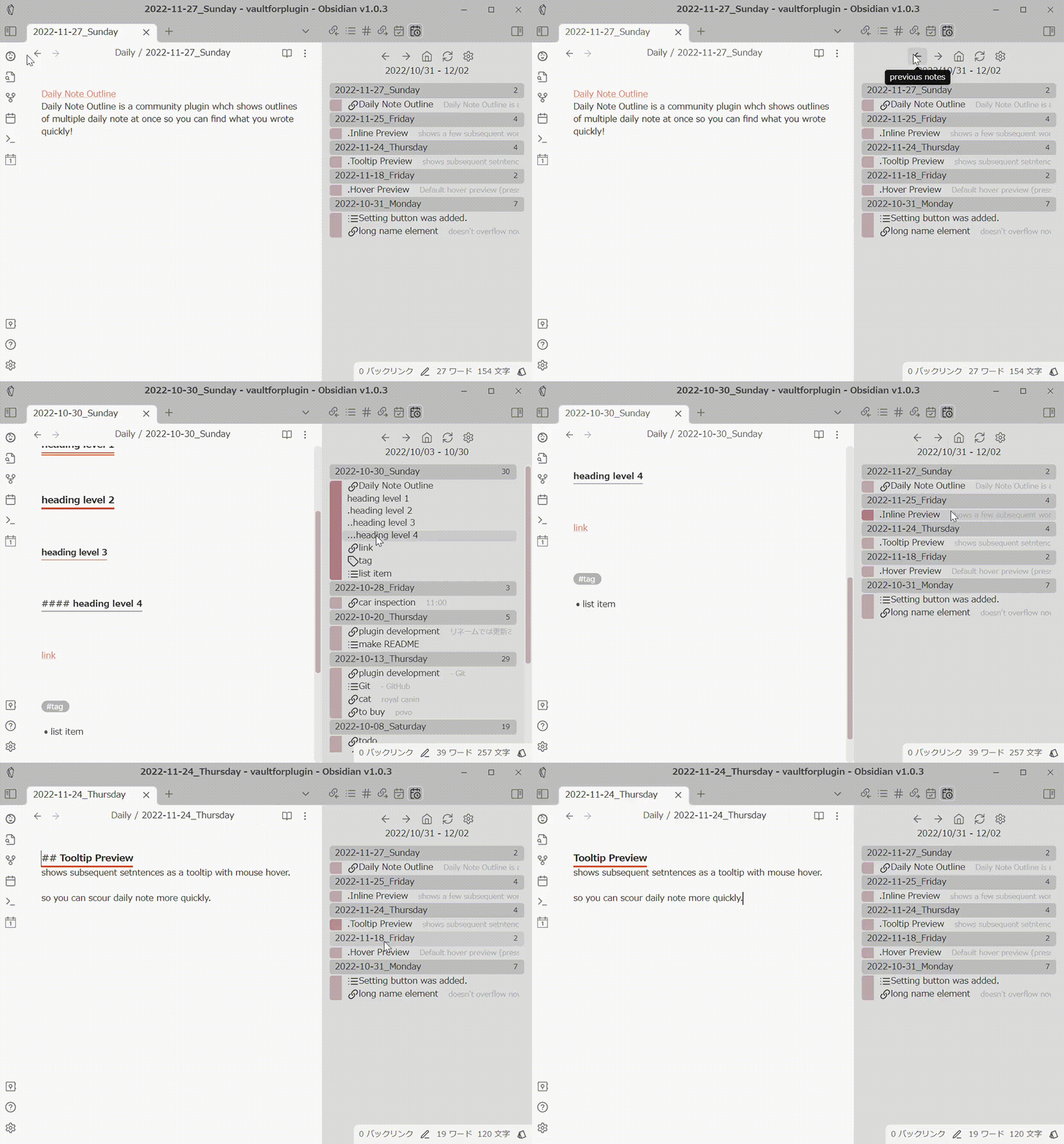
Daily notes are a good place to write down various little notes and thoughts. However, sometimes it can be difficult to find which daily note you wrote them in later. This plugin creates a custom view that displays the outlines of multiple daily notes at once. The outline can display not only headings, but also links, tags and list items.
New Feature: Create Daily Notes for Unresolved Links
In Daily Note Outline v1.5.0, a feature to create daily notes for unresolved links has been implemented.
In short, here's how it works:
If you're using the daily note format YYYY-MM-DD.md, and there's a link like [[2024-01-01]] in any note in your vault, but 2024-01-01.md doesn't exist, it will create a new 2024-01-01.md.
-
This feature is for detecting backlinks to daily notes.
-
For example, if you create a template
[[{date}]]and assign a hotkey to it using the Hotkeys for Templates plugin by @Vinzent03, you can insert a link to the daily note for that day inside your notes. If you have the showBacklinks setting enabled in DNO, files that link to that date will be listed as an outline. If the corresponding daily note doesn't exist, that backlink won't show up in the outline. However, with this new feature, DNO will detect unresolved links to daily notes and create the corresponding daily notes, allowing all daily note links to be displayed in the outline. -
Therefore, this feature is unnecessary for those who create daily notes every day.
-
Also, this feature is unnecessary for those who don't display backlinks in DNO.
-
There are two ways to use this feature:
-
Manual: Run the "Create daily notes for unresolved links" command from the command palette to detect unresolved links and create the corresponding daily notes.
-
Automatic: Turn on "Create daily notes corresponding to unresolved links at startup" in Settings -> Others, and the same command will run automatically when the view starts up.
-
Note 1 If you have a large number of links to non-existent daily notes, many daily notes may be created. (A notification to show progress will be shown if more than 5 DNs are created at once). Therefore, the first run may take a long time. Subsequent runs will be much quicker.
Note 2 If you're using the Daily Notes core plugin or the regular Periodic Notes plugin, links to past dates will create empty daily notes, while links to the current day or future dates will create daily notes with the template applied. However, if you're using the beta version of Periodic Notes (1.0.0-beta3), the template will also be applied when creating daily notes for past dates. This is because the beta version of Periodic Notes automatically applies the template when it detects that a daily note with zero content has been created.
Getting started
Install the plugin from the community plugin list. Make sure either Daily Note core plugin or Periodic Notes plugin is enabled. To display the outline, choose "Daily Note Outline: Open Outline" in the command pallete.
How to use
To change the date range to display, click on the left and right arrows. To return to the initial date range, click on the house icon. Click on the refresh icon to redraw the outline. Click on the gear icon to open setting (Right-clicking opens a context menu where you can quickly change several settings). Click on the calendar with plus icon to create/open today's daily note (you can create/open tomorrow's daily note by right-clicking). Click on each outline element to open its location. Push Ctrl key to preview. I recommend that you first set the display/hide settings for each outline element (headings, links, tags, and list items) in the settings.
Feature
Support for Periodic Notes plugin
Daily Note Outline v1.0.0- supports for periodic notes. That is, support for weekly/monthly/quarterly/yearly notes and calendar sets. (For more information on periodic notes, see https://github.com/liamcain/obsidian-periodic-notes) To display periodic notes in DNO, the following steps are required.
- Install and activate Periodic Notes community plugin and properly configure the granularity and folder paths to be used.
- Activate "periodic notes" and "calendar sets" in the "Periodic Notes" section of the DNO settings.
Usage
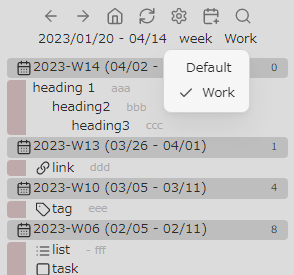
- After activating the feature, the current granularity (day/week/month/quarter/year) and calendar set name will be displayed on DNO's view.
- Left-clicking on them will toggle the granularity or calendar set to display in sequence. Right-clicking on them will show a list and allow you to select one.
Notes
- Calendar sets is a feature added in Periodic Notes v1.0.0-beta version and is not available in v0.0.17. To use the calendar set feature, you must install the beta version of Periodic Notes, e.g., by using Obsidian BRAT plugin.
- Also, since calendar sets is a beta feature of Periodic Notes, there is a possibility that it may not be available in DNO in the future due to specification changes in Periodic Notes.
- If you find any problems, please let me know at the forum or GitHub repository.
Display backlink files
Daily Note Outline v1.4.0 adds displaying backlink files.(Settings -> Basics -> Show backlink files)
In my use case, I have created a template file like [[{{date}}]] and assigned a hotkey with the Hotkeys for templates plugin by @Vinzent03 (https://github.com/Vinzent03/obsidian-hotkeys-for-templates) to insert a link to the daily note for that day.
Users who create daily notes every day will find this convenient, as they can see the note with the date inserted from DNO view.
Notes From a speed perspective, I strongly recommend installing Dataview plugin when turning this feature on. The Dataview plugin caches the vault's backlink information, and DNO attempts to use its cache when Dataview plugin is activated. In this case, the backlink information can be retrieved significantly faster than without Dataview.
Simple filter / Include / Exclude
In order to hide unnecessary items and display only the necessary ones, three types of filter functions are implemented: Simple filter, Include, and Exclude.
Simple filter simply hides items that match a specified word or phrase. The hierarchy of items is not taken into account. Include can be applied to only one type of outline element. It treats the range from the outline element of the specified type to the next similar element as a block, and only items matching the specified word or phrase and belonging to that block are displayed. Conversely, Exclude hides matching items and their blocks. If you specify an element type in the "excluding ends at" section of the settings, or if Include is enabled, the block is considered to have ended at that element, and only that part of the block is hidden.
Include and Exclude can be used at the same time. (However, it does not make sense to specify the exclude keyword for an element type that is specified in Include.) Simple filter can be used in conjunction with other filters. For example, if you specify the same keywords as those specified for Include, you can display only the elements that belong to the elements matched the include keywords, not the elements themselves.
Extract
You can extract only outline elements that contain a specific words. There are three ways to do this.
- Click on the magnifying glass button and type in the string you want to extract.
- Right-click on the outline element and select 'extract' from the context menu. Only elements containing the same name will be extracted.
- Right-click on the magnifying glass button and choose 'extract tasks'. Only list items that have checkbox will be extracted. Items that have been hidden by filtering or other means will not be displayed. To cancel the extraction, click the X button (the magnifying glass button will change to an X button).
Settings
Some child items are not initially displayed and will appear when the parent item is turned on.
Basics
Initial search type
- backward(default)
- Displays the past daily notes for the specified number of days starting from today.
- forward
- Displays daily notes for the specified number of days starting from the date specified in Onset date.
Include future daily notes
When backward search is used, daily notes of the specified number of days in the future are also displayed (If you set it long enough, you can also use this plugin as a list of upcoming events!).
Onset date
For forward search, specify the date in YYYY-MM-DD format to start the search at startup. Clicking on the date range under UI buttons jumps to the date.
Search duration
Specify the number of days to be explored per page. It is recommended to set a shorter period for those who use Daily notes every day and a longer period for those who use it only occasionally. I would recommend about 7-56 days.
Show headings / links / tags / list items & tasks
Choose whether each element should be displayed in outline.
Show all root list items
With respect to list item, if this setting is off, it shows only the first item in a continuous list. When turned on, it displays all list items at root level.
Show all tasks / Tasks only / Hide completed tasks
Display setting for tasks (list items including checkboxes). Show all tasks will show all levels of tasks, regardless of the list settings above; Task only will hide all list items except for tasks; Hide completed tasks will hide completed tasks.
Display file information
Display file information to the right of each daily note file name. lines: number of lines in the file distance: how far away the period is from the base date (today for backward search, the date specified in Onset date for forward search)
Position of the plugin view
Specify where to display the plugin's view when redisplaying or updating. (You can specify other than the left and right sidebars, but the behavior may not be as sophisticated.)
Periodic Notes
This section will not appear unless the Periodic Notes community plugin is activated.
calendar sets
Turn on if you want to use the calendar set in the Periodic Notes plugin. (Periodic Notes beta version must be installed)
periodic notes
Turn on if you want to use periodic notes.
Search duration for periodic notes
Specify the search duration per page for each periodic note.
attach date range to weekly notes
Displays the corresponding date range next to the file name of the weekly note.
Headings
Heading level to display
Choose whether each level of headings should be displayed in outline.
Preview
Inline Preview
Show a few subsequent words next to each outline elements.
Tooltip Preview
Show subsequent sentences as a tooltip with mouse hover.
Tooltip Preview direction
Specify the direction to display the tooltip preview. (I couldn't find the way to automatically determine appropriate direction...)
Simple filter
Headings/Links/Tags/List items to ignore
If each outline element contains a specified word or phrase, that outline element will not be displayed. Specify one per line.
Include
Element type for include
Specifies the type of outline element to apply the Include filter to.
Words to include
Only outline elements containing the specified word or phrase and the block following it will be displayed. Each should be separated by a new line.
Include the beginning part
Specifies whether the beginning part of a note that precedes the appearance of the outline element specified in Element type for include is to be displayed.
Exclude
Exclusion end at
If any of the outline element types is specified in this field, the area excluded by Exclude filter is terminated at the specified element. If any type is specified in Include filter, Exclude is terminated at that type and this field is ignored.
Headings/ Links/ Tags/ List items to exclude
The outline element containing the specified word or phrase and the area following it will be hidden. Each should be separated by a new line.
Appearance
Sets the appearance of each outline element when it is displayed. An icon and prefix string can be added to each element. If you choose 'custom' for icon, enter icon name of the Lucide icon (https://lucide.dev/ ) in 'Custom icon' field. Some icons do not seem to be able to be displayed.
Indent other than headings
When you choose 'follow preceding headings', other elements are indented according to the preceding heading level.
Headings: Repeat heading prefix
If you enter a prefix for headings, turning this item on will repeat the prefix for the number of levels of headings.
Headings: Add indent
Indentation is added according to the level of the heading.
Tasks: Add checkbox text to prefix
Append a string indicating the status of the checkbox to the end of the task prefix.
Others
Show only .md files / exactly matched files
If you are using the beta version of the Periodic Notes plugin, a wider range of file names will be recognized as periodic notes. Each of these options hides files that are not md files or files that do not match the format.
Debug
show debug information
If turned on, some debug infromation is displayed in the console.
Acknowledgement
In developing this plugin, I have use many great plugins in Obsidian community as references. In particular, Daily note interface by @liamcain for processing daily notes. Spaced Repetition by @st3v3nmw and Recent Files by @tgrosinger for creating custom views. The code for creating a new periodic note is partially modified from Periodic Notes by @liamcain (MIT License). I also searched and referred to a bunch of posts in plugin-dev channel on Discord.
Buy Me A Coffee
If you like my plugin, I would appreciate it if you could buy me a cup of coffee!

(want) to do
- collapse a note
- note refactoring
- show linked mentions / created / modefied files on each day (feasible in terms of performance?)
- derivative plugin for other than daily notes
done
- support for periodic notes
- show number of lines of each note
- show the first section if no outline element exists
- UI button for change settings
- simple filter / include /exclude / extract
- partially
- better preview
Changelog
-
1.5.0
- New Features
- Support for List Callouts plugin and Time list
- List items marked by the List Callouts plugin by @mgmeyers are displayed with coloring.
- List items with timestamps (
- HH:mm text), used in Thino by @Boninall and some scripts, can now be assigned a distinct icon as Time List. - List callouts and Time lists can be extracted from the context menu of the extract icon.
- Date Jumping
- The behavior of the date range displayed at the top of DNO view has been revamped.
- Clicking on the date part will display a modal for entering a date, and you can jump to the entered date.
- Right-clicking on the date part allows you to select a date candidate to jump to.
- Added a feature to create daily notes if unresolved links to non-existent daily notes are present. (See description in README for details).
- Outline element text can now be wrapped (Settings -> Appearance -> Wrap outline element text).
- Changes
- "Forward search" has been deprecated. If you want to display past dates on startup, enable Settings -> Set base date as home.
- Improvements
- Embedded links are now treated as link outline elements.
- You can now change the icon for backlinks.
- Tooltip preview is now displayed even for daily notes without outline elements.
- Separated lists and tasks into different items in the settings screen for better intuition.
- Added a delay time setting for startup(Settings -> Others -> Startup delay time). If daily notes fail to load on startup, increasing the delay time may resolve the issue.
- New Features
-
Fixed
- Fixed an issue in Reading view where clicking on an outline element would not jump to that position properly. Now the position of the outline element is highlighted when you jump to it.
-
1.4.1
- Improvement
- Added
show links in propertiesin the settings - Increased the maximum width of tooltip preview
- Added
- Fixed
- Fixed tooltip preview not being fixed correctly.
- Fixed error sometimes displayed in console.
- Improvement
-
1.4.0
- New experimental function
- Show backlink files
- You can enable the display of the backlink file to daily notes through the settings (only for existing daily notes at this time).
- For speed, I strongly recommend installing the dataview plugin if you enable this feature.
- Show backlink files
- Improvements
- The context menu of the link element now allows you to open the linked file in a new tab/new pane/new window.
- You can now set the size of the pop-out window and whether it should be displayed in the foreground(always on top).
- Fixed
- Fixed tooltip preview was not working correctly due to recent (re)changes in Obsidian.
- New experimental function
-
1.3.1
- Fixed
- Fixed DNO view becomes active when starting Obsidian
- Fixed
-
1.3.0
- New function
- Collapse notes
- Click the '>' icon next to the note title to collapse/expand
- Click on the '><(rotate)' icon at the top of DNO view to collapse/expand all notes
- Collapse notes
- Improvements
- Change background color of note titles (I recommend 'accent' for the default theme)
- Custom status icons for tasks can now be displayed
- The icons corresponding to custom statuses cannot be changed in the DNO settings screen, but can be changed by editing data.json directly.
- Changes
- The update button was removed and moved to the context menu of the home button as it is used infrequently.
- New function
-
1.2.3
- Improvement
- When extraction is turned on, the icon color changes.
- Fixed
- Fixed Tooltip preview was not working properly due to recent Obsidian changes.
- Improvement
-
1.2.2
- Fixed
- Changed extract function to be case-insensitive.
- Fixed
-
1.2.1
- Fixed
- Fixed a broken appearance with changes in Obsidian v1.3.1 (insider build).
- Fixed
-
1.2.0
- Improvement
- If you are using the beta version of the Periodic Notes plugin, a wider range of file names will be recognized as periodic notes. If you turn on
Settings -> others -> Show only exactly matched files, you will see only files that exactly match the format.
- If you are using the beta version of the Periodic Notes plugin, a wider range of file names will be recognized as periodic notes. If you turn on
- Improvement
-
1.1.1
- Fixed
- Fixed a problem that sometimes caused non .md files to be displayed unintentionally (you can redisplay them from settings -> others -> show only .md files).
- Fixed
-
1.1.0
- Improvements
- Several settings can now be changed from the context menu of the Settings button (right click on the gear icon).
- Outline elements other than headings can now be indented according to the previous heading when specified in Settings->Appearance.
- Day of the week, week number, and first tag have been added to the list of items that can be selected in Settings->Display file information.
- Linked notes can now be opened from the context menu of link elements.
- Fixed
- Fixed: When using the Periodic Notes plugin v0.0.17, weekly notes would not be displayed in DNO if the first day of the week was set to Monday.
- Added a setting to display debugging information in the console at the bottom of the settings.
- At this time, this feature is intended to narrow down the cause of reports of inability to switch to weekly notes when using the beta version of the Periodic Notes plugin.
- Improvements
-
1.0.0
- New experimental function
- Support for Periodic Notes plugin (display periodic notes, calendar sets)
- You have to install and enable Periodic Notes community plugin in advance.
- Support for Periodic Notes plugin (display periodic notes, calendar sets)
- Improvement
- Plugin setting changes are now automatically reflected in the view
- Fixed
- Fixed some outline parsing
- New experimental function
-
0.6.0
- New functions
- Now task(checkbox) is treated separately from list items
- you can extract only tasks by right clicking Extract icon
- Change the appearance of each element (Setting)
- Now task(checkbox) is treated separately from list items
- Improvements
- From the context menu, you can open the outline element in a new tab, splitted pane, or popout window
- In the settings, the dependent items are now hidden when the primary item is off.
- Extraction modal accepts Enter key
- Fixed
- Fixed the extraction function failing in some situations
- New functions
-
0.5.0
- Important fix
- Fixed overload observed in mobile version under certain situation. Please let me know if the problem persists.
- New function
- Extract
- you can extract outline elements including specific words
- click magnifying glass UI button and input words to extract
- right click on an outline element and choose 'extract' in the context menu. Then only elements with same name will be displayed.
- To finish extract, click unextract UI button
- you can extract outline elements including specific words
- Extract
- Improvements
- added a UI button to create/open today's daily note
- right click on the button shows the context menu to create tomorrow's daily note
- you can choose default position where this plugin's view appears from the settings.
- added a UI button to create/open today's daily note
- Important fix
-
0.4.0
- New functions
- Include / Exclude
- you can include or exclude some outline elements with belonging elements
- Include / Exclude
- Improvements
- after an update, the plugin now automatically open its view (no need to reopen from command pallete)
- New functions
-
0.3.0
- New functions
- 2 new ways to preview
-
- Inline Preview
- show a few subsequent words next to each outline element
-
- Tooltip Preview
- show subsequent sentences as a tooltip with mouse hover
-
- 2 new ways to preview
- Improvements
- added a UI button to open plugin setting
- click on the date range to jump to Onset date(specified in the setting).
- Fixed fixed long name items overflowing
- New functions
-
0.2.0
- New functions
- filtering outline element by word or phrase
- display some file information to the right of file name
- show the first line of the file if it has no outline element
- Improvements
- hover preview now shows proper location of each element
- New functions
-
0.1.1
- Initial release.
Obsidian Daily Note Outline 日本語ドキュメント
Introduction 概要
デイリーノートはちょっとしたメモや雑多な考えを書き留めるのに便利です。しかし、後からどこに書いたのか探すのに苦労することがあります。 このプラグインは、サイドペインに複数のデイリーノートのアウトラインを一括表示して、デイリーノートに書いた内容を把握しやすくするためのものです。見出しだけでなくリンク、タグ、リスト項目なども表示できます。
新機能: 未解決リンクに対するデイリーノートの作成 Create daily notes for unresolved links
Daily Note Outline v1.5.0で、未解決リンクに対応するデイリーノートを作成する機能が実装されました。
端的に言うとこのような動作をします:
もしあなたがYYYY-MM-DD.mdという形式のデイリーノートフォーマットを使用していたとして、
例えば[[2024-01-01]]というリンクがvault内のいずれかのノートにあるのに、
2024-01-01.mdが存在しない場合、新たに2024-01-01.mdを作成します。
- この機能はデイリーノートへのバックリンクを検出するための物です。
- 例えば
[[{date}]]というテンプレートを作成し、Hotkeys for templatesプラグインby @Vinzent03でホットキーを割り当てると、ノート内にその日のデイリーノートへのリンクを張ることができます。このようなリンクが存在する場合、DNOでshowBacklinksの設定をオンにしていると、その日付にリンクしたファイルがアウトラインに一覧として表示されます。対応するデイリーノートが未作成だとそのバックリンクはアウトラインに表示されませんが、本機能でデイリーノートへの未解決リンクを検出し、対応するデイリーノートを作成することで、全てのデイリーノートへのリンクがアウトラインとして表示可能になります。 - そのため、毎日デイリーノートを作成している人はこの機能は全く不要です。
- また、DNOにおいてバックリンクの表示を行わない人にもこの機能は全く不要です。
- この機能を利用するには2つの方法があります。
- 手動:コマンドパレットから、Create daily notes for unresolved linksコマンドを実行すると、未解決リンクを検出して対応するデイリーノートを作ります。
- 自動:設定->othersからCreate daily notes corresponding to unresolved links at startupをオンにすると、viewを起動するときに自動的に同じコマンドを実行します。
- 注意1:実体のないデイリーノートへのリンクを多数作成している場合、多数のデイリーノートが作成される可能性があります。(1度に5個以上のDNを作成する場合は進捗が表示されます)。そのため、初回実行時のみ長い時間がかかる可能性があります。2回目以降にかかる時間は僅かです。
- 注意2:デイリーノートコアプラグイン、または通常のPeriodic Notesプラグインを使用している場合、過去の日付に対するリンクについては空のデイリーノートを、当日または未来のデイリーノートへのリンクの場合はテンプレートを適用したデイリーノートを作成します。一方、Periodic Notesのベータ版(1.0.0-beta3)を使用している場合、過去の日付のデイリーノートを作成した場合もテンプレートが適用されます。これは、ベータ版のPeriodic Notesでは、容量0のデイリーノートが作成されたのを検出した場合、テンプレートを自動的に適用する処理が為されているからです。
Getting started はじめ方
本プラグインをcommunityプラグインリストからインストールし、有効化して下さい。 Daily NoteコアプラグインもしくはPeriodic Notesプラグインが有効になっていることを確かめて下さい。 アウトラインが表示されていない場合は、コマンドパレットから、「Daily Note Outline: Open Outline」を実行して下さい。
How to use 使い方
表示する日付の範囲を変更したいときは、左右の矢印をクリックして下さい。 家のアイコンをクリックすると初期設定の範囲に戻ります。 更新アイコンをクリックするとビューを再描画します。 歯車アイコンをクリックすると設定を開きます。右クリックでいくつかの項目を素早く切り替えられるコンテキストメニューを開きます。 プラスマークのついたカレンダーアイコンをクリックすると今日のデイリーノートを作成するか開きます。右クリックから翌日のデイリーノートを開けます。 各アウトライン要素をクリックするとその場所を開きます。 各要素の上でCtrlキーを押すとホバープレビューを表示します。 使用にあたり、まず設定画面で各アウトライン要素(見出し、リンク、タグ、リスト項目)ごとに表示/非表示を設定することをお勧めします。
Feature 機能
Periodic Notes pluginのサポート
Daily Note Outline v1.0.0以降では、periodic notesへ対応しています。即ち、weekly/monthly/quarterly/yearly note、およびカレンダーセットへの対応です。 (periodic notesについては詳しくは https://github.com/liamcain/obsidian-periodic-notes を参照してください) periodic notesをDNOで表示するには、以下のステップが必要です。
- Periodic Notes communityプラグインをインストール、有効化し、使用する粒度やフォルダパスなどの設定を適切に行う。
- DNOの設定の「Periodic Notes」セクションにおいて、「periodic notes」や「calendar sets」を有効化する。
使用法
- 機能を有効化すると、DNOのview上方に現在表示している粒度(day/week/month/quarter/year)やカレンダーセット名が表示されるようになります。
- それらを左クリックすると表示される粒度やカレンダーセットが順次切り替わります。右クリックすると一覧が表示され、選択できます。
注意点
- カレンダーセットはperiodic notes v1.0.0-beta版で追加された機能であり、v0.0.17でなく、obsidian BRATプラグインを利用するなどして、ベータ版のPeriodic Notesをインストールしないと利用できません。また、ベータ版の機能であることから、今後の仕様変更などに際して利用できなくなる可能性があります。
- 不具合など合った場合は、forumやGitHubリポジトリまで是非お知らせ下さい。
バックリンクファイルの表示
Daily Note Outline v1.4.0では、バックリンクファイルの表示を追加しています。設定のBasics -> Show backlink filesを有効化してください。
私の場合、[[{{date}}]]というテンプレートファイルを作成し、Hotkeys for templatesプラグインby @Vinzent03(https://github.com/Vinzent03/obsidian-hotkeys-for-templates)でホットキーを割り当て、ノートに当日デイリーノートへのリンクを挿入できるようにしています。
毎日デイリーノートを作成している方には、日付が挿入したノートをDNOから参照できて便利かと思います。
注意点
- 動作速度の観点から、バックリンクの表示をオンにする場合、Dataviewプラグインをインストールすることを強くお勧めします。Dataviewプラグインはバックリンクファイルの情報をキャッシュしており、有効化されているとDNOはそのキャッシュ情報を利用するため、処理がずっと速くなります。
Simple filter / Include / Exclude フィルター
不必要な項目を非表示にし、必要な項目のみ表示するために、simple filter, include, exclude の3つのフィルター機能を実装しています。 simple filterは、指定した単語やフレーズにマッチする項目を、単純に非表示にします。項目ごとの階層は考慮されません。 includeは、1種類のアウトライン要素のみに使えます。指定した種類のアウトライン要素から、次の同種要素までの間をひとつのブロックとして扱い、 指定した単語やフレーズにマッチする項目とそのブロックに属する項目のみを表示します。 逆に、excludeはマッチした項目とそのブロックのみを非表示にします。設定の「excluding ends at」のところで要素種別を指定するか、includeを有効にしていると、 その要素のところでブロックが終了したと判断され、そこまでが非表示になります。 includeとexcludeは同時に使用できます。(ただし、includeに指定した要素種別にexcludeキーワードを指定しても意味がありません。) simple filterは他と併用できます。例えば、includeに指定したものと同じキーワードを指定すると、includeの対象になった要素自体は表示せず、それに属する要素のみを表示できます。
Extract 抽出
特定の文字列を含むアウトライン要素のみを抽出できます。方法は3つあります。 1.虫眼鏡ボタンをクリックし、抽出したい文字列を入力して下さい。 2.アウトライン要素を右クリックし、コンテキストメニューからextractを選択して下さい。同じ名前を含むアウトライン要素のみが抽出されます。 3.虫眼鏡ボタンを右クリックし、extract tasksを選択して下さい。タスク(チェックボックスを含むリストアイテム)のみが抽出されます。
もともとfilterなどにより非表示になっている項目は表示されません。 抽出を解除するときは、×ボタン(虫眼鏡ボタンが×ボタンに変化します)をクリックして下さい。
Settings 設定
一部の子項目は初期状態では表示されず、親項目がオンになったときに表示されます。
Basics
Initial search type
- 今日の日付から後ろ向きに遡って表示するか、指定日から前向きに指定日数分表示するか選びます。
- backward(default)
- 今日を起点として指定した日数分の過去のデイリーノートを表示します。通常こちらで良いと思います。
- forward
- Onset dateで指定した日付を起点として、指定日数分のデイリーノートを表示します。
Include future daily notes
サーチタイプがbackward search のとき、指定した日数分未来のデイリーノートも表示します。長くすれば将来のイベントのリストとしても使えます!
Onset date
サーチタイプがforward search のとき起動時に探索開始する日付をYYYY-MM-DDの形式で指定します。 また、UIボタンの下の日付範囲の表示をクリックしてもこの日にジャンプします。
Search duration
1ページあたりに探索するデイリーノートの期間を日で指定します。デイリーノートを頻繁に使用する人は短く、たまにしか使わない人は長く設定するといいと思います。7日~56日くらいでしょうか。
Show headings / links / tags / list items & tasks
見出し、リンク、タグ、リスト項目(タスク含む)のそれぞれの要素をアウトラインとして表示するかどうか指定します。
Show all root list items
リスト項目に関して、この設定がオフになっていると連続したリストの初めの項目だけを表示します。オンになっていると、ルートレベルの項目(=インデントされていない項目)を全て表示します。
Show all tasks / Tasks only / Hide completed tasks
タスク(チェックボックスを含むリストアイテム)についての表示設定です。Show all tasksをオンにすると、上のリスト設定にかかわらず、全ての階層のタスクを表示します。Task onlyをオンにするとタスク以外のリストが非表示になります。Hide completed tasksは完了済みタスクを非表示にします。
Display file information
ファイル名の右側に情報を表示します lines: ファイルの行数 distance: 基準日からの日数(backward searchでは今日、forward searchではforward searchで指定した日付)や週数など。
Position of the plugin view
再表示やアップデートの際に、どこにviewを表示するかを指定します。 左右のサイドバーが無難です。それ以外も指定できますが、動作は洗練されていないかもしれません。
Periodic Notes
このセクションはPeriodic Notes コミュニティプラグインが有効化されていないと表示されません。
calendar sets
Periodic Notesプラグインのカレンダーセットを利用する場合オンにしてください(Periodic Notes ベータ版のインストールが必要です)
periodic notes
periodic notesを利用する場合オンにしてください。
Search duration for periodic notes
それぞれのperiodic notesについて1ページあたりの探索期間を指定します。
attach date range to weekly notes
Weekly noteを表示しているとき、ファイル名の横に対応する日付の範囲を表示します。
Headings
Heading level to display
各レベルの見出しをアウトラインとして表示するかそれぞれ指定します。
Preview
Inline Preview
アウトライン要素の右に、続く数単語をうっすら表示します。
Tooltip Preview
アウトライン要素にマウスカーソルを合わせると、続く文章をツールチップとして表示します。
Tooltip Preview direction
ツールチッププレビューを表示する方向を指定します(自動で振り分けたかったけどやり方が分かりませんでした…)
Simple filter
Headings/Links/Tags/List items to ignore
指定した単語やフレーズが含まれるアウトライン要素は非表示になります。それぞれ改行で区切って下さい。
Include
Element type for include
指定したアウトライン要素の種別がIncludeフィルターの対象になります。
Words to include
指定した単語やフレーズが含まれるアウトライン要素と、それに続くブロックのみが表示対象となります。 それぞれ改行で区切って下さい。
Include the beginning part
ノートの冒頭で、Element type for includeで指定したタイプのアウトライン要素が登場するより前の部分を表示対象とするかどうか指定します。
Exclude
Exclusion end at
この項目でいずれかのアウトライン要素タイプを指定した場合、Excludeフィルターによって除外される領域が指定した要素のところで打ち切られます。 Includeフィルターでいずれかのタイプが指定されていた場合、そのタイプのところでExcludeは打ち切られ、この項目は無視されます。
Headings/ Links/ Tags/ List items to exclude
指定した単語やフレーズが含まれるアウトライン要素と、それに続く領域(同種のアウトライン要素、またはExclusion end atで指定した要素が出現する前までの領域)は非表示になります。 それぞれ改行で区切って下さい。
Appearance
それぞれのアウトライン要素を表示する際の見た目を設定します。 各要素にはアイコンおよびprefix文字列を付加することができます。 アイコンでcustomを選んだ場合、Lucide (https://lucide.dev/ )のアイコン名を入力して下さい。一部のアイコンは表示できないようです。
Indent other than headings
設定すると、見出し以外のアウトライン要素が直前の見出しと同じだけ(またはさらに1段階多く)インデントされます。
Headings: Repeat heading prefix
headingsのprefixを入力した場合、この項目をオンにすると、見出しのレベルの数だけprefixが繰り返されます。
Headings: Add indent
見出しのレベルに応じてインデントを付加します。
Tasks: Add checkbox text to prefix
タスクのprefixの最後にcheckboxの状態を示す文字列を付加します。
Others
Show only .md files / exactly matched files
Periodic Notesプラグインのベータ版を使用している場合、より幅広いファイル名がperiodic notesとして認識されます。これらのオプションはそれぞれmdファイル以外、フォーマットに合致しないファイルを非表示にします。
Debug
show debug information
オンにするとデバッグのためのいくつかの情報をconsoleに表示します。
Acknowledgement 謝辞
本プラグインの作成にあたり、多くの素晴らしいObsidianのプラグインを参考にさせて頂きました。特に、 デイリーノートの処理にdaily note interface by @liamcain を使わせて頂きました。 カスタムビューの作成にSpaced Repetition by st3v3nmwとRecent files by tgrosingerを大いに参考にさせて頂きました。 Periodic noteの新規作成機能に関しては、Periodic Notes by @liamcain (MITライセンス)のコードを一部改変して使用しています。 また、discordの plugin-devの書き込みを多数参考にさせて頂きました。
Buy Me A Coffee
もしプラグインを気に入ったら、コーヒーをおごっていただけると嬉しいです!