Longform

by Kevin Barrett
5
4
3
2
1
Score: 75/100

Description

Category: Creative & Writing Tools

The Longform plugin helps writers organize and manage long writing projects such as novels and screenplays within Obsidian. It allows users to structure their work by creating a series of notes, or scenes, that can be arranged in an ordered manuscript. The plugin provides features like word count tracking, writing session goals, and project compilation to generate a complete manuscript. It supports both multi-scene and single-scene projects, making it suitable for different types of writing. Longform offers an intuitive sidebar for managing projects, scene organization through drag-and-drop, and custom styling options for an enhanced writing environment. Users can also track multiple drafts and compile their work using customizable workflows.

Reviews

No reviews yet.

Stats

920
stars
155,146
downloads
59
forks
1,735
days
158
days
416
days
39
total PRs
1
open PRs
6
closed PRs
32
merged PRs
289
total issues
112
open issues
177
closed issues
22
commits

Latest Version

a year ago

Changelog

What's Changed

New Contributors

Full Changelog: https://github.com/kevboh/longform/compare/2.0.7...2.1.0

README file from

Github

Longform

Longform is a plugin for Obsidian that helps you write and edit novels, screenplays, and other long projects. It lets you organize a series of notes, or scenes, into an ordered manuscript. It also supports single-note projects for shorter works.

[!TIP] If you’d like a way to sync, share your manuscripts with others, and edit them on the web check out my other project, screen.garden.

Major features include:

A Getting Started guide follows; there is also reasonably-complete documentation.

Installing

Longform is in the Community Plugins section of Obsidian’s settings. You may also install it manually by copying the main.js, manifest.json, and styles.css files from a release into a longform/ folder in the .obsidian/plugins folder of your vault. The Community Plugins interface is preferred.

Getting Started

Longform works by searching your vault for any note that contains a frontmatter entry named longform (don’t worry if you don’t know what that means; Longform includes tools to help you generate these files). You can think of these notes as the “spines” or tables of contents of your projects. Let‘s walk through creating two different Longform projects: a novel and a short story.

Creating a Novel

  1. To begin, find or create a folder somewhere in your vault in which you’d like to create your novel. Right-click it and select Create Longform Project.

Create Longform Project menu item

  1. A Create Project modal will appear. This modal lets us choose between Multi- and Single-scene project types. We’re creating a novel, so we’ll stick with Multi. The text under the project type switch explains a little about how each type of project works.

  2. In the Title field, enter your novel’s title. For this example we’ll use My Great Novel. The modal tells us the type of project we’re creating and the location of the Index File it will create in our vault. We’ll get into what Index Files are in a moment.
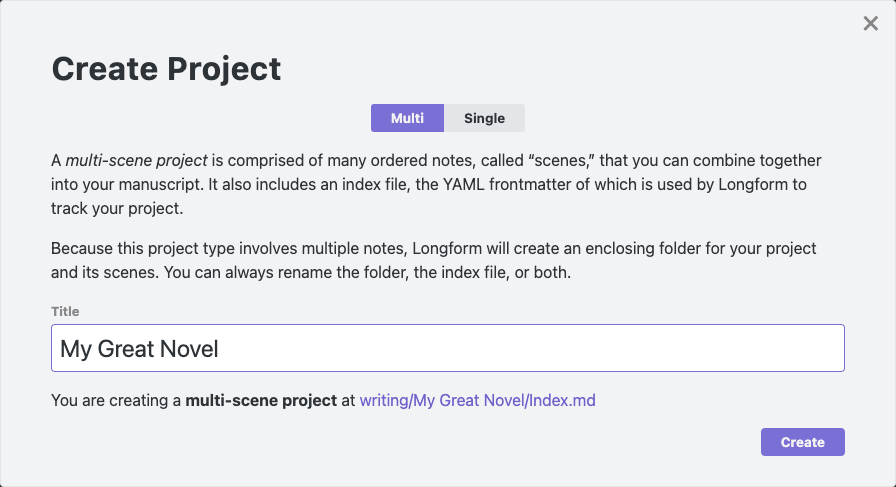
A filled-out create multi-scene project modal

Note

You don’t have to use this menu item and modal to create Longform projects. As you will see shortly, Longform projects are one or more notes organized around some YAML frontmatter. You can always create a note yourself somewhere in your vault and use the Insert Multi-Scene Frontmatter and Insert Single-Scene Frontmatter commands to populate the note—Longform will recognize it automatically. Although not recommended, you can also author the YAML frontmatter manually, too.

  1. Click Create. Longform has created the promised file. If we switch to the Longform pane in the sidebar the project is already selected. You should see three tabs: Scenes, Project, and Compile, and Scenes should be selected.
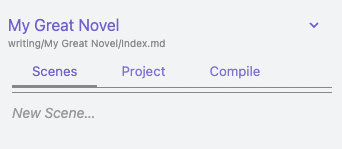
The newly-created project in the Longform pane

  1. That New Scene placeholder is a text field—click it and enter something that sounds like the first scene of a novel, maybe “The Sun Rises on Dublin,” and press enter. You should now be editing a so-named note, and your scene should appear in the Scenes tab:
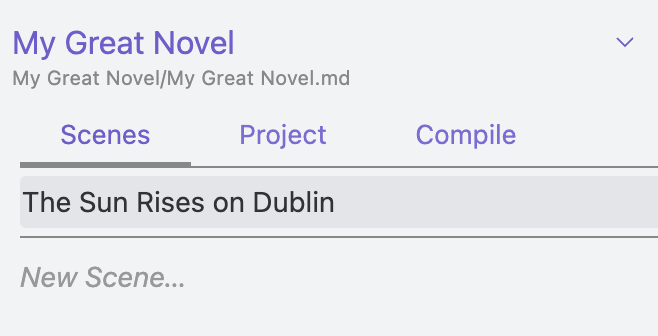
the "My Great Novel" novel with a freshly-created scene

  1. Your editor also now has the scene open and ready to write. If you click the small My Great Novel/Index.md link under your project name, you’ll be taken back to the index file where you’ll see your new scene listed under the scenes frontmatter entry:
scenes:
  - The Sun Rises on Dublin

This is how Longform tracks your work.

Warning

You should probably avoid editing the longform frontmatter in your index file directly unless you really know what you’re doing. Longform supports direct editing of it and will do its best to sync, but it’s easy to accidentally mess things up. You can always revert your changes, though: Longform will never delete files based on changes in the index file.

  1. You’re now ready to write your novel. Keep adding scenes as needed. If you’d like to add structure to your novel you can drag scenes left or right (or use the indent/Unindent commands) to create folders of scenes with parent scenes. The full documentation for multiple-scene projects might be useful.

  2. When you’re ready to generate a single manuscript for your readers, use the Compile feature. Congratulations! You’ve written a novel.

Creating a Short Story

Longform also supports single-scene projects that live as a single note in your vault. Let’s create one.

  1. Right-click the enclosing folder as before and select the Create Longform Project menu item.

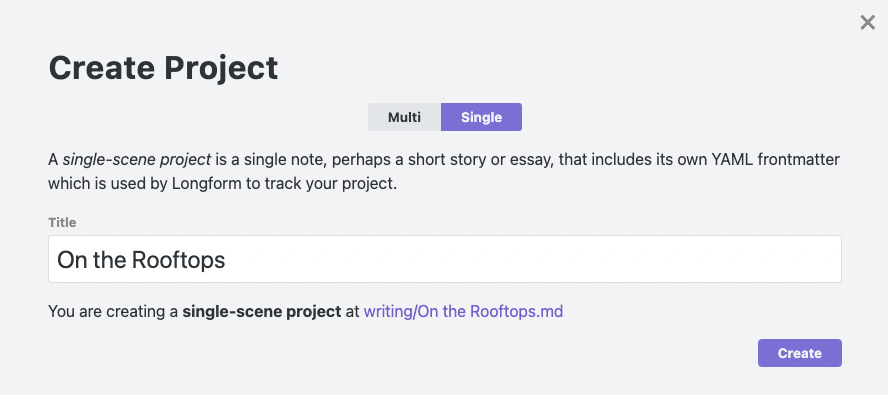
  2. In the Create Project modal, choose Single. Let’s write something noirish and call it On the Rooftops.

Creating a single-scene Longform project in the Create Project modal

  1. Click Create. Because this is a single-scene project, there is only one note associated with it and Longform will open it automatically. The frontmatter at the top tells Longform how to track your project; we’ll write the story in the note itself.

  2. Write your story! When you’re ready, you can use the Compile tab to generate a manuscript. Single-scene projects can use scene and manuscript steps in any order.

Drafts & Projects

Longform supports the creation of multiple drafts for a given project. Under the hood, drafts are just different Longform projects with the same title—they are then grouped together by Longform and presented as different versions of the same project.

To create a new draft of a project use the new draft (+) button in the Project tab, or create an entirely new project somewhere and set the title in the Project tab to be the same as your existing project.

You can rename drafts by right-clicking them in the Project tab and selecting Rename, or by setting the draftTitle attribute in their longform frontmatter.

Compiling

The Compile tab allows you to create custom workflows that turn your project into a manuscript. See COMPILE.md for more.

[!TIP] You can find more compile steps for various use cases in the community collection of compile steps.

Scene-only Styling

Longform will automatically attach a .longform-leaf class to the container panes of any notes that are part of a Longform project. This means you can add custom CSS snippets to Obsidian that style your writing environment and only your writing environment. For example, I prefer a dark theme for Obsidian but a light theme for writing, so my writing snippet looks something like this:

/* Set some variables for the entire leaf. */
.longform-leaf {
  --background-primary: white;
  --background-primary-alt: white;
  --background-secondary: white;
  --background-secondary-alt: white;
}

/* Style the editor. */
.longform-leaf .markdown-source-view {
  --background-primary: white;
  --background-primary-alt: white;
  --background-secondary: white;
  --background-secondary-alt: white;
  --text-selection: #aaa;
  --text-normal: black;
  color: black;
  background-color: white;
}

/* Style text selection. */
.longform-leaf .suggestion-item.is-selected {
  background-color: var(--text-accent);
}

/* Style the header of the leaf. */
.longform-leaf .view-header {
  background-color: white;
}

/* Style the text content of the leaf header. */
.longform-leaf .view-header-title {
  --text-normal: black;
}

Longform’s own UI will always use existing Obsidian CSS theme variables when possible, so it should always look at home in your theme.

Troubleshooting

First, the most important bit: Longform is built specifically to never alter the contents on your notes. The only note it rewrites is a project’s index file. As such, Longform can’t delete or lose your notes.

Longform does a lot of complex tracking to bridge a project’s metadata with the state of files on disk. Although it tries to cover lots of edge cases, it is possible to cause desync between what Longform thinks is happening with projects and what’s actually going on. Most often this occurs when a project’s frontmatter is malformed or invalid in some way. Because projects are inferred from frontmatter, if your frontmatter is correct you can always restart Obsidian (or choose the "reload without saving" command) to force Longform to recalculate projects.

Sponsorship

Any sponsorship is deeply appreciated, although by no means necessary.

License

See LICENSE.md. You can view the license’s history here.

Similar Plugins

info
• Similar plugins are suggested based on the common tags between the plugins.
PARA Shortcuts
4 years ago by gOAT
This plugin serves usefull commands to setup and manage your knowledge using the PARA method.
Auto Note Mover
4 years ago by faru
This is a plugin for Obsidian (https://obsidian.md).
Novel Word Count
4 years ago by Isaac Lyman
Obsidian plugin. Displays a word count or other statistic for each file, folder and vault in the File Explorer pane.
Daily Notes Viewer
4 years ago by Johnson0907
Folder Focus Mode
4 years ago by grochowski
Focus file explorer on chosen folder and its files and subdirectories, while hiding all the other elements.
Bellboy
4 years ago by Shaked Lokits
Opinionated file structure manager for the Obsidian knowledge base.
Packrat
4 years ago by Thomas Herden
Process completed instances of recurring items created by the Obsidian Tasks plugin
PodNotes
4 years ago by Christian B. B. Houmann
PodNotes is a plugin for Obsidian that helps the user write notes on podcasts.
Janitor
4 years ago by Gabriele Cannata
Performs various maintenance tasks on the Obsidian vault
Week Planner
4 years ago by Ralf Wirdemann
Daily Note Outline
4 years ago by iiz
Add a custom view which shows outline of multiple daily notes with headings, links, tags and list items
Auto Glossary
3 years ago by Ennio Italiano
Obsidian plugin that allows user to create a glossary of notes or a MOC from a selected folder.
MAKE.md
3 years ago by MAKE.md
Writing
3 years ago by johackim
Write and format your next book directly from Obsidian
ProZen
3 years ago by Moskvitin
Obsidian plugin for going FULL screen
Project Garden
3 years ago by Ben Goosman
Todo sort
3 years ago by Ryan Gomba
A plugin for Obsidian that sorts todos within a note
Boost Link Suggestions
3 years ago by Jacob Levernier
An Obsidian (https://obsidian.md) plugin for altering the order of inline link suggestions by link count and manual boosts.
File Color
3 years ago by ecustic
An Obsidian plugin for setting colors on folders and files in the file tree.
File chucker
3 years ago by Ken Lim
Contacts
3 years ago by vbeskrovnov
With this plugin, you can easily organize and manage your contacts within Obsidian. Simply create a note with contact information and use the plugin's features to quickly search, and sort through your contacts. Contacts plugin also helps you to remember birthdays of your contacts and keeps track of the last time you met them.
Order List
3 years ago by Henry Gustafson
Task Marker
3 years ago by wenlzhang
An Obsidian plugin to change task status and append text with hotkeys and right-click context menu.
Note aliases
3 years ago by Pulsovi
This plugin manages wikilinks aliases and save them on the aliases list of the linked note
Tasks Calendar Wrapper
3 years ago by zhuwenq
This plugin currently provides a timeline view to display your tasks from your obsidian valut, with customizable filters and renderring options.
Focus Active Sentence
3 years ago by artisticat
Highlight the active sentence in Obsidian.md
Brainframe
3 years ago by pedersen
Prioritize
3 years ago by EloiMusk
Obsidian Plugin, to prioritize stuff in Obsidian
File Order
3 years ago by lukasbach
Obsidian plugin to reorder files with drag-and-drop by customizing a number-prefix in the filenames
Linked Data Vocabularies
3 years ago by kometenstaub
Add linked data to the YAML of your Obsidian notes.
Plugin Manager
3 years ago by ohm-en
Allows better management of Obsidian.md plugins.
TodoTxt
3 years ago by Mark Grimes
Obsidian plugin to manage todotxt files
Note archiver
3 years ago by thenomadlad
Readability Score
3 years ago by zuchka
score the readability of your Obsidian documents using the Flesch Reading Ease (FRE) formula
Hide Folders
3 years ago by JonasDoesThings
Toggle the visibility of folders in the Obsidian.MD file navigator based on name-patterns
ZettelGPT
3 years ago by Overraddit
Turbocharge Your Note-taking with AI Assistance
Periodic PARA
3 years ago by YiBing Lin
Obsidian Plugin for combining P.A.R.A with Periodic Notes(LifeOS for Obsidian)
Fantasy name generator
3 years ago by Lukewh
TagMany
3 years ago by Joshua Martius
Tag many Notes at once in Obsidian
At People
3 years ago by Tobias Davis
Obsidian plugin to use the familiar @ notation to cross link to people.
Typing Assistant
3 years ago by Jambo
Typing Assistant is a plugin that improves writing efficiency and provides a user experience similar to that of【Notion】
Potato Indexer
3 years ago by LoyalPotato
Obsidian plugin to generate index based on your selection
Typewriter Mode
3 years ago by Davis Riedel
Typewriter Mode is a plugin that adds typewriter scrolling (current line stays at a fixed position on the screen), a highlight for the current line, dimming of unfocused paragraphs and more to Obsidian.
Expiration-Date-Tracker
3 years ago by Marius Wörfel
Opsidian plugin to keep track of all expiration dates, for example, for your groceries.
Tag Page
3 years ago by Matthew Sumpter
An Obsidian plugin to create and manage dedicated Markdown pages for tags, with features to automatically populate and refresh content based on user-defined settings.
Writing Goals
3 years ago by James Lynch
Set yourself dynamic writing goals for notes and folders to help you hit your long form writing targets with Obsidian.
digital paper
3 years ago by Daniel Fernandes
turn off backspace and undo, like writing with a pen on real paper.
TODO Wrangler
3 years ago by Jeel Shah
An obsidian plugin to wrangle your Todos and put them in their place.
Tag Breakdown Generator
3 years ago by Hananoshika Yomaru
Break down nested tags into multiple parent tags
Improved Random Note
3 years ago by ShockThunder
Fountain Editor
3 years ago by Chuang Caleb
Obsidian plugin for Fountain screenplay syntax formatting.
Automatic Tags
2 years ago by Jamalam
Add tags to new notes automatically based on their path
Sort Frontmatter
2 years ago by Kanzi
Sort frontmatter automatically
Feeds
2 years ago by LukeMT, pashashocky, madx
Magic feeds dataview query for obsidian
Tag Buddy
2 years ago by David Fasullo
Unlock powerful tag editing features in Reading Mode. Add, remove and edit tags across your vault. Use tag inboxes to level up any workflow with a powerful idea assembly line.
Key-Value List
2 years ago by Christian Wannerstedt
Obsidian plugin which makes it easy to turn lists into formatted key value lists
Desk
2 years ago by David Landry
A desk for obsidian
TickTickSync
2 years ago by thesamim
Highlight Helper
2 years ago by Chongmyung Park
Helper to collect highlight in Obsidian
Storyclock Viewer
2 years ago by Jonathan Fisher
Obsidian plugin for creating a storyclock
YouTube Template
2 years ago by sundevista
📺 A plugin that would help you to fetch YouTube videos data into your vault.
Extended Task Lists
2 years ago by joeriddles
Extended Markdown support for task lists in Obsidian.
Single File Daily Notes
2 years ago by Pranav Mangal
An Obsidian plugin to create and manage daily notes in a single file
Broken Links
2 years ago by ipshing
Folders to Graph
2 years ago by Ratibus11
Display your Obsidian vault folder structure into your graphs.
Yesterday
2 years ago by Dominik Mayer
Obsidian plugin providing Yesterday journaling support
Hemingway Mode
2 years ago by Joaquín Bernal
Reverse Prompter
2 years ago by Ryan Halliday
Let AI generate prompts to keep you writing
Cluster
2 years ago by Lorens Osman
Cluster plugin mainly designed to simplify the process of note clustering on mobile devices and work well on PCs ether
Hierarchical Outgoing Links
2 years ago by Jason Motylinski
Obsidian.md plugin which displays outgoing links as a hierarchy
Canvas2Document
2 years ago by slnsys
Plugin for Obsidian to convert a complete Canvas to a long form document
Note Chain
2 years ago by ZigHolding
Package my frequently used tools, highly personal plugins.
Task List Kanban
2 years ago by Chris Kerr
Dialogue Mode
2 years ago by Patrick Chiang
Index Notes
2 years ago by Alejandro Daniel Noel
Plugin that automatically generates index blocks based on tags
Journal Folder
2 years ago by Charl Fourie
Lite Gallery
2 years ago by Jordan Poles
VirtFolder
2 years ago by mr.grogrig
Creating a hierarchical structure like Luhmann's Zettelkasten
Auto Folder Collapse
2 years ago by Dario Casciato
A plugin for Obsidian that automatically collapses all child folders when you collapse a parent folder. This helps keep your file explorer organized and clutter-free.
Journaling
2 years ago by Ordeeper
View daily notes in a journal-like format, similar to Logseq. It enhances note organization and facilitates better reflection by consolidating daily notes into a continuous journaling view.
Dangling links
5 years ago by Graydon Hoare
obsidian plugin for displaying dangling links
Autocomplete
5 years ago by Yeboster
Obsidian plugin to provide text autocomplete
Checklist
5 years ago by delashum
Vantage - Advanced search builder
5 years ago by ryanjamurphy
Vantage helps you build complex queries using Obsidian's native search tools.
Orthography
5 years ago by denisoed
The Obsidian plugin for checking grammar and correcting spelling errors in text.
Note Folder Autorename
5 years ago by PJ Eby
Obsidian plugin to support folder-overview notes by keeping their folder in sync
Daily Stats
5 years ago by Dhruvik Parikh
Plugin to view your daily word count across all notes in your Obsidian.md vault.
Consistent attachments and links
5 years ago by Dmitry Savosh
Obsidian plugin. Move note with attachments.
Unique attachments
5 years ago by Dmitry Savosh
Obsidian plugin. Renames attachments, making their names unique.
Org Mode
5 years ago by ryanpcmcquen
Add Org Mode support to Obsidian.
Zoottelkeeper
5 years ago by Akos Balasko
Obsidian plugin of Zoottelkeeper: An automated folder-level index file generator and maintainer.
Embedded Code Title
5 years ago by tadashi-aikawa
It is an Obsidian plugin which can embeds title to code blocks.
Stille
5 years ago by Michael Lee
🌗 Stille — An Obsidian plugin that helps you focus on your writing, a section at a time.
Task Collector (TC)
5 years ago by ebullient
Manage tasks and logs within an Obsidian note.
Word Sprint
4 years ago by Andrew Lombardi
Obsidian Word Sprint plugin
Structured
4 years ago by dobrovolsky
Dialogue
4 years ago by Jakub Holub
Dialogue plugin for Obsidian.md
Flow
2 years ago by Ben Phillips
Implements key processes in David Allen's Getting Things Done (GTD) methodology
Nav Link Header
2 years ago by ahts4962
Display navigation links at the top of the notes in Obsidian
Japanese Novel Ruby
2 years ago by quels <@k-quels>
Obsidian plugin for treat Japanese novel ruby
Metadata Auto Classifier
2 years ago by Beomsu Koh
AI-powered Obsidian plugin that automatically classifies and generates metadata (tags, frontmatter) for your notes.
Occura
2 years ago by Alexey Sedoykin
Plugin for https://obsidian.md/ that automatically selected same text occurrences in opened note
downloadPDF
2 years ago by Frieda
Smart Composer
2 years ago by Heesu Suh
AI chat assistant for Obsidian with contextual awareness, smart writing assistance, and one-click edits. Features vault-aware conversations, semantic search, and local model support.
Hierarchical Backlinks
2 years ago by Jason Motylinski
Plugin which displays backlinks as a tree structure based on file paths
Nav Weight
2 years ago by shu307
A simple plugin designed to sort files in navigation based on markdown frontmatter (also known as metadata) for Obsidian.
MOC Link Helper
2 years ago by Bogdan Codreanu
This obsidian plugins allows you to quickly see which notes you need to include in your MOC.
Todos sort
a year ago by Jiri Sifalda
A plugin for Obsidian that sorts todos within a note
Brain Dump Mode
a year ago by yesjinu
Obsidian plugin - DISABLE your delete key and eliminate hesitation!
Typezen
a year ago by Ilgam Gabdullin
Plugin for obsidian which lets you turn zen mode instantly
Automatic Renumbering
a year ago by Omri Levi
Automatically reorders checklists and numbered lists as you edit them.
Bottom to Top
a year ago by Henry Gustafson
Gemini Scribe
a year ago by Allen Hutchison
An obsidian plugin to interact with Google Gemini
Auto Tasks
a year ago by Jamie Hurst
Obsidian plugin to combine periodic notes with tags and tasks to automatically manage your daily, weekly and project TODO lists. Requires the "Periodic Notes" and "Tasks" plugins.
Beautiful Contact Cards
a year ago by Seth Tenembaum
A plugin for the Obsidian text editor which renders "contact" code blocks with tappable links for phone, social media, etc.
Proletarian Wizard Task Manager
a year ago by Charles Feval
Obsidian plugin ot manage todos and projects directly from your notes.
Instant Above Divider
a year ago by SedationH
Simple Todo
a year ago by elliotxx
A minimalist text-based todo manager (Text-Based GTD) for efficient task management in Obsidian.
Folder Links
a year ago by Stefan Rausch
Obsidian Plugin that enables using links to folders.
Auto File Organizer
a year ago by mofukuru
Obsidian plugin: Automatically organizes files into folders based on their extensions.
Mass Create
a year ago by vellikhor
Create large quantities of notes easily at one time.
Abbrlink
a year ago by Q78KG
BuJo Bullets
a year ago by Will Olson
Alternate checkbox types for Obsidian to support Bullet Journal bullets
Dynamic Outline
a year ago by theopavlove
Adds a customizable GitHub-like floating table of contents to Obsidian.
Clipper Catalog
a year ago by Greg K.
A catalog view that provides a powerful interface for all your clipped web articles and content. Easily organize, search, and manage your web clippings within your vault.
Keep the Rhythm
a year ago by Ezben
An Obsidian plugin to track your daily word count through a heatmap.
Recent Notes
a year ago by Kamil Rudnicki
Recent Notes Plugin for Obsidian
Missing Link File Creator
a year ago by Lemon695
The plugin creates both missing links and the corresponding files.
Current File Tags
a year ago by Trung Tran
AI Revisionist
a year ago by Synaptic Labs
Kikijiki Habit Tracker
a year ago by KIKIJIKI
Kikijiki Habit Tracker Plugin for Obsidian
WhatsApp backup importer
a year ago by Luigi Cerone
Obsidian plugin that allows you to import exported WhatsApp chat archives (in .zip format) into your vault.
Tag Tactician
a year ago by Scott Tomaszewski
Fold Properties By Default
a year ago by Tommy Bergeron
Always have editor/metadata properties folded by default.
Organized daily notes
a year ago by duchangkim
Automatically organizes your daily notes into customizable folder structures for better organization and easier navigation.
Vault File Renamer
a year ago by Louan Fontenele
Vault File Renamer: Automatically standardizes file names to GitHub style (lowercase, no accents, only -, ., _) while preserving folder structure and file contents.
YourPulse - Your Writing Activity Visualised
a year ago by Jiri Sifalda
YourPulse.cc - Obsidian.md plugin that turns your vault into a reflection of your creativity, and put your writing on steroids 💪
Task Mover
a year ago by Mariia Nebesnaia
A plugin for obsidian to move unfinished tasks to the daily note automatically
Content Cards
a year ago by leo
Insert content cards in Markdown, such as timeline, highlightblock, target card, book information card, music information card, movie information card, photoes ablum, business card, content subfield, countdown, SWOT,BCG.
Manual Sorting
a year ago by Kh4f
📌 DnD file sorting for Obsidian
Blog AI Generator
a year ago by Gareth Ng
Obsidian Plugin: generate blog via AI based on the current note.
Write Good
a year ago by Mark Hesketh
Obsidian plugin to help improve writing style
Tab Group Arrangement
a year ago by situ2001
Arrange the tab groups of Obsidian in a more flexible way
Musical Text
a year ago by Tynan Purdy
Encourage writing with rhythm by highlighting sentences according to wordcount.
WordCraft
a year ago by Daniel Fernandes
Find rhymes, synonyms, and describing words from within Obsidian. Designed for songwriting and poetry.
WeWrite
a year ago by Learner Chen
Obsidian plugin to render note as WeChat MP article.
Inscribe
a year ago by Ahmet Ildirim
Obsidian plugin for inline autocompletion with AI
Proofreader
a year ago by pseudometa (aka Chris Grieser)
AI-based proofreading and stylistic improvements for your writing. Changes are inserted as suggestions directly in the editor, similar to suggested changes in word processing apps.
Long sentence highlighter
8 months ago by Robert Meißner
Typographer
6 months ago by René Coignard
Enhances typography with smart quotes, custom text replacements and auto-pairing characters.
My Typewriter Line
6 months ago by dmo-code
Dangerous Mode
5 months ago by Vansh Kumar
most dangerous writing app in obsidian
Japanese Manuscript Counter
4 months ago by Yo Fujii
Nova
3 months ago by Shawn Duggan
Nova - AI plugin for Obsidian that edits your documents directly through natural conversation. Stop copying from chat, start collaborating with AI.
WPM Reading Time - How Long to Read This Text
a month ago by Santi Younger
Calculate reading time estimates for selected text using your own reading speed in Words Per Minute.