Linked Data Vocabularies

by kometenstaub
5
4
3
2
1
Score: 48/100

Description

The Linked Data Vocabularies plugin enables users to integrate structured linked data vocabularies into their Obsidian notes. It supports adding metadata such as Library of Congress Subject Headings, broader and narrower terms, and related headings. The plugin provides options to insert metadata in YAML format or inline, making it compatible with plugins like Dataview. Users can customize key names, query limits, and fuzzy search sensitivity to suit their needs.

Reviews

No reviews yet.

Stats

102
stars
5,705
downloads
4
forks
1,101
days
170
days
857
days
21
total PRs
2
open PRs
2
closed PRs
17
merged PRs
22
total issues
9
open issues
13
closed issues
2
commits

Latest Version

2 years ago

Changelog

2.1.0 (2024-01-03)

Features

README file from

Github

Obsidian Linked Data Vocabularies Plugin

[!important]

If you are an existing user (version number < 1.0.0), you will need to update your data. For that you need to update the Linked Data Helper plugin to version 1.0.0 and follow the steps outlined in its settings again.

[!note]

Why should you use this plugin?

It allows you to add linked data to your notes. See @brimwatsexplanation to understand linked data better.
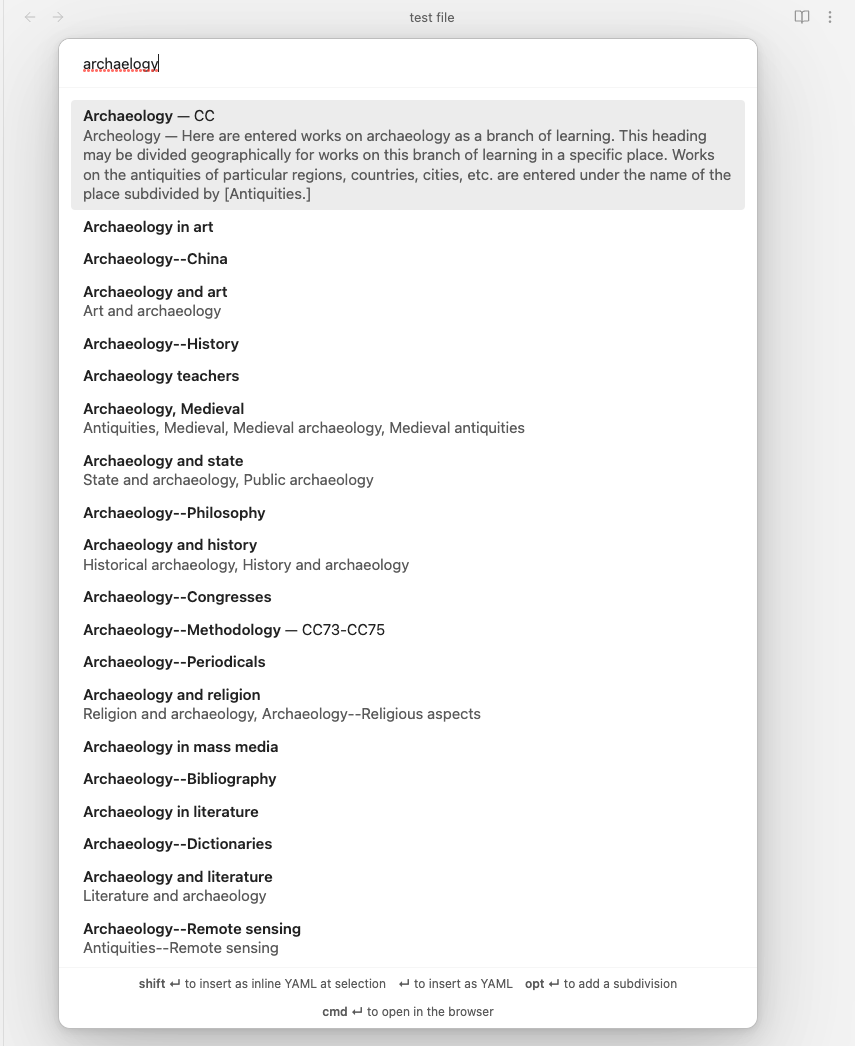
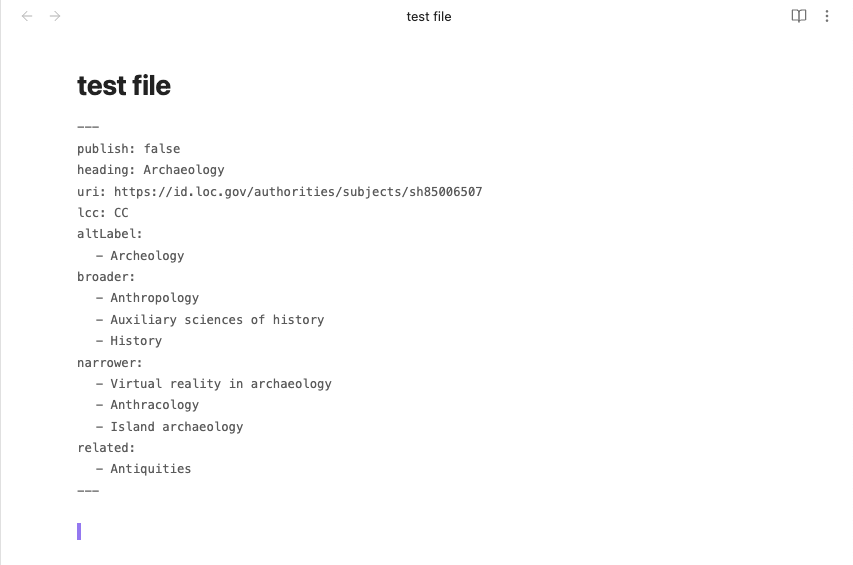
modal

result

Currently, Library of Congress Subject Headings are supported.

This plugin adds YAML keys for the selected heading, url (optional), and broader, narrower and related headings. It also supports inserting it as inline YAML at the current selection for use with Dataview.

To generate the necessary data, you have to install the Linked Data Helper plugin. To sync the data using Obsidian Sync, you will have to enable Sync all other types in the Sync settings.

Configuration

You need to input the folder in your vault where the JSON files are stored.

You can set the limit of queries to be displayed. 100 is the default setting. You can also set the fuzzy search sensitivity.

You can set the key names for heading, altLabel, uri, lcc, broader, narrower and related in the settings.

lcc is the LC Classification.

All but heading can be disabled in the settings.

[!note]

There is also an option to load the LCSH Suggester data on startup of Obsidian. This can improve performance on slower devices. It is disabled by default.

This is not recommended for mobile devices, because it will slow down every startup, which may happen more frequently.

Usage

In the editor, open the command palette and execute the LCSH command. Alternatively, you can set a hotkey for it.

There are two options: You can either use Enter to insert the data as YAML.

If there is no YAML block present, a new one will be created. If there is already YAML present, the new YAML will be appended to the current YAML.

Or you use Shift + Enter to insert it as inline YAML at the current selection.

By clicking Ctrl/Cmd + Enter, you can open the heading on the Library of Congress website.

You can also add a subdivision after an authorized heading if you press Alt + Enter. Here is an explanation of Subdivisions from @brimwats.

You can of course also use the mouse instead.

[!warning]

Inserting the YAML will overwrite existing key values or remove old key names which aren't used by the new heading. This is useful if you want to associate another heading with a note.

Therefore, make sure to decide on the key names you want to use from the beginning, otherwise the plugin will not be able to overwrite existing keys.

Also make sure not to use the same YAML keys for other data, as this plugin will overwrite them.

Modal

The Modal shows the heading in bold, under it, if existing, it shows the variant label and the note.

Next to the heading it shows, if existing, the LC Classification.

Recommendation

Use this plugin with Breadcrumbs. You can set the hierachies in its settings and will have a breadcrumbs view for navigating the heading hierarchy you create in your notes.

Explanation of linked data

Thank you @brimwats for this explanation of Linked Data!

This plugin allows the use of structured linked data vocabularies as metadata in Obsidian notes. There are some concepts that should be understood when using this plugin.

See another explanation here and here.


When a cultural heritage institution like a library receives a new item, there are several steps that must be taken before it is made available. Most importantly, the item must be cataloged with subject headings. A subject heading is a term that is meant to serve as a keyword or topic explanation for the book. If you have ever used tags or keywords, you understand the purpose. Cataloging means that an item is given at least one a subject heading such as "Poodle" or (more often) multiple headings such as "1. Dogs" and "2. Poodles."

While this might seem obvious when we speak of a “Poodle” or a “Labrador retriever” it gets vastly more confusing when trying to organize thousands or hundreds of thousands of items. And large institutions do this sort of thing everyday, so they have to be positive that all headings mean the same thing. Should a “labradoodle” (the offspring of a Labrador and a poodle) be considered a poodle or a Labrador for purposes of classification? What about a “Goldendoodle” (a golden retriever and a poodle)? How about a “Yorkipoo”? A “Pugapoo”? What about a “Cockapoo”, a “Maltipoo” or a “Poo-Shi”?

Enter controlled vocabularies and information retrieval thesauri.

When most people think of thesauri they likely think of style thesauri, which includes websites like Thesaurus.com, or a books like Rogets Thesaurus, which offer similar or dissimilar alternatives to a word or phrase. For the word “Information” Thesaurus.com offers synonyms “advice”, “clue”, or “data”, and antonyms “ignorance”, “question”, “silence”.

There are three basic rules that occur in thesauri are UF, BT/NT and RT.

  1. Use/Use For (USE/UF),
  2. Broader Terms and Narrower Terms (BT/NT), and
  3. Related Terms (RT).

USE/UF

According to the Library of Congress:

USE references are made from an unauthorized or non-preferred term to an authorized or preferred heading. Under the heading referred to, the code UF (Used For) precedes the term not used… USE references are made from an unauthorized or non-preferred term to an authorized or preferred heading. Under the heading referred to, the code UF (Used For) precedes the term not used. The codes USE and UF function as reciprocals

This is the strictest of all the rules in a thesaurus. It tells the cataloger to use one word in place of another (USE FOR), or that the material that they are looking for is under a different term (USE).

For example:

Cars (Automobiles) → USE Automobile

Automobiles → UF Cars (Automobiles)

USE references are made from synonyms, variant spellings, variant forms of expression, alternate constructions of headings, and earlier forms of headings. USE references are also made when it has been decided that words should not be used as a heading even if the heading and the unused words are not truly synonymous.

Broader Term and Narrower Term

The abbreviations BT (broader term) and NT (narrower term) indicate hiararchy.

The code BT refers to the class of which the heading is a member. So Automobiles is a broader term for Volvos. Dogs is a broader term for Poodles.

The code NT refers a member of the class represented by the heading under which the NT appears. So Volvos are a narrower term of Automobiles. Poodles are a narrower term of Dogs.

The broadest (parent) terms tend to be incredibly vague ideas, like “Art”, which then generally need to be narrowed down more to be useful, so it will have muliple NTs, or narrower terms, such as

ArtNT Western Art → NT Indigenous Art → NT Asian Art → [etc.]

These NTs will often have further NTs, so Art

  • NT Western Art
    • NT Western Sculpture
      • NT Modern Sculpture
        • NT [etc.]

The abbreviation RT (Related Term), links two headings that are associated in some manner other than by hierarchy (BTs/NTs). For example,

Birds → RT Ornithology

Ornithology → RT Birds

In the most basic sense, RTs just assert that there are connections between the current subject term and another one. For a cataloger, this enables them to consider connected terms to catalog their material under. For a user, this allows them to check under both subject headings to ensure that they have reviewed all of the relevant information.

RTs allow broader information institutions to control terminology.

Searching for vocabularies:

Subdivisions / Complex Subjects

For LCSH, this plugin also supports what are called "Subdivisions" or complex subjects. A subdivision is a way for the cataloger (aka the plugin user, aka you) to be more specific with a generic subject heading.

For example, if I wanted to catalog my note as dicsussing the Ancient Phonecians and their religion I would use this plugin to add Phonecians to my note. This would meet many people's needs. But what if I had a lot of notes about Phonecians, if I wanted to distuingish between my notes on "Ancient" and "Regular" Phonecians, or if I wanted to distinguish between notes about Phonecian religion and notes about their gods?

LCSH does not have Ancient Phonecian Gods so—enter subdivisions! Subdivisions are 'addon' terms that follow the first. Use this secondary term following the first when a more specific heading does not exist.

First find Phonecians and then press alt+enter/return to enter into complex mode, where you could pick --Religion or --Ancient.

Kinds of Subdivisions

There are five different kinds of subdivisions

  • Topic Subdivisions, which represent actions, attributes, or aspects, of the first term.
    • For example Helicopters--Flight testing; Drinking water--Aluminum content; Mental health--Nutritional aspects. Topical subdivisions are used as a standard way of expressing concepts, methods, or techniques that are common to several fields.
  • GenreForm Subdivisions, which indicate what the item is rather than what it is about. You would use this if you had a specific kind of note.
    • For example, the most frequently used form subdivisions, are --Bibliography, --Juvenile literature, and --Periodicals
  • Temporal Subdivisions, which indicate time periods covered in the contents of the work. These are usually associated with a historical treatment of a topic and are used after the subdivision --History,
    • for example, Women--History--Nineteenth Century.
  • Geographic Subdivisions, which indicate the geographic area to which treatment of a topic is limited. They may designate where something is located, or where something is from, depending upon the topic.
    • For example:
  • Language Subdivisions, which indicate what language the item is in.
    • For example: Bees--French Language.
    • If you click this link though, you'll notice that it is an empty page—this subdivision is being phased out!

More Info on Subdivisions

If you're interested in reading more, here is documentation from the Library of Congress on Types and purpose of subdivisions.

And here is another explainer of subdivisions.

Credits

This plugin uses the 'fuzzysort' npm module (https://www.npmjs.com/package/fuzzysort, https://github.com/farzher/fuzzysort). The license file can be found here.

Similar Plugins

info
• Similar plugins are suggested based on the common tags between the plugins.
MAKE.md
3 years ago by MAKE.md
Checklist
5 years ago by delashum
Meta Bind Plugin
4 years ago by Moritz Jung
A plugin for Obsidian to make your notes interactive with inline input fields, metadata displays, and buttons.
Metadata Menu
4 years ago by mdelobelle
For data management enthusiasts : type and manage the metadata of your notes.
Supercharged Links
5 years ago by mdelobelle
obsidian plugin to add attributes and context menu options to internal links
File Color
3 years ago by ecustic
An Obsidian plugin for setting colors on folders and files in the file tree.
Pretty Properties
7 months ago by Anareaty
Custom File Explorer sorting
4 years ago by SebastianMC
Take full control over the order and sorting of folders and notes in File Explorer in Obsidian
Longform
5 years ago by Kevin Barrett
A plugin for Obsidian that helps you write and edit novels, screenplays, and other long projects.
MetaEdit
5 years ago by Christian B. B. Houmann
MetaEdit for Obsidian
Consistent attachments and links
5 years ago by Dmitry Savosh
Obsidian plugin. Move note with attachments.
Auto Note Mover
4 years ago by faru
This is a plugin for Obsidian (https://obsidian.md).
Zoottelkeeper
5 years ago by Akos Balasko
Obsidian plugin of Zoottelkeeper: An automated folder-level index file generator and maintainer.
Auto Card Link
4 years ago by Nekoshita Yuki
Update time on edit
5 years ago by beaussan
Manual Sorting
a year ago by Kh4f
📌 DnD file sorting for Obsidian
Tasks Calendar Wrapper
3 years ago by zhuwenq
This plugin currently provides a timeline view to display your tasks from your obsidian valut, with customizable filters and renderring options.
April's Automatic Timelines
3 years ago by April Gras
Simple timeline generator plugin for story tellers using obsidian
Media DB Plugin
4 years ago by Moritz Jung
A plugin that can query multiple APIs for movies, series, anime, games, music and wiki articles, and import them into your vault.
Janitor
4 years ago by Gabriele Cannata
Performs various maintenance tasks on the Obsidian vault
Periodic PARA
3 years ago by YiBing Lin
Obsidian Plugin for combining P.A.R.A with Periodic Notes(LifeOS for Obsidian)
File Order
3 years ago by lukasbach
Obsidian plugin to reorder files with drag-and-drop by customizing a number-prefix in the filenames
Task Collector (TC)
5 years ago by ebullient
Manage tasks and logs within an Obsidian note.
Hide Folders
3 years ago by JonasDoesThings
Toggle the visibility of folders in the Obsidian.MD file navigator based on name-patterns
TickTickSync
2 years ago by thesamim
Task List Kanban
2 years ago by Chris Kerr
Dynamic Outline
a year ago by theopavlove
Adds a customizable GitHub-like floating table of contents to Obsidian.
Vantage - Advanced search builder
5 years ago by ryanjamurphy
Vantage helps you build complex queries using Obsidian's native search tools.
Metadata Extractor
5 years ago by kometenstaub
Obsidian Plugin that provides metadata export for use with third-party apps.
Daily Note Outline
4 years ago by iiz
Add a custom view which shows outline of multiple daily notes with headings, links, tags and list items
Dangling links
5 years ago by Graydon Hoare
obsidian plugin for displaying dangling links
Daily Notes Viewer
4 years ago by Johnson0907
Folders to Graph
2 years ago by Ratibus11
Display your Obsidian vault folder structure into your graphs.
Folder Focus Mode
4 years ago by grochowski
Focus file explorer on chosen folder and its files and subdirectories, while hiding all the other elements.
Plugin Manager
3 years ago by ohm-en
Allows better management of Obsidian.md plugins.
Embedded Code Title
5 years ago by tadashi-aikawa
It is an Obsidian plugin which can embeds title to code blocks.
Proletarian Wizard Task Manager
a year ago by Charles Feval
Obsidian plugin ot manage todos and projects directly from your notes.
Task Marker
3 years ago by wenlzhang
An Obsidian plugin to change task status and append text with hotkeys and right-click context menu.
Recent Notes
a year ago by Kamil Rudnicki
Recent Notes Plugin for Obsidian
Org Mode
5 years ago by ryanpcmcquen
Add Org Mode support to Obsidian.
Note Folder Autorename
5 years ago by PJ Eby
Obsidian plugin to support folder-overview notes by keeping their folder in sync
Frontmatter Markdown Links
a year ago by mnaoumov
Obsidian Plugin that adds support for markdown links in frontmatter
Unique attachments
5 years ago by Dmitry Savosh
Obsidian plugin. Renames attachments, making their names unique.
Tag Page
3 years ago by Matthew Sumpter
An Obsidian plugin to create and manage dedicated Markdown pages for tags, with features to automatically populate and refresh content based on user-defined settings.
Improved Random Note
3 years ago by ShockThunder
Binary File Manager
4 years ago by qawatake
An Obsidian plugin to manage binary files
TodoTxt
3 years ago by Mark Grimes
Obsidian plugin to manage todotxt files
Week Planner
4 years ago by Ralf Wirdemann
Bookshelf
a year ago by Philip Weinke
Your personal bookshelf in Obsidian
AI Tagger Universe
a year ago by Hu Nie
An intelligent Obsidian plugin that leverages AI to automatically analyze note content and suggest relevant tags, supporting both local and cloud-based LLM services.
NetClip
a year ago by Elhary
this plugin is for Obsidian that allows you to browse the web and clip webpages directly into your vault.
Auto Tag
3 years ago by Control Alt
Easily generate relevant tags for your Obsidian notes.
Scholar
3 years ago by Shannon Shen
Streamline Research Workflow in Obsidian
At People
3 years ago by Tobias Davis
Obsidian plugin to use the familiar @ notation to cross link to people.
Auto Glossary
3 years ago by Ennio Italiano
Obsidian plugin that allows user to create a glossary of notes or a MOC from a selected folder.
Contacts
3 years ago by vbeskrovnov
With this plugin, you can easily organize and manage your contacts within Obsidian. Simply create a note with contact information and use the plugin's features to quickly search, and sort through your contacts. Contacts plugin also helps you to remember birthdays of your contacts and keeps track of the last time you met them.
YouTube Template
2 years ago by sundevista
📺 A plugin that would help you to fetch YouTube videos data into your vault.
Journaling
2 years ago by Ordeeper
View daily notes in a journal-like format, similar to Logseq. It enhances note organization and facilitates better reflection by consolidating daily notes into a continuous journaling view.
Todo sort
3 years ago by Ryan Gomba
A plugin for Obsidian that sorts todos within a note
Folder Links
a year ago by Stefan Rausch
Obsidian Plugin that enables using links to folders.
Boost Link Suggestions
3 years ago by Jacob Levernier
An Obsidian (https://obsidian.md) plugin for altering the order of inline link suggestions by link count and manual boosts.
Project Garden
3 years ago by Ben Goosman
Automatic Renumbering
a year ago by Omri Levi
Automatically reorders checklists and numbered lists as you edit them.
Single File Daily Notes
2 years ago by Pranav Mangal
An Obsidian plugin to create and manage daily notes in a single file
Media Companion
a year ago by Nick de Bruin
PARA Shortcuts
4 years ago by gOAT
This plugin serves usefull commands to setup and manage your knowledge using the PARA method.
Structured
4 years ago by dobrovolsky
TagMany
3 years ago by Joshua Martius
Tag many Notes at once in Obsidian
Notes dater
3 years ago by Paul Treanor
Adds created_on and updated_on dates of the active note to status bar
Time Things
2 years ago by Nick Winters
Show clock, track time spent editing a note, and track the last time a note has been edited.
Automatic Tags
2 years ago by Jamalam
Add tags to new notes automatically based on their path
Bulk Exporter
3 years ago by symunona
Bulk export Markdown filtered, renamed and sorted by front matter metadata into a new structure.
Note archiver
3 years ago by thenomadlad
Auto Folder Collapse
2 years ago by Dario Casciato
A plugin for Obsidian that automatically collapses all child folders when you collapse a parent folder. This helps keep your file explorer organized and clutter-free.
Key-Value List
2 years ago by Christian Wannerstedt
Obsidian plugin which makes it easy to turn lists into formatted key value lists
Packrat
4 years ago by Thomas Herden
Process completed instances of recurring items created by the Obsidian Tasks plugin
Metadata Auto Classifier
2 years ago by Beomsu Koh
AI-powered Obsidian plugin that automatically classifies and generates metadata (tags, frontmatter) for your notes.
Tag Buddy
2 years ago by David Fasullo
Unlock powerful tag editing features in Reading Mode. Add, remove and edit tags across your vault. Use tag inboxes to level up any workflow with a powerful idea assembly line.
Content Cards
a year ago by leo
Insert content cards in Markdown, such as timeline, highlightblock, target card, book information card, music information card, movie information card, photoes ablum, business card, content subfield, countdown, SWOT,BCG.
Fold Properties By Default
a year ago by Tommy Bergeron
Always have editor/metadata properties folded by default.
Auto Tasks
a year ago by Jamie Hurst
Obsidian plugin to combine periodic notes with tags and tasks to automatically manage your daily, weekly and project TODO lists. Requires the "Periodic Notes" and "Tasks" plugins.
Kanban Status Updater
a year ago by Ankit Kapur
Obsidian plugin that automatically updates the note property when card is moved to a column.
Broken Links
2 years ago by ipshing
VirtFolder
2 years ago by mr.grogrig
Creating a hierarchical structure like Luhmann's Zettelkasten
Note Chain
2 years ago by ZigHolding
Package my frequently used tools, highly personal plugins.
Prioritize
3 years ago by EloiMusk
Obsidian Plugin, to prioritize stuff in Obsidian
ZettelGPT
3 years ago by Overraddit
Turbocharge Your Note-taking with AI Assistance
Brainframe
3 years ago by pedersen
Lite Gallery
2 years ago by Jordan Poles
Note aliases
3 years ago by Pulsovi
This plugin manages wikilinks aliases and save them on the aliases list of the linked note
File chucker
3 years ago by Ken Lim
Metadata Icon
2 years ago by Benature
change metadata entry icon
Flow
2 years ago by Ben Phillips
Implements key processes in David Allen's Getting Things Done (GTD) methodology
Additional Icons
2 years ago by Matthew Turk
Add additional iconsets to Obsidian
Frontmatter generator
3 years ago by Hananoshika Yomaru
A plugin for Obsidian that generates frontmatter for notes
Linked Data Helper
3 years ago by kometenstaub
Generate the necessary data for Linked Data Vocabularies.
Nav Link Header
2 years ago by ahts4962
Display navigation links at the top of the notes in Obsidian
Auto File Organizer
a year ago by mofukuru
Obsidian plugin: Automatically organizes files into folders based on their extensions.
Order List
3 years ago by Henry Gustafson
File Title Updater
a year ago by wenlzhang
An Obsidian plugin that synchronizes titles between filename, frontmatter, and first heading in your notes.
Bellboy
4 years ago by Shaked Lokits
Opinionated file structure manager for the Obsidian knowledge base.
BuJo Bullets
a year ago by Will Olson
Alternate checkbox types for Obsidian to support Bullet Journal bullets
Desk
2 years ago by David Landry
A desk for obsidian
Potato Indexer
3 years ago by LoyalPotato
Obsidian plugin to generate index based on your selection
Symbol linking
10 months ago by Evan Bonsignori ; Mara-Li
Adds ability to link with any trigger in Obsidian. Each trigger can limit linking to specific folders or file.
TODO Wrangler
3 years ago by Jeel Shah
An obsidian plugin to wrangle your Todos and put them in their place.
Extended Task Lists
2 years ago by joeriddles
Extended Markdown support for task lists in Obsidian.
Copy Metadata
3 years ago by wenlzhang
An Obsidian plugin to copy metadata to clipboard and insert it into file name.
Feeds
2 years ago by LukeMT, pashashocky, madx
Magic feeds dataview query for obsidian
File Index
2 years ago by Steffo
Obsidian plugin to create a metadata file about the files present in the Vault
Expiration-Date-Tracker
3 years ago by Marius Wörfel
Opsidian plugin to keep track of all expiration dates, for example, for your groceries.
Update Time
2 years ago by Sébastien Dubois
Obsidian plugin that updates front matter to include creation and last update times
Hierarchical Outgoing Links
2 years ago by Jason Motylinski
Obsidian.md plugin which displays outgoing links as a hierarchy
Index Notes
2 years ago by Alejandro Daniel Noel
Plugin that automatically generates index blocks based on tags
Tag Breakdown Generator
3 years ago by Hananoshika Yomaru
Break down nested tags into multiple parent tags
Sort Frontmatter
2 years ago by Kanzi
Sort frontmatter automatically
Hierarchical Backlinks
2 years ago by Jason Motylinski
Plugin which displays backlinks as a tree structure based on file paths
Highlight Helper
2 years ago by Chongmyung Park
Helper to collect highlight in Obsidian
Journal Folder
2 years ago by Charl Fourie
Cluster
2 years ago by Lorens Osman
Cluster plugin mainly designed to simplify the process of note clustering on mobile devices and work well on PCs ether
Dataview Autocompletion
a year ago by Daniel Bauer
Clipper Catalog
a year ago by Greg K.
A catalog view that provides a powerful interface for all your clipped web articles and content. Easily organize, search, and manage your web clippings within your vault.
KoReader Highlight Importer
a year ago by Tahsin Kocaman
Imports highlights and metadata from KoReader into Obsidian notes
Simple Todo
a year ago by elliotxx
A minimalist text-based todo manager (Text-Based GTD) for efficient task management in Obsidian.
Conditional Properties
4 months ago by Diego Eis
Automate frontmatter property updates in your Obsidian notes using simple conditional rules.
Tag Tactician
a year ago by Scott Tomaszewski
Note UID Generator
a year ago by Valentin Pelletier
Allow you to automatically generate UID for the notes in your vault.
LLM Tagger
a year ago by David Jayatillake
Image Metadata
2 years ago by alexeiskachykhin
Adds image metadata editing capabilities to Obsidian
Todos sort
a year ago by Jiri Sifalda
A plugin for Obsidian that sorts todos within a note
GitHub Integration
a year ago by Kirill Zhuravlev
Plugin that fetch your github stars into notes
Missing Link File Creator
a year ago by Lemon695
The plugin creates both missing links and the corresponding files.
Mass Create
a year ago by vellikhor
Create large quantities of notes easily at one time.
Vault File Renamer
a year ago by Louan Fontenele
Vault File Renamer: Automatically standardizes file names to GitHub style (lowercase, no accents, only -, ., _) while preserving folder structure and file contents.
Note Codes
8 months ago by Ezhik
Reference your Obsidian notes from anywhere with simple 4-character codes.
Virus Total Enrichment
2 years ago by ytisf
An Obsidian plugin to enrich a note with VirusTotal API.
Beautiful Contact Cards
a year ago by Seth Tenembaum
A plugin for the Obsidian text editor which renders "contact" code blocks with tappable links for phone, social media, etc.
Paste Image Into Property
a year ago by Nito
Sentinel
a year ago by Giorgos Sarigiannidis
A plugin for Obsidian that allows you to update properties or run commands based on document visibility changes.
Hardcover
3 months ago by aliceinwaterdeep
downloadPDF
2 years ago by Frieda
Boardgame Search
a year ago by Marlon May
A plugin to create notes for boardgames based on the BGG API
Organized daily notes
a year ago by duchangkim
Automatically organizes your daily notes into customizable folder structures for better organization and easier navigation.
Task Mover
a year ago by Mariia Nebesnaia
A plugin for obsidian to move unfinished tasks to the daily note automatically
Note Favicon
a year ago by mdklab
Obsidian plugin – Show Favicon from Metadata
MOC Link Helper
2 years ago by Bogdan Codreanu
This obsidian plugins allows you to quickly see which notes you need to include in your MOC.
ExMemo Assistant
a year ago by ExMemo AI
Using LLMs to manage files and generating metadata such as tags and summaries.
Current File Tags
a year ago by Trung Tran
Kikijiki Habit Tracker
a year ago by KIKIJIKI
Kikijiki Habit Tracker Plugin for Obsidian
WhatsApp backup importer
a year ago by Luigi Cerone
Obsidian plugin that allows you to import exported WhatsApp chat archives (in .zip format) into your vault.
Book Clipper
5 months ago by Hossein Fardmohammadi
Save book details from websites into your notes
Tab Group Arrangement
a year ago by situ2001
Arrange the tab groups of Obsidian in a more flexible way
Simple File Info
a year ago by Lukas Capkovic
Instant Above Divider
a year ago by SedationH
My Thesaurus
a year ago by Mara-Li
A plugin that auto tags file based on contents and a csv file or a Markdown table (inspired by https://github.com/pmartinolli/MyThesaurus)
Papers
8 months ago by William Liang
An obsidian plugin to retrieve and import research papers.
Watched-Metadata
2 years ago by Nail Ahmed
Watches for changes in metadata and updates the note content accordingly.
Abbrlink
a year ago by Q78KG
Another Name
a year ago by Jiyuan Wang
Add a subheading to your note in Obsidian
Onto Tracker
2 years ago by Jacob Hart
Plugin for obsidian allowing project management with ontologies.
Nav Weight
2 years ago by shu307
A simple plugin designed to sort files in navigation based on markdown frontmatter (also known as metadata) for Obsidian.
Discrete
9 months ago by shkarlsson
Frontmatter Metadata Link Classes
10 months ago by Varvara Zmeeva / zmeeva.io
Enhanced internal links with automatic classnames based on frontmatter metadata.
Bottom to Top
a year ago by Henry Gustafson
Frontmatter to HTML Attributes
2 months ago by Tarek Saier
Makes YAML frontmatter available as data-* attributes in HTML, enabling metadata based CSS styling.