PARA Shortcuts
4 years ago by gOAT
This plugin serves usefull commands to setup and manage your knowledge using the PARA method.
Auto Note Mover
4 years ago by faru
This is a plugin for Obsidian (https://obsidian.md).
Waypoint
4 years ago by Idrees Hassan
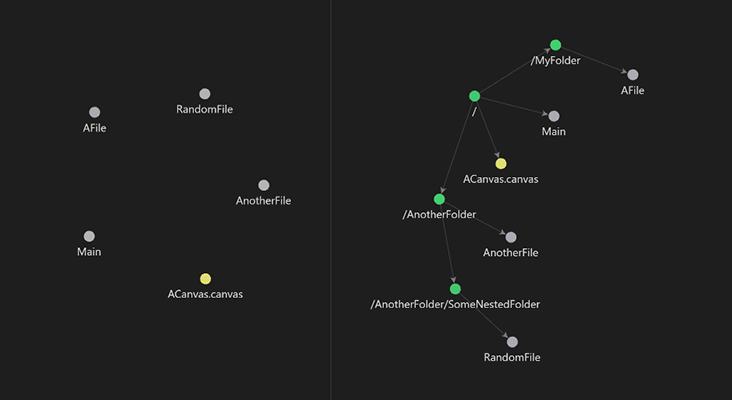
Obsidian plugin that gives you the power to generate dynamic MOCs in your folder notes. Enables folders to show up in the graph view and removes the need for messy tags!
Daily Notes Viewer
4 years ago by Johnson0907
Folder Focus Mode
4 years ago by grochowski
Focus file explorer on chosen folder and its files and subdirectories, while hiding all the other elements.
Bellboy
4 years ago by Shaked Lokits
Opinionated file structure manager for the Obsidian knowledge base.
Packrat
4 years ago by Thomas Herden
Process completed instances of recurring items created by the Obsidian Tasks plugin
Janitor
4 years ago by Gabriele Cannata
Performs various maintenance tasks on the Obsidian vault
Week Planner
4 years ago by Ralf Wirdemann
Daily Note Outline
4 years ago by iiz
Add a custom view which shows outline of multiple daily notes with headings, links, tags and list items
Project Garden
4 years ago by Ben Goosman
Todo sort
3 years ago by Ryan Gomba
A plugin for Obsidian that sorts todos within a note
Boost Link Suggestions
3 years ago by Jacob Levernier
An Obsidian (https://obsidian.md) plugin for altering the order of inline link suggestions by link count and manual boosts.
File Color
3 years ago by ecustic
An Obsidian plugin for setting colors on folders and files in the file tree.
Contacts
3 years ago by vbeskrovnov
With this plugin, you can easily organize and manage your contacts within Obsidian. Simply create a note with contact information and use the plugin's features to quickly search, and sort through your contacts. Contacts plugin also helps you to remember birthdays of your contacts and keeps track of the last time you met them.
Order List
3 years ago by Henry Gustafson
Task Marker
3 years ago by wenlzhang
An Obsidian plugin to change task status and append text with hotkeys and right-click context menu.
Note aliases
3 years ago by Pulsovi
This plugin manages wikilinks aliases and save them on the aliases list of the linked note
Tasks Calendar Wrapper
3 years ago by zhuwenq
This plugin currently provides a timeline view to display your tasks from your obsidian valut, with customizable filters and renderring options.
Prioritize
3 years ago by EloiMusk
Obsidian Plugin, to prioritize stuff in Obsidian
File Order
3 years ago by lukasbach
Obsidian plugin to reorder files with drag-and-drop by customizing a number-prefix in the filenames
Linked Data Vocabularies
3 years ago by kometenstaub
Add linked data to the YAML of your Obsidian notes.
Plugin Manager
3 years ago by ohm-en
Allows better management of Obsidian.md plugins.
TodoTxt
3 years ago by Mark Grimes
Obsidian plugin to manage todotxt files
Note archiver
3 years ago by thenomadlad
ZettelGPT
3 years ago by Overraddit
Turbocharge Your Note-taking with AI Assistance
Periodic PARA
3 years ago by YiBing Lin
Obsidian Plugin for combining P.A.R.A with Periodic Notes(LifeOS for Obsidian)
TagMany
3 years ago by Joshua Martius
Tag many Notes at once in Obsidian
At People
3 years ago by Tobias Davis
Obsidian plugin to use the familiar @ notation to cross link to people.
Potato Indexer
3 years ago by LoyalPotato
Obsidian plugin to generate index based on your selection
Expiration-Date-Tracker
3 years ago by Marius Wörfel
Opsidian plugin to keep track of all expiration dates, for example, for your groceries.
Tag Page
3 years ago by Matthew Sumpter
An Obsidian plugin to create and manage dedicated Markdown pages for tags, with features to automatically populate and refresh content based on user-defined settings.
TODO Wrangler
3 years ago by Jeel Shah
An obsidian plugin to wrangle your Todos and put them in their place.
Tag Breakdown Generator
3 years ago by Hananoshika Yomaru
Break down nested tags into multiple parent tags
Improved Random Note
3 years ago by ShockThunder
Automatic Tags
3 years ago by Jamalam
Add tags to new notes automatically based on their path
Sort Frontmatter
3 years ago by Kanzi
Sort frontmatter automatically
Feeds
3 years ago by LukeMT, pashashocky, madx
Magic feeds dataview query for obsidian
Tag Buddy
3 years ago by David Fasullo
Unlock powerful tag editing features in Reading Mode. Add, remove and edit tags across your vault. Use tag inboxes to level up any workflow with a powerful idea assembly line.
Key-Value List
3 years ago by Christian Wannerstedt
Obsidian plugin which makes it easy to turn lists into formatted key value lists
Desk
3 years ago by David Landry
A desk for obsidian
Highlight Helper
3 years ago by Chongmyung Park
Helper to collect highlight in Obsidian
YouTube Template
2 years ago by sundevista
📺 A plugin that would help you to fetch YouTube videos data into your vault.
Extended Task Lists
2 years ago by joeriddles
Extended Markdown support for task lists in Obsidian.
Single File Daily Notes
2 years ago by Pranav Mangal
An Obsidian plugin to create and manage daily notes in a single file
Graph Link Types
2 years ago by natefrisch01
Link types for Obsidian graph view.
Cluster
2 years ago by Lorens Osman
Cluster plugin mainly designed to simplify the process of note clustering on mobile devices and work well on PCs ether
Note Chain
2 years ago by ZigHolding
Package my frequently used tools, highly personal plugins.
MostUsed
2 years ago by Levi Kingma
Obsidian plugin that shows the words you use most.
Task List Kanban
2 years ago by Chris Kerr
Daily Note Structure
2 years ago by db-developer
This obsidian plugin creates a structure for your daily notes
Index Notes
2 years ago by Alejandro Daniel Noel
Plugin that automatically generates index blocks based on tags
Journal Folder
2 years ago by Charl Fourie
Lite Gallery
2 years ago by Jordan Poles
VirtFolder
2 years ago by mr.grogrig
Creating a hierarchical structure like Luhmann's Zettelkasten
Auto Folder Collapse
2 years ago by Dario Casciato
A plugin for Obsidian that automatically collapses all child folders when you collapse a parent folder. This helps keep your file explorer organized and clutter-free.
Journaling
2 years ago by Ordeeper
View daily notes in a journal-like format, similar to Logseq. It enhances note organization and facilitates better reflection by consolidating daily notes into a continuous journaling view.
Dangling links
6 years ago by Graydon Hoare
obsidian plugin for displaying dangling links
Vantage - Advanced search builder
5 years ago by ryanjamurphy
Vantage helps you build complex queries using Obsidian's native search tools.
Note Folder Autorename
5 years ago by PJ Eby
Obsidian plugin to support folder-overview notes by keeping their folder in sync
Consistent attachments and links
5 years ago by Dmitry Savosh
Obsidian plugin. Move note with attachments.
Unique attachments
5 years ago by Dmitry Savosh
Obsidian plugin. Renames attachments, making their names unique.
Org Mode
5 years ago by ryanpcmcquen
Add Org Mode support to Obsidian.
Zoottelkeeper
5 years ago by Akos Balasko
Obsidian plugin of Zoottelkeeper: An automated folder-level index file generator and maintainer.
Embedded Code Title
5 years ago by tadashi-aikawa
It is an Obsidian plugin which can embeds title to code blocks.
Longform
5 years ago by Kevin Barrett
A plugin for Obsidian that helps you write and edit novels, screenplays, and other long projects.
Structured
5 years ago by dobrovolsky
InfraNodus AI Graph View
2 years ago by Nodus Labs
Advanced graph view for Obsidian: text analysis, topic modeling, and AI with InfraNodus AI text analysis tool: https://infranodus.com
Flow
2 years ago by Ben Phillips
Implements key processes in David Allen's Getting Things Done (GTD) methodology
Nav Link Header
2 years ago by ahts4962
Display navigation links at the top of the notes in Obsidian
Metadata Auto Classifier
2 years ago by Beomsu Koh
AI-powered Obsidian plugin that automatically classifies and generates metadata (tags, frontmatter) for your notes.
Hierarchical Backlinks
2 years ago by Jason Motylinski
Plugin which displays backlinks as a tree structure based on file paths
Nav Weight
2 years ago by shu307
A simple plugin designed to sort files in navigation based on markdown frontmatter (also known as metadata) for Obsidian.
MOC Link Helper
2 years ago by Bogdan Codreanu
This obsidian plugins allows you to quickly see which notes you need to include in your MOC.
Todos sort
2 years ago by Jiri Sifalda
A plugin for Obsidian that sorts todos within a note
Automatic Renumbering
2 years ago by Omri Levi
Automatically reorders checklists and numbered lists as you edit them.
Bottom to Top
2 years ago by Henry Gustafson
Auto Tasks
2 years ago by Jamie Hurst
Obsidian plugin to combine periodic notes with tags and tasks to automatically manage your daily, weekly and project TODO lists. Requires the "Periodic Notes" and "Tasks" plugins.
Beautiful Contact Cards
2 years ago by Seth Tenembaum
A plugin for the Obsidian text editor which renders "contact" code blocks with tappable links for phone, social media, etc.
Proletarian Wizard Task Manager
2 years ago by Charles Feval
Obsidian plugin ot manage todos and projects directly from your notes.
Simple Todo
2 years ago by elliotxx
A minimalist text-based todo manager (Text-Based GTD) for efficient task management in Obsidian.
Folder Links
2 years ago by Stefan Rausch
Obsidian Plugin that enables using links to folders.
Auto File Organizer
2 years ago by mofukuru
Obsidian plugin: Automatically organizes files into folders based on their extensions.
Mass Create
2 years ago by vellikhor
Create large quantities of notes easily at one time.
BuJo Bullets
a year ago by Will Olson
Alternate checkbox types for Obsidian to support Bullet Journal bullets
Dynamic Outline
a year ago by theopavlove
Adds a customizable GitHub-like floating table of contents to Obsidian.
Clipper Catalog
a year ago by Greg K.
A catalog view that provides a powerful interface for all your clipped web articles and content. Easily organize, search, and manage your web clippings within your vault.
Recent Notes
a year ago by Kamil Rudnicki
Recent Notes Plugin for Obsidian
Missing Link File Creator
a year ago by Lemon695
The plugin creates both missing links and the corresponding files.
Kikijiki Habit Tracker
a year ago by KIKIJIKI
Kikijiki Habit Tracker Plugin for Obsidian
WhatsApp backup importer
a year ago by Luigi Cerone
Obsidian plugin that allows you to import exported WhatsApp chat archives (in .zip format) into your vault.
Enhanced Canvas
a year ago by RobertttBS
When editing on Canvas, properties and Markdown links to notes are automatically updated, enabling backlinks in Canvas.
Fold Properties By Default
a year ago by Tommy Bergeron
Always have editor/metadata properties folded by default.
Organized daily notes
a year ago by duchangkim
Automatically organizes your daily notes into customizable folder structures for better organization and easier navigation.
Attachments MD Indexer
a year ago by Ian Inkov
Converts Obsidian canvas files to markdown index files, making canvas content searchable and graph-viewable within Obsidian.
Vault File Renamer
a year ago by Louan Fontenele
Vault File Renamer: Automatically standardizes file names to GitHub style (lowercase, no accents, only -, ., _) while preserving folder structure and file contents.
Task Mover
a year ago by Mariia Nebesnaia
A plugin for obsidian to move unfinished tasks to the daily note automatically
Content Cards
a year ago by leo
Insert content cards in Markdown, such as timeline, highlightblock, target card, book information card, music information card, movie information card, photoes ablum, business card, content subfield, countdown, SWOT,BCG.
Tab Group Arrangement
a year ago by situ2001
Arrange the tab groups of Obsidian in a more flexible way
New 3D Graph
a year ago by Aryan Gupta
Visualize your vault in 3D with a powerful, highly customizable, and filterable graph.
Zettelkasten Branch Tracker
10 months ago by James Cussen
Obsidian Graph View Plugin for Zettelkasten Notes
Tasks Map
9 months ago by NicoKNL
A graph view of your tasks.
Inline Local Graph
5 months ago by TKOxff
Inline Local Graph of Obsidian