Dialogue

by Jakub Holub
5
4
3
2
1
Score: 29/100

Description

Category: Creative & Writing Tools

The Dialogue plugin allows users to create visually formatted dialogues within Obsidian notes using a simple, customizable syntax. It supports the use of participant names, dialogue layout, and style parameters to create an engaging dialogue experience. Messages can be displayed on the left or right side of the screen, with options to control the appearance of participant names, message width, and comment alignment. Users can also add delimiters to separate dialogue sections and incorporate comments for additional context. The plugin provides CSS customization options, enabling users to style dialogue elements according to participant names or unique identifiers. This tool is ideal for writers, storytellers, and those working with interactive scripts or narratives.

Reviews

No reviews yet.

Stats

169
stars
22,107
downloads
3
forks
1,616
days
1,036
days
1,450
days
2
total PRs
1
open PRs
1
closed PRs
0
merged PRs
15
total issues
13
open issues
2
closed issues
0
commits

Latest Version

4 years ago

Changelog

  • Added shorter alternatives of some commands:
    • l: for name of a participant on the left side.
    • r: for name of a participant on the right side.
    • - for delimiter.
  • Added possibility to specify custom id for a dialogue participant, see documentation.

README file from

Github

Obsidian Dialogue Plugin

Create dialogues in Markdown.
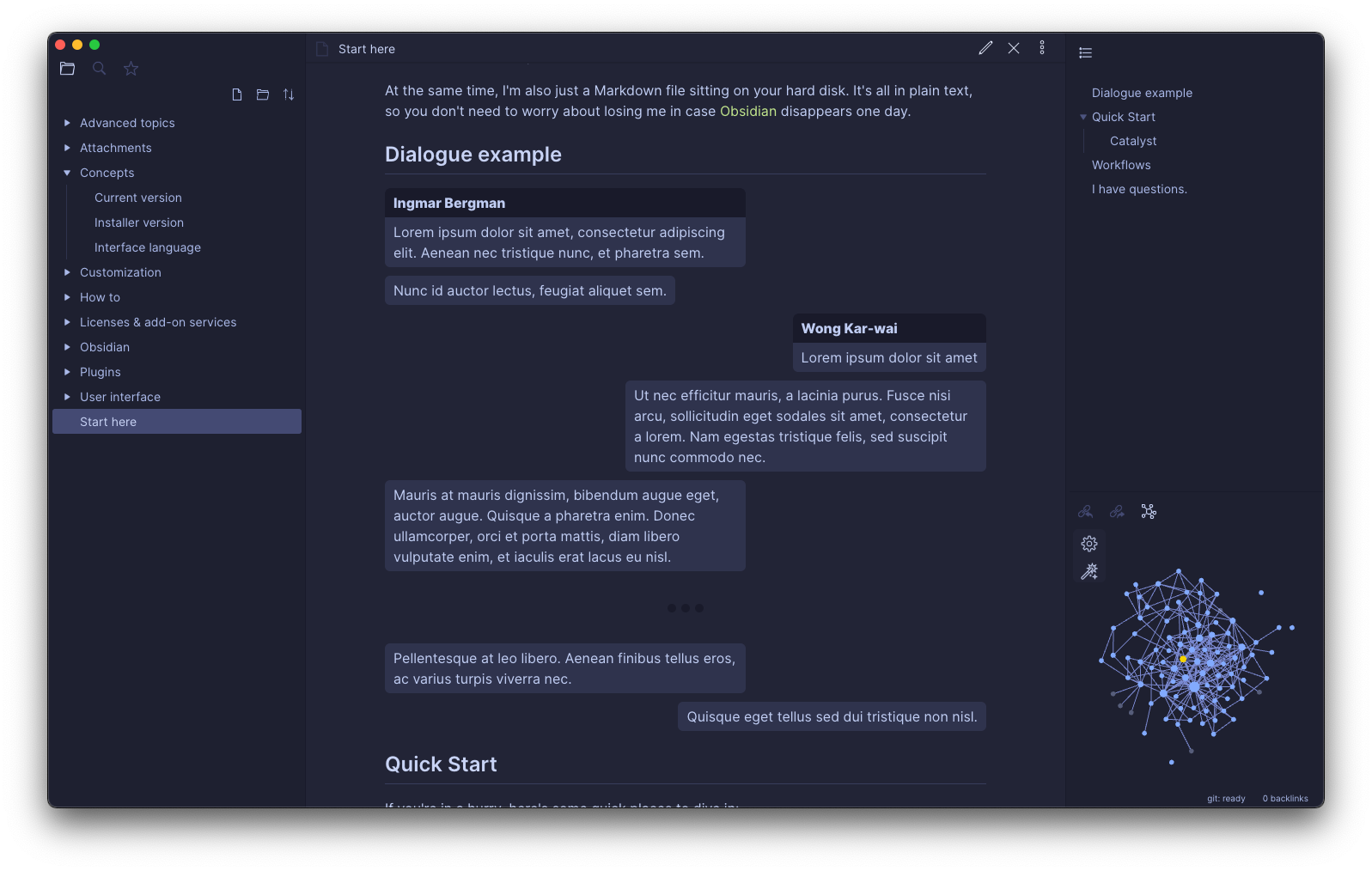
dialogue

Parameters

Parameters can be set using commands inside the dialogue. All available parameters are listed in the table below.

Available parameters

Parameter Description Default Value
left: or l: Name of the dialogue participant on the left side. none
right: or r: Name of the dialogue participant on the right side. none
titleMode: Defines if and when to render titles. See available modes in the table below. first
messageMaxWidth: Defines the max message width in the dialogue. 60%
commentMaxWidth: Defines the max comment width in the dialogue. 60%

Title Modes

Mode Description
disabled Disable all titles.
first Render each title only on the first occurence.
all Always render title.

Usage

Simple usage

The message in the dialogue must be prefixed with

  • either < (message on the left side)
  • or > (message on the right side).

The message must be exactly one paragraph.

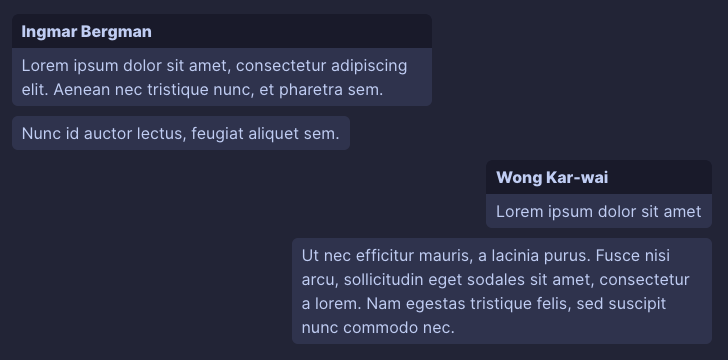
Example code
```dialogue
left: Ingmar Bergman
right: Wong Kar-wai

< Lorem ipsum dolor sit amet, consectetur adipiscing elit. Aenean nec tristique nunc, et pharetra sem.
< Nunc id auctor lectus, feugiat aliquet sem.

> Lorem ipsum dolor sit amet
> Ut nec efficitur mauris, a lacinia purus. Fusce nisi arcu, sollicitudin eget sodales sit amet, consectetur a lorem. Nam egestas tristique felis, sed suscipit nunc commodo nec.
```
Result
simple

Advanced parameters

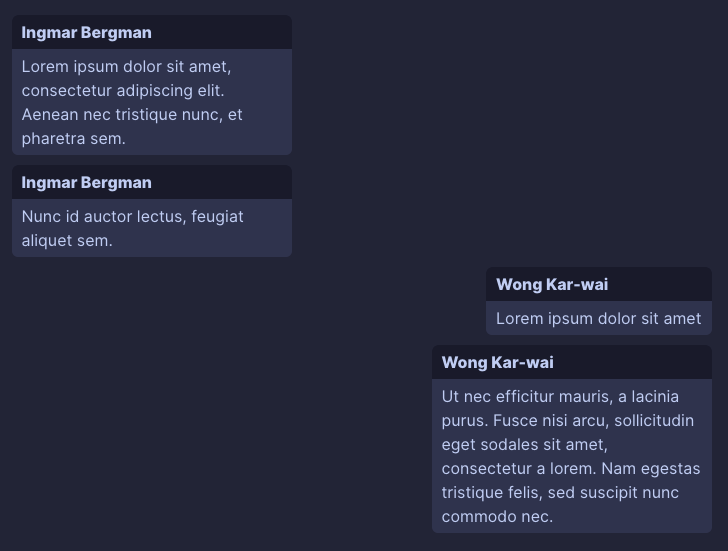
All parameters listed in the table above can be used to customize the dialogue.

Example code
```dialogue
left: Ingmar Bergman
right: Wong Kar-wai
titleMode: all
messageMaxWidth: 40%

< Lorem ipsum dolor sit amet, consectetur adipiscing elit. Aenean nec tristique nunc, et pharetra sem.
< Nunc id auctor lectus, feugiat aliquet sem.

> Lorem ipsum dolor sit amet
> Ut nec efficitur mauris, a lacinia purus. Fusce nisi arcu, sollicitudin eget sodales sit amet, consectetur a lorem. Nam egestas tristique felis, sed suscipit nunc commodo nec.
```
Result
parameters

Change of parameters during a dialogue

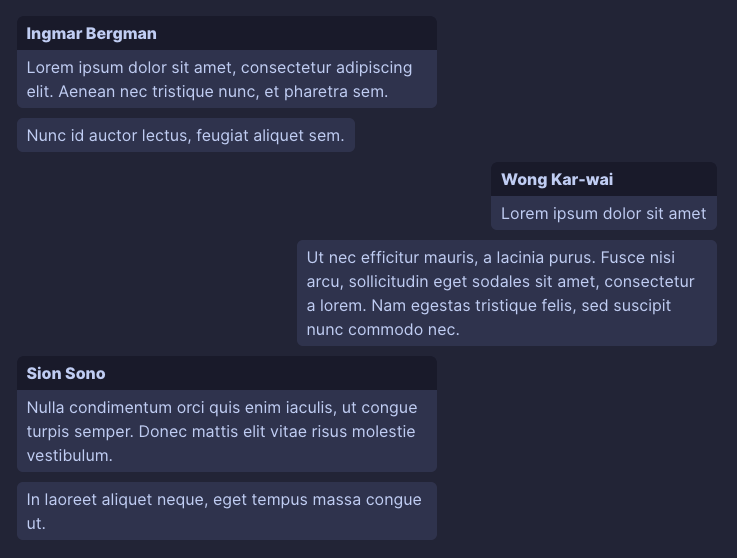
Parameters can be modified during the dialogue (the change is applied to all following messages).

Example code
```dialogue
left: Ingmar Bergman
right: Wong Kar-wai

< Lorem ipsum dolor sit amet, consectetur adipiscing elit. Aenean nec tristique nunc, et pharetra sem.
< Nunc id auctor lectus, feugiat aliquet sem.

> Lorem ipsum dolor sit amet
> Ut nec efficitur mauris, a lacinia purus. Fusce nisi arcu, sollicitudin eget sodales sit amet, consectetur a lorem. Nam egestas tristique felis, sed suscipit nunc commodo nec.

left: Sion Sono

< Nulla condimentum orci quis enim iaculis, ut congue turpis semper. Donec mattis elit vitae risus molestie vestibulum.
< In laoreet aliquet neque, eget tempus massa congue ut.
```
Result
parameters2

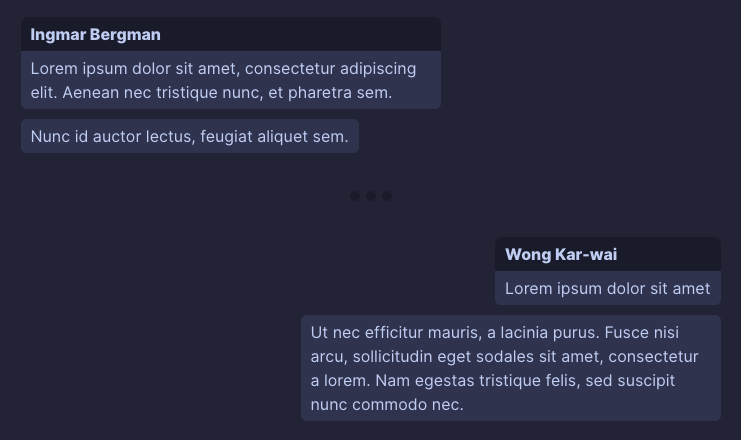
Dialogue with delimiter

Use the delimiter (or shorter -) command to add a delimiter into the dialogue.

Example code
```dialogue
left: Ingmar Bergman
right: Wong Kar-wai

< Lorem ipsum dolor sit amet, consectetur adipiscing elit. Aenean nec tristique nunc, et pharetra sem.
< Nunc id auctor lectus, feugiat aliquet sem.

delimiter

> Lorem ipsum dolor sit amet
> Ut nec efficitur mauris, a lacinia purus. Fusce nisi arcu, sollicitudin eget sodales sit amet, consectetur a lorem. Nam egestas tristique felis, sed suscipit nunc commodo nec.
```
Result
delimiter

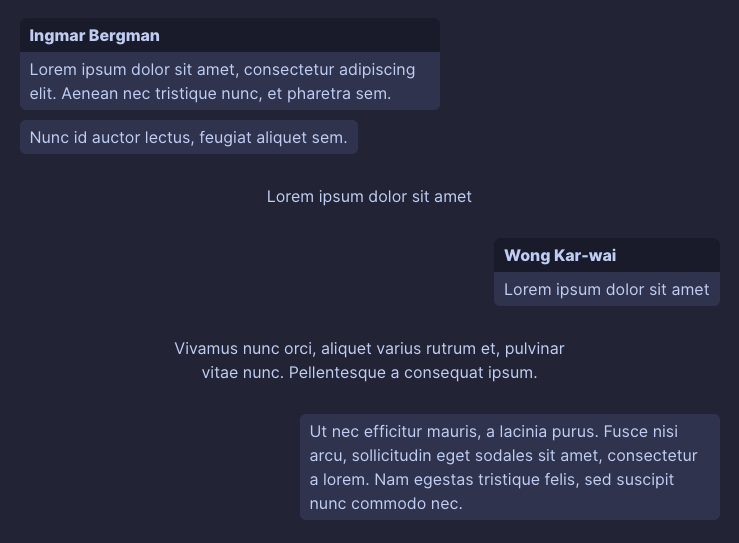
Dialogue with comments

Comments can be added into the dialogue with # prefix (see example below). The comment must be exactly one paragraph. Max width of the comments can be modified with the commentMaxWidth: parameter.

Example code
```dialogue
left: Ingmar Bergman
right: Wong Kar-wai

< Lorem ipsum dolor sit amet, consectetur adipiscing elit. Aenean nec tristique nunc, et pharetra sem.
< Nunc id auctor lectus, feugiat aliquet sem.

# Lorem ipsum dolor sit amet

> Lorem ipsum dolor sit amet

# Vivamus nunc orci, aliquet varius rutrum et, pulvinar vitae nunc. Pellentesque a consequat ipsum.

> Ut nec efficitur mauris, a lacinia purus. Fusce nisi arcu, sollicitudin eget sodales sit amet, consectetur a lorem. Nam egestas tristique felis, sed suscipit nunc commodo nec.
```
Result
comments

Custom styles for messages

Messages have special data attributes to allow custom styling.

Each message has:

  • data-participant-id attribute with a unique numeric id as a value to identify the same dialogue participant (in order of appearance, starting from number 1)
  • data-participant-name attribute with a name of the dialogue participant as a value

These attributes can be used in a CSS snippet to apply custom styles to messages based on the message author. See example below.

Specifying custom id for a dialogue particiant

To specify a custom id for a participant in the dialogue (for example if you want to have the same color for the selected participant across multiple dialogues), you can do it by appending the id to the participant definition (for example left-2: Name, where 2 is your id).

Styling example

This example sets selected background colors for the first three unique dialogue participants (in order of appearance) and also one specific color for a dialogue participant named Sion Sono.

/* messages from first dialogue participant will have #f00 background color */
.dialogue-plugin-message[data-participant-id="1"] {
	background-color: #f00;
}

/* messages from second dialogue participant will have #0f0 background color */
.dialogue-plugin-message[data-participant-id="2"] {
	background-color: #0f0;
}

/* messages from third dialogue participant will have #00f background color */
.dialogue-plugin-message[data-participant-id="3"] {
	background-color: #00f;
}

/* messages from dialogue participant named 'Sion Sono' will have #f0f background color */
.dialogue-plugin-message[data-participant-name="Sion Sono"] {
	background-color: #f0f;
}

Say Thanks 🙏

If you like this plugin and would like to support its development, you can buy me a coffee!

Similar Plugins

info
• Similar plugins are suggested based on the common tags between the plugins.
AI Revisionist
a year ago by Synaptic Labs
April's Automatic Timelines
3 years ago by April Gras
Simple timeline generator plugin for story tellers using obsidian
Autocomplete
5 years ago by Yeboster
Obsidian plugin to provide text autocomplete
Blog AI Generator
a year ago by Gareth Ng
Obsidian Plugin: generate blog via AI based on the current note.
Brain Dump Mode
a year ago by yesjinu
Obsidian plugin - DISABLE your delete key and eliminate hesitation!
Canvas Conversation
3 years ago by André Baltazar
A plugin for Obsidian that allows you to create a canvas conversation using ChatGPT.
Canvas2Document
2 years ago by slnsys
Plugin for Obsidian to convert a complete Canvas to a long form document
Chat clips
a year ago by sleepingraven
Record chat in ordinary markdown list.
Daily Stats
5 years ago by Dhruvik Parikh
Plugin to view your daily word count across all notes in your Obsidian.md vault.
Dangerous Mode
5 months ago by Vansh Kumar
most dangerous writing app in obsidian
Dialogue Mode
2 years ago by Patrick Chiang
digital paper
3 years ago by Daniel Fernandes
turn off backspace and undo, like writing with a pen on real paper.
Fantasy name generator
3 years ago by Lukewh
Focus Active Sentence
3 years ago by artisticat
Highlight the active sentence in Obsidian.md
Fountain Editor
3 years ago by Chuang Caleb
Obsidian plugin for Fountain screenplay syntax formatting.
Gemini Scribe
a year ago by Allen Hutchison
An obsidian plugin to interact with Google Gemini
Hemingway Mode
2 years ago by Joaquín Bernal
Ink Player
a year ago by Uglyboy
基于 ink 脚本语言的文字互动游戏播放器
Inscribe
a year ago by Ahmet Ildirim
Obsidian plugin for inline autocompletion with AI
Japanese Manuscript Counter
4 months ago by Yo Fujii
Keep the Rhythm
a year ago by Ezben
An Obsidian plugin to track your daily word count through a heatmap.
Long sentence highlighter
8 months ago by Robert Meißner
Longform
5 years ago by Kevin Barrett
A plugin for Obsidian that helps you write and edit novels, screenplays, and other long projects.
Musical Text
a year ago by Tynan Purdy
Encourage writing with rhythm by highlighting sentences according to wordcount.
My Typewriter Line
6 months ago by dmo-code
Nexus AI Chat Importer
2 years ago by Superkikim
Nova
3 months ago by Shawn Duggan
Nova - AI plugin for Obsidian that edits your documents directly through natural conversation. Stop copying from chat, start collaborating with AI.
Novel Word Count
4 years ago by Isaac Lyman
Obsidian plugin. Displays a word count or other statistic for each file, folder and vault in the File Explorer pane.
Occura
2 years ago by Alexey Sedoykin
Plugin for https://obsidian.md/ that automatically selected same text occurrences in opened note
Orthography
5 years ago by denisoed
The Obsidian plugin for checking grammar and correcting spelling errors in text.
PodNotes
4 years ago by Christian B. B. Houmann
PodNotes is a plugin for Obsidian that helps the user write notes on podcasts.
Proofreader
a year ago by pseudometa (aka Chris Grieser)
AI-based proofreading and stylistic improvements for your writing. Changes are inserted as suggestions directly in the editor, similar to suggested changes in word processing apps.
ProZen
3 years ago by Moskvitin
Obsidian plugin for going FULL screen
Readability Score
3 years ago by zuchka
score the readability of your Obsidian documents using the Flesch Reading Ease (FRE) formula
Reverse Prompter
2 years ago by Ryan Halliday
Let AI generate prompts to keep you writing
Ring a secretary
3 years ago by vorotamoroz
Smart Composer
2 years ago by Heesu Suh
AI chat assistant for Obsidian with contextual awareness, smart writing assistance, and one-click edits. Features vault-aware conversations, semantic search, and local model support.
Stille
5 years ago by Michael Lee
🌗 Stille — An Obsidian plugin that helps you focus on your writing, a section at a time.
Storyclock Viewer
2 years ago by Jonathan Fisher
Obsidian plugin for creating a storyclock
Typewriter Mode
3 years ago by Davis Riedel
Typewriter Mode is a plugin that adds typewriter scrolling (current line stays at a fixed position on the screen), a highlight for the current line, dimming of unfocused paragraphs and more to Obsidian.
Typezen
a year ago by Ilgam Gabdullin
Plugin for obsidian which lets you turn zen mode instantly
Typing Assistant
3 years ago by Jambo
Typing Assistant is a plugin that improves writing efficiency and provides a user experience similar to that of【Notion】
Typographer
6 months ago by René Coignard
Enhances typography with smart quotes, custom text replacements and auto-pairing characters.
WeWrite
a year ago by Learner Chen
Obsidian plugin to render note as WeChat MP article.
Word Sprint
4 years ago by Andrew Lombardi
Obsidian Word Sprint plugin
WordCraft
a year ago by Daniel Fernandes
Find rhymes, synonyms, and describing words from within Obsidian. Designed for songwriting and poetry.
WPM Reading Time - How Long to Read This Text
a month ago by Santi Younger
Calculate reading time estimates for selected text using your own reading speed in Words Per Minute.
Write Good
a year ago by Mark Hesketh
Obsidian plugin to help improve writing style
Writing
3 years ago by johackim
Write and format your next book directly from Obsidian
Writing Goals
3 years ago by James Lynch
Set yourself dynamic writing goals for notes and folders to help you hit your long form writing targets with Obsidian.
Yesterday
2 years ago by Dominik Mayer
Obsidian plugin providing Yesterday journaling support
YourPulse - Your Writing Activity Visualised
a year ago by Jiri Sifalda
YourPulse.cc - Obsidian.md plugin that turns your vault into a reflection of your creativity, and put your writing on steroids 💪