Novel Word Count

by Isaac Lyman
5
4
3
2
1
Score: 84/100

Description

The Novel Word Count plugin allows users to track a wide range of statistics for files, folders, and entire vaults directly in Obsidian's File Explorer pane. It provides real-time updates for metrics like word count, page count, reading time, character count, and even custom properties from frontmatter. The plugin allows users to display up to three statistics at once, offering flexibility to customize what data appears next to each file or folder. Users can set word count goals for specific notes and track progress as a percentage. Folder statistics roll up data from contained files, providing a comprehensive view. It includes filtering options to exclude specific files, folders, or code blocks from word counts. The plugin is designed for writers, researchers, and anyone managing large collections of notes who want to measure writing productivity in detail.

Reviews

No reviews yet.

Stats

140
stars
168,621
downloads
13
forks
1,510
days
108
days
115
days
11
total PRs
1
open PRs
6
closed PRs
4
merged PRs
126
total issues
1
open issues
125
closed issues
75
commits

Latest Version

4 months ago

Changelog

  • On the new mobile UI, place the vault count underneath the file/folder count in the left split. Fixes #131, #132.

README file from

Github

Novel Word Count for Obsidian

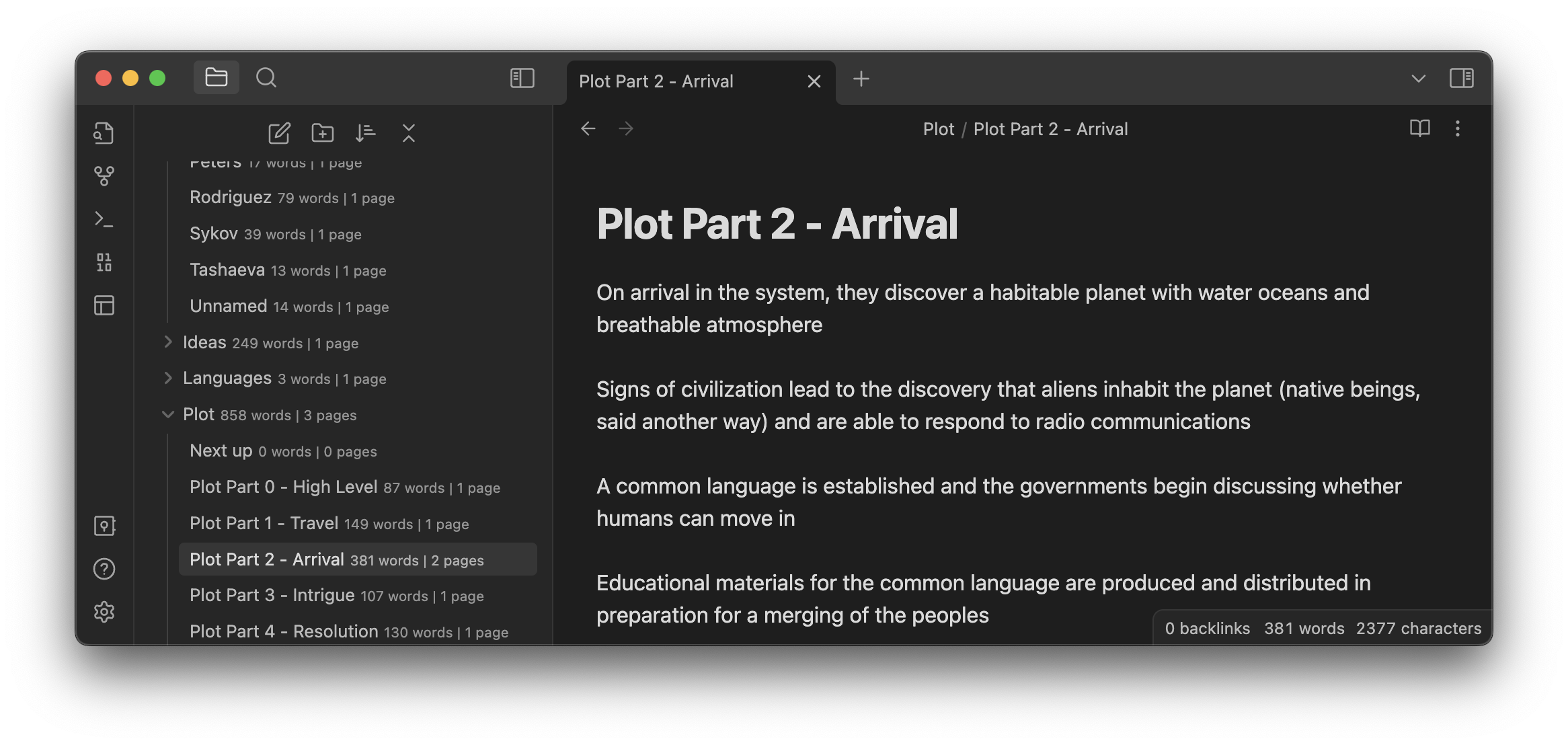
A screenshot showing slightly transparent word counts next to every document, folder, and vault in the File Explorer pane.

This plugin displays statistics of your choice next to every file, folder, and vault in the File Explorer pane. It updates in real time as you write.

Settings

Data to show. You can choose up to three data types to display side by side. Choose from the following:

Data Type Description Notes
Word count Total words. By default, a "word" is any sequence of non-whitespace characters. To change this, see Advanced > Word Count Method.
Page count Total pages, rounded up. By default, a page is 300 words. To change this, see Advanced > Page Count Method.
Page count (decimal) Total pages, precise to 2 digits after the decimal. Any settings that would apply to Page Count also apply to Page Count (decimal).
Reading Time Estimated time to read each note. By default, this is calculated at 265 words per minute (European languages) or 500 characters per minute (CJK). To change this, see Advanced > Words per minute/Characters per minute.
% of Word Goal Percent of word goal for each note. See Setting goals below.
Character count Total characters (letters, symbols, and numbers). By default, whitespace characters are included. To change this, see Advanced > Character Count Method.
Note count Total notes. Many people prefer to show this information on folders only; to do so, untoggle "Show same data on folders" and configure it as a data type there.
Line break count Total lines. Counted by line breaks, or lines of Markdown code; not equivalent to the way you'd count lines in a book.
Link count Total links to other notes. Only internal links are counted; Obsidian doesn't count links to web pages.
Embed count Total embedded images, files, and notes.
First alias The first alias of each note. If a note has no alias, nothing is shown. Since folders don't have aliases, they also show nothing.
Created date The date the note was created. On a folder, this shows the earliest creation date of all notes in the folder.
Last updated date The date the note was last updated. On a folder, this shows the latest edit date of all notes in the folder.
File size Total size on your hard drive.
Frontmatter key Any specified key in a note's Properties. No automatic prefix, suffix, abbreviation, or formatting exists for this data type. You can format your frontmatter however you like, or consider using a plugin to generate it.

Abbreviate descriptions. Enable to show shortened counts:

Full description Abbreviated
3,250 words 3,250w
30 pages 30p
45% of 2,000 45%
23,800 characters 23,800ch
12 notes 12n
18 lines 18
25s read 25s
5m read 5m
2h5m read 2h5m
3 links 3x
5 embeds 5em
alias: july +3 july
Created 1/22/2022 1/22/2022/c
Updated 1/22/2022 1/22/2022/u
13.39 KB 13.39kb

NOTE: You can set your own suffixes (or hide suffixes entirely) for most count types by enabling the "Use advanced formatting" toggle.

Alignment. Choose where data is displayed relative to file/folder names: Inline, Right-aligned, or Below. All alignments work well with vanilla Obsidian, but Inline has the greatest compatibility with custom themes and plugins.

Folders: Same data as Notes. By default, the same data types are shown on notes and folders. You can toggle this setting off to choose different data types to show on folders only.

Root: Same data as Notes. By default, the same data types are shown on notes and the vault itself. You can toggle this setting off to choose different data types to who on the vault only.

Label opacity. By default, count data is shown with an opacity value of 0.75 (meaning 25% transparent). You can raise or lower this value to make labels in the File Explorer more or less visible, respectively.

Include file/folder names. Only counts the text of notes with paths matching the indicated terms. This setting is case-sensitive and comma-separated. Any term starting with ! will be excluded instead of included. At least one file must be matched or the setting will be ignored. For example: If you set this to Included, CountMe, it will match folders called Included, Included Folder, CountMe Please, My Included CountMe, etc., and notes called Included.md, CountMe Note.md, etc., but not folders or notes called included or countme or somethingelse. If there are no folders or notes in your vault with the terms Included or CountMe, the setting will be ignored and all notes will be counted. If you set this to !Excluded, CountMe, it will match folders and files with the term CountMe unless they also contain the term Excluded in their path.

Exclude comments. Excludes any content surrounded by %% comment marks %% or <!-- HTML comment tags --> from character count, word count, and page count. This may slow down performance on very large notes or vaults.

Exclude code blocks. Excludes any content surrounded by ``` backticks from character count, word count, and page count. Includes DataView snippets. This may slow down performance on very large notes or vaults.

Exclude non-visible portions of links. Excludes (from all counts) any portions of links you wouldn't see in Reading View. For external links (e.g. [see example](https://uri)), this excludes the URI. For internal links that have an alias (e.g. [[note name|alias]]), this excludes the note name.

Character count method. Choose whether to count all characters or exclude whitespace (spaces and line breaks).

Word count method. This setting has been removed. In the latest version of the plugin, space-delimited and CJK counts are combined. Notes in any language should be counted correctly, including mixed-language notes.

Page count method. Choose whether pages are counted by number of words (default: 300) or number of characters (default: 1500). You can change the number of words/characters used.

Words per minute/CJK characters per minute. Sets the number of words (default: 265) and CJK characters (default: 500) per minute. Reading time is calculated as [word count divided by words per minute] plus [CJK character count divided by characters per minute].

Words per page/Characters per page. Sets the number of words or characters per page, depending on the selected Page count method.

Reanalyze all documents. Triggers a recount of all documents in the vault. Useful if you've made changes outside of Obsidian. (A hotkey binding is available for this command.)

Debug mode. Enables debugging output to the developer console, which may be useful if you need to report an issue.

Setting goals

To set a word goal for a note, add the word-goal property:

Comma separators are not allowed—the value must be numbers only.

On folders, the total number of words for all notes with a goal is compared to the sum of all word goals.

Excluding notes

To exclude a note from all counts except note count, created date, last updated date, and file size, add the exclude-from-word-count tag to the properties.

(The plugin will recognize the tag in any case and with or without hyphens/underscores, so you can follow your preferred tagging syntax, e.g. ExcludeFromWordCount, Exclude_from_word_count, and so on.)

Alternately, you can set the wordcount property to false. This property must always be lowercase and may not contain hyphens or underscores.

For another way to include/exclude certain notes, see the "Include file/folder names" setting description.

Safety

Novel Word Count is fully compatible with Obsidian 1.4+.

This plugin treats your vault as read-only. It never modifies, deletes, or renames any file or folder. It uses cached reads of all files for better performance.

Obsidian's API does not provide contractual access to the File Explorer pane, so this plugin uses duck typing to find it. This is technically undocumented, so there is a possibility that major updates of Obsidian will temporarily cause errors. If and when that happens, this plugin is designed to fail gracefully. In this unlikely scenario you may wish to disable the plugin until it can be updated.

This plugin's effect on the File Explorer DOM is extremely minimal, consisting of a custom HTML attribute and a few CSS rules. Style modifications are only active when the plugin is turned on.

Novel Word Count does not transmit any data over the Internet. All data is stored locally.

Installing the plugin

Search "novel word count" in the community plugin browser, or use this link.

Shout-outs

  • For an expanded version of Obsidian's built-in Word Count feature, which shows data for the current note in the Editor pane, check out Better Word Count by @lukeleppan.
  • For more features and improved graphic design around word goals, check out Writing Goals by @lynchjames.

For Developers

Development setup

  • Clone this repo.
  • npm i or yarn to install dependencies
  • npm run dev to start compilation in watch mode.
  • npm run dev-style to start stylesheet compilation in watch mode.

Creating a new release

  • Run npm run build to make sure main.js and styles.css are up to date.
  • Commit changes.
  • Run npm version {major|minor|patch} to update the manifest and package.json.
  • Push commits to the remote.
  • Create a new release and tag in GitHub, both named after the version number e.g. 2.4.1 without a "v". Attach the files main.js, styles.css, and manifest.json.

Running the plugin locally

Visit the Releases page. Download main.js, styles.css, and manifest.json to your vault at VaultFolder/.obsidian/plugins/novel-word-count/.

Similar Plugins

info
• Similar plugins are suggested based on the common tags between the plugins.
Better Word Count
6 years ago by Luke Leppan
Counts the words of selected text in the editor.
Notebook Navigator
8 months ago by Johan Sanneblad
Replace the default file explorer in Obsidian with a clean two-pane interface featuring folder tree, tag browsing, file previews, keyboard navigation, drag-and-drop, pinned notes, and customizable display options.
Longform
5 years ago by Kevin Barrett
A plugin for Obsidian that helps you write and edit novels, screenplays, and other long projects.
Smart Composer
2 years ago by Heesu Suh
AI chat assistant for Obsidian with contextual awareness, smart writing assistance, and one-click edits. Features vault-aware conversations, semantic search, and local model support.
Typewriter Mode
3 years ago by Davis Riedel
Typewriter Mode is a plugin that adds typewriter scrolling (current line stays at a fixed position on the screen), a highlight for the current line, dimming of unfocused paragraphs and more to Obsidian.
Manual Sorting
a year ago by Kh4f
📌 DnD file sorting for Obsidian
Collapse All
5 years ago by Nathonius
PodNotes
4 years ago by Christian B. B. Houmann
PodNotes is a plugin for Obsidian that helps the user write notes on podcasts.
Gemini Scribe
a year ago by Allen Hutchison
An obsidian plugin to interact with Google Gemini
Typing Assistant
3 years ago by Jambo
Typing Assistant is a plugin that improves writing efficiency and provides a user experience similar to that of【Notion】
Autocomplete
5 years ago by Yeboster
Obsidian plugin to provide text autocomplete
ProZen
3 years ago by Moskvitin
Obsidian plugin for going FULL screen
Fantasy name generator
3 years ago by Lukewh
Stille
5 years ago by Michael Lee
🌗 Stille — An Obsidian plugin that helps you focus on your writing, a section at a time.
Writing Goals
3 years ago by James Lynch
Set yourself dynamic writing goals for notes and folders to help you hit your long form writing targets with Obsidian.
Daily Stats
5 years ago by Dhruvik Parikh
Plugin to view your daily word count across all notes in your Obsidian.md vault.
File Info Panel
4 years ago by CattailNu
This plugin for Obsidian creates a small File Info view that displays the active file's date created, date modified, file size, and links to open the file in its native application and to open the file's folder.
Dialogue
4 years ago by Jakub Holub
Dialogue plugin for Obsidian.md
Word Sprint
4 years ago by Andrew Lombardi
Obsidian Word Sprint plugin
Keep the Rhythm
a year ago by Ezben
An Obsidian plugin to track your daily word count through a heatmap.
Key Promoter
5 years ago by Johannes Theiner
Learn keyboard shortcuts by showing them when using the mouse
Reveal Active File Button
4 years ago by Clare Macrae
Obsidian plugin to add a button to the top of the Obsidian File Explorer, to reveal the active file.
Fountain Editor
3 years ago by Chuang Caleb
Obsidian plugin for Fountain screenplay syntax formatting.
Canvas2Document
2 years ago by slnsys
Plugin for Obsidian to convert a complete Canvas to a long form document
Orthography
5 years ago by denisoed
The Obsidian plugin for checking grammar and correcting spelling errors in text.
Prominent Bookmarked Files
5 years ago by Jeremy Valentine
Prominently display starred files in Obsidian.md
Writing
3 years ago by johackim
Write and format your next book directly from Obsidian
Readability Score
3 years ago by zuchka
score the readability of your Obsidian documents using the Flesch Reading Ease (FRE) formula
Focus Active Sentence
3 years ago by artisticat
Highlight the active sentence in Obsidian.md
TreeFocus
3 years ago by iOSonntag
Obsidian plugin: Highlight, dim & style your files & folders in the file explorer (navigation) based on predefined or custom rules.
File Explorer Markdown Titles
5 years ago by Dylan Elliott
Obsidian Plugin that adds the the markdown title within your notes to the file explorer
Occura
2 years ago by Alexey Sedoykin
Plugin for https://obsidian.md/ that automatically selected same text occurrences in opened note
Yesterday
2 years ago by Dominik Mayer
Obsidian plugin providing Yesterday journaling support
Frontmatter Alias Display
3 years ago by muhammadv-i
A plugin for Obsidian.md to show front-matter aliases as display names in the file menu.
Wordflow Tracker
a year ago by LeCheenaX
Track the changes and stats of your edited note files automatically in Obsidian. Record the modified notes and statistics to your daily note with various customizations!
Daily Statistics
2 years ago by yefengr
obsidian daily statistics
digital paper
3 years ago by Daniel Fernandes
turn off backspace and undo, like writing with a pen on real paper.
Beeminder Word Count
5 years ago by Yuta Miyama
Beeminder integration with Obsidian, so that your word count in Obsidian contributes to your writing goals.
YourPulse - Your Writing Activity Visualised
a year ago by Jiri Sifalda
YourPulse.cc - Obsidian.md plugin that turns your vault into a reflection of your creativity, and put your writing on steroids 💪
Zen Space
a year ago by Aditya Amatya
An enhanced file explorer showing relevant only relevant files for focused work.
Ridian
a year ago by Michel Nivard
This is Ridian: R in Obsidian
Write Good
a year ago by Mark Hesketh
Obsidian plugin to help improve writing style
Storyclock Viewer
2 years ago by Jonathan Fisher
Obsidian plugin for creating a storyclock
Proofreader
a year ago by pseudometa (aka Chris Grieser)
AI-based proofreading and stylistic improvements for your writing. Changes are inserted as suggestions directly in the editor, similar to suggested changes in word processing apps.
WordCraft
a year ago by Daniel Fernandes
Find rhymes, synonyms, and describing words from within Obsidian. Designed for songwriting and poetry.
Inscribe
a year ago by Ahmet Ildirim
Obsidian plugin for inline autocompletion with AI
Dialogue Mode
2 years ago by Patrick Chiang
Typezen
a year ago by Ilgam Gabdullin
Plugin for obsidian which lets you turn zen mode instantly
Mark Open Files
a year ago by Michael Schrauzer
Adds a marker to all the File Explorer items that are currently open in the Obsidian workspace.
Hemingway Mode
2 years ago by Joaquín Bernal
Nova
3 months ago by Shawn Duggan
Nova - AI plugin for Obsidian that edits your documents directly through natural conversation. Stop copying from chat, start collaborating with AI.
Typographer
6 months ago by René Coignard
Enhances typography with smart quotes, custom text replacements and auto-pairing characters.
Rainbow Folders Fixer
a year ago by Dee
Stop rainbow folders from changing colors as you scroll through the File Explorer in Obsidian.md
Simple Focus
a year ago by Lin Qing
Allows you to focus on a specific file or folder. 让你可以专注于一个文件或文件夹
WeWrite
a year ago by Learner Chen
Obsidian plugin to render note as WeChat MP article.
Reverse Prompter
2 years ago by Ryan Halliday
Let AI generate prompts to keep you writing
Hide Index Files
a year ago by d7sd6u
Hides folder notes from the file explorer
Headings in Explorer
2 years ago by Patrick Chiang
This Obsidian plugin makes headings first class concepts in the file explorer and consolidates navigation to a single panel.
Reveal Folded
a year ago by d7sd6u
Adds a command that reveals current file while collapsing every other tree item
Musical Text
a year ago by Tynan Purdy
Encourage writing with rhythm by highlighting sentences according to wordcount.
Vault Stats
9 months ago by Blue Heron
A plugin with some simple statistics.
Target Word Count
2 years ago by TwoFive Labs
Target Word Count Plugin for Obsidian
Brain Dump Mode
a year ago by yesjinu
Obsidian plugin - DISABLE your delete key and eliminate hesitation!
Scrolls To Nav Top
9 months ago by mario
Simply scrolls to nav top
Custom Selected Word Count
a year ago by banisterious
Custom Selected Word Count for Obsidian
AI Revisionist
a year ago by Synaptic Labs
Japanese Manuscript Counter
4 months ago by Yo Fujii
My Typewriter Line
6 months ago by dmo-code
CJK Count
a year ago by Louie Kurenai
Long sentence highlighter
8 months ago by Robert Meißner
Efficient Word Count
9 months ago by Blue Heron
Efficiently calculates and caches word counts for notes, with folder exclusion. Uses cache to avoid recalculating word counts for unchanged notes.
Blog AI Generator
a year ago by Gareth Ng
Obsidian Plugin: generate blog via AI based on the current note.
Discrete
9 months ago by shkarlsson
WPM Reading Time - How Long to Read This Text
a month ago by Santi Younger
Calculate reading time estimates for selected text using your own reading speed in Words Per Minute.
Dangerous Mode
5 months ago by Vansh Kumar
most dangerous writing app in obsidian