Wordflow Tracker

by LeCheenaX
5
4
3
2
1
Score: 55/100

Description

Category: Productivity Tools

The Wordflow Tracker plugin monitors writing activity within Obsidian by capturing edits made to notes and logging detailed statistics into periodic notes such as daily or monthly logs. It tracks metrics like the number of edits, added and deleted words, net word changes, and displays this information in the status bar or within structured sections of your notes. Users can customize how and where this data is recorded-using tables, lists, or metadata blocks-and specify recording intervals or manual triggers. The plugin reads from Obsidian's built-in history without storing separate logs, ensuring performance efficiency and preserving privacy.

Reviews

No reviews yet.

Stats

27
stars
5,083
downloads
4
forks
411
days
19
days
19
days
1
total PRs
0
open PRs
0
closed PRs
1
merged PRs
14
total issues
1
open issues
13
closed issues
9
commits

Latest Version

19 days ago

Changelog

🐛 Bug Fixed:

  • Syntax change only updated today's note: now scans the entire folder for all periodic notes matching the format and containing data in the old syntax, and updates them all.

README file from

Github

Wordflow Tracker

image image

中文文档 | English

image

Introduction

WordFlow Tracker is a lite plugin that tracks your focused time and edit statistics on each note and automatically records to your daily note or periodic notes.

wordflow202

Core Features

  • Tracking the focused time, number of edits, edited words per note.

  • Display the portions of statistics with multiple views:

    • file list view:

    • tag list view: with collapsible groups and dual-layer progress bars

    • heatmap view: with custom color gradients and note navigation

  • Customize status bar content with field aliases for personalized display.

    image

    image

  • Record the modified data automatically when the note is closed. Alternatively, use command or button to record all notes.

  • AI-Powered Change Tracking: Automatically generates human-readable summaries of note modifications using LLM integration. Use the ${diff} variable in your recording syntax to have AI summarize what changed — with configurable prompts, multi-language support.

  • Display the changes in the side pane widget.

    Pasted image 20250706223743

  • Display changes in a bar style to show the portion of original contents(yellow) v.s. modified contents(red: deleted words, green: added words).

    image

  • Record edited statistics such as total words you edited today, to the YAML(Frontmatter) of daily note. Other plugins could use these metadata to generate analysis.

  • Customization of which data to be recorded with ${dataName}, see Supported String Interpolations.

  • Customization of how the data to be recorded, like inserting a table or a list to the specified position of your note. Preview recording syntax before applying changes.

How does this plugin collect data?

We fetch the edit statistcs by access the history field of Obsidian editor, which is the place to store the undo/redo history of Obsidian.

  • No extra history database is created, thus don't worry about the performance burdens in large vault.
  • No extra data file is created or exposed. This resolves the privacy concerns.

All statics are fetched by diectly reading the Obsidian data, without adding additional thread to record the data, which means that enabling the recording will bring almost no performance loss or extra RAM occupation.

The temporary edit stats collected by the plugin are destroyed after recording to your note, and the Obsidian will destory the history data after you close the application.

Guide for beginners

Step 1: Download and install the plugin.

Step 2: Enable the plugin in Obsidian > Settings > Community plugins.

Step 3: In Wordflow Tracker settings, specify your periodic note folder for placing your periodic notes, in which the edit stats will be saved.

Now the plugin will automatically track the edits you made and display them in the status bar. The edits stats will also be recorded to your periodic note, when any one of the following is met:

  1. you switch from editing mode to reading mode in Obsidian;
  2. you close a tab of notes after editing them;
  3. you manually click the button "Record wordflows from edited notes" in the left ribbon of Obsidian;
  4. you manually run the command "Record wordflows from edited notes to periodic notes" in Obsidian;
  5. the automatic recording interval is timed out, which could be set in the setting of Wordflow Tracker plugin, to record all edited notes.

Note: the tracker will be set to 0 once the note is recorded.

Advanced guide for customization

Apply templates to newly created notes before recording

Make sure your template will be applied to notes under the same periodic note folder.

If your newly created notes will be renamed by other plugins, such as Templates(core plugin) or Templater(community plugin), make sure that the name that other plugin specified is the same as periodic note format

Customize which data to be recorded

In wordflow recording syntax, you can add or delete the data in one of the following formats:

  • Table: Specify the name in heading for ${modifiedNote} in markdown table format, such as "Document words" and add "${docWords}" to the row. Available properties are listed in supported string interpolations.

    After completing the markdown table in the syntax, you can preview the result below and will be prompted to confirm changes:

    Note: ${modifiedNote} must exist in the table syntax, or the recorder will have trouble merging the existing data of note with the new data

  • Bullet List:

    Add a linebreak, press the tab key for proper spacing, and specify any name you expect for this data.

    Lastly, add a string interpolations like "${docWords}". You can preview the result below and will be prompted to confirm changes:

    Note: ${modifiedNote} must exist in the bullet list syntax, or the recorder will have trouble merging the existing data of note with the new data

  • Metadata:

    Just like adding a metadata in "source mode", you can add a property name ends with ':', and a string interpolations after it, like "${totalWords}"

Record edit stats to both note content and yaml(frontmatter)

In plugin settings, create a recorder by clicking the add button:

image

Then, adjust the perodic note folder and note format to the same as the other recorder, to record on the same note.

Lastly, adjust the record content type to a different one.

Note that you should avoid having the same record content type of 2 recorders that target on the same note. For example, avoid having one recorder which inserts table to the bottom of today's daily note, while having the other recorder which inserts table to a custom position of today's daily note.

Record edit stats to a dynamic folder

You can record edit statistics to not only a static folder, such as "Daily Notes/2025-03-23.md", but also on a dynamic folder like: "Daily Notes/2025-03/2025-03-23.md".

For details regarding how to implement this, see Enable dynamic folder

Please also ensure that this folder is the same folder where templates from other plugin will be applied.

Settings documentation

See settings documentation.

Development Roadmap

See Development Roadmap for known issues and planned features!

Want to know how this project is built? Or wanna collaborate on this plugin? See details at https://deepwiki.com/LeCheenaX/WordFlow-Tracker
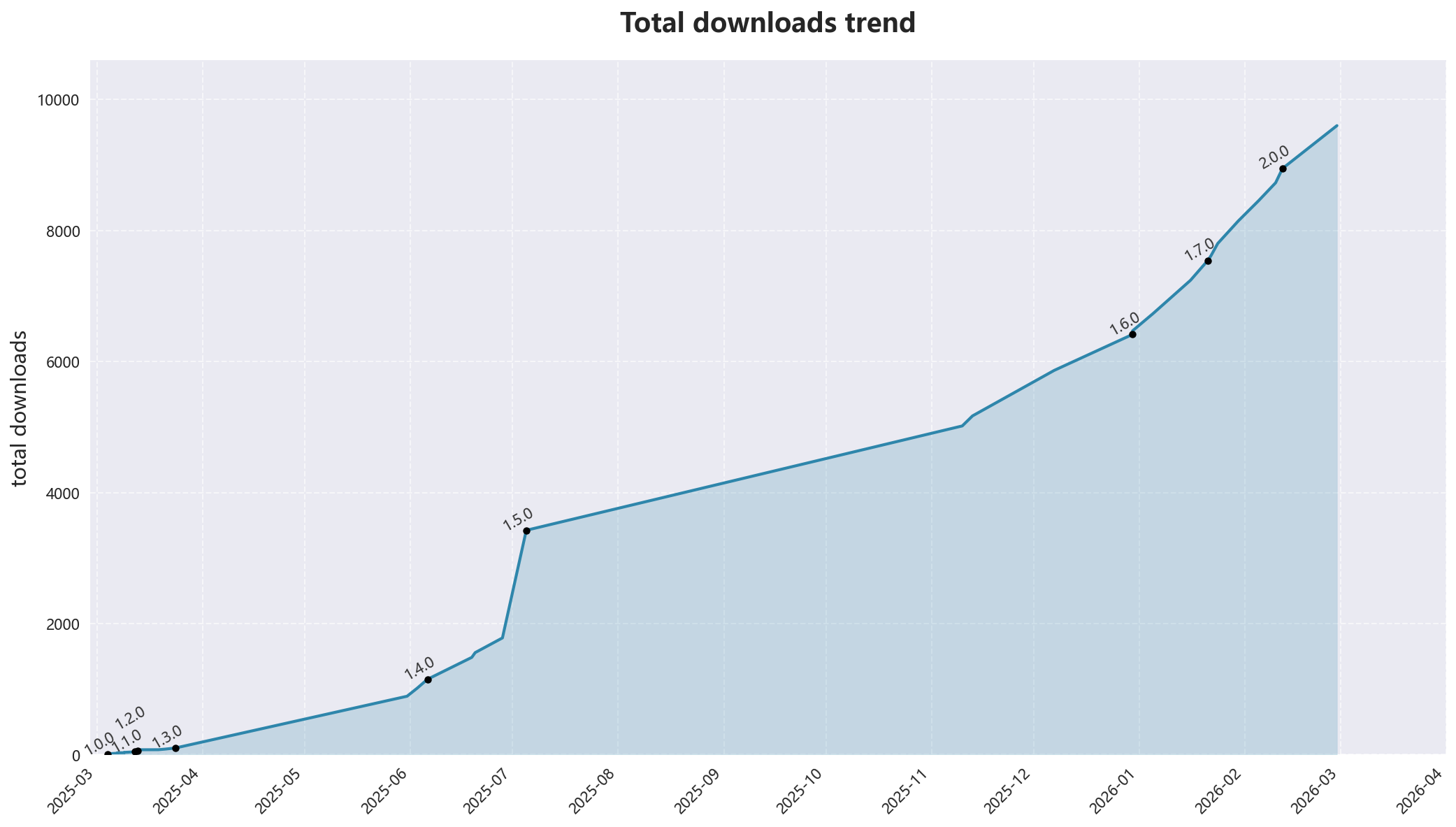
Downloads trend

Installation

Install in Obsidian

Open obsidian settings > community plugins > browse,in the pop up windows, search for Wordflow Tracker, and click the install button.

After installed, click the enable button to start the experience.

Manually installing the plugin

Copy over main.js, manifest.json, styles.css to your vault VaultFolder/.obsidian/plugins/wordflow-tracker/.

Install via BRAT

See BRAT docs.

Similar plugins

This lite plugin tries to offer unique experience for tracking edits periodically with least obstacles. However, you can try the following alternatives if interested:

Similar Plugins

info
• Similar plugins are suggested based on the common tags between the plugins.
Tomorrow's Daily Note
4 years ago by Will Olson
An obsidian plugin that creates tomorrows daily note for preemtive planning.
Pinboard Sync
4 years ago by Mathew Spolin
Obsidian plugin to sync Pinboard.in links to Daily Notes
File Info Panel
4 years ago by CattailNu
This plugin for Obsidian creates a small File Info view that displays the active file's date created, date modified, file size, and links to open the file in its native application and to open the file's folder.
Novel Word Count
4 years ago by Isaac Lyman
Obsidian plugin. Displays a word count or other statistic for each file, folder and vault in the File Explorer pane.
Daily notes opener
4 years ago by Reorx
Easily open daily notes and periodic notes in new pane; customize periodic notes background; quick append new line to daily notes.
Daily Notes Viewer
4 years ago by Johnson0907
Upcoming
4 years ago by Charlie Chao
Show upcoming daily notes in their own panes.
Repeat
4 years ago by Andre Perunicic
Review notes using periodic or spaced repetition.
Daily Note Outline
4 years ago by iiz
Add a custom view which shows outline of multiple daily notes with headings, links, tags and list items
Journal Review
3 years ago by Kageetai
Review your daily notes on their anniversaries, like "what happened today last year"
Waka time box
3 years ago by complexzeng
Reflection
3 years ago by Brandon Boswell
An Obsidian Plugin for seeing daily and weekly notes from this day in years past.
Auto Journal
3 years ago by Evan Bonsignori
Opinionated journaling automation like daily notes but with backfills for the days that you didn't open Obsidian.
Writing Goals
3 years ago by James Lynch
Set yourself dynamic writing goals for notes and folders to help you hit your long form writing targets with Obsidian.
Daily Note Pinner
3 years ago by LukeMT
Pins the daily note of the day and unpins other daily notes in Obsidian
Single File Daily Notes
2 years ago by Pranav Mangal
An Obsidian plugin to create and manage daily notes in a single file
Nested Daily Todos
2 years ago by Thomas Brezinski
A plugin for Obsidian will parse previous Daily Notes for incomplete todos and add them to today's Daily Note. It supports grouping the todos by section and supports alternative checkbox states and nested todos.
Daily note creator
2 years ago by Mario Holubar
Automatically creates missing daily notes.
Canvas Daily Note
2 years ago by Andrew McGivery
A plugin for Obsidian that allows you to add a daily note node to the canvas that will always show todays note.
Templated daily notes
2 years ago by digitorum
Allow to create templayted daily note in specific folder
Daily Note Navbar
2 years ago by Karsten Finderup Pedersen
Adds a daily note navbar to quickly navigate between sequential daily notes in Obsidian.
Telegram Inbox
2 years ago by icealtria
Receive messages from Telegram bots and add them to Obsidian's daily note.
Foodiary
2 years ago by vkostyanetsky
Food tracker plugin for Obsidian
Target Word Count
2 years ago by TwoFive Labs
Target Word Count Plugin for Obsidian
Daily Prompt
2 years ago by Erl-koenig
Future Dates
2 years ago by Dmitry Manannikov
Memos Sync
2 years ago by RyoJerryYu
Syncing Memos to Obsidian daily note. Fully compatible with official Daily Notes plugin, Calendar plugin and Periodic Notes plugin.
Daily Note Structure
2 years ago by db-developer
This obsidian plugin creates a structure for your daily notes
Everyday Classical Music
2 years ago by the flying markhor
Obsidian Plugin: Enhance your daily notes with the timeless elegance of classical music. Have a great day with the company of beautiful melodies!
Geulo
2 years ago by Junyoung Bang
Extension for pulling and syncing the videos that you liked in Youtube to Obsidian vault.
Daily Statistics
2 years ago by yefengr
obsidian daily statistics
Daily Note Collector
2 years ago by Adar Butel
An Obsidian plugin that adds links to new notes to your daily note.
Calendar
6 years ago by Liam Cain
Simple calendar widget for Obsidian.
Review
6 years ago by ryanjamurphy
Add the current note to a future daily note to remember to review it.
Better Word Count
6 years ago by Luke Leppan
Counts the words of selected text in the editor.
Rollover Daily Todos
5 years ago by Matt Sessions
An obsidian plugin that rolls over todo items from the previous daily note
Things Logbook
5 years ago by Liam Cain
Sync your Things 3 Logbook with Obsidian
Daily Stats
5 years ago by Dhruvik Parikh
Plugin to view your daily word count across all notes in your Obsidian.md vault.
Beeminder Word Count
5 years ago by Yuta Miyama
Beeminder integration with Obsidian, so that your word count in Obsidian contributes to your writing goals.
Phone to Note
5 years ago by Dylan Garrett
Unofficial phonetoroam.com plugin for Obsidian
Daily Named Folder
5 years ago by Nemo Andrea
Like daily note, but nested in a daily folder and some more improvements
Lumberjack
5 years ago by ryanjamurphy
Log your thoughts! Lumberjack adds URL commands to help you axe inefficiency and get right to writing.
Nav Link Header
2 years ago by ahts4962
Display navigation links at the top of the notes in Obsidian
Open with Natural Language Dates
2 years ago by Charlie Chao
Quickly open a daily note using natural language. Requires "Natural Language Dates" plugin to work.
Daily notes calendar
a year ago by bartkessels
Quickly navigate your vault using a calendar view, this plugin allows you to create and navigate to periodic notes and notes that are created on a specific date.
Keep the Rhythm
a year ago by Ezben
An Obsidian plugin to track your daily word count through a heatmap.
Organized daily notes
a year ago by duchangkim
Automatically organizes your daily notes into customizable folder structures for better organization and easier navigation.
On This Day
a year ago by Jose Elias Alvarez
Show your daily notes from this day in a simple panel view. Inspired by Day One's On This Day feature.
YourPulse - Your Writing Activity Visualised
a year ago by Jiri Sifalda
YourPulse.cc - Obsidian.md plugin that turns your vault into a reflection of your creativity, and put your writing on steroids 💪
Task Mover
a year ago by Mariia Nebesnaia
A plugin for obsidian to move unfinished tasks to the daily note automatically
Previous Daily Note
a year ago by Marcos Talau
Plugin for Obsidian that opens the previous daily note
Daily Note Metrics
a year ago by Andre-Diamond
Obsidian Plugin that parses Daily Notes and uses data to create charts
Multiple Daily Notes
a year ago by Vab Kapoor
Obsidian plugin for adding multiple daily notes, with some extra configurations too.
Pinned Daily Notes
a year ago by Jeremy Neiman
Dynamically update a pinned tab with today's daily note
Yesterday's note
a year ago by Trevor Tyler Lee
Obsidian plugin to open yesterday's daily note
Auto Daily Note
a year ago by John Dolittle
Daily Notes Automater
a year ago by David Pedrero
Limitless Lifelogs
a year ago by Maclean Dunkin
Sync your Limitless AI lifelog entries directly into Obsidian markdown files.
Inboxer
a year ago by Eoin Hurrell
Obsidian plugin to add an inbox to notes
Hledger Notes
a year ago by Boburmirzo Khamrakulov
Hledger Notes: Create and manage hledger entries directly in Obsidian Daily notes
Status.lol Publisher
a year ago by Eric Walker
Allows you to post to weblogs.lol, status.lol, some.pics and paste.lol from Obsidian.
Create Note with Date in This Directory
a year ago by Sangrak Choi
Obsidian plugin for creating a note with current date in this directory
Custom Selected Word Count
a year ago by banisterious
Custom Selected Word Count for Obsidian
Streams
a year ago by Floyd
Streams Obsidian Plugin
CJK Count
a year ago by Louie Kurenai
Coalesce
10 months ago by Floyd
Coalesce is an Obsidian plugin that merges all your linked notes into a single, organized view for a cohesive research and writing experience.
Vault Stats
9 months ago by Blue Heron
A plugin with some simple statistics.
Efficient Word Count
9 months ago by Blue Heron
Efficiently calculates and caches word counts for notes, with folder exclusion. Uses cache to avoid recalculating word counts for unchanged notes.
Google Calendar Importer
7 months ago by Fan Li
A simple and light-weighted google calendar importer, allow injecting the events / tasks of a day automatically to your daily notes, or import it to anywhere with a command.
Open or Create File
7 months ago by Ilya Paripsa
Set up Obsidian commands that create or open files based on predefined patterns.
Timestamper
6 months ago by René Coignard
Insert the current timestamp into your notes.
Daily Notes Tweaks
6 months ago by René Coignard
Open a random daily note and automatically switch past daily notes to reading mode.
LongtimeDiary
2 months ago by sawamaru
Show past Daily notes on the same day in previous years.
Synaptic View
2 months ago by Yongmini
A dynamic control center for your vault. Unify hubs, notes, tasks, periodic notes, and web resources with intuitive buttons. Replace new tab for instant access.
WPM Reading Time - How Long to Read This Text
a month ago by Santi Younger
Calculate reading time estimates for selected text using your own reading speed in Words Per Minute.