Influx

by Jens M Gleditsch
5
4
3
2
1
Score: 62/100

Description

The Influx plugin enhances Obsidian's backlinks functionality by providing formatted excerpts from notes containing linked mentions. It organizes and displays these excerpts based on their hierarchical position, such as bullet-level indentation, making it easier to navigate and aggregate relevant information. Designed for users who take notes hierarchically or follow bullet journaling methods, it enables the creation of topical notes as aggregates of clippings from daily notes. The plugin encourages using links as the primary organizing method for completeness and consistency, offering a streamlined way to manage and visualize interconnected information.

Reviews

No reviews yet.

Stats

357
stars
28,447
downloads
17
forks
1,299
days
36
days
99
days
24
total PRs
0
open PRs
1
closed PRs
23
merged PRs
91
total issues
28
open issues
63
closed issues
0
commits

Latest Version

3 months ago

Changelog

What's Changed

Full Changelog: https://github.com/jensmtg/influx/compare/2.3.0...2.3.1

README file from

Github

Obsidian Influx logo

Transform your Obsidian backlinks from simple links into rich context. Influx shows you the actual content surrounding each link, turning your note connections into genuine insights. Customize what you see and how you see it, making backlinks actually useful for research and discovery.
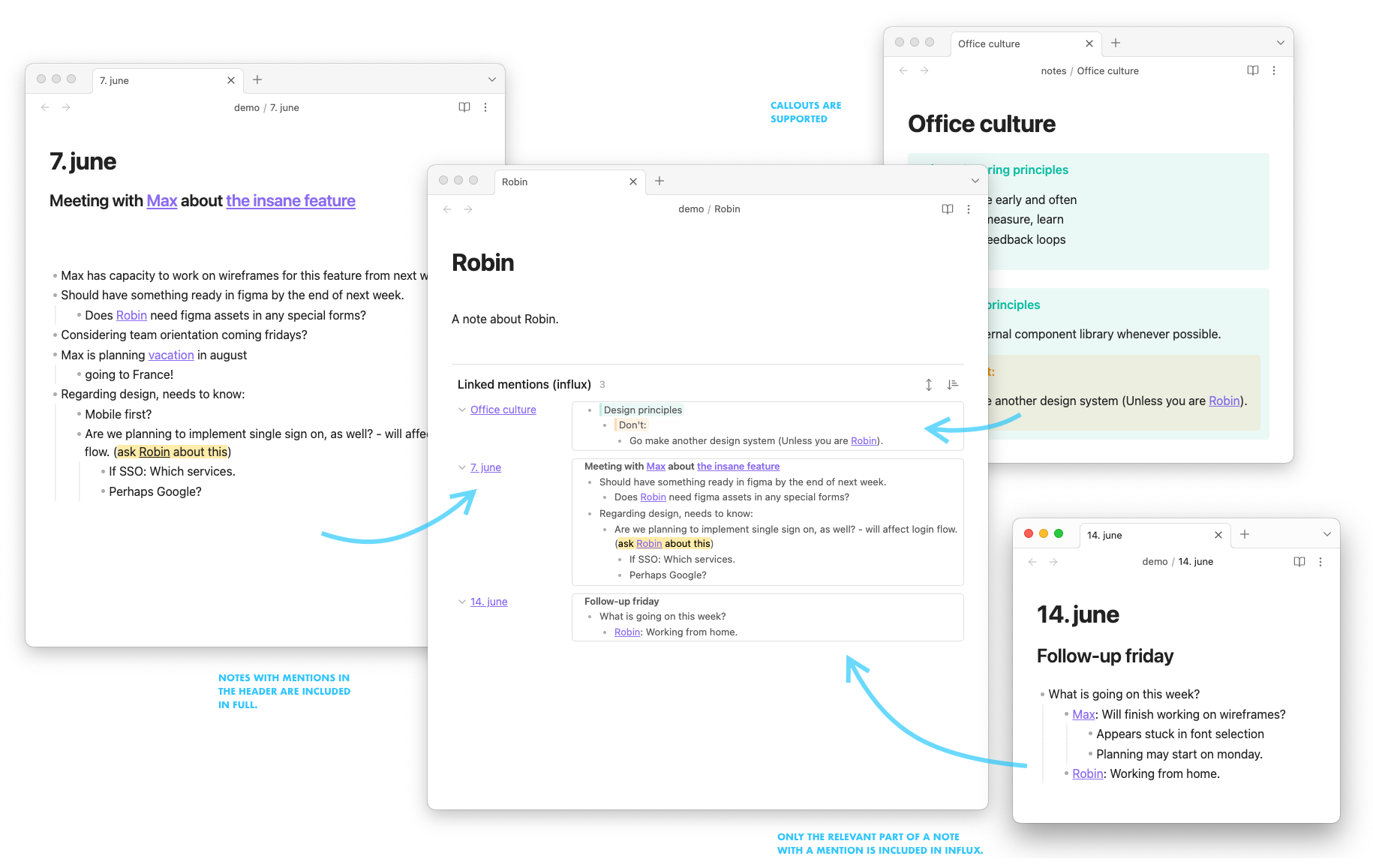
screencap

  • Rich context: See excerpts instead of just link titles
  • Smart organization: Groups related content automatically
  • Full control: Customize sorting, layout, and filtering
  • Research ready: Perfect for academic work and deep knowledge discovery

Perfect for:

  • Academic researchers: Trace citations and ideas across your knowledge base
  • Knowledge managers: Build interconnected webs of understanding
  • Writers: Track character development, themes, and plot points
  • Lifelong learners: Discover unexpected connections in your notes

"I much prefer Influx over the core Backlinks plugin - it transforms how I discover connections in my research."

Join thousands of users who've discovered that seeing your connections shouldn't mean losing the context.

Installation

  1. Open Obsidian SettingsCommunity PluginsBrowse
  2. Search for "Influx" and click Install
  3. Enable the plugin
  4. Influx will automatically appear at the bottom of your notes

Tip: If you don't see Influx after installation, try restarting Obsidian or check that your notes have incoming links.

Getting Started

Once installed and enabled, Influx automatically appears at the bottom of your notes showing contextual backlinks. You'll see actual excerpts from linked notes instead of just empty titles.

Quick setup:

  1. Go to Settings → Community Plugins → Influx to customize your experience
  2. Open any note that has backlinks
  3. Scroll to the bottom to see Influx in action
  4. Try clicking on different backlinks to see the context
  5. Explore the settings to adjust excerpt length and grouping

Recommended settings for beginners:

  • Excerpt Length: 150 characters (good balance of context vs brevity)
  • Grouping: By hierarchy (organizes content logically)
  • Max Items: 10 (keeps view manageable)

📖 Need more help? Check out our complete documentation for advanced configuration and usage examples.

Community & Support

Maintainers

  • Currently maintained by @semanticdata (Miguel Pimentel)
  • Originally created by @jensmtg (Jens M Gleditsch)

Contributors & Sponsors

Thanks to everyone who has contributed to the development of Influx:

  • @kenlim - Contributed to development through pull requests
  • @funamorikeitou - Fixed compatibility with Obsidian's Map-based backlinks data structure
  • ericlpeterson, alranel, FilSalustri, Josh2K, mrkuramoto, and Mat4m0 - Sponsors and supporters of ongoing maintenance

Transform your backlinks into insights. Install Influx today and see your notes in a whole new way.

Similar Plugins

info
• Similar plugins are suggested based on the common tags between the plugins.
Automatic Table Of Contents
3 years ago by Johan Satgé
💠 An Obsidian plugin to create a table of contents in a note, that updates itself when the note changes
obsidian floating toc
4 years ago by curtgrimes modified by Cuman
Note Companion AI
8 months ago by Benjamin Ashgan Shafii
Note Companion: AI assistant for Obsidian that goes beyond just a chat. (prev File Organizer 2000)
SystemSculpt AI
2 years ago by SystemSculpt.com
Enhance your Obsidian App experience with AI-powered tools for note-taking, task management, and much, MUCH more.
Workbench
6 years ago by ryanjamurphy
A plugin to help you collect working materials.
Daily Note Outline
4 years ago by iiz
Add a custom view which shows outline of multiple daily notes with headings, links, tags and list items
Mxmind Mindmap
2 years ago by mxmind
mxmind for obsidian plugin
Backlink Cache
3 years ago by mnaoumov
Obsidian plugin that stores backlink cache to speed up app.metadataCache.getBacklinksForFile().
Lineage
2 years ago by ycnmhd
Gingko-like interface in obsidian
Cards View
2 years ago by Maud Royer
Plugin for Obsidian.md. Displays a card view of your notes.
Project Browser
2 years ago by Dale de Silva
AutoMOC
4 years ago by Diego Alcantara
Tag Summary
4 years ago by J.D Gauchat
Carry-Forward
5 years ago by Jacob Levernier
An Obsidian Notes plugin for generating and copying block IDs, and copying lines with a link to the copied line
AidenLx's Folder Note - folderv Component
4 years ago by AidenLx
Link Tree
3 years ago by Joshua Tazman Reinier
A sidebar foldable list of Obsidian link hierarchies.
Frontmatter Markdown Links
a year ago by mnaoumov
Obsidian Plugin that adds support for markdown links in frontmatter
Footlinks
5 years ago by Daha
Obsidian plugin that extracts urls from the main text to footer, offering a better reading/editing experience.
Auto Keyword Linker
4 months ago by Daniel Rhodes
Stop manually typing [[brackets]] around recurring terms. Configure keywords with variations once, and automatically link them as you write or across your entire vault.
Rich Foot
2 years ago by Justin Parker
🦶 Obsidian plugin that adds backlink/outlink tags and created/modified dates to the footer of your notes
Keyword Highlighter
2 years ago by Marcel Goldammer
Automatically highlight specified keywords within your Obsidian notes for enhanced visibility and quick reference.
Pending notes
3 years ago by Ulises Santana
Obsidian plugin for searching links without notes in your vault.
Multiple Notes Outline
3 years ago by iiz
Automatic Linker
a year ago by Kodai Nakamura
Title Serial Number
4 years ago by Domenic
This is an obsidian plugin, and it adds serial numbers to your markdown title.
Link indexer
5 years ago by Yuliya Bagriy
Rapid Notes
3 years ago by valteriomon
Page Heading From Links
5 years ago by Mark Beattie
Obsidian plugin to populate page headings
oblogger
3 years ago by loftTech
tag explorer and frontmatter logger plugin for obsidian
Line Arrange
2 years ago by Chitwan Singh
Obsidian Plugin For Arranging Lines.
Default query in backlinks
2 years ago by Benature
Link Range
3 years ago by Ryan Mellmer
Add ranged link support to Obsidian
Subdivider
2 years ago by Tricster
Subdivider converts your notes into nested folders, automatically creating separate files for each subheading.
NoteMover shortcut
a year ago by Lars Bücker
Quickly and easily move notes to predefined folders. Perfect for organizing your notes.
Typing
3 years ago by Nikita Konodyuk
Programmatic customizations for groups of notes
Auto Archive
3 years ago by Shane Burke
Auto Archive plugin for Obsidian
Nav Link Header
2 years ago by ahts4962
Display navigation links at the top of the notes in Obsidian
Inbox Organiser
a year ago by Jamie Hurst
Obsidian plugin to capture any new notes into an inbox and periodically prompt to organise these into other folders within the vault.
Hierarchical Backlinks
2 years ago by Jason Motylinski
Plugin which displays backlinks as a tree structure based on file paths
Note 2 Tag Generator
2 years ago by Augustin
Note ID
a year ago by Dominik Mayer
Displays notes by their ID, enabling structured sequences for manuscripts or a Zettelkasten ("Folgezettel")
Dataview Autocompletion
a year ago by Daniel Bauer
Header Adjuster
2 years ago by Valentin Pelletier
Header level Reformat Plugin for Obsidian
Backlink Full Path
a year ago by mnaoumov
Obsidian plugin that shows the backlink's full path in the backlinks panel.
Daily Note Collector
2 years ago by Adar Butel
An Obsidian plugin that adds links to new notes to your daily note.
Link Maintainer
a year ago by wenlzhang
An Obsidian plugin that helps you maintain note links when splitting or reorganizing notes.
Header navigation
a year ago by readwithai
An obsidian plugin to navigate around and toggle folding on headers
WonderBox
a year ago by Christian HUMBERT
Coalesce
10 months ago by Floyd
Coalesce is an Obsidian plugin that merges all your linked notes into a single, organized view for a cohesive research and writing experience.
Template Folder
10 months ago by LucasOe
Obsidian plugin to move notes to a folder when applying a template.
Smart Link Alias
a year ago by Victor Perez-Cano
Multiple Daily Notes
a year ago by Vab Kapoor
Obsidian plugin for adding multiple daily notes, with some extra configurations too.
Atomizer
a year ago by Zac Bagley
An AI-Driven Obsidian plugin designed to turn lengthy text into insightful atomic notes. Perfect for turning source notes into ideas in a Zettelkasten workflow.
Header Counter
2 years ago by Nancy Lee
Discrete
9 months ago by shkarlsson
UnLime
10 months ago by shandyba
Obsidian Unmentioned Links toggle
Anki Helper
3 months ago by Dusk