Rich Foot

by Justin Parker
5
4
3
2
1
Score:Β 54/100

Description

Category: Note Enhancements

The Rich Foot plugin is a fantastic addition to the Obsidian ecosystem, allowing users to enhance their note-taking experience by providing valuable information at the bottom of each note. With this plugin, you can easily view backlinks, outlinks, and created/modified dates, making it easier to navigate your notes and track changes. The plugin also offers customization options for appearance, border, and links, giving you full control over how your footer looks. Additionally, you can exclude specific folders from displaying the Rich Foot feature, providing a high degree of flexibility in managing your note organization. Overall, Rich Foot is an excellent tool for Obsidian users who want to streamline their note-taking process and make it more efficient.

Reviews

No reviews yet.

Stats

52
stars
10,636
downloads
2
forks
592
days
20
days
175
days
24
total PRs
0
open PRs
0
closed PRs
24
merged PRs
47
total issues
13
open issues
34
closed issues
124
commits

Latest Version

6 months ago

Changelog

v1.11.1

πŸ“¦ Update

  • Optimized CSS for rending rich foot element at the bottom of notes

v1.11.0

This release represents a complete architectural overhaul of the Rich Foot plugin, implementing modern best practices and significant performance improvements.

✨ Performance Enhancements

  • Implemented requestAnimationFrame for all visual updates to eliminate page jitter
  • Optimized MutationObserver usage with RAF-debounced callbacks
  • Added CSS contain and will-change properties for better rendering performance
  • Reduced layout thrashing through batched DOM operations
  • Smart update detection to skip unnecessary re-renders

πŸ—οΈ Architecture Improvements

  • Complete code reorganization with separation of concerns
  • New modular structure:
    • RichFootDataManager: Handles all data fetching and parsing
    • RichFootRenderer: Pure rendering logic with optimal DOM operations
    • RichFootViewManager: View lifecycle and observer management
  • Eliminated code duplication across date parsing and link creation
  • Cleaner, more maintainable codebase with JSDoc documentation

🧹 Cleanup & Stability

  • Proper resource cleanup using Obsidian's registerEvent exclusively
  • Improved observer management with automatic disconnection
  • Data attributes for better element tracking
  • No more manual event cleanup in onunload (automatic via registration)
  • Fixed potential memory leaks from orphaned observers

πŸ”§ Compatibility

  • Enhanced native hover preview integration (works in all modes)
  • Respects view lifecycle changes more accurately

πŸ“Š Code Quality

  • Comprehensive error handling with try-catch blocks
  • Modern ES6+ patterns throughout
  • Clear naming conventions and documentation

🎨 CSS Optimizations

  • Added GPU-accelerated transforms for animations
  • Optimized transitions with will-change hints
  • Layout containment for better performance
  • Smoother fade-in animations

This update maintains 100% backwards compatibility with all existing settings and configurations while providing a more robust, performant foundation for future enhancements.

README file from

Github

🦢 Rich Foot

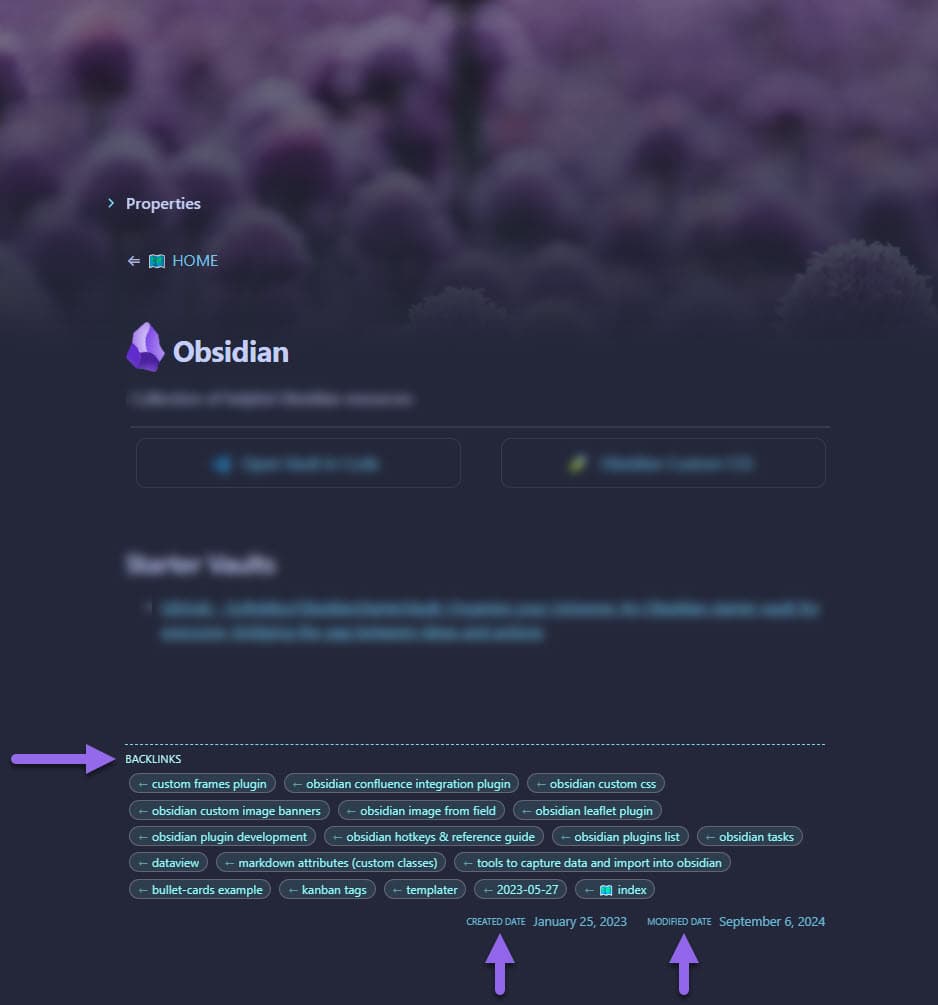
Rich Foot is an Obsidian plugin that enhances the footer of your notes by adding backlinks, outlinks, and created/modified dates.

Maintained by

Features

  • Adds backlinks to the footer of your notes (links FROM other notes TO this note)
  • Adds outlinks to the footer of your notes (links FROM this note TO other notes)
  • Displays created and modified dates for each note
  • Supports links in frontmatter
  • Stylish appearance with tag-like links
  • Highly customizable appearance with opacity and border controls
  • Option to exclude folder(s) from displaying 🦢 Rich Foot

example

Installation

  1. Open Obsidian and go to Settings
  2. Navigate to Community Plugins and disable Safe Mode
  3. Click on Browse and search for "Rich Foot"
  4. Install the plugin and enable it

Usage

Once installed and enabled, Rich Foot will automatically add the following to the footer of your notes:

  • Backlinks: Displayed as tags showing which notes link TO this note
  • Outlinks: Displayed as tags showing which notes this note links TO (disabled by default)
  • Created Date: Shows when the note was first created
  • Modified Date: Shows when the note was last modified

Frontmatter Support

Rich Foot also detects links in your note's frontmatter. For example:

---
links:
  - "[[Some Note]]"
  - "[[Another Note]]"
---

Customization

Rich Foot provides several customization options through its settings panel:

Visibility Settings

You can toggle the visibility of each section:

  • Show/Hide Backlinks
  • Show/Hide Outlinks (disabled by default)
  • Show/Hide Dates

Style Settings

Customize the appearance of your Rich Foot:

Border Customization
  • Border Width: Adjust thickness from 1-10px
  • Border Style: Choose from various styles (solid, dashed, dotted, double, groove, ridge, inset, outset)
  • Border Opacity: Control border transparency (0-1)
  • Border Color: Choose custom color for the border with color picker
  • Link Border Radius: Adjust the roundness of link corners (0-15px)
  • Links Opacity: Control transparency of backlinks and outlinks (0-1)
  • Links Color: Choose custom color for backlinks and outlinks with color picker
Dates Customization
  • Dates Opacity: Control transparency of created/modified dates (0-1)
  • Dates Color: Choose custom color for created/modified dates with color picker

Each setting includes a reset button to quickly return to default values.

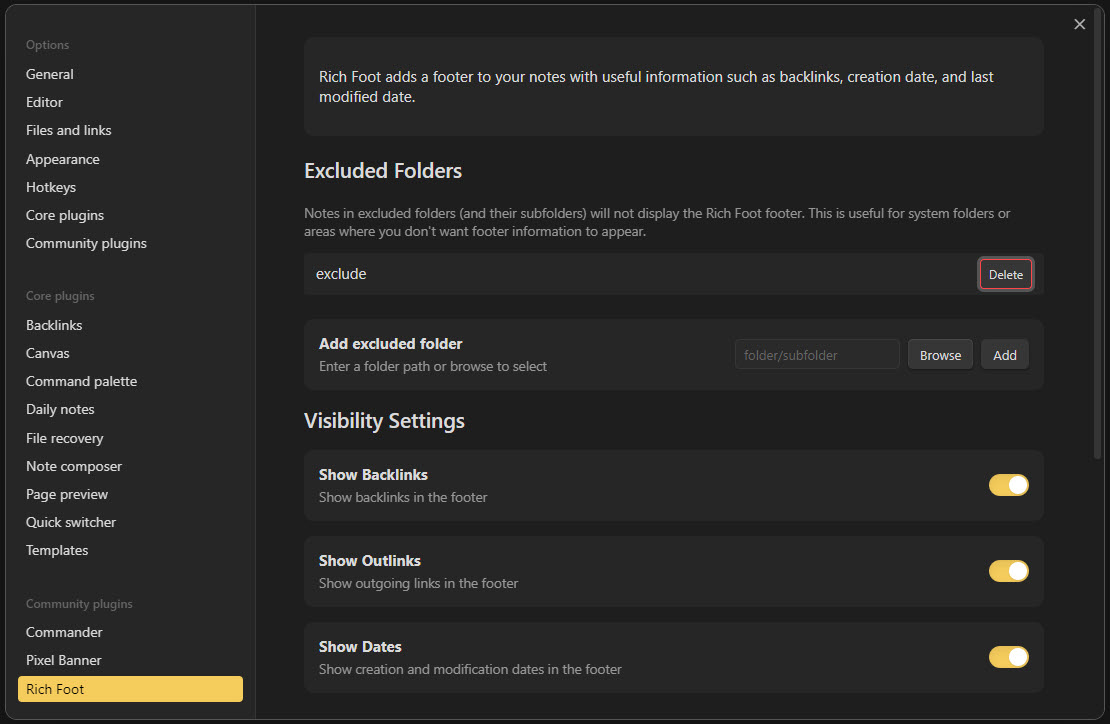
Excluding Folders

You can prevent Rich Foot from appearing in specific folders:

  1. Go to Obsidian Settings
  2. Navigate to the Rich Foot plugin settings
  3. Use the "Add excluded folder" section to:
    • Manually enter a folder path
    • Use the "Browse" button to select a folder
    • Click "Add" to add it to the exclusion list
  4. Use the "Delete" button next to any folder to remove it from the exclusion list

Notes:

  • Excluding a folder will hide Rich Foot completely from notes in that folder
  • Excluded folders also affect all subfolders
  • Links from notes in excluded folders will still appear in the backlinks of other notes
settings

License

This project is licensed under the MIT License. See the LICENSE file for details.

Appreciation

If you enjoy this plugin please consider sending me a tip to support my work πŸ˜€

🍡 tip me here

Support

If you encounter any issues or have suggestions for improvements, please open an issue on the GitHub repository.

Contributing

Contributions are welcome! Please feel free to submit a Pull Request.

Author

Created by Justin Parker


Enjoy adding rich footers to your Obsidian notes with Rich Foot! πŸ‘£

Similar Plugins

info
β€’ Similar plugins are suggested based on the common tags between the plugins.
Natural Language Dates
6 years ago by Argentina Ortega Sainz
Work with dates in natural language in Obsidian
Calendar Bases
2 months ago by Edrick Leong
Adds a calendar layout to bases so you can display notes with dates in an interactive calendar view.
Chronos Timeline
a year ago by Claire Froelich
Render interactive timelines in your Obsidian notes from simple Markdown.
Influx
4 years ago by Jens M Gleditsch
An alternative backlinks plugin, which displays relevant and formatted excerpts from notes with linked mentions, based on the position of mentions in the notes' hierarchical structure (bullet level indentation).
Daily Note Outline
4 years ago by iiz
Add a custom view which shows outline of multiple daily notes with headings, links, tags and list items
Backlink Cache
3 years ago by mnaoumov
Obsidian plugin that stores backlink cache to speed up app.metadataCache.getBacklinksForFile().
OZ Calendar
3 years ago by Ozan Tellioglu
Jump-to-Date
5 years ago by TfTHacker
Jump to a date via a convenient popup form. This plugin is a part of the Obsidian42 family of Obsidian plugins.
Project Browser
2 years ago by Dale de Silva
AutoMOC
4 years ago by Diego Alcantara
Date Inserter
2 years ago by namikaze-40p
An Obsidian plugin that lets you insert a date at the cursor position using a calendar.
Link Tree
3 years ago by Joshua Tazman Reinier
A sidebar foldable list of Obsidian link hierarchies.
Frontmatter Markdown Links
a year ago by mnaoumov
Obsidian Plugin that adds support for markdown links in frontmatter
Auto Keyword Linker
4 months ago by Daniel Rhodes
Stop manually typing [[brackets]] around recurring terms. Configure keywords with variations once, and automatically link them as you write or across your entire vault.
Default query in backlinks
2 years ago by Benature
Nav Link Header
2 years ago by ahts4962
Display navigation links at the top of the notes in Obsidian
Days Since
2 years ago by gndclouds
A plugin to show the number of days since a given date.
Easy Timeline
a year ago by Romeliun
The Easy Timeline plugin for Obsidian allows you to create timelines easily.
Hierarchical Backlinks
2 years ago by Jason Motylinski
Plugin which displays backlinks as a tree structure based on file paths
Backlink Full Path
a year ago by mnaoumov
Obsidian plugin that shows the backlink's full path in the backlinks panel.
Coalesce
10 months ago by Floyd
Coalesce is an Obsidian plugin that merges all your linked notes into a single, organized view for a cohesive research and writing experience.
UnLime
10 months ago by shandyba
Obsidian Unmentioned Links toggle
Anki Helper
3 months ago by Dusk