
README file from
GithubObsidian Itinerary
Planning a vacation or need to otherwise see a set of events on a monthly, weekly, or daily calendar? If so -- obsidian itinerary can help you keep your plans in order.
Quickstart
Imaging you have a document outlining what you want to do during an upcoming trip to Mexico; you could try to keep track of things in text like this:
# Trip to Mexico

Finally a chance to explore again.

## Oaxaca

Hotel: Hotel Fortin Plaza; check-in 5pm on 31 October check-out by 11am on 4 November

### Day of the dead Parade

Noon on November 1st

See more information here: https://thehaphazardtraveler.com/day-of-the-dead-in-oaxaca/

### Flight to CDMX

Volaris Flight 765; 12:31pm on November 10th, landing at 1:49pm

## Mexico City

Hotel: Zócalo Central Hotel; check-in 3pm on November 4th, check-out by 10am on November 10th
Mostly, though, it's up to your reading ability to keep track of what you have planned for each day, and it's really easy to lose track of things and put yourself into a situation where you forgot to book a hotel one night, or maybe had two conflicting events.
Obsidian Itinerary helps with this by letting you specify events and event calendar displays using a simple format; e.g.:
# Trip to Mexico

```itinerary
initialDate: 2021-11-01
```

## Oaxaca

```itinerary-event
title: Oaxaca
allDay: true
start: 2021-10-31
end: 2021-11-04
color: red
```

### Hotel

```itinerary-event
title: Hotel Fortin Plaza
start: 2021-10-31T17:00
end: 2021-11-04T11:00
color: brown
tag:
- hotel
```

**Hotel Fortin Plaza**
Address: Venus 118, Estrella, 68040 Oaxaca de Juárez, Oax., Mexico
Phone: : +52 951 515 7777

### Day of the dead Parade

```itinerary-event
title: Day of the Dead Parade
start: 2021-11-01T12:00
color: blue
tag:
- outing
```

See more information here: https://thehaphazardtraveler.com/day-of-the-dead-in-oaxaca/

### Other Plans

```itinerary-event
title: Drinks with Tom
start: 2021-11-01T19:00
end: 2021-11-01T21:00
tag:
- friends
```

### Flight to CDMX

```itinerary-event
title: Volaris Flight 765
start: 2021-11-04T12:31
startTimeZone: America/Los_Angeles
end: 2021-11-04T13:49
endTimeZone: America/Mexico_City
color: green
tag:
- flight
```

## Mexico City

```itinerary-event
title: Mexico City
allDay: true
start: 2021-11-04
end: 2021-11-08
color: red
```
And as a reward for your effort, you can then render calendars for your various plans, e.g:
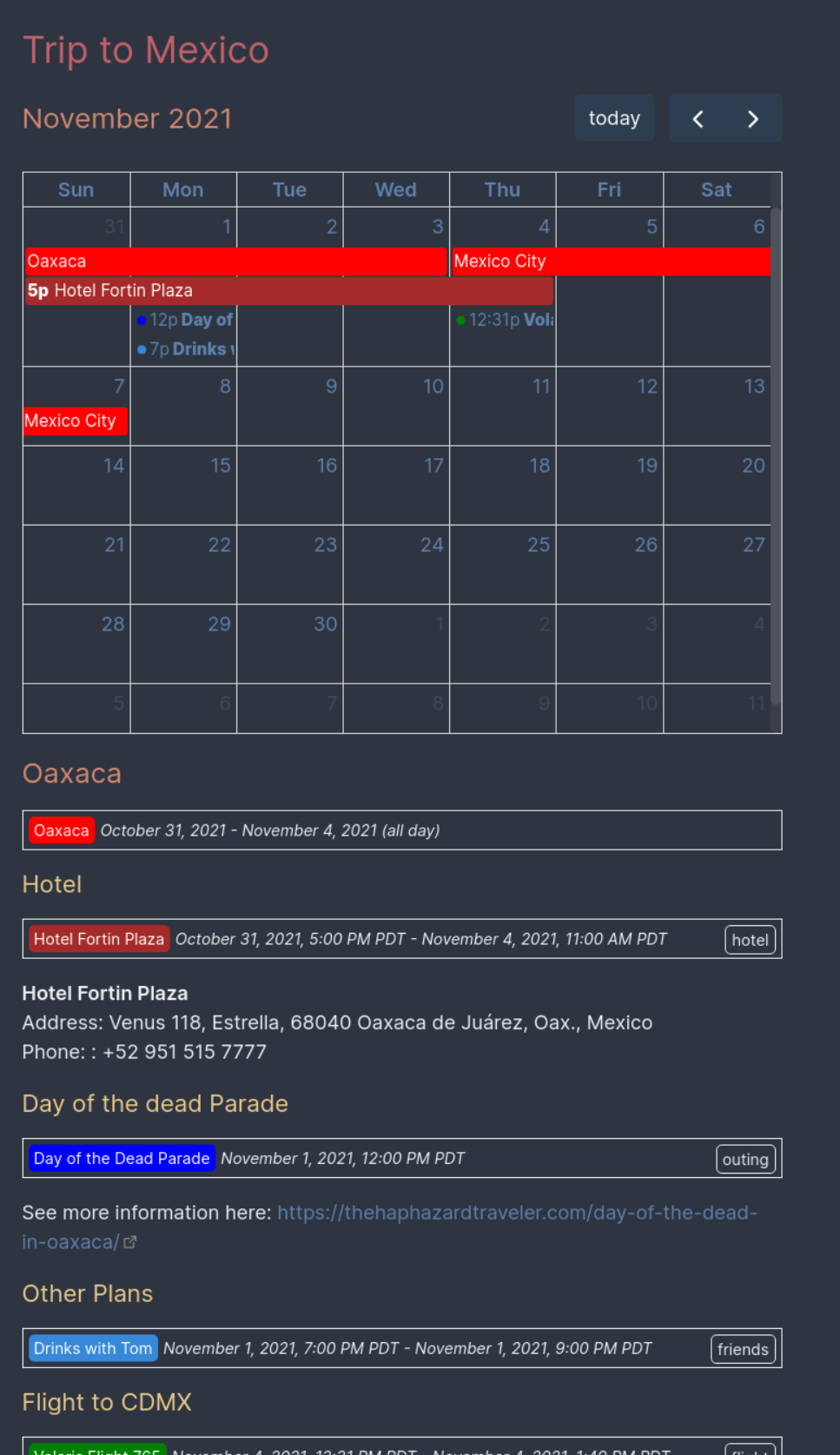
Options
Itinerary Options
You can specify the following options for displaying your itinerary:
source: The name of an obsidian source (or list of obsidian source) to gather data from; note that this must be surrounded in quotes (e.g."[[My Vacation Plans]]"). Defaults to events found in the same file the calendar is rendered in. This field also accepts a path relative to your vault root instead of an obsian source name, but using an obsidian source name is recommended since such a name can be autocompleted via the editor.filter: A list of filter expressions (see "Expressions" below) or a single filter expression to use for limiting which rows of the referenced CSV will be displayed. If unspecified, all events found in the selected sources will be included.debug: Will cause some debugging information to be printed below your rendered itinerary.
In addition to the above, you can provide any options described here: https://fullcalendar.io/docs; particularly useful properties include:
initialDate: The date to focus on your calendar. This can be useful for displaying a different month than your current date, for example. Defaults to the current date.initialView: What kind of calendar to show; by default, adayGridMonthview will be shown, but the options include:- For display of dates in a calendar grid (see https://fullcalendar.io/docs/daygrid-view)
dayGridMonth: Shows a whole calendar month.dayGridWeek: Shows a single week.
- For displaying a time grid (see https://fullcalendar.io/docs/timegrid-view)
timeGridWeek: Shows a time grid for a whole week.timeGridDay: Shows a time grid for a single day.
- For a simple list display (see https://fullcalendar.io/docs/list-view)
listYear: For a whole year.listMonth: For a single month.listWeek: For a single week.listDayFor a single day.
- For display of dates in a calendar grid (see https://fullcalendar.io/docs/daygrid-view)
Itinerary Event Options
You can specify the following options for events:
title: (Required) A name for your event.start: (Required) An ISO timestamp representing your event's start time.end: An ISO timestamp representing your event's end time.tag: A single string tag or list of tags to associate with this event. These are useful for specifically marking things like flights or hotel stays so you can generate calendars showing only one kind of event.hidden: Iftrue, this event will not be rendered individually in your notes where you've specified your event, and instead will appear only on relevant itineraries. Defaults tofalse.
Additionally, you can provide any options described here: https://fullcalendar.io/docs/event-parsing; particularly useful properties include:
color: For marking your events in a particular colorallDay: For marking your event as an "all-day" event.
Expressions
This library uses filtrex for expression evaluation; see their documentation to see more information about the expression syntax and what functions are available: https://github.com/m93a/filtrex#expressions.
See "Filtering displayed rows" for an example of a filter expression in action, but realistically they work exactly as you'd probably expect.
Tips
Rendering information for a single day
Say that you have a particularly complicated day that you'd like to render to make sure you've left yourself enough time between things:
```itinerary
initialDate: 2021-11-01
initialView: listDay
```
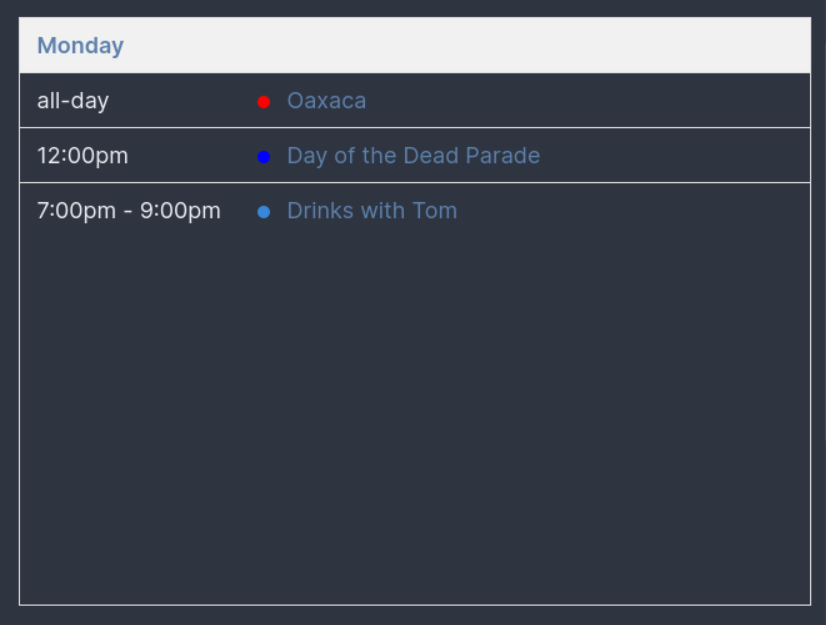
Try using timeGridDay, too!
Rendering a span of time that isn't a week or day
Imagine that you're going to be in some particular place for exactly four days; with the default dayGrid or weekGrid views, you'd have either not all of the relevant events displayed or you'd have many blank days shown. You can instead render a particular number of days easily by using the duration option:
```
initialDate: 2021-10-22
initialView: dayGrid
duration:
  days: 4
```
This option works for several of the grid options; try timeGrid, too, if you need more detail.
Filtering events to show only all-day events
This is particularly easily done since allDay is an event property:
```itinerary
filter:
- allDay
```
Filtering events based upon tag
You can filter events based upon what tags are available easily, for example:
```itinerary
filter:
- '"hotel" in tag'
```
or
```itinerary
filter:
- '"hotel" not in tag'
```
Note that the single quotes surrounding the whole expression are necessary given that this is a YAML document, and YAML documents have some parsing rules that make this just slightly awkward.
Timezones
Itineraries and events are timezone-aware and will by default interpret your events and display your itineraries using your local timezone. You can, though, override that easily.
Itinerary
If you're planning a proper adventure, you might be far from home for part of your trip, and might want a particular itinerary to be displayed in that locale's timezone. To do that, you can use the timeZone property; e.g.:
```itinerary
initialDate: 2021-10-21
timeZone: America/Los_Angeles
```
If you provide the timeZone option, all events' displayed times will be shifted to be shown in local time of the timezone you've provided.
Event
If your event is occurring far from home, you might want to specify a timezone to interpret the dates/times in:
```itinerary-event
title: New Years Eve Celebration
start: 2021-12-31T18:00
end: 2022-01-01T04:00
timeZone: America/New_York
```
When flying any significant horizontal distance around the globe, you're likely to cross some timezone boundaries during a particular event. If you have events that have differing start/end timezones, you can use the startTimeZone and endTimeZone options, e.g.:
```itinerary-event
title: PDX->YUL (AC 8653, AC 308)
start: 2022-08-07T10:30
startTimeZone: America/Los_Angeles
end: 2022-08-07T20:49
endTimeZone: America/Montreal
```
These specified time zones will be interpreted preferentially over a specified timeZone for your event; you probably want to provide either a timeZone or a startTimeZone/endTimeZone pair, though.
Hiding (or changing) the header toolbar
Maybe you don't want to see the toolbar above your rendered calendar?
```itinerary
headerToolbar:
```
See https://fullcalendar.io/docs/headerToolbar for more information.
Ordering calendar events
Perhaps you're printing some types of events on a monthly calendar:
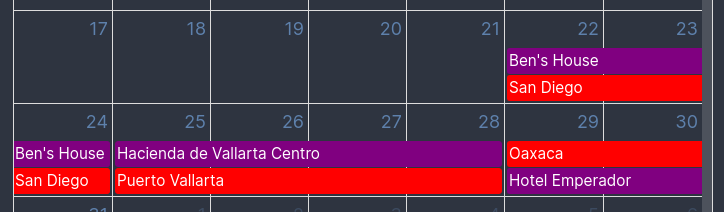
and would rather that the events be displayed in a consistent order based upon the color you set for them:
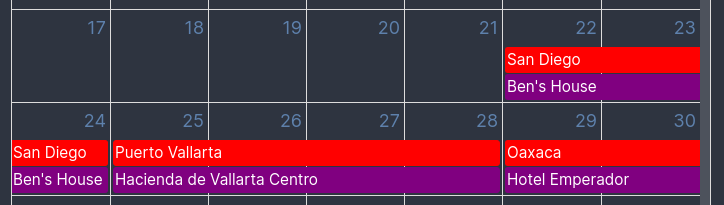
You can set a sort order for your calendar using the eventOrder option:
```itinerary
eventOrder: start,color
```
This will suggest to the calendar that you'd like your events ordered first by their start time, and secondarily by their color. The calendar will ignore this suggestion if it can arrange your calendar more compactly by ignoring this suggestion, though, but you can force it to always use your suggested ordering by using the eventOrderStrict option:
```itinerary
eventOrder: start,color
eventOrderStrict: true
```
See FullCalendar's docs covering this for more details.
Thanks
This is all built upon the excellent FullCalendar javascript library. If you want to give sombody thanks for the nice rendered calendars, they're the folks who deserve that.