
README file from
GithubObsidian AI Summarize Plugin
An intelligent Obsidian plugin that uses OpenAI models to summarize notes, extract review material, surface open loops, and create folder-level digests. It keeps summarization at the center while adding practical Obsidian workflows such as frontmatter summaries, daily-note output, linked-note context, and project digests.
Features
Core Functionality
- AI-powered summarization: Generate summaries from selected text or the full active note.
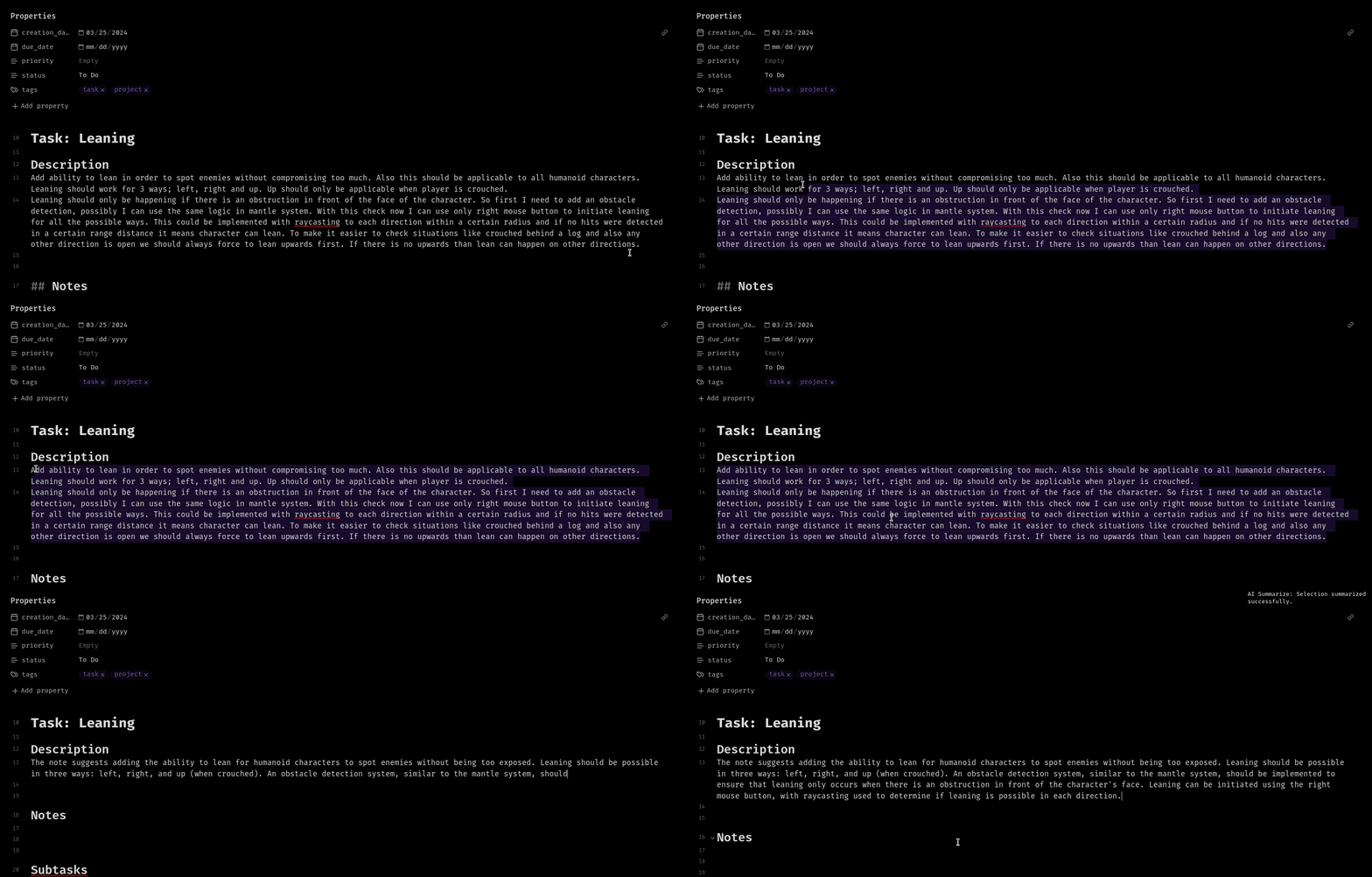
- Streaming responses: See selection summaries appear in the editor as they generate.
- Smart chunking: Large selections are split into chunks and combined into a final summary.
- Progress and cancellation: Long-running operations show progress and can be cancelled.
- Manual model refresh: Refresh available OpenAI models only when you need to.
Summary Presets
Use the right-click context menu to run one-off presets without changing your saved profile:
- Summary: Concise summary, detailed summary, bullet points, action items, study notes, meeting notes.
- Review: Review questions, flashcards, explain simply, what to remember.
- Open loops: Open loops, open questions, unresolved decisions, missing context.
Flexible Output Destinations
- Replace selection: Replace selected text with the generated summary.
- Insert below: Add output below the selected text.
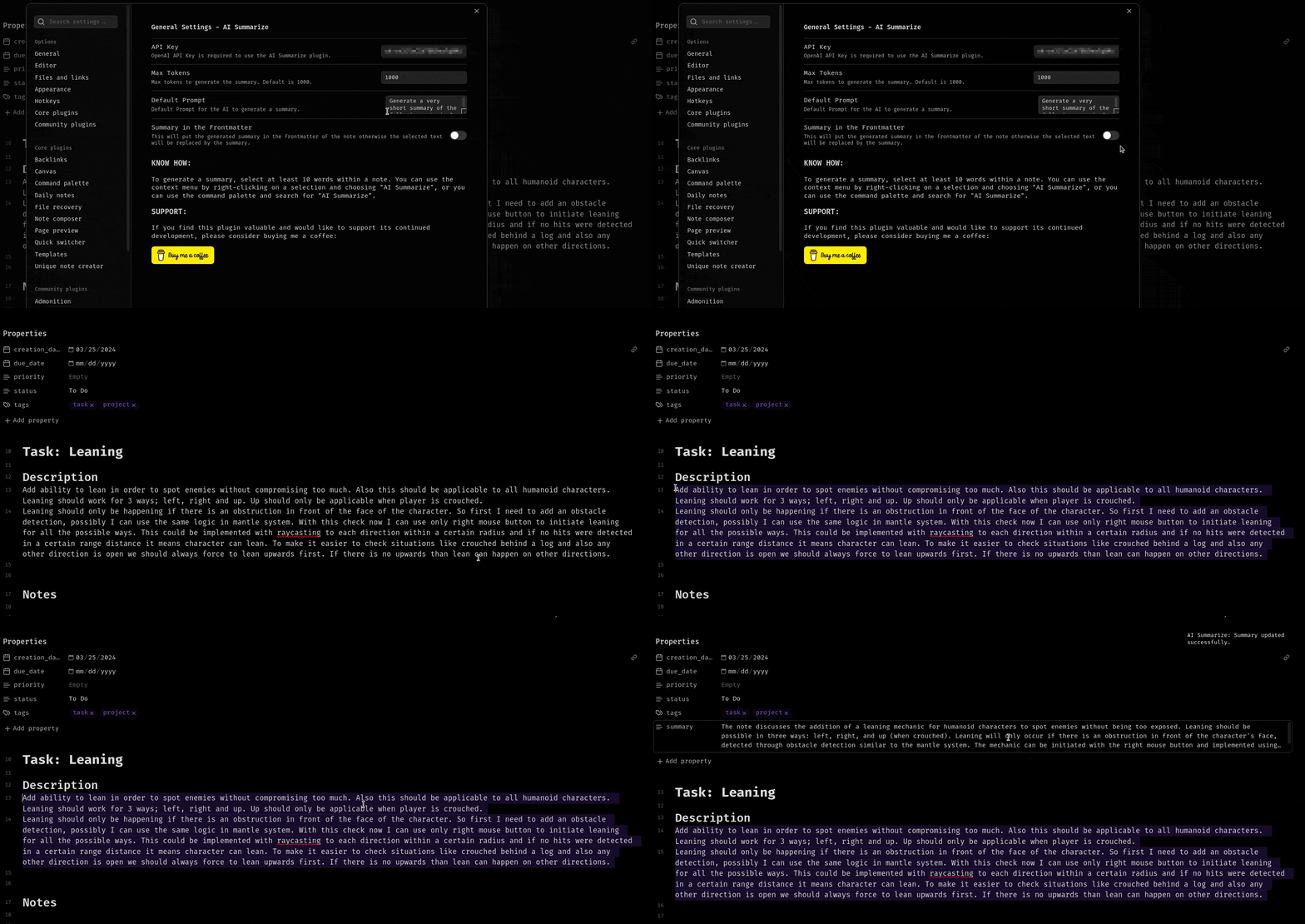
- Frontmatter: Add output to the note's YAML frontmatter under
summary. - Append to current note: Add the result to the active note.
- Create new note: Save generated output as a new note.
- Append to daily note: Send output to today's daily note.
Folder Digests
Create digests from an entire folder of notes:
- Project status: Current state, progress, risks, blockers, and next steps.
- Weekly digest: Themes, updates, completed work, and open loops.
- Research digest: Findings, evidence, contradictions, and open questions.
- Meeting digest: Decisions, action items, owners, deadlines, and follow-ups.
- Open loops digest: Folder-level questions, blockers, missing context, and unresolved decisions.
You can launch a digest from the command palette or by right-clicking a folder in the file explorer.
Link-Aware Full Note Summaries
When enabled, full-note summaries can include lightweight context from directly linked notes. The plugin prefers linked notes' summary frontmatter when available and falls back to short excerpts when needed.
Advanced Configuration
- Multiple profiles: Save different combinations of model, prompt, max tokens, system instructions, output destination, and link-aware behavior.
- Model selection: Use GPT-4o, GPT-4.1, GPT-5, reasoning models, or another available OpenAI model.
- Custom prompts: Tailor summary behavior for different note types.
- System instructions: Define tone, style, language, or output format.
- Token management: Set custom output limits with model-aware input budgeting.
Inline summarization from menu:
Frontmatter summarization:
Installation
From Obsidian Community Plugins
- Open Obsidian and navigate to Settings -> Community plugins.
- Click Browse and search for AI Summarize.
- Click Install and then Enable.
- Configure your OpenAI API key in the plugin settings.
Manual Installation
- Download the latest release from the GitHub releases page.
- Extract
main.js,manifest.json, andstyles.cssto your vault's.obsidian/plugins/ai-summarize/directory. - Reload Obsidian.
- Enable the plugin in Settings -> Community plugins.
Usage
Initial Setup
- Get an API key: Sign up at OpenAI and generate an API key.
- Configure the plugin:
- Go to Settings -> AI Summarize.
- Enter your OpenAI API key.
- Choose your preferred model or refresh the model list.
- Customize settings:
- Choose max tokens.
- Customize the default prompt and system instructions.
- Select the default output destination.
- Create profiles for different workflows.
Generating Summaries
Method 1: Context menu
- Select text in your note, at least 30 words.
- Right-click to open the context menu.
- Click AI summarize.
- Choose Active profile summary or one of the presets.
Method 2: Command palette
- Select text in your note, at least 30 words.
- Open the command palette with
Ctrl/Cmd + P. - Run AI Summarize: Summarize selection.
Method 3: Full note summary
- Open the note you want to summarize.
- Run AI Summarize: Summarize current note from the command palette.
- The result is written to your selected output destination.
Creating Folder Digests
From the command palette
- Run AI Summarize: Create digest from folder.
- Choose a folder, digest type, date filter, max files, subfolder behavior, and destination.
- Click Create digest.
From the file explorer
- Right-click a folder.
- Choose Create AI digest.
- Confirm the digest options and destination.
Cancelling Operations
Long-running AI operations show a progress notice with a Cancel button. You can also run AI Summarize: Cancel current operation from the command palette.
Starting a new AI operation cancels the previous in-progress run.
Configuration
Profile Management
Create multiple profiles for different summarization scenarios:
- Meeting notes: Bullet summaries, action items, and daily-note output.
- Research notes: Detailed summaries, review questions, and linked-note context.
- Project notes: Open loops, decisions, blockers, and folder digests.
- Study notes: Flashcards, review questions, and what-to-remember outputs.
Creating a profile:
- Go to plugin settings.
- Click New profile.
- Configure model, max tokens, prompt, system instructions, destination, and link-aware behavior.
- Name your profile.
- Switch between profiles using the dropdown.
Tips for Best Results
Prompt engineering
Good: Summarize the following in 3-4 sentences focusing on key decisions and action items.
Better: Create a concise summary highlighting: 1) main decisions made, 2) action items with owners, 3) open questions.
System instructions
- Specify language:
Always respond in English. - Define format:
Use concise markdown bullet points. - Set tone:
Use professional, academic language. - Add constraints:
Do not invent owners, deadlines, or decisions.
Notes on Large Inputs
When content is too large for the selected model:
- Selection summaries are chunked and synthesized into a final result.
- Folder digests summarize source notes first, then create a final digest.
- Link-aware summaries limit linked-note context so the active note remains the priority.
Development
npm ci
npm run build
npm run lint
For watch mode during local testing:
npm run dev
main.js is generated by esbuild and ignored by git.
Release Checklist
- Run
npm run build. - Run
npm run lint. - Confirm
package.json,manifest.json,versions.json, and the release tag use the same version. - Attach
main.js,manifest.json, andstyles.cssto the GitHub release.
Contributing
Contributions are welcome. Please test changes in a local Obsidian vault before opening a pull request.
Issues and Support
Encountered a bug or have a feature request?
- Check existing issues.
- If not found, create a new issue.
- Include your Obsidian version, plugin version, model used, steps to reproduce, and any error messages.
License
This project is licensed under the GPL-3.0 License.
Support the Project
If you find this plugin valuable and want to support continued development:
Other ways to support:
- Star the repository.
- Report bugs and suggest features.
- Improve documentation.
- Contribute code.
- Share the plugin with others.
Author
Alp Sariyer
- Website: alpsariyer.dev
- GitHub: @ravenwits
Acknowledgments
- Built with the Obsidian API.
- Powered by OpenAI.
- Inspired by the Obsidian community's need for practical AI-assisted note workflows.
Happy summarizing.
Made for the Obsidian community.