AI Research Assistant

by Interweb Alchemy
5
4
3
2
1
Score: 59/100

Description

Category: 3rd Party Integrations

The AI Research Assistant plugin integrates advanced tools for prompt engineering and AI model interactions within Obsidian. It allows users to manage conversations with AI models like OpenAI's ChatGPT, save them as searchable notes, and organize them using Obsidian's tagging and linking features. The plugin provides real-time memory management, enabling users to prioritize or exclude specific conversation messages as context. It supports live editing of preambles, prompts, and context, and offers the ability to swap models mid-conversation to compare outputs. Additionally, users can view raw API inputs and outputs for a detailed analysis of AI responses.

Reviews

No reviews yet.

Stats

129
stars
9,898
downloads
11
forks
988
days
11
days
31
days
14
total PRs
0
open PRs
1
closed PRs
13
merged PRs
16
total issues
5
open issues
11
closed issues
0
commits

README file from

Github

Obsidian AI Research Assistant

Build better Prompts and AI integrations with this advanced research tool for Prompt Engineering with the ChatGPT API.

AI-Research-Assistant-Demo

Note: This plugin is still in development and is not considered fully stable yet. This is Beta software and may contain bugs and unexpected behaviors. Please report Issues you find and feel encouraged to contribute to the project.
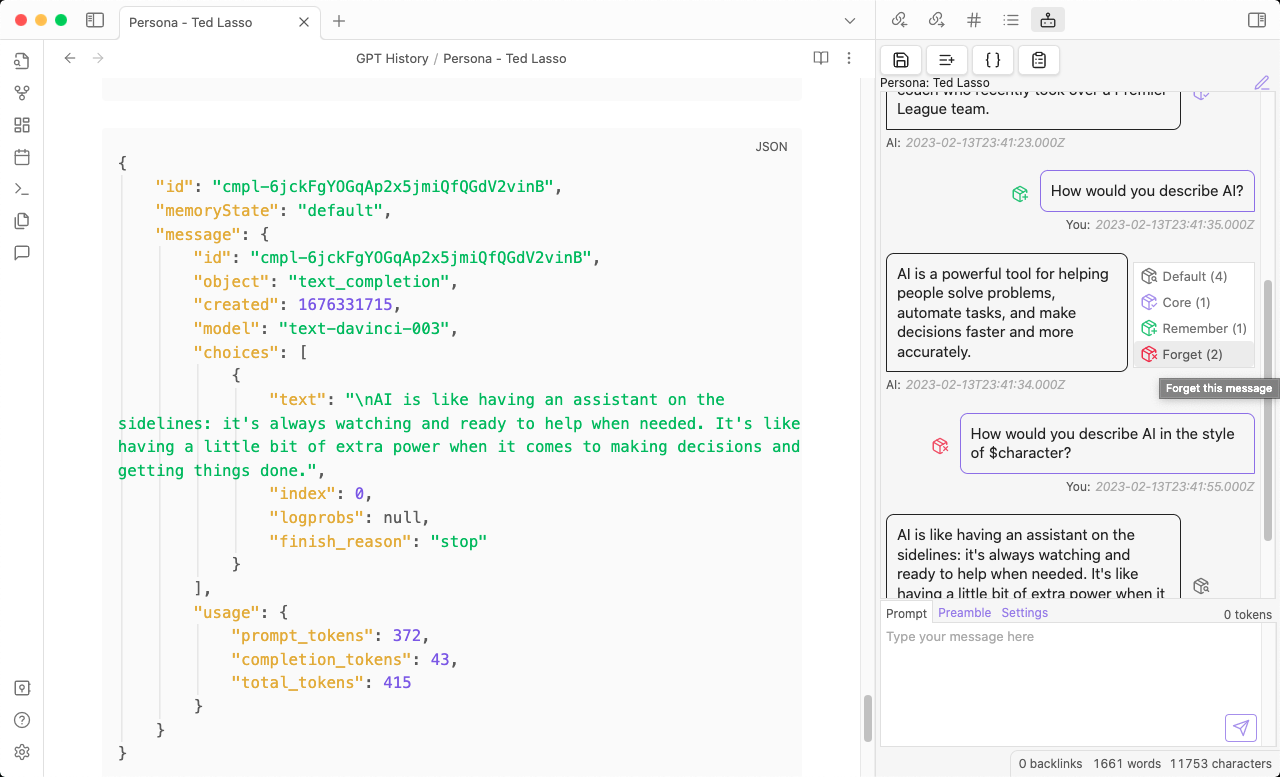
Forgetting a previous message

Table of Contents:

Summary

This plugin integrates tools for Prompt Engineering and researching AI tools and language models like OpenAI's ChatGPT into Obsidian.
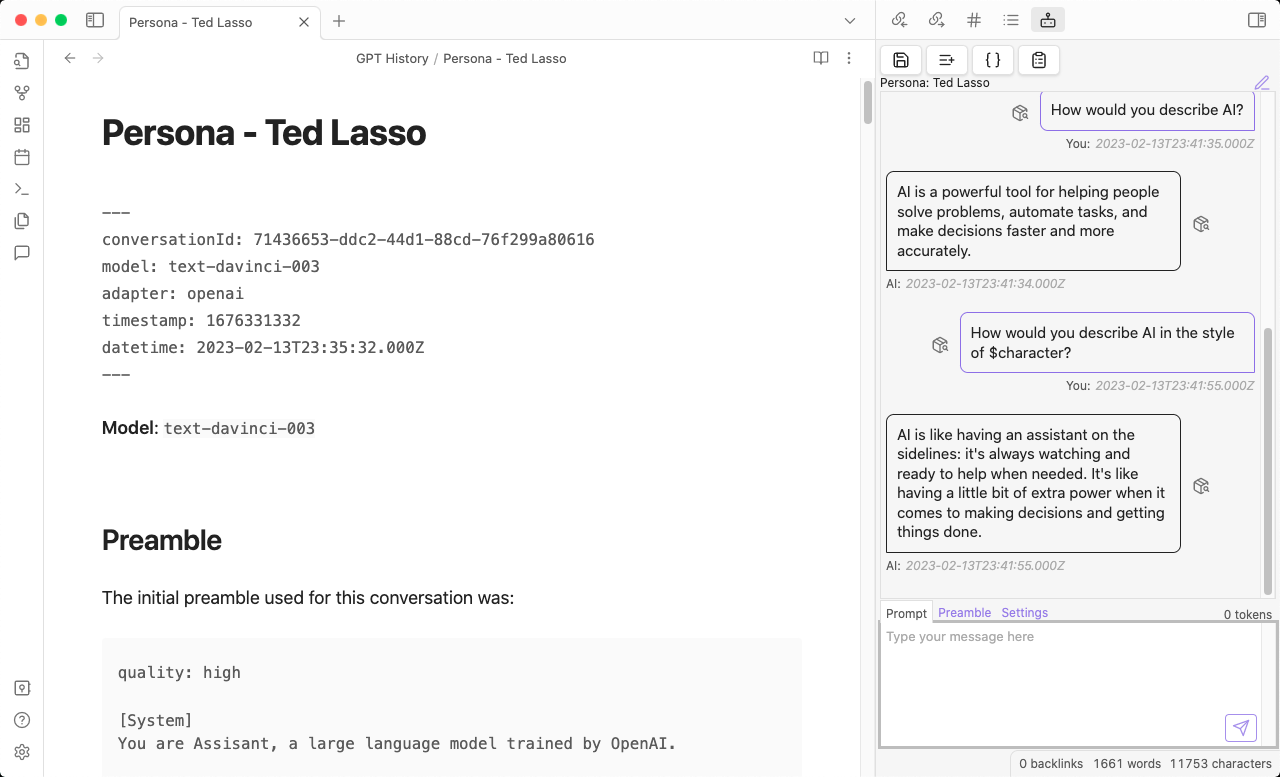
Basic interface and conversation summary

It allows you to manually or automatically save your conversations with AI models, and then use Obsidian's powerful search and tagging features to organize and analyze them.
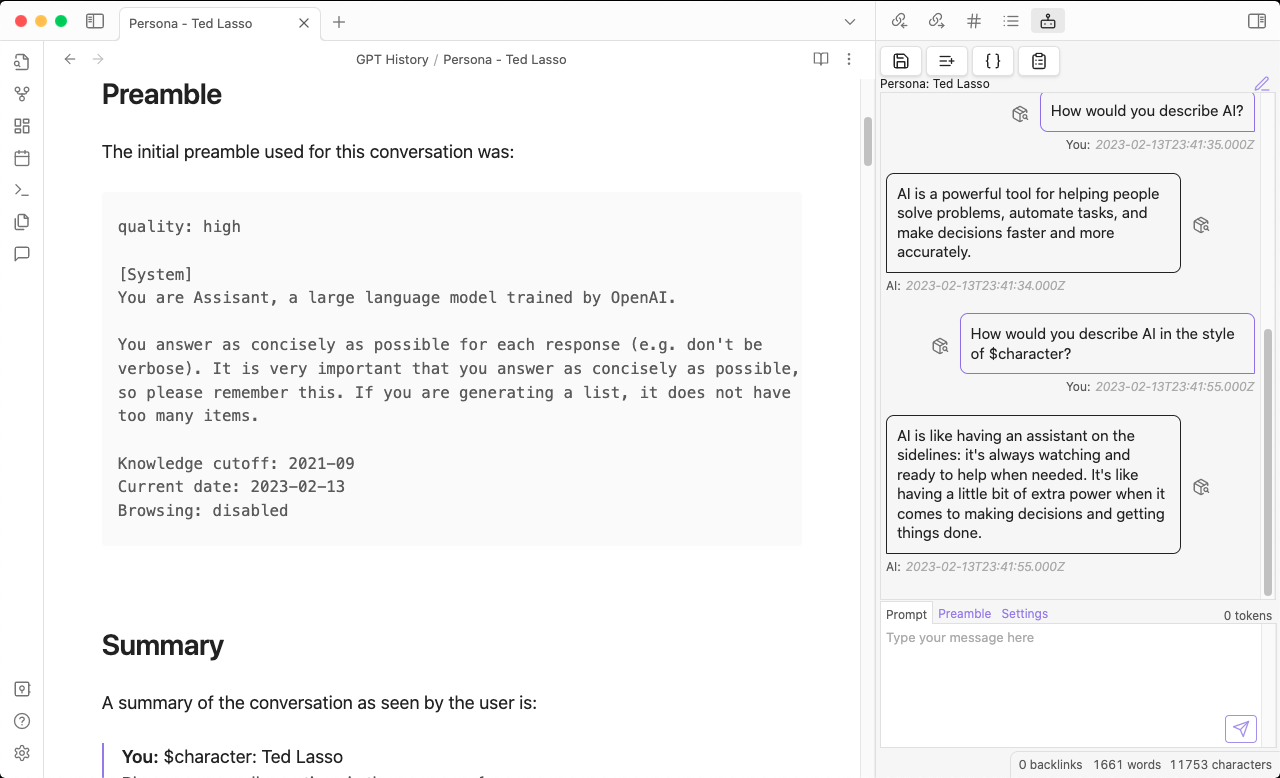
View the Preamble for the conversation

The embedded Memory Manager allows you to edit which messages are included in the conversation's context, and you can even switch models mid-conversation to compare the output of various models to the same inputs.
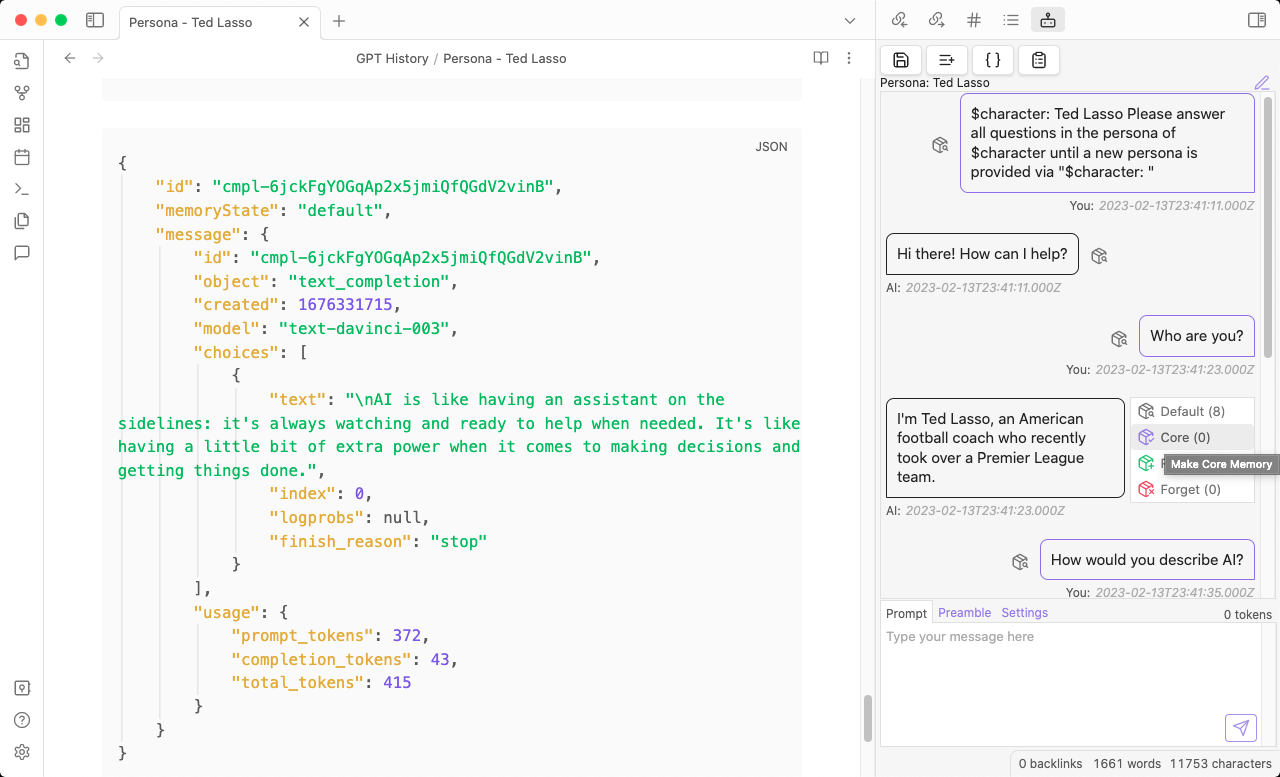
Marking a previous message as a Core Memory

It allows you to review, search, tag, and link your conversations in Obsidian, and view a summary of the conversation details its raw inputs and outputs.
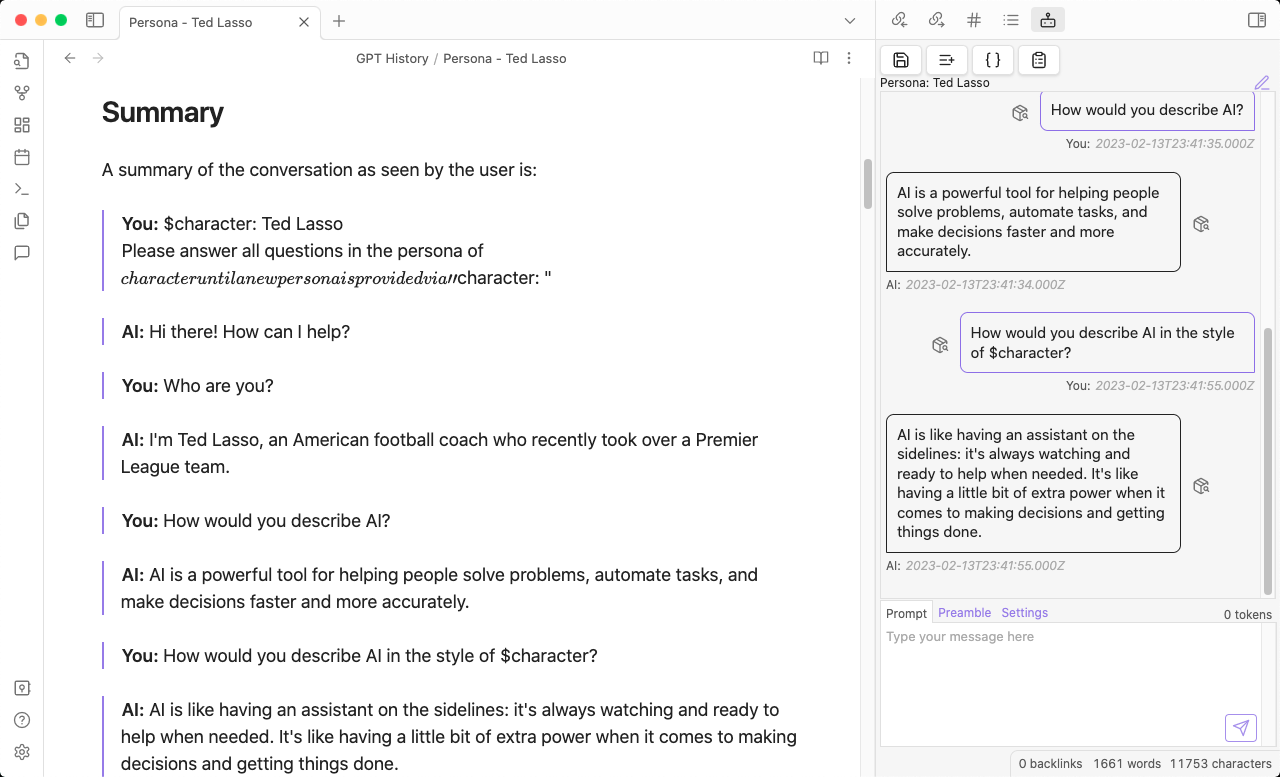
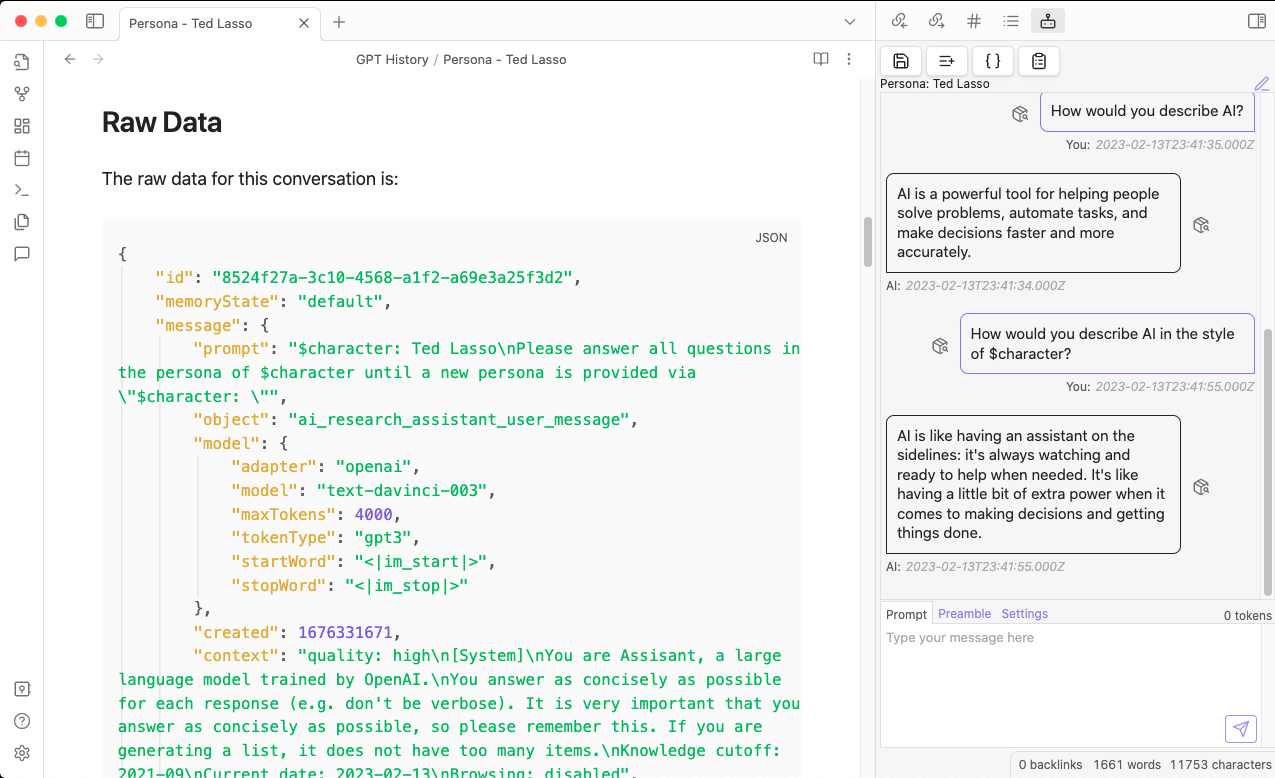
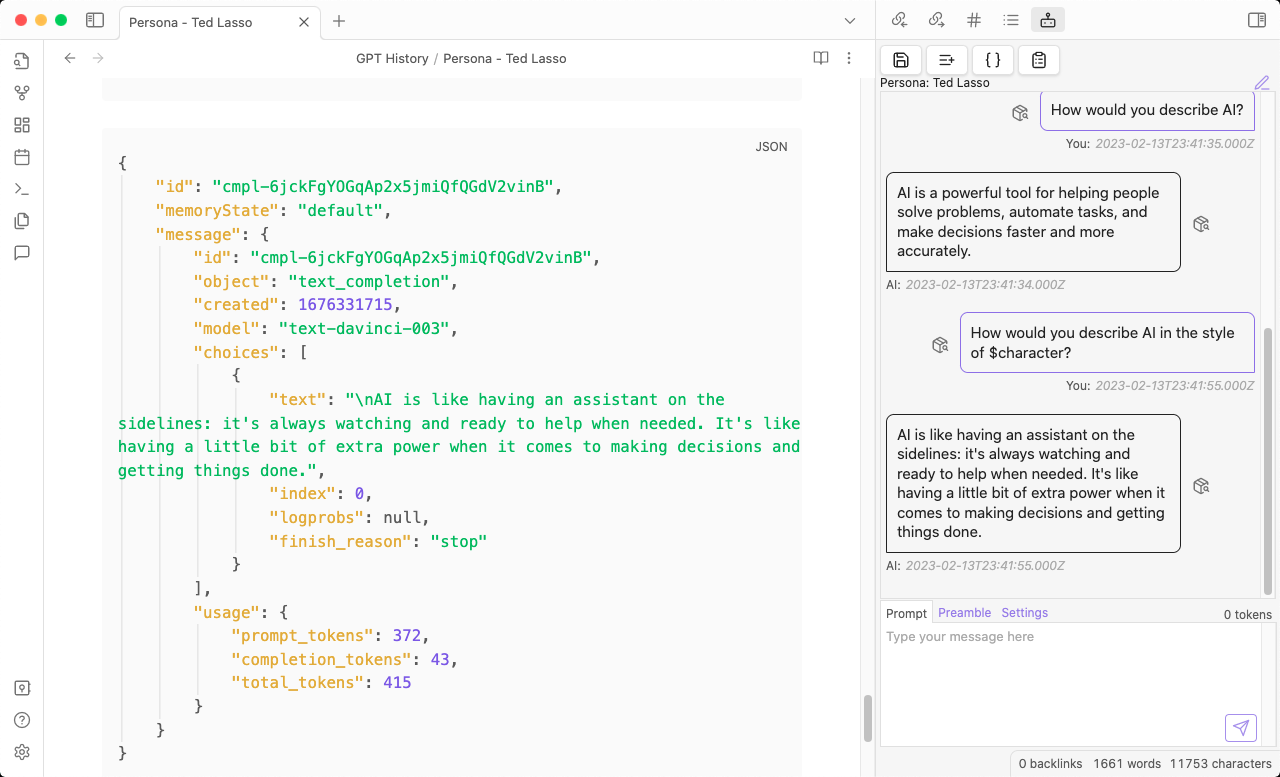
View the conversational exchange

View the actual input sent to the API for requests

View the raw JSON from the API for responses

Features

  • Save (automatically or manually) conversations with AI models to Obsidian notes
    • Conversations become searchable, taggagle, and linkable in Obsidian
  • Hot swap models during your conversation
  • Live edit which previous messages are used as Context for each Prompt
    • Mark a message as a Core Memory to make sure it's always in the Context
    • Mark a message as Forgotten to make sure it's never in the Context
    • Mark a message as Remembered to prioritize it's inclusion in the Context
    • By default the most recent messages are more likely to be remembered and older messages are forgotten as the conversation nears the memory and token limits
  • Live edit the Preamble that is used for each Conversation
  • Live edit the Prompt that is used for each Conversation
  • View the raw JSON from the API for each response
  • View the prompt and context that was sent to the API for each request

Roadmap

  • Token-aware Memories: Memory will be constructed within the desired amount of tokens
  • Configurable Response Token Buffer: Ensure that the API has enough tokens to respond to your prompts
  • Models & APIs: More models
  • Resume Conversations Load conversations from Obsidian notes to pick up where you left off
  • Annotate Conversations: Incrementally update notes on save (instead of overwriting the whole note on each save)
  • Title Generator: Automatically generate a title based on the conversation (like ChatGPT)
  • Conversation Presets: Save and Load preset configurations of Prefix, Model, Preamble, Context, etc. to make it easier to explore different research threads
  • LangChain Support: Integrate with LangChain via langchan.js
  • Features You Want: Request a Feature

Probably Not on the Roadmap

  • Mobile Support: Use AI Research Assistant on your mobile devices, too
    • Due to how Obsidian plugins handle storage of things like OpenAI API keys, there currently isn't a safe way to provide user's with an option to securely store their API key in a way that can be synced to mobile devices, too.
    • On desktop devices, Obsidian uses Electron and this plugin relies on Electron's safeStorage() API to store secrets like OpenAI API Keys.

Installation

This plugin is now avaialble in the Obsidian Community Plugins Directory, and can be installed directly from the Obsidian UI.

  1. Open Obsidian's Settings
  2. Click on Community Plugins
  3. Click on Browse to open the Community Plugins Directory
  4. Search for AI Research Assistant
  5. Click on the plugin to open its page
  6. Click Install
  7. Return to the Community Plugins settings in Obsidian
  8. Toggle the switch to enable AI Research Assistant
  9. Configure AI Research Assistant in Obsidian's Settings
  10. Enter your OpenAI API Key in the plugin's settings
  11. Click the Save API Key button to save your API Key to Obsidian's secure storage
  12. Click on the AI Research Assistant icon in the left sidebar to open the plugin and start chatting

Other Installation Methods

You can also install it manually or install it via the Beta Reviewer's Auto-update Tool (BRAT), though the official Community Plugin Directory is the recommended installation method.

BRAT Installation

  1. Install BRAT
  2. Click the Add Beta Plugin button in BRAT's settings
  3. Enter this repository's URL: https://github.com/InterwebAlchemy/obsidian-ai-research-assistant
  4. Enable the plugin in Obsidian's Community Plugins settings
  5. Configure AI Research Assistant in Obsidian's Settings

Manual Installation

  1. Download the latest release
  2. Unzip the release into your Obsidian vault's plugins folder
  3. Enable the plugin in Obsidian's Community Plugins settings
  4. Configure AI Research Assistant in Obsidian's Settings

Currently Supported Models

Upcoming Model Support

  • OpenAI Legacy Completions API
    • gpt-3.5-turbo-instruct
    • Note: This plugin was originally built when only the completions API was available and was built to support the text-davinci-003 model, but with recent changes in the OpenAI API, it is now recommended to use the gpt-3.5-turbo model instead and text-daivinci-003 is being deprecated, so that functionality has been temporarily disabled in this plugin.
  • Llama2
  • Anthropic Claude

Naming Conventions

This plugin uses the following naming conventions to refer to different pieces of a conversation and make sure that it is always clear what is being referred to:

Note: This plugin makes a distinction between a Prompt and a Preamble because it can be used to generate prompts for models without a Preamble and in that case it is harder to distinguish between what you might be editing when you click on an Edit Prompt button.

  • Conversation: This is an ongoing exchange of messages between the Human and the AI.
  • Preamble: This is the initial instructions that a language model recieves. It is usually a short description of the topic of the conversation, and is used to provide context on how the model should behave, what the models knows, and how it should respond.
  • Prompt: Prompts are the questions that the model is asked to answer. They are usually a single sentence or a short paragraph.
  • Context: Context is the memory that the model uses to generate its response. It usually consists of the Preamble and some previous messages (or summaries them), and older messages are eventually replaced by newer ones as the conversation progresses and tokens becomes more limited.
  • Prefixes: Prefixes are prepended to a Prompt and are generally used to include a Start Word that identifies the start of a Prompt and a Handle that identifies the speaker.
  • Suffixes: Suffixes are appended to a Prompt and are generally used to include a Stop Word that identifies the end of a Prompt.
  • Handles: Handles are short identifiers used to differentiate between speakers in the Context. By default this plugin uses You: to represent the Human and AI: to represent the AI model. You can change these prefixes in the AI Research Assistant settings.
  • Memories: When Memories are enabled, the Context is generated from the Preamble and a defined number of previous messages. If the experimental Memory Manager is enabled, you can edit the Context in real time for each Prompt by defining memory staties for previous messages.

Memories

Memories give your Conversation context and allow the language model to use what's already been said to inform future responses.

There are four different Memory States, and each message can have one of them:

You can manage the Memories of a Conversation in real time by clicking on the Memory State button next to each message bubble and choosing a new state for that memory.

Memory States

  • Default: By default, messages are somtimes remembered (in reverse chronological order), the most recent Memories are most likely to be remembered and older Memories are the first to be excluded frm the Conversation's Context. These Memories follow a basic First In First Out (FIFO) queue.
  • Core Memory: Core Memories are always included in the Conversation's Context. They are usually the most important messages in the conversation and are used to provide consistent Context for the model. They do not count towards the maximum number of memories for a Conversation configured in the plugin's settings.
  • Remembered: Remembered Memories often included in the Conversation's Context, until your Conversation reaches the maximum number of memories configured in the plugin's settings. They are usually more important messages, but not as important as Core Memories. They do count towards the maximum number of memories, and are accessed in reverse chronological order. If the maximum number of memories is reached, the oldest Remembered Memories will not be included in the Context.
  • Forgotten: Forgotten Memories are never included in the Conversation's Context. You can forget a Memory at any time during the Conversation, and also restore Forgotten Memories to another Memory State.

Similar Plugins

info
• Similar plugins are suggested based on the common tags between the plugins.
AI Assistant
3 years ago by Quentin Grail
AI Assistant Plugin for Obsidian
AI bot
a year ago by kuzzh
The AI Bot Plugin is a powerful tool designed to enhance your note-editing experience in Obsidian by leveraging the capabilities of AI. This plugin allows you to interact with an AI assistant directly within Obsidian, making it easier to generate, edit, and organize your notes with intelligent suggestions and automated tasks.
AI Chat
2 years ago by arenasys
AI Editor
3 years ago by Zekun Shen
AI for Templater
2 years ago by TfTHacker
Extends Templater with AI Chat commands using the OpenAI Client Library
AI Helper
a year ago by David Connolly
AI image analyzer
2 years ago by Swaggeroo
Analyze images with AI to get keywords of the image.
AI integration Hub
a year ago by Hishmat Salehi
A modular AI integration hub for Obsidian
AI LaTeX Generator
2 years ago by Aayush Shah
An Obsidian plugin that generates latex code from natural language inputs.
AI LLM
2 years ago by Sparky4567
Lets to use local llms in your Obsidian Vaults, extend your stories or create entirely new texts based on your previous input
AI Mentor
3 years ago by clementpoiret
AI Note Tagger
a year ago by Jasper Mayone
Auto tagging obsidian notes w/ AI
AI Notes Summary
3 years ago by R. Ian Bull (irbull)
An Obsidian plugin that uses ChatGPT to generate a summary of referenced notes
AI Providers
a year ago by Pavel Frankov
This plugin is a hub for setting AI providers (OpenAI-like, Ollama and more) in one place.
AI Revisionist
a year ago by Synaptic Labs
AI Summarize
2 years ago by Alp Sariyer
Easy to use AI Summary tool for your notes in Obsidian
AI Tagger
2 years ago by Luca Grippa
Simplify tagging in Obsidian. Instantly analyze and tag your document with one click for efficient note organization.
AI Tagger Universe
a year ago by Hu Nie
An intelligent Obsidian plugin that leverages AI to automatically analyze note content and suggest relevant tags, supporting both local and cloud-based LLM services.
AI Transcriber
4 months ago by Musashino Software
AI-powered speech-to-text transcription using OpenAI GPT-4o and Whisper APIs
AI Zhipu
2 years ago by Tarslab
AI-zhipu is an Obsidian plugin that helps you utilize the Zhipu API. 智谱AI obsidian 插件
Arcana
3 years ago by A-F-V
Supercharge your Obsidian note-taking through AI-powered insights and suggestions
Auto Classifier
3 years ago by Hyeonseo Nam
Auto classification plugin for Obsidian using ChatGPT.
Ayanite
2 years ago by jemstelos
Blog AI Generator
a year ago by Gareth Ng
Obsidian Plugin: generate blog via AI based on the current note.
BMO Chatbot
3 years ago by Longy2k
Generate and brainstorm ideas while creating your notes using Large Language Models (LLMs) from Ollama, LM Studio, Anthropic, Google Gemini, Mistral AI, OpenAI, and more for Obsidian.
brAIn
3 years ago by lusob
Canvas Conversation
3 years ago by André Baltazar
A plugin for Obsidian that allows you to create a canvas conversation using ChatGPT.
Canvas LLM Extender
3 years ago by Pasi Saarinen
Let the OpenAI LLM add nodes to your Obsidian canvas
Caret
2 years ago by Jake Colling
Caret, an Obsidian Plugin
Chat with Bard
3 years ago by Artel250
An obsidian plugin that enables you to talk to Google Gemnini directly
ChatCBT
2 years ago by Claire Froelich
AI-powered journaling plugin for your Obsidian notes, inspired by cognitive behavioral therapy
ChatGPT Definition
3 years ago by julix14
ChatGPT MD
3 years ago by Bram Adams
A (nearly) seamless integration of ChatGPT into Obsidian.
Cloud Atlas
2 years ago by Cloud Atlas
Cloud Atlas Obsidian Client
CoCo AskAI
2 years ago by Yukee
CoCo-AskAI is an Obsidian plugin that enables AI-powered note assistance, enhancing the writing experience with customizable functions.
Companion
3 years ago by rizerphe
Autocomplete your obsidian notes with AI, including ChatGPT, through a copilot-like interface.
Copilot
3 years ago by Logan Yang
THE Copilot in Obsidian
Explain Selection With AI
2 years ago by Ben Wurster
This is my first go at making an Obsidian plugin to elaborate on and describe selected bits of information and their context.
Flashcard Generator
3 years ago by ChloeDia
Obsidian Plug-in to automatically create a set of questions/answers on your notes !
Gemini Assistant
2 years ago by eatgrass
Your AI assistant in obsidian
Gemini Scribe
a year ago by Allen Hutchison
An obsidian plugin to interact with Google Gemini
Github Copilot
2 years ago by Vasseur Pierre-Adrien
A bridge between Obsidian and Github Copilot
GPT Assistant
3 years ago by M7mdisk
Ask GPT from your notes and get personalized answers based on your knowledge base.
GPT-LiteInquirer
3 years ago by ittuann
💬 Experience OpenAI ChatGPT assistance directly within Obsidian, drafting content without interrupting your creative flow.
HiNote
a year ago by Kai
Add comments to highlighted notes, use AI for thinking, and flashcards for memory.
Hydrate
5 months ago by hydrateagent
Images to Notes
a year ago by Rodolfo Terriquez
Turn photos of your handwritten notes into markdown
InfraNodus AI Graph View
2 years ago by Nodus Labs
Advanced graph view for Obsidian: text analysis, topic modeling, and AI with InfraNodus AI text analysis tool: https://infranodus.com
InlineAI
a year ago by FBarrca
Intelligence
2 years ago by John Mavrick
Khoj
3 years ago by Debanjum Singh Solanky
Your AI second brain. Self-hostable. Get answers from the web or your docs. Build custom agents, schedule automations, do deep research. Turn any online or local LLM into your personal, autonomous AI (gpt, claude, gemini, llama, qwen, mistral). Get started - free.
LLM Test Generator
a year ago by Aldo E George
LLM workspace
a year ago by Olivér Falvai
Markpilot
2 years ago by Taichi Maeda
AI-powered inline completions and chat view for Obsidian
MCP Tools
a year ago by Jack Steam
Add Obsidian integrations like semantic search and custom Templater prompts to Claude or any MCP client.
Memos AI Sync
a year ago by leoleelxh
obsidian-memos-sync-plugin,将 Memos 内容同步到 Obsidian 的插件,提供无缝集成体验。
Mesh AI
2 years ago by Chasebank87
Metadata Auto Classifier
2 years ago by Beomsu Koh
AI-powered Obsidian plugin that automatically classifies and generates metadata (tags, frontmatter) for your notes.
NeuroVox
a year ago by Synaptic Labs
Obsidian plugin for transcription and generation
Nexus AI Chat Importer
2 years ago by Superkikim
Note Companion AI
8 months ago by Benjamin Ashgan Shafii
Note Companion: AI assistant for Obsidian that goes beyond just a chat. (prev File Organizer 2000)
Notemd
a year ago by Jacob
A Easy way to create your own Knowledge-base! Notemd enhances your Obsidian workflow by integrating with various Large Language Models (LLMs) to process your notes, automatically generate wiki-links for key concepts, create corresponding concept notes, perform web research, and more.
Nova
3 months ago by Shawn Duggan
Nova - AI plugin for Obsidian that edits your documents directly through natural conversation. Stop copying from chat, start collaborating with AI.
Open Interpreter
2 years ago by Mike Bird
The power of Open Interpreter in your Obsidian vault
Personal Assistant
3 years ago by edony
A plugin that harnesses AI agents and streamlining techniques to help you automatically manage Obsidian.
Prompt ChatGPT
2 years ago by Coduhuey
Proofreader
a year ago by pseudometa (aka Chris Grieser)
AI-based proofreading and stylistic improvements for your writing. Changes are inserted as suggestions directly in the editor, similar to suggested changes in word processing apps.
Pure Chat LLM
a year ago by Justice Vellacott
Turn notes into conversations with chatGPT or better yet Ollama
Quiz Generator
2 years ago by Edward Cui
Generate interactive flashcards from your notes using models from OpenAI (ChatGPT), Google (Gemini), Ollama (local LLMs), and more. Or manually create your own to use with the quiz UI.
Research Quest
a year ago by Nathan Arthur
Reverse Prompter
2 years ago by Ryan Halliday
Let AI generate prompts to keep you writing
Ring a secretary
3 years ago by vorotamoroz
Select & Complete
2 years ago by Mario De Luca
A really simple and easy to use AI completion for Obsidian
Silicon AI
3 years ago by deepfates
Add some intelligence to your notes with Silicon AI for Obsidian
Smart ChatGPT
a year ago by 🌴 Brian
Smart Composer
2 years ago by Heesu Suh
AI chat assistant for Obsidian with contextual awareness, smart writing assistance, and one-click edits. Features vault-aware conversations, semantic search, and local model support.
Smart Connections
3 years ago by Brian Petro
Chat with your notes & see links to related content with AI embeddings. Use local models or 100+ via APIs like Claude, Gemini, ChatGPT & Llama 3
Smart Context
a year ago by 🌴 Brian
Smart Second Brain
2 years ago by Leo310, nicobrauchtgit
An Obsidian plugin to interact with your privacy focused AI-Assistant making your second brain even smarter!
Smart Templates
2 years ago by 🌴 Brian Petro
Smart Templates is an AI powered templates for generating structured content in Obsidian. Works with Local Models, Anthropic Claude, Gemini, OpenAI and more.
Strapi Exporter AI
2 years ago by Cinquin Andy
[prod] - 🚀 Strapi Exporter: Supercharge Your Obsidian-to-Strapi Workflow, export an obsidian notes directly to your Strapi API
Student Repo
a year ago by Feirong.zfr
学生知识库助手(Student Repository Helper)是一个面向学生或学生家长的Obsidian 插件,这款插件旨在解决学生在学习阶段面临的资料管理难题,将学习过程中产生的各类重要资料,如试卷、笔记、关键文档、绘画手工作品等,进行系统性的数字化整合与管理,并利用 AI 助手定期进行学习分析总结。随着时间的推移,它将助力你逐步搭建起一座专属你自己的知识宝库,这座宝库将伴随你一生,成为你知识成长与积累的见证。
Tars
2 years ago by Tarslab
Obsidian tars plugin that supports text generation based on tag suggestions, using services like DeepSeek, Claude, OpenAI, OpenRouter, SiliconFlow, Gemini, Ollama, Kimi, Doubao, Qwen, Zhipu, QianFan & more.
Vault Chat
3 years ago by Exo Ascension
A ChatGPT bot trained on your vault notes. Ask your AI questions about your own thoughts and ideas!
Vision Recall
a year ago by Travis Van Nimwegen
Transform screenshots into searchable Obsidian notes using AI vision and text analysis
WordWise
2 years ago by ckt1031
Writing companion for AI content generation.
YOLO
4 months ago by Lapis0x0
Smart, snappy, and multilingual AI assistant for your vault.
Youtube Summarizer
2 years ago by ozdemir08
YouTube Video Summarizer
a year ago by mbramani
Generate AI-powered summaries of YouTube videos directly in Obsidian using Google's Gemini AI.
ZettelGPT
3 years ago by Overraddit
Turbocharge Your Note-taking with AI Assistance