YOLO

by Lapis0x0
5
4
3
2
1
Score: 64/100

Description

The YOLO plugin (You Orchestrate, LLM Operates) brings comprehensive AI capabilities to your workflow through multiple interaction modes. Chat with AI models in the sidebar while treating your entire vault as context. Smart Space lets you generate content anywhere in your notes. Quick Ask provides inline assistance with three modes: conversational queries, preview-based edits and direct text modifications. Tab completion offers real-time AI suggestions as you write. The plugin supports multiple providers including OpenAI, Claude, Gemini, DeepSeek and Groq.

Reviews

No reviews yet.

Stats

1192
stars
56,098
downloads
81
forks
157
days
0
days
3
days
129
total PRs
1
open PRs
37
closed PRs
91
merged PRs
247
total issues
10
open issues
237
closed issues
128
commits

RequirementsExperimental

  • API key from supported AI provider (OpenAI, Anthropic, Google Gemini, or Groq)

Latest Version

3 days ago

Changelog

1.5.12.8 Long Conversation Performance & Fixes 🚀

🚀 Long Conversation Performance

  • Long Agent conversations with many tool calls no longer slow down over time: collapsed tool cards now skip processing their hidden parameters and result content, and unchanged tool cards from earlier turns are no longer re-rendered as new responses stream in (#420).
  • Large tool outputs are automatically truncated in the UI instead of rendering the full content at once. The model still receives the complete result; only the on-screen display is shortened (#420).

🛠️ Fixes

  • Fixed the update toast not showing the actual release notes for the new version.
  • Fixed some Streamable HTTP MCP servers failing to connect inside Obsidian due to CORS / Chromium fetch restrictions, and added compatibility for JSON-response MCP gateways such as DingTalk MCP Gateway (#417).
  • Fixed ChatGPT OAuth health checks, chat requests, and model list fetching for Codex models, avoiding failures caused by endpoint parameter incompatibilities and making the available model list more accurate. Thanks @bartolli for finding and fixing this (PR #419).
  • Fixed the mobile chat input leaving a large gap above the keyboard when the keyboard pops up; the input area now stays anchored just above the keyboard more reliably.

✨ Polish

  • Improved fs_edit parameter guidance so the model is less likely to call it without proper anchoring info, increasing edit tool success rate.
  • The fs_read tool card now shows the concrete file paths when reading a small number of files, and only abbreviates when many files are read at once.
  • Exported configuration files are now saved to a fixed YOLO/Exports directory inside the vault, making them easy to find on mobile as well.

1.5.12.8 长对话性能优化与修复 🚀

🚀 长对话性能

  • 长 Agent 对话中大量工具调用结果带来的卡顿明显缓解:折叠的工具卡现在会避免处理隐藏的大型参数和结果内容,生成过程中未变化的旧工具卡也不会被重复渲染 (#420)。
  • 大输出工具卡现在会在界面上自动按长度截断展示,不再一次性渲染整段内容,模型收到的仍是完整结果 (#420)。

🛠️ 修复

  • 修复更新提示弹窗里看不到本次版本更新内容的问题。
  • 修复部分 Streamable HTTP MCP 服务在 Obsidian 中因 CORS / Chromium fetch 限制无法连接的问题,并兼容钉钉 MCP Gateway 这类 JSON 响应模式的 MCP 配置 (#417)。
  • 修复 ChatGPT OAuth 下 Codex 模型的连接检测、对话请求和模型列表获取问题,避免因端点参数不兼容导致请求失败,并让可用模型列表显示更准确。感谢 @bartolli 发现并修复 (PR #419)。
  • 修复移动端聊天输入框在键盘弹出时与键盘之间出现大块空白的问题,输入区现在会更稳定地贴近键盘上方。

✨ 体验优化

  • 优化 Agent 文本编辑工具的参数说明,减少模型在调用 fs_edit 时因缺少定位信息导致的失败,提高编辑工具调用的成功率。
  • 优化读取工具调用卡片的缩略显示逻辑:读取少量文档时会直接展示具体文档路径,多个文档时再自动省略。
  • 优化配置导出体验:导出的配置文件现在会保存到库内 YOLO/Exports 目录,移动端也能直接找到文件。

README file from

Github

What's New

  • 1.5: Introduces a new Agent runtime that turns AI from Q&A into active collaboration—with full tool calling, MCP, Skills, desktop Bash, subagents, and web search—plus smarter long-session context and memory, refreshed hybrid RAG, focus/PDF awareness, and multi-window chat with background Agents.

Highlights

🤖 Agent Mode

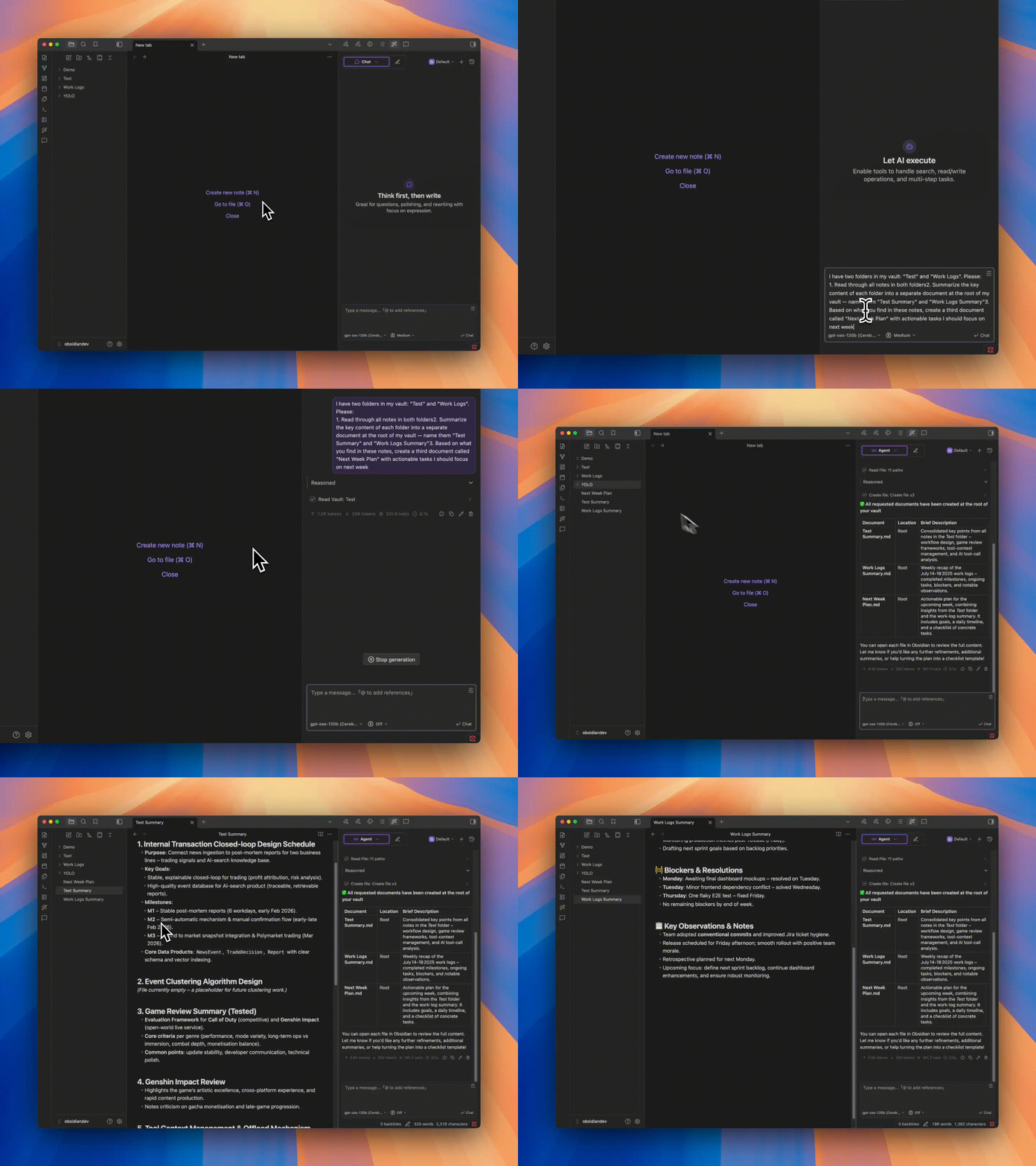
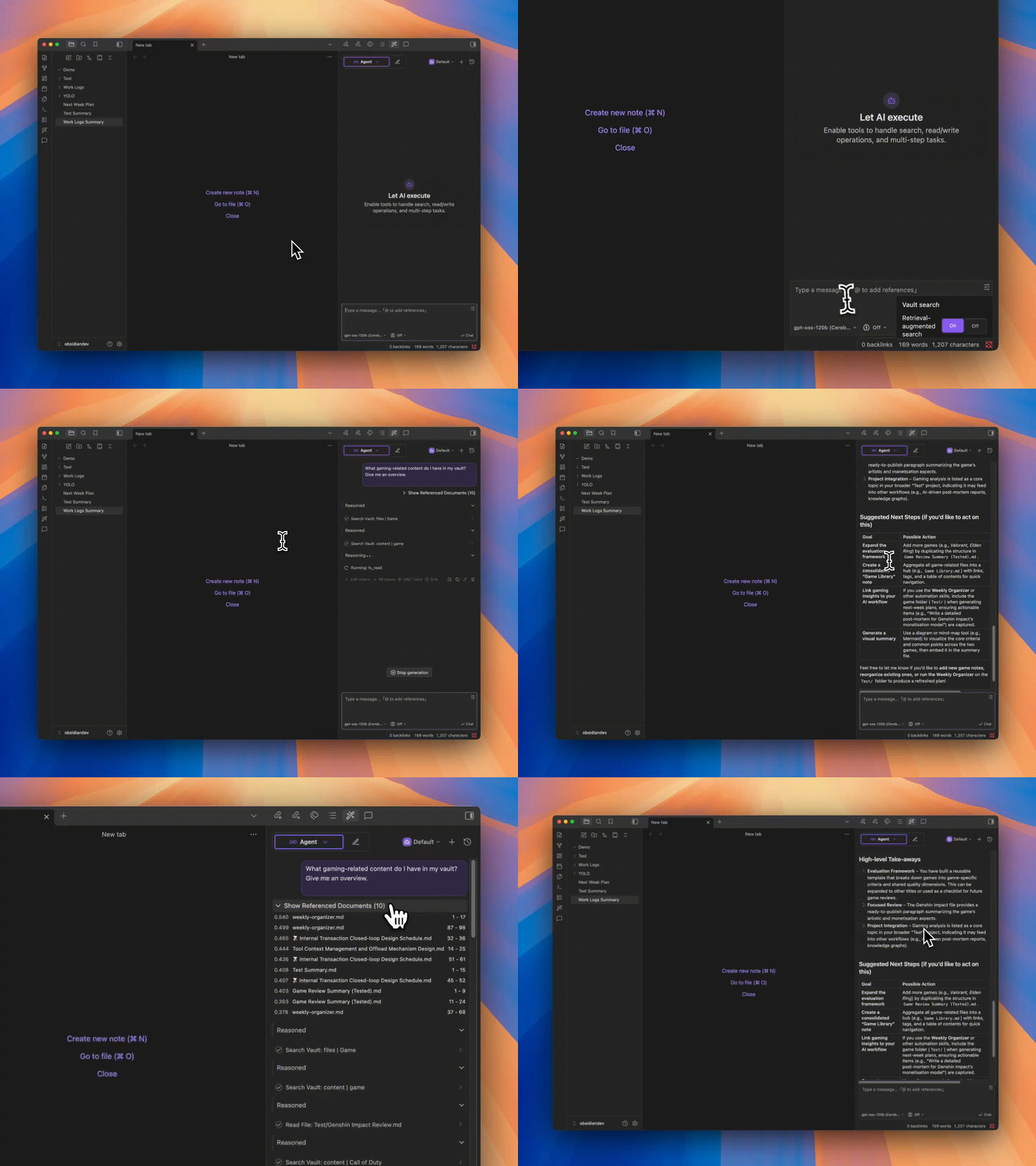
YOLO's Agent mode lets LLMs go beyond just "Q&A machines" — they can actually operate on your Vault.

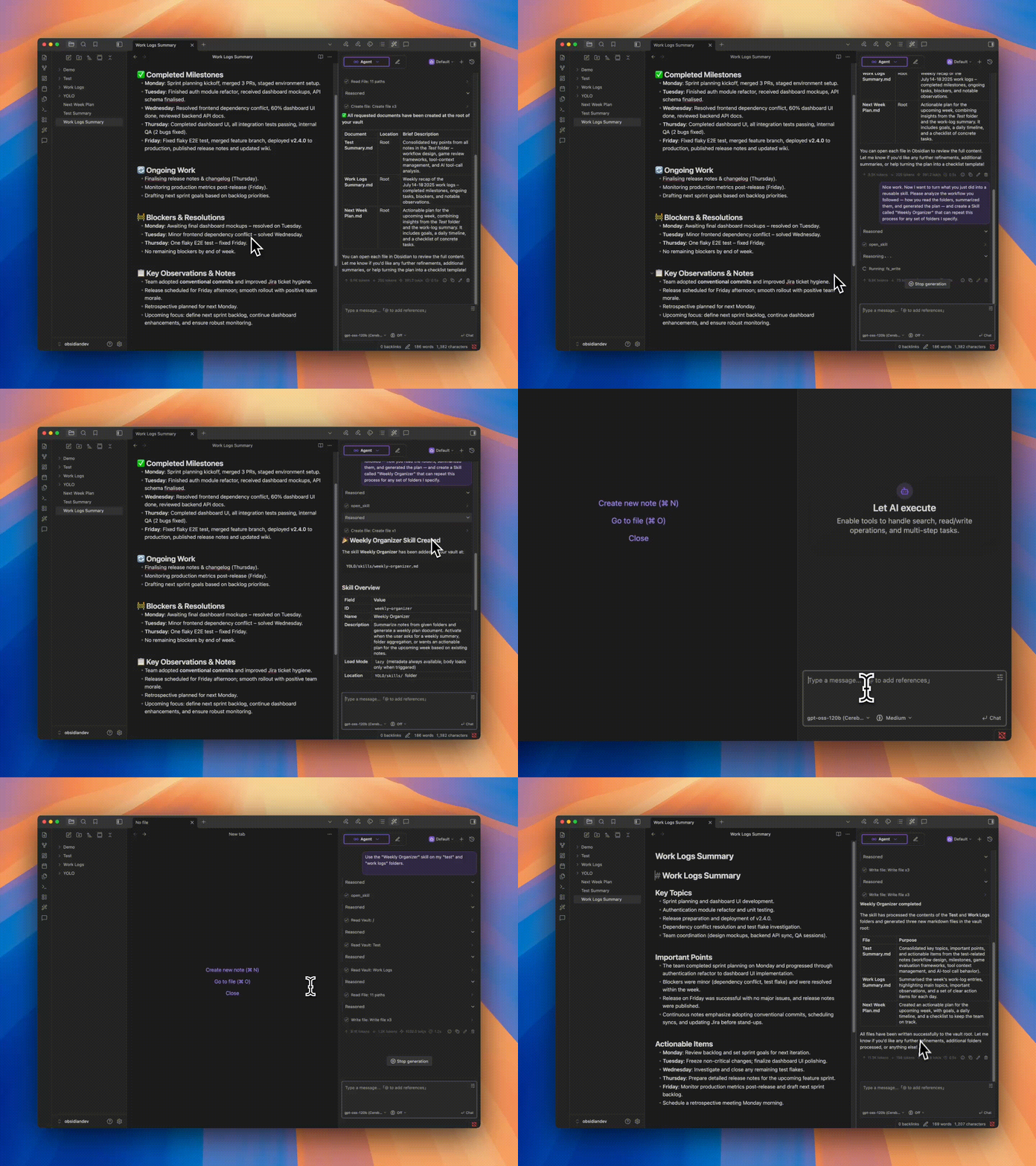
Tool Calling + MCP Custom Skills
Agent Tools Agent Skills
Freely configure toolchains so Agents can read, write, edit, and organize your files directly Encapsulate experience and SOPs into reusable skills, invoke with a single sentence — let the Agent work your way
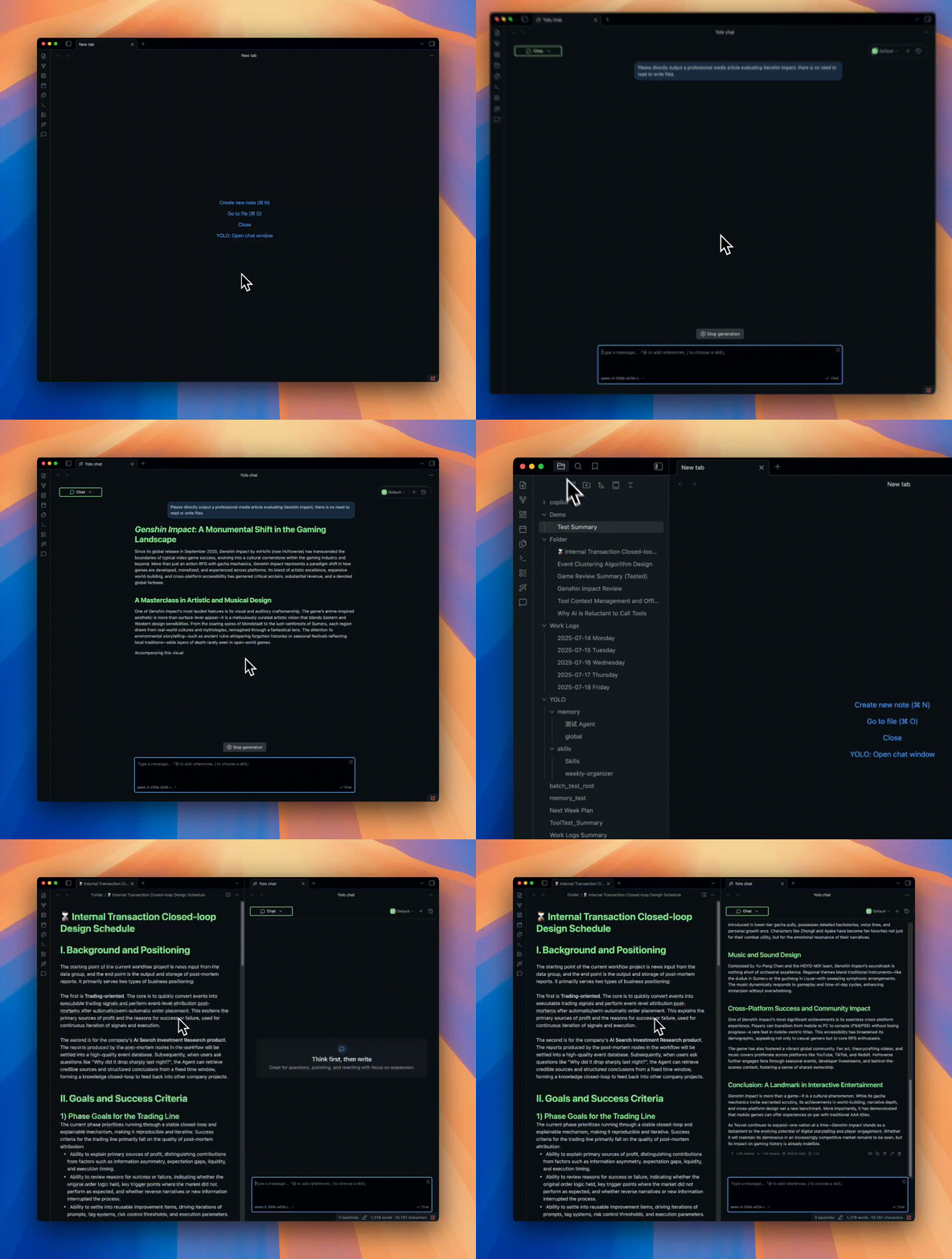
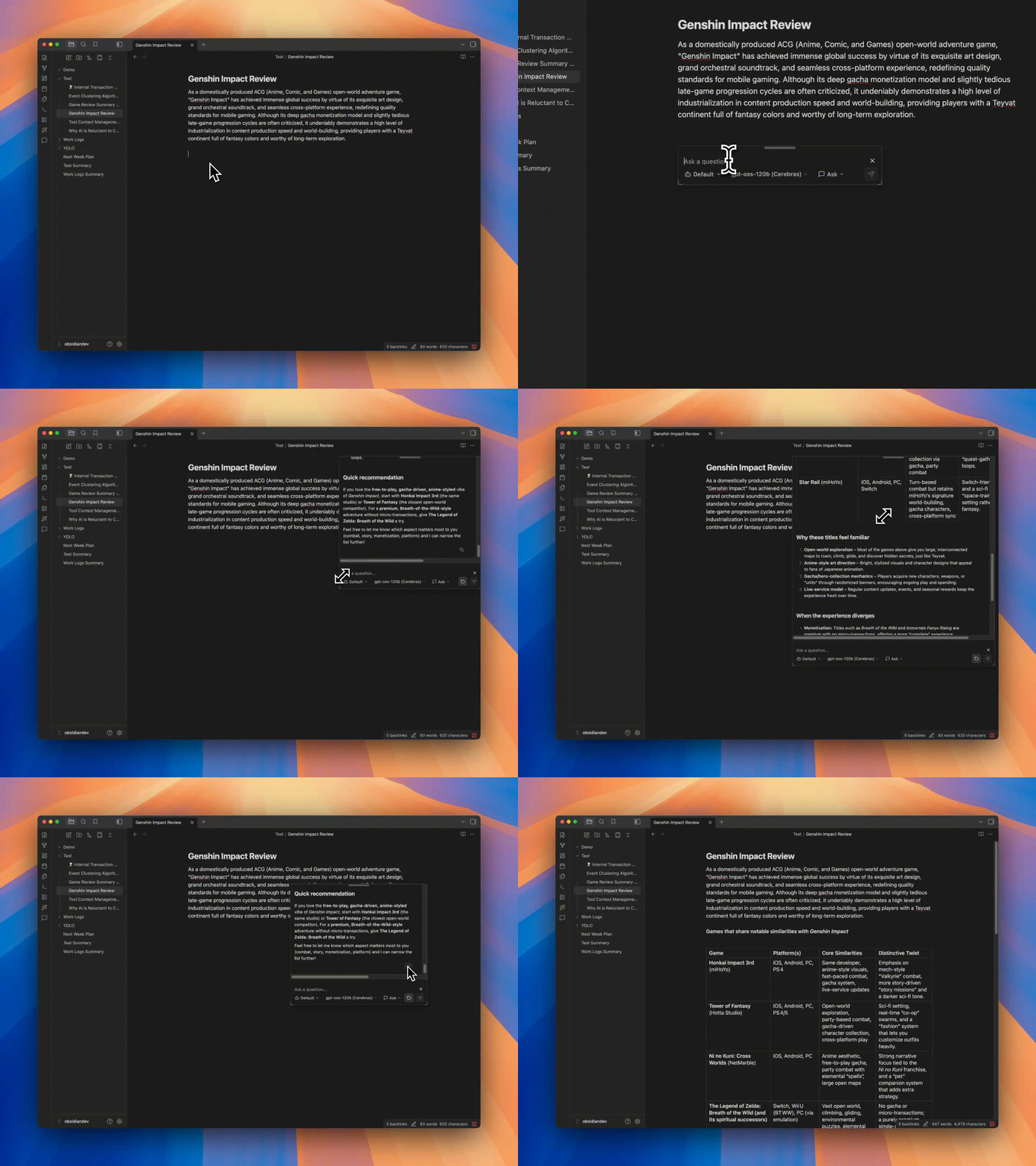
Multi-Window Chat Quick Ask
Chat Window Quick Ask
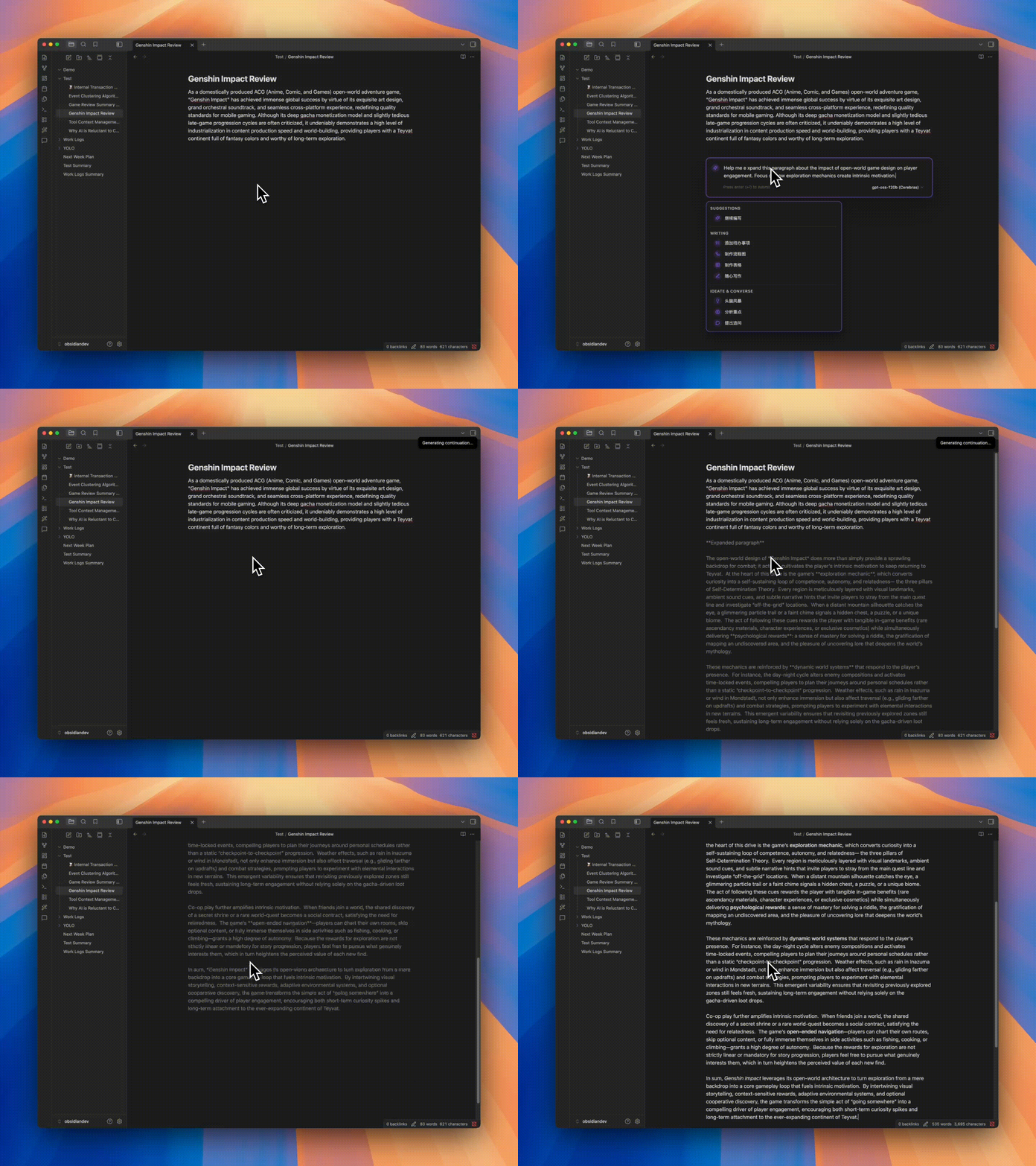
Handle different tasks and contexts in parallel across multiple chat windows, making multitasking feel more natural Trigger with a character (default @) to open an inline assistant for Q&A, editing, and continuation, making document editing seamless

🧠 Knowledge Base Q&A + ✍️ Smart Space

Knowledge Base Q&A Smart Space
RAG Vault Smart Space
Turn your entire Vault into the AI's knowledge base, powered by RAG to answer with context from your notes instead of generic output Summon anywhere to freely continue your creative flow with smooth content generation

Features

Beyond the core capabilities above, YOLO also provides:

Feature Description
💬 Sidebar Chat Seamless LLM conversation with context injection, preset prompts, Markdown smart parsing
🧠 Memory System Lets YOLO remember preferences, habits, and long-term context for more consistent conversations
🪡 Cursor Chat One-click context addition, conversation at your fingertips
⌨️ Tab Completion Real-time AI-powered completion for smoother, more natural writing
🎛️ Multi-Model Support OpenAI, Claude, Gemini, DeepSeek and other mainstream models, freely switch
🌍 i18n Native multi-language support
🧩 Experimental Features Learning Mode, sub-Agents, explore personalized workflows

Quick Start

  1. Open Obsidian Settings → Community Plugins → Browse → Search "YOLO"
  2. Install and enable
  3. Configure your API key in plugin settings, or use your own ChatGPT OAuth / Gemini OAuth:
  4. Open the sidebar to start chatting — or try Quick Ask by typing @ in the editor

Installation

See Quick Start above.

Manual Installation

  1. Go to Releases and download the latest main.js, manifest.json, styles.css
  2. Create folder: <vault>/.obsidian/plugins/obsidian-yolo/
  3. Copy files to that folder, then enable the plugin in Obsidian Settings

[!WARNING] YOLO cannot coexist with Smart Composer. Please disable or uninstall Smart Composer before using YOLO.

Mobile Support Note

Due to the capability gap between Obsidian mobile and desktop, YOLO cannot fully match the desktop feature set and overall experience on mobile in the short term. With limited personal maintenance bandwidth, I can currently only guarantee that YOLO remains usable on mobile, not that every feature will reach desktop-level parity.

If you use YOLO on mobile, you may still encounter unavailable features, inconsistent behavior, or incomplete adaptations for some workflows. Please keep that expectation in mind.

Roadmap

  • Better and stronger Vault AI search
  • Background Agent (long-running task automation)
  • Multi-Agent orchestration (via subagents)
  • Learning Mode — a dedicated study view
  • Annotation Mode — real-time AI annotations and suggestions on notes
  • Built-in assistant — a corner-pinned helper for config/agents, with auto-compaction and scheduled tasks
  • Better AI whiteboard
  • Voice input & meeting notes

Feedback & Issues

Hit a bug, something confusing, or have an idea? Open an issue:

🐛 Report a bug · ✨ Request a feature

What helps:

  • Bug reports with a clear reproduction (Obsidian version, OS, plugin version, what you did, what happened)
  • "I tried X and got Y" reports — UX papercuts, confusing wording, broken docs, outdated translations
  • Concrete feature ideas tied to a real use case ("when I do A, I want B because C")

Please search existing issues first to avoid duplicates.

Contributing

All forms of contribution are welcome — bug reports, documentation improvements, feature enhancements.

Please open an issue first to discuss feasibility and implementation for major features.

See CONTRIBUTING.md for the full guide: what we welcome, AI-assisted PR policy, size guidelines, and dev setup.

Acknowledgments

Thanks to Smart Composer for the original work — without them, there would be no YOLO.

Special thanks to Kilo Code for their sponsorship. Kilo is an open-source AI coding assistant platform with 500+ AI models, helping developers build and iterate faster.

Support

If you find YOLO valuable, consider supporting the project:

Development logs are regularly updated on the blog.

License

MIT License

Star History

Star History Chart

Similar Plugins

info
• Similar plugins are suggested based on the common tags between the plugins.
Smart Connections
3 years ago by Brian Petro
Find related notes and excerpts while writing. Your link building copilot displays relevant content in graph + list view. A local embedding model powers semantic search. Zero setup. No API key.
Canvas Conversation
3 years ago by André Baltazar
A plugin for Obsidian that allows you to create a canvas conversation using ChatGPT.
Khoj
3 years ago by Debanjum Singh Solanky
Your AI second brain. Self-hostable. Get answers from the web or your docs. Build custom agents, schedule automations, do deep research. Turn any online or local LLM into your personal, autonomous AI (gpt, claude, gemini, llama, qwen, mistral). Get started - free.
ChatGPT MD
3 years ago by Bram Adams
A (nearly) seamless integration of ChatGPT into Obsidian.
GPT Assistant
3 years ago by M7mdisk
Ask GPT from your notes and get personalized answers based on your knowledge base.
AI Assistant
3 years ago by Quentin Grail
AI Assistant Plugin for Obsidian
GPT-LiteInquirer
3 years ago by ittuann
💬 Experience OpenAI ChatGPT assistance directly within Obsidian, drafting content without interrupting your creative flow.
AI Mentor
3 years ago by clementpoiret
Better MathJax
3 years ago by GreasyCat
brAIn
3 years ago by lusob
Silicon AI
3 years ago by deepfates
Add some intelligence to your notes with Silicon AI for Obsidian
Arcana
3 years ago by A-F-V
Supercharge your Obsidian note-taking through AI-powered insights and suggestions
Flashcards LLM
3 years ago by Marco Pampaloni
Use Large Language Models (such as ChatGPT) to automatically generate flashcards from obsidian notes
Chat Stream
3 years ago by Ryan P Smith
Obsidian canvas plugin for using AI completion with threads of canvas nodes
Vault Chat
3 years ago by Exo Ascension
A ChatGPT bot trained on your vault notes. Ask your AI questions about your own thoughts and ideas!
BMO Chatbot
3 years ago by Longy2k
Generate and brainstorm ideas while creating your notes using Large Language Models (LLMs) from Ollama, LM Studio, Anthropic, Google Gemini, Mistral AI, OpenAI, and more for Obsidian.
AI Notes Summary
3 years ago by R. Ian Bull (irbull)
An Obsidian plugin that uses ChatGPT to generate a summary of referenced notes
Copilot auto completion
3 years ago by Jordi Smit
AI Research Assistant
3 years ago by Interweb Alchemy
Prompt Engineering Research Tool for AI APIs
ChatGPT Definition
3 years ago by julix14
Flashcard Generator
3 years ago by ChloeDia
Obsidian Plug-in to automatically create a set of questions/answers on your notes !
AI Editor
3 years ago by Zekun Shen
Cannoli
3 years ago by blindmansion
Cannoli allows you to build and run no-code LLM scripts using the Obsidian Canvas editor.
Chat with Bard
3 years ago by Artel250
An obsidian plugin that enables you to talk to Google Gemnini directly
Canvas LLM Extender
3 years ago by Pasi Saarinen
Let the OpenAI LLM add nodes to your Obsidian canvas
ChatCBT
3 years ago by Claire Froelich
AI-powered journaling plugin for your Obsidian notes, inspired by cognitive behavioral therapy
Intelligence
3 years ago by John Mavrick
Ollama Chat
2 years ago by Brumik
A plugin for chatting with you obsidian notes trough local Ollama LLM instead of Chat GTP.
Reason
2 years ago by Joshua Pham
Digest your Obsidian notes
Gemini Assistant
2 years ago by eatgrass
Your AI assistant in obsidian
Smart Second Brain
2 years ago by Leo310, nicobrauchtgit
An Obsidian plugin to interact with your privacy focused AI-Assistant making your second brain even smarter!
WordWise
2 years ago by ckt1031
Writing companion for AI content generation.
AI Tagger
2 years ago by Luca Grippa
Simplify tagging in Obsidian. Instantly analyze and tag your document with one click for efficient note organization.
Quiz Generator
2 years ago by Edward Cui
Generate interactive flashcards from your notes using models from OpenAI (ChatGPT), Google (Gemini), Ollama (local LLMs), and more. Or manually create your own to use with the quiz UI.
AI Zhipu
2 years ago by Tarslab
AI-zhipu is an Obsidian plugin that helps you utilize the Zhipu API. 智谱AI obsidian 插件
AI LLM
2 years ago by Sparky4567
Lets to use local llms in your Obsidian Vaults, extend your stories or create entirely new texts based on your previous input
AI Summarize
2 years ago by Alp Sariyer
Easy to use AI Summary tool for your notes in Obsidian
Reverse Prompter
2 years ago by Ryan Halliday
Let AI generate prompts to keep you writing
Markpilot
2 years ago by Taichi Maeda
AI-powered inline completions and chat view for Obsidian
AI for Templater
2 years ago by TfTHacker
Extends Templater with AI Chat commands using the OpenAI Client Library
Strapi Exporter AI
2 years ago by Cinquin Andy
[prod] - 🚀 Strapi Exporter: Supercharge Your Obsidian-to-Strapi Workflow, export an obsidian notes directly to your Strapi API
CoCo AskAI
2 years ago by Yukee
CoCo-AskAI is an Obsidian plugin that enables AI-powered note assistance, enhancing the writing experience with customizable functions.
AI Chat
2 years ago by arenasys
Local LLM Helper
2 years ago by Mani Mohan
An Obsidian plugin to process text, chat with AI, and semantically search your notes — works with any OpenAI-compatible LLM server (Ollama, LM Studio, vLLM, and more).
Github Copilot
2 years ago by Vasseur Pierre-Adrien
A bridge between Obsidian and Github Copilot
Ayanite
2 years ago by jemstelos
Simple Prompt
2 years ago by David Zachariae
Simple Prompt Plugin is a plugin for Obsidian that allows you generate content in your notes using LLMs.
Explain Selection With AI
2 years ago by Ben Wurster
This is my first go at making an Obsidian plugin to elaborate on and describe selected bits of information and their context.
Tars
2 years ago by Tarslab
Obsidian tars plugin that supports text generation based on tag suggestions, using services like DeepSeek, Claude, OpenAI, OpenRouter, SiliconFlow, Gemini, Ollama, Kimi, Doubao, Qwen, Zhipu, QianFan & more.
Caret
2 years ago by Jake Colling
Caret, an Obsidian Plugin
AI image analyzer
2 years ago by Swaggeroo
Analyze images with AI to get keywords of the image.
Smart Templates
2 years ago by 🌴 Brian Petro
Smart Templates is an AI powered templates for generating structured content in Obsidian. Works with Local Models, Anthropic Claude, Gemini, OpenAI and more.
AI LaTeX Generator
2 years ago by Aayush Shah
An Obsidian plugin that generates latex code from natural language inputs.
Mesh AI
2 years ago by Chasebank87
Various Complements
5 years ago by tadashi-aikawa
This plugin for Obsidian enables you complete words like the auto-completion of IDE.
LLM Summary
2 years ago by QSun
wip
InfraNodus AI Graph View
2 years ago by Nodus Labs
Advanced graph view for Obsidian: text analysis, topic modeling, and AI with InfraNodus AI text analysis tool: https://infranodus.com
Open Interpreter
2 years ago by Mike Bird
The power of Open Interpreter in your Obsidian vault
Metadata Auto Classifier
2 years ago by Beomsu Koh
AI-powered Obsidian plugin that automatically classifies and generates metadata (tags, frontmatter) for your notes.
Smart Composer
2 years ago by Heesu Suh
AI chat assistant for Obsidian with contextual awareness, smart writing assistance, and one-click edits. Features vault-aware conversations, semantic search, and local model support.
PromptCrafter
2 years ago by Fabrice Hong
Create reusable, modular prompts in Obsidian
NeuroVox
2 years ago by Synaptic Labs
Obsidian plugin for transcription and generation
Gemini Scribe
2 years ago by Allen Hutchison
An obsidian plugin to interact with Google Gemini
AI bot
2 years ago by kuzzh
The AI Bot Plugin is a powerful tool designed to enhance your note-editing experience in Obsidian by leveraging the capabilities of AI. This plugin allows you to interact with an AI assistant directly within Obsidian, making it easier to generate, edit, and organize your notes with intelligent suggestions and automated tasks.
LLM workspace
2 years ago by Olivér Falvai
Smart Context
a year ago by 🌴 Brian
AI Revisionist
a year ago by Synaptic Labs
Dataview Autocompletion
a year ago by Daniel Bauer
WhatsApp backup importer
a year ago by Luigi Cerone
Obsidian plugin that allows you to import exported WhatsApp chat archives (in .zip format) into your vault.
YouTube Video Summarizer
a year ago by mbramani
Generate AI-powered summaries of YouTube videos directly in Obsidian using Google's Gemini AI.
InlineAI
a year ago by FBarrca
AI Providers
a year ago by Pavel Frankov
This plugin is a hub for setting AI providers (OpenAI-like, Ollama and more) in one place.
AI integration Hub
a year ago by Hishmat Salehi
A modular AI integration hub for Obsidian
LLM Tagger
a year ago by David Jayatillake
Vision Recall
a year ago by Travis Van Nimwegen
Transform screenshots into searchable Obsidian notes using AI vision and text analysis
AI Tagger Universe
a year ago by Hu Nie
An intelligent Obsidian plugin that leverages AI to automatically analyze note content and suggest relevant tags, supporting both local and cloud-based LLM services.
Chat clips
a year ago by sleepingraven
Record chat in ordinary markdown list.
Memos AI Sync
a year ago by leoleelxh
obsidian-memos-sync-plugin,将 Memos 内容同步到 Obsidian 的插件,提供无缝集成体验。
Blog AI Generator
a year ago by Gareth Ng
Obsidian Plugin: generate blog via AI based on the current note.
Student Repo
a year ago by Feirong.zfr
学生知识库助手(Student Repository Helper)是一个面向学生或学生家长的Obsidian 插件,这款插件旨在解决学生在学习阶段面临的资料管理难题,将学习过程中产生的各类重要资料,如试卷、笔记、关键文档、绘画手工作品等,进行系统性的数字化整合与管理,并利用 AI 助手定期进行学习分析总结。随着时间的推移,它将助力你逐步搭建起一座专属你自己的知识宝库,这座宝库将伴随你一生,成为你知识成长与积累的见证。
Research Quest
a year ago by Nathan Arthur
LLM Test Generator
a year ago by Aldo E George
HiNote
a year ago by Kai
Add comments to highlighted notes, use AI for thinking, and flashcards for memory.
Large Language Models
a year ago by eharris128, r-mahoney, & jsmorabito
The LLM plugin gives Obsidian users access to local and web-based, large language models via several chat interfaces: modal, widget, FAB window, and commands.
Proofreader
a year ago by pseudometa (aka Chris Grieser)
AI-based proofreading and stylistic improvements for your writing. Changes are inserted as suggestions directly in the editor, similar to suggested changes in word processing apps.
Cut The Fluff
a year ago by Adam Fletcher
Obsidian plugin to avoid unnecessary complexity and clutter in your writing
Images to Notes
a year ago by Rodolfo Terriquez
Turn photos of your handwritten notes into markdown
Notemd
a year ago by Jacob
A Easy way to create your own Knowledge-base! Notemd enhances your Obsidian workflow by integrating with various Large Language Models (LLMs) to process your notes, automatically generate wiki-links for key concepts, create corresponding concept notes, perform web research, and more.
Pure Chat LLM
a year ago by Justice Vellacott
Turn notes into conversations with chatGPT or better yet Ollama
LLM docs
a year ago by Shane Lamb
Chat with LLM in regular markdown files in Obsidian
LLM Shortcut
a year ago by Viktor Chernodub
A plugin for Obsidian that provides a way to create shortcuts for commands powered by LLM capabilities.
Canvas LLM
8 months ago by Mike Farlenkov
A canvas-like UI to talk with LLMs in Obsidian.
Steward
8 months ago by Dang Nguyen
A vault-specific agent equipped with agentic capacity, fast search, flexible commands, vault management, and terminals to "jump" into other CLI agents, such as Claude, Gemini, etc.
AI Transcriber
5 months ago by Musashino Software
AI-powered speech-to-text transcription using OpenAI GPT-4o and Whisper APIs
Nova
5 months ago by Shawn Duggan
Nova - AI plugin for Obsidian that edits your documents directly through natural conversation. Stop copying from chat, start collaborating with AI.
Smart Export
3 months ago by Iván Sotillo
Plugin that follows wikilinks to a configurable depth, joining the notes into a single export.