Cannoli

by blindmansion
5
4
3
2
1
Score: 55/100

Description

Category: Coding & Technical Tools

The Cannoli plugin enables users to build and execute no-code LLM (Large Language Model) scripts directly within Obsidian using the Canvas editor. By creating nodes and arrows with specific logic and functionality, users can define workflows, variables, and branching choices to automate tasks and interact with their vault. Cannolis can also be used to create custom chatbots with dynamic logic and formatting. Supporting multiple LLM providers such as OpenAI and Anthropic, the plugin allows flexibility in AI integration. It also offers local LLM usage through Ollama. With features like HTTP requests and audio-triggered scripts, Cannoli provides a versatile tool for enhancing workflows in Obsidian.

Reviews

No reviews yet.

Stats

409
stars
11,092
downloads
36
forks
956
days
178
days
194
days
20
total PRs
3
open PRs
2
closed PRs
15
merged PRs
44
total issues
23
open issues
21
closed issues
217
commits

Latest Version

6 months ago

Changelog

Add documentation for goal nodes

README file from

Github

Cannoli

Join our Discord

Cannoli allows you to build and run no-code LLM scripts using the Obsidian Canvas editor.

What is a Cannoli?
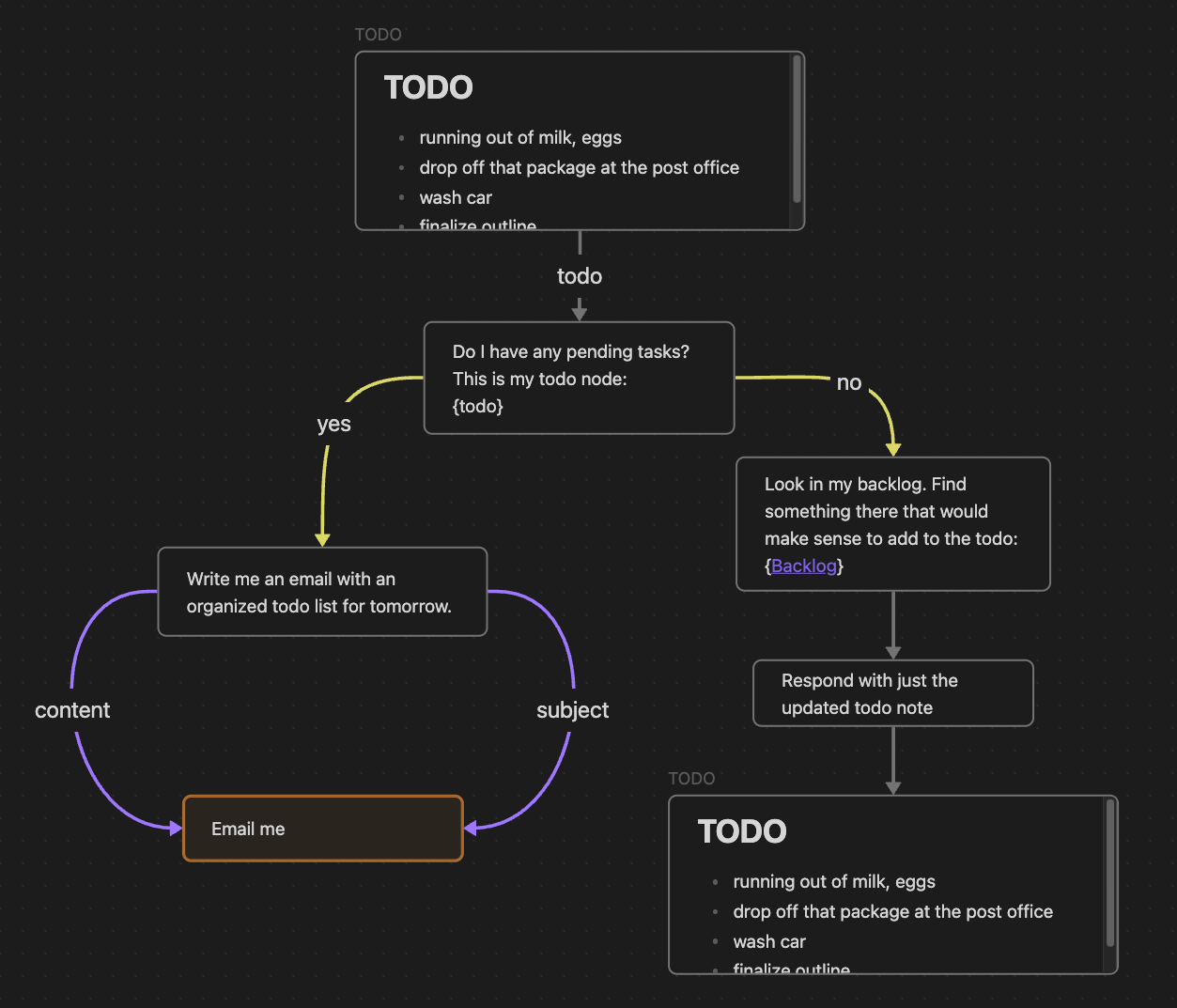
Example Cannoli

Cannolis are scripts that leverage LLMs to read/write to your vault, and take actions using HTTP requests. Cannolis are created in the Obsidian Canvas editor, using cards and arrows to define variables and logic. They can be run within Obsidian using the control ribbon button or the command palette.

Using colors or prefixes, you can create nodes and arrows of different types to define basic logical functions like variables, fields, loops, and branching choices. If a Canvas is a Directed Acyclic Graph and follows the Cannoli schema, it can be run as a cannoli.

Cannoli can also be used to make llm-chatbots with custom logic and abilities. Complete with streaming and customizable formatting.

Documentation

You can access a walkthrough folder of sample cannolis in the plugin settings (full docs website forthcoming).

Cannoli College

Running Cannolis

Cannolis can be run in several ways:

Icon

  • Click the Cannoli ribbon icon

    • If you're on a canvas file, it will be run as a cannoli
    • If you're on a note with a "cannoli" property, the canvas file in that property will be run as a cannoli
  • Run the "Start/Stop cannoli" command in the command palette (functions the same as the ribbon icon)

  • If a canvas file name ends with ".cno", it will have its own run command in the command palette

  • Make an audio recording on a note with a "cannoli" property

    • That recording will be (1) transcribed using Whisper, (2) replace the reference, and (3) trigger the cannoli defined in the property.

AI providers

Cannoli currently supports the following LLM providers:

  • OpenAI
  • Groq
  • Anthropic
  • Gemini

You can select a default provider, edit its settings individually, and override that default wherever you like.

Ollama setup

Cannoli can also use local LLMs with Ollama. To use Ollama, switch the "AI provider" dropdown to Ollama, and make sure the ollama url reflects your setup (the default is usually the case).

We also need to configure the OLLAMA_ORIGINS environment variable to "*" in order for requests from obsidian desktop to reach the ollama server successfully. Reference this document to configure this environment variable for each operating system, for example, in Mac OS you will run the command launchctl setenv OLLAMA_ORIGINS "*" in your terminal and restart ollama.

You can change the default model in the settings, and define the model per-node in Cannolis themselves using config arrows as usual, but note that the model will have to load every time you change it, so having several models in one cannoli will take longer.

Network use

  • Cannoli makes requests to LLM provider APIs based on the setup of the cannoli being run.
  • Cannoli can send HTTP requests that you define up front.

Development

See DEVELOPMENT.md for development instructions.

Similar Plugins

info
• Similar plugins are suggested based on the common tags between the plugins.
Flashcards LLM
3 years ago by Marco Pampaloni
Use Large Language Models (such as ChatGPT) to automatically generate flashcards from obsidian notes
BMO Chatbot
3 years ago by Longy2k
Generate and brainstorm ideas while creating your notes using Large Language Models (LLMs) from Ollama, LM Studio, Anthropic, Google Gemini, Mistral AI, OpenAI, and more for Obsidian.
AI Editor
3 years ago by Zekun Shen
Ollama Chat
2 years ago by Brumik
A plugin for chatting with you obsidian notes trough local Ollama LLM instead of Chat GTP.
Local LLM Helper
2 years ago by Mani Mohan
An Obsidian plugin to process text, chat with AI, and semantically search your notes — works with any OpenAI-compatible LLM server (Ollama, LM Studio, vLLM, and more).
Simple Prompt
2 years ago by David Zachariae
Simple Prompt Plugin is a plugin for Obsidian that allows you generate content in your notes using LLMs.
Caret
2 years ago by Jake Colling
Caret, an Obsidian Plugin
LLM Summary
2 years ago by QSun
wip
PromptCrafter
2 years ago by Fabrice Hong
Create reusable, modular prompts in Obsidian
LLM workspace
a year ago by Olivér Falvai
LLM Tagger
a year ago by David Jayatillake
LLM Test Generator
a year ago by Aldo E George
Large Language Models
a year ago by eharris128, r-mahoney, & jsmorabito
The LLM plugin gives Obsidian users access to local and web-based, large language models via several chat interfaces: modal, widget, FAB window, and commands.
Pure Chat LLM
a year ago by Justice Vellacott
Turn notes into conversations with chatGPT or better yet Ollama
LLM docs
a year ago by Shane Lamb
Chat with LLM in regular markdown files in Obsidian
LLM Shortcut
9 months ago by Viktor Chernodub
A plugin for Obsidian that provides a way to create shortcuts for commands powered by LLM capabilities.
Canvas LLM
7 months ago by Mike Farlenkov
A canvas-like UI to talk with LLMs in Obsidian.
Steward
6 months ago by Dang Nguyen
A vault-specific agent equipped with agentic capacity, fast search, flexible commands, vault management, and terminals to "jump" into other CLI agents, such as Claude, Gemini, etc.
YOLO
4 months ago by Lapis0x0
Smart, snappy, and multilingual AI assistant for your vault.
Smart Export
2 months ago by Iván Sotillo
Plugin that follows wikilinks to a configurable depth, joining the notes into a single export.