Regex Mark

by Mara-Li
5
4
3
2
1
Score: 58/100

Description

Category: Note Enhancements

The Regex Mark plugin is a powerful tool for Obsidian users who want to add custom CSS classes to their text based on regular expressions. With this plugin, you can define a regex pattern and a corresponding CSS class, and the plugin will automatically apply that class to any text that matches the pattern. This allows for fine-grained styling of your notes and increases readability.

The plugin also supports advanced features such as custom Markdown tags, code block highlighting, and import/export functionality. Additionally, it provides options to disable regex matching in specific views (reading mode, live preview, source mode) and change the default open/close tags for regex patterns.

Overall, Regex Mark is a versatile plugin that can help you customize your Obsidian experience and make your notes more visually appealing.

Reviews

No reviews yet.

Stats

29
stars
8,294
downloads
2
forks
711
days
249
days
302
days
5
total PRs
0
open PRs
0
closed PRs
5
merged PRs
29
total issues
2
open issues
27
closed issues
85
commits

Latest Version

10 months ago

Changelog

1.11.0 (2025-07-11)

Bug Fixes

  • should not trim the string as space can be in the regex. (15dada6), closes #29

README file from

Github

Obsidian Regex Mark is a plugin for Obsidian that allows to add custom CSS classes to text based on regular expressions.

Usage

Add a regular expression and a CSS class to the plugin settings. The plugin will then add the CSS class to any text that matches the regular expression.

The contents of the regex will be added to the span tag with the data-content attributes for a more granular styling.

How it works

The following regular expression will add the CSS class comment to any text that matches the regular expression.

regex: //.*$
class: comment

And the following text:

This is a normal line of text. //This is a comment.

will be converted to:

<p>This is a normal line of text. <span data-contents="//This is a comment." class="comment">//This is a comment.</span></p>

It is also possible to create "custom" Markdown tags using the {{open:regex}} and {{close:regex}} syntax. You need to toggle the option hide to enable it.

[!NOTE] The usage of __ for underline (ie __text__) is not supported in reading mode, but works well in Live Preview!

The plugin will mimic the behavior of Obsidian with transforming:

__text__

to:

<span class="underline" contenteditable="false">
  <span>
    <span class="cm-hide">__</span>
    <span class="underline">this is a normal text with underline (in LP)</span>
    <span class="cm-hide">__</span>
  </span>
</span>

The css will after hide the .cm-hide class, unless you select it (only in livePreview for the selection).

Selecting the text will show everything, like with other markup.

Named group

You can also encapsulate a sub-css into a regex mark, using named group. The group name will be used as the CSS class. For example :

  • Regex : {{open:^-# }}((@(?<bold>.*)@)?(?<other>.*))
  • Text : ^-# @bold@ hello world
  • Result :
    <span class="small" data-contents="^-# @bold@ hello world">
      <span class="bold">bold</span>
      <span class="other"> hello world</span>
    </span>
    

[!important] If you want to keep the rest of the text, you need to add another named group at the end of the regex, like (?<other>.*) in the example above. This mean that is not possible to match multiple time the same group in the same text: -# @bold@ hello world @bold@ will not work as expected.

[!WARNING] The named group is only displayed when not in source mode or when the cursor is not on the text.

Class Substitution

To the class string substitution will be applied. Explaination taken from

Pattern Inserts
$$ Becomes "$"
$& Becomes the full matched string.
$n Becomes the capturing group n
$<Name> Becomes the named capturing group "Name"

For example :

  • Regex : \color\[(r|b|g)]
  • Class : color-$1
  • Text : \color[r]
  • Result :
    <span class="color-r" data-contents="\color[r]">
      \color[r]
    </span>
    

Settings
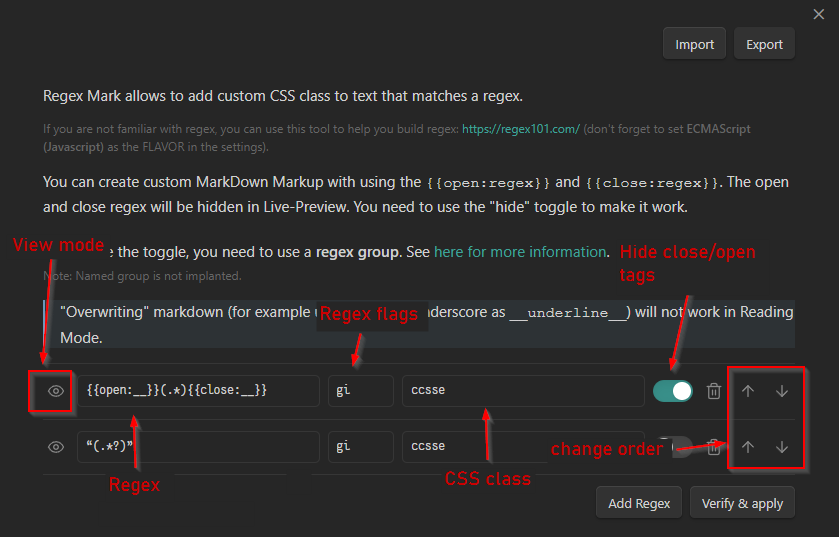
img.png

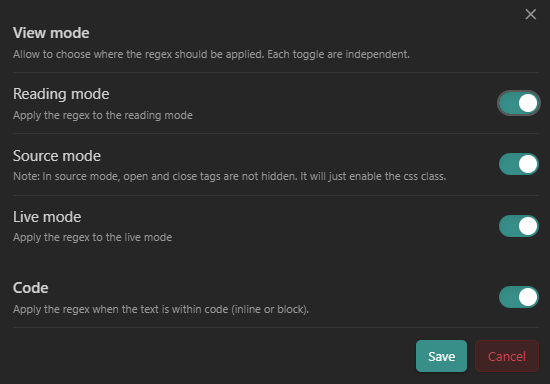
View mode

img.png You can disable "per view" the regex, aka, disabling for:

  • Reading mode
  • Live Preview mode
  • Source mode

Each toggle is independent, so you can disable for reading mode, but enable for live preview mode.

You can also disable/enable a snippet within code (code-block or inline, between backticks), with toggle "Code".

Auto rules

You can enable (or disable) a regex for a specific files, using either :

  • The file path
  • Properties (YAML frontmatter) based on the values of a configurable frontmatter key (regex_mark by default)1.

You can choose to NOT or EQUAL :

  • NOT : The regex will not be applied to all files that not match the rule.
  • EQUAL : The regex will be applied to all files that match the rule.

In auto-rules, regex are supported, so you can use them too.

Change open/close tags (advanced user only!)

This setting allow to change the default {{open:}} and {{close:}} tags to something else, allowing to use the } (for example) as an opening/closing (ie {regex} can be recognized and stylized). When the tags are changed, the regex are automatically updated to use the new tags. If a regex is broken, it will be disabled in all view, and a warning will be displayed in a Notice.

Import / export

You can share your regexes with other people without manually sharing the data.json using the import / export feature. You can also use it to back up your regexes.

The settings also port the open/close tags, so you can share the settings with the tags you use. Manual regex in object format can also be imported, and they will be added to the list.

Next steps

You can then use the CSS class to style the text in your CSS snippet or any other usages. You can even import or export settings from others!

Examples

  • Underline : {{open:__}}(.*){{close:__}} Note: To make it works in Reading mode, read this
  • SuperScript : {{open:\^}}(.) (Note: It works for "one" character only here, but you can use ^x^ syntax if you want to use for more text: {{open:\^}}(.*){{close:\^}})
  • SubScript : {{open:_}}([a-zA-Z\d]\b)) (As before, it works for only one element)

The CSS for the above example is:

.superscript {
    vertical-align: super;
    font-size: 90%;
}

.subscript {
    vertical-align: sub;
    font-size: 90%;
}

Additional notes

In reading mode the plugin can't override the default mark behavior. For example, ** and __ will be always bold, and render without the tag. The plugin won't recognize the opening and closing pattern, and ignore it.

To prevent this, you can escape the pattern using a backslash (\):

\__hello world\__
lorem ipsum (won't be in italic)

In reading view, it will render as:

__hello world__

And the regex should be: {{open:\\?_\\?_}}(.*){{close:\\?_\\?_}} You need to make the backslash optional, because they don't render in the reading view.


[!WARNING] If your Obsidian refuse to open a file, and you get this error in the console:

RangeError: Decorations that replace line breaks may not be specified via plugins

That's mean that one of your regex doesn't work inside Obsidian. You need to check every regex you have added to find the one that cause the issue and delete it, and reload Obsidian to make it work again. I tried to find a way to catch the error and display it in the console, but I didn't find a way to do it... So, if you have any idea, I'm open to suggestions!


Credits


Transparency

I use some IA (with Copilot in Agent) on some part of the code, mainly for the experimental features like the named group. I already standed against the use of AI for code generation, but I think that using it for some parts of the code is not a problem, as long as I don't use it for the main part of the plugin, and I uderstand the results. I also, sometimes, ask question to ChatGPT to help me to "think" (as a duckduck debugging) about the code, but I don't use it to write the code (or only some little snippets).

If you like, you can help me, correct the code generation, or even help me with pair programming! My discord is mara__li (yes, simple likes that, with two underscore). You can also find me on the official Obsidian Discord Server. I'm (mostly) chill >:)

Footnotes

  1. You need to reload the file (open it again) to apply/disable the regex when the frontmatter is changed in the reading mode.

Similar Plugins

info
• Similar plugins are suggested based on the common tags between the plugins.
Regex Find and Replace
4 years ago by Martin Eder
Plugin for Obsidian, providing search/replace functionality which supports regular expressions and selections.
Dynamic Highlights
4 years ago by nothingislost
An experimental Obsidian plugin that highlights all occurrences of the word under the cursor
Snippetor
4 years ago by ebullient
An assist for creating CSS snippets for Obsidian
Text Generator
4 years ago by Noureddine Haouari
Text Generator is a versatile plugin for Obsidian that allows you to generate text content using various AI providers, including OpenAI, Anthropic, Google and local models.
Linkify
4 years ago by Matthew Chan
Translator
4 years ago by Haifeng Lu
A plugin for Obsidian to translate selected text.
Group Snippets
4 years ago by Mara-Li
Create folder of snippets to activate them in one click !
Bulk Rename
4 years ago by Oleg Lustenko
Text Dataset Aid Plugin
3 years ago by Conner Ohnesorge
This is a obsidian plugin to help with the creation of personal jsonl datasets for text generation models.
Toggle Case
3 years ago by automattech
Obsidian plugin to toggle between `lowercase` `UPPERCASE` and `Title Case`
Text Extractor
3 years ago by Simon Cambier
A (companion) plugin to facilitate the extraction of text from images (OCR) and PDFs.
Canvas CSS class
3 years ago by Lisandra-dev
A plugin that will add a css class to your canvas & adding to each canvas the path to help personnalization
Hyphenation
3 years ago by 7596ff
Enables justified text and hyphenation
Global Search and Replace
3 years ago by Mahmoud Fawzy Khalil
A plugin to do a global search and replace in all your Obsidian vault files.
Jelly Snippets
3 years ago by Spencer Gouw
A simple text snippets plugin for Obsidian.md. BACKUP SNIPPETS BEFORE UPDATING.
Colored Text
3 years ago by Erinc Ayaz
Style Text
3 years ago by Juanjo Arranz
Apply custom CSS styles to selected text in your Obsidian Notes
Colored Tags
3 years ago by Pavel Frankov
Colorizes tags in different colors.
Fill in the Blank (FITB)
3 years ago by Shawn McGee
File Explorer++
3 years ago by kelszo
A plugin for https://obsidian.md, which enables the ability to hide and pin specific files and folders in the file explorer by applying custom filters.
Text Transform
3 years ago by ipshing
Text Conversions
3 years ago by Juan D Frias
Text conversions for Obsidian
R.E.L.A.X.
2 years ago by Syr
Regex Obsidian Plugin
Dynamic Text Concealer
2 years ago by Matt Cole Anderson
Obsidian.md Plugin to conceal or replace user configured text patterns in Live Preview and Read Mode.
Text Focus
2 years ago by usysrc
Focus the text area when opening a new note.
Tag Links
2 years ago by Zacchary Dempsey-Plante
A plugin for Obsidian that allows tags to be opened as links using a hotkey.
LinkMagic
2 years ago by AndyReifman
Remove Newlines
2 years ago by Elias Jaffe
A plugin for Obsidian.md which removes newlines and blank lines from selected or pasted text.
CSS Inlay Colors
2 years ago by Benji Grant
Show inline color hints for CSS colors in Obsidian
Arcane Obfuscate
2 years ago by Shusako
Obfuscate text in Obsidian.md with an arcane runic effect.
CSS Inserter
2 years ago by Erika Gozar
Inserts user-defined css snippets into the selected text.
Text expand
6 years ago by MrJackphil
A simple text expand plugin for Obsidian.md
css snippets
5 years ago by Daniel Brandenburg
Obsidian plugin for css snippets
Text Snippets
5 years ago by Ariana Khitrova
Snippets plugin for obsidian
Find and replace in selection
5 years ago by Dmitry Savosh
Obsidian plugin. Find and replace in selection.
Regex Pipeline
5 years ago by No3371
An Obsidian plugin that allows users to setup custom regex rules to automatically format notes.
Text Format
5 years ago by Benature
Format seleted text in Obsdidian.md
Text Transporter
5 years ago by TfTHacker
Text Transporter - advanced text management for Obsidian.
Snippet Commands
5 years ago by death_au
Registers custom css snippets as commands (which you can bind hotkeys to)
MySnippets
5 years ago by Chetachi
MySnippets is a plugin that adds a status bar menu allowing the user to quickly manage their snippets within the comfort of their workspace 🖌.
Auto Class
4 years ago by Nathonius
Automatically add CSS classes to notes based on file path.
Colorizelt
2 years ago by Artsem Holub (WiNE-iNEFF)
Easy color and clear selected text
复制图文 (Copy Image Text)
2 years ago by msgk
obsidian插件,复制笔记内容(包括文本和图片)到剪贴板
Blue Star
2 years ago by Wang Guoshi
A plugin for Obsidian that generates Anki flashcards in various ways.
Text Finder
a year ago by hafuhafu
Provides a find/replace window in edit mode similar to VSCode (supports regular expressions and case sensitivity).
Textgrams
a year ago by Akop Kesheshyan
Create and store ASCII graphics in your Obsidian
Snippetsaurus
a year ago by Christian Humbert
Hide Commands in Menu
a year ago by bomian98
Obsidian Plugin, hide different commands in different menus.
AutoMover
a year ago by Al0cam
Move files and notes with specified names into their designated folders according to rules you define.
aDHL
a year ago by tine-schreibt
The Dynamic Highlights Plugin, but with hotkeys, more options and sorting; works well with Highlightr.
FileName Styler
a year ago by Marc Feininger
An Obsidian plugin to hide, customize, and decorate file names in the sidebar using regex and customizable profiles.
Regex Line Filter
a year ago by 64MM4-KN1F3
A note filtering plugin for Obsidian
Custom Selected Word Count
a year ago by banisterious
Custom Selected Word Count for Obsidian
Auto Replacer
10 months ago by Alecell
A live text replacement plugin that applies automatic formatting, corrections, or custom replacements in real-time. Define your own regex-based rules and transformation logic to modify text dynamically as you type.
URL Formatter
8 months ago by Thomas Snoeck
Automatically formats specific URLs pasted into Obsidian into clean Markdown links.
Custom Theme Studio
7 months ago by @gapmiss
An Obsidian.md plugin to create and tweak custom themes with live CSS editing, element styling, and instant previews. All without leaving Obsidian.